
Robot Perception, Planning & Manipulation · Lesson 11
Robot End Effectors and Grippers
Est. 60–75 min
Why
Why this lesson matters
The end effector (also called the tool head) is the device at the end of a robot arm that interacts with the environment — usually a gripper or a tool. Lessons 6–10 planned motions for the arm. From this lesson onwards we care about what happens at the tip: holding, lifting and placing things without dropping or crushing them.
You will learn the four families of grippers, the simple grip-force formula, and how friction and acceleration change it. In the code lab you calculate the squeeze needed for real lab objects. On the bench you build a gentle servo gripper that closes until a force sensor on the jaw says “enough”, then stops.
Concept
End effectors, gripper types and grip force
1. What is an end effector?
In the strict definition from serial manipulators, the end effector is the last link — the “end” of the robot, where tools are attached. In a wider sense it is the part of the robot that interacts with the work. Wheels of a mobile robot or feet of a humanoid are not end effectors; they are for mobility.
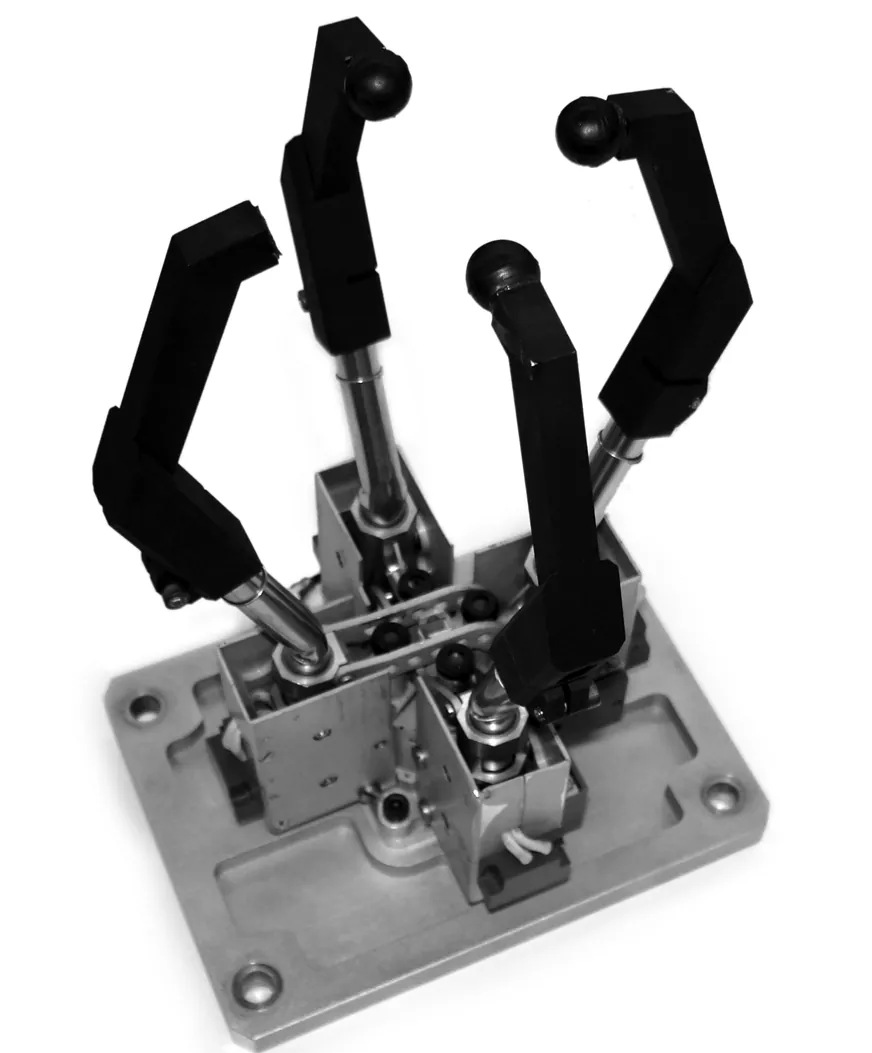
2. Four families of grippers
| Family | How it holds | Example |
|---|---|---|
| Impactive | jaws or claws physically grasp the object | two-finger servo gripper, three-finger hand |
| Ingressive | pins, needles or hackles penetrate the surface | textile, carbon and glass-fibre handling |
| Astrictive | attractive force on the surface: suction, magnetism or electroadhesion | vacuum cups, electromagnets |
| Contigutive | direct contact for adhesion: glue, surface tension, freezing | cryogenic and capillary grippers |
3. How much squeeze? The grip-force formula
For a friction (jaw) gripper the main force holding the object is friction. A simple estimate of the squeeze force needed is F = m (a + g) / (μ n), where m is the mass, a the acceleration of the move, g = 9.81 m/s², μ the friction coefficient between pad and object, and n the number of fingers. The “+ g” is there because lifting upward fights gravity.
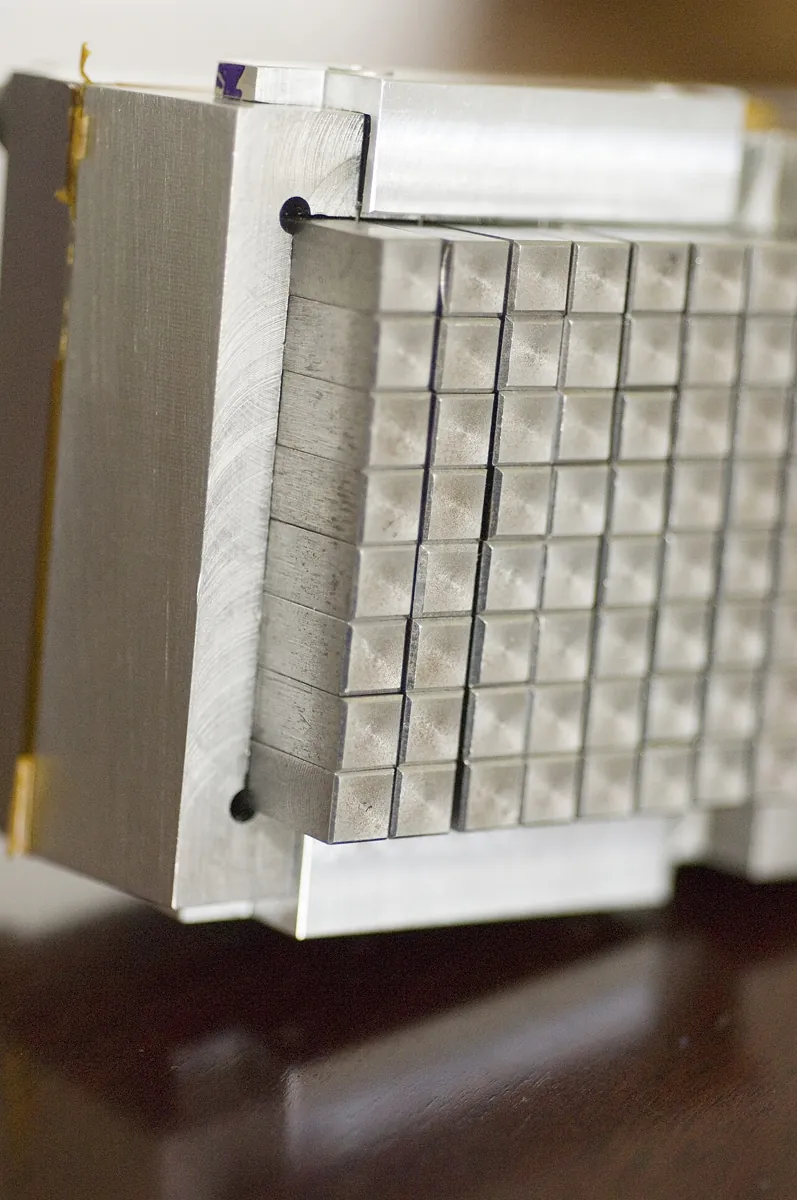
4. Finger shape
The shape of the finger surface can match the object: a concave impression for round objects, a flat face for square ones. Two-finger grippers are common for simpler industrial tasks, and the fingers are often replaceable — so one gripper body can serve many jobs with different fingers.
5. Feeling the grip
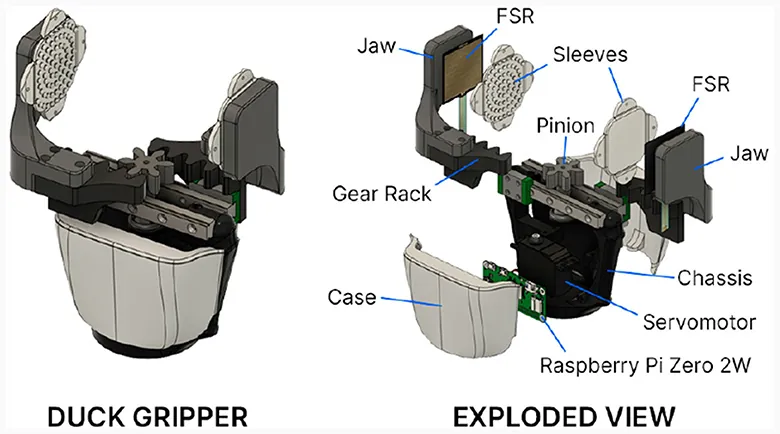
A servo gripper that just goes to “closed” will crush a foam cube and still drop a slippery bottle. Better: put a force-sensing resistor (FSR) on the jaw pad, close slowly, and stop when the force reading is high enough. The Duck Gripper below uses exactly this idea — FSRs on both jaws, driven by a servo through a rack and pinion.
Visual
Visualise it: how a gripper closes
Three common grippers — parallel jaw, vacuum cup and soft gripper — each suit different objects. Change the type and the opening to compare them. (Educational explorer.)
Interactive · Gripper explorer · Educational

Two fingers close on opposite faces — great for boxes; needs good width clearance.
Educational gripper toy — not CAD / not force-closure solver.
Code lab
Code lab: how hard must the gripper squeeze?
grip_force_lab.py applies F = m(a + g)/(μn) to four desk objects. The masses and μ values are example numbers — weigh your own objects, and measure μ with the tilt test: put the object on a pad sample, tilt slowly, and μ ≈ tan(angle where it starts to slide).
"""grip_force_lab.py — Stage 13 L11 (AIHUB STATION lab)

How hard must a friction gripper squeeze?  Textbook estimate (Wikipedia, Robot end effector):
    F = m (a + g) / (mu * n)
m = mass (kg), a = acceleration of the move (m/s^2), g = 9.81 m/s^2,
mu = friction coefficient between finger pad and object, n = number of fingers.
All masses and mu values below are EXAMPLE numbers for the Kota lab desk — weigh your own
objects and measure mu with the tilt test (see the lesson). Run:  python3 grip_force_lab.py
"""
G = 9.81
SAFETY = 2.0          # our classroom choice: squeeze twice the minimum

objects = [  # name, mass kg, mu (example pad/object pair)
    ("foam cube 3 cm",          0.005, 0.6),
    ("AA cell",                 0.023, 0.4),
    ("small bottle, half full", 0.150, 0.3),
    ("M3 screw box",            0.060, 0.5),
]

def grip_force(m, a, mu, n):
    return m * (a + G) / (mu * n)

print("1. Minimum squeeze force (N) for a 2-finger gripper, lifting with a = 2 m/s^2")
print(f"   {'object':26s} {'mass g':>7s} {'mu':>4s} {'F min':>7s} {'with x2':>8s}")
for name, m, mu in objects:
    f = grip_force(m, 2.0, mu, 2)
    print(f"   {name:26s} {m*1000:7.0f} {mu:4.1f} {f:7.2f} {f*SAFETY:8.2f}")

print("\n2. Same bottle (150 g), what changes the force most?")
base = grip_force(0.150, 2.0, 0.3, 2)
for label, f in [("baseline: mu 0.3, a 2, 2 fingers", base),
                 ("rubber pads, mu 0.8", grip_force(0.150, 2.0, 0.8, 2)),
                 ("gentle move, a 0.5", grip_force(0.150, 0.5, 0.3, 2)),
                 ("jerky move, a 10", grip_force(0.150, 10.0, 0.3, 2)),
                 ("3 fingers", grip_force(0.150, 2.0, 0.3, 3))]:
    print(f"   {label:34s} {f:5.2f} N  ({f/base*100:4.0f}% of baseline)")

print("\n3. Can our servo gripper hold it?  (jaw force MEASURED on the bench, example value)")
JAW_N = 4.0           # example: replace with your kitchen-scale measurement
for name, m, mu in objects:
    need = grip_force(m, 2.0, mu, 2) * SAFETY
    print(f"   {name:26s} needs {need:5.2f} N  -> {'OK' if JAW_N >= need else 'TOO HEAVY/SLIPPERY: add pads or slow down'}")

print("\n4. Fastest safe acceleration for the bottle with the measured jaw force")
for mu in (0.3, 0.5, 0.8):
    a_max = JAW_N / SAFETY * mu * 2 / 0.150 - G
    print(f"   mu {mu}: a_max = {a_max:5.1f} m/s^2" + ("   (cannot even hold it still)" if a_max < 0 else ""))
Output (run with python3 grip_force_lab.py)
1. Minimum squeeze force (N) for a 2-finger gripper, lifting with a = 2 m/s^2
   object                      mass g   mu   F min  with x2
   foam cube 3 cm                   5  0.6    0.05     0.10
   AA cell                         23  0.4    0.34     0.68
   small bottle, half full        150  0.3    2.95     5.91
   M3 screw box                    60  0.5    0.71     1.42

2. Same bottle (150 g), what changes the force most?
   baseline: mu 0.3, a 2, 2 fingers    2.95 N  ( 100% of baseline)
   rubber pads, mu 0.8                 1.11 N  (  38% of baseline)
   gentle move, a 0.5                  2.58 N  (  87% of baseline)
   jerky move, a 10                    4.95 N  ( 168% of baseline)
   3 fingers                           1.97 N  (  67% of baseline)

3. Can our servo gripper hold it?  (jaw force MEASURED on the bench, example value)
   foam cube 3 cm             needs  0.10 N  -> OK
   AA cell                    needs  0.68 N  -> OK
   small bottle, half full    needs  5.91 N  -> TOO HEAVY/SLIPPERY: add pads or slow down
   M3 screw box               needs  1.42 N  -> OK

4. Fastest safe acceleration for the bottle with the measured jaw force
   mu 0.3: a_max =  -1.8 m/s^2   (cannot even hold it still)
   mu 0.5: a_max =   3.5 m/s^2
   mu 0.8: a_max =  11.5 m/s^2
Try it: switch between parallel jaw, vacuum cup and soft gripper, and drag the opening slider. Which family from the table above is each one? (Educational explorer, not a real gripper model.)
Interactive · Gripper explorer · Educational
Two fingers close on opposite faces — great for boxes; needs good width clearance.
Educational gripper toy — not CAD / not force-closure solver.
Bench build: a gentle servo gripper with a force sensor
fsr_gripper.ino closes the jaw 1° at a time, slows down after first contact, and stops as soon as the FSR reading reaches HOLD. If the jaw reaches its closed limit with no force, it reports “nothing grasped” and opens again. If force is too low at the limit, it warns “do not lift”.
| Part | Connection | Note |
|---|---|---|
| Gripper servo (SG90-class) | signal → D6 | OPEN_DEG / CLOSED_DEG measured on your gripper |
| Servo supply | red → +5–6 V, brown → supply GND | separate supply; supply GND joined to UNO GND |
| FSR on jaw pad | UNO 5 V → FSR → A1 | signal-level only (tiny current) |
| Divider resistor | A1 → 10 kΩ → GND | reading rises as the FSR is pressed |
| Button | D3 → button → GND | INPUT_PULLUP; press to close, press again to open |
// fsr_gripper.ino — Stage 13 L11 (AIHUB STATION lab)
// A gentle servo gripper: close step by step until the force-sensing resistor (FSR)
// on the jaw pad reads "contact + enough squeeze", then STOP closing and hold.
// Second press opens. If the jaw reaches fully closed with no force -> "nothing grasped".
//
// Wiring (Arduino UNO):
//   Gripper servo signal -> D6
//   Servo red/brown -> SEPARATE 5-6 V supply, GND joined to UNO GND (never the UNO 5 V pin)
//   FSR divider: UNO 5 V -> FSR -> A1 -> 10 kOhm -> GND   (reading rises as you press)
//   Button: D3 -> button -> GND (INPUT_PULLUP)
#include <Servo.h>

const int OPEN_DEG = 20, CLOSED_DEG = 110;   // measure on YOUR gripper; never drive past the jaw stop
const int CONTACT = 60;                      // ADC counts: first touch (calibrate with Serial Monitor)
const int HOLD = 300;                        // ADC counts: firm enough (calibrate with your object)

Servo jaw;
int pos = OPEN_DEG;
bool closed = false;

int fsr() {                                   // average 8 readings to calm the noise
  long s = 0;
  for (int i = 0; i < 8; i++) s += analogRead(A1);
  return s / 8;
}

void openJaw() {
  for (; pos > OPEN_DEG; pos--) { jaw.write(pos); delay(10); }
  closed = false;
  Serial.println(F("open"));
}

void closeGently() {
  bool touched = false;
  while (pos < CLOSED_DEG) {
    int f = fsr();
    if (f >= HOLD) break;                     // squeezing enough: stop here
    if (f >= CONTACT && !touched) { touched = true; Serial.print(F("contact at ")); Serial.println(pos); }
    pos++;
    jaw.write(pos);
    delay(touched ? 40 : 10);                 // slow down after contact
  }
  int f = fsr();
  Serial.print(F("stopped at ")); Serial.print(pos); Serial.print(F(" deg, FSR ")); Serial.println(f);
  if (f < CONTACT) { Serial.println(F("nothing grasped - opening")); openJaw(); return; }
  if (f < HOLD) Serial.println(F("weak grip: reached CLOSED_DEG before HOLD - do not lift"));
  else Serial.println(F("holding"));
  closed = true;
}

void setup() {
  Serial.begin(115200);
  pinMode(3, INPUT_PULLUP);
  jaw.attach(6);
  jaw.write(pos);
  Serial.println(F("fsr_gripper ready - press button to close/open"));
}

void loop() {
  static unsigned long last = 0;
  if (millis() - last > 500) { last = millis(); Serial.print(F("FSR ")); Serial.println(fsr()); }
  if (digitalRead(3) == LOW) {
    delay(30);
    if (closed) openJaw(); else closeGently();
    while (digitalRead(3) == LOW) {}
  }
}fsr_gripper ready - press button to close/open
FSR <idle reading>
contact at <deg>
stopped at <deg> deg, FSR <reading>
holding
or, with nothing between the jaws:
stopped at 110 deg, FSR <low>
nothing grasped - openingDebugging
| Symptom | Likely cause | Fix |
|---|---|---|
| Object slips while lifting | low μ, fast lift, weak squeeze | Rubber pads; slower lift; raise HOLD |
| Foam object crushed | HOLD too high | Lower HOLD; slow the closing after contact |
| FSR reads 0 all the time | divider wired wrong | Check 5 V → FSR → A1 → 10 kΩ → GND |
| FSR reading jumps | loose pad, noise | Fix the FSR firmly behind a flat pad; average more readings |
| Servo buzzes and gets hot while holding | stalling at the limit | Stop at HOLD, check CLOSED_DEG, consider a gearing/worm design |
| UNO resets when gripping | servo on UNO 5 V pin | Give the servo its own supply, join grounds |
Real world
End effectors in the real world
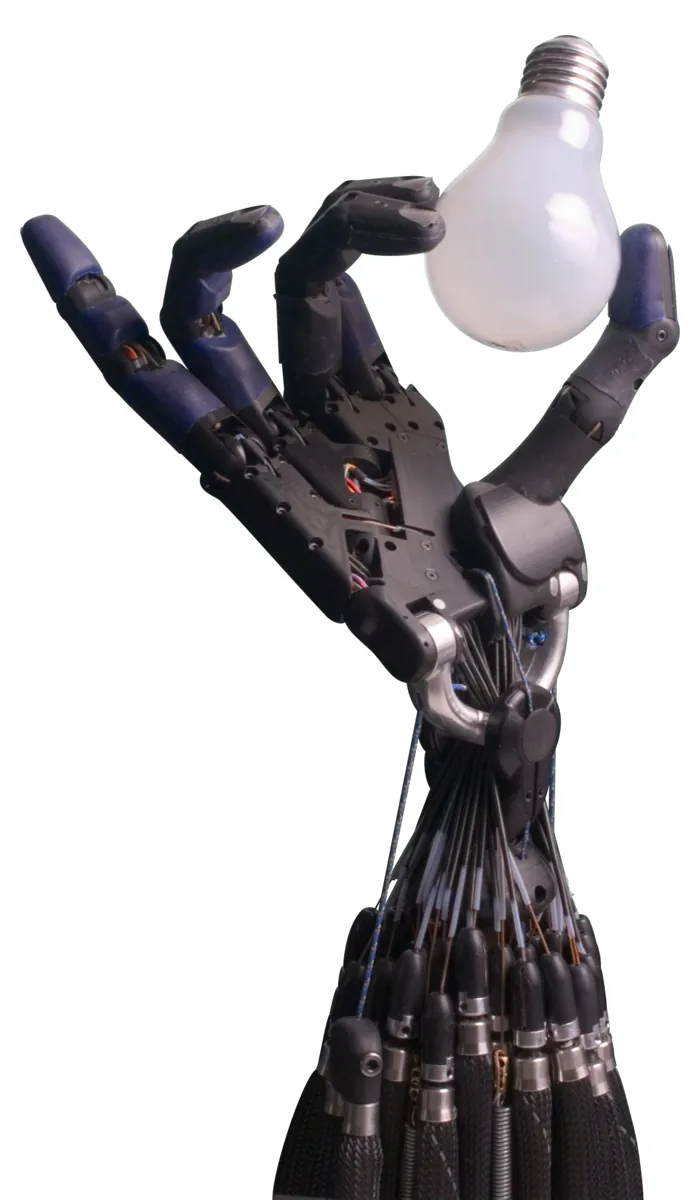
- Factories: end effectors used as tools include spot-welding heads and paint spray guns.
- Cars and sheet metal: vacuum cups and electromagnets dominate.
- Surgery: surgical robots have specially made end effectors, such as a scalpel.
- Micro-handling: electrostatic, capillary, cryogenic and ultrasonic grippers for parts smaller than about 5 mm.
- Your lab: choose the simplest gripper that holds your object — and add rubber pads before buying a bigger motor.
Think
Think about it
Think
Your gripper drops a bottle during a fast lift. Your friend wants to buy a servo with double torque. What would you check first?
Experiment
Try it in the lab
About 60 minutes. Python 3 for the script; Arduino UNO, a servo gripper with its own supply, an FSR, a 10 kΩ resistor, a push button, a kitchen scale and some desk objects.
Experiment
Squeeze, lift, measure
You will need
- `grip_force_lab.py` (Python 3, no libraries)
- Gripper explorer (in your browser)
- Arduino UNO, SG90-class servo gripper, separate 5–6 V supply, FSR, 10 kΩ resistor, push button, jumper wires
- Kitchen scale, rubber bands, foam cube, small bottle
Steps
- Weigh four objects and measure μ with the tilt test (plastic jaw and rubber pad). Put your numbers into the script.
- Measure your jaw force: close the gripper on the kitchen scale pan (with a spacer) and read the grams; force ≈ grams × 9.81 / 1000 N.
- Run the script with your numbers. Which objects are OK?
- Bench: calibrate CONTACT and HOLD, then grip each object 5 times. Log stop angle and FSR reading.
- Lift each object slowly and quickly. Does the slip match the script’s prediction?
- Add rubber pads and repeat.
Interactive · Gripper explorer · Educational
Two fingers close on opposite faces — great for boxes; needs good width clearance.
Educational gripper toy — not CAD / not force-closure solver.
A good grasp is a balance: enough squeeze for mass and acceleration, not so much that you crush the object. Friction is your cheapest helper.
Knowledge check
Check your understanding
Knowledge check
1. An end effector is…
2. A vacuum suction cup is which gripper family?
3. Needle grippers for textiles are…
4. In F = m(a + g)/(μn), what does n stand for?
5. Changing pads from μ 0.3 to 0.8 makes the needed force…
6. Why is “+ g” in the formula when lifting?
7. Why stop closing when the FSR reaches HOLD?
8. Where should the gripper servo get its power?
Mini assignment
Hands-on assignment
Mini assignment
A gripper that knows when to stop
Measure, calculate and build a force-aware gripper for your own desk objects.
Deliverables
- A table of your four objects: mass, μ (plastic and rubber), needed force with ×2 margin.
- Your measured jaw force and the method you used.
- Calibrated CONTACT and HOLD values with a Serial Monitor log for each object.
- A slip test: slow vs fast lift, plastic vs rubber pads, with your prediction and the result.
Do this, step by step
- Run
grip_force_lab.pyand check the force it gives for each example object. - Weigh your four objects and fill mass, μ (plastic and rubber) and needed force with the ×2
SAFETYmargin. - Measure your jaw force with a kitchen scale and put it in
JAW_N. - Bench: gripper servo on its own supply, grounds joined; upload
fsr_gripper.inoand calibrateCONTACTandHOLDwith the Serial Monitor. - Do the slip test: slow vs fast lift, plastic vs rubber pads. Write your prediction first.
Stuck? Hints, one at a time
- If the force needed is more than
JAW_N, the object will slip. Use rubber pads (higher μ) or a lighter object. - Lifting adds gravity, so the formula uses (a + g). A fast lift needs more grip than a slow one.
- If the servo buzzes and gets warm, it is stalled. Stop at
HOLDinstead of driving toCLOSED_DEG.
Challenges (pick by level)
- 🟢 Beginner: Sort 10 things in the lab (screw, sheet of paper, steel plate, foam, bottle…) into the gripper family that would suit each best.
- 🟡 Intermediate: Measure μ for three pad materials with the tilt test and update the script.
- 🟠 Advanced: Add a second FSR to the other jaw and stop only when both read contact (object centred).
- 🔴 Expert: Detect slip: during a lift, if the FSR reading suddenly drops, stop the arm and squeeze a little more.
- ⚫ Research: Compare a vacuum cup and a two-finger gripper for picking flat cardboard pieces. List what you would measure to decide.
Next step
You now know what the gripper can hold. But where exactly should the fingers go on the object? In Lesson 12 — Grasp Planning you will choose grasp points and approach directions.
Look back: Lesson 10: RRT and RRT* Concepts. Next: Lesson 12: Grasp Planning. Related: Stage 4 — Electronics.
Sources
- Wikipedia — Robot end effector — definition; impactive/ingressive/astrictive/contigutive grippers; force closure; finger shape; grip-force formula F = m(a + g)/(μn); tools and micro-handling.
- Arduino Servo library (GitHub) — controlling RC hobby servos.
- Photos: Wikimedia Commons (credits under each image).
Self-attested for now — keep artifacts in your lab notebook.
Complete
Today's goal
0 of 1 done today
Mark this lesson complete when you have worked the experiment, knowledge check, and assignment (even roughly).