
Robot Perception, Planning & Manipulation · Lesson 12
Grasp Planning
Est. 60–75 min
Why
Why this lesson matters
A grasp is a place where the fingers touch the object, plus the direction from which the hand arrives. For a parallel-jaw gripper coming from the top, one grasp is just: a centre point, a wrist angle (yaw) and an opening width. Grasp planning is the job of producing many such candidates, throwing away the bad ones, and ranking the rest.
In this lesson you will learn the four questions every grasp must answer — does it fit, will friction hold, will the object twist, and can the arm reach it without hitting anything. You will run a small grasp planner in Python, and on the bench the UNO will check a chosen grasp and refuse it if the gripper or wrist cannot do it.
Concept
Candidates, friction cones and grasp scores
1. Generate, filter, rank
Almost every grasp planner, from a school project to MoveIt, follows the same pattern. First generate many candidate grasps. Then filter: remove the ones that are impossible. Finally rank the survivors with a score and try the best one first. MoveIt Task Constructor’s pick-and-place example works this way: a GenerateGraspPose stage tries the object from many orientations (the angle delta sets how far apart they are), and a ComputeIK wrapper keeps only the poses the arm can actually reach.
| Step | Question | Our simple test |
|---|---|---|
| Fit | Does the object fit between the open jaws? | width + clearance ≤ maximum opening |
| Friction | Will the fingers slide off the surface? | grasp line inside the friction cone at both contacts |
| Balance | Will the object twist when lifted? | distance of the centre of mass from the grasp line |
| Room | Is there space for the fingers? | finger blocks do not touch neighbours |
| Reach | Can the arm get the hand there? | grasp centre inside the arm’s workspace (IK) |
2. Friction cone: the most important picture
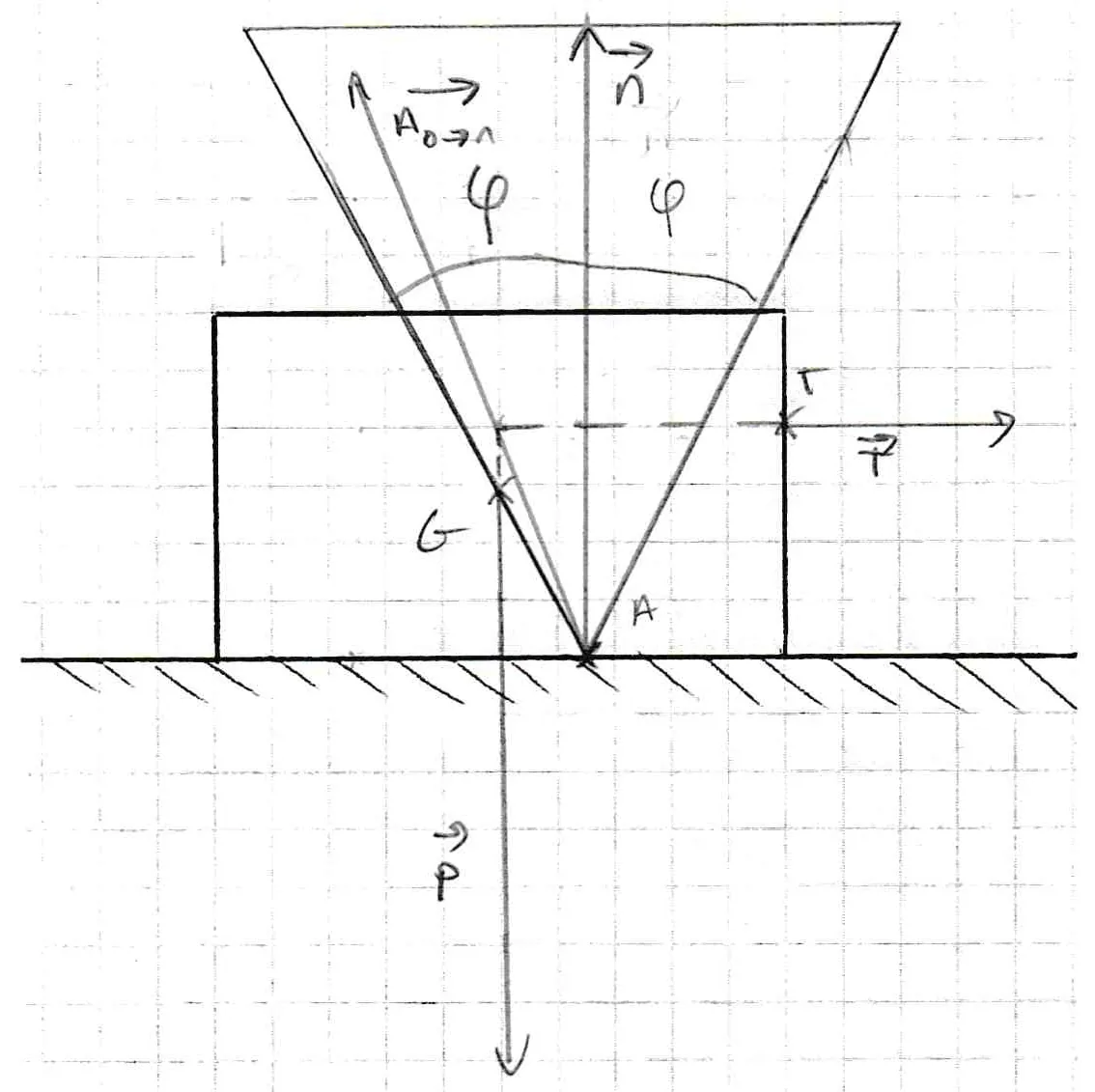
Remember Coulomb friction: the friction force can be anything from zero up to μ × (normal force). So a finger pushing on a surface does not have to push exactly straight in. It can push at a slant, and friction will stop sliding, as long as the slant is not too big. The largest safe slant is the angle of friction, θ = arctan(μ). Draw that angle on both sides of the surface normal and you get a friction cone.
3. Centre of mass: why the corner grasp swung
When you lift, gravity pulls at the object’s centre of mass. If the grasp line passes through it (or very near it), the weight hangs straight below the fingers. If the grasp line is far from it, the weight makes a turning force (torque) about the grasp line. Two small finger pads can only resist a little torque, so the object swings and slips — exactly what happened to Riya’s box. So our score rewards grasp lines close to the centre of mass.
4. Score and choose
Our planner gives each surviving grasp a score out of 100: half from the friction margin (how far inside the cone the worst contact is) and half from the balance (centre-of-mass offset, 0 cm = full marks, 2 cm or more = zero). These weights are a classroom choice, not a standard. Research planners use more careful quality measures and learned models; the idea of “score, then try the best reachable one” stays the same.
Visual
Visualise it: rank the grasps
Grasp candidates ranked by a simple quality score and filtered by reachability. A perfect-looking grasp the arm cannot reach is worth nothing. (Educational simulation.)
Interactive · Grasp planning lab · Educational

- Grasp A · yaw 0° · quality 0.90 · reachable
- Grasp D · yaw -30° · quality 0.65 · reachable
- Grasp B · yaw 45° · quality 0.63 · reachable
- Grasp C · yaw 90° · quality 0.58 · IK fail (edu)
Selected: Grasp A (highest reachable quality).
Toy ranking — not force closure / not Dex-Net / not industrial grasp database.
Code lab
Code lab: a small grasp planner
grasp_planning_lab.py works in a top view of the desk (cm). It samples 5 points on every edge of an object, pairs points on different edges into candidate grasps, rejects the impossible ones with a reason, then scores and sorts the rest. Gripper opening 5 cm, a 2-link arm with 15 cm and 12 cm links — all example numbers; put in your own.
"""Grasp planning lab (Stage 13, Lesson 12) - plain Python, no libraries.

Top view of a desk. A parallel-jaw gripper comes straight down from above
and squeezes an object between two flat fingers. We:
  1. generate candidate grasps (pairs of contact points on opposite edges),
  2. reject the ones that break a rule (too wide, outside the friction cone,
     fingers hit a neighbour, centre out of the arm's reach),
  3. score the survivors and pick the best.
All sizes in cm. Object sizes, mu and arm lengths are EXAMPLE numbers.
Educational model only - not a real grasp-quality metric like force closure tests
in research planners.
"""
import math

MAX_OPEN = 5.0      # gripper opening (cm), measured on your gripper
CLEAR = 0.5         # open this much wider than the object before closing
FINGER = 1.0        # finger thickness along the grasp line (cm)
PAD = 1.2           # finger width across the grasp line (cm)
L1, L2 = 15.0, 12.0 # top-view arm links from the base at (0, 0)


def rect(cx, cy, w, h, deg):
    a = math.radians(deg); c, s = math.cos(a), math.sin(a)
    pts = [(-w/2, -h/2), (w/2, -h/2), (w/2, h/2), (-w/2, h/2)]
    return [(cx + x*c - y*s, cy + x*s + y*c) for x, y in pts]


def edges(poly):
    n = len(poly)
    for i in range(n):
        (x1, y1), (x2, y2) = poly[i], poly[(i+1) % n]
        L = math.hypot(x2-x1, y2-y1)
        # polygon is counter-clockwise, so the outward normal is (dy, -dx)
        yield i, (x1, y1), (x2, y2), ((y2-y1)/L, -(x2-x1)/L)


def centroid(poly):
    a = cx = cy = 0.0
    n = len(poly)
    for i in range(n):
        x1, y1 = poly[i]; x2, y2 = poly[(i+1) % n]
        k = x1*y2 - x2*y1
        a += k; cx += (x1+x2)*k; cy += (y1+y2)*k
    return cx/(3*a), cy/(3*a)


def angle(u, v):
    c = max(-1.0, min(1.0, u[0]*v[0] + u[1]*v[1]))
    return math.degrees(math.acos(c))


def seg_circle_clear(a, b, c, r):
    ax, ay = a; bx, by = b
    dx, dy = bx-ax, by-ay
    t = max(0.0, min(1.0, ((c[0]-ax)*dx + (c[1]-ay)*dy) / (dx*dx + dy*dy)))
    return math.hypot(ax + t*dx - c[0], ay + t*dy - c[1]) - r


def contact_points(poly, steps=5):
    """Sample points along every edge, each with its outward normal."""
    pts = []
    for i, a, b, nrm in edges(poly):
        for k in range(1, steps+1):
            f = k/(steps+1)
            pts.append(((a[0] + f*(b[0]-a[0]), a[1] + f*(b[1]-a[1])), nrm, i))
    return pts


def candidates(poly, steps=5):
    """Every pair of sampled points on two different edges is one candidate grasp."""
    pts = contact_points(poly, steps)
    out = []
    for m in range(len(pts)):
        for k in range(m+1, len(pts)):
            (p, n1, i), (q, n2, j) = pts[m], pts[k]
            if i != j:
                out.append((p, n1, q, n2, i, j))
    return out


def evaluate(poly, mu, neighbours=(), label=''):
    cone = math.degrees(math.atan(mu))
    com = centroid(poly)
    good, bad = [], {}
    cands = candidates(poly)
    for p, n1, q, n2, i, j in cands:
        w = math.hypot(q[0]-p[0], q[1]-p[1])
        axis = ((q[0]-p[0])/w, (q[1]-p[1])/w)
        # squeeze force at p points along +axis (into the object): compare with inward normal -n1
        a1 = angle(axis, (-n1[0], -n1[1]))
        a2 = angle((-axis[0], -axis[1]), (-n2[0], -n2[1]))
        mid = ((p[0]+q[0])/2, (p[1]+q[1])/2)
        reason = None
        if w + CLEAR > MAX_OPEN:
            reason = 'too wide'
        elif max(a1, a2) > cone:
            reason = 'outside friction cone'
        else:
            r = math.hypot(*mid)
            if not (abs(L1-L2) + 1 <= r <= L1 + L2 - 1):
                reason = 'out of reach'
        if reason is None:
            # open fingers: blocks just outside each contact, on the grasp line
            clear = 99.0
            for c, s in ((p, -1), (q, 1)):
                o0 = (c[0] + s*axis[0]*CLEAR/2, c[1] + s*axis[1]*CLEAR/2)
                o1 = (o0[0] + s*axis[0]*FINGER, o0[1] + s*axis[1]*FINGER)
                for nb_c, nb_r in neighbours:
                    clear = min(clear, seg_circle_clear(o0, o1, nb_c, nb_r) - PAD/2)
            if clear < 0.3:
                reason = 'finger hits neighbour'
        if reason:
            bad[reason] = bad.get(reason, 0) + 1
            continue
        # offset of the centre of mass from the grasp line -> object twists when lifted
        off = abs((com[0]-p[0])*axis[1] - (com[1]-p[1])*axis[0])
        margin = 1 - max(a1, a2)/cone if cone > 0 else 0
        score = 50*margin + 50*max(0.0, 1 - off/2.0)
        yaw = math.degrees(math.atan2(axis[1], axis[0]))
        yaw = (yaw + 90) % 180 - 90       # a parallel jaw is the same grasp turned 180 deg
        good.append((score, w, off, max(a1, a2), yaw, mid))
    good.sort(key=lambda g: -g[0])
    print(f'{label}: mu {mu} -> friction cone half-angle {cone:.1f} deg, COM ({com[0]:.1f}, {com[1]:.1f})')
    print(f'  candidates checked {len(cands)}, kept {len(good)}, rejected {dict(sorted(bad.items()))}')
    for s, w, off, a, yaw, mid in good[:3]:
        print(f'  score {s:5.1f}  width {w:.1f}  COM offset {off:.2f}  worst contact angle {a:4.1f}  '
              f'yaw {yaw:+6.1f}  centre ({mid[0]:.1f}, {mid[1]:.1f})')
    return good


print('1. An eraser box 3 x 6 cm, turned 30 deg, at (18, 8) cm; plastic fingers mu 0.3')
box = rect(18, 8, 3, 6, 30)
g1 = evaluate(box, 0.3, label='box')
print('   -> only the 3 cm side fits a 5 cm gripper; the middle of the long faces wins.\n')

print("2. The same box with a cup (radius 3.5 cm) parked 2 mm from one long face")
cup = ((18 + 5.2*math.cos(math.radians(30)), 8 + 5.2*math.sin(math.radians(30))), 3.5)
g2 = evaluate(box, 0.3, neighbours=[cup], label='box + cup')
print('   -> the finger on the cup side has no room: zero grasps. Move the cup or push the box.\n')

print('3. A tapered block (top view: 5 cm wide at the bottom, 4.8 cm long, sides lean 20 deg)')
t = 4.8*math.tan(math.radians(20))
wedge = [(19.5, -2.4), (24.5, -2.4), (24.5 - t, 2.4), (19.5 + t, 2.4)]
side = math.degrees(math.atan2(t, 4.8))
print(f'   each slanted side leans {side:.1f} deg; jaws squeeze across the slanted sides')
evaluate(wedge, 0.3, label='wedge plastic')
evaluate(wedge, 0.8, label='wedge rubber ')
print('   -> plastic (cone 16.7 deg) cannot hold the 20 deg slope, rubber pads (38.7 deg) can.\n')

print('4. The same box moved far away to (26, 6)')
evaluate(rect(26, 6, 3, 6, 30), 0.3, label='far box')
print('   -> every grasp is "out of reach": the best grasp is useless if the arm cannot get there.\n')

print('5. Candidate density on the box (contacts per edge)')
for steps in (1, 3, 5, 9):
    print(f'   {steps} points per edge -> {len(contact_points(box, steps))} contact points, '
          f'{len(candidates(box, steps))} candidate pairs to test')
Output (run with python3 grasp_planning_lab.py)
1. An eraser box 3 x 6 cm, turned 30 deg, at (18, 8) cm; plastic fingers mu 0.3
box: mu 0.3 -> friction cone half-angle 16.7 deg, COM (18.0, 8.0)
  candidates checked 150, kept 5, rejected {'outside friction cone': 94, 'too wide': 51}
  score 100.0  width 3.0  COM offset 0.00  worst contact angle  0.0  yaw  +30.0  centre (18.0, 8.0)
  score  75.0  width 3.0  COM offset 1.00  worst contact angle  0.0  yaw  +30.0  centre (18.5, 7.1)
  score  75.0  width 3.0  COM offset 1.00  worst contact angle  0.0  yaw  +30.0  centre (17.5, 8.9)
   -> only the 3 cm side fits a 5 cm gripper; the middle of the long faces wins.

2. The same box with a cup (radius 3.5 cm) parked 2 mm from one long face
box + cup: mu 0.3 -> friction cone half-angle 16.7 deg, COM (18.0, 8.0)
  candidates checked 150, kept 0, rejected {'finger hits neighbour': 5, 'outside friction cone': 94, 'too wide': 51}
   -> the finger on the cup side has no room: zero grasps. Move the cup or push the box.

3. A tapered block (top view: 5 cm wide at the bottom, 4.8 cm long, sides lean 20 deg)
   each slanted side leans 20.0 deg; jaws squeeze across the slanted sides
wedge plastic: mu 0.3 -> friction cone half-angle 16.7 deg, COM (22.0, -0.4)
  candidates checked 150, kept 0, rejected {'outside friction cone': 115, 'too wide': 35}
wedge rubber : mu 0.8 -> friction cone half-angle 38.7 deg, COM (22.0, -0.4)
  candidates checked 150, kept 21, rejected {'outside friction cone': 94, 'too wide': 35}
  score  64.9  width 3.8  COM offset 0.37  worst contact angle 20.0  yaw   +0.0  centre (22.0, -0.8)
  score  63.4  width 3.3  COM offset 0.43  worst contact angle 20.0  yaw   +0.0  centre (22.0, 0.0)
  score  56.2  width 3.6  COM offset 0.06  worst contact angle 32.7  yaw  +12.7  centre (21.9, -0.4)
   -> plastic (cone 16.7 deg) cannot hold the 20 deg slope, rubber pads (38.7 deg) can.

4. The same box moved far away to (26, 6)
far box: mu 0.3 -> friction cone half-angle 16.7 deg, COM (26.0, 6.0)
  candidates checked 150, kept 0, rejected {'out of reach': 5, 'outside friction cone': 94, 'too wide': 51}
   -> every grasp is "out of reach": the best grasp is useless if the arm cannot get there.

5. Candidate density on the box (contacts per edge)
   1 points per edge -> 4 contact points, 6 candidate pairs to test
   3 points per edge -> 12 contact points, 54 candidate pairs to test
   5 points per edge -> 20 contact points, 150 candidate pairs to test
9 points per edge -> 36 contact points, 486 candidate pairs to testTry it: change the object width and the reach bias, then read the ranked grasp candidates. Watch a high-quality grasp drop out when it is not reachable. (Educational simulation — not a real grasp-quality model.)
Interactive · Grasp planning lab · Educational
- Grasp A · yaw 0° · quality 0.90 · reachable
- Grasp D · yaw -30° · quality 0.65 · reachable
- Grasp B · yaw 45° · quality 0.63 · reachable
- Grasp C · yaw 90° · quality 0.58 · IK fail (edu)
Selected: Grasp A (highest reachable quality).
Toy ranking — not force closure / not Dex-Net / not industrial grasp database.
Bench build: the UNO checks a grasp before moving
grasp_executor.ino receives one grasp from the planner over Serial — G <yaw_deg> <width_mm> — and runs its own safety checks: width + 5 mm clearance must fit the jaw, and the wrist servo must be able to reach the yaw. Because a parallel jaw turned by 180° is the same grasp, it folds any yaw into −90…+90° first. Then it turns the wrist slowly, pre-opens the jaw, waits for you to lower the arm and press the button, and closes gently to 2 mm past the object width.
| Part | Connection | Note |
|---|---|---|
| Wrist servo (SG90/MG90-class) | signal → D9 | WRIST_MIN/MAX = safe range you measured |
| Gripper servo | signal → D6 | measure JAW_OPEN_DEG, JAW_CLOSED_DEG and MAX_OPEN_MM |
| Servo supply | red → +5–6 V, brown → supply GND | separate supply; supply GND joined to UNO GND |
| Button | D3 → button → GND | INPUT_PULLUP; press when the jaws are at grasp height |
// grasp_executor.ino - Stage 13, Lesson 12: Grasp Planning
// Takes ONE grasp chosen by grasp_planning_lab.py and checks it before moving:
//   G <yaw_deg> <width_mm>   e.g.  G 30 30   (yaw of the grasp line, object width)
//   O                         open the jaw fully
// The UNO refuses grasps that are too wide or need a wrist angle the servo cannot reach.
// Then: wrist turns slowly, jaw pre-opens to width + clearance, waits for the
// "at grasp height" button, closes slowly to a gentle squeeze.
//
// Wiring: wrist servo signal D9, gripper servo signal D6, button D3 -> GND (INPUT_PULLUP).
// Servos on their OWN 5-6 V supply, supply GND joined to UNO GND. Never from the UNO 5 V pin.
#include <Servo.h>

const int WRIST_PIN = 9, JAW_PIN = 6, BTN = 3;
const int WRIST_MIN = 10, WRIST_MAX = 170;   // safe servo range (deg), measure yours
const int JAW_OPEN_DEG = 40;                 // servo angle at full opening  (measure)
const int JAW_CLOSED_DEG = 110;              // servo angle with jaws touching (measure)
const float MAX_OPEN_MM = 50.0;              // jaw gap at JAW_OPEN_DEG (measure with a ruler)
const float CLEAR_MM = 5.0;                  // pre-open this much wider than the object
const float SQUEEZE_MM = 2.0;                // close this far past the object width (soft pads)

Servo wrist, jaw;
int wristDeg = 90, jawDeg = JAW_OPEN_DEG;

int jawAngleFor(float gapMm) {               // linear calibration: gap (mm) -> servo deg
  if (gapMm < 0) gapMm = 0;
  if (gapMm > MAX_OPEN_MM) gapMm = MAX_OPEN_MM;
  return (int)(JAW_CLOSED_DEG + (JAW_OPEN_DEG - JAW_CLOSED_DEG) * gapMm / MAX_OPEN_MM + 0.5);
}

void slowMove(Servo &s, int &cur, int target) {
  while (cur != target) {
    cur += (target > cur) ? 1 : -1;
    s.write(cur);
    delay(15);                               // about 65 deg per second
  }
}

int foldYaw(int yaw) {                       // a parallel jaw turned 180 deg is the same grasp
  while (yaw > 90) yaw -= 180;
  while (yaw < -90) yaw += 180;
  return yaw;
}

void setup() {
  pinMode(BTN, INPUT_PULLUP);
  Serial.begin(115200);
  wrist.attach(WRIST_PIN); wrist.write(wristDeg);
  jaw.attach(JAW_PIN); jaw.write(jawDeg);
  Serial.println(F("grasp_executor ready: G <yaw_deg> <width_mm> | O"));
}

void loop() {
  if (!Serial.available()) return;
  char c = Serial.read();
  if (c == 'O') {
    slowMove(jaw, jawDeg, JAW_OPEN_DEG);
    Serial.println(F("opened"));
    return;
  }
  if (c != 'G') return;
  int yaw = Serial.parseInt();
  float width = Serial.parseFloat();
  yaw = foldYaw(yaw);
  int wristTarget = 90 + yaw;
  Serial.print(F("grasp yaw ")); Serial.print(yaw);
  Serial.print(F(" width ")); Serial.println(width, 1);
  if (width <= 0) { Serial.println(F("REFUSED: width must be > 0")); return; }
  if (width + CLEAR_MM > MAX_OPEN_MM) { Serial.println(F("REFUSED: too wide for this gripper")); return; }
  if (wristTarget < WRIST_MIN || wristTarget > WRIST_MAX) {
    Serial.println(F("REFUSED: wrist cannot turn that far - pick another grasp"));
    return;
  }
  slowMove(wrist, wristDeg, wristTarget);
  slowMove(jaw, jawDeg, jawAngleFor(width + CLEAR_MM));
  Serial.println(F("pre-grasp ready: lower the arm, then press the button"));
  while (digitalRead(BTN) == HIGH) {
    if (Serial.available() && Serial.peek() == 'O') { Serial.println(F("cancelled")); return; }
  }
  delay(30);
  slowMove(jaw, jawDeg, jawAngleFor(width - SQUEEZE_MM));
  Serial.print(F("closed at ")); Serial.print(jawDeg); Serial.println(F(" deg - check the hold before lifting"));
  while (digitalRead(BTN) == LOW) {}         // wait for release
}grasp_executor ready: G <yaw_deg> <width_mm> | O
> G 30 30
grasp yaw 30 width 30.0
pre-grasp ready: lower the arm, then press the button
closed at <deg> deg - check the hold before lifting
> G 210 30
grasp yaw 30 width 30.0 (210 deg folded to 30 deg - same grasp)
pre-grasp ready: lower the arm, then press the button
> G 0 60
grasp yaw 0 width 60.0
REFUSED: too wide for this gripper
> G 85 20
grasp yaw 85 width 20.0
REFUSED: wrist cannot turn that far - pick another graspDebugging
| Symptom | Likely cause | Fix |
|---|---|---|
| Planner keeps 0 grasps | object wider than the gripper, or μ too low | Check the “rejected” counts; add rubber pads; choose a different object face |
| Object swings after lift | grasp far from centre of mass | Pick the grasp with smaller COM offset; slow the lift |
| Jaw opening wrong size | jaw calibration not measured | Measure the gap with a ruler at JAW_OPEN_DEG and JAW_CLOSED_DEG |
| Wrist turns the wrong way | servo mounted mirrored | Use 90 − yaw instead of 90 + yaw, then retest with yaw +30 |
| Finger lands on the neighbour | planner did not know about the neighbour | Add every nearby object to the world model (Lessons 2 and 4) |
| UNO resets when both servos move | servos on UNO 5 V | Separate supply, grounds joined |
Real world
Grasp planning in the real world
- Unknown objects: a robot must build grasp candidates from what its sensors see (Lessons 1–4) and rank them — our script is a small 2D version of that idea.
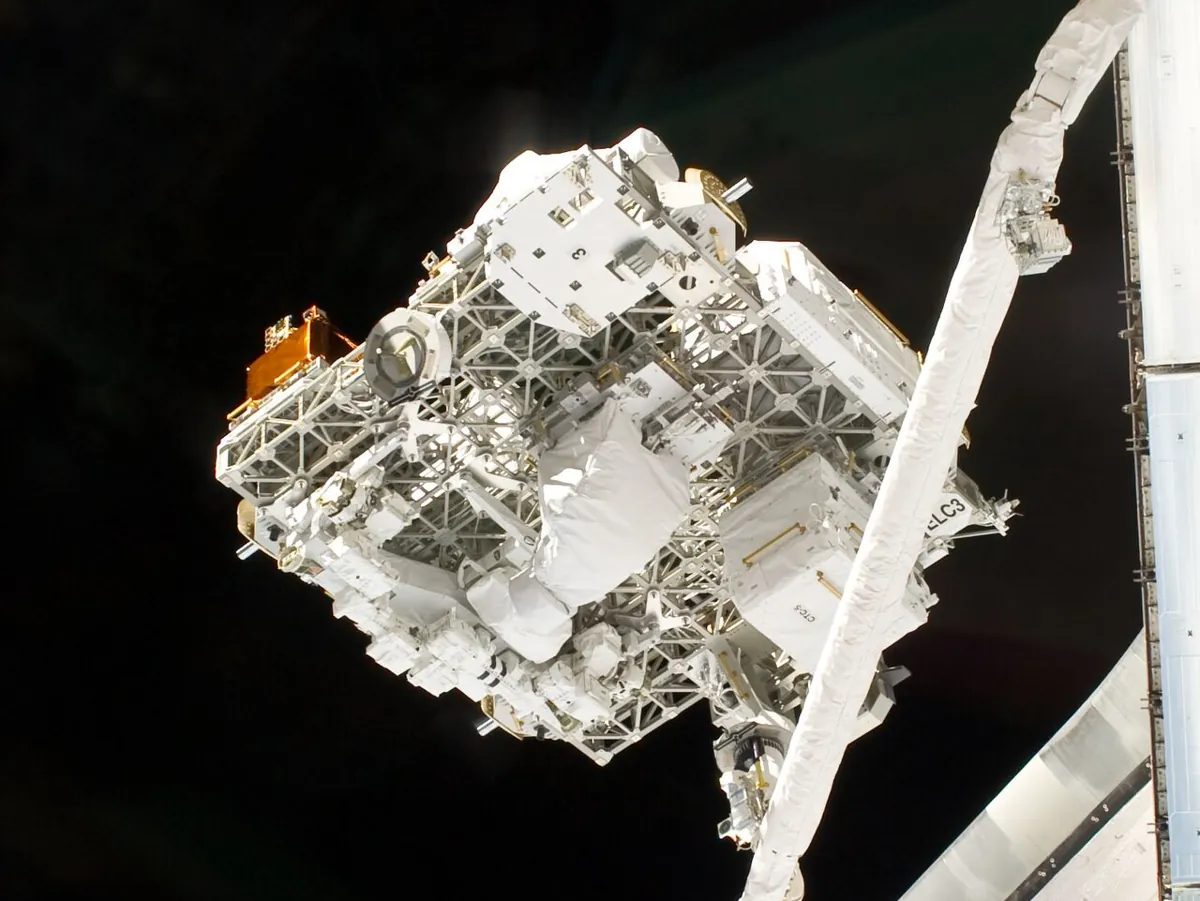
- MoveIt Task Constructor: generates grasp poses around an object at a set angle step, runs IK on each, and keeps only reachable ones before planning the approach and lift.
- Your lab: start with a top-down parallel jaw, flat-sided objects and rubber pads. Most failures you will see are fit, friction and centre of mass — the first three checks.
Think
Think about it
Think
Your planner’s best grasp scores 100 but fails the reach check. The second-best scores 75 and is reachable. Which should the robot try, and what could you do to get the 100?
Experiment
Try it in the lab
About 60 minutes. Python 3 for the planner; an Arduino UNO with a wrist servo and a gripper servo on their own supply, a push button, a ruler and three desk objects (a box, a tapered object, a round one).
Experiment
Plan, check, grasp
You will need
- `grasp_planning_lab.py` (Python 3, no libraries)
- Grasp planning lab interactive (in your browser)
- Arduino UNO, two SG90/MG90-class servos (wrist + gripper), separate 5–6 V supply, push button, jumper wires
- Ruler, rubber bands, eraser box, door stopper or tapered block, foam block
Steps
- Measure your gripper: maximum opening (mm) with a ruler, and the jaw servo angles fully open and closed. Put them in both programs.
- Measure your box and draw it in the script (centre, width, length, angle on the desk).
- Run the planner. Note how many candidates are rejected for each reason.
- Send the best grasp to the UNO (`G <yaw> <width_mm>`). Lower the arm by hand to grasp height, press the button, lift slowly.
- Now deliberately send a grasp 1 cm off-centre. Lift. Does it swing more?
- Repeat with the tapered block, first with bare plastic jaws, then with rubber bands on the fingers. Compare with the planner’s prediction.
Interactive · Grasp planning lab · Educational
- Grasp A · yaw 0° · quality 0.90 · reachable
- Grasp D · yaw -30° · quality 0.65 · reachable
- Grasp B · yaw 45° · quality 0.63 · reachable
- Grasp C · yaw 90° · quality 0.58 · IK fail (edu)
Selected: Grasp A (highest reachable quality).
Toy ranking — not force closure / not Dex-Net / not industrial grasp database.
Most grasps a robot could try are bad. A good planner is mostly a good filter: fit, friction, balance, room and reach — then pick the best of what remains.
Knowledge check
Check your understanding
Knowledge check
1. For a top-down parallel-jaw gripper, one grasp can be described by…
2. The half-angle of the friction cone is…
3. With μ = 0.3 the cone is about 16.7°. A surface leans 20° from the squeeze direction. What happens?
4. Why does a grasp far from the centre of mass cause trouble?
5. The highest-scoring grasp fails IK. The planner should…
6. Why can the UNO fold yaw 210° into 30°?
7. In MoveIt Task Constructor, what does the angle delta of GenerateGraspPose control?
8. Where should the wrist and gripper servos get power?
Mini assignment
Hands-on assignment
Mini assignment
A grasp planner for your desk
Plan grasps for three real objects, test them on the bench and compare the planner with reality.
Deliverables
- Your gripper measurements (opening, jaw angles) and μ for plastic and rubber pads.
- Planner output for three objects with the rejection counts explained in your own words.
- A bench log: best grasp vs a deliberately off-centre grasp — did it hold, did it swing?
- One case where the planner said “no grasp” and what you changed in the scene to fix it.
Do this, step by step
- Run
grasp_planning_lab.pyand read why each candidate was rejected. - Measure your gripper:
MAX_OPEN,FINGER,PAD, and μ for your pads, and put them in the script. - Plan grasps for three real objects and explain the rejection counts in your own words.
- Bench: wrist and jaw servos on their own supply; upload
grasp_executor.inoand try the best grasp and an off-centre grasp. - Find one “no grasp” case and change the scene to fix it.
Stuck? Hints, one at a time
- If every grasp is rejected as too wide, compare the object width plus
CLEARwithMAX_OPEN(5 cm). - A parallel jaw rotated 180° makes the same grasp, so yaw 210° is the same as 30°.
- If the object swings when lifted, the grasp is off the centre of mass. Move the grasp line towards the centre.
Challenges (pick by level)
- 🟢 Beginner: For five desk objects, draw the top view and mark by hand the grasp you would choose. Then run the planner. Did you agree?
- 🟡 Intermediate: Add a third score term: prefer grasps whose yaw is close to the wrist’s current angle (less wrist motion).
- 🟠 Advanced: Approximate a circle (a cup) as a 16-sided polygon and run the planner. Why do so many grasps through the centre survive?
- 🔴 Expert: Connect the two programs with pySerial so the laptop sends the best grasp, reads “REFUSED”, and automatically tries the next one.
- ⚫ Research: Read the MoveIt Task Constructor pick-and-place tutorial and map each of our five checks to the MTC stage that does a similar job. Which of our checks has no stage there?
Next step
You now know where to grasp. But a grasp is not a single moment — the hand must come in without knocking the object, close, and lift straight up. In Lesson 13 — Approach, Grasp & Lift you will turn one grasp into a safe, step-by-step motion.
Look back: Lesson 11: Robot End Effectors and Grippers. Next: Lesson 13: Approach, Grasp & Lift. Related: Stage 11 — Computer Vision.
Sources
- MoveIt — Pick and Place with MoveIt Task Constructor — GenerateGraspPose with angle delta, ComputeIK wrapper keeping reachable grasp poses, approach / close hand / attach / lift stages.
- Wikipedia — Friction — Coulomb friction F_f ≤ μF_n, angle of friction θ = arctan(μ_s), typical μ ranges (most dry pairs 0.3–0.6, rubber higher).
- Wikipedia — Robot end effector — parallel-jaw and other gripper types (from Lesson 11).
- Arduino Servo library (GitHub) — controlling RC hobby servos.
- Photos: Wikimedia Commons (credits under each image).
Self-attested for now — keep artifacts in your lab notebook.
Complete
Today's goal
0 of 1 done today
Mark this lesson complete when you have worked the experiment, knowledge check, and assignment (even roughly).