
Robotics Orientation · Lesson 03
Sensors
Est. 40–55 min
Why
Why sensors come first
A robot without sensors is like a person walking with closed eyes. It can follow a memorised plan, but the moment a chair is moved, it crashes. Sensors give the robot information about the world (where is the wall?) and about itself (what angle is my elbow at?). Without them, there is no feedback loop.
Concept
The big idea: a sensor turns the physical world into numbers
A sensor converts something physical (distance, light, angle, tilt, temperature, force) into an electrical signal: a voltage, a pulse, or digital data. The controller reads that signal and turns it into a number like “47 cm” or “92°”.
Two families of sensors
| Family | What it senses | Examples | Human version |
|---|---|---|---|
| Proprioceptive (self-sensing) | The robot’s own state | Joint encoders, servo potentiometer, IMU (tilt/rotation), motor current | Knowing where your hand is with eyes closed |
| Exteroceptive (world-sensing) | The environment | Ultrasonic and IR distance, camera, LiDAR, bump switch, line sensor | Seeing, hearing, touching |
Five properties to check on any sensor
- Range: the smallest and largest value it can measure. The HC-SR04 ultrasonic module is commonly listed for about 2 cm to 400 cm.
- Resolution: the smallest change it can notice. A kitchen scale might show 1 g steps; a bathroom scale 100 g steps.
- Accuracy vs precision: accuracy = how close to the truth; precision = how repeatable. A clock that is always exactly 5 minutes fast is precise but not accurate.
- Noise: random jitter. Read the same wall ten times and you get 49.8, 50.3, 50.1… cm.
- Update rate: how many readings per second. A slow sensor on a fast robot means the robot is acting on old news.
How it works
How an ultrasonic sensor actually works, step by step
Trigger
The Arduino sets the TRIG pin HIGH for 10 microseconds. That is the “start measuring now” command.
Shout
The module sends a short burst of 40 kHz ultrasound from one of its “eyes” (the transmitter). Humans can hear only up to about 20 kHz, so it’s silent to us.
Start the stopwatch
The module sets its ECHO pin HIGH while it waits.
Hear the echo
The sound bounces off the wall and returns to the other “eye” (the receiver). ECHO goes LOW.
Calculate
The time ECHO stayed HIGH is the round-trip time. Distance = time × speed of sound ÷ 2. We divide by 2 because the sound went there and back.
distance = (echo time × speed of sound) ÷ 2
- Speed of sound in air ≈ 331.3 + 0.606 × T m/s (T in °C)
- At about 20 °C that is ≈ 343 m/s = 0.0343 cm per microsecond
Visual
Visualise it: an ultrasonic sensor measuring a wall
Move the wall, change the air temperature, add noise and average more readings. Watch the echo time, what typical code reports, and how much averaging helps.
Interactive · Ultrasonic echo lab (HC-SR04 style)
Echo time
2861 µs
Speed of sound
349.5 m/s
Code reports (343 m/s)
49.1 cm
Average of 5
49.2 cm
Speed of sound in air ≈ 331.3 + 0.606 × T (m/s). Many Arduino sketches hard-code 0.0343 cm/µs (343 m/s, about 20 °C), so they read slightly wrong when it is hot or cold. Noise here is a simple ± uniform model.
Worked example
Worked examples: echo time, temperature and noise
Code lab
Code lab: read a real HC-SR04 with Arduino
Wire the module to an Arduino Uno as shown in the comments, upload the sketch from the Arduino IDE, then open Tools → Serial Monitor at 9600 baud.
// ultrasonic_hcsr04.ino — read distance from an HC-SR04 and print it.
// Wiring (Arduino Uno): VCC -> 5V, GND -> GND, TRIG -> pin 9, ECHO -> pin 10

const int TRIG_PIN = 9;
const int ECHO_PIN = 10;

void setup() {
  Serial.begin(9600);
  pinMode(TRIG_PIN, OUTPUT);
  pinMode(ECHO_PIN, INPUT);
}

void loop() {
  // 1. Send a 10 microsecond pulse on TRIG to start a measurement
  digitalWrite(TRIG_PIN, LOW);
  delayMicroseconds(2);
  digitalWrite(TRIG_PIN, HIGH);
  delayMicroseconds(10);
  digitalWrite(TRIG_PIN, LOW);

  // 2. Measure how long ECHO stays HIGH (time for sound to go and come back)
  //    Timeout 30000 us (~5 m round trip) so a missing echo can't freeze the loop.
  unsigned long duration = pulseIn(ECHO_PIN, HIGH, 30000UL);

  if (duration == 0) {
    Serial.println("No echo (out of range or bad wiring)");
  } else {
    // 3. Convert: sound travels ~0.0343 cm per microsecond at about 20 °C; divide by 2 for one way
    float distanceCm = duration * 0.0343 / 2.0;
    Serial.print("Echo: ");
    Serial.print(duration);
    Serial.print(" us  ->  Distance: ");
    Serial.print(distanceCm, 1);
    Serial.println(" cm");
  }
  delay(100);  // ~10 readings per second
}
Example Serial Monitor output (hand at ~50 cm, then ~20 cm, then removed; your numbers will differ)
Echo: 2915 us  ->  Distance: 50.0 cm
Echo: 2903 us  ->  Distance: 49.8 cm
Echo: 1170 us  ->  Distance: 20.1 cm
No echo (out of range or bad wiring)
No sensor yet? The Python script below does the same maths and shows how temperature and averaging change the answer. Run it on any computer.
# sensor_math.py — ultrasonic echo maths + a moving average to calm noisy readings.

def speed_of_sound(temp_c):
    return 331.3 + 0.606 * temp_c          # metres per second

def echo_time_us(distance_cm, temp_c):
    v = speed_of_sound(temp_c)
    return 2 * (distance_cm / 100) / v * 1e6  # there AND back, in microseconds

for t in (10, 20, 35):
    us = echo_time_us(50, t)
    reported = us * 0.0343 / 2             # what a sketch assuming 343 m/s prints
    print(f"{t:2d} °C: v={speed_of_sound(t):.1f} m/s  echo={us:7.1f} µs  code says {reported:5.2f} cm (true 50 cm)")

# Moving average of the last 5 readings
readings = [50.4, 49.1, 62.0, 50.2, 49.7, 50.9, 48.8, 50.3]   # 62.0 is a glitch
window = []
for r in readings:
    window.append(r)
    if len(window) > 5:
        window.pop(0)
    avg = sum(window) / len(window)
    print(f"raw={r:5.1f}  avg_of_{len(window)}={avg:5.2f}")
Expected output
10 °C: v=337.4 m/s  echo= 2964.2 µs  code says 50.84 cm (true 50 cm)
20 °C: v=343.4 m/s  echo= 2911.9 µs  code says 49.94 cm (true 50 cm)
35 °C: v=352.5 m/s  echo= 2836.8 µs  code says 48.65 cm (true 50 cm)
raw= 50.4  avg_of_1=50.40
raw= 49.1  avg_of_2=49.75
raw= 62.0  avg_of_3=53.83
raw= 50.2  avg_of_4=52.92
raw= 49.7  avg_of_5=52.28
raw= 50.9  avg_of_5=52.38
raw= 48.8  avg_of_5=52.32
raw= 50.3  avg_of_5=49.98
Simulator
Try it in the simulator
Simulator · Sensors
Sensor noise: moving average vs low-pass filter
Add Gaussian noise to a distance signal and compare a moving average with a first-order low-pass: less noise, more lag.
Loading simulator…
Formulas used
- MA: y[n] = (1/N)·Σ x[n−k], k = 0…N−1
- Low-pass: y[n] = y[n−1] + α·(x[n] − y[n−1])
- α = Δt / (RC + Δt), RC = 1 / (2π·fc)
- MA delay ≈ (N − 1)/2 samples
Model & limits
Zero-mean Gaussian noise with a fixed seed (repeatable). Real sensors also have outliers, quantisation and drift.
Real world
Real sensors you will hold in your hand
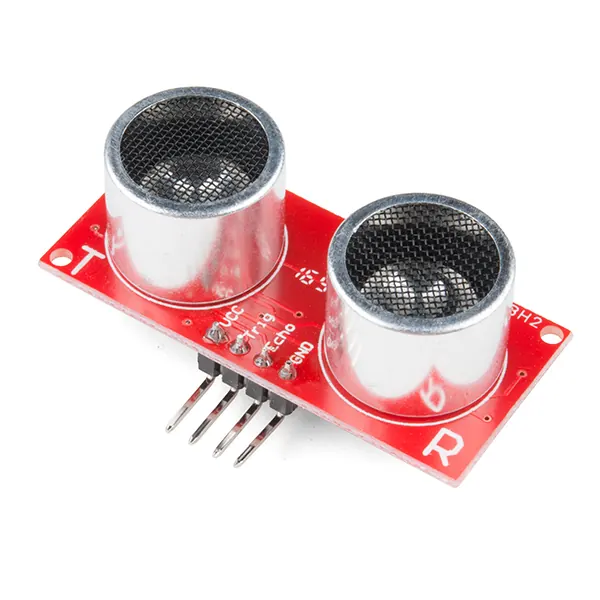
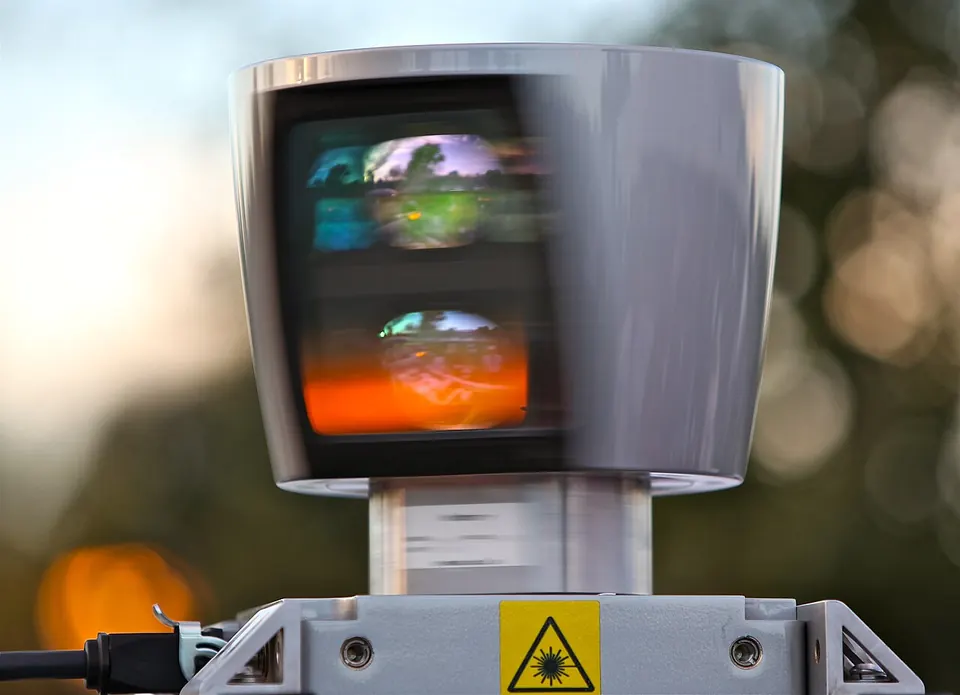
- Line-follower robots use a row of IR reflectance sensors pointing at the floor to see a black line on white.
- Robot vacuums use bump switches, IR cliff sensors and wheel encoders.
- Robot arms read joint angles with encoders (industrial) or a potentiometer inside each hobby servo (Stage 6).
- Phones contain an IMU (accelerometer + gyroscope). That is how the screen rotates when you tilt it. Many drones and balancing robots use the same kind of chip.
Mistakes
Common mistakes and debugging
Hardware & safety
Hardware lab and safety notes
Wire the HC-SR04 and run ultrasonic_hcsr04.ino from the code lab.
- VCC → 5V, GND → GND, TRIG → pin 9, ECHO → pin 10 (Arduino Uno, which is a 5 V board).
- Point it at a flat wall or a book; the datasheet range is about 2 cm to 4 m.
- Open Serial Monitor at 9600 baud.
Debugging
Debugging: when it doesn’t work
| Symptom | Likely cause | Fix |
|---|---|---|
| Always “No echo” | TRIG/ECHO swapped, or nothing within ~4 m | Check pins 9/10; aim at a flat object 20–100 cm away |
| Readings jump around | Soft or angled surface (cloth, sofa), or a cone hitting the table | Use a flat hard target; lift the sensor off the table |
| Distance always about 0 | Object closer than ~2 cm | Move the object back |
| Garbage characters in Serial Monitor | Baud rate mismatch | Set Serial Monitor to 9600 |
Think
Think about it
Think
Your distance sensor suddenly reports 2 cm while the hallway is empty. What are three non-“AI” explanations?
Experiment
Try it in the lab: tune a stop-before-the-wall rule
A simple obstacle-avoiding robot uses two thresholds: go forward in open space, turn when something is getting close, and stop when it’s very close. Let’s tune them.
Experiment
Threshold policy lab
You will need
- The simulator below (no hardware needed)
- Optional hardware: Arduino Uno, HC-SR04, 4 jumper wires, USB cable
Steps
- Use the distance-sensor demo below.
- Find thresholds that stop before a “wall” but still allow forward motion in open space.
- Note how noisy thresholds create chatter (rapid FORWARD/STOP flipping).
- With hardware: upload ultrasonic_hcsr04.ino, slowly move your hand towards the sensor, and write down the distance at which readings start to jump around.
Interactive · Distance-sensor decision
Measured distance
80 cm
Policy: distance ≤ stop → STOP · else ≤ turn → TURN · else FORWARD. Real robots add hysteresis to avoid chatter.
Knowledge check
Check your understanding
Knowledge check
1. A joint encoder is primarily…
2. Why do hobby distance sensors need careful thresholds?
3. Cameras are powerful because they…
4. An ultrasonic echo takes 1166 µs at about 20 °C (0.0343 cm/µs). How far is the object?
5. Why should `pulseIn()` be given a timeout?
Practice quiz
Mini assignment
Hands-on assignment
Mini assignment
Sensor pick list
Choose sensors for a line-following mobile robot and for a pick-and-place arm. Justify each in one line.
Deliverables
- Two short lists with justifications
Stretch (code): in sensor_math.py, replace the moving average with a median of the last 5 readings (sorted(window)[len(window)//2]). Does the 62.0 glitch still pull the result?
Do this, step by step
- Wire the HC-SR04 and upload
ultrasonic_hcsr04.ino. - Place a book at 10, 20, 50 and 100 cm (measure with a tape). Record 5 readings at each distance.
- Work out the average error at each distance in cm.
- Now aim at a pillow or curtain at 50 cm and record 5 readings. Compare.
- Write your sensor pick lists for a line follower and a pick-and-place arm (format below).
Stuck? Hints, one at a time
- Hint 1: Error = sensor reading − tape reading. Keep the sign so you can see if it reads long or short.
- Hint 2: Soft surfaces absorb sound, so echoes get weak or missing — that is a real failure mode to write in your list.
- Hint 3: For the arm, think about what it must know about *itself* (joint angles: proprioceptive) and about the *world* (object position: exteroceptive).
Challenges (pick by level)
- 🟢 Easy: Change the code to print distance in mm.
- 🟡 Medium: Replace the moving average in
sensor_math.pywith a median of 5. Does the 62.0 glitch still pull the result? - 🟠 Hard: On the Uno, light the built-in LED when something is closer than 15 cm, with hysteresis (ON below 15 cm, OFF above 20 cm).
Next step
Next, Lesson 4: Actuators — the parts that move. Related: sensors and wiring in depth in Stage 4 — Electronics & Embedded Systems, cameras in Stage 11 — Computer Vision.
Sources
- HC-SR04 datasheet (SparkFun PDF) — range, 10 µs trigger, echo timing.
- Arduino — pulseIn() — measuring the echo pulse with a timeout.
- Wikipedia — Speed of sound — about 343 m/s in air at 20 °C.
- Wikipedia — Lidar — laser distance sensing.
- Photos: Wikimedia Commons (credits under each image).
Self-attested for now — keep artifacts in your lab notebook.
Complete
Today's goal
0 of 1 done today
Mark this lesson complete when you have worked the experiment, knowledge check, and assignment (even roughly).