
ROS 2 & Robot Software Architecture (Fundamentals) · Lesson 13
Robot State & TF Trees
Est. 55–75 min
Why
Why this lesson matters
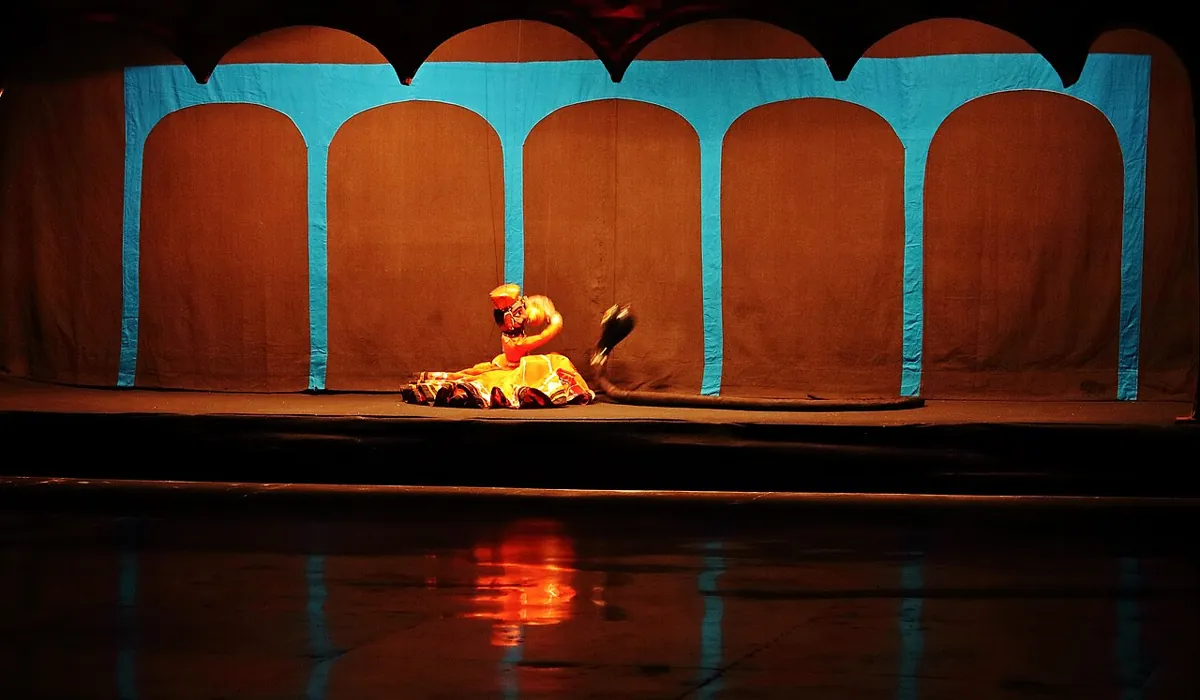
Think of a Rajasthani kathputli. The puppet’s body — head, arms, legs and how they are tied — is fixed when the puppet is made. During the show, the puppeteer only pulls strings. The audience sees the whole body move. In ROS 2 the URDF is the puppet, joint_states are the strings, and robot_state_publisher turns string pulls into the position of every body part.
By the end of this lesson you will be able to: read and write a small URDF with links and fixed, revolute, continuous and prismatic joints; explain what robot_state_publisher subscribes to and publishes; start it with a launch file that loads the URDF as robot_description; drive it from sliders or from your Arduino knobs; use frame_prefix for more than one arm; and debug the usual “my model is broken in RViz” problems.
Concept
URDF, joint_states and robot_state_publisher
URDF in one minute
- A URDF is an XML file with one
<robot>, many<link>s (rigid parts) and<joint>s that connect a parent link to a child link — so it is a tree, just like Lesson 12. - A joint’s
<origin>is in the parent’s frame: it says where the child frame starts. If you leave outrpy, the child has the same orientation as the parent. - A link’s
<visual>has its own origin — it only moves the drawing, not the frame. - Units are metres and radians.
| Type | Moves how | Limits | Arm example |
|---|---|---|---|
fixed | Does not move | — | Camera bracket, tool flange |
revolute | Rotates about <axis> | <limit lower upper effort velocity> in radians | Shoulder, elbow, wrist |
continuous | Rotates, any angle (no limits) | None | A wheel, an endless turntable |
prismatic | Slides along <axis> | Same tag, in metres | Linear rail, telescopic gripper |
planar, floating | 2D / free in 3D | Need more than one number — not covered in the tutorial | Mobile base (advanced) |
What robot_state_publisher does (from its README)
- At startup it is given the URDF in the
robot_descriptionparameter. This must be set at startup or the node fails to start. - It subscribes to
joint_states(sensor_msgs/msg/JointState). - Fixed joints are published once to
/tf_static(transient local, so late subscribers still get them). - Movable joints are published to
/tfwhenever that joint is updated in ajoint_statesmessage. - It republishes the URDF on the
robot_descriptiontopic (transient local). - Parameters:
publish_frequency(max rate for/tf, default 20.0 Hz),ignore_timestamp(default false),frame_prefix(default empty).
So the full pipeline is: something publishes joint angles (sliders from joint_state_publisher_gui, or your Arduino through joint_state_node.py) → robot_state_publisher → /tf and /tf_static → anyone can look up any frame (RViz, your planner, tool_tracker.py from Lesson 12).
Visual
Visualise it: from joint angles to a full TF tree
joint_states in, TF tree out: robot_state_publisher computes every link frame from the URDF and the current joint angles.
Interactive · TF2 frame tree explorer
ROS 2 / TF2 communication simulator — educational only (not a live tf2_ros buffer)

Move joints, pick frames, then lookup — educational transforms only.
Code lab
Code lab: read a URDF like robot_state_publisher does
First the URDF of our bench arm — the same geometry as Lesson 12, so you can compare. Notice world_to_base, tool_mount and camera_mount are fixed; shoulder and elbow are revolute about z with 0–180° limits.
<?xml version="1.0"?>
<!-- arm_2dof.urdf - the bench arm from Lessons 12-13: base, shoulder, elbow, tool, camera.
     Same geometry as tf_tree_sim.py. Units: metres and radians (REP 103). -->
<robot name="aihub_arm_2dof">
  <link name="world"/>
  <link name="base_link">
    <visual>
      <geometry><cylinder radius="0.06" length="0.05"/></geometry>
      <origin xyz="0 0 0.025"/>
    </visual>
  </link>
  <link name="shoulder_link">
    <visual>
      <geometry><box size="0.20 0.03 0.03"/></geometry>
      <origin xyz="0.10 0 0"/>
    </visual>
  </link>
  <link name="elbow_link">
    <visual>
      <geometry><box size="0.15 0.025 0.025"/></geometry>
      <origin xyz="0.075 0 0"/>
    </visual>
  </link>
  <link name="tool0"/>
  <link name="camera_link"/>

  <!-- fixed: published once on /tf_static -->
  <joint name="world_to_base" type="fixed">
    <parent link="world"/>
    <child link="base_link"/>
    <origin xyz="0 0 0.40"/>
  </joint>

  <!-- revolute: published on /tf whenever joint_states has "shoulder" -->
  <joint name="shoulder" type="revolute">
    <parent link="base_link"/>
    <child link="shoulder_link"/>
    <origin xyz="0 0 0"/>
    <axis xyz="0 0 1"/>
    <limit lower="0.0" upper="3.1416" effort="1.0" velocity="1.0"/>
  </joint>

  <joint name="elbow" type="revolute">
    <parent link="shoulder_link"/>
    <child link="elbow_link"/>
    <origin xyz="0.20 0 0"/>
    <axis xyz="0 0 1"/>
    <limit lower="0.0" upper="3.1416" effort="1.0" velocity="1.0"/>
  </joint>

  <joint name="tool_mount" type="fixed">
    <parent link="elbow_link"/>
    <child link="tool0"/>
    <origin xyz="0.15 0 0"/>
  </joint>

  <!-- camera on a pole, 0.30 m in front, 0.50 m up, looking straight down (pitch = pi) -->
  <joint name="camera_mount" type="fixed">
    <parent link="base_link"/>
    <child link="camera_link"/>
    <origin xyz="0.30 0 0.50" rpy="0 3.1416 0"/>
  </joint>
</robot>
urdf_rsp_sim.py (plain Python, no ROS needed) parses that file with xml.etree, checks the tree, sends fixed joints to “/tf_static” once with a frame_prefix, then handles three joint_states messages — one with a missing joint, one complete, one with an unknown joint and an out-of-range angle. Run python3 urdf_rsp_sim.py from the code folder.
"""urdf_rsp_sim.py - a toy robot_state_publisher (plain Python, no ROS 2 needed).

Reads arm_description_example/urdf/arm_2dof.urdf and does what the robot_state_publisher README says:
  - the URDF (kinematic tree) is given once at startup
  - fixed joints  -> published once on /tf_static
  - movable joints -> published on /tf whenever that joint appears in a joint_states message
  - frame_prefix  -> added to every frame name
It also checks the tree and warns about missing or out-of-limit joints. Teaching model, not the real node.
"""
import math
import os
import xml.etree.ElementTree as ET

HERE = os.path.dirname(os.path.abspath(__file__))
URDF = os.path.join(HERE, "arm_description_example", "urdf", "arm_2dof.urdf")


def mat(xyz, rpy, axis=(0, 0, 1), angle=0.0):
    """origin (xyz, rpy) followed by a rotation 'angle' about 'axis' (only z axes used here)."""
    r, p, y = rpy
    cr, sr, cp, sp, cy, sy = math.cos(r), math.sin(r), math.cos(p), math.sin(p), math.cos(y), math.sin(y)
    R = [[cy * cp, cy * sp * sr - sy * cr, cy * sp * cr + sy * sr],
         [sy * cp, sy * sp * sr + cy * cr, sy * sp * cr - cy * sr],
         [-sp, cp * sr, cp * cr]]
    if angle:
        assert tuple(axis) == (0, 0, 1), "toy model supports z axes only"
        c, s = math.cos(angle), math.sin(angle)
        Z = [[c, -s, 0], [s, c, 0], [0, 0, 1]]
        R = [[sum(R[i][k] * Z[k][j] for k in range(3)) for j in range(3)] for i in range(3)]
    return [R[0] + [xyz[0]], R[1] + [xyz[1]], R[2] + [xyz[2]], [0, 0, 0, 1]]


def mul(a, b):
    return [[sum(a[i][k] * b[k][j] for k in range(4)) for j in range(4)] for i in range(4)]


def floats(text, n=3):
    return [float(v) for v in text.split()] if text else [0.0] * n


root = ET.parse(URDF).getroot()
links = [l.get("name") for l in root.findall("link")]
joints = []
for j in root.findall("joint"):
    o = j.find("origin")
    lim = j.find("limit")
    joints.append({
        "name": j.get("name"), "type": j.get("type"),
        "parent": j.find("parent").get("link"), "child": j.find("child").get("link"),
        "xyz": floats(o.get("xyz") if o is not None else None),
        "rpy": floats(o.get("rpy") if o is not None else None),
        "axis": floats(j.find("axis").get("xyz")) if j.find("axis") is not None else [1, 0, 0],
        "limit": (float(lim.get("lower")), float(lim.get("upper"))) if lim is not None else None,
    })

print(f"Part 1: read {os.path.basename(URDF)} - robot '{root.get('name')}'")
print(f"  {len(links)} links, {len(joints)} joints")
children = [j["child"] for j in joints]
roots = [l for l in links if l not in children]
dupes = {c for c in children if children.count(c) > 1}
print(f"  root link: {roots}  (must be exactly one)")
print(f"  links with two parents: {sorted(dupes) or 'none'}")
for j in joints:
    lim = f" limits {math.degrees(j['limit'][0]):.0f}..{math.degrees(j['limit'][1]):.0f} deg" if j["limit"] else ""
    print(f"  {j['type']:<9} {j['name']:<13} {j['parent']:>13} -> {j['child']:<13}{lim}")

prefix = "arm1/"
print(f"\nPart 2: startup - fixed joints go to /tf_static ONCE (frame_prefix '{prefix}')")
for j in joints:
    if j["type"] == "fixed":
        x, y, z = j["xyz"]
        print(f"  /tf_static  {prefix}{j['parent']} -> {prefix}{j['child']}  xyz=({x:.2f}, {y:.2f}, {z:.2f})")

movable = {j["name"]: j for j in joints if j["type"] != "fixed"}
state = {}


def on_joint_states(names, positions_deg):
    for n, d in zip(names, positions_deg):
        if n not in movable:
            print(f"  WARN joint '{n}' is not in the URDF - ignored")
            continue
        lo, hi = movable[n]["limit"]
        if not math.radians(d) >= lo - 1e-9 or not math.radians(d) <= hi + 1e-9:
            print(f"  WARN {n}={d:.0f} deg is outside the URDF limits")
        state[n] = math.radians(d)
        j = movable[n]
        print(f"  /tf        {prefix}{j['parent']} -> {prefix}{j['child']}  angle={d:.1f} deg")
    missing = [n for n in movable if n not in state]
    if missing:
        print(f"  (no transform yet for {missing}: their child frames are not in the tree)")


def pose_in(target_root, frame):
    by_child = {j["child"]: j for j in joints}
    t = mat((0, 0, 0), (0, 0, 0))
    chain = []
    while frame != target_root:
        j = by_child[frame]
        chain.append(j)
        frame = j["parent"]
    for j in reversed(chain):
        t = mul(t, mat(j["xyz"], j["rpy"], j["axis"], state.get(j["name"], 0.0)))
    return [round(t[i][3], 3) + 0.0 for i in range(3)]


print("\nPart 3: joint_states arrive (names must match the URDF joint names)")
print("  msg 1: name=['shoulder']")
on_joint_states(["shoulder"], [30.0])
print("  msg 2: name=['shoulder', 'elbow']")
on_joint_states(["shoulder", "elbow"], [30.0, 45.0])
print(f"  tool0 in base_link = {pose_in('base_link', 'tool0')}   (Lesson 12 sim at t=0: 0.212, 0.245)")
print("  msg 3: name=['shoulder', 'elbow', 'wrist'] with elbow=200 deg")
on_joint_states(["shoulder", "elbow", "wrist"], [60.0, 200.0, 10.0])

print("\nPart 4: one URDF, many answers")
on_joint_states(["shoulder", "elbow"], [60.0, 0.0])
for f in ("tool0", "camera_link"):
    print(f"  {f:<11} in world = {pose_in('world', f)}")
print("  -> no hand-written broadcaster: change the URDF, every frame follows")
Output (run with python3 urdf_rsp_sim.py)
Part 1: read arm_2dof.urdf - robot 'aihub_arm_2dof'
  6 links, 5 joints
  root link: ['world']  (must be exactly one)
  links with two parents: none
  fixed     world_to_base         world -> base_link
  revolute  shoulder          base_link -> shoulder_link limits 0..180 deg
  revolute  elbow         shoulder_link -> elbow_link    limits 0..180 deg
  fixed     tool_mount       elbow_link -> tool0
  fixed     camera_mount      base_link -> camera_link

Part 2: startup - fixed joints go to /tf_static ONCE (frame_prefix 'arm1/')
  /tf_static  arm1/world -> arm1/base_link  xyz=(0.00, 0.00, 0.40)
  /tf_static  arm1/elbow_link -> arm1/tool0  xyz=(0.15, 0.00, 0.00)
  /tf_static  arm1/base_link -> arm1/camera_link  xyz=(0.30, 0.00, 0.50)

Part 3: joint_states arrive (names must match the URDF joint names)
  msg 1: name=['shoulder']
  /tf        arm1/base_link -> arm1/shoulder_link  angle=30.0 deg
  (no transform yet for ['elbow']: their child frames are not in the tree)
  msg 2: name=['shoulder', 'elbow']
  /tf        arm1/base_link -> arm1/shoulder_link  angle=30.0 deg
  /tf        arm1/shoulder_link -> arm1/elbow_link  angle=45.0 deg
  tool0 in base_link = [0.212, 0.245, 0.0]   (Lesson 12 sim at t=0: 0.212, 0.245)
  msg 3: name=['shoulder', 'elbow', 'wrist'] with elbow=200 deg
  /tf        arm1/base_link -> arm1/shoulder_link  angle=60.0 deg
  WARN elbow=200 deg is outside the URDF limits
  /tf        arm1/shoulder_link -> arm1/elbow_link  angle=200.0 deg
  WARN joint 'wrist' is not in the URDF - ignored

Part 4: one URDF, many answers
  /tf        arm1/base_link -> arm1/shoulder_link  angle=60.0 deg
  /tf        arm1/shoulder_link -> arm1/elbow_link  angle=0.0 deg
  tool0       in world = [0.175, 0.303, 0.4]
  camera_link in world = [0.3, 0.0, 0.9]
  -> no hand-written broadcaster: change the URDF, every frame follows
Try it: move the joints and watch every child frame in the tree follow.
Interactive · TF2 frame tree explorer
ROS 2 / TF2 communication simulator — educational only (not a live tf2_ros buffer)
Move joints, pick frames, then lookup — educational transforms only.
display_launch.py — the real robot_state_publisher
The Jazzy demo launch file reads the URDF with the FileContent substitution and passes it as robot_description. We do the same, add frame_prefix: arm1/, and choose the joint source with a use_gui argument: sliders, or the knobs on your Arduino.
"""display_launch.py - robot_state_publisher + joint source for the 2-joint bench arm (ROS 2 Jazzy).

Pattern from the Jazzy "Using URDF with robot_state_publisher" demo launch: FileContent reads the URDF
and passes it as the robot_description parameter (it must be set at startup).
  ros2 launch arm_description display_launch.py                       # sliders (joint_state_publisher_gui)
  ros2 launch arm_description display_launch.py use_gui:=false port:=/dev/ttyACM0   # real knobs
Then: rviz2  (Fixed Frame = arm1/world, add RobotModel + TF)
"""
from launch import LaunchDescription
from launch.actions import DeclareLaunchArgument
from launch.conditions import IfCondition, UnlessCondition
from launch.substitutions import FileContent, LaunchConfiguration, PathJoinSubstitution
from launch_ros.actions import Node
from launch_ros.substitutions import FindPackageShare


def generate_launch_description():
    urdf = FileContent(
        PathJoinSubstitution([FindPackageShare('arm_description'), 'urdf', 'arm_2dof.urdf']))
    use_gui = LaunchConfiguration('use_gui')
    port = LaunchConfiguration('port')

    return LaunchDescription([
        DeclareLaunchArgument('use_gui', default_value='true',
                              description='Sliders instead of the Arduino knobs'),
        DeclareLaunchArgument('port', default_value='/dev/ttyACM0',
                              description='Arduino serial port (two_pot_stream.ino)'),
        Node(
            package='robot_state_publisher',
            executable='robot_state_publisher',
            namespace='arm1',
            output='screen',
            parameters=[{'robot_description': urdf, 'frame_prefix': 'arm1/'}]),
        Node(
            package='joint_state_publisher_gui',
            executable='joint_state_publisher_gui',
            namespace='arm1',
            condition=IfCondition(use_gui)),
        Node(
            package='arm_control',
            executable='joint_state',            # Lesson 5 joint_state_node.py: publishes 'shoulder' and 'elbow' in radians
            namespace='arm1',
            parameters=[{'port': port}],
            condition=UnlessCondition(use_gui)),
])data_files=[
('share/ament_index/resource_index/packages', ['resource/' + package_name]),
('share/' + package_name, ['package.xml']),
(os.path.join('share', package_name, 'urdf'), glob('urdf/*')),
(os.path.join('share', package_name, 'launch'), glob('launch/*launch.[pxy][yma]*')),
],colcon build --symlink-install --packages-select arm_description
source install/setup.bash
ros2 launch arm_description display_launch.py # sliders
rviz2 # Fixed Frame: arm1/world; add RobotModel and TF
ros2 topic echo /arm1/joint_states
ros2 run tf2_ros tf2_echo arm1/base_link arm1/tool0
ros2 run tf2_tools view_frames
ros2 param get /arm1/robot_state_publisher publish_frequencyReal world
Robot descriptions in the real world
- Official tutorials: the URDF tutorials build R2D2-style robots and show them with
ros2 launch urdf_tutorial display.launch.py model:=…; the GUI parses the URDF, finds non-fixed joints and their limits, and publishesJointStatefor robot_state_publisher. - Simulated robots: the Jazzy robot_state_publisher tutorial couples a small
JointStatepublisher node with robot_state_publisher to animate a walking R2D2-style robot in RViz. - Digital twins: the same URDF drives the RViz model, a simulator and the motion planner, so all of them agree on where every link is.
- Your 6DOF arm: one URDF with six revolute joints replaces six hand-written broadcasters.
Bench build
Bench build: a digital twin you turn with your hands
Same two-pot board and two_pot_stream.ino from Lesson 4. Turn a knob, and the model in RViz turns with it — the first “digital twin” of your arm. No motors yet.
| From | To | Note |
|---|---|---|
| Pot 1 outer legs | Arduino 5V and GND | 10 kΩ; wiper to A0 → joint shoulder |
| Pot 2 outer legs | Arduino 5V and GND | 10 kΩ; wiper to A1 → joint elbow |
| Arduino USB | ROS 2 computer | 115200 baud, 20 Hz |
Sliders first
ros2 launch arm_description display_launch.py— move the sliders and check the model in RViz.Now real knobs
Close it, then
ros2 launch arm_description display_launch.py use_gui:=false port:=/dev/ttyACM0.Compare
Turn the shoulder knob to the middle (about 90°). The upper arm in RViz should point along base +y.
Track the tool
Run
tool_tracker.pyfrom Lesson 12 with-p target_frame:=arm1/base_link -p source_frame:=arm1/tool0.Change the robot, not the code
Edit the elbow
<origin xyz="0.20 0 0">to your real link length, rebuild, relaunch. Every frame updates.
Debugging
Debugging URDF and robot_state_publisher
| Symptom | Likely cause | Fix |
|---|---|---|
| robot_state_publisher exits at startup | robot_description not set, or the URDF has an XML error | Check the path in the launch file; parse the file with Python first |
| Some links white / “No transform” in RViz | Those joints never appear in joint_states | ros2 topic echo joint_states; names must match URDF joint names |
| Model does not show at all | RobotModel listens on the wrong description topic, or wrong Fixed Frame | Topic /arm1/robot_description, Fixed Frame arm1/world |
| Link points the wrong way | Wrong <axis> or rpy; degrees used instead of radians | Move one slider at a time and compare with the real arm |
| Two arms fight over frames | Same frame names | Different frame_prefix per arm |
| Model lags behind knobs | publish_frequency lower than the joint rate | Raise it to match your joint_states rate |
Think
Think about it
Think
Your gripper has two fingers that always move together. Would you give them two independent joints in `joint_states`, or something else? What happens in RViz if you forget the second finger’s joint?
Experiment
Try it in the lab
About 40 minutes with Python; the ROS 2 steps need ROS 2 Jazzy with robot_state_publisher, joint_state_publisher_gui and RViz; the bench step needs the two-pot board.
Experiment
Describe once, move anywhere
You will need
- `urdf_rsp_sim.py`, `arm_2dof.urdf` and Python 3
- tf2 frame tree explorer (in your browser)
- Optional: ROS 2 Jazzy, `urdf_tutorial` package, `display_launch.py`, Arduino UNO with two 10 kΩ pots
Steps
- Run `urdf_rsp_sim.py`. Change the elbow origin to 0.25 m. Predict tool0 for shoulder 30°, elbow 45° and check.
- Add a `wrist` revolute joint and a `wrist_link` to the URDF. Make the simulator publish it, and see msg 3’s warning disappear.
- Break the URDF on purpose: give `tool0` a second parent. Does Part 1 catch it?
- With ROS 2: run `ros2 launch urdf_tutorial display.launch.py model:=urdf/06-flexible.urdf` and move the sliders.
- With ROS 2: run `display_launch.py` and compare `tf2_echo arm1/base_link arm1/tool0` with the simulator.
- Bench: drive the model with your knobs and measure the lag at different `publish_frequency` values.
Interactive · TF2 frame tree explorer
ROS 2 / TF2 communication simulator — educational only (not a live tf2_ros buffer)
Move joints, pick frames, then lookup — educational transforms only.
All geometry lives in one file. Joint angles are the only thing that changes at runtime. robot_state_publisher joins the two and gives every node the same TF tree.
Knowledge check
Check your understanding
Knowledge check
1. robot_state_publisher subscribes to…
2. Where are fixed joints published, and how often?
3. What happens if `robot_description` is not set at startup?
4. A joint’s `<origin>` is expressed in…
5. Which joint type rotates with lower/upper limits?
6. Half the arm is missing in RViz but the base shows. Most likely?
7. Two identical arms on one PC need…
Mini assignment
Hands-on assignment
Mini assignment
A URDF for your 6DOF arm
Measure your arm, write its URDF, and drive it in RViz from joint angles.
Deliverables
- A sketch of your arm with every link length and joint axis measured.
- `my_arm.urdf` with six revolute joints, limits and a tool frame — parsed without errors by `urdf_rsp_sim.py` (adapt it to more joints).
- Optional (ROS 2): RViz screenshot with RobotModel and TF, plus `view_frames` PDF.
- Optional (bench): a short video of the knobs moving two joints of your model.
Do this, step by step
- Run
python3 urdf_rsp_sim.py, set the elbow origin to 0.25 m and predict tool0 for shoulder 30°, elbow 45° before running. - Measure every link length and joint axis of your arm and sketch them.
- Write
my_arm.urdfwith six revolute joints, limits and atool0frame, and make the simulator parse it without errors. - Break it on purpose (give
tool0two parents) and check the error. - Optional with ROS 2: show the model in RViz with RobotModel and TF displays.
Stuck? Hints, one at a time
- URDF lengths are in metres and angles in radians — 25 cm is 0.25.
- Every joint needs a parent link, a child link, an origin and an axis; revolute joints also need limits.
- If the model looks folded, check the joint axis first (
0 0 1vs0 1 0).
Challenges (pick by level)
- 🟢 Easy: Run the official
urdf_tutorialdisplay launch with three different models and list the joint types you see. - 🟡 Medium: Add a
<visual>with simple boxes and cylinders to every link of your arm. - 🟠 Hard-ish: Write a node that publishes
joint_statesfor all six joints from a cubic trajectory (Stage 9) and watch the arm move in RViz. - 🔴 Hard: Run two arms with
frame_prefixarm1/andarm2/under a sharedworldframe and place them 1 m apart. - ⚫ Research: Read the Jazzy xacro tutorial and rewrite your URDF with macros for repeated links.
Next step
Your TF tree is only as good as the messages feeding it. On Wi-Fi or a busy USB link, some messages arrive late or never. In Lesson 14 — QoS & Reliable Communication you will learn how ROS 2 lets you choose between “every message” and “latest message, fast”.
Look back: Lesson 12: TF2 & Coordinate Frames. Next: Lesson 14: QoS & Reliable Robot Communication. Related: Stage 8 — Kinematics & IK.
Sources
- robot_state_publisher README (jazzy) — URDF at startup, subscribes joint_states, fixed → transient-local /tf_static once, movable → /tf, robot_description topic, parameters and defaults.
- ROS 2 Jazzy docs — Building a visual robot model with URDF from scratch — links, joints, joint origin in parent frame, visual origin,
display.launch.py model:=. - ROS 2 Jazzy docs — Building a movable robot model with URDF — continuous, revolute, prismatic, planar/floating, limits, joint_state_publisher_gui → robot_state_publisher.
- ROS 2 Jazzy docs — Using URDF with robot_state_publisher (Python) and its demo_launch.py —
FileContent+robot_description, installingurdf/. - ROS 2 Jazzy docs — Using Xacro to clean up a URDF file — for the research challenge.
- ros2/launch substitutions (jazzy) —
FileContentis available in Jazzy. - Docs text read from the official docs source ros2/ros2_documentation (jazzy branch).
- Photos: Wikimedia Commons (credits under each image).
Self-attested for now — keep artifacts in your lab notebook.
Complete
Today's goal
0 of 1 done today
Mark this lesson complete when you have worked the experiment, knowledge check, and assignment (even roughly).