
ROS 2 & Robot Software Architecture (Fundamentals) · Lesson 12
TF2 & Coordinate Frames
Est. 55–75 min
Why
Why this lesson matters
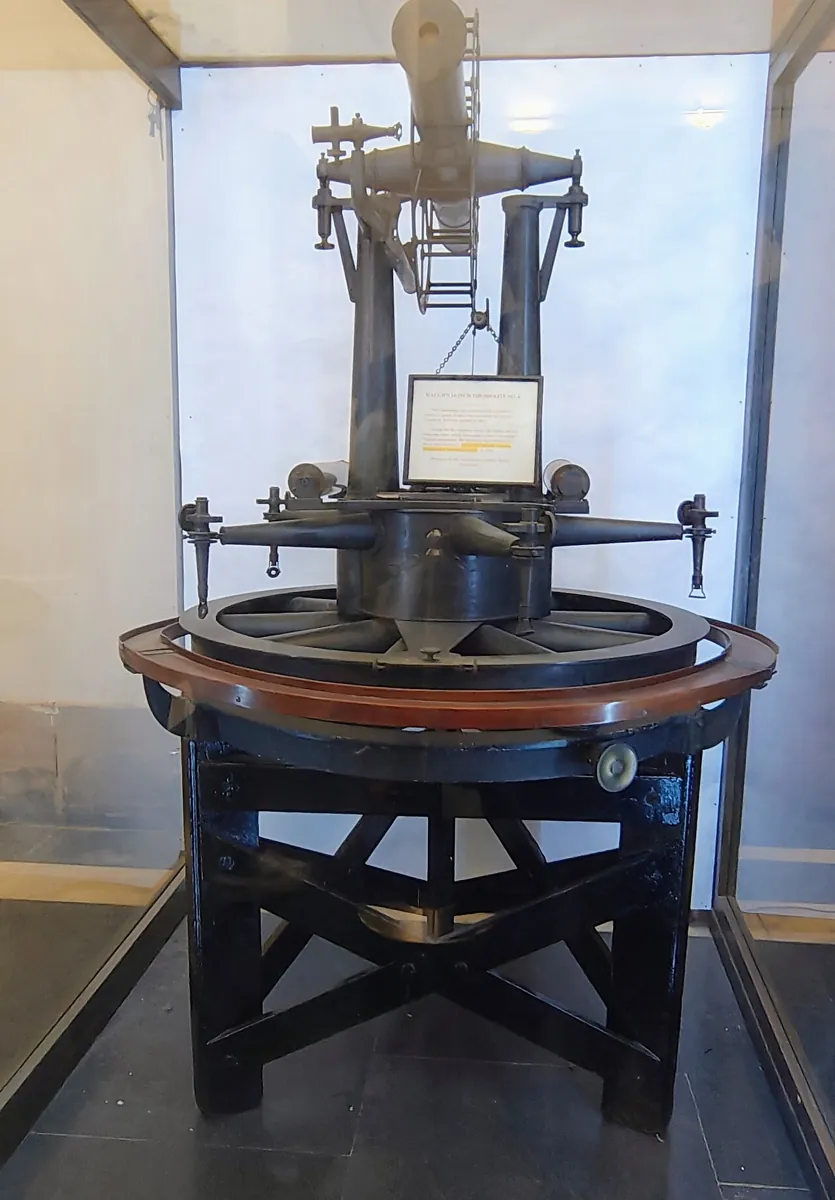
Ask someone in Kota for directions and they say “two lanes after the coaching centre, on your left”. That is a position relative to a landmark and to the way you are facing. Ask the same thing on Google Maps and you get latitude and longitude. Same place, different frames of reference. A robot has many such frames — base, every joint, the gripper, the camera — and they move all the time.
By the end of this lesson you will be able to: explain what a coordinate frame and a transform are; draw your arm as a tree of frames; tell static from moving transforms; publish both with StaticTransformBroadcaster and TransformBroadcaster; look up the tool’s position with a Buffer and TransformListener; use static_transform_publisher, tf2_echo and view_frames; and fix the most common tf2 errors.
Concept
How tf2 keeps track of frames
What the Jazzy docs say tf2 is
- tf2 is the transform library: it keeps track of multiple coordinate frames over time.
- It keeps the relationships in a tree, buffered in time, so you can transform points and vectors between any two frames at any time in the buffer.
- Questions it answers: “Where was the head frame relative to the world 5 seconds ago?”, “What is the pose of the object in my gripper relative to my base?”
- It works across a distributed system: frame information is available to all ROS 2 components on any computer.
- Two jobs for you as a programmer: broadcast transforms and listen for transforms.
Frames, transforms and the tree
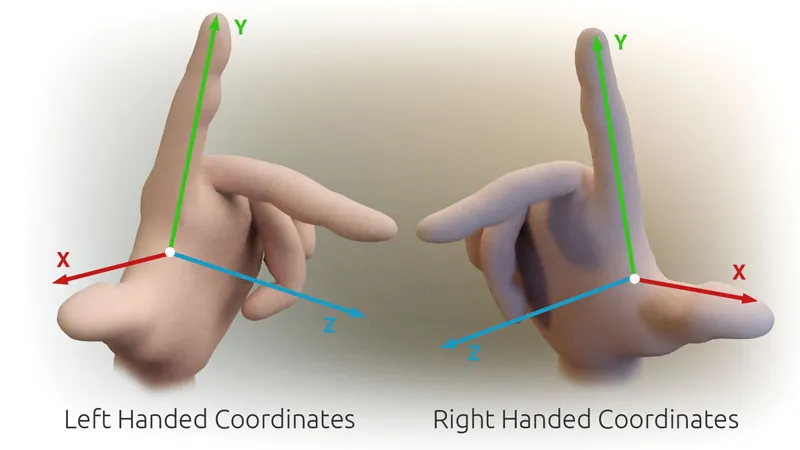
A frame is an origin plus three axes x, y, z. ROS convention REP 103 says all frames are right-handed and angles are in radians. A transform from a parent to a child says where the child’s origin is (translation x, y, z) and how it is turned (rotation, stored as a quaternion) — the geometry_msgs/msg/TransformStamped message has header.frame_id (parent), child_frame_id and header.stamp. Every frame has exactly one parent, so the frames form a tree, and tf2 can chain transforms along the tree: base → shoulder → elbow → tool.
| Kind | Example on our arm | How to publish | Topic |
|---|---|---|---|
| Static (never changes) | Camera bolted to a pole; tool at the end of the forearm | StaticTransformBroadcaster or static_transform_publisher | /tf_static |
| Moving (changes with time) | Shoulder and elbow angles | TransformBroadcaster every time the joints change | /tf |
Looking up a transform
The listener tutorial creates a Buffer, a TransformListener that fills it, and then calls lookup_transform(target_frame, source_frame, time). Passing rclpy.time.Time() gets the latest available transform. The call is wrapped in try/except TransformException, because at startup or after a crash the frames may not be there yet.
Visual
Visualise it: a frame tree for your arm
Your arm as a tree of frames: base, shoulder, elbow, tool and camera — move a joint and every child frame moves with it.
Interactive · TF2 frame tree explorer
ROS 2 / TF2 communication simulator — educational only (not a live tf2_ros buffer)

Move joints, pick frames, then lookup — educational transforms only.
Code lab
Code lab: build a toy tf2, then broadcast and listen for real
tf_tree_sim.py (plain Python, no ROS needed) builds our arm’s tree with 4×4 matrices, stores one second of 20 Hz joint angles, and then: finds the tool in the base frame (and checks it by hand with cos and sin), shows the same point in three frames, converts a nut seen by the camera into the arm’s frame and back, and triggers four classic tf2 errors. Run python3 tf_tree_sim.py.
"""tf_tree_sim.py - a toy tf2 for a 2-joint arm (plain Python, no ROS 2 needed).

Frames (parent -> child), like the tf2 tutorials' world/turtle frames:
  world -> base_link        static: arm bolted 0.40 m above the floor-origin, on the table
  base_link -> shoulder_link  moving: rotates about z by the shoulder angle
  shoulder_link -> elbow_link moving: 0.20 m along x, rotates about z by the elbow angle
  elbow_link -> tool0         static: 0.15 m along x
  base_link -> camera_link    static: camera on a pole, 0.30 m in front, 0.50 m up, looking straight down
Each transform is a 4x4 matrix that gives the child frame's pose in the parent frame.
lookup(target, source) returns T such that  p_target = T * p_source  (like lookup_transform).
This is a teaching model, not the tf2 library.
"""
import math

def rot_z(deg, x=0.0, y=0.0, z=0.0):
    c, s = math.cos(math.radians(deg)), math.sin(math.radians(deg))
    return [[c, -s, 0, x], [s, c, 0, y], [0, 0, 1, z], [0, 0, 0, 1]]

def rot_y(deg, x=0.0, y=0.0, z=0.0):
    c, s = math.cos(math.radians(deg)), math.sin(math.radians(deg))
    return [[c, 0, s, x], [0, 1, 0, y], [-s, 0, c, z], [0, 0, 0, 1]]

def mul(a, b):
    return [[sum(a[i][k] * b[k][j] for k in range(4)) for j in range(4)] for i in range(4)]

def inv(t):
    r = [[t[j][i] for j in range(3)] for i in range(3)]          # R transposed
    p = [-sum(r[i][k] * t[k][3] for k in range(3)) for i in range(3)]
    return [r[0] + [p[0]], r[1] + [p[1]], r[2] + [p[2]], [0, 0, 0, 1]]

def apply(t, p):
    return [sum(t[i][k] * v for k, v in enumerate(p + [1.0])) for i in range(3)]

def fmt(p):
    return "(" + ", ".join(f"{v:+.3f}" for v in p) + ")"


class Buffer:
    """Stores parent/child transforms with timestamps, like tf2's buffer (10 s by default)."""
    def __init__(self):
        self.parent = {}
        self.history = {}  # child -> list of (time, matrix); time None = static

    def set(self, parent, child, t, stamp=None):
        if child in self.parent and self.parent[child] != parent:
            raise ValueError(f"{child} already has parent {self.parent[child]} - a frame has ONE parent")
        self.parent[child] = parent
        self.history.setdefault(child, []).append((stamp, t))

    def _at(self, child, time):
        hist = self.history[child]
        if hist[0][0] is None:
            return hist[-1][1]
        if time is None:                      # like rclpy.time.Time(): latest available
            return hist[-1][1]
        times = [s for s, _ in hist]
        if time > times[-1]:
            raise LookupError(f"extrapolation into the future: asked {time:.2f}s, newest {child} is {times[-1]:.2f}s")
        if time < times[0]:
            raise LookupError(f"extrapolation into the past: asked {time:.2f}s, oldest {child} is {times[0]:.2f}s")
        return min(hist, key=lambda h: abs(h[0] - time))[1]

    def chain(self, frame):
        out = [frame]
        while out[-1] in self.parent:
            out.append(self.parent[out[-1]])
        return out

    def to_root(self, frame, time):
        t = rot_z(0)
        for child in reversed(self.chain(frame)[:-1]):
            t = mul(t, self._at(child, time))
        return t                               # pose of frame in its root

    def lookup(self, target, source, time=None):
        if self.chain(target)[-1] != self.chain(source)[-1]:
            raise LookupError(f"{target} and {source} are not part of the same tree")
        return mul(inv(self.to_root(target, time)), self.to_root(source, time))


buf = Buffer()
buf.set("world", "base_link", rot_z(0, 0.0, 0.0, 0.40))
buf.set("elbow_link", "tool0", rot_z(0, 0.15))
buf.set("base_link", "camera_link", rot_y(180, 0.30, 0.0, 0.50))     # camera z axis points straight down

# 20 Hz joint angles for 1 s (like joint_states -> broadcaster)
for i in range(21):
    t = round(i * 0.05, 2)
    shoulder, elbow = 30.0 + 30.0 * t, 45.0 - 45.0 * t
    buf.set("base_link", "shoulder_link", rot_z(shoulder), stamp=t)
    buf.set("shoulder_link", "elbow_link", rot_z(elbow, 0.20), stamp=t)

print("Part 1: the tree (each frame has exactly one parent)")
for child, parent in buf.parent.items():
    kind = "static" if buf.history[child][0][0] is None else "moving"
    print(f"  {parent:>13} -> {child:<13} ({kind})")

print("\nPart 2: where is the tool? lookup(base_link, tool0) at t=0.00 and latest")
origin = [0.0, 0.0, 0.0]
for when in (0.0, None):
    p = apply(buf.lookup("base_link", "tool0", when), origin)
    label = "t=0.00" if when is not None else "latest"
    print(f"  {label}: tool0 origin in base_link = {fmt(p)}")
hx = 0.20 * math.cos(math.radians(30)) + 0.15 * math.cos(math.radians(75))
hy = 0.20 * math.sin(math.radians(30)) + 0.15 * math.sin(math.radians(75))
print(f"  check t=0.00 by hand: x = 0.20cos30 + 0.15cos75 = {hx:+.3f}, y = 0.20sin30 + 0.15sin75 = {hy:+.3f}")

print("\nPart 3: the same point in three frames (latest)")
for frame in ("world", "base_link", "camera_link"):
    print(f"  tool0 origin in {frame:<11} = {fmt(apply(buf.lookup(frame, 'tool0'), origin))}")

print("\nPart 4: camera (looking down) sees a nut 0.45 m along its z axis - where is it for the arm?")
nut_cam = [0.05, 0.02, 0.45]
nut_base = apply(buf.lookup("base_link", "camera_link"), nut_cam)
print(f"  nut in camera_link = {fmt(nut_cam)}")
print(f"  nut in base_link   = {fmt(nut_base)}   <- the arm plans in this frame")
back = apply(buf.lookup("camera_link", "base_link"), nut_base)
print(f"  back to camera     = {fmt(back)}   (lookup the other way = inverse)")

print("\nPart 5: things that go wrong")
tests = [
    ("ask for t=1.50 s (data only up to 1.00 s)", lambda: buf.lookup("base_link", "tool0", 1.50)),
    ("ask for t=-0.50 s (before any data)", lambda: buf.lookup("base_link", "tool0", -0.50)),
    ("gripper_cam published with no link to the tree", lambda: (buf.set("gripper_mount", "gripper_cam", rot_z(0)), buf.lookup("base_link", "gripper_cam"))),
    ("a second node says camera_link's parent is world", lambda: buf.set("world", "camera_link", rot_z(0))),
]
for name, fn in tests:
    try:
        fn()
        print(f"  {name}: OK")
    except (LookupError, ValueError) as e:
        print(f"  {name}:\n    -> {e}")
Output (run with python3 tf_tree_sim.py)
Part 1: the tree (each frame has exactly one parent)
          world -> base_link     (static)
     elbow_link -> tool0         (static)
      base_link -> camera_link   (static)
      base_link -> shoulder_link (moving)
  shoulder_link -> elbow_link    (moving)

Part 2: where is the tool? lookup(base_link, tool0) at t=0.00 and latest
  t=0.00: tool0 origin in base_link = (+0.212, +0.245, +0.000)
  latest: tool0 origin in base_link = (+0.175, +0.303, +0.000)
  check t=0.00 by hand: x = 0.20cos30 + 0.15cos75 = +0.212, y = 0.20sin30 + 0.15sin75 = +0.245

Part 3: the same point in three frames (latest)
  tool0 origin in world       = (+0.175, +0.303, +0.400)
  tool0 origin in base_link   = (+0.175, +0.303, +0.000)
  tool0 origin in camera_link = (+0.125, +0.303, +0.500)

Part 4: camera (looking down) sees a nut 0.45 m along its z axis - where is it for the arm?
  nut in camera_link = (+0.050, +0.020, +0.450)
  nut in base_link   = (+0.250, +0.020, +0.050)   <- the arm plans in this frame
  back to camera     = (+0.050, +0.020, +0.450)   (lookup the other way = inverse)

Part 5: things that go wrong
  ask for t=1.50 s (data only up to 1.00 s):
    -> extrapolation into the future: asked 1.50s, newest shoulder_link is 1.00s
  ask for t=-0.50 s (before any data):
    -> extrapolation into the past: asked -0.50s, oldest shoulder_link is 0.00s
  gripper_cam published with no link to the tree:
    -> base_link and gripper_cam are not part of the same tree
  a second node says camera_link's parent is world:
-> camera_link already has parent base_link - a frame has ONE parentTry it: move the joints, pick two frames, and see the transform between them change.
Interactive · TF2 frame tree explorer
ROS 2 / TF2 communication simulator — educational only (not a live tf2_ros buffer)
Move joints, pick frames, then lookup — educational transforms only.
arm_tf_broadcaster.py — publish the tree
Static frames are sent once at startup. The two moving frames are sent on every joint_states message, stamped with the sensor’s time (not “now”), so tf2 knows exactly when the arm was in that pose.
"""arm_tf_broadcaster.py - publish the arm's frames to tf2 (rclpy, ROS 2 Jazzy).

Static frames (sent once with StaticTransformBroadcaster, topic /tf_static):
  world -> base_link, elbow_link -> tool0, base_link -> camera_link
Moving frames (sent on every joint_states message with TransformBroadcaster, topic /tf):
  base_link -> shoulder_link (shoulder angle about z), shoulder_link -> elbow_link (0.20 m, elbow about z)
Same tree as tf_tree_sim.py. Joint names/units come from joint_state_node.py (Lesson 5: radians).
In Lesson 13 robot_state_publisher will do this job for you from a URDF file.

ros2 run arm_control arm_tf_broadcaster --ros-args -r __ns:=/arm1
"""
import math

import rclpy
from geometry_msgs.msg import TransformStamped
from rclpy.node import Node
from sensor_msgs.msg import JointState
from tf2_ros import TransformBroadcaster
from tf2_ros.static_transform_broadcaster import StaticTransformBroadcaster


def quaternion_from_euler(roll, pitch, yaw):
    """Roll, pitch, yaw in radians -> (x, y, z, w), same idea as the tf2 static broadcaster tutorial."""
    cr, sr = math.cos(roll / 2), math.sin(roll / 2)
    cp, sp = math.cos(pitch / 2), math.sin(pitch / 2)
    cy, sy = math.cos(yaw / 2), math.sin(yaw / 2)
    return (sr * cp * cy - cr * sp * sy,
            cr * sp * cy + sr * cp * sy,
            cr * cp * sy - sr * sp * cy,
            cr * cp * cy + sr * sp * sy)


class ArmTfBroadcaster(Node):
    def __init__(self):
        super().__init__('arm_tf_broadcaster')
        self.declare_parameter('upper_arm_m', 0.20)
        self.declare_parameter('tool_offset_m', 0.15)
        self.tf_broadcaster = TransformBroadcaster(self)
        self.static_broadcaster = StaticTransformBroadcaster(self)
        now = self.get_clock().now().to_msg()
        tool = self.get_parameter('tool_offset_m').value
        self.static_broadcaster.sendTransform([
            self.make('world', 'base_link', now, z=0.40),
            self.make('elbow_link', 'tool0', now, x=tool),
            self.make('base_link', 'camera_link', now, x=0.30, z=0.50, pitch=math.pi),
        ])
        self.create_subscription(JointState, 'joint_states', self.on_joints, 10)

    def make(self, parent, child, stamp, x=0.0, y=0.0, z=0.0, roll=0.0, pitch=0.0, yaw=0.0):
        t = TransformStamped()
        t.header.stamp = stamp
        t.header.frame_id = parent
        t.child_frame_id = child
        t.transform.translation.x = x
        t.transform.translation.y = y
        t.transform.translation.z = z
        q = quaternion_from_euler(roll, pitch, yaw)
        t.transform.rotation.x, t.transform.rotation.y = q[0], q[1]
        t.transform.rotation.z, t.transform.rotation.w = q[2], q[3]
        return t

    def on_joints(self, msg):
        pos = dict(zip(msg.name, msg.position))
        if 'shoulder' not in pos or 'elbow' not in pos:
            self.get_logger().warn('joint_states without shoulder/elbow', throttle_duration_sec=2.0)
            return
        stamp = msg.header.stamp          # use the sensor's time, not "now"
        upper = self.get_parameter('upper_arm_m').value
        self.tf_broadcaster.sendTransform([
            self.make('base_link', 'shoulder_link', stamp, yaw=pos['shoulder']),
            self.make('shoulder_link', 'elbow_link', stamp, x=upper, yaw=pos['elbow']),
        ])


def main():
    rclpy.init()
    node = ArmTfBroadcaster()
    try:
        rclpy.spin(node)
    except KeyboardInterrupt:
        pass
    finally:
        node.destroy_node()
        rclpy.try_shutdown()


if __name__ == '__main__':
    main()
tool_tracker.py — ask where the tool is
"""tool_tracker.py - ask tf2 where the tool is (rclpy, ROS 2 Jazzy).

Pattern from the tf2 listener tutorial: a Buffer, a TransformListener that fills it,
and lookup_transform(target_frame, source_frame, time) inside try/except TransformException.
rclpy.time.Time() means "the latest available transform".

ros2 run arm_control tool_tracker --ros-args -p target_frame:=base_link -p source_frame:=tool0
"""
import math

import rclpy
from rclpy.node import Node
from tf2_ros import TransformException
from tf2_ros.buffer import Buffer
from tf2_ros.transform_listener import TransformListener


class ToolTracker(Node):
    def __init__(self):
        super().__init__('tool_tracker')
        self.target = self.declare_parameter('target_frame', 'base_link').value
        self.source = self.declare_parameter('source_frame', 'tool0').value
        self.tf_buffer = Buffer()
        self.tf_listener = TransformListener(self.tf_buffer, self)
        self.create_timer(0.5, self.on_timer)

    def on_timer(self):
        try:
            t = self.tf_buffer.lookup_transform(self.target, self.source, rclpy.time.Time())
        except TransformException as ex:
            self.get_logger().info(f'Could not transform {self.source} to {self.target}: {ex}')
            return
        p = t.transform.translation
        reach = math.sqrt(p.x ** 2 + p.y ** 2)
        self.get_logger().info(
            f'{self.source} in {self.target}: x={p.x:+.3f} y={p.y:+.3f} z={p.z:+.3f} m '
            f'(reach {reach:.3f} m)')


def main():
    rclpy.init()
    node = ToolTracker()
    try:
        rclpy.spin(node)
    except KeyboardInterrupt:
        pass
    finally:
        node.destroy_node()
        rclpy.try_shutdown()


if __name__ == '__main__':
main()# a static transform without writing code (all args except --frame-id/--child-frame-id are optional)
ros2 run tf2_ros static_transform_publisher --x 0.30 --z 0.50 --pitch 3.14159 \
--frame-id base_link --child-frame-id camera_link
# print the transform between two frames (usage: tf2_echo [source_frame] [target_frame])
ros2 run tf2_ros tf2_echo base_link tool0
# draw the whole tree into frames.pdf (Linux)
ros2 run tf2_tools view_frames
# the raw messages
ros2 topic echo /tf_static
ros2 topic echo /tfReal world
Coordinate frames in the real world
- turtlesim (official tutorials): every turtle gets a frame under
world; a listener uses tf2 to make turtle2 follow turtle1. - Mobile robots: the docs’ example question — “What is the current pose of the base frame in the map frame?” — is asked many times a second by navigation software.
- Pick and place: a camera finds a part in the camera frame; tf2 converts it to the robot base frame so the arm can reach it.
- Your 6DOF arm: six joints mean six moving frames plus the tool and camera. In the next lesson a URDF file and
robot_state_publisherwill publish them for you.
Bench build
Bench build: knobs move frames, tf2 tracks the tool
The two-pot board from Lesson 4 becomes a “digital twin” controller: turn the knobs, joint_state_node.py publishes the angles, arm_tf_broadcaster.py turns them into frames, and tool_tracker.py prints where the tool is. No motors — safe to turn as fast as you like.
| From | To | Note |
|---|---|---|
| Pot 1 outer legs | Arduino 5V and GND | 10 kΩ; wiper to A0 (shoulder) |
| Pot 2 outer legs | Arduino 5V and GND | 10 kΩ; wiper to A1 (elbow) |
| Arduino USB | ROS 2 computer | two_pot_stream.ino, 115200 baud, 20 Hz |
Stream the joints
python3 joint_state_node.py --ros-args -r __ns:=/arm1 -p port:=/dev/ttyACM0Broadcast frames
ros2 run arm_control arm_tf_broadcaster --ros-args -r __ns:=/arm1Track the tool
ros2 run arm_control tool_tracker— turn the shoulder knob and watch x and y change while reach stays the same.Check with the tools
ros2 run tf2_ros tf2_echo base_link tool0andros2 run tf2_tools view_frames; openframes.pdf.Measure
Set both knobs to the middle. Measure a cardboard model of the arm with a ruler and compare with
tool_tracker’s numbers.Break it
Stop the broadcaster.
tool_trackershould log “Could not transform…”. Start it again and the numbers return.
Debugging
Debugging tf2
| Symptom | Likely cause | Fix |
|---|---|---|
| “… not part of the same tree” | A frame’s parent is never published, or names differ (base vs base_link) | view_frames; publish the missing link |
| Extrapolation into the future / past | Asking for a time the buffer does not have; clocks or stamps wrong | Use rclpy.time.Time() for latest; stamp with sensor time |
| Tool moves the wrong way | Angle sign or axis wrong; degrees passed instead of radians | Check with tf2_echo while moving one joint |
| Frame “jumps” between two places | Two nodes publish the same child frame | One publisher per frame; unique names per arm |
| Lookup fails at startup only | Listener asked before the first transforms arrived | Catch TransformException and try again on the next timer tick |
| Static frame missing in RViz | Static broadcaster not running | ros2 topic echo /tf_static |
Think
Think about it
Think
Your camera is mounted on the arm’s wrist instead of on a pole. Which transform becomes moving, which stays static, and what changes in the tree?
Experiment
Try it in the lab
About 40 minutes with Python; the ROS 2 steps need ROS 2 Jazzy with tf2_ros and tf2_tools; the bench step needs the two-pot board.
Experiment
Move a frame, predict, check
You will need
- `tf_tree_sim.py` and Python 3
- tf2 frame tree explorer (in your browser)
- Optional: ROS 2 Jazzy, turtlesim tf2 demo, `arm_tf_broadcaster.py`, `tool_tracker.py`, Arduino UNO with two 10 kΩ pots
Steps
- Run `tf_tree_sim.py`. Change the camera height from 0.50 to 0.60 m. Predict the nut’s z in `base_link` first, then run.
- Add a `wrist_cam` frame under `tool0` (0.03 m along z). Where is it in `base_link` at the latest time?
- With ROS 2: run the `static_transform_publisher` example and check it with `ros2 topic echo /tf_static`.
- With ROS 2: run `arm_tf_broadcaster.py` with a fake `joint_states` (`ros2 topic pub`) and check `tf2_echo base_link tool0` against the simulator.
- With ROS 2: run `view_frames` and draw the PDF tree in your notebook.
- Bench: compare `tool_tracker` with a ruler on a cardboard arm at three knob positions.
Interactive · TF2 frame tree explorer
ROS 2 / TF2 communication simulator — educational only (not a live tf2_ros buffer)
Move joints, pick frames, then lookup — educational transforms only.
Once every link is published once, tf2 answers “where is X relative to Y?” for any two frames, at any time in the buffer. Your code stops doing trigonometry by hand.
Knowledge check
Check your understanding
Knowledge check
1. tf2 stores frame relationships as…
2. How many parents can a frame have?
3. A camera bolted to a fixed pole should be published with…
4. In `lookup_transform(target, source, rclpy.time.Time())`, the time argument means…
5. Which tool draws the frame tree into frames.pdf?
6. The camera sees a nut at (0.05, 0.02, 0.45) m. What must you do before sending it to the arm?
7. Why stamp moving transforms with the sensor’s time instead of “now”?
Mini assignment
Hands-on assignment
Mini assignment
The frame map of your 6DOF arm
Name, draw and publish every frame of your arm, and prove tf2 gives the right tool position.
Deliverables
- A drawing of your arm’s frame tree (base, six joints, tool, camera) with parent→child and static/moving marked.
- Output of `tf_tree_sim.py` after your experiment changes.
- Optional (ROS 2): `frames.pdf` from `view_frames` and one `tf2_echo` screenshot.
- Optional (bench): a table of knob angles, `tool_tracker` x/y and ruler x/y at three positions.
Do this, step by step
- Run
python3 tf_tree_sim.pyand change the camera height to 0.60 m; predict the nut’s z first. - Draw your arm’s frame tree (base, six joints, tool, camera) and mark each link as static or moving.
- Add the
wrist_camframe undertool0and find it inbase_link. - Optional with ROS 2: run
arm_tf_broadcaster.pywith a fakejoint_statesand comparetf2_echo base_link tool0with the simulator. - Optional bench: compare
tool_trackerx/y with a ruler at three knob positions.
Stuck? Hints, one at a time
- Each frame has exactly one parent; if you have two parents, the tree is broken.
- Fixed mounts (camera on a stand) go on
/tf_static; joints that move go on/tf. - The nut is seen relative to the camera, so if the camera’s mount moves 0.10 m up in its parent frame, the nut’s z in
base_linkalso goes up 0.10 m.
Challenges (pick by level)
- 🟢 Easy: Publish
camera_linkwithstatic_transform_publisherand see it withtf2_echo. - 🟡 Medium: Extend
tf_tree_sim.pyto all six joints of your arm with your real link lengths. - 🟠 Hard-ish: Add a
wrist_cameraundertool0toarm_tf_broadcaster.pyand transform a fake detection intobase_linkintool_tracker.py. - 🔴 Hard: Run two arms (
arm1/…,arm2/…frame names) under oneworldand compute the distance between their tools. - ⚫ Research: Read the tf2 concepts page section on velocity and explain why two velocities must be in the same observing frame before you compare them.
Next step
Writing a broadcaster for six joints by hand is tiring and easy to get wrong. In Lesson 13 — Robot State Publisher & TF Trees you will describe the arm once in a URDF file and let ROS 2 publish every frame for you.
Look back: Lesson 11: ROS 2 Tools & CLI. Next: Lesson 13: Robot State & TF Trees. Related: Stage 8 — Kinematics & IK.
Sources
- ROS 2 Jazzy docs — tf2 (concepts) — tree buffered in time, any two frames, example questions, distributed, frame vs data inverse, broadcast and listen.
- ROS 2 Jazzy docs — Introducing tf2 —
view_frames(frames.pdf, Linux only),tf2_echo [source_frame] [target_frame]. - ROS 2 Jazzy docs — Writing a static broadcaster (Python) —
StaticTransformBroadcaster,quaternion_from_euler,/tf_static,static_transform_publisherarguments. - ROS 2 Jazzy docs — Writing a broadcaster (Python) —
TransformBroadcaster,TransformStampedfields,tf2_echo world turtle1. - ROS 2 Jazzy docs — Writing a listener (Python) —
Buffer,TransformListener,lookup_transform(target, source, time),rclpy.time.Time()= latest,TransformException. - REP 103 — Standard Units of Measure and Coordinate Conventions — right-handed frames, radians.
- Docs text read from the official docs source ros2/ros2_documentation (jazzy branch).
- Photos: Wikimedia Commons (credits under each image).
Self-attested for now — keep artifacts in your lab notebook.
Complete
Today's goal
0 of 1 done today
Mark this lesson complete when you have worked the experiment, knowledge check, and assignment (even roughly).