
Robot Perception, Planning & Manipulation · Lesson 13
Approach, Grasp & Lift
Est. 60–75 min
Why
Why this lesson matters
Every pick, from a toy claw machine to a space station arm, is a short sequence of phases: go to a pre-grasp pose above or in front of the object, approach slowly along one straight direction, close the gripper, check that the object is really held, lift straight away from the table, and only then move sideways. Each phase has its own speed, its own collision rules and its own way to fail.
In the code lab you will check plans with and without a pre-grasp, find the safe lift height before moving sideways, and see what slow approaches cost in time. On the bench, your UNO will run a guarded pick: it lowers until an ultrasonic sensor says “close enough”, closes until a force sensor says “held”, does a small test lift, and aborts safely if anything looks wrong.
Concept
Pre-grasp, approach, close, check, lift
1. Pre-grasp: the doorway before the room
The pre-grasp pose is the grasp pose moved back along the approach direction — for a top-down pick, simply a few centimetres above the grasp. The robot can reach the pre-grasp with any free-space planner (Lessons 6–10), because there is nothing to touch there. From the pre-grasp, the final approach is a short straight line. MoveIt’s pick-and-place tutorial does exactly this: its “approach object” stage moves the hand 10–15 cm in a straight line along the hand’s forward direction.
| Phase | Motion | Speed | Collision rule | Typical failure |
|---|---|---|---|---|
| Pre-grasp | free-space plan to a pose above/in front | normal | avoid everything, including the object | pre-grasp too low → sweeps into neighbours |
| Approach | straight line along the approach direction | slow | fingers may come close to the object | object moved → fingers land on it |
| Close | gripper only | slow after contact | hand–object contact allowed | closes on air, or crushes |
| Check | small test lift | slow | object now attached to the hand | slipping grip |
| Lift | straight up, away from the table | slow | held object is part of the robot | drags or tips the object |
| Transit / retreat | free-space plan | normal | avoid everything (with the held object) | held object hits obstacles |
2. Why a straight-line approach?
A free-space planner may wander anywhere to reach a goal — fine in empty air, risky near the object. A straight line along the approach direction is predictable: the fingers come down on both sides of the object exactly as the grasp planner imagined. In MoveIt this straight motion uses a Cartesian path planner, which moves the end effector in a straight line, while free-space moves use a sampling planner.
3. Close, attach, check
During the close, the hand is meant to touch the object, so a planner must allow that contact; MoveIt does this with an “allow collision (hand, object)” step. After the close, the object is attached to the hand: in the world model it now moves with the gripper, and the planner must check the held object against obstacles too. Before lifting fully, do a short test lift and read the force sensor. A steady reading means hold; a falling reading means slip; a near-zero reading means the fingers closed on nothing.
4. Lift before you travel
Moving sideways while the object still touches the table drags it, tips it or knocks it into neighbours. So the lift is a straight move away from the support surface, high enough that the bottom of the held object clears everything on the way to the place location. In MoveIt’s tutorial the lift stage moves 10–30 cm straight up in the world frame.
Visual
Visualise it: the phases of a pick
A pick as phases: approach along one direction, grasp, lift clear of the table, then retreat. Step through each phase and reset. (Educational simulation.)
Interactive · Pick-and-place planner · Educational


Ready — step through Approach → Retreat.
Educational pick/place — not MoveIt task constructor / not industrial cell planner.
Code lab
Code lab: check a pick, phase by phase
approach_lift_lab.py works in a side view of the desk (cm). A 3 cm block stands 3 cm from a 12 cm tall bottle; a 6 cm wall stands between the block and the tray. The open gripper is a 7 cm × 8 cm box above the tool centre point (TCP), and every straight move is sampled every 2 mm with 1 cm padding around obstacles. All sizes and speeds are example numbers.
"""Approach, grasp & lift lab (Stage 13, Lesson 13) - plain Python, no libraries.

Side view of a desk (x right, z up, cm). A top-down parallel gripper has to
pick a small block that stands next to a tall bottle and carry it over a
low wall to a tray. We compare plans and phase settings.
All sizes and speeds are EXAMPLE numbers - measure your own robot.
"""
import math

TABLE = 0.0
BLOCK = (20.0, 23.0, 0.0, 4.0)     # x0, x1, z0, z1 (the object to pick)
BOTTLE = (14.0, 17.0, 0.0, 12.0)   # tall neighbour
WALL = (27.0, 29.0, 0.0, 6.0)      # low wall between the block and the tray
TRAY_X = 34.0
HOME = (8.0, 25.0)                 # tool centre point (between the fingertips)
GRASP = (21.5, 2.0)                # TCP at the middle of the block's height
OPEN_W, FINGER_H = 7.0, 8.0        # open gripper: 7 cm wide, 8 cm tall above the TCP
CLOSED_W = 5.0                     # closed on the 3 cm block (+ 2 x 1 cm fingers)
PAD = 1.0                          # safety padding around obstacles (cm)


def box_hits(box, rect, pad):
    ax0, ax1, az0, az1 = box
    bx0, bx1, bz0, bz1 = rect
    return ax0 < bx1 + pad and ax1 > bx0 - pad and az0 < bz1 + pad and az1 > bz0 - pad


def gripper_box(tcp, width, holding):
    x, z = tcp
    bottom = z - (2.0 if holding else 0.5)          # fingertips (and a held block) hang below the TCP
    return (x - width/2, x + width/2, bottom, z + FINGER_H)


def check_segment(a, b, width, holding, obstacles, step=0.2):
    """Sample a straight TCP move; return the first obstacle the gripper box touches."""
    n = max(1, int(math.hypot(b[0]-a[0], b[1]-a[1]) / step))
    for k in range(n + 1):
        t = k / n
        p = (a[0] + t*(b[0]-a[0]), a[1] + t*(b[1]-a[1]))
        g = gripper_box(p, width, holding)
        if g[2] < TABLE - 0.01:
            return f'table at ({p[0]:.1f}, {p[1]:.1f})'
        for name, rect in obstacles:
            if box_hits(g, rect, PAD):
                return f'{name} at ({p[0]:.1f}, {p[1]:.1f})'
    return None


def run_plan(title, moves):
    print(title)
    ok = True
    for label, a, b, width, holding, obstacles in moves:
        hit = check_segment(a, b, width, holding, obstacles)
        print(f'  {label:<26} ({a[0]:4.1f},{a[1]:4.1f}) -> ({b[0]:4.1f},{b[1]:4.1f})  '
              + ('HITS ' + hit if hit else 'clear'))
        ok = ok and hit is None
    print('  ->', 'PLAN OK' if ok else 'PLAN REJECTED')
    return ok


SCENE_FREE = [('bottle', BOTTLE), ('block', BLOCK), ('wall', WALL)]
SCENE_HELD = [('bottle', BOTTLE), ('wall', WALL)]      # the block is now attached to the hand

print('1. Fly straight from HOME to the grasp (no pre-grasp)')
run_plan('', [('home -> grasp', HOME, GRASP, OPEN_W, False, [('bottle', BOTTLE)])])

print('\n2. Pre-grasp above the block, then approach straight down')
for h in (4.0, 8.0, 12.0):
    pre = (GRASP[0], GRASP[1] + h)
    run_plan(f' pre-grasp {h:.0f} cm above the grasp', [
        ('home -> pre-grasp', HOME, pre, OPEN_W, False, SCENE_FREE),
        ('approach (straight down)', pre, GRASP, OPEN_W, False, [('bottle', BOTTLE)]),
    ])

print('\n3. Lift height before moving sideways to the tray (block held, bottom 2 cm below TCP)')
for lift in (2.0, 6.0, 10.0):
    up = (GRASP[0], GRASP[1] + lift)
    run_plan(f' lift {lift:.0f} cm', [
        ('lift (straight up)', GRASP, up, CLOSED_W, True, SCENE_HELD),
        ('transit to tray', up, (TRAY_X, up[1]), CLOSED_W, True, SCENE_HELD),
    ])

print('\n4. Time budget: fast in free space, slow near contact')
FAST, SLOW = 10.0, 2.0   # cm/s
legs = [('home -> pre-grasp', math.hypot(GRASP[0]-HOME[0], GRASP[1]+12-HOME[1]), FAST),
        ('approach 12 cm', 12.0, SLOW), ('close gripper', 0, None), ('lift 10 cm', 10.0, SLOW),
        ('transit 12.5 cm', TRAY_X - GRASP[0], FAST)]
total_slow = total_fast = 0.0
for name, d, v in legs:
    t = 0.8 if v is None else d / v      # closing the jaw: about 0.8 s (example)
    tf = 0.8 if v is None else d / FAST
    total_slow += t; total_fast += tf
    print(f'  {name:<18} {d:5.1f} cm  {t:4.1f} s')
print(f'  total {total_slow:.1f} s with slow approach/lift vs {total_fast:.1f} s all fast '
      f'(+{total_slow - total_fast:.1f} s for safety)')
print('  approach only the last 3 cm slowly instead:', end=' ')
t3 = (legs[0][1] + 9.0) / FAST + 3.0 / SLOW + 0.8 + 10.0 / SLOW + legs[4][1] / FAST
print(f'{t3:.1f} s')

print('\n5. Hold check after a 1 cm test lift (simulated FSR readings, HOLD = 300)')
for name, readings in [('good grip', [420, 415, 418, 416]),
                       ('slipping', [380, 300, 210, 120]),
                       ('missed', [12, 10, 11, 9])]:
    worst = min(readings)
    drop = readings[0] - readings[-1]
    if worst >= 300 and drop < 50:
        verdict = 'HOLD -> continue lift'
    elif readings[0] < 50:
        verdict = 'NOTHING -> open, retreat, re-detect'
    else:
        verdict = 'SLIP -> lower, open, re-grasp'
    print(f'  {name:<10} {readings}  -> {verdict}')
Output (run with python3 approach_lift_lab.py)
1. Fly straight from HOME to the grasp (no pre-grasp)

  home -> grasp              ( 8.0,25.0) -> (21.5, 2.0)  HITS bottle at (14.8, 13.4)
  -> PLAN REJECTED

2. Pre-grasp above the block, then approach straight down
 pre-grasp 4 cm above the grasp
  home -> pre-grasp          ( 8.0,25.0) -> (21.5, 6.0)  HITS bottle at (16.3, 13.4)
  approach (straight down)   (21.5, 6.0) -> (21.5, 2.0)  clear
  -> PLAN REJECTED
 pre-grasp 8 cm above the grasp
  home -> pre-grasp          ( 8.0,25.0) -> (21.5,10.0)  HITS bottle at (18.4, 13.4)
  approach (straight down)   (21.5,10.0) -> (21.5, 2.0)  clear
  -> PLAN REJECTED
 pre-grasp 12 cm above the grasp
  home -> pre-grasp          ( 8.0,25.0) -> (21.5,14.0)  clear
  approach (straight down)   (21.5,14.0) -> (21.5, 2.0)  clear
  -> PLAN OK

3. Lift height before moving sideways to the tray (block held, bottom 2 cm below TCP)
 lift 2 cm
  lift (straight up)         (21.5, 2.0) -> (21.5, 4.0)  clear
  transit to tray            (21.5, 4.0) -> (34.0, 4.0)  HITS wall at (23.5, 4.0)
  -> PLAN REJECTED
 lift 6 cm
  lift (straight up)         (21.5, 2.0) -> (21.5, 8.0)  clear
  transit to tray            (21.5, 8.0) -> (34.0, 8.0)  HITS wall at (23.5, 8.0)
  -> PLAN REJECTED
 lift 10 cm
  lift (straight up)         (21.5, 2.0) -> (21.5,12.0)  clear
  transit to tray            (21.5,12.0) -> (34.0,12.0)  clear
  -> PLAN OK

4. Time budget: fast in free space, slow near contact
  home -> pre-grasp   17.4 cm   1.7 s
  approach 12 cm      12.0 cm   6.0 s
  close gripper        0.0 cm   0.8 s
  lift 10 cm          10.0 cm   5.0 s
  transit 12.5 cm     12.5 cm   1.2 s
  total 14.8 s with slow approach/lift vs 6.0 s all fast (+8.8 s for safety)
  approach only the last 3 cm slowly instead: 11.2 s

5. Hold check after a 1 cm test lift (simulated FSR readings, HOLD = 300)
  good grip  [420, 415, 418, 416]  -> HOLD -> continue lift
  slipping   [380, 300, 210, 120]  -> SLIP -> lower, open, re-grasp
  missed     [12, 10, 11, 9]  -> NOTHING -> open, retreat, re-detect
Try it: step through Approach → Grasp → Lift → Retreat and reset. At each phase, say which collision rule applies. (Educational simulation, not a real motion planner.)
Interactive · Pick-and-place planner · Educational
Ready — step through Approach → Retreat.
Educational pick/place — not MoveIt task constructor / not industrial cell planner.
Bench build: a guarded pick on the UNO
approach_grasp_lift.ino runs the phases on one lift servo and one gripper servo. An HC-SR04 on the wrist looks straight down at the object: the arm lowers quickly while the gap is large and slowly inside a 6 cm zone, and stops at a 3 cm gap (the HC-SR04 cannot measure below 2 cm, so mount it about 3 cm above the fingertips). Then the jaw closes until the FSR reaches HOLD, a 3° test lift checks the grip, and only then does the arm lift fully. Every failure calls the same abort: open the jaw and go back up.
| Part | Connection | Note |
|---|---|---|
| Lift servo (shoulder or single-joint arm) | signal → D9 | measure LIFT_UP and LIFT_LOWEST so the jaw never hits the table |
| Gripper servo | signal → D6 | JAW_OPEN / JAW_CLOSED measured on your gripper |
| Servo supply | red → +5–6 V, brown → supply GND | separate supply; supply GND joined to UNO GND |
| HC-SR04 (on the wrist, looking down) | VCC 5 V, TRIG → D7, ECHO → D8, GND | sensor only — fine on UNO 5 V; range 2–400 cm |
| FSR on the jaw pad | UNO 5 V → FSR → A1 → 10 kΩ → GND | same divider as Lesson 11 |
| Start button | D3 → button → GND | INPUT_PULLUP |
// approach_grasp_lift.ino - Stage 13, Lesson 13: Approach, Grasp & Lift
// One pick as a sequence of guarded phases on a single "lift" joint + gripper:
//   PRE-GRASP -> APPROACH (fast, then slow near the object) -> CLOSE (stop on force)
//   -> TEST LIFT (check hold) -> LIFT -> done.  Any failure: open and go back up.
// An HC-SR04 on the wrist looks DOWN and measures the gap to the object top.
//
// Wiring: lift servo D9, gripper servo D6 (both on their OWN 5-6 V supply, grounds joined),
// HC-SR04 TRIG D7 / ECHO D8 (5 V logic, powered from UNO 5 V - it is a sensor, not a motor),
// FSR: UNO 5 V -> FSR -> A1 -> 10 kOhm -> GND,  start button D3 -> GND (INPUT_PULLUP).
#include <Servo.h>

const int LIFT_PIN = 9, JAW_PIN = 6, TRIG = 7, ECHO = 8, FSR = A1, BTN = 3;
const int LIFT_UP = 60, LIFT_LOWEST = 130;   // servo angles: arm high / lowest safe (measure!)
const int JAW_OPEN = 40, JAW_CLOSED = 110;   // measure on your gripper
const float SLOW_ZONE_CM = 6.0;              // below this gap, move slowly
const float GRASP_GAP_CM = 3.0;              // stop here (HC-SR04 minimum range is 2 cm: mount it
                                             // so a 3 cm gap = fingertips at grasp height)
const int CONTACT = 60, HOLD = 300;          // FSR thresholds (calibrate)
const int TEST_LIFT_STEPS = 3;               // small lift to test the grip

Servo lift, jaw;
int liftDeg = LIFT_UP, jawDeg = JAW_OPEN;

float gapCm() {
  digitalWrite(TRIG, LOW); delayMicroseconds(2);
  digitalWrite(TRIG, HIGH); delayMicroseconds(10);
  digitalWrite(TRIG, LOW);
  unsigned long us = pulseIn(ECHO, HIGH, 25000UL);   // time-out: no echo
  if (us == 0) return -1;
  return us / 58.0;                                  // about 58 us per cm (there and back)
}

void step(Servo &s, int &cur, int target, int ms) {
  if (cur == target) return;
  cur += (target > cur) ? 1 : -1;
  s.write(cur);
  delay(ms);
}

void abortPick(const __FlashStringHelper *why) {
  Serial.print(F("ABORT: ")); Serial.println(why);
  while (jawDeg != JAW_OPEN) step(jaw, jawDeg, JAW_OPEN, 10);
  while (liftDeg != LIFT_UP) step(lift, liftDeg, LIFT_UP, 20);
}

void pick() {
  Serial.println(F("PRE-GRASP: up, jaw open"));
  while (jawDeg != JAW_OPEN) step(jaw, jawDeg, JAW_OPEN, 10);
  while (liftDeg != LIFT_UP) step(lift, liftDeg, LIFT_UP, 15);

  Serial.println(F("APPROACH"));
  while (true) {
    float g = gapCm();
    if (g < 0) { abortPick(F("no echo - sensor blocked or nothing below")); return; }
    if (g <= GRASP_GAP_CM) break;
    if (liftDeg >= LIFT_LOWEST) { abortPick(F("reached lowest safe angle, object not found")); return; }
    step(lift, liftDeg, LIFT_LOWEST, g > SLOW_ZONE_CM ? 15 : 60);   // fast far away, slow near
    if (analogRead(FSR) > CONTACT) { abortPick(F("unexpected contact while approaching")); return; }
  }
  Serial.print(F("at grasp height, lift ")); Serial.println(liftDeg);

  Serial.println(F("CLOSE"));
  while (analogRead(FSR) < HOLD) {
    if (jawDeg >= JAW_CLOSED) { abortPick(F("jaw closed on nothing")); return; }
    step(jaw, jawDeg, JAW_CLOSED, analogRead(FSR) > CONTACT ? 40 : 10);
  }

  Serial.println(F("TEST LIFT"));
  int before = analogRead(FSR);
  for (int i = 0; i < TEST_LIFT_STEPS; i++) step(lift, liftDeg, LIFT_UP, 60);
  delay(300);
  int after = analogRead(FSR);
  Serial.print(F("FSR before ")); Serial.print(before); Serial.print(F(" after ")); Serial.println(after);
  if (after < HOLD || before - after > 50) { abortPick(F("grip slipping - lower, open, re-grasp")); return; }

  Serial.println(F("LIFT"));
  while (liftDeg != LIFT_UP) {
    step(lift, liftDeg, LIFT_UP, 40);
    if (analogRead(FSR) < HOLD - 50) { Serial.println(F("SLIP during lift - stopping")); return; }
  }
  Serial.println(F("DONE: holding, arm up"));
}

void setup() {
  pinMode(TRIG, OUTPUT); pinMode(ECHO, INPUT); pinMode(BTN, INPUT_PULLUP);
  Serial.begin(115200);
  lift.attach(LIFT_PIN); lift.write(liftDeg);
  jaw.attach(JAW_PIN); jaw.write(jawDeg);
  Serial.println(F("approach_grasp_lift ready - press the button to pick"));
}

void loop() {
  if (digitalRead(BTN) == LOW) {
    delay(30);
    pick();
    while (digitalRead(BTN) == LOW) {}
  }
}approach_grasp_lift ready - press the button to pick
PRE-GRASP: up, jaw open
APPROACH
at grasp height, lift <deg>
CLOSE
TEST LIFT
FSR before <reading> after <reading>
LIFT
DONE: holding, arm up
or, with the object removed:
APPROACH
ABORT: reached lowest safe angle, object not foundDebugging
| Symptom | Likely cause | Fix |
|---|---|---|
| Neighbour knocked over on the way | no pre-grasp, or pre-grasp too low | Raise the pre-grasp above the tallest neighbour plus padding |
| Fingers land on top of the object | object moved after detection | Re-detect at the pre-grasp before approaching |
| “no echo” abort | sensor too close (<2 cm) or angled away | Mount the HC-SR04 higher and straight down |
| Approach stops early | sensor sees a finger or cable | Keep fingers and wires out of the sensor’s view |
| Test lift reports slip | low friction or weak HOLD | Rubber pads, re-calibrate HOLD, grasp nearer the centre of mass (Lesson 12) |
| Object dragged sideways | travel started before lift finished | Finish the lift before any sideways move |
| UNO resets during lift | servos on UNO 5 V | Separate supply, grounds joined |
Real world
Approach, grasp and lift in the real world
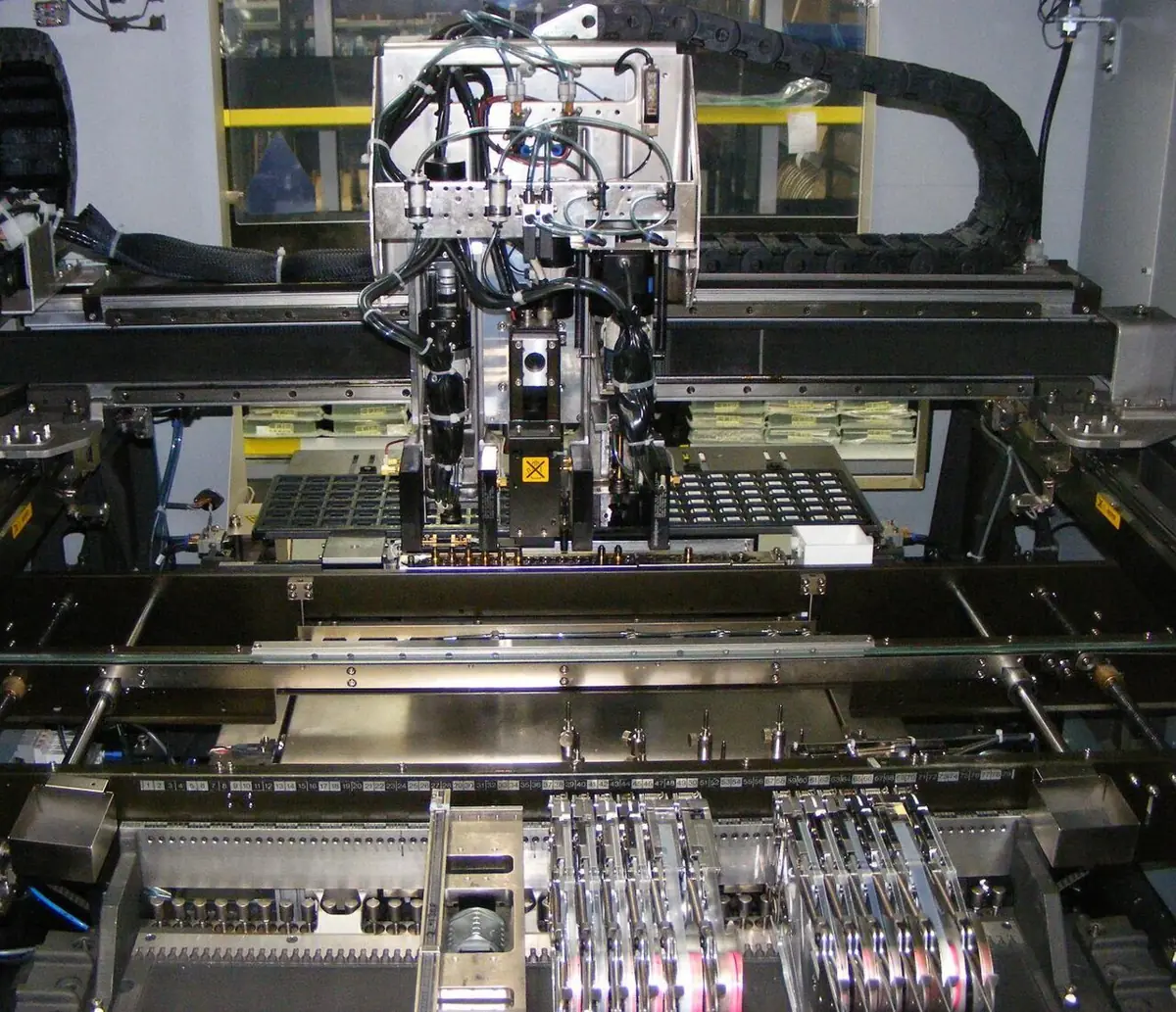
- Electronics factories: surface-mount pick-and-place machines pick components from reels and place them on circuit boards.
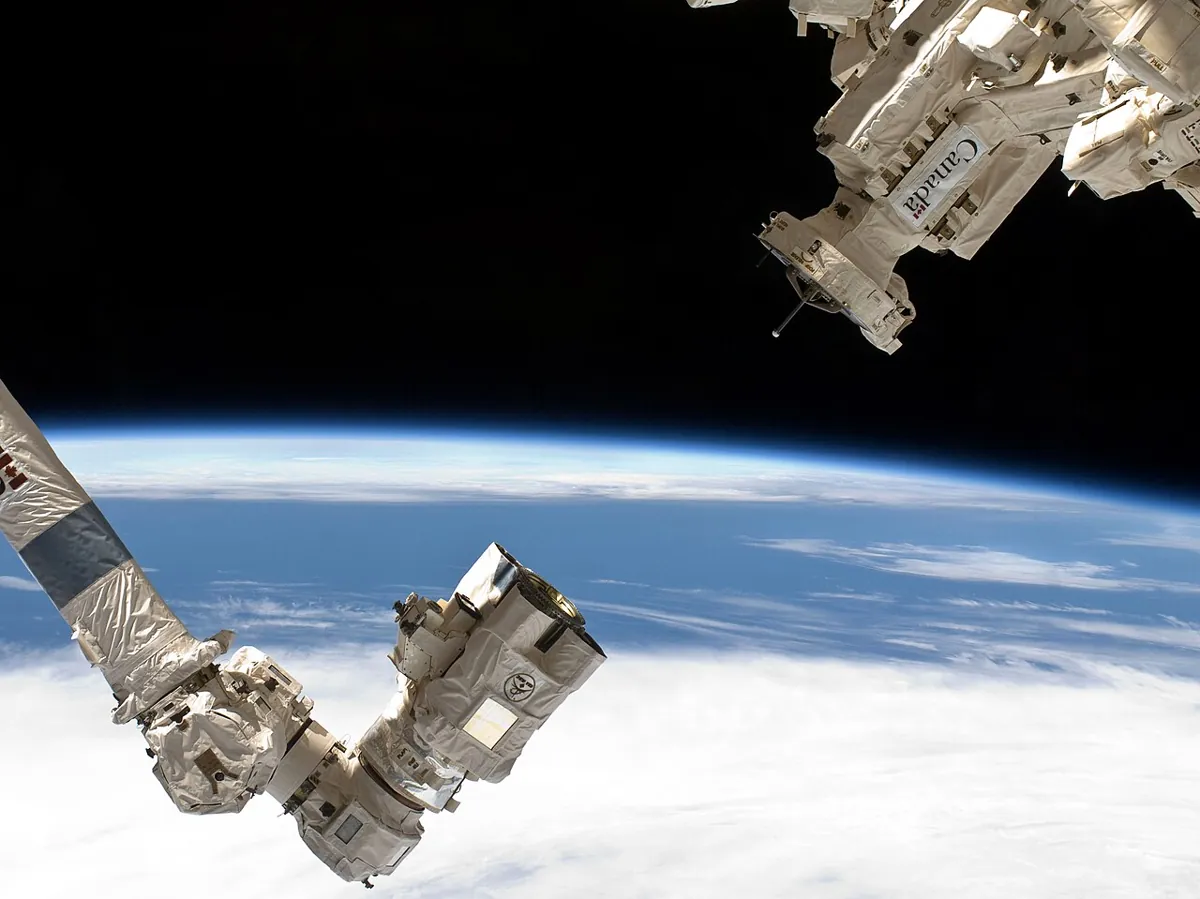
- Space: Canadarm2 and Dextre, parts of the station’s Mobile Servicing System, handle hardware outside the International Space Station.
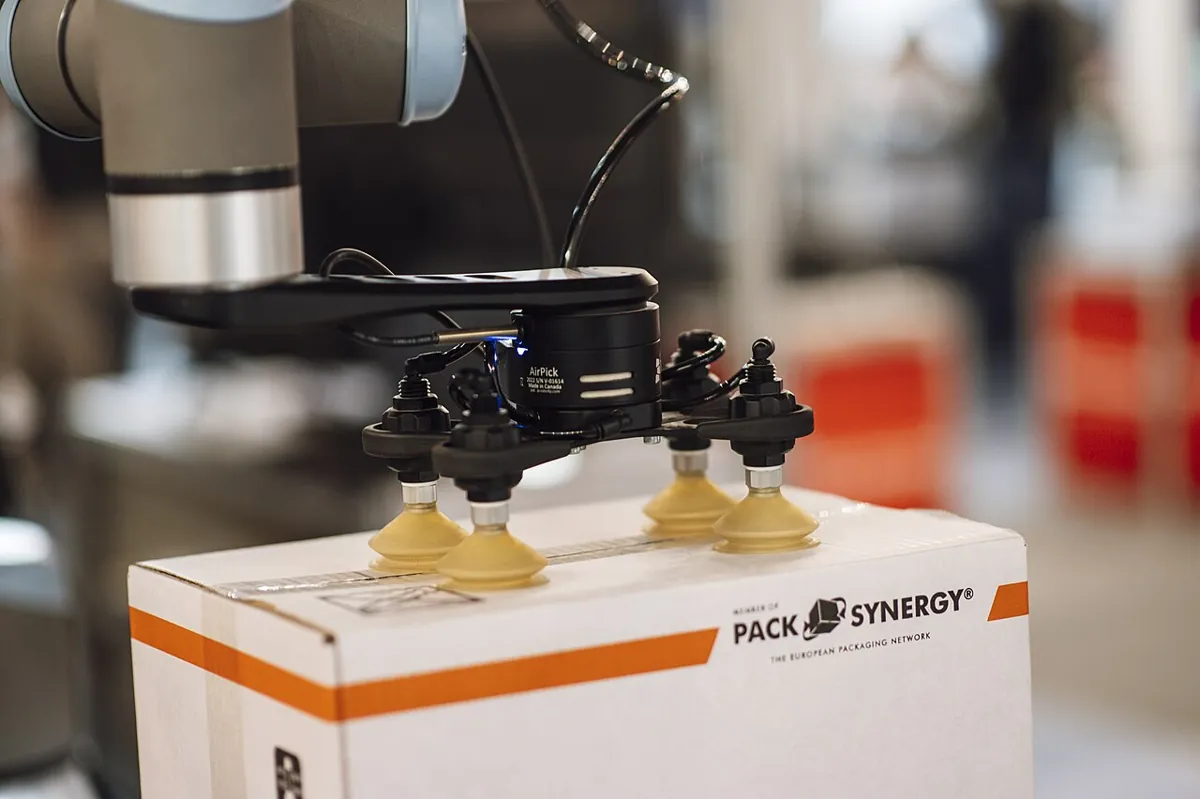
- Packaging: suction-cup grippers approach boxes from the top and lift them straight up.
- MoveIt: approach (straight line), allow hand–object collision, close, attach, lift (straight up) — the same phases as our sketch, with a full 3D world model.
- Your lab: pre-grasp high, approach slow, close on force, test lift, lift before travelling.
Think
Think about it
Think
Your pick works 9 times out of 10. On the tenth, the gripper closes on air because a classmate nudged the block after the camera looked. Which phase would you change, and how?
Experiment
Try it in the lab
About 60 minutes. Python 3 for the plan checker; an Arduino UNO with a lift servo and a gripper servo on their own supply, an HC-SR04, an FSR with a 10 kΩ resistor, a push button, a small block and a tall bottle.
Experiment
A guarded pick, step by step
You will need
- `approach_lift_lab.py` (Python 3, no libraries)
- Pick-and-place planner interactive (in your browser)
- Arduino UNO, two SG90/MG90-class servos, separate 5–6 V supply, HC-SR04, FSR, 10 kΩ resistor, push button, jumper wires
- Ruler, small block, tall bottle, rubber bands
Steps
- Measure your desk scene (block, neighbour, any wall or tray edge) and put the numbers in the script. Find the lowest pre-grasp height and lift height that pass.
- On the bench: set LIFT_UP, LIFT_LOWEST, JAW_OPEN and JAW_CLOSED with nothing in the gripper.
- Calibrate CONTACT and HOLD as in Lesson 11.
- Run 10 picks of the block. Log: approach stop angle, FSR before/after the test lift, success or abort reason.
- Run 3 picks with the block removed and 3 with the pads wiped smooth. Do the aborts happen for the right reason?
- Time a full pick with the slow zone at 6 cm and at 2 cm. Which would you choose, and why?
Interactive · Pick-and-place planner · Educational
Ready — step through Approach → Retreat.
Educational pick/place — not MoveIt task constructor / not industrial cell planner.
A reliable pick is not one clever move. It is a chain of simple phases, each with a check and a safe way out.
Knowledge check
Check your understanding
Knowledge check
1. A pre-grasp pose is…
2. Why approach in a straight line from the pre-grasp?
3. In the code lab, why did the 8 cm pre-grasp fail?
4. Why must a planner allow hand–object collision during the close?
5. After the close, the object is “attached”. This means…
6. During the test lift, the FSR reading falls from 380 to 120. The robot should…
7. Why lift before moving sideways?
8. The HC-SR04 minimum range is about…
Mini assignment
Hands-on assignment
Mini assignment
Make your pick reliable
Turn a single grasp into a guarded pick and measure how reliable it is.
Deliverables
- Your measured scene and the pre-grasp/lift heights your version of the script accepts.
- A 10-pick log: approach stop angle, FSR before/after test lift, result.
- Three deliberate failures (object removed, slippery pads, object nudged) and how your sketch reacted.
- A phase table for your own robot like the one in this lesson, with speeds and checks filled in.
Do this, step by step
- Run
approach_lift_lab.pyand read which plan hits theBOTTLEand which is safe. - Put your measured scene into
BLOCK,BOTTLEandWALL, and find the pre-grasp and lift heights that pass. - Bench: servos on their own supply, grounds joined; upload
approach_grasp_lift.inoand calibrateCONTACTandHOLD. - Log 10 picks: approach stop distance, FSR before/after the test lift, result.
- Try three failures (object removed, slippery pads, object nudged) and note how the sketch reacts.
Stuck? Hints, one at a time
- Go to pre-grasp above the object first, then approach straight down. Going straight from home is what knocked the bottle over.
- The HC-SR04 cannot measure below about 2 cm, so the approach stops at
GRASP_GAP_CM= 3 cm. - If the FSR reading drops during the test lift, the object is slipping. Lower, open and re-grasp.
Challenges (pick by level)
- 🟢 Beginner: Play a claw-machine game (or watch a video) and write down its phases. Which of our checks does it skip?
- 🟡 Intermediate: Add a RETREAT phase to the sketch: after DONE, wait for the button, lower to the same angle, open, and go back up.
- 🟠 Advanced: Add one automatic retry: on “slip”, lower, open, close again with HOLD + 50, and test again before giving up.
- 🔴 Expert: Extend the Python checker to a 2-link arm with inverse kinematics (Kinematics & IK stage) so the approach is a straight line of the fingertips while the joints move.
- ⚫ Research: Read the approach, close-hand, attach and lift stages in the MoveIt Task Constructor tutorial. Why does the approach use a Cartesian path planner but the move to the pick use a sampling planner?
Next step
You can now pick an object reliably. But a pick is only half the job. In Lesson 14 — Pick-and-Place Planning you will plan the whole trip: pick, carry with the attached object, and place it down gently at the right spot.
Look back: Lesson 12: Grasp Planning. Next: Lesson 14: Pick-and-Place Planning. Related: Stage 7 — Control Systems & PID.
Sources
- MoveIt — Pick and Place with MoveIt Task Constructor — approach object (straight Cartesian move 0.1–0.15 m along the hand direction), allow collision (hand, object), close hand, attach object, lift 0.1–0.3 m in world z; Cartesian vs sampling planners.
- HC-SR04 datasheet (SparkFun-hosted PDF) — range 2–400 cm, 10 µs trigger, echo µs / 58 = cm.
- Arduino Servo library (GitHub) — controlling RC hobby servos.
- Photos: Wikimedia Commons (credits under each image).
Self-attested for now — keep artifacts in your lab notebook.
Complete
Today's goal
0 of 1 done today
Mark this lesson complete when you have worked the experiment, knowledge check, and assignment (even roughly).