
ROS 2 & Robot Software Architecture (Fundamentals) · Lesson 02
ROS 2 Architecture Overview
Est. 45–60 min
Why
Why this lesson matters
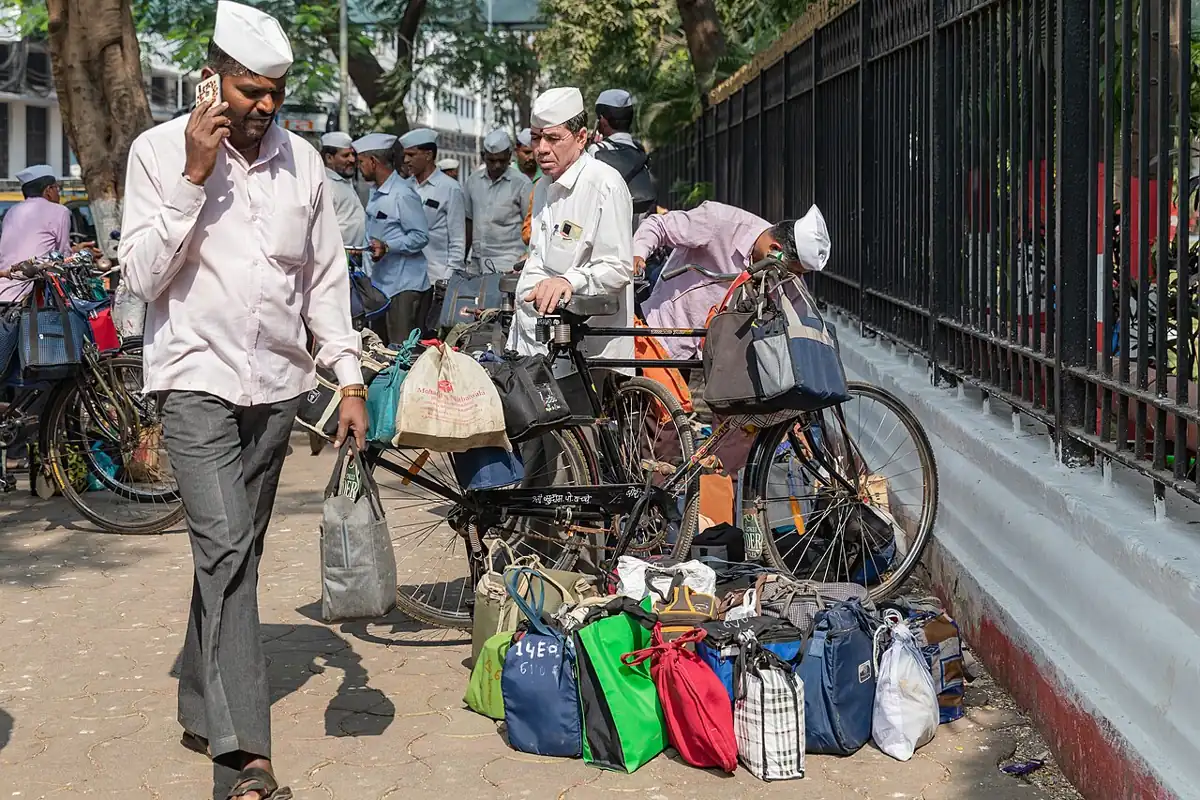
Think of the famous Mumbai dabbawalas. A mother packs lunch at home (your code). A local dabbawala collects it and paints a code on the lid (serialisation and addressing). The tiffin travels by local train with thousands of others (the network). At the destination station another dabbawala reads the code and delivers it to the right office desk (deserialisation and delivery). The mother does not need to know the train timetable, and the office worker does not need to know the house. Each layer does its own job and trusts the next one. ROS 2 is built the same way.
By the end of this lesson you will be able to: draw the ROS 2 stack — your node, client library (rclpy / rclcpp), rcl, rmw, DDS — and say what each layer does; explain why Python and C++ nodes can talk to each other; explain how nodes find each other without a central master (discovery and ROS_DOMAIN_ID); switch the middleware vendor with one environment variable; and run a toy Python simulation that sends a message down and up a model of the stack.
Concept
The ROS 2 layer cake
Five layers, from your code down to the wire
| Layer | What it is | What it does for you | Do you touch it? |
|---|---|---|---|
| Your node code | Your .py or .cpp file | The robot logic: read sensor, solve IK, send command | Every day |
Client library — rclpy (Python), rclcpp (C++) | The ROS 2 API in your language | Create nodes, publishers, subscriptions, timers, parameters, logging | Every day |
rcl — ROS client library core (C) | Shared code under every client library | Names and namespaces, the ROS graph, common behaviour so Python and C++ act the same | Rarely |
rmw — ROS middleware interface | A thin, vendor-neutral C API | Hides which middleware is used; one package per vendor, e.g. rmw_fastrtps_cpp | Only to choose a vendor |
| DDS / RTPS implementation | e.g. eProsima Fast DDS (default), Eclipse Cyclone DDS | Discovery, publish/subscribe, request/reply for services, serialisation, network transport | Almost never |
Laptop A (Python)                         Laptop B (C++)
─────────────────                         ──────────────
shoulder_angle_node.py                    shoulder_monitor.cpp
   publisher.publish(msg)                    callback(msg)  ▲
        │ rclpy                                       rclcpp │
        ▼ rcl                                            rcl │
        ▼ rmw (rmw_fastrtps_cpp)          rmw (rmw_fastrtps_cpp)
        ▼ Fast DDS: serialise → bytes      bytes → deserialise ▲
        └──────────── UDP over Wi-Fi / Ethernet ──────────────┘
Why Python and C++ can talk
The official docs explain two reasons. First, both rclpy and rclcpp are built on the same rcl C library, so they behave the same way. Second, every message type is described once in an interface file (like Float64.msg), and code generators produce a matching Python class and C++ struct from it. That is why from std_msgs.msg import Float64 in Python and #include "std_msgs/msg/float64.hpp" in C++ describe exactly the same data. A good pattern used in many labs: write quick tools and UIs in Python, write fast control loops in C++.
The rmw layer: swap the engine, keep the car
DDS is an industry standard with several vendors. ROS 2 does not tie you to one. The rmw layer is the plug point: your code calls rcl, rcl calls rmw, and the rmw package for your chosen vendor talks to that vendor’s DDS. The docs state the goal clearly — insulate your code from the middleware so changing vendors has minimal impact on it. You choose at run time with an environment variable:
# default (Fast DDS) — nothing to set
ros2 run demo_nodes_cpp talker

# same program on Cyclone DDS (install ros-jazzy-rmw-cyclonedds-cpp first)
RMW_IMPLEMENTATION=rmw_cyclonedds_cpp ros2 run demo_nodes_cpp talker

# check what your system is using and whether anything looks wrong
ros2 doctor --reportDiscovery: no master, no IP addresses
ROS 1 needed a central roscore master — if it died, new connections could not be made. In ROS 2, discovery is distributed and done by the middleware. From the docs: when a node starts it advertises itself to other nodes in the same ROS domain; they reply with their own information so matching publishers and subscribers can connect; nodes keep advertising periodically, and announce when they go offline. Nodes connect only if their Quality of Service settings are compatible (Lesson 14).
- `ROS_DOMAIN_ID` separates groups on the same network. Default is 0. Nodes on domain 5 never see nodes on domain 7.
- In a college lab with ten teams on one Wi-Fi, give each team its own domain ID, or Team 3’s arm may obey Team 8’s commands.
- Same process, different process or different machine — your node code is identical. Only where you start it changes.
Visual
Visualise it: label the layers
Label the layers of the ROS 2 stack and trace a message from a Python publisher, through rcl, rmw and DDS, to a C++ subscriber.
Interactive · ROS 2 architecture explorer
ROS 2 communication simulator — educational only (not a live ROS 2 runtime)

Code lab
Code lab: send one message through a model of the stack
ros2_layers_sim.py is a toy simulation (plain Python, no ROS needed) with one small class per layer: Node (like rclpy), Rcl (names and the graph), Rmw (the only layer that talks to the vendor) and two interchangeable vendors. A sensor node publishes three shoulder angles; a monitor node receives them. Then the program swaps the vendor and tries to publish the wrong message type. Run it with python3 ros2_layers_sim.py.
"""
ros2_layers_sim.py — Stage 10 · L02 (plain Python 3, no ROS needed)

A toy model of the ROS 2 layer cake, so you can *see* one message travel
down and up the stack. It is a simulation, not real ROS 2:

    your node code      (like rclpy / rclcpp)
    client library core (like rcl)    -- names, graph, same for every language
    middleware adapter  (like rmw)    -- the only layer that knows the vendor
    "DDS vendor"        (like Fast DDS / Cyclone DDS) -- discovery + bytes on the wire
"""
import struct


# ---------- bottom: two interchangeable "vendors" ----------
class VendorA:
    name = "fastdds-like"

    def __init__(self):
        self.wire = []                       # what would go on the network

    def send(self, topic, payload):
        self.wire.append((topic, payload))

    def take(self, topic):
        out = [p for t, p in self.wire if t == topic]
        self.wire = [(t, p) for t, p in self.wire if t != topic]
        return out


class VendorB(VendorA):
    name = "cyclonedds-like"                 # different internals, same duties


# ---------- rmw-like: the only layer that touches the vendor ----------
class Rmw:
    def __init__(self, vendor):
        self.vendor = vendor

    def publish(self, topic, type_name, fields):
        if type_name != "std_msgs/msg/Float64":
            raise TypeError("toy serializer only knows Float64")
        payload = struct.pack("<d", fields["data"])      # 8 bytes, little-endian double
        print(f"    rmw[{self.vendor.name}]: serialised {fields} -> {payload.hex(' ')}")
        self.vendor.send(topic, payload)

    def take(self, topic):
        return [{"data": struct.unpack("<d", p)[0]} for p in self.vendor.take(topic)]


# ---------- rcl-like: names and the graph, no vendor knowledge ----------
class Rcl:
    def __init__(self, rmw):
        self.rmw = rmw
        self.graph = {}                      # topic -> {"type":..., "pubs":set, "subs":set}

    def resolve(self, node, name):
        return name if name.startswith("/") else "/" + name   # relative -> absolute

    def add(self, kind, node, name, type_name):
        topic = self.resolve(node, name)
        entry = self.graph.setdefault(topic, {"type": type_name, "pubs": set(), "subs": set()})
        if entry["type"] != type_name:
            raise TypeError(f"{topic} already carries {entry['type']}, not {type_name}")
        entry[kind].add(node)
        return topic


# ---------- rclpy-like: what you actually write ----------
class Node:
    def __init__(self, name, rcl):
        self.name, self.rcl = name, rcl

    def create_publisher(self, type_name, topic):
        t = self.rcl.add("pubs", self.name, topic, type_name)
        return lambda value: self.rcl.rmw.publish(t, type_name, {"data": value})

    def create_subscription(self, type_name, topic, callback):
        t = self.rcl.add("subs", self.name, topic, type_name)
        return t, callback


def run(vendor):
    print(f"--- run with vendor {vendor.name} ---")
    rcl = Rcl(Rmw(vendor))
    sensor = Node("shoulder_angle_node", rcl)
    monitor = Node("shoulder_monitor", rcl)
    publish = sensor.create_publisher("std_msgs/msg/Float64", "shoulder_angle_deg")
    topic, cb = monitor.create_subscription("std_msgs/msg/Float64", "shoulder_angle_deg",
                                            lambda m: print(f"    monitor got {m['data']:.1f} deg"))
    for angle in (30.0, 75.5, 121.25):
        print(f"  node: publish({angle})")
        publish(angle)
        for msg in rcl.rmw.take(topic):
            cb(msg)
    print("  graph:", {t: {k: sorted(v) if isinstance(v, set) else v for k, v in e.items()} for t, e in rcl.graph.items()})
    return rcl


rcl = run(VendorA())
print()
run(VendorB())
print()
print("--- type safety check ---")
try:
    Node("bad_node", rcl).create_publisher("std_msgs/msg/String", "/shoulder_angle_deg")
except TypeError as e:
    print("  refused:", e)
print()
print("SUMMARY")
print("  node code identical for both vendors: True")
print("  only the rmw layer called the vendor; rcl kept names + graph")
print("  a wrong message type on an existing topic was refused")
Output (run with python3 ros2_layers_sim.py)
--- run with vendor fastdds-like ---
  node: publish(30.0)
    rmw[fastdds-like]: serialised {'data': 30.0} -> 00 00 00 00 00 00 3e 40
    monitor got 30.0 deg
  node: publish(75.5)
    rmw[fastdds-like]: serialised {'data': 75.5} -> 00 00 00 00 00 e0 52 40
    monitor got 75.5 deg
  node: publish(121.25)
    rmw[fastdds-like]: serialised {'data': 121.25} -> 00 00 00 00 00 50 5e 40
    monitor got 121.2 deg
  graph: {'/shoulder_angle_deg': {'type': 'std_msgs/msg/Float64', 'pubs': ['shoulder_angle_node'], 'subs': ['shoulder_monitor']}}

--- run with vendor cyclonedds-like ---
  node: publish(30.0)
    rmw[cyclonedds-like]: serialised {'data': 30.0} -> 00 00 00 00 00 00 3e 40
    monitor got 30.0 deg
  node: publish(75.5)
    rmw[cyclonedds-like]: serialised {'data': 75.5} -> 00 00 00 00 00 e0 52 40
    monitor got 75.5 deg
  node: publish(121.25)
    rmw[cyclonedds-like]: serialised {'data': 121.25} -> 00 00 00 00 00 50 5e 40
    monitor got 121.2 deg
  graph: {'/shoulder_angle_deg': {'type': 'std_msgs/msg/Float64', 'pubs': ['shoulder_angle_node'], 'subs': ['shoulder_monitor']}}

--- type safety check ---
  refused: /shoulder_angle_deg already carries std_msgs/msg/Float64, not std_msgs/msg/String

SUMMARY
  node code identical for both vendors: True
  only the rmw layer called the vendor; rcl kept names + graph
a wrong message type on an existing topic was refusedTry it: label each layer of the stack, then follow one message from the publisher down to the network and up to the subscriber.
Interactive · ROS 2 architecture explorer
ROS 2 communication simulator — educational only (not a live ROS 2 runtime)
Real code: a C++ node that listens to your Python node
shoulder_monitor.cpp is a real rclcpp node, written with the same calls as the official Jazzy C++ subscriber tutorial. It subscribes to /shoulder_angle_deg from Lesson 1’s Python node and warns when the angle leaves a safe window set by two parameters. You will learn to build C++ packages in Lesson 8; for now, read it side by side with the Python node and notice how the same ideas — node name, topic name, message type, queue depth 10, callback, spin — appear in both languages.
// shoulder_monitor.cpp — Stage 10 · L02 — a C++ (rclcpp) node that listens to the Python node
//
// Subscribes to /shoulder_angle_deg (std_msgs/msg/Float64), published by
// shoulder_angle_node.py from Lesson 1, and warns when the angle leaves a safe window.
// Python publisher + C++ subscriber = the same topic, the same message type: that is
// what the shared rcl / rmw layers buy you. Written against the ROS 2 Jazzy rclcpp API
// (same calls as the official "Writing a simple publisher and subscriber (C++)" tutorial).
// Build it inside an ament_cmake package (Lesson 8 shows how), then:
//   ros2 run <your_package> shoulder_monitor

#include <memory>

#include "rclcpp/rclcpp.hpp"
#include "std_msgs/msg/float64.hpp"

class ShoulderMonitor : public rclcpp::Node
{
public:
  ShoulderMonitor()
  : Node("shoulder_monitor")
  {
    min_deg_ = this->declare_parameter("min_deg", 20.0);
    max_deg_ = this->declare_parameter("max_deg", 160.0);
    auto topic_callback =
      [this](std_msgs::msg::Float64::UniquePtr msg) -> void {
        if (msg->data < min_deg_ || msg->data > max_deg_) {
          RCLCPP_WARN(this->get_logger(), "Shoulder at %.1f deg is OUTSIDE the safe window", msg->data);
        } else {
          RCLCPP_INFO(this->get_logger(), "Shoulder at %.1f deg", msg->data);
        }
      };
    subscription_ =
      this->create_subscription<std_msgs::msg::Float64>("shoulder_angle_deg", 10, topic_callback);
    RCLCPP_INFO(this->get_logger(), "Watching shoulder, safe window %.0f-%.0f deg", min_deg_, max_deg_);
  }

private:
  rclcpp::Subscription<std_msgs::msg::Float64>::SharedPtr subscription_;
  double min_deg_;
  double max_deg_;
};

int main(int argc, char * argv[])
{
  rclcpp::init(argc, argv);
  rclcpp::spin(std::make_shared<ShoulderMonitor>());
  rclcpp::shutdown();
  return 0;
}| Idea | rclpy (Python) | rclcpp (C++) |
|---|---|---|
| Start ROS | rclpy.init() | rclcpp::init(argc, argv) |
| A node | class X(Node) + super().__init__('name') | class X : public rclcpp::Node + Node("name") |
| Publisher | self.create_publisher(Float64, 'topic', 10) | create_publisher<std_msgs::msg::Float64>("topic", 10) |
| Subscription | self.create_subscription(Float64, 'topic', cb, 10) | create_subscription<std_msgs::msg::Float64>("topic", 10, cb) |
| Run callbacks | rclpy.spin(node) | rclcpp::spin(node) |
| Log | self.get_logger().info(...) | RCLCPP_INFO(get_logger(), ...) |
Real world
The architecture in real robots
- Mobile robots in warehouses: a typical design runs motor and lidar drivers on the robot’s computer, navigation on the same machine, and a fleet dashboard elsewhere — all as nodes in one or more domains.
- Robot arms in research labs: hardware interface and controllers run in C++ for speed; planning tools and experiment scripts are written in Python; RViz runs on a desktop. One graph, three languages of use.
- Multi-robot teams: distributed discovery means no single master to crash — one of the main reasons the “Why ROS 2?” article gives for the redesign.
- Choosing a vendor: teams that need small memory footprint, a particular licence or safety-certified middleware can choose a different DDS through
rmwwithout rewriting their nodes.
Bench build
Bench build: one robot graph across two computers
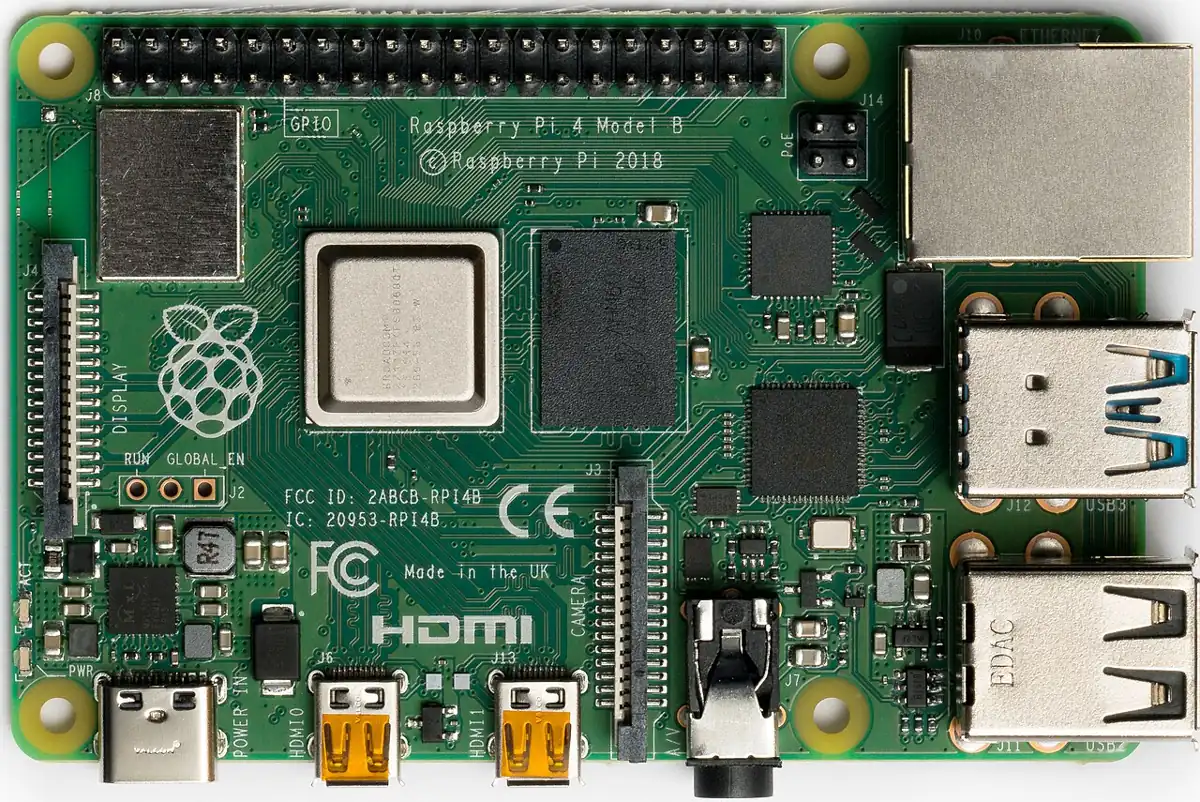
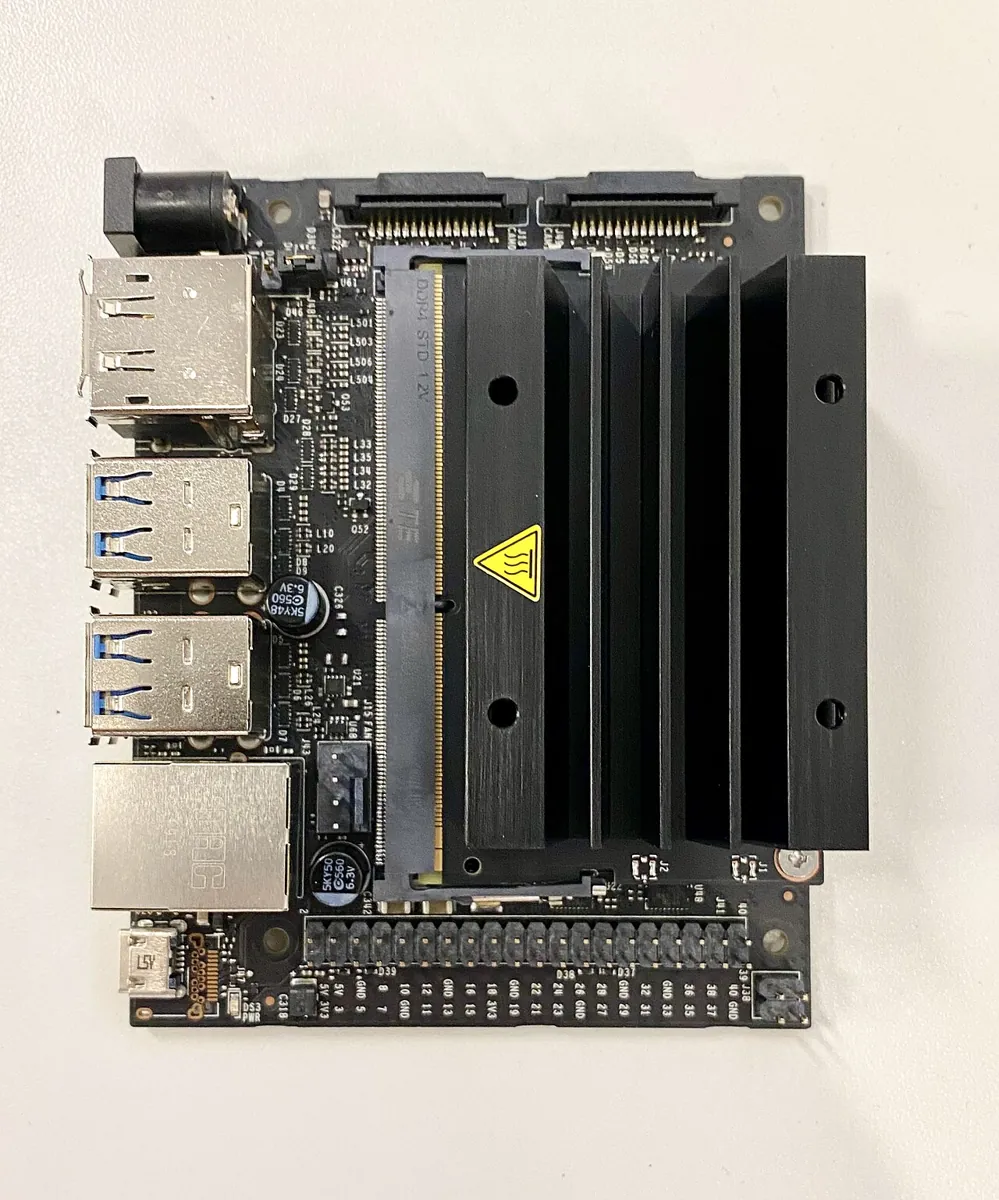
Real robots often split work between an on-board computer (Raspberry Pi or NVIDIA Jetson on the robot, talking to the hardware) and a laptop (planning, RViz, your UI). In this build the Pi runs Lesson 1’s shoulder_angle_node.py with the Arduino potentiometer, and the laptop runs ros2 topic echo or shoulder_monitor. No code changes — only discovery.
Same ROS 2 release on both
For example Jazzy on Ubuntu 24.04 on the laptop and on the Pi. The Jazzy release page lists Ubuntu 24.04 on both
amd64(most laptops) andarm64(Raspberry Pi 4/5, Jetson-class boards) as supported.Same network
Put both on the same Wi-Fi or Ethernet switch. Some college and office Wi-Fi networks block multicast, which discovery uses — a cheap travel router or a phone hotspot is a common fix.
Same domain on both
Pick a team number, e.g.
export ROS_DOMAIN_ID=23, in every terminal on both machines (or in~/.bashrc).Start the sensor on the Pi
python3 shoulder_angle_node.py --ros-args -p port:=/dev/ttyACM0(Arduino from Lesson 1 plugged into the Pi’s USB).Look from the laptop
ros2 node listshould show/shoulder_angle_node; thenros2 topic echo /shoulder_angle_deg. Turn the knob on the robot side and watch the laptop.Break it on purpose
Change the laptop to
ROS_DOMAIN_ID=24. The topic disappears. Change it back — it returns within seconds, with no restart of the Pi.
Debugging
Debugging the stack
| Symptom | Likely layer | Fix |
|---|---|---|
| Works on one laptop, nothing seen from the second | Discovery / network | Same ROS_DOMAIN_ID, same network, multicast allowed; check firewall (ufw) |
Both machines see the node in ros2 node list but topic echo stays silent | Type or QoS mismatch | ros2 topic info -v /topic — compare message types and QoS of both sides |
| Everything slow or flaky on Wi-Fi with camera images | Network / QoS | Send images compressed or at lower rate; keep high-rate control on one machine |
RMW_IMPLEMENTATION set but program errors on start | rmw package missing | Install it, e.g. sudo apt install ros-jazzy-rmw-cyclonedds-cpp |
| Two machines with different ROS 2 releases misbehave | Version mismatch | Use the same release (e.g. Jazzy) on every machine of one robot |
| Not sure what is wrong at all | Any | Run ros2 doctor --report on both machines and compare |
Think
Think about it
Think
Priya says, “If rmw already hides the vendor, why not put every node of our arm on a different laptop? More computers, more speed!” What would you tell her about the 500 Hz joint control loop?
Experiment
Try it in the lab
About 30–40 minutes with Python and the explorer; the two-computer bench needs ROS 2 on two machines.
Experiment
Trace a message through the layers
You will need
- `ros2_layers_sim.py` and Python 3
- ROS 2 architecture explorer (in your browser)
- Notebook and pencil
- Optional: two computers with ROS 2 Jazzy, the Lesson 1 Arduino potentiometer, a Wi-Fi router or hotspot
Steps
- Run `ros2_layers_sim.py`. For one message, write down every layer it passed through, in order, on the way down and on the way up.
- Change the second vendor class to print a different message inside `send()`. Confirm nothing above `Rmw` had to change.
- Add a `namespace` argument to `Node` and make `Rcl.resolve()` turn `shoulder_angle_deg` into `/arm1/shoulder_angle_deg`. Why would two identical arms in one lab need this?
- In the explorer, label all five layers without help, then check yourself against the concept table.
- Optional (real ROS 2): run `ros2 run demo_nodes_cpp talker` with the default middleware and `ros2 run demo_nodes_py listener` in a second terminal. Then try the Cyclone DDS line from the concept section if it is installed.
- Optional (two computers): do the bench build, then change one machine’s `ROS_DOMAIN_ID` and time how long the topic takes to reappear after you change it back.
Interactive · ROS 2 architecture explorer
ROS 2 communication simulator — educational only (not a live ROS 2 runtime)
Your code only ever talks to the client library. Everything below — names, graph, middleware, bytes, network — is handled by layers you can inspect but rarely need to change. Discovery, not hard-coded addresses, joins machines together, and the domain ID decides who can see whom.
Knowledge check
Check your understanding
Knowledge check
1. Which layer do you write against in everyday Python ROS 2 code?
2. rclpy and rclcpp behave the same way mainly because…
3. What is the job of the rmw layer?
4. How do you run a node on Cyclone DDS instead of the default?
5. Two teams share a lab Wi-Fi. How do they stop seeing each other’s topics?
6. Compared with ROS 1, how do ROS 2 nodes find each other?
7. A publisher sends std_msgs/msg/String on /shoulder_angle_deg and a subscriber expects Float64 on the same name. What happens in real ROS 2?
8. Where should a 500 Hz joint control loop run?
Mini assignment
Hands-on assignment
Mini assignment
Architecture sheet for your 6DOF arm
Design how your arm’s software will be split across layers and computers, and prove one cross-language link works.
Deliverables
- A neat drawing of the five-layer stack with one real example at each layer from your project (e.g. “my IK node”, “rclpy”, “rcl”, “rmw_fastrtps_cpp”, “Fast DDS”).
- A table of your arm’s nodes with: language (Python/C++), computer (Pi/Jetson/laptop), rate (Hz) and a one-line reason for each choice.
- Your team’s chosen `ROS_DOMAIN_ID` and `RMW_IMPLEMENTATION`, and where you set them.
- Output of `ros2_layers_sim.py` after adding the namespace change from the experiment.
- Optional: a screenshot showing a Python publisher on one machine and a C++ (or `ros2 topic echo`) subscriber on another, with `ros2 node list` from both.
Do this, step by step
- Run
python3 ros2_layers_sim.pyand write the layers one message passes through, down and up. - Draw the five-layer stack and put one real name from your project at each layer (e.g. your IK node, rclpy, rcl, rmw_fastrtps_cpp, Fast DDS).
- Fill a table of your arm’s nodes: language, computer, rate (Hz) and one reason.
- Add the namespace change from the experiment so
shoulder_angle_degresolves to/arm1/shoulder_angle_deg, and save the output. - Pick a team
ROS_DOMAIN_ID(0–101 is the safe range on Linux) and write where you set it (e.g.~/.bashrc).
Stuck? Hints, one at a time
- The order going down is your code → client library (rclpy/rclcpp) → rcl → RMW → DDS; going up is the reverse.
- Only the vendor class should change when you swap middleware — if you edited anything above
Rmw, undo it. - For the namespace, join
/+ namespace +/+ the relative name; absolute names (starting with/) stay as they are.
Challenges (pick by level)
- 🟢 Easy: Explain the five layers using the dabbawala story — which person or step matches rclpy, rcl, rmw and DDS?
- 🟢 Easy: Run
ros2 doctor --reportand find which middleware and ROS distribution your machine reports. - 🟡 Medium: In the toy, add a third vendor that stores bytes in a different order (big-endian) on the wire but still decodes correctly. Which single class did you change?
- 🟠 Hard-ish: Make the toy
Rclkeep a graph of both types when they differ (instead of refusing), and print a warning likeros2 topic infowould. Why is the real behaviour harder to debug? - 🔴 Hard: Run
demo_nodes_cpp talkerwith Fast DDS anddemo_nodes_py listenerwith Cyclone DDS on the same machine. Record what happens and research why one vendor per system is recommended. - ⚫ Research: Read the docs page “Internal ROS 2 interfaces” and explain static versus dynamic type support in your own words, with one sentence on where
.msgfiles enter the picture.
Next step
You have seen the whole stack. Now zoom in on its building block. In Lesson 3 — Nodes: The Building Blocks you will design good nodes — one job each, clear names and namespaces — and build a small node graph for your arm.
Look back: Lesson 1: Why Robots Need ROS 2. Next: Lesson 3: Nodes — The Building Blocks. Related: Stage 3 — Linux & Dev Environment.
Sources
- ROS 2 Jazzy docs — Client libraries — rclcpp and rclpy both use rcl; code generators let nodes in different languages share messages; community libraries such as rclc for micro-ROS.
- ROS 2 Jazzy docs — Internal ROS 2 interfaces — the rcl and rmw APIs, rmw_fastrtps_cpp, goal of insulating user code from the middleware, type support.
- ROS 2 Jazzy docs — Different ROS 2 middleware vendors — DDS/RTPS, Fast DDS default, Cyclone DDS, Connext, GurumDDS.
- ROS 2 Jazzy docs — Working with multiple RMW implementations — choosing the middleware with
RMW_IMPLEMENTATION. - ROS 2 Jazzy docs — Discovery — nodes advertise to the same ROS domain, periodic advertising, QoS compatibility.
- ROS 2 Jazzy docs — The ROS_DOMAIN_ID — domain separation; default 0.
- ROS 2 Jazzy docs — Writing a simple publisher and subscriber (C++) —
create_subscription,UniquePtrcallback,rclcpp::spinused inshoulder_monitor.cpp. - ROS 2 Jazzy docs — Getting started with ros2doctor —
ros2 doctorand--report. - ROS 2 design — “Why ROS 2?” — move to DDS; multi-robot and non-ideal network use cases.
- ROS 2 Jazzy docs — Jazzy Jalisco release page — supported platforms: Ubuntu 24.04 (Noble) amd64 and arm64.
- Raspberry Pi — 15W USB-C Power Supply and Raspberry Pi 4 datasheet — 5.1 V / 3 A recommended supply; GPIO bank tied to the 3.3 V rail.
- Docs text read from the official docs source ros2/ros2_documentation (jazzy branch).
- Photos: Wikimedia Commons (credits under each image).
Self-attested for now — keep artifacts in your lab notebook.
Complete
Today's goal
0 of 1 done today
Mark this lesson complete when you have worked the experiment, knowledge check, and assignment (even roughly).