
Robot Perception, Planning & Manipulation · Lesson 14
Pick-and-Place Planning
Est. 60–75 min
Why
Why this lesson matters
A full pick-and-place task is a chain: pick (Lesson 13), carry the object to the place area, choose a place pose for the object, work out the matching gripper pose, lower, release, and retreat. Every link uses the same world model, and the held object is part of the robot while it is carried. If any link fails — the place pose is out of reach, the wrist cannot turn that far, a finger would hit a neighbour — the planner must try another candidate, just as the grasp planner did in Lesson 12.
In the code lab you will convert “where the object should be” into “where the gripper must go”, test place candidates on a shelf with a cup on it, pick the one that needs the least wrist turning, and see why release height and retreat direction matter. On the bench, your UNO will run a guarded place: turn the wrist, lower fast then slow, open the jaw just above the shelf, and retreat straight up.
Concept
Pick, carry, place, release, retreat
1. The task as a chain of stages
| Stage | What happens | Planner / check |
|---|---|---|
| Pick (Lesson 13) | pre-grasp, approach, close, attach, lift | grasp candidates, straight-line moves |
| Move to place | carry the object to above the place area | free-space planner, held object checked for collisions |
| Generate place pose | candidate poses for the OBJECT on the target surface | reach, wrist limits, support, room for fingers |
| Lower / release | come down to the surface, open the hand | slow near contact; then hand–object contact no longer allowed |
| Detach | the object belongs to the world again | world model updated |
| Retreat | move the hand away from the placed object | straight-line move, away first |
2. Object pose → gripper pose
You usually know where the object should end up (“on the shelf mark, square to the edge”). The robot, however, moves the gripper. The link between them is the grasp offset: where the gripper holds the object, measured in the object’s own frame. If the grasp was 1 cm from the box centre, then gripper pose = object pose × grasp offset. Forget the offset and the box lands exactly 1 cm away from the mark — Riya’s first mistake. MoveIt solves this by remembering how the object was attached during the pick and computing inverse kinematics for the place pose with that attachment.
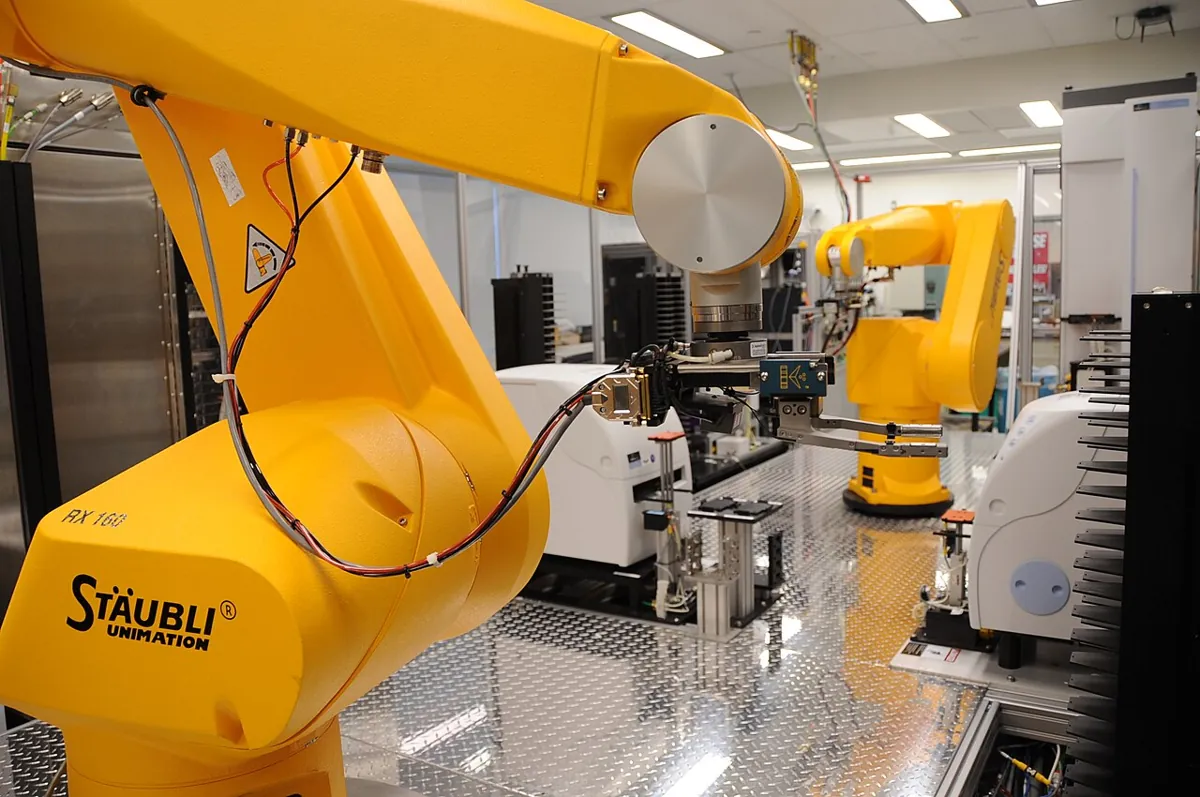
3. Place candidates and checks
Like grasps, places are generated, filtered and ranked. Generate: a few spots on the target surface, each with a few object yaws. Filter: can the arm reach the gripper pose? Can the wrist turn that far? Is the whole object footprint on the support (not hanging over the edge)? Is there room for the open fingers beside neighbours? Rank: least wrist turning, shortest carry, farthest from neighbours — whatever matters for your cell.
4. Release gently, retreat away first
If the jaw opens while the object is still above the surface, it falls. Neglecting air resistance, an object dropped from height d lands at v = √(2·g·d): from 2 cm that is already about 0.63 m/s — enough to bounce or tip a light box. So lower until the object is (almost) touching, then open. After opening, the fingers are only a few millimetres from the object, so the first move must be away (straight up for a top-down place); only then move sideways.
Visual
Visualise it: one pick-and-place task
One task, many phases: pick, carry, place, release, retreat. Step through the phases and reset. (Educational simulation.)
Interactive · Pick-and-place planner · Educational


Ready — step through Approach → Retreat.
Educational pick/place — not MoveIt task constructor / not industrial cell planner.
Code lab
Code lab: plan a place on a crowded shelf
place_planning_lab.py is a top view of the desk (cm, degrees). A 2-link arm (15 cm + 12 cm, with a 1 cm safety band at both ends of its reach) carries the 3 × 6 cm eraser box from Lesson 12. The grasp is 1 cm from the box centre along its long side. The shelf spans x 12–22, y −8 to 8, and a cup of radius 2.5 cm stands at (18, 6.5). The wrist can turn ±80°. All sizes are example numbers.
"""Pick-and-place planning lab (Stage 13, Lesson 14) - plain Python, no libraries.

Top view of a desk (x, y in cm, yaw in degrees). The eraser box from Lesson 12
(3 x 6 cm) is picked with a top-down parallel gripper and must be placed on a
shelf. We work out where the GRIPPER must go for a wanted OBJECT pose, check
place candidates, and see why release height and retreat matter.
All sizes are EXAMPLE numbers.
"""
import math

L1, L2 = 15.0, 12.0
REACH = (abs(L1 - L2) + 1, L1 + L2 - 1)   # 1 cm safety band at both ends
WRIST = 80.0                              # wrist yaw limit after folding (deg)
BOX_W, BOX_L = 3.0, 6.0                   # grasp across the 3 cm width
FINGER, CLEAR, PAD = 1.0, 0.5, 1.2        # finger thickness, opening clearance, finger width
SHELF = (12.0, 22.0, -8.0, 8.0)           # support area x0, x1, y0, y1
CUP = ((18.0, 6.5), 2.5)                  # a cup already on the shelf


def compose(a, b):
    """pose a followed by pose b (2D: x, y, yaw)."""
    ax, ay, at = a; bx, by, bt = b
    c, s = math.cos(math.radians(at)), math.sin(math.radians(at))
    return (ax + c*bx - s*by, ay + s*bx + c*by, at + bt)


def inverse(p):
    x, y, t = p
    c, s = math.cos(math.radians(t)), math.sin(math.radians(t))
    return (-(c*x + s*y), -(-s*x + c*y), -t)


def fold(deg):
    deg = (deg + 180) % 360 - 180
    if deg > 90: deg -= 180
    if deg < -90: deg += 180
    return deg


def corners(pose):
    out = []
    for dx, dy in ((-BOX_W/2, -BOX_L/2), (BOX_W/2, -BOX_L/2), (BOX_W/2, BOX_L/2), (-BOX_W/2, BOX_L/2)):
        out.append(compose(pose, (dx, dy, 0))[:2])
    return out


print('1. Object pose -> gripper pose (the grasp offset matters)')
# grasp found in Lesson 12, written in the OBJECT frame: 1 cm along the box's long axis,
# fingers squeezing across the width (gripper yaw = object yaw)
grasp_in_obj = (0.0, 1.0, 0.0)
target_obj = (16.0, -2.0, 0.0)
right = compose(target_obj, grasp_in_obj)
print(f'   want the box at {target_obj}; grasp offset in the object frame {grasp_in_obj}')
print(f'   gripper must go to ({right[0]:.1f}, {right[1]:.1f}, yaw {right[2]:.0f})')
for yaw in (0, 90):
    t = (16.0, -2.0, float(yaw))
    g = compose(t, grasp_in_obj)
    wrong_obj = compose((t[0], t[1], t[2]), inverse(grasp_in_obj))  # where the box ends up if we send the gripper to t
    err = math.hypot(wrong_obj[0] - t[0], wrong_obj[1] - t[1])
    print(f'   object yaw {yaw:3d}: gripper ({g[0]:5.1f}, {g[1]:5.1f}); forgetting the offset puts the box {err:.1f} cm off target')
back = compose(compose(target_obj, grasp_in_obj), inverse(grasp_in_obj))
print(f'   check: gripper pose x inverse(grasp) = ({back[0]:.1f}, {back[1]:.1f}, {back[2]:.0f}) = object pose\n')


def check_place(obj):
    g = compose(obj, grasp_in_obj)
    r = math.hypot(g[0], g[1])
    if not (REACH[0] <= r <= REACH[1]):
        return None, f'out of reach (r {r:.1f} cm)'
    wy = fold(g[2])
    if abs(wy) > WRIST:
        return None, f'wrist limit (needs yaw {wy:+.0f})'
    x0, x1, y0, y1 = SHELF
    if not all(x0 <= cx <= x1 and y0 <= cy <= y1 for cx, cy in corners(obj)):
        return None, 'overhangs the shelf edge'
    # fingers beside the long faces, at the grasp point, pre-opened by CLEAR
    for side in (-1, 1):
        off = side * (BOX_W/2 + CLEAR/2 + FINGER/2)
        f = compose(g, (off, 0.0, 0))
        (cx, cy), cr = CUP
        if math.hypot(f[0] - cx, f[1] - cy) < cr + max(FINGER, PAD)/2 + 0.3:
            return None, 'finger hits the cup'
    (cx, cy), cr = CUP
    if any(math.hypot(px - cx, py - cy) < cr + 0.3 for px, py in corners(obj)):
        return None, 'box overlaps the cup'
    return g, 'OK'


print('2. Place candidates on the shelf (x 12-22, y -8..8) with a cup at (18, 6.5)')
spots = [(16.0, -2.0), (17.0, 3.5), (14.0, 4.0), (20.5, -1.0), (28.0, 0.0)]
ok = []
for x, y in spots:
    for yaw in (0, 45, 90):
        g, why = check_place((x, y, float(yaw)))
        print(f'   box at ({x:4.1f}, {y:4.1f}) yaw {yaw:3d}: {why}')
        if g:
            ok.append(((x, y, yaw), g))
print(f'   -> {len(ok)} of {len(spots)*3} candidates usable\n')

print('3. Choose: least wrist turning from the pick (picked at gripper yaw +30)')
PICK_YAW = 30.0
best = min(ok, key=lambda c: abs(fold(c[1][2]) - PICK_YAW))
for (obj, g) in ok:
    print(f'   box {obj}: wrist turn {abs(fold(g[2]) - PICK_YAW):4.0f} deg')
print(f'   -> chosen {best[0]}\n')

print('4. Release height: open the jaw this high above the shelf')
g = 9.81
for h in (0.0, 0.5, 2.0, 5.0):
    v = math.sqrt(2 * g * h / 100)
    print(f'   {h:3.1f} cm -> box lands at {v:.2f} m/s')
print('   -> lower until the box touches (force drop / sensor), then open.\n')

print('5. Retreat after releasing: open first, then go up')
finger_gap = BOX_W/2 + CLEAR/2   # finger inner face distance from the box centre after opening
print(f'   jaw open by {CLEAR} cm -> each finger {CLEAR/2:.2f} cm from the box face')
SIDE_STEP = 1.0  # cm the arm would slide sideways on its way back
for move in ('up first', 'sideways first'):
    room = CLEAR/2
    hit = move == 'sideways first' and SIDE_STEP > room
    print(f'   {move:<15} -> ' + (f'finger drags the box ({SIDE_STEP} cm slide, only {room} cm of room)' if hit else 'clear'))
Output (run with python3 place_planning_lab.py)
1. Object pose -> gripper pose (the grasp offset matters)
   want the box at (16.0, -2.0, 0.0); grasp offset in the object frame (0.0, 1.0, 0.0)
   gripper must go to (16.0, -1.0, yaw 0)
   object yaw   0: gripper ( 16.0,  -1.0); forgetting the offset puts the box 1.0 cm off target
   object yaw  90: gripper ( 15.0,  -2.0); forgetting the offset puts the box 1.0 cm off target
   check: gripper pose x inverse(grasp) = (16.0, -2.0, 0) = object pose

2. Place candidates on the shelf (x 12-22, y -8..8) with a cup at (18, 6.5)
   box at (16.0, -2.0) yaw   0: OK
   box at (16.0, -2.0) yaw  45: OK
   box at (16.0, -2.0) yaw  90: wrist limit (needs yaw +90)
   box at (17.0,  3.5) yaw   0: finger hits the cup
   box at (17.0,  3.5) yaw  45: finger hits the cup
   box at (17.0,  3.5) yaw  90: wrist limit (needs yaw +90)
   box at (14.0,  4.0) yaw   0: finger hits the cup
   box at (14.0,  4.0) yaw  45: overhangs the shelf edge
   box at (14.0,  4.0) yaw  90: wrist limit (needs yaw +90)
   box at (20.5, -1.0) yaw   0: OK
   box at (20.5, -1.0) yaw  45: overhangs the shelf edge
   box at (20.5, -1.0) yaw  90: wrist limit (needs yaw +90)
   box at (28.0,  0.0) yaw   0: out of reach (r 28.0 cm)
   box at (28.0,  0.0) yaw  45: out of reach (r 27.3 cm)
   box at (28.0,  0.0) yaw  90: out of reach (r 27.0 cm)
   -> 3 of 15 candidates usable

3. Choose: least wrist turning from the pick (picked at gripper yaw +30)
   box (16.0, -2.0, 0): wrist turn   30 deg
   box (16.0, -2.0, 45): wrist turn   15 deg
   box (20.5, -1.0, 0): wrist turn   30 deg
   -> chosen (16.0, -2.0, 45)

4. Release height: open the jaw this high above the shelf
   0.0 cm -> box lands at 0.00 m/s
   0.5 cm -> box lands at 0.31 m/s
   2.0 cm -> box lands at 0.63 m/s
   5.0 cm -> box lands at 0.99 m/s
   -> lower until the box touches (force drop / sensor), then open.

5. Retreat after releasing: open first, then go up
   jaw open by 0.5 cm -> each finger 0.25 cm from the box face
   up first        -> clear
   sideways first  -> finger drags the box (1.0 cm slide, only 0.25 cm of room)
Try it: step through Approach → Grasp → Lift → Retreat. Then do it again in your head for the place: move to place → lower → open → retreat up. (Educational simulation, not a real motion planner.)
Interactive · Pick-and-place planner · Educational
Ready — step through Approach → Retreat.
Educational pick/place — not MoveIt task constructor / not industrial cell planner.
Bench build: a guarded place on the UNO
place_executor.ino is the second half of Lesson 13’s pick. The PC (or you, in the Serial Monitor) sends P <yaw>, for example P 45. The UNO refuses yaws beyond ±80°, turns the wrist, then lowers using the HC-SR04 that looks down from the gripper: fast while the box is more than 4 cm above the shelf, slow inside that zone, and it opens the jaw when the box bottom is 0.5 cm above the shelf. Then it retreats straight up, and only then turns the wrist back. The abort button lifts the arm at any time.
| Part | Connection | Note |
|---|---|---|
| Wrist servo | signal → D10 | WRIST_CENTRE = servo angle for yaw 0; check ±80° does not hit end stops |
| Lift servo | signal → D9 | LIFT_UP and LIFT_DOWN_MAX measured with the gripper empty |
| Gripper servo | signal → D6 | JAW_HOLD from Lesson 13; JAW_RELEASE opens only a little |
| Servo supply | red → +5–6 V, brown → supply GND | separate supply; supply GND joined to UNO GND |
| HC-SR04 (on the gripper, looking down) | VCC 5 V, TRIG → D7, ECHO → D8, GND | measure BOX_BELOW_CM (sensor to box bottom); range starts at 2 cm |
| Abort button | D3 → button → GND | INPUT_PULLUP |
// Stage 13 - Lesson 14: Pick-and-Place Planning - place executor (Arduino UNO)
// The PC plans the place (where, which yaw). The UNO does the careful part:
// turn the wrist, lower fast then slow, release just above the shelf, retreat UP first.
// Serial (115200):  "P <yaw>"  e.g. "P 45"   -> place at that wrist yaw
//                   "H"                       -> go home (up, wrist 0, jaw closed on part)
// Wiring:
//   Wrist servo signal  -> D10   Lift servo signal -> D9   Jaw servo signal -> D6
//   Servo power: separate 5-6 V supply (NOT the UNO 5V pin), grounds joined
//   HC-SR04 on the gripper, looking down: TRIG -> D7, ECHO -> D8, VCC 5V, GND
//   Abort button D3 -> GND (INPUT_PULLUP)
// All angles and distances are EXAMPLE values - measure your own arm.
#include <Servo.h>

const int WRIST_PIN = 10, LIFT_PIN = 9, JAW_PIN = 6;
const int TRIG_PIN = 7, ECHO_PIN = 8, ABORT_PIN = 3;

const int WRIST_CENTRE = 90;     // servo angle for yaw 0
const int WRIST_LIMIT = 80;      // allowed yaw -80..+80
const int LIFT_UP = 40, LIFT_DOWN_MAX = 140;   // servo angles (bigger = lower)
const int JAW_HOLD = 60, JAW_RELEASE = 75;     // open just a little to release

const float BOX_BELOW_CM = 3.0;  // box bottom is this far below the sensor
const float SLOW_ZONE_CM = 4.0;  // slow down when the box is this close to the shelf
const float RELEASE_CM = 0.5;    // open the jaw when the box is this high

Servo wrist, lift, jaw;
int liftPos = LIFT_UP;

float readCm() {
  digitalWrite(TRIG_PIN, LOW);  delayMicroseconds(2);
  digitalWrite(TRIG_PIN, HIGH); delayMicroseconds(10);
  digitalWrite(TRIG_PIN, LOW);
  unsigned long us = pulseIn(ECHO_PIN, HIGH, 30000UL);
  if (us == 0) return -1;            // no echo
  return us / 58.0;
}

bool aborted() { return digitalRead(ABORT_PIN) == LOW; }

void goUp() {
  while (liftPos > LIFT_UP) { liftPos--; lift.write(liftPos); delay(10); }
}

void goHome() {
  goUp();
  wrist.write(WRIST_CENTRE);
  Serial.println(F("HOME"));
}

void place(int yaw) {
  if (yaw < -WRIST_LIMIT || yaw > WRIST_LIMIT) {
    Serial.println(F("REFUSED wrist limit - replan with another yaw"));
    return;
  }
  wrist.write(WRIST_CENTRE + yaw);
  delay(400);
  while (true) {
    if (aborted()) { goUp(); Serial.println(F("ABORT")); return; }
    float d = readCm();
    if (d < 0) { goUp(); Serial.println(F("FAIL no echo")); return; }
    float boxGap = d - BOX_BELOW_CM;          // box bottom to shelf
    if (boxGap <= RELEASE_CM) break;          // close enough: release
    if (liftPos >= LIFT_DOWN_MAX) { goUp(); Serial.println(F("FAIL no shelf found")); return; }
    liftPos++;
    lift.write(liftPos);
    delay(boxGap > SLOW_ZONE_CM ? 10 : 40);   // slow near the shelf
  }
  jaw.write(JAW_RELEASE);                     // 1) open a little
  delay(300);
  goUp();                                     // 2) retreat straight UP first
  wrist.write(WRIST_CENTRE);                  // 3) only then turn / move sideways
  Serial.println(F("PLACED"));
}

void setup() {
  Serial.begin(115200);
  pinMode(TRIG_PIN, OUTPUT);
  pinMode(ECHO_PIN, INPUT);
  pinMode(ABORT_PIN, INPUT_PULLUP);
  wrist.attach(WRIST_PIN); lift.attach(LIFT_PIN); jaw.attach(JAW_PIN);
  wrist.write(WRIST_CENTRE); lift.write(LIFT_UP); jaw.write(JAW_HOLD);
  Serial.println(F("READY: P <yaw> | H"));
}

void loop() {
  if (!Serial.available()) return;
  char c = Serial.read();
  if (c == 'P') {
    int yaw = Serial.parseInt();
    place(yaw);
  } else if (c == 'H') {
    goHome();
  }
}READY: P <yaw> | H
P 45
PLACED
P 90
REFUSED wrist limit - replan with another yaw
P 0 (with the shelf removed)
FAIL no shelf foundDebugging
| Symptom | Likely cause | Fix |
|---|---|---|
| Box lands about 1 cm off the mark | gripper sent to the object pose | Compose with the grasp offset (section 1 of the script) |
| Box lands rotated | wrist zero not at yaw 0, or yaw sign flipped | Re-measure WRIST_CENTRE; test P 30 and P −30 |
| Box bounces or tips | released too high | Lower RELEASE_CM; check BOX_BELOW_CM with a ruler |
| “FAIL no shelf found” | LIFT_DOWN_MAX too high, or the sensor sees past the shelf edge | Place nearer the shelf centre; re-measure limits |
| Placed box dragged on retreat | sideways or wrist motion before going up | Open → up → then turn, as in the sketch |
| Finger knocks a neighbour | no finger-room check | Add the neighbour to the place filter; open the jaw less |
| UNO resets when the wrist turns | servos on UNO 5 V | Separate supply, grounds joined |
Real world
Pick-and-place in the real world
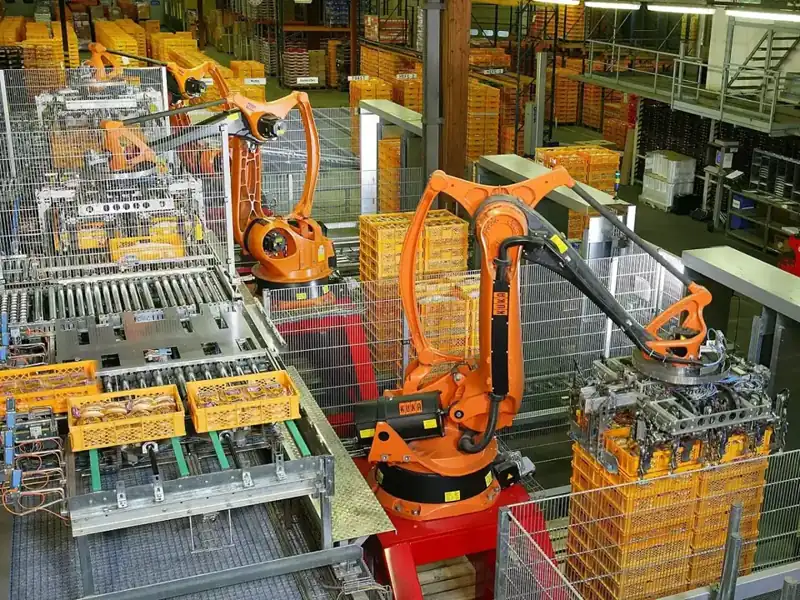
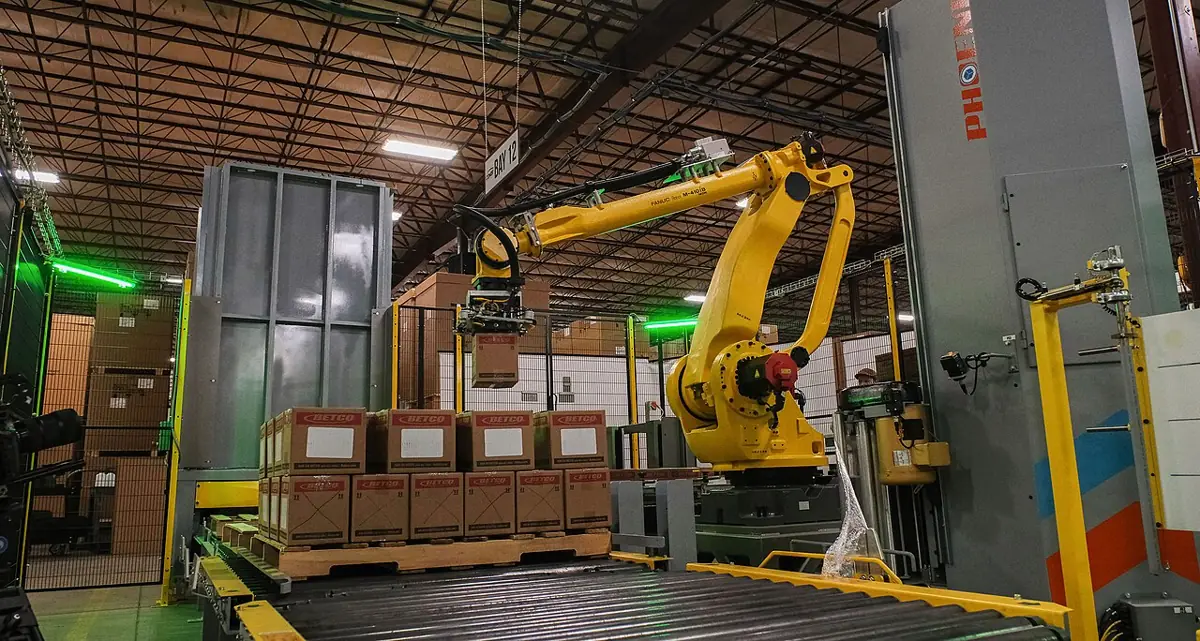
- Palletizing: robots stack cartons and crates onto pallets layer by layer, each item at a planned place pose.
- Lab automation: arms move sample plates between incubators, dispensers and readers.
- Electronics: pick-and-place machines put components at exact positions on circuit boards (Lesson 13).
- MoveIt: move to place → generate place pose → open hand → forbid collision (hand, object) → detach → retreat → return home.
- Your lab: plan the place in Python, execute it carefully on the UNO.
Think
Think about it
Think
Your planner finds no valid place at all on a crowded shelf. Name three things the robot (or you) could change before giving up.
Experiment
Try it in the lab
About 60 minutes. Python 3 for the planner; an Arduino UNO with wrist, lift and gripper servos on their own supply, an HC-SR04, a push button, a small box and a cup on a shelf (a book on the desk works).
Experiment
Plan it, then place it
You will need
- `place_planning_lab.py` (Python 3, no libraries)
- Pick-and-place planner interactive (in your browser)
- Arduino UNO, three SG90/MG90-class servos, separate 5–6 V supply, HC-SR04, push button, jumper wires
- Ruler, protractor, small box, cup, masking tape for marks
Steps
- Measure your shelf, the cup and your grasp offset. Put them in the script and list the place candidates it accepts.
- Mark the chosen place on the shelf with tape: the box centre and its yaw.
- On the bench: set WRIST_CENTRE, LIFT_UP, LIFT_DOWN_MAX, JAW_HOLD and JAW_RELEASE; measure BOX_BELOW_CM.
- Pick the box by hand into the jaw (or run Lesson 13’s pick), then send `P <yaw>` for the chosen candidate. Measure how far the box lands from the mark.
- Repeat 10 times. Then repeat 5 times with RELEASE_CM = 2.0. Compare the errors and watch for bounces.
- Send a yaw beyond ±80° and remove the shelf once. Do the refusals and aborts behave as planned?
Interactive · Pick-and-place planner · Educational
Ready — step through Approach → Retreat.
Educational pick/place — not MoveIt task constructor / not industrial cell planner.
A good place is planned for the OBJECT, executed with the GRIPPER, released low, and finished with a retreat away from what you just placed.
Knowledge check
Check your understanding
Knowledge check
1. You want the box at (16, −2, yaw 0). The grasp is 1 cm along the box’s y axis. Where does the gripper go?
2. Why did every yaw-90 place fail in the code lab?
3. Which is NOT a usual place-pose check?
4. A box is released 2 cm above the shelf (no air resistance). It lands at about…
5. After opening the jaw, the first move should be…
6. In MoveIt Task Constructor, what happens to the object at “detach object”?
7. Which stage connects the end of the pick to the place pose in the MTC tutorial?
8. No place candidate passes. A sensible next step is…
Mini assignment
Hands-on assignment
Mini assignment
Place it right, ten times
Plan places for your own shelf in Python, then execute them on the bench and measure the error.
Deliverables
- Your measured scene, grasp offset and the full candidate printout (accepted and rejected with reasons).
- A 10-place log for the chosen candidate: distance from the mark (mm) and yaw error (degrees).
- A comparison of RELEASE_CM 0.5 vs 2.0: errors and any bounces or tips.
- A short note: which check rejected the most candidates on your shelf, and how you could change the scene or the grasp to fix it.
Do this, step by step
- Run
place_planning_lab.pyand read the accepted and rejected place candidates. - Put your shelf (
SHELF), the cup (CUP) and your grasp offset into the script. - Bench: upload
place_executor.inoand log 10 places: distance from the mark (mm) and yaw error. - Compare
RELEASE_CM0.5 vs 2.0 in the sketch and note any bounce or tip. - Write which check rejected the most candidates and how you could fix it.
Stuck? Hints, one at a time
- The gripper pose is the place pose combined with the grasp offset. If the box lands to one side, check the order in
compose(). - Wrist yaw is limited to ±80° (
WRIST). If most candidates fail on yaw, try a different grasp yaw. - If the box tips on release, lower more slowly near the shelf (
SLOW_ZONE_CM) and open only a little (JAW_RELEASE).
Challenges (pick by level)
- 🟢 Beginner: Place a cup on a tray by hand, slowly. Write the phases you used (move, lower, release, retreat). Did you go up before moving away?
- 🟡 Intermediate: Add a “keep 2 cm from the shelf edge” rule and a second neighbour object to the script. How many candidates survive now?
- 🟠 Advanced: Rank candidates by a weighted cost: wrist turning + 2 × carry distance. Does the choice change?
- 🔴 Expert: Combine Lesson 12 and this lesson: for every grasp candidate × place candidate pair, check both and choose the best pair, not the best grasp first.
- ⚫ Research: Read the place stages in the MoveIt Task Constructor tutorial. Why does generate place pose need to know which stage attached the object (the “monitored stage”)?
Next step
You can now plan and execute a full pick-and-place. In Lesson 15 — The Manipulation Pipeline you will join everything from this stage — perception, world model, grasp planning, motion planning and execution — into one loop that runs again and again.
Look back: Lesson 13: Approach, Grasp & Lift. Next: Lesson 15: Manipulation Pipeline. Related: Stage 10 — ROS 2.
Sources
- MoveIt — Pick and Place with MoveIt Task Constructor — “move to place” Connect stage; place container: generate place pose (with the attach stage as monitored stage) + ComputeIK, open hand, forbid collision (hand, object), detach object, retreat 0.1–0.3 m; return home.
- Wikipedia — Equations for a falling body — impact speed v = √(2gd), neglecting air resistance.
- HC-SR04 datasheet (SparkFun-hosted PDF) — range 2–400 cm, echo µs / 58 = cm.
- Arduino Servo library (GitHub) — controlling RC hobby servos.
- Photos: Wikimedia Commons (credits under each image).
Self-attested for now — keep artifacts in your lab notebook.
Complete
Today's goal
0 of 1 done today
Mark this lesson complete when you have worked the experiment, knowledge check, and assignment (even roughly).