
Robot Perception, Planning & Manipulation · Lesson 02
Robot World Models
Est. 60–75 min
Why
Why this lesson matters
In Lesson 1 you saw that the planner never acts on the real world — it acts on the world model. This lesson is about building that model well. A good world model must remember things it cannot see right now, forget things that have really gone, ignore one-frame ghosts, smooth noisy positions, and know which object is in the gripper.
You will write a small world model in plain Python (about 150 lines), run one six-second desk story through three different designs, and see exactly where each one fails. On the bench, an Arduino UNO with a panning ultrasonic sensor builds its own tiny map with time stamps and fading confidence.
Concept
What a robot remembers about the world
1. What is a world model?
A world model is the robot’s best current guess about its surroundings, stored in its memory. It is built from sensor data, but it is not the same as the sensor data. A camera frame says “I see red pixels here, now”. The world model says “there is a 4 cm block at (22, −5) cm in base_link, last seen 0.4 s ago, and I am 90% sure of it”.
| Kind of model | What it stores | Good for | Example |
|---|---|---|---|
| Object list | Each object: id, class, pose, size, time, confidence | Picking things, reasoning about “the cup” | MoveIt collision objects, your Python script |
| Occupancy grid / voxels | For each small cell: occupied, free or unknown | Collision checking against unknown shapes | OctoMap 3D occupancy |
| Robot state | Joint angles, what is attached to the gripper | Self-collision, carrying objects | MoveIt planning scene robot state |
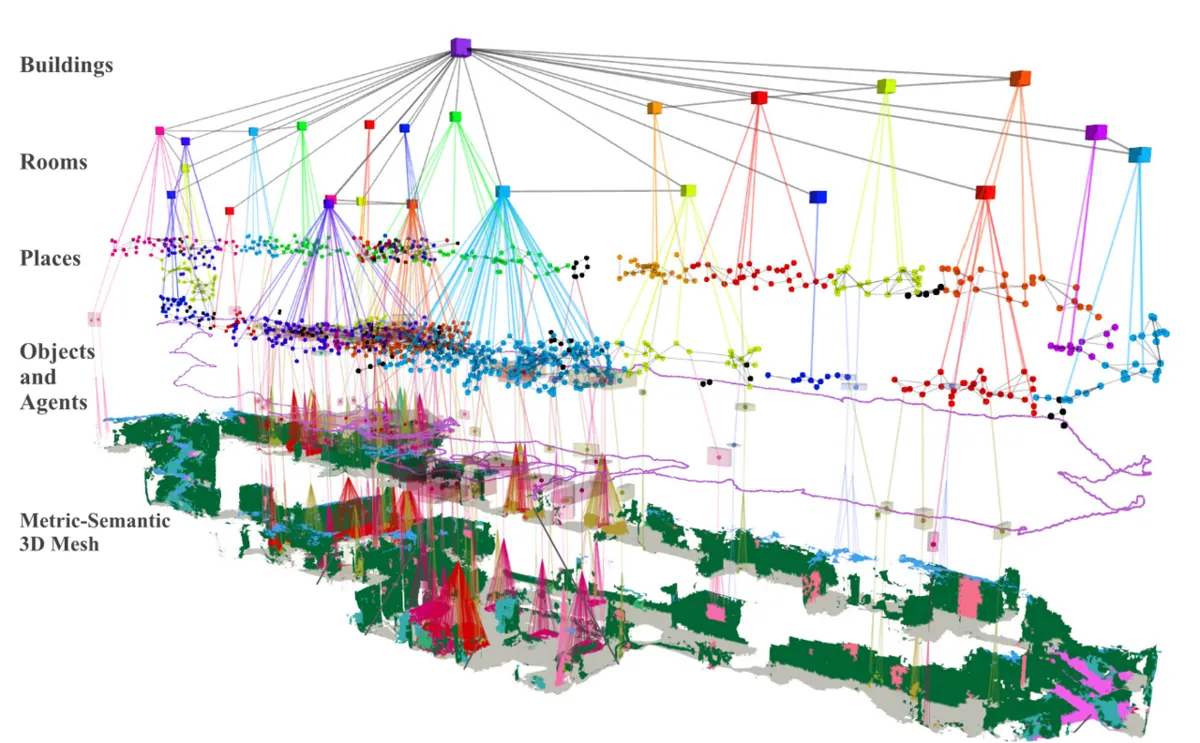
| Layered / semantic map | Geometry + objects + places + rooms | Big tasks: “bring the cup from the kitchen” | 3D scene graphs |
2. What each object entry holds
- id — a stable name like
o2, so “the block I am picking” stays the same object from frame to frame. - class — cup, block, box. Matching is done only between the same class.
- pose — position (and later orientation) in a named frame, usually
base_linkorworld. Lesson 3 goes deep into frames. - size / shape — a box, cylinder or mesh, so the planner can check collisions.
- last seen — a time stamp. Old information is less trustworthy.
- confidence — how sure we are the object is really there (0 to 1).
- state — tentative (seen once or twice), confirmed, or attached (in the gripper).
3. The five jobs of the update loop
- Associate: for each new detection, find the existing object it belongs to — same class and nearest, within a gate (3 cm in our script). This is called data association.
- Smooth: move the stored position a little towards the measurement:
new = old + 0.3 × (measured − old). Noise averages out; real motion still comes through. - Confirm: a new object starts as tentative. Only after 3 sightings is it confirmed and shown to the planner. One-frame ghosts (a shadow, a reflection) never get that far.
- Forget: if an object should be visible but is not seen, its confidence drops (0.5 per second in the script). Below 0.2 it is removed. But if the arm is hiding it (occlusion), do not lower confidence — absence of evidence is not evidence of absence.
- Attach / detach: when the gripper closes on the block, the block moves with the hand and is no longer an obstacle for the hand. When it is placed, it goes back into the world at its new spot.
4. Occupancy: free, occupied — and unknown
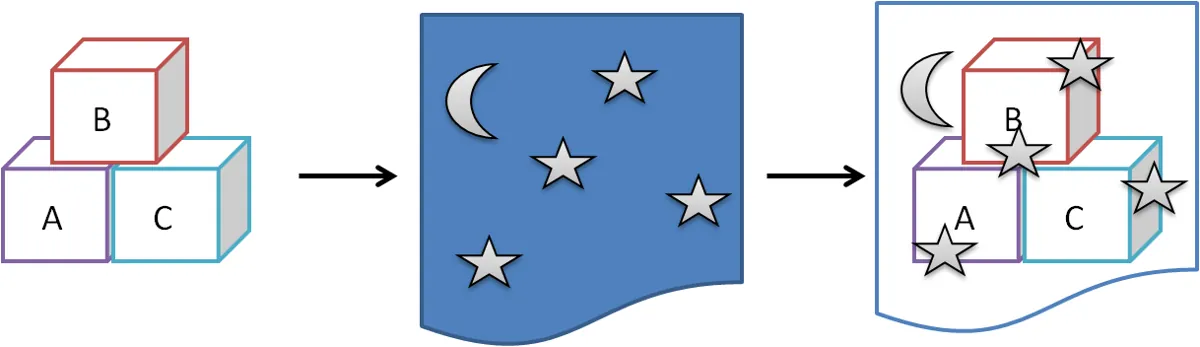
An occupancy grid splits space into small cells. Each cell holds the probability that it is occupied. The idea was first proposed by Moravec and Elfes in 1985 for sonar maps, and each cell is usually updated with a small Bayes filter, often stored as log-odds. OctoMap extends this to 3D with an octree, and it keeps three states: occupied, free and unknown. Unknown is important: a cell the sensor has never seen is not “free”. A careful planner treats unknown space as dangerous.
| Cell state | Meaning | Planner should… |
|---|---|---|
| Occupied | Sensor saw something here | avoid it (plus a safety padding) |
| Free | Sensor ray passed through here | allow motion |
| Unknown | Never observed (behind an object, outside view) | avoid, or look first |
5. The two classic mistakes
| Design | What it does | How it fails |
|---|---|---|
| No memory | World = only what this frame shows | Forgets hidden objects; flickers with every missed detection; ghosts appear and vanish |
| Never forget | Everything seen once stays for ever | Keeps ghosts and objects that were removed; old positions of moved objects stay as obstacles |
| Full model | Gate + smooth + confirm + decay + occlusion + attach | Needs tuning: gate, decay rate and confirm count depend on your sensor |
Visual
Visualise it: truth vs the robot’s model
The world model is the planner’s only view of reality. Toggle layers and add noise to see how far the model can drift from the truth. (Educational explorer, not an industrial perception stack.)
Interactive · World model explorer · Educational


Mesh/primitive shapes of table, walls, and arm links — a teaching stand-in for CAD/URDF visuals.
World honesty score (toy)
85
Educational browser world model — not MoveIt planning scene / not Gazebo / not industrial map stack.
Code lab
Code lab: one desk story, three world models
world_model_lab.py plays a six-second desk story at 5 camera frames per second (example values). A cup sits at (20, 10) cm and a block at (22, −5) cm, with 4 mm of detection noise. At 1.0 s a shadow gives one false “block”. From 2.0 to 2.6 s the arm hides the block. At 3.0 s Meera takes her cup away. At 4.0 s the arm picks the block, and at 5.0 s places it at (10, 20) cm. The same story runs through A) no memory, B) never forget and C) the full model, and the planner asks the same questions each time. Run python3 world_model_lab.py — no libraries needed.
"""world_model_lab.py — Stage 13 L02 (AIHUB STATION lab)

A small robot WORLD MODEL for a desk arm, in plain Python.
Each object has: id, class, position in base_link (m), size, last-seen time,
confidence, state (tentative / confirmed / attached).

Rules (all example values):
  * match a detection to an object of the same class within 3 cm (gate)
  * smooth position: new = old + 0.3 * (measured - old)
  * new objects are TENTATIVE until seen 3 times
  * confidence +0.25 per sighting (max 1), -0.5 per second when the object
    SHOULD be visible but is not; removed below 0.2
  * no decay while the arm hides the object (occlusion)
  * picked object becomes ATTACHED to the gripper (moves with it, and is not
    an obstacle for the gripper) - like MoveIt's attached collision objects

We run the same 6-second desk story through three models:
  A) "no memory"    - the world is only what this frame shows
  B) "never forget" - everything ever confirmed stays forever
  C) the full model above
Run:  python3 world_model_lab.py
"""
import math, random

GATE, ALPHA, CONFIRM_N = 0.03, 0.3, 3
CONF_UP, CONF_DECAY, CONF_MIN = 0.25, 0.5, 0.2
DT = 0.2                                  # camera at 5 Hz

class Obj:
    def __init__(self, oid, cls, pos, t):
        self.id, self.cls, self.pos = oid, cls, list(pos)
        self.seen, self.last, self.conf, self.state = 1, t, CONF_UP, "tentative"
    def __repr__(self):
        return f"{self.id}:{self.cls}@({self.pos[0]*100:.1f},{self.pos[1]*100:.1f})cm c={self.conf:.2f} {self.state}"

class WorldModel:
    def __init__(self, mode="full"):
        self.mode, self.objs, self.next_id, self.log = mode, [], 1, []
    def update(self, t, dets, occluded=(), gripper=None):
        if self.mode == "nomem":
            self.objs = [Obj(f"o{i}", c, p, t) for i, (c, p) in enumerate(dets)]
            for o in self.objs: o.state = "confirmed"
            return
        matched = set()
        for cls, p in dets:
            best, bd = None, GATE
            for o in self.objs:
                if o.cls == cls and o.state != "attached":
                    d = math.dist(o.pos, p)
                    if d < bd: best, bd = o, d
            if best is None:
                o = Obj(f"o{self.next_id}", cls, p, t); self.next_id += 1
                self.objs.append(o); matched.add(o.id)
                self.log.append(f"t={t:.1f}s NEW tentative {o}")
                continue
            best.pos = [best.pos[k] + ALPHA*(p[k]-best.pos[k]) for k in range(2)]
            best.seen += 1; best.last = t; best.conf = min(1.0, best.conf + CONF_UP)
            matched.add(best.id)
            if best.state == "tentative" and best.seen >= CONFIRM_N:
                best.state = "confirmed"; self.log.append(f"t={t:.1f}s CONFIRMED {best}")
        if self.mode == "forever":
            return
        for o in list(self.objs):
            if o.state == "attached":
                o.pos = list(gripper); continue
            if o.id in matched or o.id in occluded:
                continue
            o.conf -= CONF_DECAY * DT
            if o.conf < CONF_MIN:
                self.objs.remove(o); self.log.append(f"t={t:.1f}s REMOVED {o.id} ({o.cls}) - not seen since t={o.last:.1f}s")
    def confirmed(self):
        return [o for o in self.objs if o.state == "confirmed"]
    def find(self, cls):
        c = [o for o in self.objs if o.cls == cls and o.state in ("confirmed", "attached")]
        return c[0] if c else None

def blocked(model, a, b, ignore=("block",), pad=0.03):
    """Is the straight gripper path a->b (top view) within pad of any confirmed obstacle?
    The object we are carrying (ignore) is not an obstacle for its own move."""
    hits = []
    for o in model.confirmed():
        if o.cls in ignore: continue
        ax, ay = a; bx, by = b; px, py = o.pos
        L2 = (bx-ax)**2 + (by-ay)**2
        s = max(0, min(1, ((px-ax)*(bx-ax) + (py-ay)*(by-ay)) / L2))
        if math.hypot(ax + s*(bx-ax) - px, ay + s*(by-ay) - py) < pad + 0.03:
            hits.append(o.cls)
    return hits

# ---------------- the desk story ----------------
CUP, BLOCK = (0.20, 0.10), (0.22, -0.05)
def truth_at(t):
    """What is really on the desk at time t, and what can the camera see?"""
    objs = []
    if t < 3.0: objs.append(("cup", CUP))                        # Meera takes her cup at 3.0 s
    if t < 4.0: objs.append(("block", BLOCK))                    # arm picks the block at 4.0 s
    elif t >= 5.0: objs.append(("block", (0.10, 0.20)))          # placed at 5.0 s
    visible = [o for o in objs if not (o[0] == "block" and 2.0 <= t < 2.6)]   # arm hides block
    occluded_block = 2.0 <= t < 2.6
    return objs, visible, occluded_block

def detect(visible, t, rng):
    dets = [(c, (p[0] + rng.gauss(0, 0.004), p[1] + rng.gauss(0, 0.004))) for c, p in visible]
    if abs(t - 1.0) < 1e-9:
        dets.append(("block", (0.30, 0.15)))                      # one false detection (shadow)
    return dets

def run(mode, verbose=False):
    rng = random.Random(3)
    wm = WorldModel(mode)
    occl_id = None
    report = {}
    raw_x, filt_x = [], []
    for k in range(31):
        t = round(k*DT, 1)
        objs, visible, occ = truth_at(t)
        dets = detect(visible, t, rng)
        grip = None
        if mode == "full":
            b = wm.find("block")
            occl = (b.id,) if (occ and b) else ()
            if t == 4.0 and b:  b.state = "attached"; wm.log.append(f"t=4.0s ATTACHED {b.id} to gripper (not an obstacle for the hand now)")
            if 4.0 <= t < 5.0: grip = (0.16 - 0.06*(t-4.0), 0.07 + 0.13*(t-4.0))
            if t == 5.0 and b and b.state == "attached":
                b.state = "confirmed"; b.pos = [0.10, 0.20]; wm.log.append("t=5.0s DETACHED block, back in the world at (10.0,20.0)cm")
            wm.update(t, dets, occl, grip)
        else:
            wm.update(t, dets)
        if mode == "full":
            for c, p in dets:
                if c == "cup": raw_x.append(p[0])
            cup = wm.find("cup")
            if cup and t <= 2.8: filt_x.append(cup.pos[0])
        # three questions the planner asks
        if t == 2.2: report["2.2 s: is the block known (arm is hiding it)?"] = "yes" if wm.find("block") else "NO - planner would forget it"
        if t == 1.2: report["1.2 s: confirmed objects"] = ", ".join(sorted(o.cls for o in wm.confirmed()))
        if t == 4.8:
            h = blocked(wm, (0.22, -0.05), (0.10, 0.20))
            report["4.8 s: carry path (22,-5)->(10,20) blocked by"] = ", ".join(h) if h else "nothing - path free"
    if verbose:
        print("\n".join(wm.log))
        sd = lambda xs: (sum((x-sum(xs)/len(xs))**2 for x in xs)/len(xs))**0.5
        print(f"cup x noise: raw detections sd {sd(raw_x)*1000:.1f} mm, smoothed model sd {sd(filt_x[3:])*1000:.1f} mm")
    report["6.0 s: final model"] = "; ".join(repr(o) for o in wm.objs) or "(empty)"
    return report

if __name__ == "__main__":
    print("Desk story: cup at (20,10) cm, block at (22,-5) cm, camera 5 Hz, noise 4 mm")
    print("t=1.0 shadow -> false 'block' at (30,15); t=2.0-2.6 arm hides block;")
    print("t=3.0 cup taken away; t=4.0 block picked; t=5.0 block placed at (10,20)\n")
    print("=== C) full world model: event log ===")
    rc = run("full", verbose=True)
    for name, mode in (("A) no memory", "nomem"), ("B) never forget", "forever"), ("C) full model", "full")):
        r = rc if mode == "full" else run(mode)
        print(f"\n=== {name} ===")
        for k, v in r.items(): print(f"  {k}: {v}")
Output (run with python3 world_model_lab.py)
Desk story: cup at (20,10) cm, block at (22,-5) cm, camera 5 Hz, noise 4 mm
t=1.0 shadow -> false 'block' at (30,15); t=2.0-2.6 arm hides block;
t=3.0 cup taken away; t=4.0 block picked; t=5.0 block placed at (10,20)

=== C) full world model: event log ===
t=0.0s NEW tentative o1:cup@(20.0,10.5)cm c=0.25 tentative
t=0.0s NEW tentative o2:block@(21.6,-4.6)cm c=0.25 tentative
t=0.4s CONFIRMED o1:cup@(20.0,10.3)cm c=0.75 confirmed
t=0.4s CONFIRMED o2:block@(22.1,-4.8)cm c=0.75 confirmed
t=1.0s NEW tentative o3:block@(30.0,15.0)cm c=0.25 tentative
t=1.2s REMOVED o3 (block) - not seen since t=1.0s
t=4.0s ATTACHED o2 to gripper (not an obstacle for the hand now)
t=4.6s REMOVED o1 (cup) - not seen since t=2.8s
t=5.0s DETACHED block, back in the world at (10.0,20.0)cm
cup x noise: raw detections sd 2.7 mm, smoothed model sd 0.8 mm

=== A) no memory ===
  1.2 s: confirmed objects: block, cup
  2.2 s: is the block known (arm is hiding it)?: NO - planner would forget it
  4.8 s: carry path (22,-5)->(10,20) blocked by: nothing - path free
  6.0 s: final model: o0:block@(10.1,19.9)cm c=0.25 confirmed

=== B) never forget ===
  1.2 s: confirmed objects: block, cup
  2.2 s: is the block known (arm is hiding it)?: yes
  4.8 s: carry path (22,-5)->(10,20) blocked by: cup
  6.0 s: final model: o1:cup@(19.7,9.8)cm c=1.00 confirmed; o2:block@(22.2,-5.4)cm c=1.00 confirmed; o3:block@(30.0,15.0)cm c=0.25 tentative; o4:block@(10.1,20.1)cm c=1.00 confirmed

=== C) full model ===
  1.2 s: confirmed objects: block, cup
  2.2 s: is the block known (arm is hiding it)?: yes
  4.8 s: carry path (22,-5)->(10,20) blocked by: nothing - path free
  6.0 s: final model: o2:block@(10.1,20.1)cm c=1.00 confirmed
Try it: turn world-model layers on and off and raise perception noise. Watch how the model drifts from the true scene. (Educational explorer, not an industrial perception stack.)
Interactive · World model explorer · Educational
Mesh/primitive shapes of table, walls, and arm links — a teaching stand-in for CAD/URDF visuals.
World honesty score (toy)
85
Educational browser world model — not MoveIt planning scene / not Gazebo / not industrial map stack.
Bench build: a sweeping sonar world map on the UNO
sweep_world_map.ino turns an HC-SR04 on a small pan servo from 30° to 150° in 15° steps (9 directions). For each direction it stores the distance, the time it was last seen and a confidence that rises by 0.5 on every good reading and fades by 0.25 per second. Readings outside 2–200 cm are not trusted. A direction whose confidence falls below 0.2 is printed as “free / forgotten”. If any remembered object is closer than 20 cm, the red LED lights. This is a one-dimensional world model with memory and forgetting — the same ideas as the Python script.
| Part | Connection | Note |
|---|---|---|
| HC-SR04 | VCC → 5V, GND → GND, TRIG → D7, ECHO → D8 | mount it on the servo horn |
| Pan servo (SG90-class) | signal → D9 | power from a separate 5–6 V supply |
| Servo supply | red → +5–6 V, brown → supply GND | supply GND joined to UNO GND |
| Red LED + 220 Ω | D6 → resistor → LED → GND | an object within 20 cm is remembered |
// sweep_world_map.ino — Stage 13 L02 (AIHUB STATION lab)
// A tiny WORLD MODEL on an Arduino UNO: a servo pans an HC-SR04 from 30 to 150 deg
// in 15-deg steps. For each direction we remember distance, time seen and a
// confidence that fades if the reading goes away. LED on D6 = "something within
// 20 cm is remembered". Prints the map every sweep.
//
// Wiring (example):  HC-SR04 TRIG D7, ECHO D8, VCC 5V, GND.
//   Pan servo signal D9. Servo power from a SEPARATE 5-6 V supply (never the
//   UNO 5V pin / GPIO), grounds joined. Red LED + 220 ohm on D6.
#include <Servo.h>

const int TRIG = 7, ECHO = 8, SERVO_PIN = 9, LED = 6;
const int N = 9;                       // 30,45,...,150 deg
const float NEAR_CM = 20.0;
const float DECAY_PER_S = 0.25;        // one sweep ~1.3 s: lose ~0.33, re-seen gains 0.5
Servo pan;

struct Cell { float cm; unsigned long seenMs; float conf; };
Cell cells[N];

float readCm() {
  digitalWrite(TRIG, LOW);  delayMicroseconds(2);
  digitalWrite(TRIG, HIGH); delayMicroseconds(10);
  digitalWrite(TRIG, LOW);
  unsigned long us = pulseIn(ECHO, HIGH, 30000UL);   // timeout = nothing within ~5 m
  if (us == 0) return -1;
  return us / 58.0;
}

void setup() {
  Serial.begin(115200);
  pinMode(TRIG, OUTPUT); pinMode(ECHO, INPUT); pinMode(LED, OUTPUT);
  pan.attach(SERVO_PIN);
  for (int i = 0; i < N; i++) { cells[i].cm = -1; cells[i].seenMs = 0; cells[i].conf = 0; }
}

void loop() {
  static unsigned long lastMs = millis();
  for (int i = 0; i < N; i++) {
    int angle = 30 + 15 * i;
    pan.write(angle);
    delay(120);                                   // let the servo settle + echoes die
    float d = readCm();
    unsigned long now = millis();
    float dt = (now - lastMs) / 1000.0; lastMs = now;
    if (dt > 0.5) dt = 0.5;
    // fade every cell a little
    for (int k = 0; k < N; k++) {
      cells[k].conf -= DECAY_PER_S * dt;
      if (cells[k].conf < 0) cells[k].conf = 0;
    }
    if (d > 2 && d < 200) {                       // trust only 2..200 cm
      if (cells[i].conf > 0.2) cells[i].cm += 0.3 * (d - cells[i].cm);   // smooth
      else cells[i].cm = d;                                              // fresh object
      cells[i].seenMs = now;
      cells[i].conf += 0.5; if (cells[i].conf > 1) cells[i].conf = 1;
    }
  }
  // report + decide
  bool nearObj = false;
  Serial.println(F("angle  cm     age_ms  conf"));
  for (int i = 0; i < N; i++) {
    Serial.print(30 + 15 * i); Serial.print(F("    "));
    if (cells[i].conf > 0.2) {
      Serial.print(cells[i].cm, 1); Serial.print(F("   "));
      Serial.print(millis() - cells[i].seenMs); Serial.print(F("   "));
      Serial.println(cells[i].conf, 2);
      if (cells[i].cm < NEAR_CM) nearObj = true;
    } else {
      Serial.println(F("--  (free / forgotten)"));
    }
  }
  digitalWrite(LED, nearObj ? HIGH : LOW);
  Serial.println();
}angle cm age_ms conf
30 -- (free / forgotten)
45 42.3 1180 0.71
60 41.8 1030 0.74
75 -- (free / forgotten)
90 16.4 740 0.82
105 16.9 590 0.85
120 -- (free / forgotten)
135 -- (free / forgotten)
150 88.0 0 0.50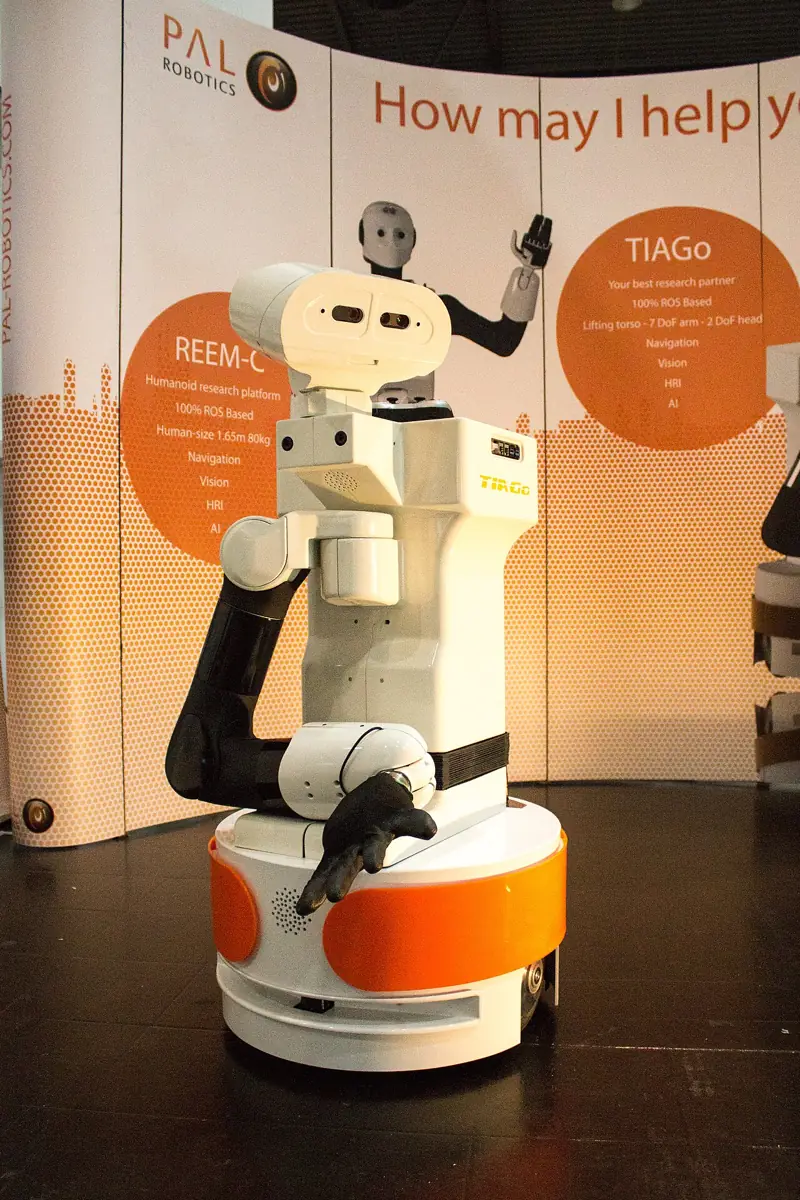
Debugging
| Symptom | Likely cause | Fix |
|---|---|---|
| Two copies of the same object | gate too small, or the object moved faster than the gate allows | Increase the gate; predict motion before matching |
| Two nearby objects merge into one | gate too large | Smaller gate; match on class and size too |
| Object vanishes when the arm passes in front | no occlusion handling | Do not decay objects that are hidden by the robot |
| Planner avoids things that are gone | never forgets | Add decay and removal below a threshold |
| Arm “collides” with the object it is holding | object not attached to the gripper | Remove from world, attach to the hand with allowed touch links |
| Positions jitter by a few mm | no smoothing | Exponential smoothing or a Kalman filter |
| Bench: every cell says forgotten | decay faster than one sweep refreshes | Lower DECAY_PER_S or sweep faster |
| Bench: random 3–5 cm readings | sensor sees the servo or desk edge | Raise and tilt the sensor; ignore readings below 2 cm |
Real world
World models in the real world

- Manipulation stacks: MoveIt keeps a planning scene with collision objects, an optional OctoMap from depth sensors, and attached objects on the gripper. Planning requests are always answered against this scene, never against raw images.
- Mapping research: occupancy grids (Moravec and Elfes, 1985) and 3D OctoMaps are standard ways to store “where is it occupied, where is it free, where don’t we know”.
- Service robots: home-style robots like TIAGo must handle people moving cups and chairs — exactly the remember/forget balance in this lesson.
- Air traffic and self-driving cars: tracking systems keep lists of moving objects with ids and confidence, associate new measurements to old tracks, and drop tracks that go stale.
- Your lab: keep an object list for the blocks you pick, and a padded box for the desk, the camera stand and the wall.
Think
Think about it
Think
Your camera runs at 30 frames per second, and your arm sometimes hides objects for up to 1.5 seconds. A person may also remove an object at any time. How would you choose the decay rate, and what extra information would let you tell “hidden” from “removed”?
Experiment
Try it in the lab
About 60 minutes. Python 3 for the script; Arduino UNO, HC-SR04, a small servo with its own 5–6 V supply, an LED and a 220 Ω resistor for the bench.
Experiment
Break and tune a world model
You will need
- `world_model_lab.py` (Python 3, no libraries)
- World-model explorer (in your browser)
- Arduino UNO, HC-SR04, SG90-class servo + separate 5–6 V supply, red LED, 220 Ω resistor, jumper wires, a few boxes
Steps
- Run `world_model_lab.py`. Find the line where the shadow “block” is removed and explain why it never reached the planner.
- Set `CONFIRM_N = 1`. Run again. What happens to the shadow? Is it now an obstacle?
- Set `GATE = 0.005` (5 mm). How many objects does the full model create now? Why?
- Set `CONF_DECAY = 2.0`. Does the full model still survive the occlusion? Now remove the occlusion handling (pass an empty tuple). What breaks?
- Change the occlusion window to 2.0–3.5 s. With the default decay, is the block still known at the end of it?
- Bench: place two boxes at different angles, wait two sweeps, then remove one. Count the sweeps until it shows “forgotten”.
- Bench: try DECAY_PER_S = 0.1 and 0.6. Write down which value you would use near people, and why.
Interactive · World model explorer · Educational
Mesh/primitive shapes of table, walls, and arm links — a teaching stand-in for CAD/URDF visuals.
World honesty score (toy)
85
Educational browser world model — not MoveIt planning scene / not Gazebo / not industrial map stack.
A world model is a set of small rules about trust: when to believe something new, how long to remember, when to forget. The numbers depend on your sensor rate, noise and how fast the world changes.
Knowledge check
Check your understanding
Knowledge check
1. What is the difference between a camera frame and a world model?
2. “Data association” means…
3. Why is a new object kept “tentative” for a few frames?
4. The arm hides the block for 0.6 s. The no-memory model…
5. What problem does the never-forget model cause after the cup is taken away?
6. In an occupancy map, a cell the sensor has never seen should be treated as…
7. When the gripper picks the block, the world model should…
8. On the bench, every direction prints “free / forgotten” even with boxes in front. Most likely…
Mini assignment
Hands-on assignment
Mini assignment
A world model for your desk arm
Design, code and test a small world model for your own desk-arm setup.
Deliverables
- A table of every object and obstacle your arm must know about (desk, camera stand, wall, blocks, cup), with frame, size, and whether it is static or changes.
- Your chosen values for gate, smoothing, confirm count and decay rate, with one sentence each on why.
- An event log from `world_model_lab.py` (or your own version) showing NEW, CONFIRMED, REMOVED, ATTACHED and DETACHED events.
- A bench log from `sweep_world_map.ino` showing an object appearing, being remembered, and being forgotten after removal.
Do this, step by step
- Run
world_model_lab.pyand find the NEW, CONFIRMED, REMOVED, ATTACHED and DETACHED events in the log. - Fill your object table: frame, size, static or changing.
- Change one value at a time (gate, smoothing, confirm count, decay) and note how the log changes.
- Hide the block for a short time (like the forearm in the story) and check the model still remembers it.
- Bench: upload
sweep_world_map.ino, put a box in front, then remove it and log until it is forgotten.
Stuck? Hints, one at a time
- If objects appear and vanish every frame, your confirm count is too low or your gate is too tight.
- Unknown is not free. If your planner treats space the sensor has never seen as clear, that is a bug — look first or avoid it.
DECAY_PER_Sis 0.25 and one sweep takes about 1.3 s. If everything reads “forgotten”, decay is faster than one sweep can refresh it.
Challenges (pick by level)
- 🟢 Beginner: Add a third object (a pen holder at (5, −15) cm) to the story and check it gets confirmed and kept.
- 🟡 Intermediate: Make the block slide 1 cm per second from 0 to 2 s. Tune the gate and smoothing so the model follows it with one id and no duplicates.
- 🟠 Advanced: Replace exponential smoothing with a simple 1D Kalman filter per axis, and compare the position spread with the 0.8 mm result.
- 🔴 Expert: Add a 2D occupancy grid (1 cm cells, log-odds update) over the desk next to the object list, and plan the carry path against both.
- ⚫ Research: Read the OctoMap paper and the MoveIt planning-scene docs. Write one page on when you would use an object list, an octree, or both, for a desk arm with a depth camera.
Next step
Every entry in your world model has a pose in a frame. In Lesson 3 — Objects, Poses and Coordinate Frames you will learn to describe position and orientation properly, and to move a pose between camera, base and gripper frames without mistakes.
Look back: Lesson 1: From Perception to Robot Action. Next: Lesson 3: Objects, Poses & Coordinate Frames. Related: Stage 12 — Simulation & Digital Twin.
Sources
- MoveIt — Planning Scene Monitor (concepts) — planning scene = world + robot state; world geometry monitor; occupancy map monitor / OctoMap from point clouds and depth images.
- MoveIt — Planning Scene ROS API tutorial — planning scene diffs, adding/removing collision objects, attaching and detaching objects with touch links.
- OctoMap — 3D occupancy mapping — octree-based probabilistic 3D occupancy maps with occupied, free and unknown space.
- Wikipedia — Occupancy grid mapping — Moravec and Elfes (1985), per-cell binary Bayes filter, log-odds.
- HC-SR04 datasheet (SparkFun-hosted PDF) — 2 cm–4 m range, 10 µs trigger, 15° measuring angle.
- Arduino Servo library (GitHub) — controlling RC hobby servos.
- Photos: Wikimedia Commons (credits under each image).
Self-attested for now — keep artifacts in your lab notebook.
Complete
Today's goal
0 of 1 done today
Mark this lesson complete when you have worked the experiment, knowledge check, and assignment (even roughly).