
Robot Perception, Planning & Manipulation · Lesson 04
Occupancy & Collision Representation
Est. 60–75 min
Why
Why this lesson matters
Lesson 2 gave you a world model and Lesson 3 gave every object a pose. A planner needs one more thing: the space each object takes up, in a form that is quick to check. This lesson is about collision representation: simple shapes, bounding volumes, voxels and octrees, safety padding, unknown space, removing the robot from its own sensor data, and checking the whole motion — not just its end points.
You will measure, in plain Python, how much extra space each shape blocks, how much faster simple shapes are, what padding does, why unknown is not free, and how a fast motion can “jump through” a thin wall. On the bench, an Arduino refuses servo moves that would come too close to an obstacle it measures.
Concept
Turning things into shapes a planner can check
1. The question a collision checker answers
For one robot configuration (a set of joint angles), the collision checker answers: does any part of the robot overlap any obstacle, or itself? Often it also gives the distance to the nearest obstacle. A planner may ask this thousands of times for one plan, so the check must be fast. Libraries such as FCL (used by MoveIt) answer collision, distance and tolerance questions, and can also do continuous collision detection — whether two shapes touch while moving.
| Shape | Stored as | Check is | Good for |
|---|---|---|---|
| Sphere | centre + radius | very fast (one distance) | rough first check; round things |
| Box (AABB or oriented) | centre, size, rotation | fast | tables, boxes, shelves |
| Capsule / cylinder | segment + radius | fast | robot links, bottles, cups |
| Mesh | many triangles | slow | exact shapes from CAD |
| Voxels / octree | grid of filled cells | fast per cell, many cells | unknown shapes from depth sensors |
2. Bounding volumes: cheap but generous
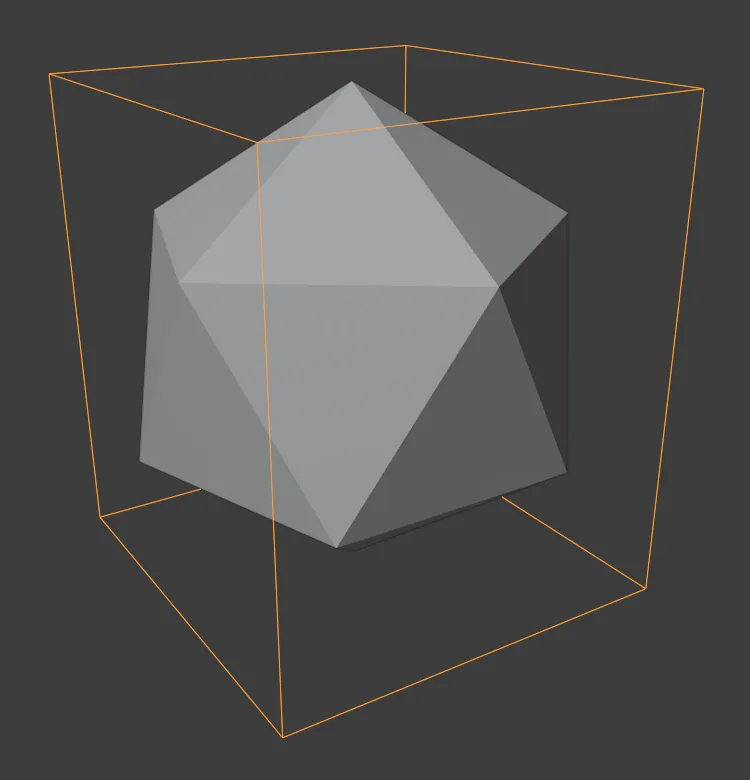
A bounding volume is a simple closed shape that completely contains an object. If two bounding volumes do not intersect, the objects inside cannot collide — that is a quick “no”. Testing a bounding volume is much faster than testing every triangle. Many systems build a bounding volume hierarchy: a tree of boxes inside boxes, so most of the scene is rejected in a few tests. The price is that a bounding shape blocks extra space that is really free.
3. Voxels and octrees
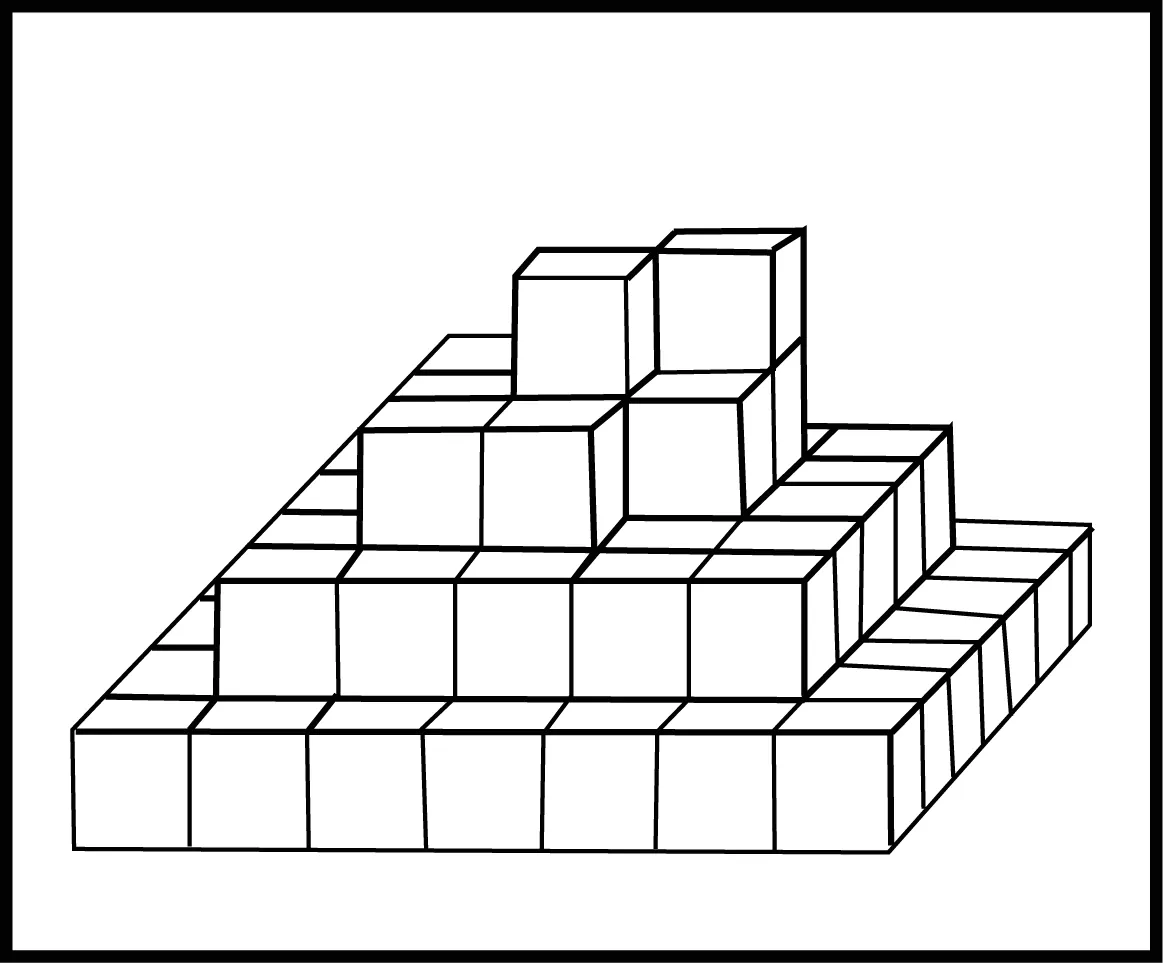
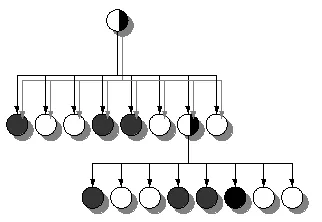
A depth camera does not give you “a mug”; it gives you thousands of 3D points. The easy way to use them is to drop each point into a 3D grid of small cubes — voxels — and mark those cells occupied. Smaller voxels follow the shape more closely but need many more cells. An octree saves memory: it splits space into 8 children only where there is detail, so big empty regions are stored as one large cell. OctoMap uses octrees for probabilistic 3D occupancy, and keeps occupied, free and unknown space.
4. Padding, unknown space and the robot itself
- Padding (safety margin): grow every obstacle (or every link) by a small distance, for example 1 cm. This covers sensor noise, calibration error and the arm not following the path perfectly. Too little padding → grazes. Too much → “no path found”.
- Unknown space: a sensor only sees the front of things. Cells behind and inside objects were never observed. A safe planner treats unknown as not free, or looks again from another angle first.
- Self-filtering: a depth camera that sees the desk also sees the robot’s own arm. Those points must be removed (MoveIt’s occupancy monitor has a self-filter for depth images), or the robot will think it is always in collision with itself.
- Allowed collisions: some contacts are expected — fingers touching the object being grasped, neighbouring links touching at a joint. These pairs are listed as allowed, rather than switching collision checking off.
5. Checking the motion, not only the poses
A plan is a sequence of poses. If you only check a few of them, a fast motion can pass straight through a thin obstacle between two checked poses — the checker never sees it. Either check many intermediate poses (so the robot moves less than about one link thickness per step), or use a continuous check that tests the whole swept motion.
Visual
Visualise it: the planner’s collision world
The planner never sees your desk — it sees shapes. Change the shapes, voxel size and padding, and see which robot poses become “in collision”. (Educational explorer, not a certified collision checker.)
Interactive · Collision world explorer · Educational AABB

Educational occupancy grid — not FCL / not Bullet / not industrial collision checking.
Code lab
Code lab: shapes, padding, unknown space and swept checks
collision_world_lab.py works in a top view of a 2-link desk arm: base at the origin, links of 15 cm and 12 cm, each link a capsule of radius 1.5 cm (example values). Part 1 represents one mug in five ways. Part 2 times simple vs detailed tests. Part 3 checks arm poses near the mug with and without 1 cm padding. Part 4 builds a 1 cm occupancy grid by casting rays from one sensor at a box. Part 5 shows self-filtering. Part 6 swings the arm fast past a 1 cm thin wall. Run python3 collision_world_lab.py.
"""collision_world_lab.py — Stage 13 L04 (AIHUB STATION lab)

How a planner "sees" obstacles: shapes, bounding volumes, voxels, padding,
unknown space, self-filtering and swept (continuous) checks.
Top view of a 2-link desk arm (example values, metres):
  base at (0, 0), link 1 = 0.15 m, link 2 = 0.12 m, each link a capsule of radius 1.5 cm.
Run:  python3 collision_world_lab.py
"""
import math, random, time

L1, L2, LINK_R = 0.15, 0.12, 0.015

def fk(q1, q2):
    """joint angles (deg) -> elbow and tip points"""
    a, b = math.radians(q1), math.radians(q1 + q2)
    e = (L1*math.cos(a), L1*math.sin(a))
    t = (e[0] + L2*math.cos(b), e[1] + L2*math.sin(b))
    return (0.0, 0.0), e, t

def seg_point_dist(a, b, p):
    ax, ay = a; bx, by = b; px, py = p
    L2_ = (bx-ax)**2 + (by-ay)**2
    s = 0 if L2_ == 0 else max(0, min(1, ((px-ax)*(bx-ax) + (py-ay)*(by-ay)) / L2_))
    return math.hypot(ax + s*(bx-ax) - px, ay + s*(by-ay) - py)

def seg_box_dist(a, b, box, n=20):
    """approx. distance from segment a-b to an axis-aligned box (xmin,ymin,xmax,ymax)"""
    best = 9.0
    for i in range(n + 1):
        s = i / n; x = a[0] + s*(b[0]-a[0]); y = a[1] + s*(b[1]-a[1])
        dx = max(box[0] - x, 0, x - box[2]); dy = max(box[1] - y, 0, y - box[3])
        best = min(best, math.hypot(dx, dy))
    return best

def arm_clearance(q, obstacles, pad=0.0):
    """smallest gap (m) between arm capsules and any obstacle; < 0 means collision"""
    pts = fk(*q); gap = 9.0
    for a, b in ((pts[0], pts[1]), (pts[1], pts[2])):
        for kind, data in obstacles:
            if kind == "circle":
                (cx, cy), r = data
                d = seg_point_dist(a, b, (cx, cy)) - r
            else:
                d = seg_box_dist(a, b, data)
            gap = min(gap, d - LINK_R - pad)
    return gap

# ---------------- 1. one mug, five representations ----------------
print("1. One mug (top view: body r = 4 cm, handle sticking out 3 cm), five ways")
MUG_C, MUG_R = (0.20, 0.08), 0.04
def in_mug(x, y):
    if math.hypot(x - MUG_C[0], y - MUG_C[1]) <= MUG_R: return True
    return 0.04 <= x - MUG_C[0] <= 0.07 and abs(y - MUG_C[1]) <= 0.008    # handle
xs = [MUG_C[0] - 0.06 + i*0.001 for i in range(140)]
ys = [MUG_C[1] - 0.06 + j*0.001 for j in range(120)]
true_area = sum(in_mug(x, y) for x in xs for y in ys) * 1e-6
reps = {}
SPH_C, SPH_R = (0.215, 0.08), 0.056                     # smallest-ish circle around body + handle
assert all(math.hypot(x-SPH_C[0], y-SPH_C[1]) <= SPH_R for x in xs for y in ys if in_mug(x, y))
reps["bounding circle (r 5.6 cm)"] = math.pi * SPH_R**2
reps["bounding box 11 x 8 cm"] = 0.11 * 0.08
for res in (0.02, 0.01, 0.005):
    cells = set()
    for x in xs:
        for y in ys:
            if in_mug(x, y): cells.add((math.floor(x/res), math.floor(y/res)))
    reps[f"voxels {res*100:.1f} cm ({len(cells)} cells)"] = len(cells) * res * res
print(f"   true shape area          : {true_area*1e4:6.1f} cm^2")
for k, v in reps.items():
    print(f"   {k:27s}: {v*1e4:6.1f} cm^2  (+{(v/true_area - 1)*100:5.0f}% extra 'blocked' space)")

# ---------------- 2. speed of simple vs detailed tests ----------------
print("\n2. Speed: 20 000 point tests against each shape")
rng = random.Random(1)
P = [(rng.uniform(0.1, 0.3), rng.uniform(0.0, 0.16)) for _ in range(20000)]
t0 = time.perf_counter(); n1 = sum(math.hypot(x-SPH_C[0], y-SPH_C[1]) < SPH_R for x, y in P); t1 = time.perf_counter()
poly = [(MUG_C[0] + MUG_R*math.cos(2*math.pi*k/64), MUG_C[1] + MUG_R*math.sin(2*math.pi*k/64)) for k in range(64)]
def in_poly(x, y):
    c = False
    for i in range(64):
        (x1, y1), (x2, y2) = poly[i], poly[i-1]
        if (y1 > y) != (y2 > y) and x < (x2-x1)*(y-y1)/(y2-y1) + x1: c = not c
    return c
t2 = time.perf_counter(); n2 = sum(in_poly(x, y) for x, y in P); t3 = time.perf_counter()
print(f"   circle test        : {n1:5d} hits in {1000*(t1-t0):6.1f} ms   (your times will differ)")
print(f"   64-edge body mesh  : {n2:5d} hits in {1000*(t3-t2):6.1f} ms  (about {(t3-t2)/(t1-t0):.0f}x slower)")
print("   -> check the cheap bounding shape first; only if it hits, check the detailed shape")

# ---------------- 3. padding ----------------
print("\n3. Padding: straight arm (q2 = 0) swung close to the mug body")
obst = [("circle", (MUG_C, MUG_R))]
for q in ((30, 0), (38, 0), (41, 0)):
    g0 = arm_clearance(q, obst); g1 = arm_clearance(q, obst, pad=0.01)
    print(f"   q={q}: clearance {g0*1000:5.1f} mm -> {'touching!' if g0 < 0 else 'free'};"
          f"  with 1 cm padding: {g1*1000:5.1f} mm -> {'REJECT' if g1 < 0 else 'ok'}")

# ---------------- 4. occupancy from a depth scan: free / occupied / unknown ----------------
print("\n4. Occupancy grid from one sensor at (0.30, -0.10) looking at a box")
RES = 0.01; BOX = (0.14, 0.04, 0.22, 0.10)           # 8 x 6 cm box
SENS = (0.30, -0.10)
grid = {}                                          # (i,j) -> 'occ' / 'free'
for k in range(61):                                # rays over 60 degrees
    ang = math.radians(120 + k)
    for step in range(1, 400):
        r = step * 0.0025
        x = SENS[0] + r*math.cos(ang); y = SENS[1] + r*math.sin(ang)
        c = (math.floor(x/RES), math.floor(y/RES))
        if BOX[0] <= x <= BOX[2] and BOX[1] <= y <= BOX[3]:
            grid[c] = "occ"; break
        if grid.get(c) != "occ": grid[c] = "free"
box_cells = {(i, j) for i in range(14, 22) for j in range(4, 10)}
seen_occ = sum(1 for c in box_cells if grid.get(c) == "occ")
unknown_box = sum(1 for c in box_cells if c not in grid)
print(f"   box covers {len(box_cells)} cells: {seen_occ} seen occupied (front faces), {unknown_box} UNKNOWN (inside/behind)")
behind = (math.floor(0.12/RES), math.floor(0.12/RES))
print(f"   cell at (12, 12) cm behind the box: {grid.get(behind, 'unknown')}")
print("   -> a planner that treats unknown as free would drive straight behind the box")

# ---------------- 5. self-filtering ----------------
print("\n5. Self-filter: the depth camera also sees the arm itself")
q_now = (60, -30)
base, elbow, tip = fk(*q_now)
cloud = [(MUG_C[0] + MUG_R*math.cos(a/10), MUG_C[1] + MUG_R*math.sin(a/10)) for a in range(63)]
arm_pts = [(elbow[0]*s, elbow[1]*s) for s in (0.3, 0.6, 0.9)] + [(elbow[0] + (tip[0]-elbow[0])*s, elbow[1] + (tip[1]-elbow[1])*s) for s in (0.3, 0.6, 0.9)]
cloud += arm_pts
def cloud_hits(q, pts, pad=0.0):
    b, e, t = fk(*q)
    return sum(1 for p in pts if min(seg_point_dist(b, e, p), seg_point_dist(e, t, p)) < LINK_R + pad)
print(f"   without self-filter: {cloud_hits(q_now, cloud)} cloud points inside the arm -> 'collision' at the current pose, planner stuck")
filtered = [p for p in cloud if min(seg_point_dist(base, elbow, p), seg_point_dist(elbow, tip, p)) > LINK_R + 0.01]
print(f"   with self-filter (remove points within link radius + 1 cm): {len(cloud)-len(filtered)} removed, {cloud_hits(q_now, filtered)} hits")

# ---------------- 6. discrete vs swept checks ----------------
print("\n6. Fast swing q1: -30 -> +60 deg (q2 = 0) past a 1 cm thin wall")
WALL = ("box", (0.18, 0.115, 0.30, 0.125))         # thin wall at y = 11.5..12.5 cm
for n in (2, 3, 10, 50):
    hit = any(arm_clearance((-30 + 90*i/(n-1), 0), [WALL]) < 0 for i in range(n))
    print(f"   {n:3d} samples along the motion: {'COLLISION found' if hit else 'no collision found'}")
step_deg = math.degrees(2*LINK_R / (L1 + L2))
print(f"   rule of thumb: tip moves {math.radians(90)*(L1+L2)*100:.0f} cm; sample so it moves less than a link diameter (~{step_deg:.1f} deg per step)")
Output (run with python3 collision_world_lab.py; timings differ per computer)
1. One mug (top view: body r = 4 cm, handle sticking out 3 cm), five ways
   true shape area          :   55.1 cm^2
   bounding circle (r 5.6 cm) :   98.5 cm^2  (+   79% extra 'blocked' space)
   bounding box 11 x 8 cm     :   88.0 cm^2  (+   60% extra 'blocked' space)
   voxels 2.0 cm (20 cells)   :   80.0 cm^2  (+   45% extra 'blocked' space)
   voxels 1.0 cm (68 cells)   :   68.0 cm^2  (+   23% extra 'blocked' space)
   voxels 0.5 cm (250 cells)  :   62.5 cm^2  (+   13% extra 'blocked' space)

2. Speed: 20 000 point tests against each shape
   circle test        :  6089 hits in    1.5 ms   (your times will differ)
   64-edge body mesh  :  3162 hits in   58.7 ms  (about 39x slower)
   -> check the cheap bounding shape first; only if it hits, check the detailed shape

3. Padding: straight arm (q2 = 0) swung close to the mug body
   q=(30, 0): clearance -24.3 mm -> touching!;  with 1 cm padding: -34.3 mm -> REJECT
   q=(38, 0): clearance   5.1 mm -> free;  with 1 cm padding:  -4.9 mm -> REJECT
   q=(41, 0): clearance  15.8 mm -> free;  with 1 cm padding:   5.8 mm -> ok

4. Occupancy grid from one sensor at (0.30, -0.10) looking at a box
   box covers 48 cells: 8 seen occupied (front faces), 40 UNKNOWN (inside/behind)
   cell at (12, 12) cm behind the box: unknown
   -> a planner that treats unknown as free would drive straight behind the box

5. Self-filter: the depth camera also sees the arm itself
   without self-filter: 6 cloud points inside the arm -> 'collision' at the current pose, planner stuck
   with self-filter (remove points within link radius + 1 cm): 6 removed, 0 hits

6. Fast swing q1: -30 -> +60 deg (q2 = 0) past a 1 cm thin wall
     2 samples along the motion: no collision found
     3 samples along the motion: no collision found
    10 samples along the motion: COLLISION found
    50 samples along the motion: COLLISION found
rule of thumb: tip moves 42 cm; sample so it moves less than a link diameter (~6.4 deg per step)Try it: switch between shapes, voxel sizes and padding, and see which arm poses the planner now rejects. (Educational explorer, not a certified collision checker.)
Interactive · Collision world explorer · Educational AABB
Educational occupancy grid — not FCL / not Bullet / not industrial collision checking.
Bench build: a padded keep-out check on the UNO
padded_keepout.ino is a tiny collision checker. A potentiometer commands a servo “arm” — a 10 cm pointer with 1 cm half-width — between 30° and 150°. An HC-SR04 beside the servo axis looks straight ahead (the 90° direction). Whatever it measures is modelled as a circle of radius 3 cm whose near edge is at the measured distance. Before every move, the sketch computes the clearance between the pointer segment and the circle. If the clearance is below the 1 cm padding, the move is refused: the servo holds its last safe angle and the red LED lights.
| Part | Connection | Note |
|---|---|---|
| Potentiometer 10 kΩ | ends → 5V and GND, wiper → A0 | commanded angle |
| HC-SR04 | VCC → 5V, GND → GND, TRIG → D7, ECHO → D8 | next to the servo, facing the 90° direction |
| Servo (SG90-class) + 10 cm pointer | signal → D9 | power from a separate 5–6 V supply |
| Servo supply | red → +5–6 V, brown → supply GND | supply GND joined to UNO GND |
| Green LED + 220 Ω | D5 → resistor → LED → GND | move accepted |
| Red LED + 220 Ω | D6 → resistor → LED → GND | move refused |
// padded_keepout.ino — Stage 13 L04 (AIHUB STATION lab)
// A collision check on the UNO. A pot commands a servo "arm" (a 10 cm pointer).
// An HC-SR04 next to the servo axis looks straight ahead (the 90 deg direction).
// Whatever it sees is modelled as a CIRCLE obstacle of radius 3 cm whose near
// edge is at the measured distance. Before every move we compute the clearance
// between the pointer (a segment, plus its 1 cm half-width) and the circle.
// If clearance < PAD, the move is refused: the servo holds its last safe angle
// and the red LED lights.
//
// Wiring (example): pot wiper A0 (ends 5V/GND). HC-SR04 TRIG D7, ECHO D8.
//   Servo signal D9 - power from a SEPARATE 5-6 V supply (never GPIO or the UNO
//   5V pin), grounds joined. Green LED D5, red LED D6, each with 220 ohm.
#include <Servo.h>

const int TRIG = 7, ECHO = 8, SERVO_PIN = 9, POT = A0, GREEN = 5, RED = 6;
const float ARM_CM = 10.0, ARM_HALF_W = 1.0;   // pointer length and half-width
const float OBST_R = 3.0;                      // obstacle model radius
const float PAD = 1.0;                         // safety padding, cm
Servo arm;
int safeAngle = 30;

float readCm() {
  digitalWrite(TRIG, LOW);  delayMicroseconds(2);
  digitalWrite(TRIG, HIGH); delayMicroseconds(10);
  digitalWrite(TRIG, LOW);
  unsigned long us = pulseIn(ECHO, HIGH, 30000UL);
  return us == 0 ? -1 : us / 58.0;
}

// distance from point (px,py) to segment (0,0)-(bx,by)
float segPointDist(float bx, float by, float px, float py) {
  float L2 = bx * bx + by * by;
  float s = (px * bx + py * by) / L2;
  if (s < 0) s = 0; if (s > 1) s = 1;
  float dx = s * bx - px, dy = s * by - py;
  return sqrt(dx * dx + dy * dy);
}

void setup() {
  Serial.begin(115200);
  pinMode(TRIG, OUTPUT); pinMode(ECHO, INPUT);
  pinMode(GREEN, OUTPUT); pinMode(RED, OUTPUT);
  arm.attach(SERVO_PIN);
  arm.write(safeAngle);
}

void loop() {
  int want = map(analogRead(POT), 0, 1023, 30, 150);
  float d = readCm();
  float clearance = 99;
  if (d > 2 && d < 100) {
    // obstacle centre lies straight ahead (90 deg) at d + radius
    float cx = 0, cy = d + OBST_R;
    float a = want * PI / 180.0;
    float bx = ARM_CM * cos(a), by = ARM_CM * sin(a);
    clearance = segPointDist(bx, by, cx, cy) - OBST_R - ARM_HALF_W;
  }
  bool ok = clearance >= PAD;
  if (ok) safeAngle = want;                  // accept the move
  arm.write(safeAngle);
  digitalWrite(GREEN, ok ? HIGH : LOW);
  digitalWrite(RED, ok ? LOW : HIGH);
  Serial.print(F("want=")); Serial.print(want);
  Serial.print(F(" d=")); Serial.print(d, 1);
  Serial.print(F(" clear=")); Serial.print(clearance, 1);
  Serial.print(ok ? F(" OK  angle=") : F(" REFUSED hold=")); Serial.println(safeAngle);
  delay(60);
}want=40 d=12.0 clear=7.5 OK angle=40
want=70 d=12.0 clear=2.6 OK angle=70
want=90 d=10.5 clear=-0.5 REFUSED hold=70
want=90 d=30.0 clear=19.0 OK angle=90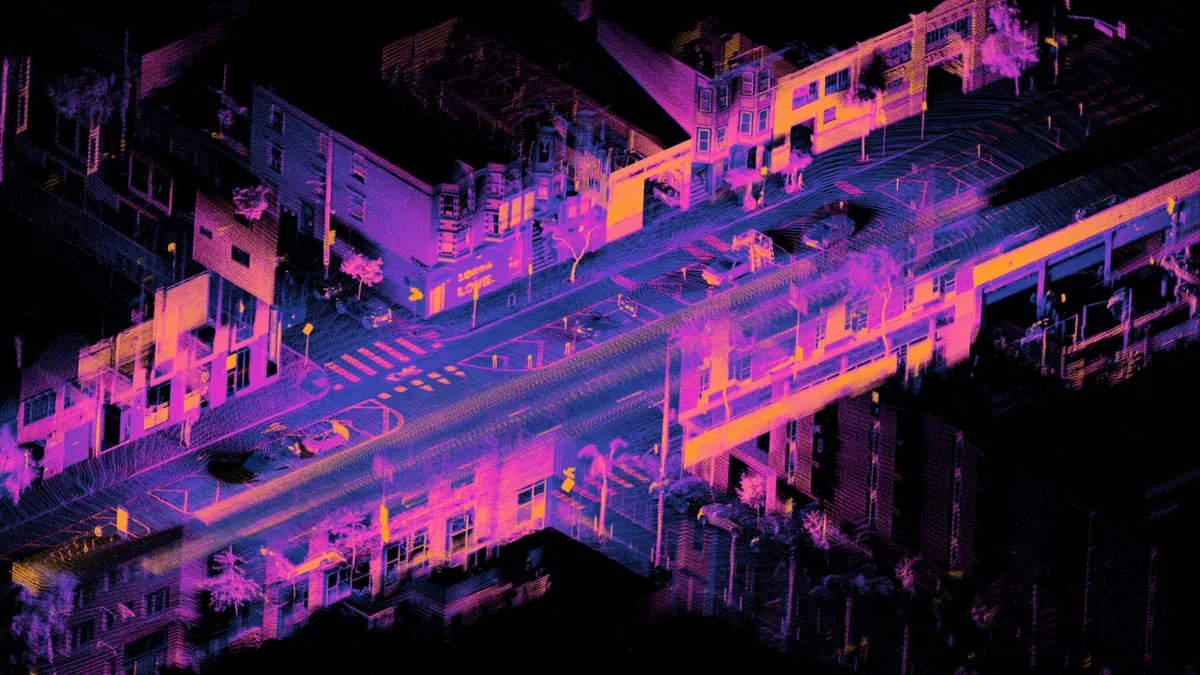
Debugging
| Symptom | Likely cause | Fix |
|---|---|---|
| Arm grazes objects the planner said were clear | object stored as a point or too-small shape; no padding | Use a proper shape; add 0.5–1 cm padding |
| Planner says “no path” almost always | huge bounding shapes or padding | Tighter shapes (capsules, smaller voxels); smaller padding |
| Robot is “in collision” at its start pose | own arm in the point cloud; or a touching pair not allowed | Self-filter the cloud; allow expected contacts (fingers–object) |
| Fast moves hit thin things | too few samples along the motion | Smaller steps or continuous collision checking |
| Planner goes behind objects into a wall | unknown space treated as free | Treat unknown as occupied, or look from another view |
| Collision checks are slow | meshes everywhere | Bounding volumes first; simpler shapes for links |
| Bench: refuses every move | echo from the pointer or desk | Raise the sensor; aim it just above the pointer’s plane |
Real world
Collision worlds in the real world
- MoveIt: the planning scene holds collision objects (boxes, cylinders, meshes) and, optionally, an OctoMap built from point clouds or depth images, with the robot’s own body filtered out. Attached objects travel with the gripper.
- Collision libraries: FCL answers collision, distance, tolerance and continuous-collision queries for many primitive shapes, meshes and octrees.
- Self-driving cars and delivery robots: lidar clouds like the one above are turned into occupancy grids, with free, occupied and unknown cells.
- Games and graphics: bounding volume hierarchies reject most objects with a few box tests, the same idea robots use.
- Your lab: model the desk as a box, the camera stand as a cylinder, blocks as boxes, and the arm links as capsules — and add 1 cm padding.
Think
Think about it
Think
Your depth camera can only see the front of a cardboard box on the desk. The arm must reach behind the box to pick a pen. What are your options, and what would you choose for a desk arm in a classroom with students around?
Experiment
Try it in the lab
About 60 minutes. Python 3 for the script; Arduino UNO, HC-SR04, a small servo with its own 5–6 V supply, a 10 kΩ potentiometer, two LEDs and two 220 Ω resistors for the bench.
Experiment
Find the right shapes and padding for your desk
You will need
- `collision_world_lab.py` (Python 3, no libraries)
- Collision-world explorer (in your browser)
- Arduino UNO, HC-SR04, SG90-class servo + separate 5–6 V supply, 10 kΩ potentiometer, green and red LEDs, two 220 Ω resistors, a card pointer, a box
Steps
- Run `collision_world_lab.py`. Add a 0.25 cm voxel size to Part 1. How many cells, and how much extra space?
- In Part 3, find the smallest q1 (with q2 = 0) that passes with 1 cm padding. Then with 2 cm padding.
- In Part 4, add a second sensor at (0.05, 0.25). How many box cells are still unknown?
- In Part 6, make the wall 3 cm thick. How many samples do you need now? Explain.
- Set the self-filter margin to 0 cm. Do any arm points remain? Why is a small extra margin used?
- Bench: measure the angle where the pointer stops with the box at 12, 15 and 20 cm.
- Bench: set PAD to 0 and to 3 cm. Which would you use with students around the desk?
Interactive · Collision world explorer · Educational AABB
Educational occupancy grid — not FCL / not Bullet / not industrial collision checking.
Collision representation is a trade-off between safety, speed and how much free space you give up. Simple shapes plus a little padding, checked often enough along the motion, are the everyday answer.
Knowledge check
Check your understanding
Knowledge check
1. If two bounding volumes do not intersect, then…
2. Why are robot links often modelled as capsules?
3. Smaller voxels…
4. An octree saves memory because…
5. A pose clears the mug by 5 mm and the padding is 1 cm. The planner should…
6. Space behind a box that the sensor never saw should be treated as…
7. Why is a self-filter needed on depth data?
8. A fast motion checked at only 2 poses missed a thin wall. The fix is…
Mini assignment
Hands-on assignment
Mini assignment
A collision model of your desk-arm cell
Build and test the collision world your planner will use.
Deliverables
- A table of every obstacle in your cell (desk, wall, camera stand, blocks, cup) with the shape you chose, its size in cm, and why.
- Your arm links as capsules: segment lengths and radii, measured from the real arm.
- Your padding choice, with a measured reason (for example, your arm’s repeat error or your sensor noise).
- A run of `collision_world_lab.py` (or your version) where you show one pose rejected only because of padding, and one swept motion that needs more samples.
- A bench log from `padded_keepout.ino` showing OK and REFUSED moves.
Do this, step by step
- Run
collision_world_lab.pyand note which poses are rejected and why. - Choose a shape (box, cylinder, sphere) for every obstacle in your cell and write its size in cm.
- Model your arm links as capsules with measured length and radius.
- Show one pose rejected only because of padding, and one swept motion past the thin
WALLthat needs more samples. - Bench: upload
padded_keepout.ino, turn the pot and log OK and REFUSED moves near the obstacle.
Stuck? Hints, one at a time
- If a pose looks clear but the arm still touches, check you used the capsule radius, not just the centre line.
- Padding should come from a measurement, like your arm’s repeat error or sensor noise — not a guess.
- The circle test is many times faster than the 64-edge mesh in the script. Use simple shapes first and only refine where it matters.
Challenges (pick by level)
- 🟢 Beginner: For your water bottle, compare a bounding box, a bounding cylinder and 1 cm voxels: how much extra space does each block?
- 🟡 Intermediate: Add oriented boxes (with yaw) to the script and check the arm against a box rotated by 30°.
- 🟠 Advanced: Build a 3D voxel grid from a real depth image (or a saved point cloud) and count occupied, free and unknown cells.
- 🔴 Expert: Use python-fcl (or MoveIt) to check your arm capsules against a mesh of your desk setup and compare times with your own code.
- ⚫ Research: Read the OctoMap paper and write one page on how probabilistic updates handle moving people near a robot.
Next step
Now the robot knows what is around it and how much space it takes. Next it must decide what to do. In Lesson 5 — Planning a Robot Task you will break “put the red block in the tray” into steps with preconditions and effects, before any motion is planned.
Look back: Lesson 3: Objects, Poses & Coordinate Frames. Next: Lesson 5: Planning a Robot Task. Related: Stage 12 — Simulation & Digital Twin.
Sources
- FCL — The Flexible Collision Library (README, GitHub) — collision, distance, tolerance and continuous collision queries; supported shapes including octrees via OctoMap.
- Wikipedia — Bounding volume — if bounding volumes do not intersect, the objects cannot collide; bounding volume hierarchies.
- OctoMap — 3D occupancy mapping — octree-based probabilistic occupancy with occupied, free and unknown space.
- MoveIt — Planning Scene Monitor (concepts) — collision objects, occupancy map monitor, depth-image self-filter.
- Wikipedia — Occupancy grid mapping — grid cells as occupied/free probabilities.
- HC-SR04 datasheet (SparkFun-hosted PDF) — 2 cm–4 m range, 10 µs trigger, 15° measuring angle.
- Photos: Wikimedia Commons (credits under each image).
Self-attested for now — keep artifacts in your lab notebook.
Complete
Today's goal
0 of 1 done today
Mark this lesson complete when you have worked the experiment, knowledge check, and assignment (even roughly).