
ROS 2 & Robot Software Architecture (Fundamentals) · Lesson 10
Parameters & Configuration
Est. 50–70 min
Why
Why this lesson matters
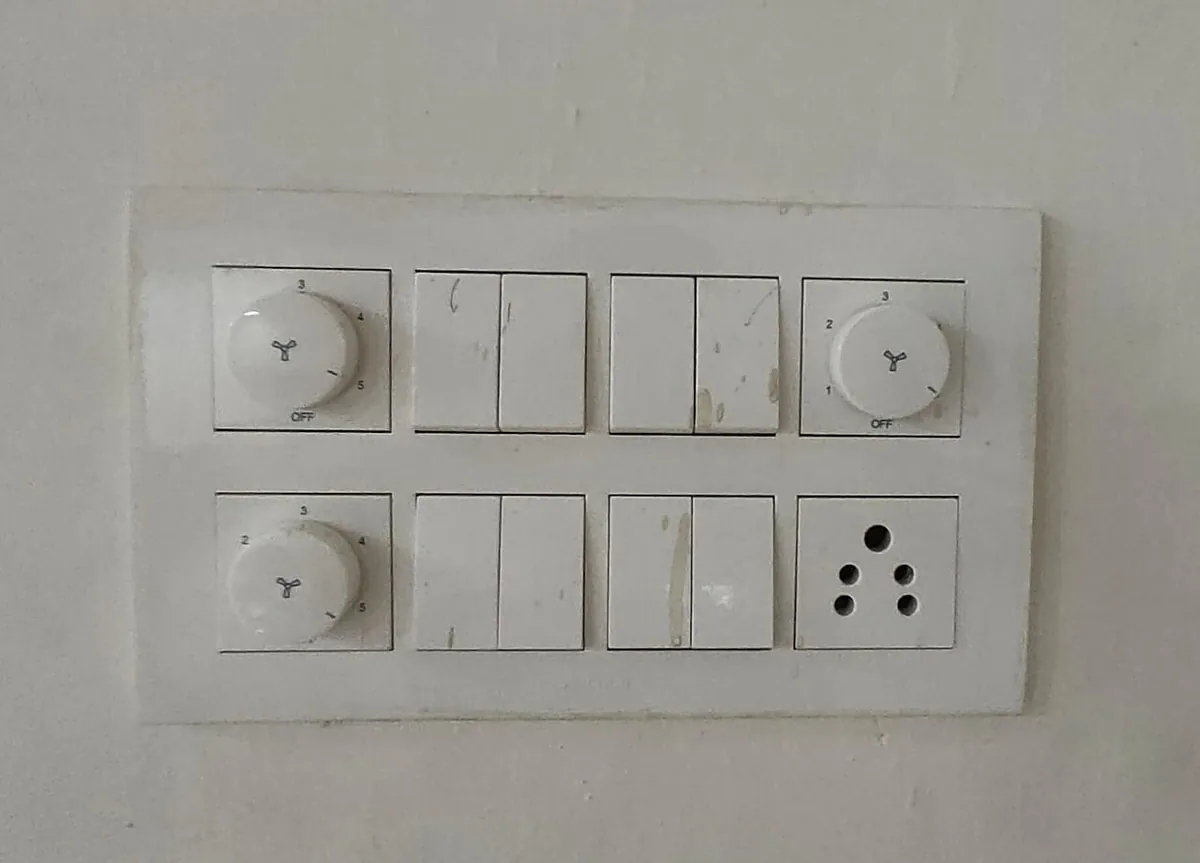
Think of the fan regulator on your wall. The fan’s motor and wiring (the code) never change, but you turn the knob from 1 to 5 to set the speed (a parameter) — even while the fan is running. And the knob only goes from OFF to 5: it has a range. ROS 2 parameters work the same way.
By the end of this lesson you will be able to: explain what a parameter is and which types it can have; declare parameters with descriptions, ranges and read-only; use ros2 param list/get/set/dump/load; start nodes with -p and --params-file; write a YAML file for two arms; reject unsafe changes with a callback; and send accepted limits to an Arduino.
Concept
How ROS 2 parameters work
What the Jazzy docs say
- Parameters are associated with individual nodes. They configure a node at startup (and during runtime) without changing the code.
- A parameter lives as long as its node. Restart the node and it starts from defaults again (unless you load a file).
- Each parameter has a key, a value and a descriptor. Value types:
bool,int64,float64,string,byte[],bool[],int64[],float64[],string[]. - By default a node must declare every parameter it accepts, so names and types are fixed at startup and misconfiguration is less likely.
- By default, changing the type of a declared parameter at runtime fails — e.g. putting a boolean into an integer parameter.
- Every node gets parameter services (
list_parameters,get_parameters,set_parameters, …);ros2 paramuses them.
Descriptors: description, range, read-only
The descriptor (rcl_interfaces/msg/ParameterDescriptor) can hold a description, read_only, and a floating_point_range or integer_range (from, to, step — step 0 means any value in between). Use it so ros2 param describe tells the next student what a value means and what is allowed.
Three callbacks
| Callback (rclpy method) | When it runs | Use it to |
|---|---|---|
add_pre_set_parameters_callback | Before the change; may edit the list | Change one parameter whenever another changes |
add_on_set_parameters_callback | Inspects the change; returns SetParametersResult | Reject unsafe values — and have no side effects |
add_post_set_parameters_callback | After the change succeeded | React: send new limits to hardware, log |
Visual
Visualise it: arguments and parameters flowing into nodes
Arguments, YAML and command-line values flow into nodes as parameters — see which value wins for each node.
Interactive · Launch & parameter lab
ROS 2 communication simulator — educational only (not a live ros2 launch / param)


Running: none
- Launch or tweak params to see the event log.
Code lab
Code lab: a toy parameter store, then a real joint-limits node
param_sim.py (plain Python, no ROS needed) declares four parameters, tries seven changes (good, wrong type, out of range, min above max, read-only, undeclared), loads one YAML file for two arms with a /** wildcard, and shows that values are lost on restart. Run python3 param_sim.py.
"""param_sim.py - a toy ROS 2 parameter store (plain Python, no ROS 2 needed).

Rules copied from the ROS 2 Jazzy "Parameters" concept page and docs:
  * parameters belong to one node and configure it without changing the code
  * a node must declare a parameter before it can be set (by default)
  * changing the type of a declared parameter fails (by default)
  * a descriptor can hold a description, a range and read_only
  * a "set parameters" callback can inspect a change and reject it
  * YAML files use <node>: ros__parameters: ...; /** matches any node in any namespace
This is a teaching model, not rclpy.
"""

TYPES = {bool: "bool", int: "int64", float: "float64", str: "string"}


class ToyNode:
    def __init__(self, fqn):
        self.fqn = fqn
        self.params, self.desc, self.callbacks = {}, {}, []

    def declare(self, name, default, description="", rng=None, read_only=False):
        self.params[name] = default
        self.desc[name] = dict(type=type(default), description=description, rng=rng, read_only=read_only)

    def set(self, name, value, at_startup=False):
        if name not in self.params:
            return f"FAIL  {name}: parameter not declared"
        d = self.desc[name]
        if d["read_only"] and not at_startup:
            return f"FAIL  {name}: read-only, can only be set at startup"
        if type(value) is not d["type"]:
            return f"FAIL  {name}: type is {TYPES[d['type']]}, got {TYPES.get(type(value), type(value).__name__)}"
        if d["rng"] and not (d["rng"][0] <= value <= d["rng"][1]):
            return f"FAIL  {name}: {value} outside range {d['rng'][0]}..{d['rng'][1]}"
        for cb in self.callbacks:
            ok, reason = cb(name, value, self.params)
            if not ok:
                return f"FAIL  {name}: rejected by callback - {reason}"
        old = self.params[name]
        self.params[name] = value
        return f"OK    {name}: {old} -> {value}"


def limits_callback(name, value, params):
    new = dict(params, **{name: value})
    if new["min_deg"] >= new["max_deg"]:
        return False, f"min_deg ({new['min_deg']}) must be below max_deg ({new['max_deg']})"
    return True, ""


def make_limits_node(fqn):
    n = ToyNode(fqn)
    n.declare("min_deg", 10.0, "lowest allowed angle", rng=(0.0, 180.0))
    n.declare("max_deg", 170.0, "highest allowed angle", rng=(0.0, 180.0))
    n.declare("max_speed_dps", 60.0, "speed limit, deg/s", rng=(1.0, 180.0))
    n.declare("port", "", "serial port, '' = simulate", read_only=True)
    n.callbacks.append(limits_callback)
    return n


print("Part 1: declared parameters of /arm1/joint_limits (ros2 param list)")
node = make_limits_node("/arm1/joint_limits")
for k, v in node.params.items():
    d = node.desc[k]
    extra = f" range {d['rng'][0]}..{d['rng'][1]}" if d["rng"] else ""
    extra += " read_only" if d["read_only"] else ""
    print(f"  {k:<14} {TYPES[d['type']]:<8} = {v!r:<8} {d['description']}{extra}")

print("\nPart 2: ros2 param set while the node runs")
for name, value in [("max_speed_dps", 30.0), ("max_speed_dps", 30), ("max_deg", 200.0),
                    ("min_deg", 175.0), ("max_deg", 150.0), ("port", "/dev/ttyACM0"), ("gain", 2.0)]:
    print(f"  set {name + '=' + repr(value):<28} {node.set(name, value)}")

print("\nPart 3: one YAML file for two arms (--params-file arm_params.yaml)")
yaml_file = {
    "/**": {"max_speed_dps": 45.0},
    "/arm1/joint_limits": {"min_deg": 20.0, "max_deg": 160.0},
    "/arm2/joint_limits": {"min_deg": 5.0, "max_deg": 175.0, "port": "/dev/ttyACM1"},
}


def matches(pattern, fqn):
    return pattern == "/**" or pattern == fqn


for fqn in ["/arm1/joint_limits", "/arm2/joint_limits"]:
    n = make_limits_node(fqn)
    for pattern, values in yaml_file.items():
        if matches(pattern, fqn):
            for k, v in values.items():
                n.set(k, v, at_startup=True)
    print(f"  {fqn}: " + ", ".join(f"{k}={v!r}" for k, v in n.params.items()))

print("\nPart 4: parameters live as long as the node")
fresh = make_limits_node("/arm1/joint_limits")
print(f"  after restart without the YAML file: max_speed_dps={fresh.params['max_speed_dps']} (back to default)")
print("  -> save with: ros2 param dump /arm1/joint_limits > arm1_limits.yaml")
Output (run with python3 param_sim.py)
Part 1: declared parameters of /arm1/joint_limits (ros2 param list)
  min_deg        float64  = 10.0     lowest allowed angle range 0.0..180.0
  max_deg        float64  = 170.0    highest allowed angle range 0.0..180.0
  max_speed_dps  float64  = 60.0     speed limit, deg/s range 1.0..180.0
  port           string   = ''       serial port, '' = simulate read_only

Part 2: ros2 param set while the node runs
  set max_speed_dps=30.0           OK    max_speed_dps: 60.0 -> 30.0
  set max_speed_dps=30             FAIL  max_speed_dps: type is float64, got int64
  set max_deg=200.0                FAIL  max_deg: 200.0 outside range 0.0..180.0
  set min_deg=175.0                FAIL  min_deg: rejected by callback - min_deg (175.0) must be below max_deg (170.0)
  set max_deg=150.0                OK    max_deg: 170.0 -> 150.0
  set port='/dev/ttyACM0'          FAIL  port: read-only, can only be set at startup
  set gain=2.0                     FAIL  gain: parameter not declared

Part 3: one YAML file for two arms (--params-file arm_params.yaml)
  /arm1/joint_limits: min_deg=20.0, max_deg=160.0, max_speed_dps=45.0, port=''
  /arm2/joint_limits: min_deg=5.0, max_deg=175.0, max_speed_dps=45.0, port='/dev/ttyACM1'

Part 4: parameters live as long as the node
  after restart without the YAML file: max_speed_dps=60.0 (back to default)
  -> save with: ros2 param dump /arm1/joint_limits > arm1_limits.yaml
Try it: change parameters from the command line, a YAML file and a launch file, and see which value each node ends up with.
Interactive · Launch & parameter lab
ROS 2 communication simulator — educational only (not a live ros2 launch / param)
Running: none
- Launch or tweak params to see the event log.
joint_limits_node.py — limits as real parameters
Declares the limits with descriptors and ranges, rejects min_deg >= max_deg in the set callback (no side effects there, as the docs warn), and only after a change is accepted sends L<min>,<max> to the Arduino. Targets on ~/target_deg are clamped and sent as P<deg>. It is the only node that opens the serial port.
"""joint_limits_node.py - joint limits as ROS 2 parameters (rclpy, ROS 2 Jazzy).

Declares min_deg / max_deg / max_speed_dps with descriptions and ranges, and a read-only port.
A "set parameters" callback rejects bad changes (min must stay below max) with no side effects;
a "post set" callback then sends accepted limits to the Arduino as "L<min>,<max>".
Targets on ~/target_deg (std_msgs/Float64) are clamped and sent as "P<deg>".
This node is the only one that opens the serial port (one port, one node).

ros2 run arm_control joint_limits --ros-args -r __ns:=/arm1 -p port:=/dev/ttyACM0
ros2 param set /arm1/joint_limits max_deg 150.0
ros2 topic pub --once /arm1/joint_limits/target_deg std_msgs/msg/Float64 "{data: 165.0}"
ros2 run arm_control joint_limits --ros-args -r __ns:=/arm1 --params-file arm_params.yaml
"""
import rclpy
from rclpy.node import Node
from rcl_interfaces.msg import FloatingPointRange, ParameterDescriptor, SetParametersResult
from std_msgs.msg import Float64


def angle_desc(text):
    return ParameterDescriptor(
        description=text,
        floating_point_range=[FloatingPointRange(from_value=0.0, to_value=180.0, step=0.0)],
    )


class JointLimits(Node):
    def __init__(self):
        super().__init__('joint_limits')
        self.declare_parameter('min_deg', 10.0, angle_desc('Lowest allowed joint angle (deg)'))
        self.declare_parameter('max_deg', 170.0, angle_desc('Highest allowed joint angle (deg)'))
        self.declare_parameter('max_speed_dps', 60.0, ParameterDescriptor(
            description='Speed limit (deg/s)',
            floating_point_range=[FloatingPointRange(from_value=1.0, to_value=180.0, step=0.0)]))
        self.declare_parameter('port', '', ParameterDescriptor(
            description="Arduino serial port; '' = simulate", read_only=True))

        self.add_on_set_parameters_callback(self.check_limits)       # may reject, no side effects
        self.add_post_set_parameters_callback(self.apply_limits)     # runs only after success

        self.serial = None
        port = self.get_parameter('port').value
        if port:
            import serial  # pyserial (rosdep key python3-serial)
            self.serial = serial.Serial(port, 115200, timeout=0.1)
        self.send_limits()
        self.create_subscription(Float64, '~/target_deg', self.on_target, 10)

    def current(self):
        return {n: self.get_parameter(n).value for n in ('min_deg', 'max_deg', 'max_speed_dps')}

    def check_limits(self, params):
        new = self.current()
        for p in params:
            if p.name in new:
                new[p.name] = p.value
        if new['min_deg'] >= new['max_deg']:
            return SetParametersResult(
                successful=False,
                reason=f"min_deg ({new['min_deg']}) must be below max_deg ({new['max_deg']})")
        return SetParametersResult(successful=True)

    def apply_limits(self, params):
        changed = ', '.join(f'{p.name}={p.value}' for p in params)
        self.get_logger().info(f'limits changed: {changed}')
        self.send_limits()

    def on_target(self, msg):
        lim = self.current()
        deg = min(max(msg.data, lim['min_deg']), lim['max_deg'])
        if deg != msg.data:
            self.get_logger().warn(f'target {msg.data:.1f} clamped to {deg:.1f}')
        if self.serial:
            self.serial.write(f'P{deg:.1f}\n'.encode())

    def send_limits(self):
        lim = self.current()
        line = f"L{lim['min_deg']:.1f},{lim['max_deg']:.1f}\n"
        if self.serial:
            self.serial.write(line.encode())
        self.get_logger().info(f"limits {lim['min_deg']}..{lim['max_deg']} deg, "
                               f"max {lim['max_speed_dps']} deg/s -> {line.strip()}"
                               + ('' if self.serial else ' (simulated)'))


def main():
    rclpy.init()
    node = JointLimits()
    try:
        rclpy.spin(node)
    except KeyboardInterrupt:
        pass
    finally:
        node.destroy_node()
        rclpy.try_shutdown()


if __name__ == '__main__':
    main()
arm_params.yaml — one file, two arms
# arm_params.yaml - one file for both arms in the lab.
# Format from the ROS 2 Jazzy docs: <node>: ros__parameters: ...
# "/**" matches any node in any namespace.
/**:
  ros__parameters:
    max_speed_dps: 45.0

/arm1/joint_limits:
  ros__parameters:
    min_deg: 20.0
    max_deg: 160.0

/arm2/joint_limits:
  ros__parameters:
    min_deg: 5.0
    max_deg: 175.0
    port: /dev/ttyACM1
ros2 run arm_control joint_limits --ros-args -r __ns:=/arm1
ros2 param list /arm1/joint_limits
ros2 param describe /arm1/joint_limits max_deg
ros2 param get /arm1/joint_limits max_deg
ros2 param set /arm1/joint_limits max_deg 150.0 # OK
ros2 param set /arm1/joint_limits min_deg 175.0 # rejected by our callback
ros2 param set /arm1/joint_limits max_speed_dps 30 # fails: integer into float64
ros2 param dump /arm1/joint_limits > arm1_limits.yaml
ros2 param load /arm1/joint_limits arm1_limits.yaml
# start with values
ros2 run arm_control joint_limits --ros-args -r __ns:=/arm1 -p max_deg:=150.0
ros2 run arm_control joint_limits --ros-args -r __ns:=/arm1 --params-file arm_params.yamlIn a launch file (Lesson 9), pass the YAML path in parameters=[...] the same way we passed a dictionary: parameters=[os.path.join(get_package_share_directory('arm_bringup'), 'config', 'arm_params.yaml')], and install the config/ folder through data_files like launch/.
Real world
Parameters in the real world
- turtlesim (official tutorial):
background_r,background_g,background_bchange the window colour at runtime; every node also hasuse_sim_time. - Robot arms: joint limits, speeds, controller gains and serial ports differ between robots of the same model — they live in per-robot YAML files.
- Field robots: the same code runs in the lab and outdoors with different speed limits loaded from different files.
- Teaching labs: students tune a gain with
ros2 param set, thendumpthe best values for the next class.

Bench build
Bench build: change a joint’s limits while it runs
One servo again, with a new sketch. The firmware keeps hard limits (5–175°) that no parameter can widen; parameters can only narrow the range. That is how real robots layer safety: software limits inside hardware limits.
| From | To | Note |
|---|---|---|
| Servo signal | Arduino D9 | Signal only |
| Servo + (red) | Separate 5–6 V supply + | Not the Arduino 5V pin or any GPIO |
| Servo − (brown/black) | Supply − | — |
| Supply − | Arduino GND | Common ground |
| Arduino USB | ROS 2 computer | 115200 baud |
// servo_limits.ino - one servo with limits that ROS 2 parameters can change.
//   "P<deg>"        move to an angle (e.g. P93.5), clamped to the current limits
//   "L<min>,<max>"  new limits from joint_limits_node.py (e.g. L20.0,160.0)
// Hard limits 5..175 deg are fixed in firmware: a parameter can narrow them, never widen them.
// POWER: servo red (+) to a SEPARATE 5-6 V supply, never the Arduino 5V pin or a GPIO. Join grounds.
#include <Servo.h>

const int SERVO_PIN = 9;
const float HARD_MIN = 5.0, HARD_MAX = 175.0;
float minDeg = 10.0, maxDeg = 170.0;
Servo joint;
char buf[24];
byte n = 0;

int degToUs(float d) { return (int)(544.0 + (2400.0 - 544.0) * d / 180.0); }  // Servo library default range

float clampf(float v, float lo, float hi) { return v < lo ? lo : (v > hi ? hi : v); }

void handle(char *line) {
  if (line[0] == 'P') {
    float d = clampf(atof(line + 1), minDeg, maxDeg);
    joint.writeMicroseconds(degToUs(d));
  } else if (line[0] == 'L') {
    char *comma = strchr(line, ',');
    if (!comma) return;
    float lo = clampf(atof(line + 1), HARD_MIN, HARD_MAX);
    float hi = clampf(atof(comma + 1), HARD_MIN, HARD_MAX);
    if (lo < hi) {
      minDeg = lo;
      maxDeg = hi;
      Serial.print("ok L");
      Serial.print(minDeg, 1);
      Serial.print(",");
      Serial.println(maxDeg, 1);
    } else {
      Serial.println("err limits");
    }
  }
}

void setup() {
  Serial.begin(115200);
  joint.attach(SERVO_PIN);
  joint.writeMicroseconds(degToUs(90.0));
}

void loop() {
  while (Serial.available()) {
    char c = Serial.read();
    if (c == '\n') {
      buf[n] = 0;
      if (n > 1) handle(buf);
      n = 0;
    } else if (n < sizeof(buf) - 1) {
      buf[n++] = c;
    }
  }
}Serial Monitor test
Horn free. Send
L40,140, thenP20— the servo should stop at 40°. SendL1,179— firmware clamps to 5–175. Close Serial Monitor.Start the node
ros2 run arm_control joint_limits --ros-args -r __ns:=/arm1 -p port:=/dev/ttyACM0Move
ros2 topic pub --once /arm1/joint_limits/target_deg std_msgs/msg/Float64 "{data: 120.0}"Narrow the range live
ros2 param set /arm1/joint_limits max_deg 100.0, then send 120 again — it stops at 100 and the node logs a clamp warning.Try a bad change
ros2 param set /arm1/joint_limits min_deg 120.0must be rejected and the servo must not move.

Debugging
Debugging parameters
| Symptom | Likely cause | Fix |
|---|---|---|
| “Wrong parameter type” | Sent 30 to a float parameter | Write 30.0 |
| Value from YAML ignored | Node name/namespace in YAML does not match, or missing ros__parameters | Compare with ros2 node list; use /** to test |
| “parameter not declared” | Node never called declare_parameter | Declare it (with a default) in __init__ |
| Change accepted but hardware unchanged | Hardware updated in the set callback, or not at all | Do side effects in the post-set callback |
Cannot change port | It is read-only | Set at startup with -p or YAML, then restart |
| Values gone after restart | Parameters live only as long as the node | ros2 param dump to a file and load it at startup |
Think
Think about it
Think
Which of these should be parameters, and which should stay as constants in code: the servo signal pin, joint limits, the serial port, the cubic-profile formula, the publish rate, the robot’s name?
Experiment
Try it in the lab
About 40 minutes with Python; the ROS 2 steps need ROS 2 Jazzy with turtlesim and your arm_ws; the bench step needs one servo and servo_limits.ino.
Experiment
Tune, reject, save, reload
You will need
- `param_sim.py` and Python 3
- Launch & parameter lab (in your browser)
- Optional: ROS 2 Jazzy, turtlesim, `joint_limits_node.py`, `arm_params.yaml`, Arduino UNO, hobby servo, separate 5–6 V supply
Steps
- Run `param_sim.py`. Add a callback rule: `max_speed_dps` above 90 is rejected when `max_deg - min_deg` is over 120. Test it.
- Add `/arm3/joint_limits` to the simulator’s YAML with only a port. What limits does it get?
- With ROS 2: follow the tutorial — change turtlesim’s `background_r` to 150, `dump` to a file, restart with `--params-file`.
- With ROS 2: run `joint_limits_node.py`, try every `ros2 param set` from the code lab and note which fail and why.
- With ROS 2: start two copies in `/arm1` and `/arm2` with `arm_params.yaml` and compare `ros2 param get` results.
- Bench: narrow the range live and watch the servo stop at the new limit.
Interactive · Launch & parameter lab
ROS 2 communication simulator — educational only (not a live ros2 launch / param)
Running: none
- Launch or tweak params to see the event log.
Parameters move robot-specific numbers out of code, and declared types, ranges and callbacks stop bad values before they reach hardware.
Knowledge check
Check your understanding
Knowledge check
1. ROS 2 parameters belong to…
2. By default, can you set a parameter that the node never declared?
3. `ros2 param set /arm1/joint_limits max_speed_dps 30` fails on a float64 parameter. Why?
4. Which callback should reject an unsafe value?
5. In a parameter YAML file, `/**` means…
6. Which command saves a running node’s parameters to a file?
7. Why keep hard limits in the Arduino even with parameter limits?
Mini assignment
Hands-on assignment
Mini assignment
A configuration file for your 6DOF arm
Move every robot-specific number of your arm out of code and into declared parameters and a YAML file.
Deliverables
- A table of parameters for all six joints: node, name, type, default, range, read-only?, description.
- Output of `param_sim.py` after your experiment changes.
- Optional (ROS 2): your YAML file, `ros2 param list` and one rejected `ros2 param set` with its message.
- Optional (bench): a short video of the servo range narrowing live.
Do this, step by step
- Run
python3 param_sim.pyand add themax_speed_dpsrule from the experiment; test both a passing and a failing value. - Make a table of parameters for all six joints: node, name, type, default, range, read-only, description.
- Add
/arm3/joint_limitswith only a port and write which limits it gets. - Optional with ROS 2: run
joint_limits_node.py, try everyros2 param setfrom the code lab and note which are refused. - Optional bench: narrow the range live and watch the servo stop at the new limit.
Stuck? Hints, one at a time
- A parameter that is not in the YAML falls back to the default from
declare_parameter. - The set-parameters callback can refuse a change — return a failed result with a clear reason.
- Keep hardware values like the port read-only so nobody changes them while the arm is moving.
Challenges (pick by level)
- 🟢 Easy: Change turtlesim’s background with
ros2 param set, then dump and reload it. - 🟡 Medium: Add
home_degtojoint_limits_node.pyand reject it if it is outside min/max. - 🟠 Hard-ish: Use float arrays (
float64[]) for all six joint limits in one node and validate every pair. - 🔴 Hard: Load
arm_params.yamlfrom yourarm_bringuplaunch file for both arms using thensargument. - ⚫ Research: Read the ROS 2 demos
set_parameters_callback.cppexample and explain the order of the three callbacks.
Next step
You have used many ros2 commands already. In Lesson 11 — ROS 2 Tools & CLI you will collect them into a toolbox for inspecting and debugging any ROS 2 system.
Look back: Lesson 9: Launch Files. Next: Lesson 11: ROS 2 Tools & CLI. Related: Stage 7 — Control Systems & PID.
Sources
- ROS 2 Jazzy docs — Parameters (concepts) — per-node, startup/runtime, lifetime, types, descriptors, declaring, type changes fail, three callbacks, parameter services,
ros2 param. - ROS 2 Jazzy docs — Understanding parameters (tutorial) —
list/get/set/dump/load,--params-file, turtlesim background,use_sim_time. - ROS 2 Jazzy docs — Using parameters in a class (Python) —
declare_parameter,get_parameter,ParameterDescriptor(description=…). - ROS 2 Jazzy docs — Passing ROS arguments to nodes —
-p name:=value, YAMLros__parameters,/**and*wildcards. - rcl_interfaces ParameterDescriptor.msg (jazzy) and FloatingPointRange.msg — description, read_only, ranges, step 0.
- rclpy node.py (jazzy) —
declare_parameter,add_on_set_parameters_callback,add_post_set_parameters_callback. - ros2cli ros2param verbs (jazzy) —
describe,delete,dump,get,list,load,set. - Docs text read from the official docs source ros2/ros2_documentation (jazzy branch).
- Photos: Wikimedia Commons (credits under each image).
Self-attested for now — keep artifacts in your lab notebook.
Complete
Today's goal
0 of 1 done today
Mark this lesson complete when you have worked the experiment, knowledge check, and assignment (even roughly).