
ROS 2 & Robot Software Architecture (Fundamentals) · Lesson 06
Services — Request/Response
Est. 45–60 min
Why
Why this lesson matters
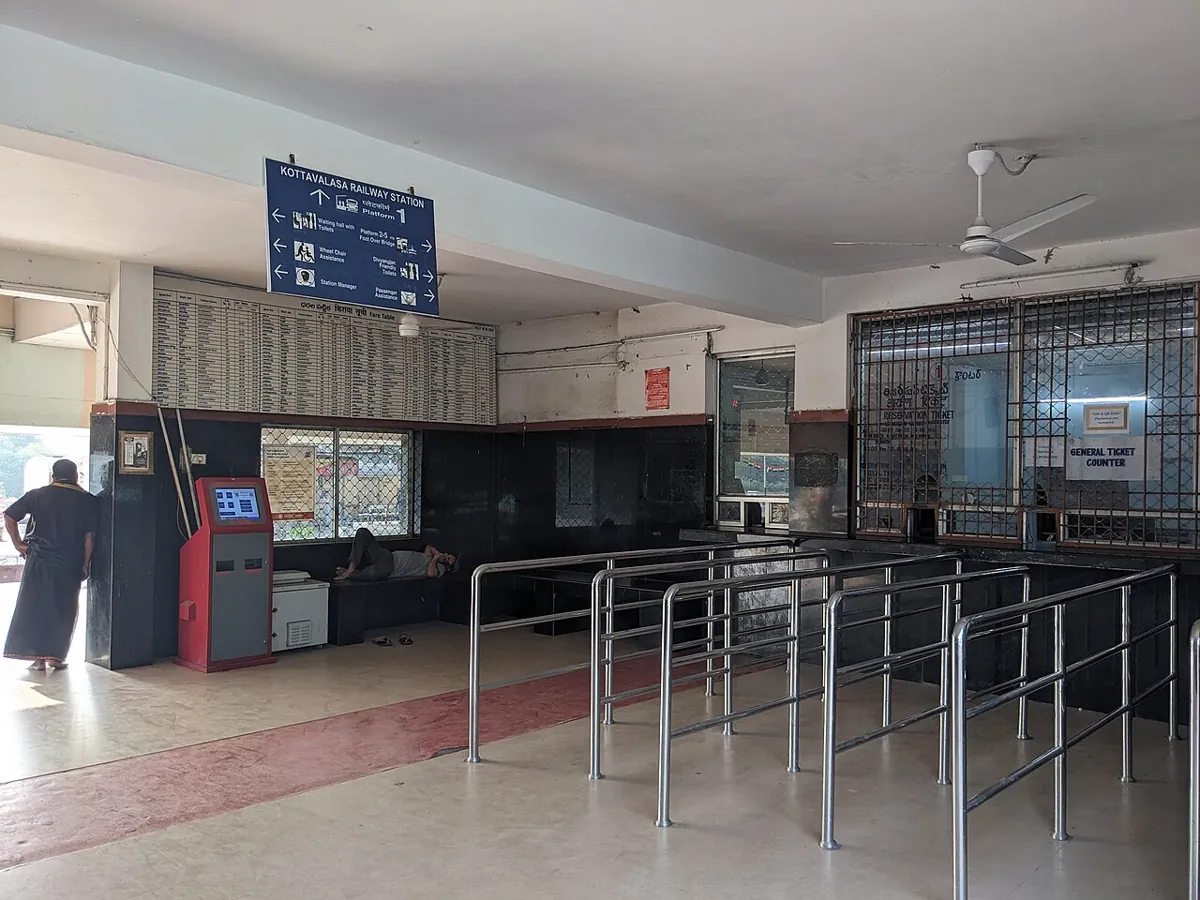
Think of the ticket counter at a railway station. You go to the window, ask one clear question (“one ticket to Kota, sleeper”), and wait. The clerk does a short job and gives you one answer: a ticket, or “sorry, waitlisted”. If the counter is closed, you know immediately. You would never stand at the counter for the whole train journey — that would be a different kind of job. A ROS 2 service is that counter window.
By the end of this lesson you will be able to: explain a service as a remote procedure call with a request and a response; know the docs’ rules (return quickly; one server per name; many clients); use the standard std_srvs/srv/SetBool; write a service server and an async client in rclpy; call services from the terminal with ros2 service list -t, type, find and call; and decide between topic, service and action.
Concept
How a service works
The official definition
The Jazzy docs say a service is a remote procedure call: a node asks another node to do a computation and return a result. The Understanding services tutorial adds that services use a call-and-response model, while topics give continual updates — services only provide data when called by a client.
| Rule from the docs | What it means for our arm |
|---|---|
| Services are expected to return quickly, as the client is generally waiting | Open/close the gripper, read a mode, reset a counter — short jobs |
| Never use them for long-running processes, especially ones that may need to be pre-empted | Moving the arm for 4 s is an action (Lesson 7) |
| There should only ever be one server per service name; with two, which one answers is undefined | Only one gripper_service per arm namespace |
| There can be any number of clients | Dashboard, planner and you in the terminal can all call it |
| Service names look like topic names | Relative set_gripper → /arm1/set_gripper in namespace /arm1 |
The .srv type: request --- response
As you saw in Lesson 5, a .srv file is two message definitions separated by ---. The standard std_srvs/srv/SetBool is perfect for on/off jobs:
bool data # e.g. for hardware enabling / disabling
---
bool success   # indicate successful run of triggered service
string message # informational, e.g. for error messages
Server and client in rclpy
- Server:
self.create_service(SetBool, 'set_gripper', self.on_request). The callback gets(request, response), fills the response and returns it. - Client:
self.create_client(SetBool, 'set_gripper'), thenwait_for_service(timeout_sec=…), thencall_async(request)which returns a future. - Waiting for the answer: the official tutorial uses
rclpy.spin_until_future_complete(node, future). We add a timeout so the client never hangs forever.
Visual
Visualise it: request, response and when to use an action
Compare a service (one request, one response) with an action (goal, feedback, result).
Interactive · Service / action explorer
ROS 2 communication simulator — educational only (not a live ROS 2 runtime)

Service /set_mode · type example_interfaces/srv/SetBool (conceptual)
- No calls yet — send a request.
Code lab
Code lab: a toy service, then a real server and client
service_sim.py (plain Python) shows: calling before a server exists; two clients sharing one server; a server that refuses; a slow 6-second job timing out as a service; and a topic/service/action decision table. Run python3 service_sim.py.
"""service_sim.py - request/response in plain Python (no ROS 2 needed).

Models ideas from the ROS 2 Jazzy "Services" concept page:
  * a service is a remote procedure call: client sends a request, server computes, returns a response
  * services should return QUICKLY - the client is usually waiting
  * one server per service name; any number of clients
Uses std_srvs/SetBool's shape: request {data: bool} -> response {success: bool, message: str}
This is a teaching model, not the real ROS 2 middleware.
"""


class Graph:
    def __init__(self):
        self.servers = {}

    def create_service(self, name, handler, cost_s=0.01):
        if name in self.servers:
            # real ROS 2 does not stop you, but which server answers is UNDEFINED
            print(f"  WARNING: second server on {name} - docs: which one answers is undefined")
        self.servers[name] = (handler, cost_s)

    def call(self, name, request, timeout_s=1.0):
        if name not in self.servers:
            return None, f"no server for {name} (wait_for_service would keep waiting)"
        handler, cost = self.servers[name]
        if cost > timeout_s:
            return None, f"timed out after {timeout_s:.1f} s (server needs {cost:.1f} s)"
        return handler(request), f"answered in {cost:.2f} s"


gripper = {"closed": False, "estop": False}


def set_gripper(req):
    if gripper["estop"]:
        return {"success": False, "message": "refused: e-stop active"}
    if gripper["closed"] == req["data"]:
        return {"success": True, "message": "already " + ("closed" if req["data"] else "open")}
    gripper["closed"] = req["data"]
    return {"success": True, "message": "closed" if req["data"] else "opened"}


g = Graph()
print("Part 1: call before any server exists")
print("  ", g.call("/arm1/set_gripper", {"data": True}))

print("\nPart 2: server up, three calls from two different clients")
g.create_service("/arm1/set_gripper", set_gripper)
for who, d in (("dashboard", True), ("planner", True), ("dashboard", False)):
    resp, info = g.call("/arm1/set_gripper", {"data": d})
    print(f"   {who:9s} data={d!s:5s} -> {resp}  [{info}]")

print("\nPart 3: the server can say NO - always check success")
gripper["estop"] = True
print("  ", g.call("/arm1/set_gripper", {"data": True})[0])
gripper["estop"] = False

print("\nPart 4: a slow job squeezed into a service")
g.create_service("/arm1/move_to_home", lambda r: {"success": True, "message": "home"}, cost_s=6.0)
print("  ", g.call("/arm1/move_to_home", {"data": True}, timeout_s=2.0))
print("   -> a 6 s motion has no progress and no cancel here: use an ACTION (Lesson 7)")

print("\nPart 5: topic vs service vs action - pick one")
jobs = [("joint angles at 50 Hz", "topic"), ("open the gripper, did it work?", "service"),
        ("read current mode once", "service"), ("move arm to pose (4 s, cancellable)", "action"),
        ("camera images", "topic"), ("start calibration and report progress", "action")]
for job, kind in jobs:
    print(f"   {job:40s} -> {kind}")
Output (run with python3 service_sim.py)
Part 1: call before any server exists
   (None, 'no server for /arm1/set_gripper (wait_for_service would keep waiting)')

Part 2: server up, three calls from two different clients
   dashboard data=True  -> {'success': True, 'message': 'closed'}  [answered in 0.01 s]
   planner   data=True  -> {'success': True, 'message': 'already closed'}  [answered in 0.01 s]
   dashboard data=False -> {'success': True, 'message': 'opened'}  [answered in 0.01 s]

Part 3: the server can say NO - always check success
   {'success': False, 'message': 'refused: e-stop active'}

Part 4: a slow job squeezed into a service
   (None, 'timed out after 2.0 s (server needs 6.0 s)')
   -> a 6 s motion has no progress and no cancel here: use an ACTION (Lesson 7)

Part 5: topic vs service vs action - pick one
   joint angles at 50 Hz                    -> topic
   open the gripper, did it work?           -> service
   read current mode once                   -> service
   move arm to pose (4 s, cancellable)      -> action
   camera images                            -> topic
start calibration and report progress -> actionTry it: send a service request and an action goal, and compare how each one replies.
Interactive · Service / action explorer
ROS 2 communication simulator — educational only (not a live ROS 2 runtime)
Service /set_mode · type example_interfaces/srv/SetBool (conceptual)
- No calls yet — send a request.
The server: gripper_service_node.py
A real rclpy server for ROS 2 Jazzy, in the style of the official service tutorial. It offers set_gripper (SetBool). With a board connected it sends G1/G0 over serial and waits at most 0.3 s for ok …; without a board it simulates. It returns quickly either way.
"""gripper_service_node.py - rclpy (ROS 2 Jazzy) SERVICE SERVER using std_srvs/srv/SetBool.

Service name (relative): set_gripper      request.data True = close, False = open
Response: success (bool) + message (str). It answers quickly: it only sends one serial
command to the Arduino (gripper_servo.ino) and waits briefly for "ok"/"err".
Pattern follows the Jazzy "Writing a simple service and client (Python)" tutorial.

  python3 gripper_service_node.py --ros-args -r __ns:=/arm1 -p port:=/dev/ttyACM0
  python3 gripper_service_node.py --ros-args -r __ns:=/arm1          # no board: simulated
"""
import rclpy
from rclpy.node import Node
from std_srvs.srv import SetBool


class GripperService(Node):
    def __init__(self):
        super().__init__('gripper_service')
        self.declare_parameter('port', '')
        self.declare_parameter('baud', 115200)
        port = self.get_parameter('port').value
        self.serial = None
        if port:
            import serial  # pyserial
            self.serial = serial.Serial(port, int(self.get_parameter('baud').value), timeout=0.3)
        self.closed = False
        self.srv = self.create_service(SetBool, 'set_gripper', self.on_request)
        self.get_logger().info(f'service ready: {self.resolve_service_name("set_gripper")}')

    def on_request(self, request, response):
        want = bool(request.data)
        if self.serial is None:
            self.closed = want
            response.success = True
            response.message = 'simulated: ' + ('closed' if want else 'opened')
            return response
        self.serial.reset_input_buffer()
        self.serial.write(b'G1\n' if want else b'G0\n')
        reply = self.serial.readline().decode(errors='ignore').strip()   # short timeout (0.3 s)
        response.success = reply.startswith('ok')
        response.message = reply or 'no reply from board'
        if response.success:
            self.closed = want
        return response


def main():
    rclpy.init()
    node = GripperService()
    try:
        rclpy.spin(node)
    except KeyboardInterrupt:
        pass
    finally:
        node.destroy_node()
        rclpy.try_shutdown()


if __name__ == '__main__':
    main()
The client: gripper_client.py
"""gripper_client.py - rclpy (ROS 2 Jazzy) SERVICE CLIENT for set_gripper (std_srvs/srv/SetBool).

  python3 gripper_client.py close --ros-args -r __ns:=/arm1
  python3 gripper_client.py open  --ros-args -r __ns:=/arm1

Waits up to 5 s for the server, sends one request with call_async, waits up to 2 s for
the answer, and ALWAYS checks response.success.
"""
import sys

import rclpy
from rclpy.node import Node
from rclpy.utilities import remove_ros_args
from std_srvs.srv import SetBool


class GripperClient(Node):
    def __init__(self):
        super().__init__('gripper_client')
        self.cli = self.create_client(SetBool, 'set_gripper')


def main():
    rclpy.init(args=sys.argv)
    args = remove_ros_args(sys.argv)
    want_close = len(args) > 1 and args[1] == 'close'
    node = GripperClient()
    try:
        if not node.cli.wait_for_service(timeout_sec=5.0):
            node.get_logger().error('set_gripper service not available - is the server running in my namespace?')
            return
        req = SetBool.Request()
        req.data = want_close
        future = node.cli.call_async(req)
        rclpy.spin_until_future_complete(node, future, timeout_sec=2.0)
        if not future.done():
            node.get_logger().error('no response within 2 s')
            return
        resp = future.result()
        if resp.success:
            node.get_logger().info(f'OK: {resp.message}')
        else:
            node.get_logger().warn(f'server refused: {resp.message}')
    finally:
        node.destroy_node()
        rclpy.try_shutdown()


if __name__ == '__main__':
main()python3 gripper_service_node.py --ros-args -r __ns:=/arm1
ros2 service list -t # names with [types]
ros2 service type /arm1/set_gripper # std_srvs/srv/SetBool
ros2 service find std_srvs/srv/SetBool
ros2 interface show std_srvs/srv/SetBool
ros2 service call /arm1/set_gripper std_srvs/srv/SetBool "{data: true}"
# response: std_srvs.srv.SetBool_Response(success=True, message='simulated: closed')
python3 gripper_client.py open --ros-args -r __ns:=/arm1The tutorial also shows ros2 service echo, but notes that it needs service introspection, which is disabled by default and must be switched on in code with configure_introspection. So do not be surprised if echo shows nothing for our nodes.
Real world
Services in the real world
- turtlesim (official tutorial):
/clear(std_srvs/srv/Empty) wipes the drawing;/spawn(turtlesim/srv/Spawn) creates a new turtle and replies with its name. - Hardware enable/disable: the SetBool definition itself gives “hardware enabling / disabling” as its example use.
- Every node’s parameters: ROS 2 parameters are built on services (Lesson 10) — you have been using services without knowing it.
- Grippers and tools: open/close, tare a force sensor, switch a vacuum on — short commands where you want a clear yes or no.

Bench build
Bench build: a servo gripper behind a service
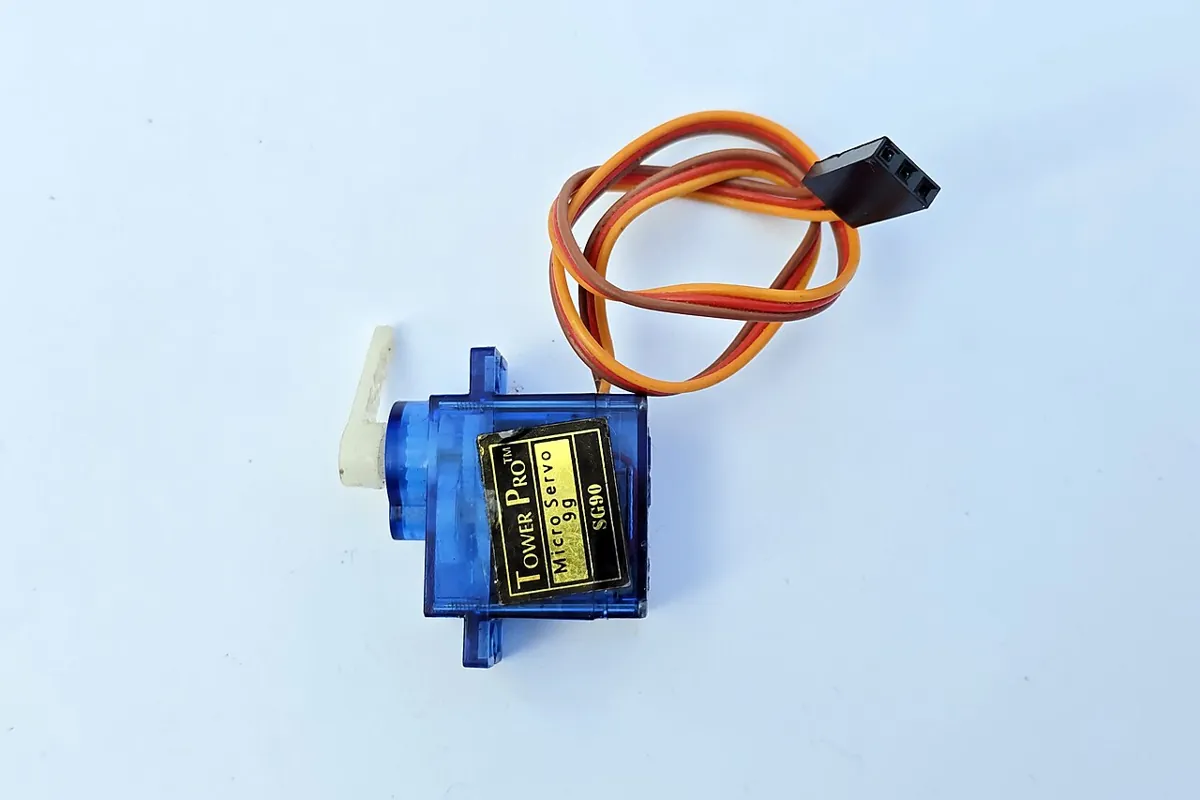
One hobby servo works the gripper jaw. The Arduino UNO listens for G1/G0 and replies ok closed / ok open, so the service can report real success. This is the first build in this stage that moves a motor, so read the safety box before wiring.
| From | To | Note |
|---|---|---|
| Servo signal (orange/yellow) | Arduino D9 | Signal only |
| Servo + (red) | Separate 5–6 V supply + | Not the Arduino 5V pin or any GPIO |
| Servo − (brown/black) | Supply − | — |
| Supply − | Arduino GND | Common ground, so the signal has a reference |
| Arduino USB | ROS 2 computer | 115200 baud |
// gripper_servo.ino - one hobby servo as a gripper, commanded over serial.
//   "G1" -> close (CLOSE_DEG), "G0" -> open (OPEN_DEG); replies "ok closed" / "ok open" / "err ..."
// Used by gripper_service_node.py.
// POWER: the servo's red (+) wire goes to a SEPARATE 5-6 V supply, NOT the Arduino 5V pin or a GPIO.
//        Join the supply's GND to Arduino GND. Only the signal wire goes to D9.
#include <Servo.h>

const int SERVO_PIN = 9;
const int OPEN_DEG = 30;    // adjust to your gripper; stay inside its free travel
const int CLOSE_DEG = 110;

Servo grip;
String line;

void setup() {
  Serial.begin(115200);
  grip.attach(SERVO_PIN);
  grip.write(OPEN_DEG);     // start open
}

void loop() {
  while (Serial.available()) {
    char c = Serial.read();
    if (c == '\n' || c == '\r') {
      line.trim();
      if (line == "G1") {
        grip.write(CLOSE_DEG);
        Serial.println("ok closed");
      } else if (line == "G0") {
        grip.write(OPEN_DEG);
        Serial.println("ok open");
      } else if (line.length() > 0) {
        Serial.println("err unknown command");
      }
      line = "";
    } else if (line.length() < 16) {
      line += c;
    }
  }
}Find safe angles first
With the jaw unmounted, try
OPEN_DEGandCLOSE_DEGvalues in Serial Monitor (G0,G1). Pick angles that do not press the jaw against its stops — a stalled servo heats up and draws high current.Close Serial Monitor
Only one program can hold the port.
Start the server
python3 gripper_service_node.py --ros-args -r __ns:=/arm1 -p port:=/dev/ttyACM0Call it
ros2 service call /arm1/set_gripper std_srvs/srv/SetBool "{data: true}"— the jaw closes and the response saysok closed. Unplug the USB and call again: the response is now a failure, not a silent lie.
Debugging
Debugging services
| Symptom | Likely cause | Fix |
|---|---|---|
| Client prints “service not available” | Server not running, or in another namespace | ros2 service list and compare full names |
| Client hangs forever | No timeout on waiting for the future | Use timeout_sec in spin_until_future_complete and check future.done() |
ros2 service call fails to parse | Bad YAML or wrong type name | Copy the type from ros2 service type; use "{data: true}" |
| Sometimes one behaviour, sometimes another | Two servers on the same name | Only one server per service name (docs: undefined which answers) |
| Whole node freezes while serving | Long work inside the callback | Keep it short; move long jobs to an action |
| Response says success but jaw did not move | Servo unpowered or ground not joined | Check separate supply and common GND |
Think
Think about it
Think
Yatika wants a service `move_to_home` that moves all six joints home and replies when finished (about 5 s). It works on the bench. Why do the docs advise against this, and what breaks first in a real cell?
Experiment
Try it in the lab
About 40 minutes with Python; the ROS 2 and bench steps need ROS 2 Jazzy and the servo build.
Experiment
Server, client and the limits of a service
You will need
- `service_sim.py` and Python 3
- Service/action explorer (in your browser)
- Optional: ROS 2 Jazzy, `gripper_service_node.py`, `gripper_client.py`, Arduino UNO, hobby servo, separate 5–6 V supply
Steps
- Run `service_sim.py`. Create a second server on `/arm1/set_gripper` and read the warning. Why is “undefined” dangerous for a gripper?
- Change Part 4’s timeout to 10 s. The call now “works” — list two reasons it is still a bad design.
- With ROS 2: run turtlesim and call `/spawn` as in the official tutorial.
- With ROS 2: start `gripper_service_node.py` (simulated) and call it three ways: `ros2 service call`, `gripper_client.py`, and twice in a row with the same value.
- With ROS 2: stop the server and run `gripper_client.py`. How long does it wait, and what does it print?
- Bench: call close/open with the servo; then unplug USB and call again. Record each response.
Interactive · Service / action explorer
ROS 2 communication simulator — educational only (not a live ROS 2 runtime)
Service /set_mode · type example_interfaces/srv/SetBool (conceptual)
- No calls yet — send a request.
A service gives you a guaranteed reply — or a clear failure — for short jobs. It is the right tool when the caller must know the outcome before continuing, and the wrong tool for anything long or cancellable.
Knowledge check
Check your understanding
Knowledge check
1. A ROS 2 service is best described as…
2. How many servers should a service name have?
3. How many clients can use one service?
4. In rclpy, `call_async(request)` returns…
5. Which should NOT be a service?
6. The response to `set_gripper` arrives with `success: false`. You should…
7. Where should the gripper servo’s red wire go?
Mini assignment
Hands-on assignment
Mini assignment
Service plan for your 6DOF arm
Find every short command in your arm, give each a service type, and prove one works end to end.
Deliverables
- A table of 4–6 services: full name in `/arm1`, type (standard first), what the request means, what success means, expected time to answer.
- A list of jobs you rejected as services and why (topic or action instead).
- Output of `service_sim.py` after your experiment changes.
- Optional (ROS 2): `ros2 service list -t` and two `ros2 service call` outputs — one success, one failure.
- Optional (bench): a short video of the gripper responding to service calls, plus your OPEN/CLOSE angles.
Do this, step by step
- Run
python3 service_sim.pyand create the second server on/arm1/set_gripper; read the warning. - Make a table of 4–6 services for your arm: name, type, request meaning, success meaning, expected answer time.
- List the jobs you rejected as services and say whether each is a topic or an action.
- Change the Part 4 timeout to 10 s and write two reasons it is still a bad design.
- Optional with ROS 2: save one successful and one failed
ros2 service call.
Stuck? Hints, one at a time
- Two servers on one service name means you cannot know which one answers — never allow it for hardware.
- A service should answer in well under a second; anything that moves an arm for seconds belongs in an action.
- Try
std_srvs/srv/SetBoolorTriggerfirst before you design a custom type.
Challenges (pick by level)
- 🟢 Easy: Call turtlesim’s
/clearand/spawnfrom the terminal. - 🟢 Easy: Use
ros2 service find std_srvs/srv/SetBoolto list every SetBool service running. - 🟡 Medium: Add a
get_gripperservice usingstd_srvs/srv/Triggerthat returns whether the jaw is closed inmessage. - 🟠 Hard-ish: Make the server refuse to close while a
/estop_requesttopic (Lesson 3) has recently beenTrue. - 🔴 Hard: Write your own
SetGripper.srv(target opening in mm → success, message, actual mm) inarm_interfacesand switch the server to it. - ⚫ Research: Read about
configure_introspectionin the Jazzy docs and enableros2 service echofor your server.
Next step
Short questions are solved. Now the long ones: “move to pose”, with progress and a cancel button. In Lesson 7 — Actions (Long-Running Tasks) you will build an action server and client.
Look back: Lesson 5: Messages & Data Types. Next: Lesson 7: Actions — Long-Running Robot Tasks. Related: Stage 7 — Control Systems & PID.
Sources
- ROS 2 Jazzy docs — Services — remote procedure call, return quickly, not for long/pre-emptable jobs, one server per name, many clients.
- ROS 2 Jazzy docs — Understanding services (tutorial) — call-and-response,
ros2 service list -t/type/find/call/echo(needs introspection), turtlesim/clearand/spawn. - ROS 2 Jazzy docs — Writing a simple service and client (Python) —
create_service,create_client,wait_for_service,call_async,spin_until_future_complete. - std_srvs/srv/SetBool.srv (common_interfaces, jazzy) — request
data, responsesuccessandmessage. - rclpy source (jazzy) — node.py and utilities.py —
resolve_service_name,remove_ros_args. - Arduino Servo library —
attach,write. - Docs text read from the official docs source ros2/ros2_documentation (jazzy branch).
- Photos: Wikimedia Commons (credits under each image).
Self-attested for now — keep artifacts in your lab notebook.
Complete
Today's goal
0 of 1 done today
Mark this lesson complete when you have worked the experiment, knowledge check, and assignment (even roughly).