
Computer Vision for Robotics (Vision Foundations) · Lesson 12
Camera Calibration
Est. 50–65 min
Why
Why this lesson matters
Every camera has its own focal length, its own image centre, and its own lens distortion. Until you measure these numbers, a pixel is just a pixel — you cannot turn it into millimetres the arm can trust. Camera calibration is the measurement. You show the camera a printed checkerboard from many angles, OpenCV finds the corners, and it solves for the numbers. After that, every lesson that follows — perspective, depth and object pose — stands on this one result.
Concept
What calibration measures: K and the distortion numbers
1. The ideal camera: a pinhole
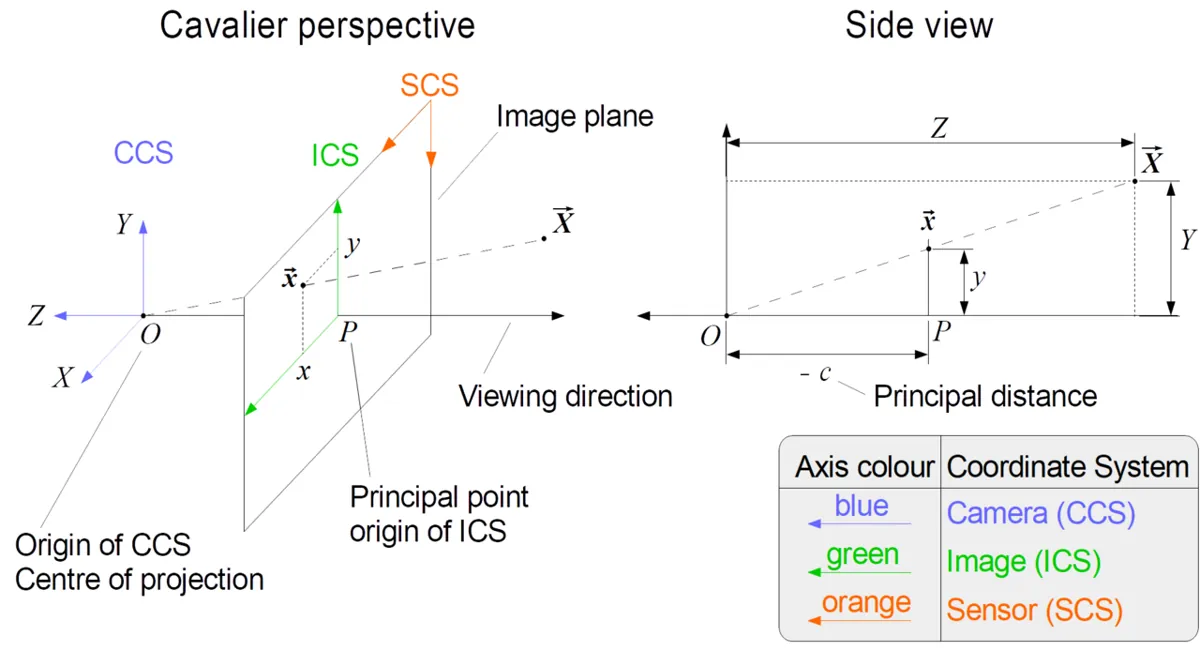
In the ideal (pinhole) model, a point in front of the camera at (X, Y, Z) lands on the image at u = fx·X/Z + cx and v = fy·Y/Z + cy. Things twice as far away look half as big. Four numbers describe this camera, and they are packed into the camera matrix K:
| Number | Meaning | Typical webcam (1280 × 720) |
|---|---|---|
| fx, fy | focal length measured in pixels (x and y) | roughly 800–1100 px — depends on the lens |
| cx, cy | principal point: where the optical axis hits the sensor | near the image centre (640, 360), but rarely exactly |
| K | [[fx, 0, cx], [0, fy, cy], [0, 0, 1]] | one 3 × 3 matrix per camera *and* resolution |
2. The real camera: lens distortion
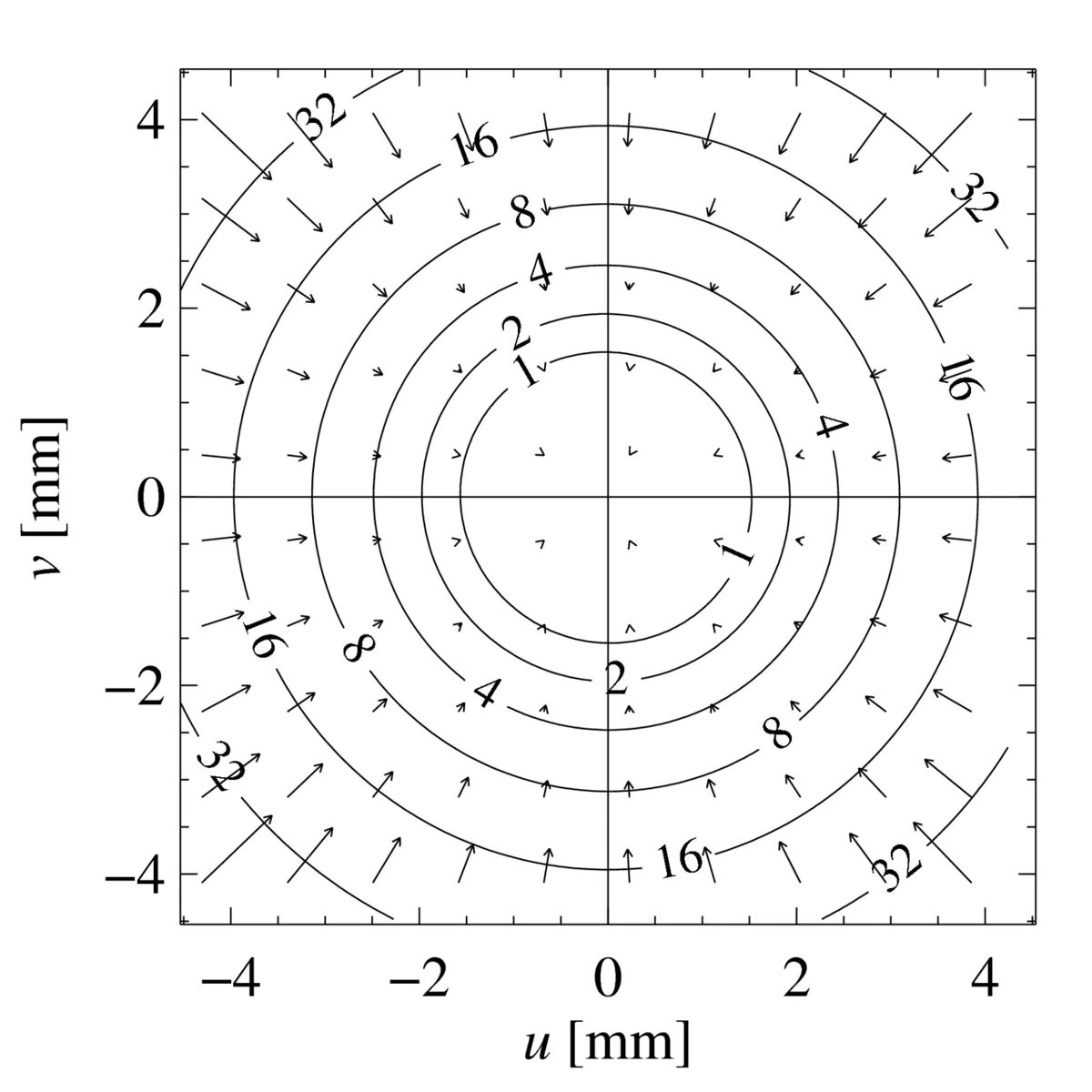
Real lenses bend straight lines. In barrel distortion the picture bulges outward (common in wide-angle webcams); in pincushion distortion lines bow inward. The effect grows quickly with distance from the centre — that is why Ananya’s arm was fine in the middle and 4 cm off in the corner. OpenCV describes it with five numbers (k1, k2, p1, p2, k3): k1, k2, k3 are *radial* terms (they grow with r², r⁴, r⁶), and p1, p2 are *tangential* terms for a lens that is not perfectly parallel to the sensor. For barrel distortion, k1 is usually negative.
3. How a checkerboard solves the puzzle
Known 3D points
A board with 9 × 6 inner corners and 25 mm squares gives 54 corner positions you know exactly: (0,0,0), (25,0,0), (50,0,0)… The board is flat, so Z = 0 for all of them.
Measured 2D points
cv.findChessboardCornersfinds the same 54 corners in the photo, andcv.cornerSubPixrefines them to a fraction of a pixel.Many views
You repeat this with the board tilted, turned and moved to the edges and corners of the image. Each view adds 54 equations.
Solve
cv.calibrateCamerafinds K, the distortion numbers, and the pose of the board in every view, so that projecting the known 3D points lands as close as possible to the measured corners.Check
The leftover gap is the reprojection error (RMS, in pixels). Small means the model fits your images.
Visual
Visualise it: the calibration lab
Move fx, cx, k1, corner noise and scene depth. Chessboard mode shows the corner residuals; Perspective mode shows how K maps 3D points to pixels. Educational estimates — not a real lens fit.
Interactive · Camera calibration lab · Educational

Intrinsics K map rays to pixels; bad fx / unmodeled distortion raise reprojection residual. Projection collapses Z — robots recover depth later. Estimates are educational, not a real OpenCV calibration runtime.
Code lab
Code lab: calibrate a virtual camera, then your real one
We start with a virtual camera whose true numbers we know (fx = 900, fy = 905, cx = 652, cy = 355, strong barrel distortion k1 = −0.32). The script photographs a virtual 9 × 6 board from 15 random angles, adds 0.3 px of corner noise like a real detector, and runs exactly the same cv.calibrateCamera you will use on your webcam. Because we know the truth, we can check how good the answer is — something you can never do with a real camera.
"""Stage 11 L12 - Camera calibration with a virtual checkerboard (no camera needed).

We invent a 'true' webcam (focal length, centre, barrel distortion), photograph a
9x6-corner checkerboard with 25 mm squares from many poses, add 0.3 px corner noise,
and ask cv.calibrateCamera to recover the camera. Then we check:
 1) how close the estimate is to the truth
 2) reprojection error (the number calibration tools report)
 3) how many views you need, and why tilted views matter
 4) what undistortion does to a point near the corner of the image
 5) what calibration buys the robot: millimetre error on the table
"""
import cv2 as cv
import numpy as np

rng = np.random.default_rng(12)
W, H = 1280, 720
K_true = np.array([[900.0, 0, 652.0], [0, 905.0, 355.0], [0, 0, 1]])
D_true = np.array([-0.32, 0.12, 0.0005, -0.0004, 0.0])            # k1 k2 p1 p2 k3: barrel
COLS, ROWS, SQ = 9, 6, 25.0                                       # inner corners, square mm
board = np.zeros((COLS * ROWS, 3), np.float32)
board[:, :2] = np.mgrid[0:COLS, 0:ROWS].T.reshape(-1, 2) * SQ
board[:, :2] -= board[:, :2].mean(axis=0)                         # centre the board


def random_view(tilt_deg):
    rvec = np.radians(rng.uniform(-tilt_deg, tilt_deg, 3)) * np.array([1, 1, 0.5])
    tvec = np.array([rng.uniform(-260, 260), rng.uniform(-150, 150), rng.uniform(330, 600)])
    pts, _ = cv.projectPoints(board, rvec, tvec, K_true, D_true)
    pts = pts.reshape(-1, 2) + rng.normal(0, 0.3, (len(board), 2))  # corner detector noise
    if (pts < 5).any() or (pts[:, 0] > W - 5).any() or (pts[:, 1] > H - 5).any():
        return None                                                # board left the image
    return pts.astype(np.float32)


def collect(n, tilt):
    views = []
    while len(views) < n:
        v = random_view(tilt)
        if v is not None:
            views.append(v)
    return views


def calibrate(views):
    rms, K, D, rvecs, tvecs = cv.calibrateCamera([board] * len(views), views, (W, H), None, None)
    return rms, K, D.ravel(), rvecs, tvecs


print('1) Calibrate from 15 tilted views (up to 35 deg)')
views = collect(15, 35)
rms, K, D, rvecs, tvecs = calibrate(views)
print(f'   fx {K[0, 0]:7.1f}  (true 900.0)   fy {K[1, 1]:7.1f}  (true 905.0)')
print(f'   cx {K[0, 2]:7.1f}  (true 652.0)   cy {K[1, 2]:7.1f}  (true 355.0)')
print(f'   k1 {D[0]:+.3f} (true -0.320)   k2 {D[1]:+.3f} (true +0.120)')

print('\n2) Reprojection error')
errs = []
for v, r, t in zip(views, rvecs, tvecs):
    p, _ = cv.projectPoints(board, r, t, K, D)
    errs.append(np.linalg.norm(p.reshape(-1, 2) - v, axis=1))
errs = np.concatenate(errs)
print(f'   RMS from calibrateCamera: {rms:.3f} px   mean {errs.mean():.3f} px   worst corner {errs.max():.3f} px')
print('   -> 0.3 px noise per axis gives about 0.42 px RMS, so the model fits. Values above ~1 px mean trouble.')

print('\n3) How many views, and does tilt matter? (focal-length error, 10 random trials each)')
for n, tilt in [(3, 35), (6, 35), (15, 35), (15, 3)]:
    fx_err = []
    for _ in range(10):
        _, Kn, _, _, _ = calibrate(collect(n, tilt))
        fx_err.append(abs(Kn[0, 0] - 900))
    print(f'   {n:2d} views, tilt up to {tilt:2d} deg: |fx error| median {np.median(fx_err):6.1f} px, worst {max(fx_err):6.1f} px')

print('\n4) Undistort one point near the image corner')
corner_ideal = np.array([[[1180.0, 650.0]]])                      # where a pinhole camera would put it
norm = cv.undistortPoints(corner_ideal, K_true, None)             # ideal pixel -> ray
seen, _ = cv.projectPoints(np.array([[norm[0, 0, 0], norm[0, 0, 1], 1.0]]), np.zeros(3), np.zeros(3), K_true, D_true)
seen = seen.reshape(2)
fixed = cv.undistortPoints(seen.reshape(1, 1, 2), K, D, P=K).reshape(2)
print(f'   pinhole (true) position  ({corner_ideal[0, 0, 0]:.1f}, {corner_ideal[0, 0, 1]:.1f})')
print(f'   distorted camera shows   ({seen[0]:.1f}, {seen[1]:.1f})  <- {np.linalg.norm(seen - corner_ideal.reshape(2)):.1f} px off')
print(f'   after undistortPoints    ({fixed[0]:.1f}, {fixed[1]:.1f})  <- {np.linalg.norm(fixed - corner_ideal.reshape(2)):.2f} px off')

print('\n5) What it means on the table (camera 500 mm above, looking down)')
Z = 500.0
for name, px in [('centre', np.array([652.0, 355.0])), ('corner', corner_ideal.reshape(2))]:
    ray = cv.undistortPoints(px.reshape(1, 1, 2), K_true, None).reshape(2)
    true_xy = ray * Z
    d, _ = cv.projectPoints(np.array([[ray[0], ray[1], 1.0]]), np.zeros(3), np.zeros(3), K_true, D_true)
    d = d.reshape(2)
    naive = cv.undistortPoints(d.reshape(1, 1, 2), K_true, None).reshape(2) * Z   # perfect K, distortion ignored
    calib = cv.undistortPoints(d.reshape(1, 1, 2), K, D).reshape(2) * Z
    print(f'   {name:6s}: distortion ignored -> off by {np.linalg.norm(naive - true_xy):5.1f} mm;  full calibration -> off by {np.linalg.norm(calib - true_xy):4.2f} mm')
np.savez('camera_calib.npz', K=K, D=D, size=(W, H))
print('saved camera_calib.npz (K, D, image size)')
Output (tested with opencv-python 5.0)
1) Calibrate from 15 tilted views (up to 35 deg)
   fx   900.7  (true 900.0)   fy   905.5  (true 905.0)
   cx   650.3  (true 652.0)   cy   355.8  (true 355.0)
   k1 -0.322 (true -0.320)   k2 +0.123 (true +0.120)

2) Reprojection error
   RMS from calibrateCamera: 0.410 px   mean 0.365 px   worst corner 1.103 px
   -> 0.3 px noise per axis gives about 0.42 px RMS, so the model fits. Values above ~1 px mean trouble.

3) How many views, and does tilt matter? (focal-length error, 10 random trials each)
    3 views, tilt up to 35 deg: |fx error| median    4.5 px, worst   26.0 px
    6 views, tilt up to 35 deg: |fx error| median    2.2 px, worst    6.3 px
   15 views, tilt up to 35 deg: |fx error| median    2.7 px, worst    4.0 px
   15 views, tilt up to  3 deg: |fx error| median  117.3 px, worst  288.6 px

4) Undistort one point near the image corner
   pinhole (true) position  (1180.0, 650.0)
   distorted camera shows   (1116.5, 614.8)  <- 72.6 px off
   after undistortPoints    (1180.9, 650.3)  <- 0.95 px off

5) What it means on the table (camera 500 mm above, looking down)
   centre: distortion ignored -> off by   0.0 mm;  full calibration -> off by 1.04 mm
   corner: distortion ignored -> off by  40.3 mm;  full calibration -> off by 1.27 mm
saved camera_calib.npz (K, D, image size)
Reading the output
- Recovered numbers: fx 900.7 vs 900, cx 650.3 vs 652, k1 −0.322 vs −0.320 — calibration really does measure the lens.
- RMS 0.41 px: with 0.3 px noise on x and y, the expected RMS is about 0.42 px, so the model fits. On a real webcam, aim for below about 0.5 px and investigate anything above 1 px.
- Tilt matters more than count: 15 views held almost flat (tilt up to 3°) gave a median fx error of 117 px. Tilted views (up to 35°) gave 2–5 px. Flat views cannot separate “long focal length” from “board far away”.
- A few views is risky: with only 3 views the worst fx error was 26 px; with 6 or more it stayed within about 6 px here.
- Distortion is the big one at the corners: a point near the image corner was 72.6 px off before undistortion and under 1 px after.
- On the table (camera 500 mm above): ignoring distortion puts a corner block about 40 mm off; full calibration brings it to about 1.3 mm. That is Ananya’s 4 cm, explained.
Calibrate your own webcam
Print a checkerboard with 10 × 7 squares (that is 9 × 6 inner corners), measure one square with a ruler — printers often scale pages — and fix it flat on a clipboard or a floor tile. The script shows the detected corners live; press SPACE to capture a view, c to calibrate, q to quit. After calibration the live view is undistorted so you can check that straight edges look straight.
"""Stage 11 L12 - Calibrate YOUR webcam with a printed checkerboard.

Print a checkerboard with 10 x 7 squares (= 9 x 6 inner corners), measure one square
with a ruler (e.g. 25 mm), and stick it on something flat (a clipboard or a tile).

  python calibrate_webcam.py --square 25                   # webcam: SPACE = capture, c = calibrate, q = quit
  python calibrate_webcam.py --square 25 --images "shots/*.png"   # calibrate from saved photos
  python calibrate_webcam.py --square 25 --port COM5   # capture with the Arduino button (both hands on the board)

Saves camera_calib.npz (K, D, image size). Keep the camera's focus and zoom fixed afterwards!
"""
import argparse
import glob

import cv2 as cv
import numpy as np

CRIT = (cv.TERM_CRITERIA_EPS + cv.TERM_CRITERIA_MAX_ITER, 30, 0.001)


def board_points(cols, rows, square):
    objp = np.zeros((cols * rows, 3), np.float32)
    objp[:, :2] = np.mgrid[0:cols, 0:rows].T.reshape(-1, 2) * square
    return objp


def find(gray, cols, rows):
    ok, corners = cv.findChessboardCorners(gray, (cols, rows), None)
    if ok:
        corners = cv.cornerSubPix(gray, corners, (11, 11), (-1, -1), CRIT)   # sub-pixel accuracy
    return ok, corners


def calibrate(obj, img, size):
    rms, K, D, rvecs, tvecs = cv.calibrateCamera(obj, img, size, None, None)
    print(f'views used: {len(img)}   RMS reprojection error: {rms:.3f} px  (aim for < 0.5, worry above 1)')
    print('K =\n', np.round(K, 1))
    print('D (k1 k2 p1 p2 k3) =', np.round(D.ravel(), 4))
    np.savez('camera_calib.npz', K=K, D=D, size=size)
    print('saved camera_calib.npz')
    return K, D


def main():
    ap = argparse.ArgumentParser()
    ap.add_argument('--cols', type=int, default=9, help='inner corners across')
    ap.add_argument('--rows', type=int, default=6, help='inner corners down')
    ap.add_argument('--square', type=float, required=True, help='square size in mm (measure it!)')
    ap.add_argument('--images', help='glob of saved photos instead of the webcam')
    ap.add_argument('--cam', type=int, default=0)
    ap.add_argument('--port', help='Arduino capture button, e.g. COM5 or /dev/ttyUSB0')
    a = ap.parse_args()
    objp = board_points(a.cols, a.rows, a.square)
    obj, img = [], []

    if a.images:
        files = sorted(glob.glob(a.images))
        size = None
        for f in files:
            gray = cv.imread(f, cv.IMREAD_GRAYSCALE)
            if gray is None:
                continue
            size = gray.shape[::-1]
            ok, corners = find(gray, a.cols, a.rows)
            print(f'{f}: {"corners found" if ok else "NOT found - skipped"}')
            if ok:
                obj.append(objp); img.append(corners)
        if len(img) < 3:
            raise SystemExit('need at least 3 good views (10-20 is better)')
        calibrate(obj, img, size)
        return

    cap = cv.VideoCapture(a.cam)
    if not cap.isOpened():
        raise SystemExit('camera not found - try --cam 1')
    ser = None
    if a.port:
        import serial  # pip install pyserial
        ser = serial.Serial(a.port, 115200, timeout=0)
    K = D = None
    while True:
        ok, frame = cap.read()
        if not ok:
            break
        gray = cv.cvtColor(frame, cv.COLOR_BGR2GRAY)
        found, corners = find(gray, a.cols, a.rows)
        view = frame.copy()
        if found:
            cv.drawChessboardCorners(view, (a.cols, a.rows), corners, found)
        if K is not None:
            view = cv.undistort(frame, K, D)          # after calibration: straight lines stay straight
        cv.putText(view, f'views: {len(img)}  SPACE capture, c calibrate, q quit', (10, 25),
                   cv.FONT_HERSHEY_SIMPLEX, 0.6, (0, 255, 255), 2)
        cv.imshow('calibrate', view)
        k = cv.waitKey(1) & 0xFF
        if k == ord('q'):
            break
        button = ser is not None and b'CAPTURE' in ser.readline()
        if (k == ord(' ') or button) and found:
            obj.append(objp); img.append(corners)
            print(f'captured view {len(img)} - now tilt or move the board')
            if ser:
                ser.write(b'OK\n')
        elif button and ser:
            ser.write(b'NOBOARD\n')
        if k == ord('c') and len(img) >= 3:
            K, D = calibrate(obj, img, gray.shape[::-1])
    cap.release()
    cv.destroyAllWindows()


if __name__ == '__main__':
main()Bench build: a hands-free capture button
Holding a board steady with both hands *and* pressing SPACE is hard. A push button on an Arduino UNO (on the desk or under your foot) sends CAPTURE to the laptop. The laptop replies OK (green flash) when it captured a view, or NOBOARD (red flash) when it could not see all the corners.
| Part | Connection | Note |
|---|---|---|
| Push button | D2 ↔ GND | INPUT_PULLUP, no resistor needed |
| Green LED | D5 → 220 Ω → LED → GND | about 10–15 mA per LED with 220 Ω |
| Red LED | D6 → 220 Ω → LED → GND | |
| USB cable | UNO ↔ laptop | power and serial at 115200 baud |
// Stage 11 L12 - Hands-free capture button for camera calibration
// Hold the checkerboard with both hands, press the foot/desk button, and the laptop
// captures a view. The laptop answers "OK" (green flash) or "NOBOARD" (red flash).
// Wiring: button D2 <-> GND (INPUT_PULLUP, no resistor). Green LED D5, red LED D6,
// each through 220 ohm to GND (about 10-15 mA per LED). Signals only - nothing else on these pins.

const byte BTN = 2, LED_OK = 5, LED_BAD = 6;
const unsigned long DEBOUNCE_MS = 40, MIN_GAP_MS = 700;   // no double captures
unsigned long lastPress = 0;
bool lastState = HIGH;
char buf[12];
byte len = 0;

void flash(byte pin) {
  digitalWrite(pin, HIGH);
  delay(150);
  digitalWrite(pin, LOW);
}

void setup() {
  Serial.begin(115200);
  pinMode(BTN, INPUT_PULLUP);
  pinMode(LED_OK, OUTPUT);
  pinMode(LED_BAD, OUTPUT);
}

void loop() {
  bool s = digitalRead(BTN);
  if (s == LOW && lastState == HIGH && millis() - lastPress > MIN_GAP_MS) {
    delay(DEBOUNCE_MS);
    if (digitalRead(BTN) == LOW) {
      Serial.println(F("CAPTURE"));
      lastPress = millis();
    }
  }
  lastState = s;

  while (Serial.available()) {                 // replies from the laptop
    char c = Serial.read();
    if (c == '\n') {
      buf[len] = 0;
      if (strcmp(buf, "OK") == 0) flash(LED_OK);
      else if (strcmp(buf, "NOBOARD") == 0) flash(LED_BAD);
      len = 0;
    } else if (c != '\r' && len < sizeof(buf) - 1) {
      buf[len++] = c;
    }
  }
}
Run the Python script with --port COM5 (Windows) or --port /dev/ttyUSB0 (Linux). The Arduino IDE’s Serial Monitor must be closed — only one program can open the port.
Debugging
| Symptom | Likely cause | Fix |
|---|---|---|
findChessboardCorners never succeeds | wrong inner-corner count, glare, or board partly out of view | Count *inner* corners (9 × 6 for 10 × 7 squares); avoid shiny paper; keep the whole board in frame |
| RMS above 1 px | blurry captures, bent board, or a few bad views | Hold still, use a flat board, delete the worst views and recalibrate |
| fx changes a lot between runs | views too flat or too few | Tilt the board 20–40° in different directions; take 10–20 views |
| Corners still wrong after undistort | board never reached the image corners | Capture views with the board near all four corners and edges |
| Numbers in squares, not mm | --square left out or wrong | Pass the measured square size in mm |
| Calibration “stopped working” | autofocus, zoom or resolution changed | Fix focus and resolution, then recalibrate — K belongs to one setting |
Real world
Calibration in real systems
Robot cells: a camera on a robot cell is calibrated before its pixels are turned into millimetres, and calibrated again after a lens change, a knock, or a change of resolution. Wrist cameras need trustworthy intrinsics before hand–eye and pose pipelines can use them.
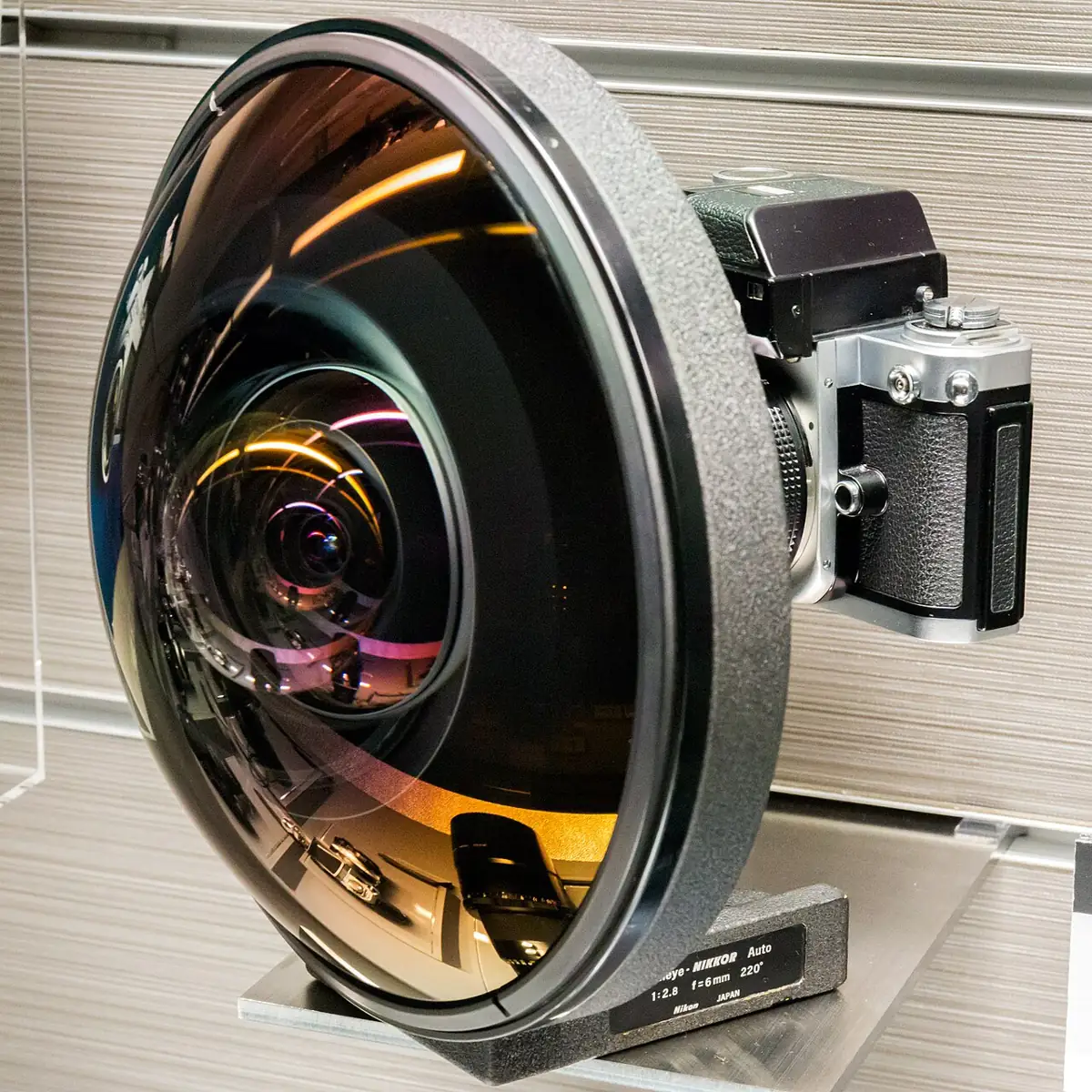
- Photo software: editors and libraries such as Lensfun correct the distortion of known lenses using stored calibration data.
- Stereo and depth cameras: both cameras must be calibrated (and undistorted) before depth can be computed — the OpenCV tutorial notes this for stereo applications.
- Mapping and measuring: photogrammetry measures real sizes from photos and depends on a calibrated camera model.
Think
Think about it
Think
Your calibration says fx = 990 px, but the true value is 900 px (10% too high). The camera looks straight down at the table, and you use Z = fx × (real size) / (size in pixels) to estimate the distance to a block. What happens to the distance estimate?
Experiment
Try it in the lab
About 45 minutes. You need a laptop with a webcam, a printed 10 × 7 checkerboard on a flat board, and a ruler. Bench part: Arduino UNO, a push button, 2 LEDs, 2 × 220 Ω.
Experiment
Calibrate, break it, and fix it
You will need
- `calibration_lab.py` and `calibrate_webcam.py` (opencv-python, numpy; pyserial for the button)
- Printed checkerboard (9 × 6 inner corners) on a flat board, and a ruler
- Camera calibration lab (browser)
- Bench: Arduino UNO, push button, 2 LEDs, 2 × 220 Ω, breadboard, jumpers
Steps
- Run `calibration_lab.py`. Change the noise from 0.3 to 1.0 px. How do the RMS and fx error change?
- Change `D_true` to zero (a perfect lens). How far off is the corner point now without undistortion?
- In the browser lab, raise k1 and watch the residuals at the corners grow while the centre stays quiet.
- Calibrate your webcam with 15 tilted views, including the image corners. Write down fx, fy, cx, cy, k1 and the RMS.
- Calibrate again with 15 almost-flat views held in the centre only. Compare the numbers.
- Bench: build the capture button and capture a full calibration with your hands on the board.
Interactive · Camera calibration lab · Educational
Intrinsics K map rays to pixels; bad fx / unmodeled distortion raise reprojection residual. Projection collapses Z — robots recover depth later. Estimates are educational, not a real OpenCV calibration runtime.
- RMS rises with corner noise, but a good calibration still finds K close to the truth.
- Flat, centre-only views give very different fx values each time — tilted, well-spread views agree.
- A ruler near the image edge looks straight after
cv.undistort.
Knowledge check
Check your understanding
Knowledge check
1. Which numbers are in the camera matrix K?
2. Barrel distortion is usually worst…
3. Why should the checkerboard be tilted in many views?
4. An RMS reprojection error of 3 px on a webcam most likely means…
5. You change the webcam from 1280 × 720 to 640 × 480. What about your calibration?
Mini assignment
Hands-on assignment
Mini assignment
Calibrate the lab camera and prove it
Calibrate the webcam that looks at the arm’s table, then prove with a ruler that pixel measurements near the corners improve.
Deliverables
- `camera_calib.npz` plus a screenshot of the printed K, D and RMS.
- Two photos of a straight ruler near the image edge: raw and undistorted.
- A table of 5 measured positions on the table (centre and 4 corners): true mm, uncorrected estimate, corrected estimate.
- A short note: how many views you used, how you tilted them, and your RMS.
Do this, step by step
- Print a 9 × 6 inner-corner checkerboard, glue it flat and measure one square with a ruler.
- Run
calibrate_webcam.py --square <your mm>with 15 tilted views that also fill the image corners (SPACE = capture, c = calibrate). - Save
camera_calib.npzand screenshot K, D and the RMS. - Photograph a straight ruler near the image edge, raw and undistorted.
- Measure 5 table positions (centre and 4 corners): true mm, uncorrected and corrected estimate.
Stuck? Hints, one at a time
- Enter the square size in mm exactly as measured — a wrong size scales every distance later.
- A low RMS from flat, centre-only views can still give a wrong k1; tilt the board and fill the corners.
- Recalibrate whenever you change resolution, focus or zoom — the numbers belong to one camera setting.
Challenges (pick by level)
- 🟢 Beginner: Run
calibration_lab.pywith 3, 6 and 15 views and plot the fx error. - 🟡 Intermediate: Calibrate your webcam twice on two different days. How much do fx and cx change?
- 🟠 Advanced: Compute and show the reprojection error *per view* (with
cv.projectPoints) and remove the worst two views. Does the RMS improve? - 🔴 Expert: Calibrate with a circle grid (
cv.findCirclesGrid) and compare the result with the checkerboard calibration. - ⚫ Research: Fit fisheye-style distortion with the
cv.fisheyemodule on a wide-angle camera and compare the corner accuracy with the standard model.
Next step
With K and distortion known, you can go from 3D points to pixels — and back. In Lesson 13 — Perspective and Projection you use K to project points, fix a tilted view of the table with a homography, and turn table pixels into millimetres.
Sources
- OpenCV 4.x — Camera Calibration — radial and tangential distortion, the five coefficients (k1 k2 p1 p2 k3), the camera matrix,
findChessboardCorners,cornerSubPix,calibrateCamera, undistortion and reprojection error; at least 10 test patterns recommended. - Wikipedia — Distortion (optics)) — barrel, pincushion and mustache distortion, the Brown–Conrady model, and software correction (including OpenCV and Lensfun).
- Photos: Wikimedia Commons (credits under each image).
Look back: Lesson 11: Classical vs AI Vision. Next: Lesson 13: Perspective & Projection. Related: Stage 11 — Computer Vision, Stage 13 — Perception, Planning & Manipulation.
Self-attested for now — keep artifacts in your lab notebook.
Complete
Today's goal
0 of 1 done today
Mark this lesson complete when you have worked the experiment, knowledge check, and assignment (even roughly).