
Computer Vision for Robotics (Vision Foundations) · Lesson 11
Classical vs AI Vision
Est. 50–65 min
Why
Why this lesson matters
Every robot vision engineer makes this choice again and again: classical (rules you write: thresholds, shapes, templates) or learned (rules a model learns from labelled examples, today usually a deep neural network). Neither always wins. This chapter gives you a fair, measured comparison and a simple way to decide — and shows the hybrid that real cells often use.
Concept
Rules you write vs rules you learn
1. Two ways to get a rule
| Classical vision | Learned (AI) vision | |
|---|---|---|
| Who makes the rule | you — HSV ranges, area, shape, templates | a training algorithm, from labelled examples |
| What you need | controlled light, known objects, your time | many labelled images that cover real variation |
| When it fails | something you did not plan for (sticker, new lamp) | something not in the training data (new light, new background) |
| How you fix it | change the code / re-tune numbers | add data and retrain |
| Explaining a decision | easy — “extent 0.77 < 0.88” | hard — “the model’s weights said so” |
| Compute | small — a laptop or Raspberry Pi CPU is plenty | more; deep detectors usually want a GPU or accelerator |
2. What “learned” looks like inside
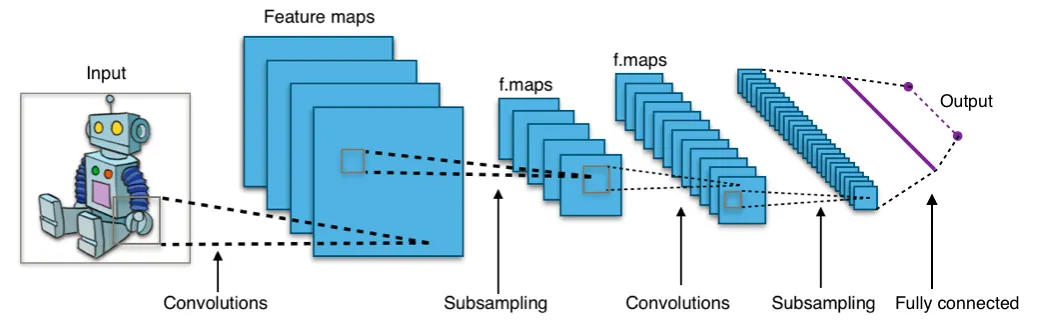
A CNN’s first layers learn edge- and colour-like filters — similar to the Sobel and HSV tools you wrote by hand in earlier lessons — and deeper layers combine them into parts and objects. In our lab script we use a far smaller learner, k-nearest neighbours (k-NN): it stores every labelled training crop and labels a new crop by a vote of the *k* most similar ones. Simple, but it shows the same habits as big models: it is only as good as its data.
3. A decision checklist
Can you control the scene?
Fixed light, plain background, colour-coded parts → start classical.
How much do objects vary?
Many shapes, textures, brands, poses → learned.
Do you have labelled data?
No data and no time to label → classical, or a pre-trained model for common objects.
What hardware and speed?
Small CPU or tight timing → classical. Laptop GPU / edge AI board → learned is possible.
Must you explain every reject?
Safety- or quality-critical → keep a classical check or a human in the loop.
Visual
Visualise it: two kinds of scores
The same desk scene scored two ways — Classical-style and AI-style (fake) — with threshold and noise controls. Teaching only, not a real network.
Interactive · Object detection simulator · Educational (not YOLO)


- block conf=0.88 KEEP · box (40,70,50,45)
- cup conf=0.77 KEEP · box (130,85,42,55)
- bolt conf=0.67 KEEP · box (210,110,28,22)
Scores and boxes are scripted for teaching. This is not a real detector (not YOLO, not OpenCV DNN). Use it to practice threshold tradeoffs: high threshold → fewer false alarms, more misses.
Code lab
Code lab: the same job, two ways, four lights
classical_vs_learned_lab.py makes 64 × 64 crops of six kinds: red square blocks (sometimes with a white part-number sticker) and five look-alikes — orange cap, round red lid, wooden table, blue block, empty mat. The classical detector uses the HSV red gate from Lesson 10 plus area, extent and aspect rules. The learned detector is k-NN (k = 5) on 16 × 16 HSV patches, trained on 1,200 labelled crops in normal and dim light. Both are tested on new crops in normal, dim, warm and magenta light.
"""Stage 11 L11 - Classical vs learned vision on the same job.

Job: is the 64x64 crop a RED SQUARE BLOCK (pickable) or not?
Negatives: orange cap, red round lid, wooden table patch, blue block, empty mat.
  Classical = hand-written rules (HSV red gate + area + squareness)
  Learned   = k-nearest-neighbour on tiny HSV patches, trained from labelled examples
We test both in: normal light, dim light, warm (yellow) light, and a NEW condition
(magenta-tinted LED strip) that the learned model never saw in training.
"""
import time

import cv2 as cv
import numpy as np

rng = np.random.default_rng(7)
S = 64
KINDS = ['red_block', 'orange_cap', 'red_lid', 'wood', 'blue_block', 'empty']


def make_crop(kind, light, sticker=False):
    img = np.full((S, S, 3), (60, 60, 60), np.uint8)                 # dark grey mat
    c = (int(rng.integers(26, 38)), int(rng.integers(26, 38)))
    size, ang = int(rng.integers(26, 34)), float(rng.uniform(0, 90))
    if kind == 'red_block':
        cv.fillPoly(img, [cv.boxPoints((c, (size, size), ang)).astype(np.int32)], (40, 40, 200))
        if sticker:                                                   # white part-number sticker on the block
            cv.rectangle(img, (c[0] - 4, c[1] - 12), (c[0] + 12, c[1] + 2), (235, 235, 235), -1)
    elif kind == 'blue_block':
        cv.fillPoly(img, [cv.boxPoints((c, (size, size), ang)).astype(np.int32)], (200, 90, 30))
    elif kind == 'orange_cap':
        cv.circle(img, c, size // 3, (30, 120, 235), -1)
    elif kind == 'red_lid':
        cv.circle(img, c, size // 2 + 2, (40, 40, 200), -1)
    elif kind == 'wood':
        img[:] = (70, 120, 170)
        for y in range(0, S, 4):
            cv.line(img, (0, y + int(rng.integers(0, 3))), (S, y), (55, 95, 150), 1)
    gain = {'normal': (1, 1, 1), 'dim': (0.5, 0.5, 0.5), 'warm': (0.75, 1.0, 1.15), 'magenta': (1.2, 0.6, 1.1)}[light]
    img = img.astype(np.float32) * np.array(gain, np.float32) + rng.normal(0, 7, img.shape)
    return np.clip(img, 0, 255).astype(np.uint8)


def dataset(n_per_kind, lights, sticker_rate=0.0, balance=1):
    X, y = [], []
    for light in lights:
        for k in KINDS:
            reps = n_per_kind * (balance if k == 'red_block' else 1)   # as many positives as negatives
            for _ in range(reps):
                X.append(make_crop(k, light, sticker=rng.random() < sticker_rate))
                y.append(1 if k == 'red_block' else 0)
    return X, np.array(y)


# ---------- classical: rules a human wrote ----------
def classical(crop):
    hsv = cv.cvtColor(cv.GaussianBlur(crop, (5, 5), 0), cv.COLOR_BGR2HSV)
    m = cv.inRange(hsv, (0, 120, 50), (8, 255, 255)) | cv.inRange(hsv, (172, 120, 50), (180, 255, 255))
    cnts, _ = cv.findContours(m, cv.RETR_EXTERNAL, cv.CHAIN_APPROX_SIMPLE)
    if not cnts:
        return 0
    c = max(cnts, key=cv.contourArea)
    area = cv.contourArea(c)
    (_, _), (w, h), _ = cv.minAreaRect(c)
    extent = area / max(1.0, w * h)                    # square ~1.0, circle ~0.785
    return int(area > 300 and extent > 0.88 and max(w, h) / max(1.0, min(w, h)) < 1.3)


# ---------- learned: k-NN on tiny HSV patches ----------
def features(crop):
    hsv = cv.cvtColor(cv.resize(crop, (16, 16), interpolation=cv.INTER_AREA), cv.COLOR_BGR2HSV).astype(np.float32)
    ang = hsv[..., 0] * (np.pi / 90)                   # hue is a circle: use cos/sin
    return np.concatenate([np.cos(ang).ravel(), np.sin(ang).ravel(), hsv[..., 1].ravel() / 255, hsv[..., 2].ravel() / 255])


class KNN:
    def fit(self, X, y):
        self.F = np.array([features(x) for x in X]); self.y = y; return self

    def predict(self, crop, k=5):
        d = np.linalg.norm(self.F - features(crop), axis=1)
        return int(self.y[np.argsort(d)[:k]].mean() > 0.5)


def score(fn, X, y):
    p = np.array([fn(x) for x in X])
    tp = int(((p == 1) & (y == 1)).sum()); fp = int(((p == 1) & (y == 0)).sum()); fn_ = int(((p == 0) & (y == 1)).sum())
    return (p == y).mean(), tp / max(1, tp + fn_), fp


X_tr, y_tr = dataset(60, ['normal', 'dim'], sticker_rate=0.5, balance=5)
knn = KNN().fit(X_tr, y_tr)
print(f'Learned model trained on {len(X_tr)} labelled crops (normal + dim light, half the blocks with stickers)\n')
print('1) Accuracy / recall / false positives on 60 new crops per condition')
print('   condition          classical                learned (k-NN)')
for light, stick in [('normal', 0.0), ('dim', 0.0), ('normal', 1.0), ('warm', 0.0), ('magenta', 0.0)]:
    X, y = dataset(10, [light], sticker_rate=stick)
    a1, r1, f1 = score(classical, X, y)
    a2, r2, f2 = score(knn.predict, X, y)
    tag = '  <- light never seen in training' if light in ('warm', 'magenta') else ''
    name = light + (' +sticker' if stick else '')
    print(f'   {name:16s}   acc {a1:.2f} rec {r1:.2f} FP {f1:2d}    acc {a2:.2f} rec {r2:.2f} FP {f2:2d}{tag}')

print('\n2) Speed per crop (your computer will differ)')
crop = make_crop('red_block', 'normal')
for name, fn in [('classical', classical), ('learned k-NN', knn.predict)]:
    t = time.perf_counter()
    for _ in range(300):
        fn(crop)
    print(f'   {name:12s} {1000 * (time.perf_counter() - t) / 300:.3f} ms')

print('\n3) Retrain with 40 magenta-light examples per kind (fix by DATA, not by code)')
X2, y2 = dataset(40, ['magenta'], sticker_rate=0.5, balance=5)
knn2 = KNN().fit(X_tr + X2, np.concatenate([y_tr, y2]))
X, y = dataset(10, ['magenta'])
print(f'   learned on magenta: acc {score(knn2.predict, X, y)[0]:.2f}  (classical needs a human to re-tune the rules)')

print('\n4) Why did it decide that? (explainability)')
lid = make_crop('red_lid', 'normal')
hsv = cv.cvtColor(lid, cv.COLOR_BGR2HSV)
m = cv.inRange(hsv, (0, 120, 50), (8, 255, 255)) | cv.inRange(hsv, (172, 120, 50), (180, 255, 255))
c = max(cv.findContours(m, cv.RETR_EXTERNAL, cv.CHAIN_APPROX_SIMPLE)[0], key=cv.contourArea)
(_, _), (w, h), _ = cv.minAreaRect(c)
print(f'   classical on red lid: REJECT because extent = {cv.contourArea(c) / (w * h):.2f} < 0.88 (round, not square)')
print(f'   learned on red lid  : {"ACCEPT" if knn.predict(lid) else "REJECT"} because its 5 nearest training crops voted that way')

print('\n5) Hybrid: both agree -> act, disagree -> ASK a human (send "?" to the Arduino)')
for light, stick in [('normal', 0.0), ('normal', 1.0), ('magenta', 0.0)]:
    X, y = dataset(10, [light], sticker_rate=stick)
    ok = wrong = ask = 0
    for x, t in zip(X, y):
        a, b = classical(x), knn.predict(x)
        if a != b:
            ask += 1
        elif a == t:
            ok += 1
        else:
            wrong += 1
    name = light + (' +sticker' if stick else '')
    print(f'   {name:16s} acted correctly {ok:2d}, acted WRONG {wrong:2d}, asked a human {ask:2d}  (of {len(y)})')
Output (python3 classical_vs_learned_lab.py, tested with opencv-python 5.0; timings depend on your computer)
Learned model trained on 1200 labelled crops (normal + dim light, half the blocks with stickers)

1) Accuracy / recall / false positives on 60 new crops per condition
   condition          classical                learned (k-NN)
   normal             acc 1.00 rec 1.00 FP  0    acc 0.75 rec 0.90 FP 14
   dim                acc 1.00 rec 1.00 FP  0    acc 0.78 rec 0.80 FP 11
   normal +sticker    acc 0.85 rec 0.10 FP  0    acc 0.77 rec 0.90 FP 13
   warm               acc 1.00 rec 1.00 FP  0    acc 0.83 rec 0.00 FP  0  <- light never seen in training
   magenta            acc 0.83 rec 1.00 FP 10    acc 0.50 rec 1.00 FP 30  <- light never seen in training

2) Speed per crop (your computer will differ)
   classical    0.033 ms
   learned k-NN 2.094 ms

3) Retrain with 40 magenta-light examples per kind (fix by DATA, not by code)
   learned on magenta: acc 0.95  (classical needs a human to re-tune the rules)

4) Why did it decide that? (explainability)
   classical on red lid: REJECT because extent = 0.77 < 0.88 (round, not square)
   learned on red lid  : REJECT because its 5 nearest training crops voted that way

5) Hybrid: both agree -> act, disagree -> ASK a human (send "?" to the Arduino)
   normal           acted correctly 48, acted WRONG  0, asked a human 12  (of 60)
   normal +sticker  acted correctly 41, acted WRONG  1, asked a human 18  (of 60)
   magenta          acted correctly 20, acted WRONG  0, asked a human 40  (of 60)
Try it: switch between Classical-style and AI-style scores, add noise, and sweep the threshold. Which style keeps the bolt? Which one flickers more? (Educational sim with fake scores — not a real network.)
Interactive · Object detection simulator · Educational (not YOLO)
- block conf=0.88 KEEP · box (40,70,50,45)
- cup conf=0.77 KEEP · box (130,85,42,55)
- bolt conf=0.67 KEEP · box (210,110,28,22)
Scores and boxes are scripted for teaching. This is not a real detector (not YOLO, not OpenCV DNN). Use it to practice threshold tradeoffs: high threshold → fewer false alarms, more misses.
Bench build: a human-in-the-loop decision panel
In the hybrid, the laptop sends one character per decision: Y (both agree — pick), N (both agree — not a target) or ? (they disagree). On ? the yellow LED blinks and the panel waits for a human to press CONFIRM or REJECT. If nobody answers in 5 seconds it replies REJECT timeout — the safe default is “do not move”.
| Part | Connection | Note |
|---|---|---|
| Green LED | D5 → 220 Ω → LED → GND | about 10–15 mA per LED with 220 Ω |
| Red LED | D6 → 220 Ω → LED → GND | |
| Yellow LED | D7 → 220 Ω → LED → GND | blinks while asking |
| CONFIRM button | D2 ↔ GND | INPUT_PULLUP, no resistor needed |
| REJECT button | D3 ↔ GND | INPUT_PULLUP |
// Stage 11 L11 - Human-in-the-loop decision panel for a hybrid vision system
// Laptop sends one character per decision:
//   'Y' = both pipelines agree: pick it   -> green LED
//   'N' = both agree: not a target        -> red LED
//   '?' = they disagree: ask a human      -> yellow LED blinks, wait for a button
// Buttons: D2 = CONFIRM (it is a target), D3 = REJECT. Wired to GND, INPUT_PULLUP (no resistor).
// If nobody answers within 5 s, the panel says REJECT - the safe default is "do not move".
// LEDs: D5 green, D6 red, D7 yellow, each through 220 ohm to GND (about 10-15 mA per LED).
// Pins only drive LEDs - motors/servos need their own supply and driver.

const byte LED_G = 5, LED_R = 6, LED_Y = 7, BTN_OK = 2, BTN_NO = 3;
const unsigned long ASK_TIMEOUT_MS = 5000;
bool asking = false;
unsigned long askStart = 0;

void show(byte pin) {
  digitalWrite(LED_G, pin == LED_G);
  digitalWrite(LED_R, pin == LED_R);
  digitalWrite(LED_Y, pin == LED_Y);
}

bool pressed(byte pin) {             // simple debounce: must stay LOW for 30 ms
  if (digitalRead(pin) == HIGH) return false;
  delay(30);
  return digitalRead(pin) == LOW;
}

void answer(bool isTarget, const __FlashStringHelper *why) {
  asking = false;
  show(isTarget ? LED_G : LED_R);
  Serial.print(isTarget ? F("CONFIRM ") : F("REJECT "));
  Serial.println(why);
}

void setup() {
  Serial.begin(115200);
  pinMode(LED_G, OUTPUT); pinMode(LED_R, OUTPUT); pinMode(LED_Y, OUTPUT);
  pinMode(BTN_OK, INPUT_PULLUP); pinMode(BTN_NO, INPUT_PULLUP);
  show(255);                         // all off
  Serial.println(F("decision panel ready"));
}

void loop() {
  if (Serial.available()) {
    char c = Serial.read();
    if (c == 'Y') { asking = false; show(LED_G); }
    else if (c == 'N') { asking = false; show(LED_R); }
    else if (c == '?') { asking = true; askStart = millis(); Serial.println(F("ASKING")); }
  }
  if (asking) {
    digitalWrite(LED_Y, (millis() / 250) % 2);       // blink yellow
    digitalWrite(LED_G, LOW); digitalWrite(LED_R, LOW);
    if (pressed(BTN_OK)) answer(true, F("human"));
    else if (pressed(BTN_NO)) answer(false, F("human"));
    else if (millis() - askStart > ASK_TIMEOUT_MS) answer(false, F("timeout"));
  }
}import serial, time # pip install pyserial
ser = serial.Serial('COM5', 115200, timeout=0.1) # or /dev/ttyUSB0
time.sleep(2) # UNO resets when the port opens
a, b = classical(crop), knn.predict(crop)
ser.write(b'Y' if a and b else b'N' if not a and not b else b'?')
print(ser.readline().decode().strip()) # e.g. ASKING, then CONFIRM humanDebugging
| Symptom | Likely cause | Fix |
|---|---|---|
| Classical works on the bench, fails at the demo | new light or new object look | Control the light; add the new case to your rules and tests |
| Learned model great in testing, bad in the lab | test data too similar to training data | Test on photos from a different day, light and camera |
| Learned model says “yes” to everything red | class imbalance or weak features | Balance positives and negatives; add hard negatives (lids, caps) |
| Model fails only in one light | that light is missing from training | Collect and label examples in that light, retrain |
| Too many “ask a human” prompts | the two pipelines disagree often | Improve the weaker one; log the disagreements — they are your best new training data |
Real world
Classical and AI vision in real systems
Factory inspection: machine-vision systems have long used thresholding, blob extraction, edge detection, template matching and gauging to give pass/fail results and part positions to robots. Since the late 2010s, deep learning has been added for jobs where defects cannot be separated by a simple rule such as “dark = bad” — and both now run side by side.
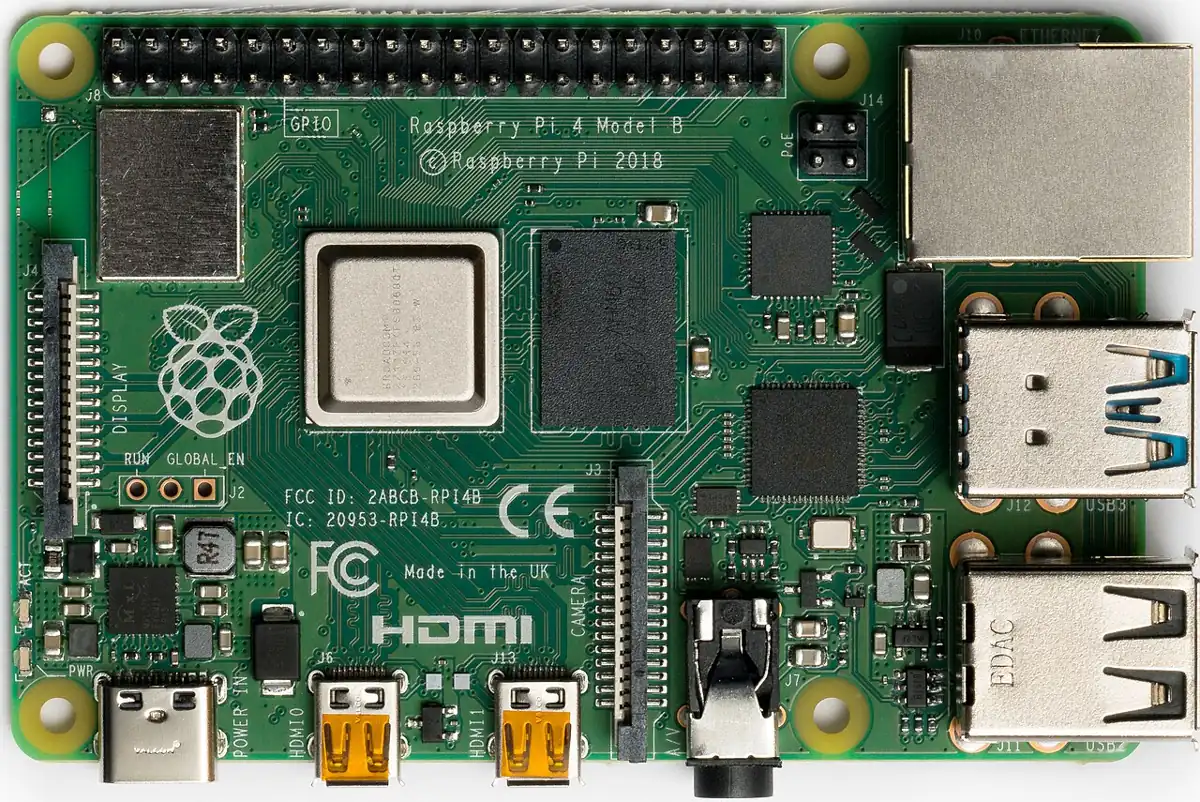
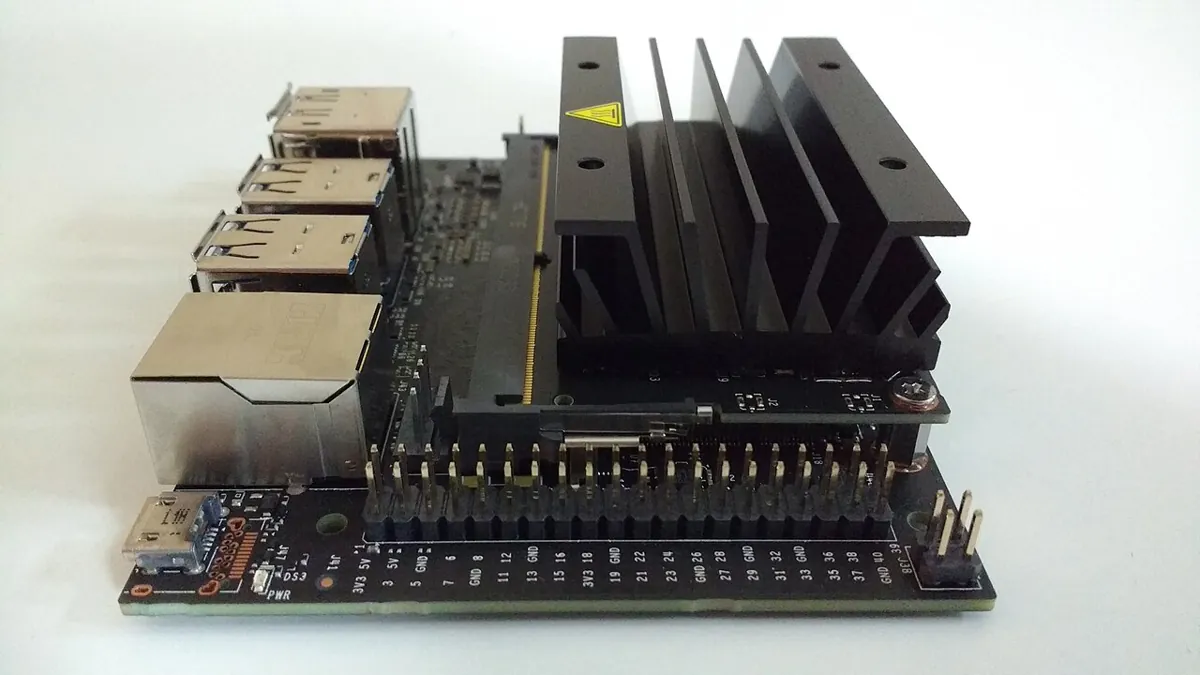
- Robot labs: markers, colour tape and fixed lighting keep classical vision fast and easy to debug.
- Warehouses and kitchens: thousands of different items → learned detectors trained on large datasets.
- Safety-critical cells: a learned model may find the part, but hardware interlocks and simple checks decide whether the robot may move.
Think
Think about it
Think
Your learned model is 98% accurate on your test set, but fails badly on the first day in a new lab. What probably happened, and how would you build a better test set?
Experiment
Try it in the lab
About 45 minutes. Python part needs NumPy and OpenCV; bench part needs an Arduino UNO, 3 LEDs, 3 × 220 Ω and 2 push buttons.
Experiment
Make the comparison yourself
You will need
- `classical_vs_learned_lab.py` (opencv-python, numpy; pyserial for the panel)
- Object detection simulator (browser)
- Bench: Arduino UNO, 3 LEDs, 3 × 220 Ω, 2 push buttons, breadboard, jumpers
Steps
- Run the script. Write down accuracy and false positives for both methods in all five conditions.
- Set `sticker_rate=0.0` in the training set. What happens to the learned model on stickered blocks?
- Change `extent > 0.88` to `extent > 0.75` in the classical rule. Stickers pass now — what else passes?
- Change k from 5 to 1 and to 15. What happens to false positives?
- In the simulator, compare Classical-style and AI-style scores with noise on.
- Bench: build the panel, send `Y`, `N` and `?` from the Serial Monitor, and test the 5-second timeout.
Interactive · Object detection simulator · Educational (not YOLO)
- block conf=0.88 KEEP · box (40,70,50,45)
- cup conf=0.77 KEEP · box (130,85,42,55)
- bolt conf=0.67 KEEP · box (210,110,28,22)
Scores and boxes are scripted for teaching. This is not a real detector (not YOLO, not OpenCV DNN). Use it to practice threshold tradeoffs: high threshold → fewer false alarms, more misses.
Classical rules are fast, exact and explainable inside the conditions you planned for, and brittle outside them. Learned models handle the variation they were trained on, and fail on what they never saw. The hybrid, with “ask a human” as the safe default, gives the fewest wrong actions.
Knowledge check
Check your understanding
Knowledge check
1. Classical vision is usually the better first choice when…
2. In our test the classical rule failed on stickered blocks because…
3. The learned model failed in warm light because…
4. The usual way to fix a learned model that fails in a new condition is…
5. k-NN classifies a new example by…
6. In a hybrid system, when classical and learned disagree, the safe action is…
7. A good test set for a vision model should…
8. In the decision panel, what happens if nobody presses a button within 5 s?
Mini assignment
Hands-on assignment
Mini assignment
Classical vs learned on real photos
Repeat today’s comparison with real camera photos of one object you want the arm to pick, and write a one-page recommendation.
Deliverables
- 60 labelled photos (30 target, 30 look-alikes) in two lighting setups, plus 20 test photos from a third setup.
- Your classical rule (Lesson 10 style) and its accuracy and false positives on the test photos.
- A k-NN model trained on the first two setups, with the same numbers.
- A table of the hybrid’s correct / wrong / asked counts.
- A one-page recommendation: which approach for the Kota lab arm, and why — with numbers.
Do this, step by step
- Take 30 photos of your target and 30 of look-alikes, in two lighting setups.
- Take 20 test photos in a third setup that you never use for tuning or training.
- Write a Lesson 10-style classical rule and measure its accuracy and false positives on the test photos.
- Train a k-NN on the first two setups and measure it on the same test photos.
- Run the hybrid (both must agree, else ask) and write a one-page recommendation with numbers.
Stuck? Hints, one at a time
- Never test on photos you trained or tuned on — that hides the real error.
- If the learned model fails on stickered blocks, add stickered examples to the training set (see
sticker_rate). - When the two methods disagree, the hybrid should ask or do nothing — count those as “asked”, not as wrong.
Challenges (pick by level)
- 🟢 Beginner: Fill in the decision checklist for three tasks: sort coloured blocks, find any cup on a cluttered desk, read a part number.
- 🟡 Intermediate: Balance the training set differently (fewer positives) and show how false positives and recall change.
- 🟠 Advanced: Replace raw pixels with better features (hue histogram + extent + aspect) for k-NN and compare.
- 🔴 Expert: Log every “ask a human” crop with the human’s answer, add them to the training set, retrain, and show the ask-rate falling over three rounds.
- ⚫ Research: Run a pre-trained detector on your test photos (for example a YOLO model from Ultralytics) and compare its results and speed with your hybrid. Report honestly where each wins.
Next step
Whatever detector you use, its pixel answers are only useful to the arm if you know how the camera maps the world to pixels. In Lesson 12 — Camera Calibration you measure your camera’s focal length and lens distortion with a printed checkerboard.
Sources
- Wikipedia — Machine vision — classical processing methods (thresholding, blob extraction, edge detection, template matching, gauging), pass/fail and robot-guidance outputs, and deep learning in machine vision from the late 2010s.
- Wikipedia — k-nearest neighbors algorithm — vote of the k nearest training examples; skewed class distributions; feature scaling; odd k for two classes.
- OpenCV 4.x — Changing Colorspaces — HSV conversion and
inRangeused in the classical detector. - Photos: Wikimedia Commons (credits under each image).
Look back: Lesson 10: Color-Based Object Detection. Next: Lesson 12: Camera Calibration. Related: Stage 11 — Computer Vision, Stage 13 — Perception, Planning & Manipulation.
Self-attested for now — keep artifacts in your lab notebook.
Complete
Today's goal
0 of 1 done today
Mark this lesson complete when you have worked the experiment, knowledge check, and assignment (even roughly).