
Robot Simulation & Digital Twin · Lesson 03
Robot Models & URDF Concepts
Est. 55–70 min
Why
Why this lesson matters
A simulator, a digital twin, RViz and a motion planner all need the same thing first: a robot description — a file that says what parts the robot has, how they are joined, how far each joint can turn, and where every part is. In the ROS world, that file is usually URDF (Unified Robot Description Format), written in XML.
In this lesson you will read a real URDF of our desk arm, check it with a Python script the way a simulator would, use it to compute where the gripper tip is, break it on purpose to see the classic mistakes, and finally copy its joint limits onto the Arduino so the real arm and its model obey the same rules.
Concept
How a robot is written down: links, joints and URDF
1. Links and joints
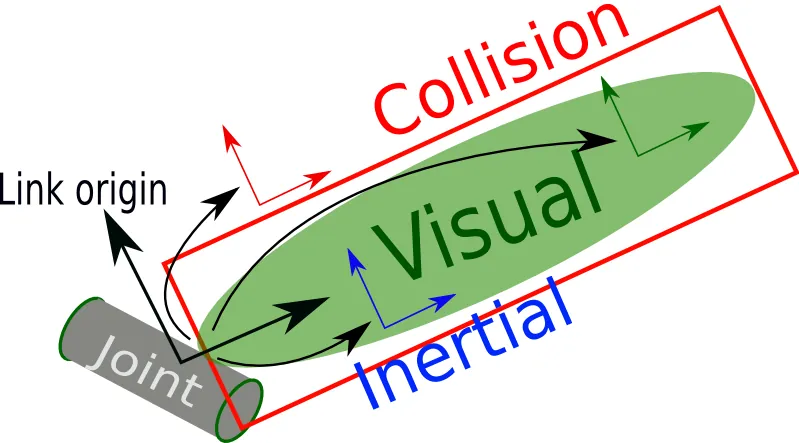
A link is one rigid part of the robot: the base, the upper arm, the forearm, the gripper. A joint connects exactly two links — a parent and a child — and says how the child can move relative to the parent. Think of your own arm: shoulder, upper arm, elbow, forearm, wrist, hand. Bones are links; the places where they bend are joints.
| Joint type | How the child moves | Limit units | Example |
|---|---|---|---|
| fixed | Not at all — glued to the parent | — | Camera bolted to the gripper, the tool_tip frame |
| revolute | Turns about an axis, between a lower and upper limit | radians | Servo joints of our desk arm, gripper fingers |
| continuous | Turns about an axis forever, no limits | — | Wheels, a head that can spin all the way round |
| prismatic | Slides along an axis, between limits | metres | A linear rail, a telescopic gripper pole |
| planar / floating | Moves in a plane / in all of 3D space | — | Rarely used for arms; cannot be described by one number |
2. A robot is a tree
URDF is a tree with exactly one root link (usually base_link). Every other link has exactly one parent joint. An arm is a simple chain; a robot with two arms or a camera on a mast becomes a branching tree. Two things are therefore illegal: a link with two parents (a loop), and a link with no joint at all (a second root floating in space).
<robot name="desk_arm">The whole file sits inside one robot tag.
<link name="upper_arm">A rigid part, with optional
<visual>,<collision>and<inertial>inside.<joint name="elbow_pitch" type="revolute">Connects
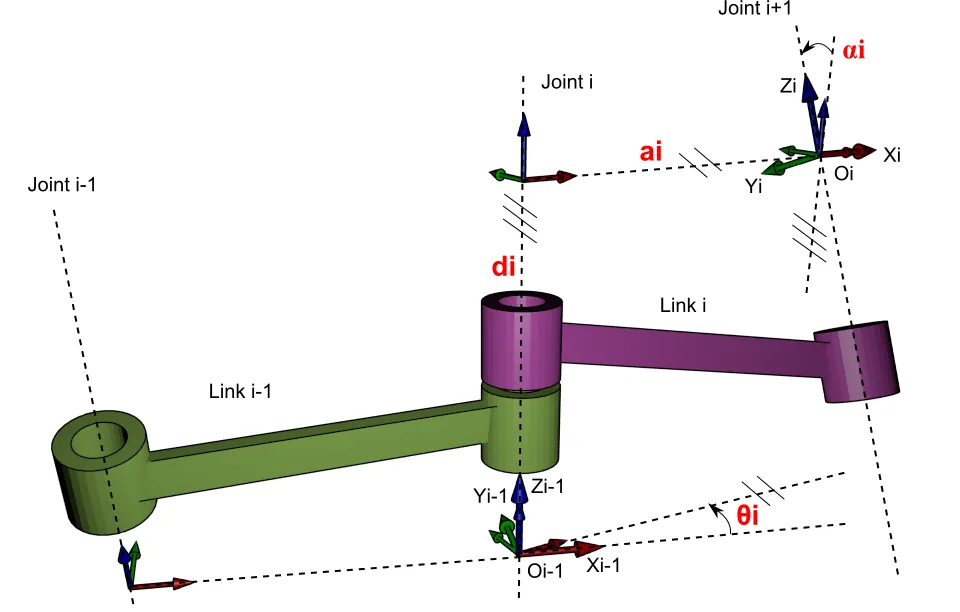
<parent link="upper_arm"/>to<child link="forearm"/>.<origin xyz="0 0 0.12" rpy="0 0 0"/>Where the joint sits, measured in the parent link’s frame: 0.12 m up the upper arm.
rpy= roll, pitch, yaw in radians.<axis xyz="0 1 0"/>The direction the joint turns about (here the y axis).
<limit lower="-2.20" upper="2.20" effort="0.15" velocity="2.0"/>Range in radians (±126°), plus the maximum effort and speed.
3. Units: the silent killer
4. From description to position: forward kinematics
Because every joint origin is written in its parent’s frame, a program can start at base_link and walk down the tree: move by the joint origin, turn by the joint angle about its axis, move to the next joint, and so on. Multiplying these steps gives the position of any link — this is forward kinematics (Stage 8), done automatically from the file. In ROS 2, robot_state_publisher does exactly this to compute the transforms between all the parts.
Visual
Visualise it: build a robot description
Educational URDF-style builder: links, joints, types and limits as a tree. (Not production URDF or Xacro.)
Interactive · URDF robot builder · Educational (not production URDF)


base_link
Root / base — usually fixed to world in teaching models.
link_1
link_2
ee_link
<!-- educational pseudo-URDF — NOT production -->
<robot name="toy_arm">
  <link name="base_link"/>
  <link name="link_1"/>
  <joint name="j1" type="revolute">
    <parent link="base_link"/>
    <child link="link_1"/>
  </joint>
  <link name="link_2"/>
  <joint name="j2" type="revolute">
    <parent link="link_1"/>
    <child link="link_2"/>
  </joint>
  <link name="ee_link"/>
  <joint name="j3" type="fixed">
    <parent link="link_2"/>
    <child link="ee_link"/>
  </joint>
</robot>
Educational browser builder — not production URDF/Xacro, not Gazebo spawn, not Isaac articulation. Full robot description → planned Stage 19.
Code lab
Code lab: read, check and use a URDF
Here is the teaching URDF of our desk arm: 6 links and 5 joints (base yaw, shoulder pitch, elbow pitch, wrist pitch, and a fixed tool_tip). The lengths are example numbers — measure your own arm and replace them.
<?xml version="1.0"?>
<!-- desk_arm.urdf - Stage 12 Lesson 3: a teaching model of a 4-joint desk arm.
     Lengths in metres, angles in radians, masses in kg. Example numbers:
     measure YOUR arm with a ruler and replace them. -->
<robot name="desk_arm">

  <link name="base_link">
    <visual><geometry><cylinder length="0.04" radius="0.06"/></geometry></visual>
  </link>

  <link name="shoulder_link">
    <visual><geometry><box size="0.05 0.05 0.06"/></geometry></visual>
  </link>

  <link name="upper_arm">
    <visual>
      <origin xyz="0 0 0.06" rpy="0 0 0"/>
      <geometry><box size="0.03 0.03 0.12"/></geometry>
    </visual>
    <inertial><mass value="0.08"/><inertia ixx="0.0001" iyy="0.0001" izz="0.00002" ixy="0" ixz="0" iyz="0"/></inertial>
  </link>

  <link name="forearm">
    <visual>
      <origin xyz="0 0 0.05" rpy="0 0 0"/>
      <geometry><box size="0.025 0.025 0.10"/></geometry>
    </visual>
  </link>

  <link name="gripper">
    <visual><geometry><box size="0.04 0.02 0.05"/></geometry></visual>
  </link>

  <link name="tool_tip"/>

  <!-- base yaw: turns the whole arm left/right about z -->
  <joint name="base_yaw" type="revolute">
    <parent link="base_link"/>
    <child link="shoulder_link"/>
    <origin xyz="0 0 0.05" rpy="0 0 0"/>
    <axis xyz="0 0 1"/>
    <limit lower="-1.57" upper="1.57" effort="0.2" velocity="2.0"/>
  </joint>

  <!-- shoulder pitch: lifts the upper arm forward/back about y -->
  <joint name="shoulder_pitch" type="revolute">
    <parent link="shoulder_link"/>
    <child link="upper_arm"/>
    <origin xyz="0 0 0.03" rpy="0 0 0"/>
    <axis xyz="0 1 0"/>
    <limit lower="-1.40" upper="1.40" effort="0.2" velocity="2.0"/>
  </joint>

  <!-- elbow pitch: 0.12 m up the upper arm -->
  <joint name="elbow_pitch" type="revolute">
    <parent link="upper_arm"/>
    <child link="forearm"/>
    <origin xyz="0 0 0.12" rpy="0 0 0"/>
    <axis xyz="0 1 0"/>
    <limit lower="-2.20" upper="2.20" effort="0.15" velocity="2.0"/>
  </joint>

  <!-- wrist pitch: 0.10 m up the forearm -->
  <joint name="wrist_pitch" type="revolute">
    <parent link="forearm"/>
    <child link="gripper"/>
    <origin xyz="0 0 0.10" rpy="0 0 0"/>
    <axis xyz="0 1 0"/>
    <limit lower="-1.57" upper="1.57" effort="0.1" velocity="2.0"/>
  </joint>

  <!-- fixed frame between the gripper fingers: where the tool "is" -->
  <joint name="tool_fixed" type="fixed">
    <parent link="gripper"/>
    <child link="tool_tip"/>
    <origin xyz="0 0 0.06" rpy="0 0 0"/>
  </joint>

</robot>
urdf_check.py uses only Python’s built-in XML parser. It does what a simulator does when it loads a model: parse, check, build the tree, compute positions. Then it breaks the file in five classic ways. Put both files in one folder and run python3 urdf_check.py.
"""urdf_check.py - Stage 12 Lesson 3: read a URDF like a simulator does.

1. Parse desk_arm.urdf (standard library xml only).
2. Check the model: one root, a real tree, limits present and sensible.
3. Print the link/joint tree.
4. Forward kinematics: chain the joint <origin>s and rotations to find
   where tool_tip is for a given set of joint angles.
5. Break the file on purpose and show the checker catching each mistake.
6. Print a C table of joint limits for the Arduino sketch.
Run:  python3 urdf_check.py   (desk_arm.urdf must be in the same folder)
"""
import math
import os
import xml.etree.ElementTree as ET

HERE = os.path.dirname(os.path.abspath(__file__))


def load(text):
    root = ET.fromstring(text)
    links = [l.get("name") for l in root.findall("link")]
    joints = []
    for j in root.findall("joint"):
        o = j.find("origin")
        a = j.find("axis")
        lim = j.find("limit")
        joints.append({
            "name": j.get("name"),
            "type": j.get("type"),
            "parent": j.find("parent").get("link"),
            "child": j.find("child").get("link"),
            "xyz": [float(v) for v in (o.get("xyz", "0 0 0") if o is not None else "0 0 0").split()],
            "rpy": [float(v) for v in (o.get("rpy", "0 0 0") if o is not None else "0 0 0").split()],
            "axis": [float(v) for v in (a.get("xyz") if a is not None else "1 0 0").split()],
            "lower": float(lim.get("lower", 0)) if lim is not None else None,
            "upper": float(lim.get("upper", 0)) if lim is not None else None,
        })
    return root.get("name"), links, joints


def check(links, joints):
    problems = []
    names = set(links)
    if len(names) != len(links):
        problems.append("two links share a name")
    children = {}
    for j in joints:
        for end in ("parent", "child"):
            if j[end] not in names:
                problems.append(f"joint {j['name']}: {end} link '{j[end]}' does not exist")
        if j["child"] in children:
            problems.append(f"link {j['child']} has two parents ({children[j['child']]} and {j['name']}) - not a tree")
        children[j["child"]] = j["name"]
        if j["type"] in ("revolute", "prismatic"):
            if j["lower"] is None:
                problems.append(f"joint {j['name']}: {j['type']} joint needs a <limit>")
            elif j["lower"] >= j["upper"]:
                problems.append(f"joint {j['name']}: lower {j['lower']} is not below upper {j['upper']}")
            elif j["type"] == "revolute" and max(abs(j["lower"]), abs(j["upper"])) > 2 * math.pi:
                problems.append(f"joint {j['name']}: limit {j['upper']} > 2*pi - degrees written where radians are needed?")
    roots = [l for l in links if l not in children]
    if len(roots) != 1:
        problems.append(f"model needs exactly one root link, found {len(roots)}: {roots}")
    return problems, roots


def print_tree(root, joints, depth=0, link=None):
    link = link or root
    if depth == 0:
        print(link)
    for j in joints:
        if j["parent"] == link:
            extra = ""
            if j["lower"] is not None:
                extra = f"  [{math.degrees(j['lower']):.0f} deg .. {math.degrees(j['upper']):.0f} deg]"
            print("    " * depth + f"└─ {j['name']} ({j['type']}){extra} → {j['child']}")
            print_tree(root, joints, depth + 1, j["child"])


# ---- tiny 4x4 matrix helpers (no numpy needed) ----
def matmul(a, b):
    return [[sum(a[i][k] * b[k][j] for k in range(4)) for j in range(4)] for i in range(4)]


def rot_axis(axis, q):
    x, y, z = axis
    n = math.sqrt(x * x + y * y + z * z)
    x, y, z = x / n, y / n, z / n
    c, s, t = math.cos(q), math.sin(q), 1 - math.cos(q)
    return [[t * x * x + c, t * x * y - s * z, t * x * z + s * y, 0],
            [t * x * y + s * z, t * y * y + c, t * y * z - s * x, 0],
            [t * x * z - s * y, t * y * z + s * x, t * z * z + c, 0],
            [0, 0, 0, 1]]


def origin(xyz, rpy):
    r, p, y = rpy
    m = matmul(rot_axis((0, 0, 1), y), matmul(rot_axis((0, 1, 0), p), rot_axis((1, 0, 0), r)))
    m[0][3], m[1][3], m[2][3] = xyz
    return m


def fk(root, joints, angles, target):
    """Walk from the root to `target`, multiplying origin * joint-rotation."""
    path = []
    link = target
    by_child = {j["child"]: j for j in joints}
    while link != root:
        j = by_child[link]
        path.append(j)
        link = j["parent"]
    m = [[1 if i == k else 0 for k in range(4)] for i in range(4)]
    for j in reversed(path):
        m = matmul(m, origin(j["xyz"], j["rpy"]))
        if j["type"] == "revolute":
            q = angles.get(j["name"], 0.0)
            q = max(j["lower"], min(j["upper"], q))      # respect the limits
            m = matmul(m, rot_axis(j["axis"], q))
    return m[0][3], m[1][3], m[2][3]


text = open(os.path.join(HERE, "desk_arm.urdf"), encoding="utf-8").read()
name, links, joints = load(text)
problems, roots = check(links, joints)
print(f"robot '{name}': {len(links)} links, {len(joints)} joints, root = {roots[0]}")
print("checks:", "all OK" if not problems else problems)
print()
print_tree(roots[0], joints)
print()

poses = {
    "home (all zero)": {},
    "shoulder 30 deg forward": {"shoulder_pitch": math.radians(30)},
    "reach: shoulder 45, elbow 60, wrist -15": {"shoulder_pitch": math.radians(45), "elbow_pitch": math.radians(60), "wrist_pitch": math.radians(-15)},
    "same reach, base turned 90 deg": {"base_yaw": math.radians(90), "shoulder_pitch": math.radians(45), "elbow_pitch": math.radians(60), "wrist_pitch": math.radians(-15)},
}
print("forward kinematics: where is tool_tip? (metres, in base_link frame)")
for label, q in poses.items():
    x, y, z = fk(roots[0], joints, q, "tool_tip")
    print(f"  {label:42s} x={x:+.3f}  y={y:+.3f}  z={z:+.3f}")
print()

print("break the model on purpose:")
mistakes = {
    "typo in a child link name": text.replace('<child link="forearm"/>', '<child link="fore_arm"/>'),
    "limit written in degrees": text.replace('lower="-2.20" upper="2.20"', 'lower="-126" upper="126"'),
    "lower and upper swapped": text.replace('lower="-1.40" upper="1.40"', 'lower="1.40" upper="-1.40"'),
    "a link with no joint (2 roots)": text.replace('<link name="tool_tip"/>', '<link name="tool_tip"/>\n  <link name="camera_link"/>'),
    "limit tag deleted": text.replace('<limit lower="-1.57" upper="1.57" effort="0.1" velocity="2.0"/>', ''),
}
for label, bad in mistakes.items():
    p, _ = check(*load(bad)[1:])
    print(f"  {label:32s} -> {p[0] if p else 'NOT CAUGHT'}")
print()

print("// C table for urdf_limits.ino (degrees, from the URDF radians)")
print("const JointLimit JOINTS[] = {")
for j in joints:
    if j["type"] == "revolute":
        print(f"  {{\"{j['name']}\", {math.degrees(j['lower']):.0f}, {math.degrees(j['upper']):.0f}}},")
print("};")
Output (run with python3 urdf_check.py)
robot 'desk_arm': 6 links, 5 joints, root = base_link
checks: all OK

base_link
└─ base_yaw (revolute)  [-90 deg .. 90 deg] → shoulder_link
    └─ shoulder_pitch (revolute)  [-80 deg .. 80 deg] → upper_arm
        └─ elbow_pitch (revolute)  [-126 deg .. 126 deg] → forearm
            └─ wrist_pitch (revolute)  [-90 deg .. 90 deg] → gripper
                └─ tool_fixed (fixed) → tool_tip

forward kinematics: where is tool_tip? (metres, in base_link frame)
  home (all zero)                            x=+0.000  y=+0.000  z=+0.360
  shoulder 30 deg forward                    x=+0.140  y=+0.000  z=+0.322
  reach: shoulder 45, elbow 60, wrist -15    x=+0.241  y=+0.000  z=+0.139
  same reach, base turned 90 deg             x=+0.000  y=+0.241  z=+0.139

break the model on purpose:
  typo in a child link name        -> joint elbow_pitch: child link 'fore_arm' does not exist
  limit written in degrees         -> joint elbow_pitch: limit 126.0 > 2*pi - degrees written where radians are needed?
  lower and upper swapped          -> joint shoulder_pitch: lower 1.4 is not below upper -1.4
  a link with no joint (2 roots)   -> model needs exactly one root link, found 2: ['base_link', 'camera_link']
  limit tag deleted                -> joint wrist_pitch: revolute joint needs a <limit>

// C table for urdf_limits.ino (degrees, from the URDF radians)
const JointLimit JOINTS[] = {
  {"base_yaw", -90, 90},
  {"shoulder_pitch", -80, 80},
  {"elbow_pitch", -126, 126},
  {"wrist_pitch", -90, 90},
};Try it: add links and joints, change joint types and limits, and watch the tree and the model change. (Educational URDF-style builder, not production URDF.)
Interactive · URDF robot builder · Educational (not production URDF)
base_link
Root / base — usually fixed to world in teaching models.
link_1
link_2
ee_link
<!-- educational pseudo-URDF — NOT production -->
<robot name="toy_arm">
  <link name="base_link"/>
  <link name="link_1"/>
  <joint name="j1" type="revolute">
    <parent link="base_link"/>
    <child link="link_1"/>
  </joint>
  <link name="link_2"/>
  <joint name="j2" type="revolute">
    <parent link="link_1"/>
    <child link="link_2"/>
  </joint>
  <link name="ee_link"/>
  <joint name="j3" type="fixed">
    <parent link="link_2"/>
    <child link="ee_link"/>
  </joint>
</robot>
Educational browser builder — not production URDF/Xacro, not Gazebo spawn, not Isaac articulation. Full robot description → planned Stage 19.
Bench build: the same limits on the real arm
The last part of the script prints a C table of joint limits. urdf_limits.ino pastes that table in, so the Arduino clamps every command to the same limits the simulator uses. It also needs a zero offset per joint: the servo angle at which the real joint is at URDF zero. Servo horns are never mounted exactly at 90°, so you find this number by eye on your own arm.
| Part | Connection | Note |
|---|---|---|
| SG90 / MG90S servo signal (shoulder) | D9 | orange/yellow wire; the other joints are dry-run only in this build |
| Servo power | separate 5–6 V supply (4×AA or 5 V 2 A adapter) | red to supply +, brown to supply − |
| Common ground | supply − to Arduino GND | needed so the signal has a reference |
| USB | Arduino ↔ laptop | Serial Monitor at 115200, line ending “Newline” |
// urdf_limits.ino - Stage 12 Lesson 3: the same joint limits on the bench
// as in desk_arm.urdf, so the real arm and its model agree.
// Board: Arduino Uno. Optional: one SG90/MG90S servo for shoulder_pitch on D9.
// Servo power: separate 5-6 V supply, grounds joined. NEVER from a GPIO pin
// or the Arduino 5V pin.
// Serial Monitor 115200, line ending "Newline". Commands:
//   J <joint> <deg>   e.g.  J shoulder_pitch 30     (joint angle, 0 = URDF zero)
//   L                 list joints and limits

#include <Servo.h>

struct JointLimit {
  const char* name;
  int lowerDeg;
  int upperDeg;
};

// Pasted from the output of urdf_check.py (URDF radians -> degrees)
const JointLimit JOINTS[] = {
  {"base_yaw", -90, 90},
  {"shoulder_pitch", -80, 80},
  {"elbow_pitch", -126, 126},
  {"wrist_pitch", -90, 90},
};
const uint8_t N_JOINTS = sizeof(JOINTS) / sizeof(JOINTS[0]);

// Servo degrees when the joint is at URDF zero. Find it by eye on YOUR arm:
// the horn is never mounted exactly at 90.
const int ZERO_OFFSET[] = {90, 92, 88, 90};
const uint8_t SHOULDER = 1;     // only this joint has a real servo in this build
const uint8_t SERVO_PIN = 9;

Servo shoulder;
char line[40];
uint8_t len = 0;

void listJoints() {
  for (uint8_t i = 0; i < N_JOINTS; i++) {
    Serial.print(JOINTS[i].name);
    Serial.print(F("  "));
    Serial.print(JOINTS[i].lowerDeg);
    Serial.print(F(" .. "));
    Serial.println(JOINTS[i].upperDeg);
  }
}

void handle(char* cmd) {
  if (cmd[0] == 'L') { listJoints(); return; }
  if (cmd[0] != 'J') { Serial.println(F("? use J <joint> <deg> or L")); return; }
  char* name = strtok(cmd + 1, " ");
  char* val = strtok(NULL, " ");
  if (!name || !val) { Serial.println(F("? J <joint> <deg>")); return; }
  for (uint8_t i = 0; i < N_JOINTS; i++) {
    if (strcmp(name, JOINTS[i].name) != 0) continue;
    int want = atoi(val);
    int q = constrain(want, JOINTS[i].lowerDeg, JOINTS[i].upperDeg);
    int servoDeg = ZERO_OFFSET[i] + q;
    if (servoDeg < 0 || servoDeg > 180) {
      Serial.println(F("REFUSED: outside the servo's 0-180 range"));
      return;
    }
    Serial.print(name);
    Serial.print(F(" joint "));
    Serial.print(q);
    if (q != want) Serial.print(F(" (clamped by URDF limit)"));
    Serial.print(F(" -> servo "));
    Serial.println(servoDeg);
    if (i == SHOULDER) shoulder.write(servoDeg);
    return;
  }
  Serial.println(F("? unknown joint (type L)"));
}

void setup() {
  Serial.begin(115200);
  shoulder.write(ZERO_OFFSET[SHOULDER]);   // start at URDF zero
  shoulder.attach(SERVO_PIN);
  Serial.println(F("urdf_limits ready. L = list, J <joint> <deg>"));
}

void loop() {
  while (Serial.available()) {
    char c = Serial.read();
    if (c == '\r') continue;
    if (c == '\n') {
      line[len] = '\0';
      if (len) handle(line);
      len = 0;
    } else if (len < sizeof(line) - 1) {
      line[len++] = c;
    }
  }
}urdf_limits ready. L = list, J <joint> <deg>
J shoulder_pitch 30
shoulder_pitch joint 30 -> servo 122
J shoulder_pitch 120
shoulder_pitch joint 80 (clamped by URDF limit) -> servo 172
J elbow_pitch -120
REFUSED: outside the servo's 0-180 rangeDebugging
| Symptom | Likely cause | Fix |
|---|---|---|
ParseError in Python | broken XML: missing /> or a closing tag | Open the file in an editor with XML highlighting; check the line number in the error |
| Arm appears huge or tiny in a viewer | centimetres or millimetres instead of metres | Divide by 100 or 1000; URDF lengths are metres |
| Joint spins far past its stops in simulation | limit written in degrees | Convert to radians (deg × π / 180) |
| Parts float or overlap in the viewer | joint origin measured from the wrong frame | Origins are in the parent link’s frame, from the parent joint |
| Arm bends the wrong way | axis sign flipped | Change 0 1 0 to 0 -1 0 (or the reverse) and re-check FK |
| Serial says “? unknown joint” | typo or extra spaces | Type L to list the exact joint names |
Real world
Robot descriptions in the real world
- ROS 2 and RViz: the official ROS 2 URDF tutorials build an R2D2-style robot step by step — fixed joints first, then continuous, revolute and prismatic joints — and show it in RViz, where
joint_state_publisher_guigives a slider for every non-fixed joint. - Simulators: Gazebo describes worlds in SDF and can also load URDF robots, so the same description drives the simulator, the viewer and (later in this course) the twin.
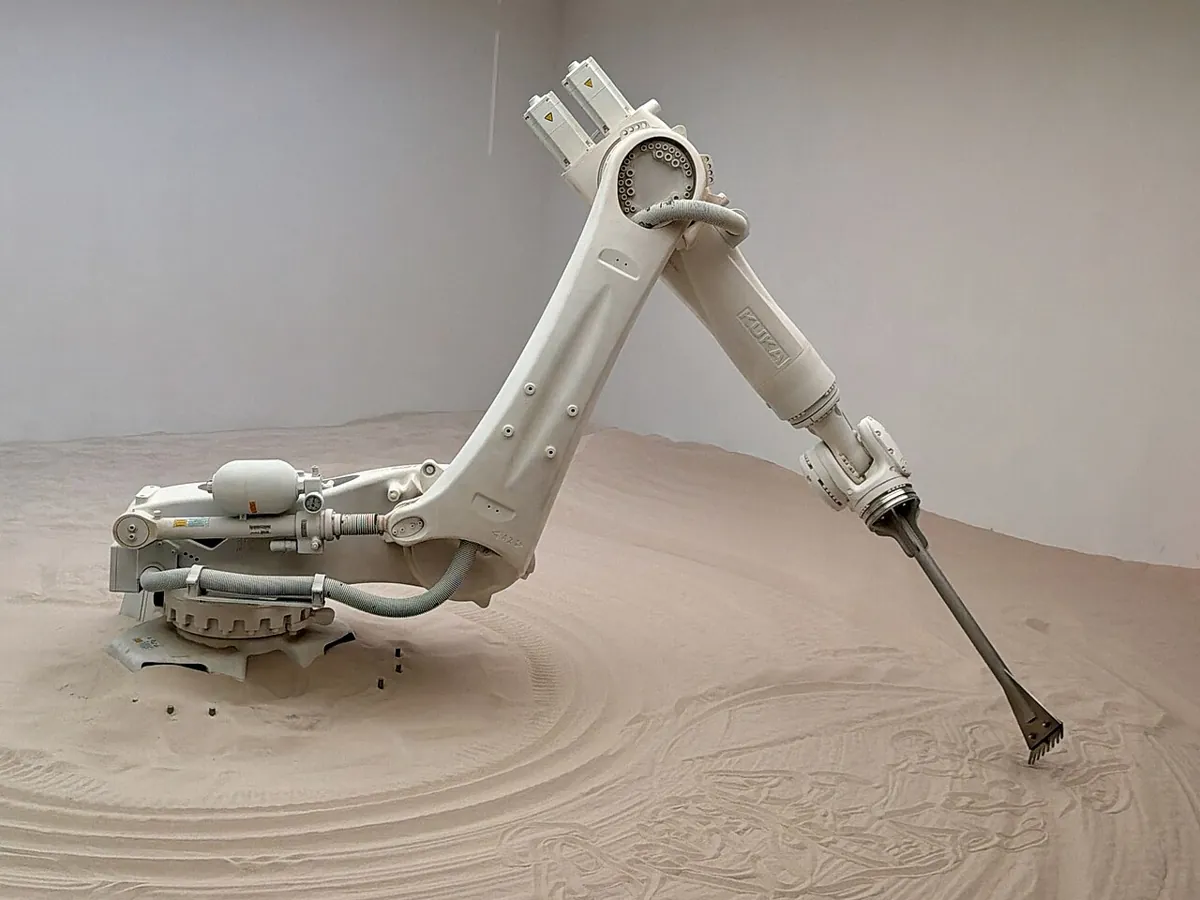
- Industrial arms: six-axis factory robots are chains of revolute joints from base to wrist. To program them off-line in simulation, the software needs exactly this kind of description: link lengths, joint axes and joint ranges.
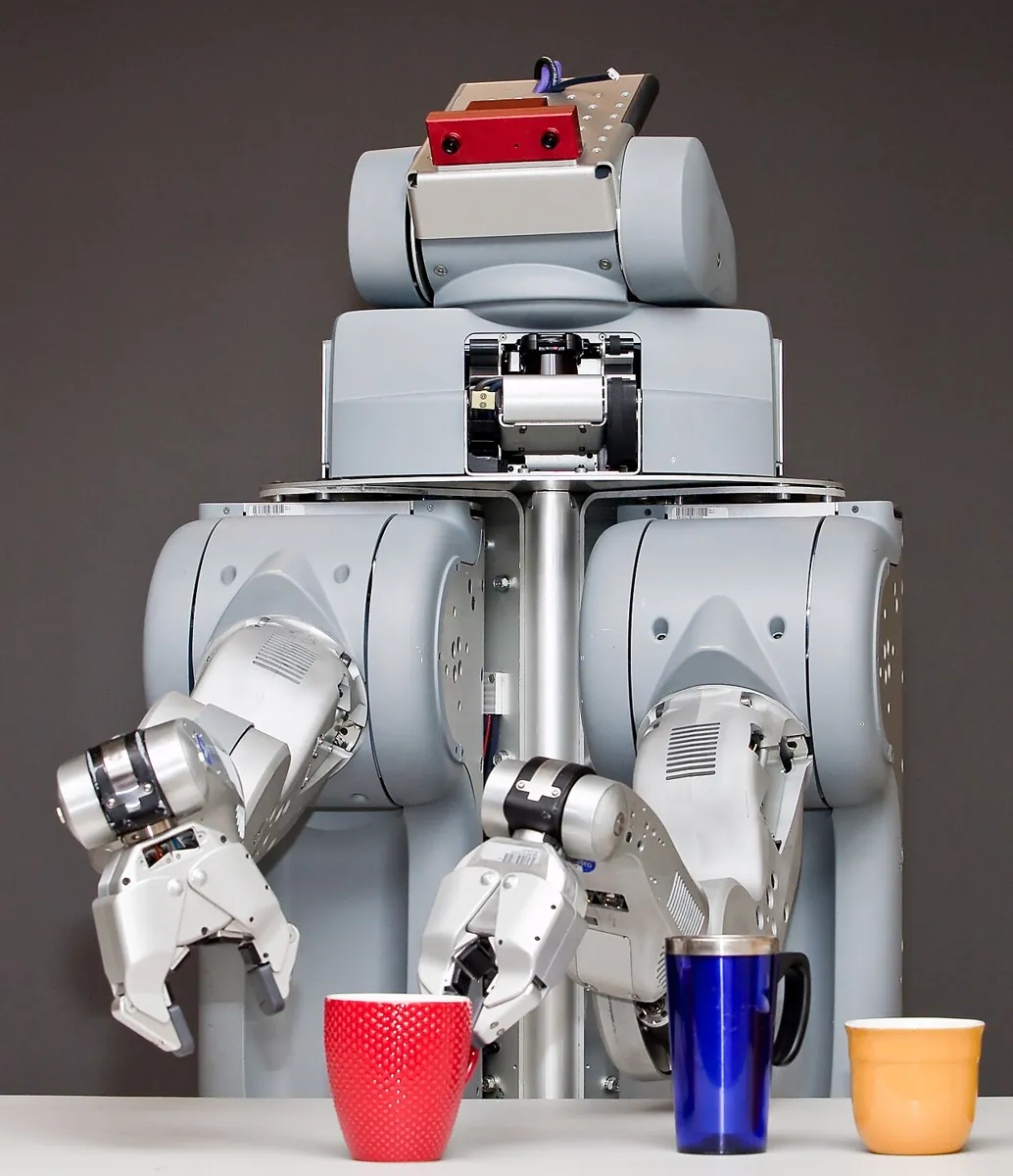
- Research robots: two-armed mobile robots such as the PR2 are big branching trees — base, torso, head, two arms, two grippers — all in one description.
Think
Think about it
Think
Your friend downloads a beautiful 3D mesh of a robot arm and says “now I have a robot model for simulation”. What is still missing?
Experiment
Try it in the lab
About 55 minutes. The Python part needs only Python 3. The bench part needs an Arduino UNO, one SG90/MG90S servo and a separate 5–6 V supply.
Experiment
Measure, write, check, match
You will need
- `desk_arm.urdf` and `urdf_check.py` (Python 3, no libraries)
- URDF robot builder (in your browser)
- Ruler or vernier caliper
- Optional bench: Arduino UNO, SG90 servo, 4×AA holder or 5 V 2 A adapter, jumper wires
Steps
- Run `urdf_check.py`. Check the home-pose height by adding the joint origins yourself.
- Measure your real arm: base to shoulder axis, shoulder to elbow, elbow to wrist, wrist to fingertip. Put your numbers (in metres!) into `desk_arm.urdf` and re-run.
- Add a `camera_link` with a **fixed** joint to `gripper` (origin 0.02 m forward). Run the checker — it should pass now.
- Turn `wrist_pitch` into a `continuous` joint and remove its limit. What does the checker say, and is that right for a servo joint?
- In the URDF builder, build the same 4-joint chain and compare the tree with the script output.
- Bench: upload `urdf_limits.ino`, find your shoulder’s real zero offset, send `J shoulder_pitch 30`, then `J shoulder_pitch 120`, then fix the elbow limit in the URDF as the tip box explains.
Interactive · URDF robot builder · Educational (not production URDF)
base_link
Root / base — usually fixed to world in teaching models.
link_1
link_2
ee_link
<!-- educational pseudo-URDF — NOT production -->
<robot name="toy_arm">
  <link name="base_link"/>
  <link name="link_1"/>
  <joint name="j1" type="revolute">
    <parent link="base_link"/>
    <child link="link_1"/>
  </joint>
  <link name="link_2"/>
  <joint name="j2" type="revolute">
    <parent link="link_1"/>
    <child link="link_2"/>
  </joint>
  <link name="ee_link"/>
  <joint name="j3" type="fixed">
    <parent link="link_2"/>
    <child link="ee_link"/>
  </joint>
</robot>
Educational browser builder — not production URDF/Xacro, not Gazebo spawn, not Isaac articulation. Full robot description → planned Stage 19.
The URDF is the robot’s identity card. When its numbers match the ruler, the simulator’s forward kinematics matches the real arm. When the bench uses the same limits as the model, a planner can never ask for a move the arm cannot do.
Knowledge check
Check your understanding
Knowledge check
1. URDF-style robot models primarily describe…
2. A URDF joint’s `<origin>` is measured in…
3. Which joint type turns about an axis but has a lower and upper limit?
4. A revolute limit is written as `upper="126"`. What is most likely wrong?
5. Why is a URDF a tree with one root?
6. Which three descriptions can a URDF link have?
7. In the bench build, the elbow command was REFUSED. What is the right fix?
Mini assignment
Hands-on assignment
Mini assignment
A URDF of your own arm
Describe your real desk arm in URDF, prove the file is correct with numbers, and make the bench obey the same limits.
Deliverables
- Your `my_arm.urdf` with measured link lengths (metres), real joint limits (radians) and at least one fixed frame (tool tip or camera).
- Output of `urdf_check.py` on your file: tree, “all OK”, and FK for home plus two poses.
- A photo of your arm in one of those poses with a ruler, and the measured tip height next to the FK number. Explain any difference.
- Bench: the Serial Monitor log of three `J` commands, including one clamped by the URDF limit.
Do this, step by step
- Measure each link of your arm with a ruler and convert to metres.
- Copy
desk_arm.urdftomy_arm.urdfand put in your lengths and joint limits in radians. - Add one fixed frame (tool tip or camera).
- Run
urdf_check.pyon your file until it prints the tree and “all OK”, then read FK for home and two poses. - Pose the real arm, measure the tip height with a ruler, and compare with the FK number.
Stuck? Hints, one at a time
- URDF uses metres and radians. 90° is about 1.571 rad, and 12 cm is 0.12, not 12.
- A link with no parent joint, or a joint that names a missing link, breaks the tree. Read the first error from
urdf_check.pyand fix only that. - If the measured height is off by about one link length, a joint
originis probably on the wrong axis.
Challenges (pick by level)
- 🟢 Beginner: Add a
prismaticjoint for a linear rail under the base (limits 0 to 0.30 m). Does the checker accept it? Where is the tool tip when the rail is at 0.30? - 🟡 Intermediate: Extend
check()to warn when a link has no<collision>element. Which links indesk_arm.urdfwould fail? - 🟠 Advanced: Make
urdf_check.pysweep each joint across its limits in 10° steps and report the lowest z the tool tip ever reaches. Does it go below the table (z < 0)? - 🔴 Expert: Write
urdf_to_arduino.pythat writes the completeJOINTS[]andZERO_OFFSET[]block into alimits.hfile, so the sketch includes it and nobody copies numbers by hand. - ⚫ Research: Read the two ROS 2 URDF tutorials in the sources. Write half a page on what
joint_state_publisher_guiandrobot_state_publishereach do with the URDF.
Next step
You can write a robot down. In Lesson 4 — Links, Joints and Robot Structure you will look closer at the structure itself: chains vs trees, degrees of freedom, joint axes and how the choice of joints decides what the arm can and cannot reach.
Look back: Lesson 2: What Is a Digital Twin?. Next: Lesson 4: Links, Joints & Robot Structure. Related: Stage 8 — Kinematics & IK.
Sources
- ROS 2 docs — Building a visual robot model with URDF from scratch — links and fixed joints, “URDF is ultimately a tree structure with one root link”, joint origin defined in the parent’s reference frame, metres,
rpy, visual origins. - ROS 2 docs — Building a movable robot model with URDF — continuous, revolute and prismatic joints,
<axis>,<limit>(radians for revolute, metres for prismatic, effort and velocity required), planar and floating joints,joint_state_publisher_guiandrobot_state_publisher. - urdf_tutorial — 06-flexible.urdf — complete example URDF with movable joints, used to cross-check tag syntax.
- Wikipedia — Robotics simulator — Gazebo describes worlds in SDF and can also load URDF robots.
- Photos: Wikimedia Commons (credits under each image). The URDF link diagram and the Denavit–Hartenberg diagram are shown as diagrams.
Self-attested for now — keep artifacts in your lab notebook.
Complete
Today's goal
0 of 1 done today
Mark this lesson complete when you have worked the experiment, knowledge check, and assignment (even roughly).