
Robot Simulation & Digital Twin · Lesson 01
Why Robots Need Simulation
Est. 45–60 min
Why
Why this lesson matters
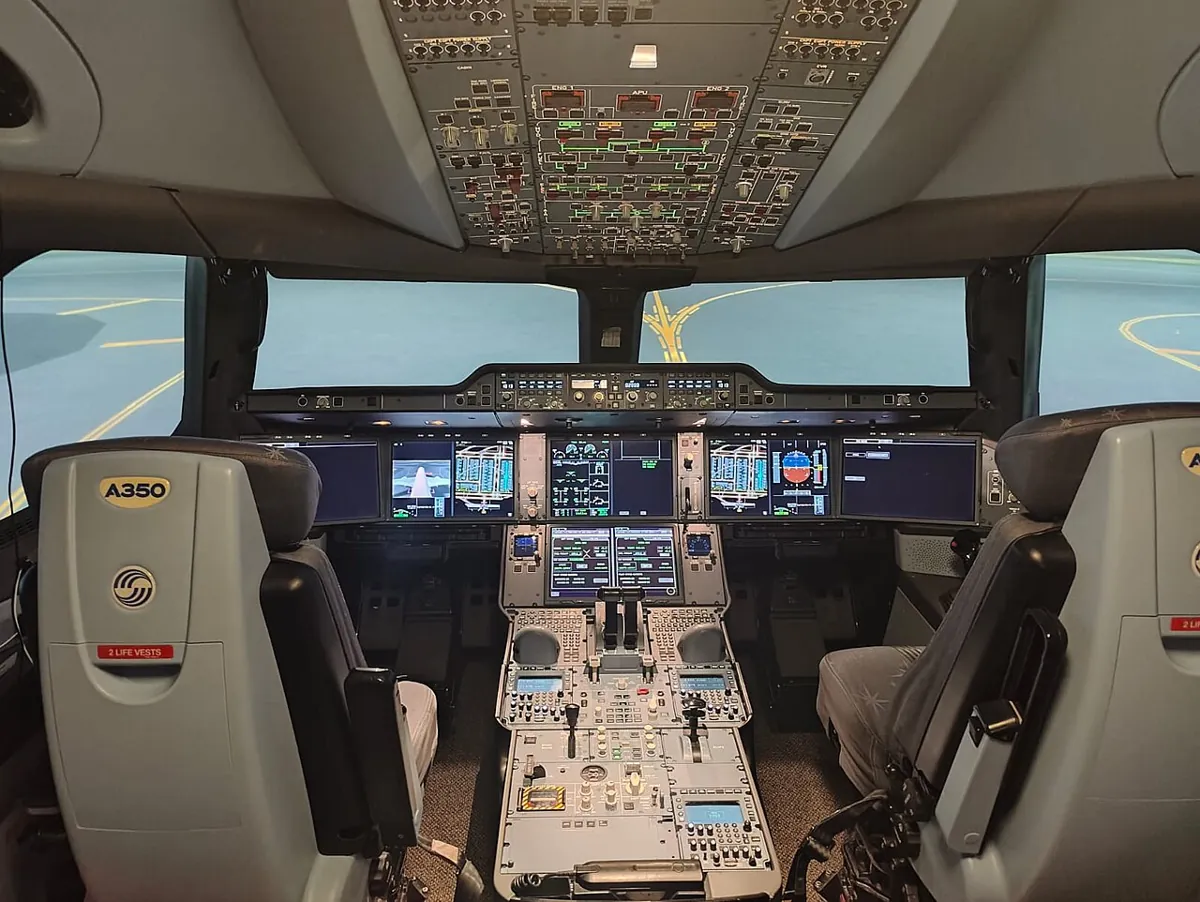
Pilots do the same thing. Before a new pilot ever flies a real Airbus, she spends many hours in a flight simulator — a cockpit on the ground where engine failures, storms and bad landings can be practised again and again without risking a single life. Robot engineers rehearse in the same way. A robot simulator is a computer model of the robot and its world where you can try code, break things and learn — and only then move the real metal.
Stages 7–11 gave our arm kinematics, trajectories, ROS 2 and vision. Stage 12 gives it a rehearsal stage and, later, a digital twin — a live model that mirrors the real arm. In this first lesson you will tune a joint in a Python simulation, discover that a “perfect” simulated gain crashes on a messier arm, fix that by testing many versions, and build a DRY RUN / LIVE switch on the Arduino so “simulate first” becomes a habit of your hands, not just your head.
Concept
What a simulator really is
1. A simulator is a model plus a clock
Every simulator — from a 40-line Python file to Gazebo or NVIDIA Isaac Sim — does the same thing in a loop: take the current state (angles, speeds, positions), work out the forces and commands, move time forward by a small step dt, and compute the new state. A flight simulator solves the aircraft’s equations of motion 50 or 60 times every second. Our toy joint in the code lab takes 1 ms steps.
State
What is true now: joint angle θ, speed ω, where the block is.
Inputs
What your controller code commands: torque, target angle, gripper open/close.
Physics
Rules that turn inputs into change: inertia, friction, gravity, contacts, motor limits.
Step
Move time forward by dt and compute the new state. Repeat thousands of times.
2. Why rehearse? Five big wins
| Win | What it means on our bench | Real-world version |
|---|---|---|
| Safety | A wild gain hits a virtual shelf, not your hand | Pilots practise engine failures; cars are crash-tested with dummies |
| Cost | No stripped gears, burnt drivers or bent brackets | Factories program robot cells off-line, so the line keeps running |
| Speed | 24 s of arm motion simulated in a fraction of a second | Simulators can run headless and faster than real time |
| Repeatability | Exactly the same start every time — fair comparison | Regression tests run the same scene after every code change |
| Edge cases | Try “sensor 30 ms late” or “weak motor” on purpose | Test rare failures that are dangerous to create for real |
3. The catch: the reality gap
A simulator only knows what you told it. If your model has no friction, no sensor delay and an endlessly strong motor, it will happily tell you a gain is “perfect” that crashes on the real arm. This difference between the model and the real robot is called the reality gap (or sim-to-real gap). Sensor-based behaviour is especially hard to simulate, because real readings depend on light, noise and timing.
4. The simulator family you will meet
| Simulator | Known for | Notes |
|---|---|---|
| Gazebo (Gazebo Sim) | Open-source robot simulator from Open Robotics, tight ROS 2 links | Worlds and robots described in SDF; also loads URDF; can run headless with gz sim -s |
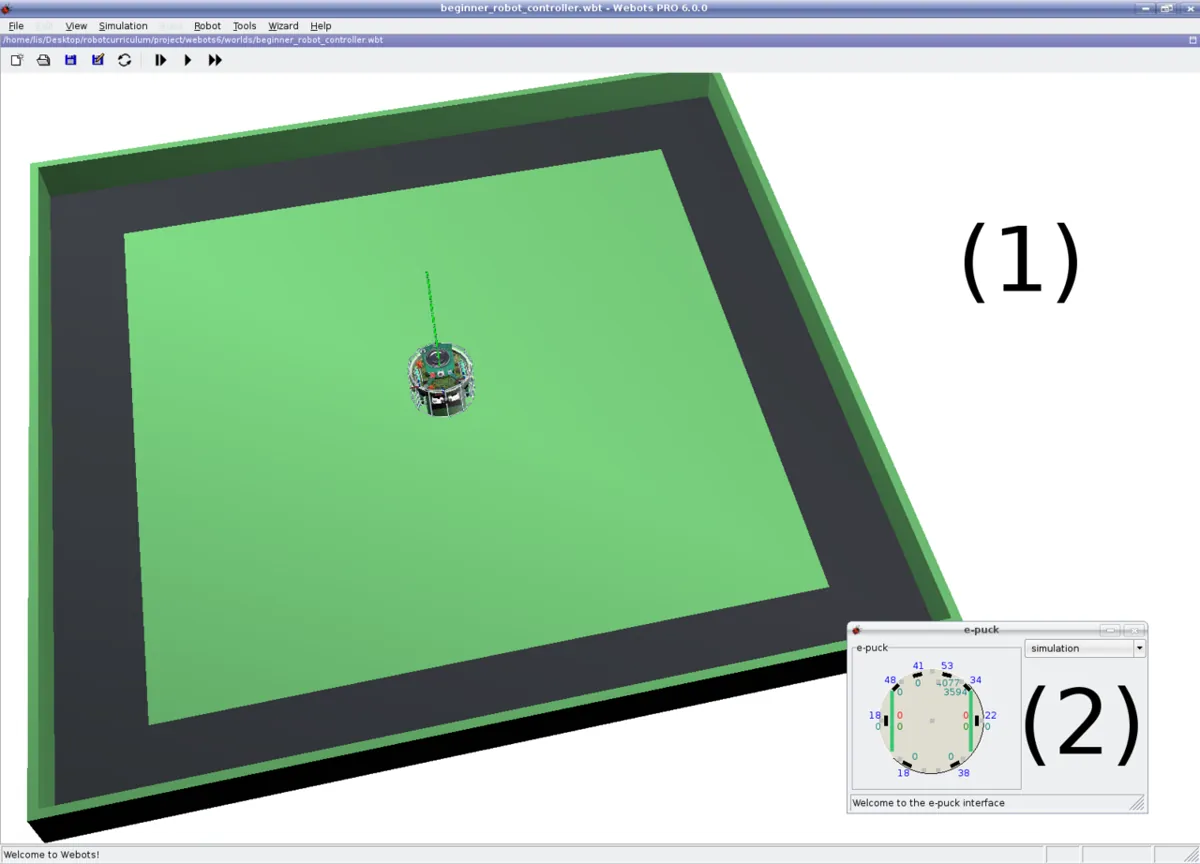
| Webots | Open-source simulator by Cyberbotics, many ready robot models | Controllers in C, C++, Python, Java, MATLAB or ROS |
| NVIDIA Isaac Sim | Photo-realistic scenes and GPU physics for AI and vision | Needs a strong NVIDIA GPU |
| MuJoCo, PyBullet | Fast physics engines popular in research and learning | Often used for many quick trials |
| Our browser sims + Python | Learning the ideas in this stage | Educational approximations — not a replacement for the tools above |
Visual
Visualise it: the value of rehearsal
Educational why-simulate explorer: rehearsal value, the cost of skipping simulation and the sim-to-real gap. (A browser sim, not Gazebo / Isaac / MuJoCo.)
Interactive · Robot simulation explorer · Educational


Practice motions, debug logic, and catch bad joint limits before you bend a real servo horn.
Educational value score
57
Toy metric — teaches tradeoffs, not a real KPI.
Browser educational sim — not Gazebo / not Isaac Sim / not MuJoCo / not a real-time physics engine.
Code lab
Code lab: crash it in simulation first
rehearsal_sim.py needs only plain Python 3 (no libraries). It models one shoulder joint: a link with inertia, a motor driven by a PD controller (torque = kp × error − kd × speed), and a shelf at 100°. The task is to swing from 0° to 90°. Touching 100° is a crash. Run python3 rehearsal_sim.py.
"""rehearsal_sim.py - Stage 12 Lesson 1: why robots rehearse in simulation.

A toy shoulder joint (one link, one motor) must swing from 0 deg to 90 deg.
A shelf sits at 100 deg: if the link overshoots past it, that is a CRASH.

Part A  tune the controller gain in simulation (many trials, no broken parts)
Part B  run the "best" gain on a messier 'real' arm (friction + delay + weak motor)
Part C  test every gain on several messy versions and pick a SAFE gain
Only Python's standard library is needed:  python3 rehearsal_sim.py
"""
import time

DT = 0.001          # simulation step: 1 ms
T_END = 3.0         # simulate 3 s for each trial
TARGET = 90.0       # deg
SHELF = 100.0       # deg - touching this is a crash
TOL = 3.0           # deg - "arrived" means within 3 deg of the target
INERTIA = 0.02      # kg m^2 (toy value for a small link)


def run_trial(kp, kd=0.25, friction=0.0, delay_s=0.0, max_torque=10.0, damping=0.002):
    """Simulate one move. Returns (crashed, peak_deg, settle_s or None)."""
    theta, omega = 0.0, 0.0                    # deg, deg/s
    delay_steps = int(round(delay_s / DT))
    history = [0.0] * (delay_steps + 1)          # what the controller 'sees' (late)
    peak, settle_t, inside_since = 0.0, None, None
    steps = int(T_END / DT)
    for i in range(steps):
        seen = history[0]                        # delayed measurement
        error = TARGET - seen
        torque = kp * error / 57.2958 - kd * omega / 57.2958   # N m (deg -> rad)
        torque = max(-max_torque, min(max_torque, torque))     # motor limit
        # Coulomb friction opposes motion (or holds the link still if torque is small)
        if abs(omega) < 1e-6 and abs(torque) <= friction:
            alpha = 0.0
        else:
            direction = 1.0 if omega > 0 else -1.0 if omega < 0 else (1.0 if torque > 0 else -1.0)
            alpha = (torque - friction * direction - damping * omega / 57.2958) / INERTIA
        omega += alpha * 57.2958 * DT          # rad/s^2 -> deg/s
        theta += omega * DT
        history.append(theta)
        history.pop(0)
        peak = max(peak, theta)
        if theta >= SHELF:
            return True, theta, None
        t = (i + 1) * DT
        if abs(theta - TARGET) <= TOL:
            if inside_since is None:
                inside_since = t
        else:
            inside_since = None
    settle_t = inside_since
    return False, peak, settle_t


def fmt(result):
    crashed, peak, settle = result
    if crashed:
        return "CRASH into shelf"
    s = f"{settle:.2f} s" if settle is not None else "not within 3 deg after 3 s"
    return f"peak {peak:6.1f} deg, settles {s}"


GAINS = [0.25, 0.5, 1, 1.5, 2, 3, 4, 6]

print("PART A - tune in simulation (clean model: no friction, no delay)")
start = time.perf_counter()
clean = {}
for kp in GAINS:
    clean[kp] = run_trial(kp)
    print(f"  kp = {kp:4}  ->  {fmt(clean[kp])}")
elapsed = time.perf_counter() - start
sim_time = len(GAINS) * T_END
print(f"  simulated {sim_time:.0f} s of arm motion; computer time well under real time: {elapsed < sim_time}")
ok = [k for k in GAINS if not clean[k][0] and clean[k][2] is not None]
best = min(ok, key=lambda k: clean[k][2])
print(f"  fastest gain that does not crash: kp = {best}  ({fmt(clean[best])})")
print(f"  crashes found without breaking anything: {sum(1 for k in GAINS if clean[k][0])}")

print()
print("PART B - same gain on a messier 'real' arm (reality gap)")
messy = dict(friction=0.05, delay_s=0.03, max_torque=0.6)
print(f"  'real' arm adds: friction {messy['friction']} N m, sensor delay {messy['delay_s']*1000:.0f} ms, motor limit {messy['max_torque']} N m")
print(f"  kp = {best} on clean sim : {fmt(clean[best])}")
print(f"  kp = {best} on 'real' arm: {fmt(run_trial(best, **messy))}")

print()
print("PART C - test every gain on 4 messy versions, keep only gains that pass ALL")
VERSIONS = [
    dict(friction=0.00, delay_s=0.00, max_torque=10.0),
    dict(friction=0.05, delay_s=0.03, max_torque=0.6),
    dict(friction=0.10, delay_s=0.02, max_torque=0.8),
    dict(friction=0.03, delay_s=0.05, max_torque=1.0),
]
safe = []
for kd in (0.25, 0.5):
    print(f"  damping kd = {kd}")
    for kp in GAINS:
        results = [run_trial(kp, kd=kd, **v) for v in VERSIONS]
        good = [(not r[0]) and r[2] is not None and r[2] <= 2.5 for r in results]
        worst_peak = max(r[1] for r in results)
        marks = " ".join("ok" if g else ("CRASH" if r[0] else "slow") for g, r in zip(good, results))
        print(f"    kp = {kp:4}  ->  {marks:24s} worst peak {worst_peak:6.1f} deg  {'PASS' if all(good) else 'fail'}")
        if all(good):
            safe.append((worst_peak, kp, kd))
if safe:
    print(f"  (kp, kd) pairs that pass every version: {[(kp, kd) for _, kp, kd in safe]}")
    peak, kp, kd = min(safe)                     # biggest gap to the shelf wins
    print(f"  choose kp = {kp}, kd = {kd}: worst peak {peak:.1f} deg = {SHELF - peak:.1f} deg away from the shelf")
    print("  then still try it slowly on the real arm, with a hand on the servo power switch")
else:
    print("  no gain passes every version -> change the design before touching hardware")
Output (run with python3 rehearsal_sim.py)
PART A - tune in simulation (clean model: no friction, no delay)
  kp = 0.25  ->  peak   86.2 deg, settles not within 3 deg after 3 s
  kp =  0.5  ->  peak   89.9 deg, settles 1.49 s
  kp =    1  ->  peak   90.2 deg, settles 0.60 s
  kp =  1.5  ->  peak   93.1 deg, settles 0.57 s
  kp =    2  ->  peak   96.9 deg, settles 0.56 s
  kp =    3  ->  CRASH into shelf
  kp =    4  ->  CRASH into shelf
  kp =    6  ->  CRASH into shelf
  simulated 24 s of arm motion; computer time well under real time: True
  fastest gain that does not crash: kp = 2  (peak   96.9 deg, settles 0.56 s)
  crashes found without breaking anything: 3

PART B - same gain on a messier 'real' arm (reality gap)
  'real' arm adds: friction 0.05 N m, sensor delay 30 ms, motor limit 0.6 N m
  kp = 2 on clean sim : peak   96.9 deg, settles 0.56 s
  kp = 2 on 'real' arm: CRASH into shelf

PART C - test every gain on 4 messy versions, keep only gains that pass ALL
  damping kd = 0.25
    kp = 0.25  ->  slow slow slow slow      worst peak   86.2 deg  fail
    kp =  0.5  ->  ok slow slow slow        worst peak   89.9 deg  fail
    kp =    1  ->  ok ok slow ok            worst peak   92.5 deg  fail
    kp =  1.5  ->  ok ok ok CRASH           worst peak  100.1 deg  fail
    kp =    2  ->  ok CRASH ok CRASH        worst peak  100.1 deg  fail
    kp =    3  ->  CRASH CRASH CRASH CRASH  worst peak  100.3 deg  fail
    kp =    4  ->  CRASH CRASH CRASH CRASH  worst peak  100.3 deg  fail
    kp =    6  ->  CRASH CRASH CRASH CRASH  worst peak  100.4 deg  fail
  damping kd = 0.5
    kp = 0.25  ->  slow slow slow slow      worst peak   70.0 deg  fail
    kp =  0.5  ->  slow slow slow slow      worst peak   85.8 deg  fail
    kp =    1  ->  ok slow slow ok          worst peak   89.9 deg  fail
    kp =  1.5  ->  ok ok slow ok            worst peak   90.0 deg  fail
    kp =    2  ->  ok ok ok ok              worst peak   90.0 deg  PASS
    kp =    3  ->  ok ok ok ok              worst peak   94.2 deg  PASS
    kp =    4  ->  ok ok ok CRASH           worst peak  100.1 deg  fail
    kp =    6  ->  ok CRASH CRASH CRASH     worst peak  100.2 deg  fail
  (kp, kd) pairs that pass every version: [(2, 0.5), (3, 0.5)]
  choose kp = 2, kd = 0.5: worst peak 90.0 deg = 10.0 deg away from the shelf
then still try it slowly on the real arm, with a hand on the servo power switchTry it: switch between “Why simulate”, “Cost of skipping” and “Sim ≠ real”, and move the risk and iteration sliders. (An educational browser sim, not Gazebo or Isaac.)
Interactive · Robot simulation explorer · Educational
Practice motions, debug logic, and catch bad joint limits before you bend a real servo horn.
Educational value score
57
Toy metric — teaches tradeoffs, not a real KPI.
Browser educational sim — not Gazebo / not Isaac Sim / not MuJoCo / not a real-time physics engine.
Bench build: a DRY RUN / LIVE switch
The simplest simulation of all is a dry run: the robot computes its whole plan and prints it, but the motor stays switched off. CNC machines and 3D printers have the same idea. dry_run_first.ino reads a toggle switch. In DRY RUN (the default) the servo is detached and every planned angle is printed. In LIVE the same plan moves the servo. Targets outside 10–170° are refused in both modes, and flipping the switch mid-move stops the move.
| Part | Connection | Note |
|---|---|---|
| Toggle switch | D2 → switch → GND | INPUT_PULLUP: open = DRY RUN, closed = LIVE |
| On-board LED | D13 (built in) | ON = LIVE, so you can see the mode from across the bench |
| SG90 / MG90S servo signal | D9 | orange/yellow wire |
| Servo power | separate 5–6 V supply (4×AA or a 5 V 2 A adapter) | red to supply +, brown to supply − |
| Common ground | supply − to Arduino GND | needed so the signal has a reference |
// dry_run_first.ino - Stage 12 Lesson 1: "simulate first" habit on a real bench
// A toggle switch picks DRY RUN (default, safe) or LIVE.
//   DRY RUN: the sketch plans the move and PRINTS every servo angle - the servo is detached.
//   LIVE   : the same plan is sent to the servo.
// Serial Monitor at 115200 baud, send:  M 120   (move to 120 deg)
// Wiring:
//   D2  -> toggle switch -> GND  (INPUT_PULLUP: open = DRY RUN, closed = LIVE)
//   D13 -> on-board LED (ON = LIVE)
//   D9  -> servo signal. Servo red/brown on a SEPARATE 5-6 V supply, grounds joined.
//          Never power a servo from a GPIO pin or the Arduino 5 V pin.
#include <Servo.h>

const int SWITCH_PIN = 2;
const int LED_PIN = 13;
const int SERVO_PIN = 9;
const int MIN_DEG = 10;     // soft limits: stay away from the end stops
const int MAX_DEG = 170;
const int STEP_DEG = 2;     // move in small steps ...
const int STEP_MS = 20;     // ... every 20 ms = 100 deg/s max

Servo joint;
int currentDeg = 90;
bool wasLive = false;

bool liveMode() { return digitalRead(SWITCH_PIN) == LOW; }

void setup() {
  pinMode(SWITCH_PIN, INPUT_PULLUP);
  pinMode(LED_PIN, OUTPUT);
  Serial.begin(115200);
  Serial.println(F("dry_run_first ready. Send: M <deg>"));
  Serial.println(liveMode() ? F("Mode: LIVE") : F("Mode: DRY RUN"));
}

void runMove(int target) {
  bool live = liveMode();
  if (target < MIN_DEG || target > MAX_DEG) {
    Serial.print(F("REFUSED: ")); Serial.print(target);
    Serial.print(F(" is outside ")); Serial.print(MIN_DEG);
    Serial.print('-'); Serial.println(MAX_DEG);
    return;
  }
  int steps = abs(target - currentDeg) / STEP_DEG;
  Serial.print(live ? F("LIVE move ") : F("DRY RUN move "));
  Serial.print(currentDeg); Serial.print(F(" -> ")); Serial.print(target);
  Serial.print(F(" in ")); Serial.print((long)steps * STEP_MS); Serial.println(F(" ms"));
  int dir = (target > currentDeg) ? 1 : -1;
  while (currentDeg != target) {
    if (liveMode() != live) {              // switch flipped mid-move: stop where we are
      Serial.println(F("MODE CHANGED - move stopped"));
      return;
    }
    int next = currentDeg + dir * STEP_DEG;
    if ((dir > 0 && next > target) || (dir < 0 && next < target)) next = target;
    currentDeg = next;
    if (live) {
      joint.write(currentDeg);
    } else {
      Serial.print(F("  plan ")); Serial.println(currentDeg);
    }
    delay(STEP_MS);
  }
  Serial.println(F("done"));
}

void loop() {
  bool live = liveMode();
  if (live != wasLive) {                   // attach only in LIVE mode
    if (live) { joint.attach(SERVO_PIN); joint.write(currentDeg); }
    else { joint.detach(); }
    digitalWrite(LED_PIN, live ? HIGH : LOW);
    Serial.println(live ? F("Mode: LIVE") : F("Mode: DRY RUN"));
    wasLive = live;
  }
  if (Serial.available()) {
    char c = Serial.read();
    if (c == 'M' || c == 'm') {
      int target = Serial.parseInt();
      runMove(target);
    }
  }
}Mode: DRY RUN
M 100
DRY RUN move 90 -> 100 in 100 ms
plan 92
plan 94
plan 96
plan 98
plan 100
done
M 200
REFUSED: 200 is outside 10-170Debugging
| Symptom | Likely cause | Fix |
|---|---|---|
| Python: every gain crashes | kd too small for the inertia | Raise kd (more damping) and run again |
| Python: every gain is “slow” | friction too high for a pure P/PD controller | Raise kp carefully, or loosen TOL; later lessons add integral action |
| Sketch always says DRY RUN | switch wired to 5 V instead of GND, or wrong pin | Wire D2 → switch → GND; the pin reads LOW when closed |
| Servo jitters or Arduino resets in LIVE | servo powered from the Arduino 5 V pin | Use a separate 5–6 V supply and join the grounds |
| Servo does not move but LIVE LED is on | no common ground | Connect supply − to Arduino GND |
M 120 does nothing | Serial Monitor line ending or baud mismatch | Set 115200 baud; type M 120 and press Send |
Real world
Simulation in the real world
- Pilot training: flight simulators re-create the aircraft’s behaviour and its environment so pilots can practise procedures and emergencies on the ground. Some simulator hours can even be credited towards a pilot licence.
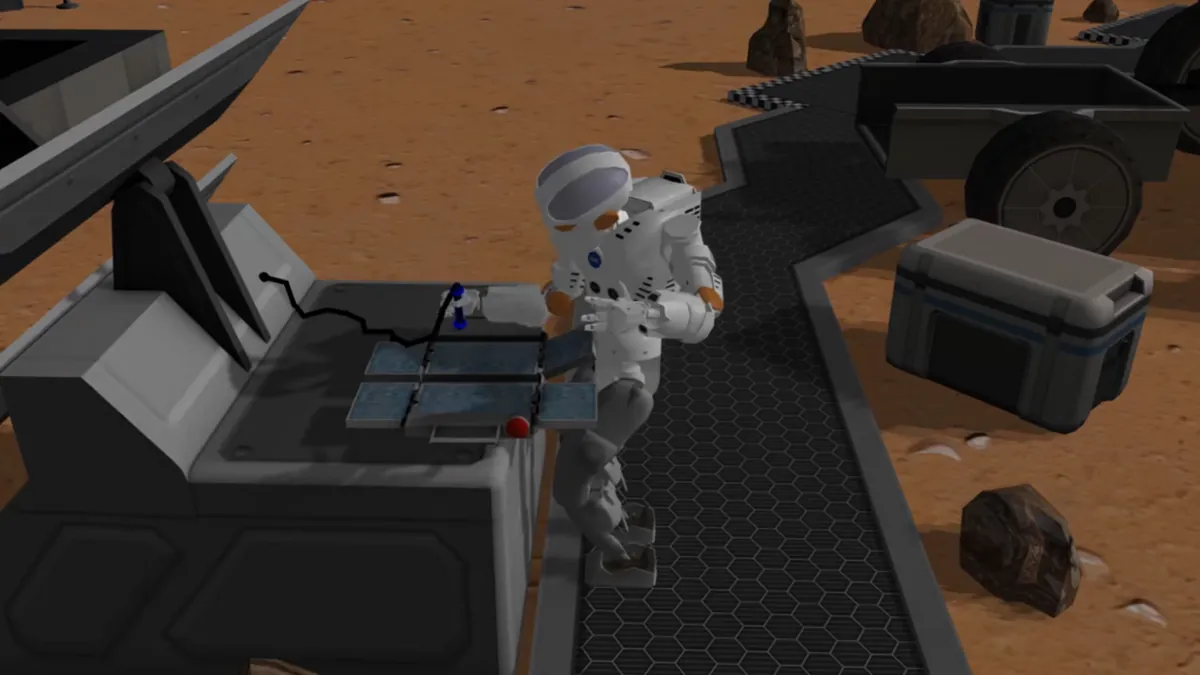
- Robot challenges in simulation: in NASA’s Space Robotics Challenge, teams programmed the Valkyrie humanoid robot inside the Gazebo simulator to solve tasks on a virtual Mars base — no real robot was put at risk.
- Factories: robot cells are programmed and checked off-line in simulation, so the real assembly line does not stop while engineers try ideas.
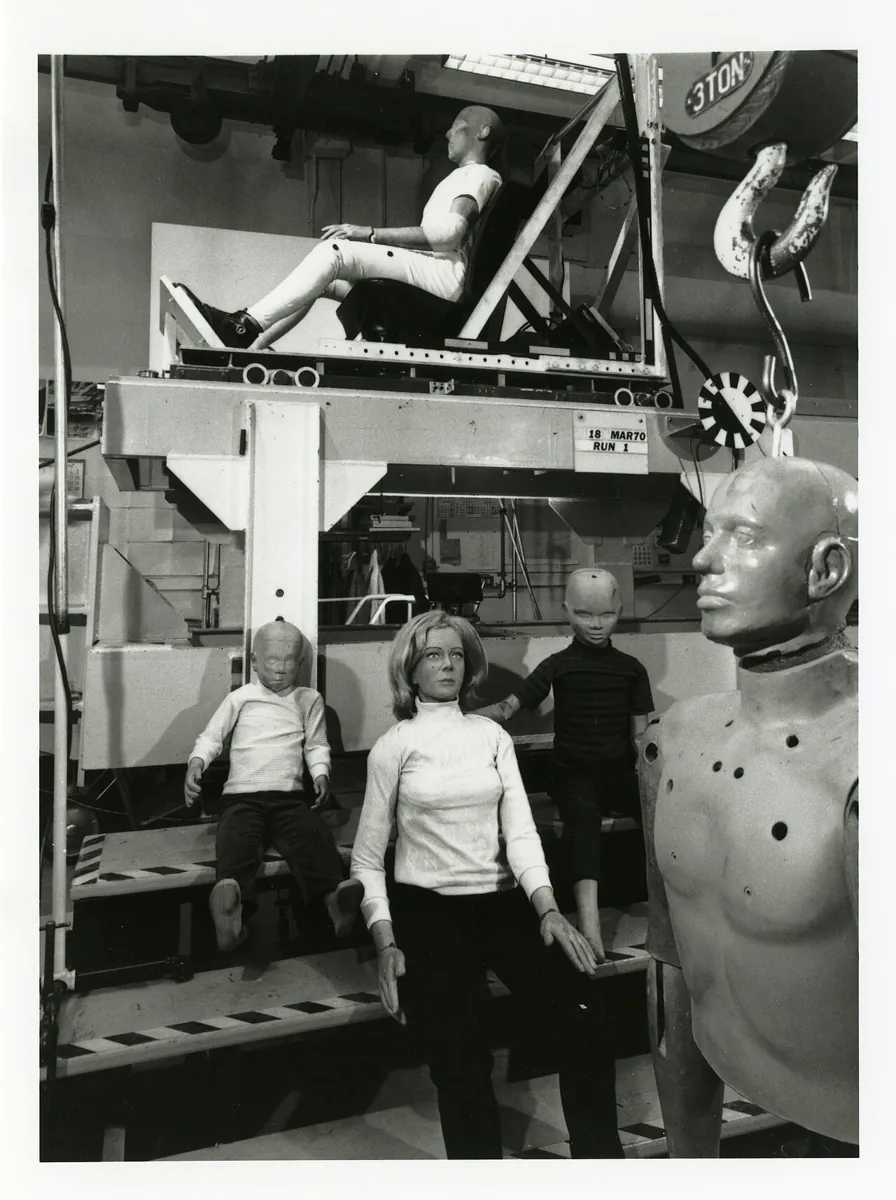
- Crash testing: car makers use crash test dummies so that a dangerous test teaches engineers without hurting a person. Simulation does the same for robots, even more cheaply.
Think
Think about it
Think
Your gain passes all four versions of the model in Part C. Your friend says: “Then we can skip the slow first test on the real arm.” Is your friend right?
Experiment
Try it in the lab
About 45 minutes. The Python part needs only Python 3. The bench part needs an Arduino UNO, one SG90/MG90S servo, a toggle switch and a separate 5–6 V servo supply.
Experiment
Tune, crash, close the gap
You will need
- `rehearsal_sim.py` (Python 3, no libraries)
- Robot simulation explorer (in your browser)
- Optional bench: Arduino UNO, SG90 servo, toggle switch, 4×AA holder or 5 V 2 A adapter, jumper wires
Steps
- Run `rehearsal_sim.py`. Note which gains crash in Part A.
- Move the shelf: set `SHELF = 95`. Which gains crash now? Which pairs survive Part C?
- Make the sensor slower: change the 30 ms delay in Part B to 60 ms. Does `kp = 1.5` still survive?
- Add a fifth version to `VERSIONS` with `friction=0.15`. Do any pairs still pass? What would you change?
- In the browser explorer, find the setting where skipping simulation “costs” the most.
- Bench: upload `dry_run_first.ino`. Send `M 120` in DRY RUN and read the plan. Then flip to LIVE and send it again.
Interactive · Robot simulation explorer · Educational
Practice motions, debug logic, and catch bad joint limits before you bend a real servo horn.
Educational value score
57
Toy metric — teaches tradeoffs, not a real KPI.
Browser educational sim — not Gazebo / not Isaac Sim / not MuJoCo / not a real-time physics engine.
A clean model finds the obvious crashes for free. A model with friction and delay finds the sneaky ones. Testing many versions picks a gain with margin. And a dry run on the real bench is the last, cheapest rehearsal before the motor moves.
Knowledge check
Check your understanding
Knowledge check
1. A primary reason to simulate before using hardware is…
2. Every simulator repeats which loop?
3. In the code lab, kp = 2 passed the clean model but crashed on the messier arm. This is an example of…
4. Which change made gains pass every version in Part C?
5. Simulation often under-represents…
6. In `dry_run_first.ino`, what does DRY RUN mode do?
7. Where should the servo take its power from?
Mini assignment
Hands-on assignment
Mini assignment
Your “simulate first” card
Show, with numbers, why a gain must be tested on more than one model before the real arm, and plan your own first safe real test.
Deliverables
- A five-line “why simulate” card: two wins you saw in the code lab, two reality-gap causes, and one thing simulation cannot tell you.
- Output of `rehearsal_sim.py` after you change the shelf to 95° and add one version of your own to `VERSIONS`, with the pair you would choose and why.
- A first-real-test checklist (at least six lines) for the desk arm: DRY RUN, soft limits, separate servo supply, slow speed, hand on power switch, what you will measure.
- Optional (bench): a screenshot of the DRY RUN plan for `M 150` and a short video of the same move in LIVE.
Do this, step by step
- Run
rehearsal_sim.pyonce as shipped and note which gains crash on which version. - Change the shelf to 95° and add one version of your own to
VERSIONS(for example more friction or a longer delay). - Run again and pick the gain pair that passes every version; write one line on why.
- Write your five-line “why simulate” card and your six-line first-real-test checklist.
- Bench (optional): upload
dry_run_first.ino, sendM 150in DRY RUN, read the plan, then try LIVE slowly with your hand on the power switch.
Stuck? Hints, one at a time
- If every gain now crashes, your new version may be too harsh. Change one thing at a time (only friction, or only delay).
- More damping (
kd) usually helps a late sensor more than a biggerkpdoes. - In DRY RUN the servo stays detached. If it moves, check the mode before sending any LIVE command.
Challenges (pick by level)
- 🟢 Beginner: Change
GAINSto include 2.5 and 3.5. Where exactly does the clean model start crashing? - 🟡 Intermediate: Make
run_trialalso return the time of the peak, and print it. Does the messy arm peak later than the clean one? Why? - 🟠 Advanced: Add integral action (
ki × sum of error × dt) and find a(kp, ki, kd)that removes the “slow” results without any crash. - 🔴 Expert: Replace the four fixed
VERSIONSwith 200 random ones (friction 0–0.12, delay 0–60 ms, motor 0.5–1.5 N·m). Report the pass rate of each pair. This is the idea behind domain randomisation. - ⚫ Research: Read the Gazebo “Getting Started” page and write half a page on what
gz sim -s shapes.sdfdoes and why running headless matters for automatic testing.
Next step
You know why robots rehearse. In Lesson 2 — What Is a Digital Twin? the model stops being a one-time rehearsal and becomes a live mirror of the real arm: model + measured state + sync, and how honest a twin must be about what it does not know.
Look back: Stage 11 L16: Capstone — Vision-Guided Pick. Next: Lesson 2: What Is a Digital Twin?. Related: Stage 9 — Trajectory Planning.
Sources
- Wikipedia — Robotics simulator — definition (develop for a robot without the physical machine, saving cost and time), off-line programming, sensor-based actions harder to simulate, Gazebo (ODE/Bullet/Simbody/DART; SDF/URDF) and Webots (fork of ODE; C/C++/Python/Java/MATLAB/ROS) comparison.
- Gazebo docs — Getting Started with Gazebo —
gz sim shapes.sdf, headless server-only mode with-s, SDF worlds, Gazebo Harmonic recommended with ROS 2 Jazzy on Ubuntu 24.04. - Wikipedia — Flight simulator — re-creates aircraft flight for training and design; equations of motion solved 50 or 60 times per second; engineering simulators find errors faster and reduce risk and cost.
- Arduino Servo library —
attach,write,detach; servos draw considerable power, so use a separate supply and connect the grounds. - Photos: Wikimedia Commons (credits under each image). Valkyrie screenshot described on Commons as Task 2 of NASA’s Space Robotics Challenge on the Gazebo simulator.
Self-attested for now — keep artifacts in your lab notebook.
Complete
Today's goal
0 of 1 done today
Mark this lesson complete when you have worked the experiment, knowledge check, and assignment (even roughly).