
Robot Simulation & Digital Twin · Lesson 02
What Is a Digital Twin?
Est. 50–65 min
Why
Why this lesson matters
In Lesson 1 the simulator was a rehearsal: you tried ideas before touching hardware. A digital twin is different. It is a model that stays connected to one particular, real machine, keeps updating itself from that machine’s sensor data, and can be used to make decisions about it — “is it healthy?”, “what will happen if I send this command?”.
In this lesson you will build all three kinds of digital copy in Python — a plain model, a “shadow” and a real twin — and watch which one notices a blocked joint, a pulled cable and a dangerous command. Then you will make the Arduino stream a live joint angle to a laptop twin, with a STALE warning when the data stops.
Concept
Model, shadow, twin — three different things
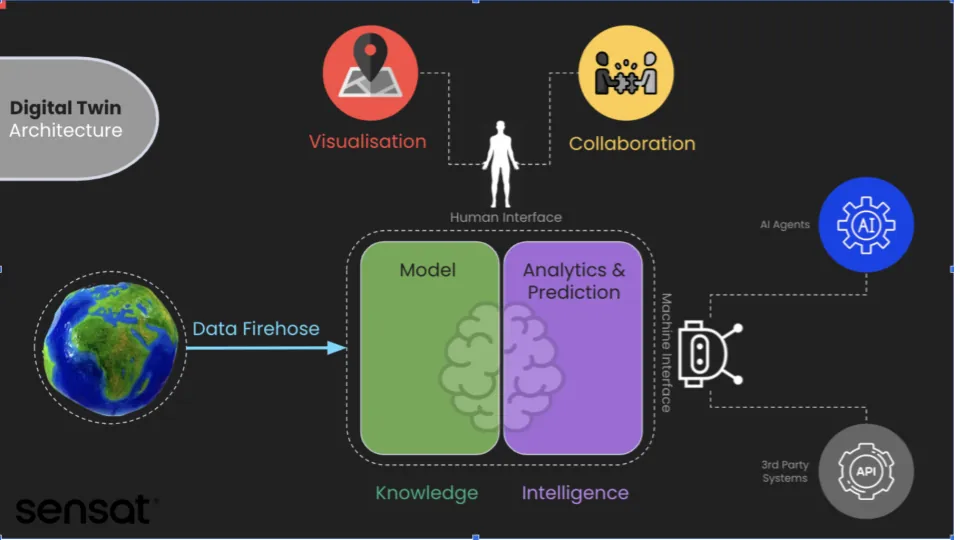
1. Three parts of every digital twin
The physical thing
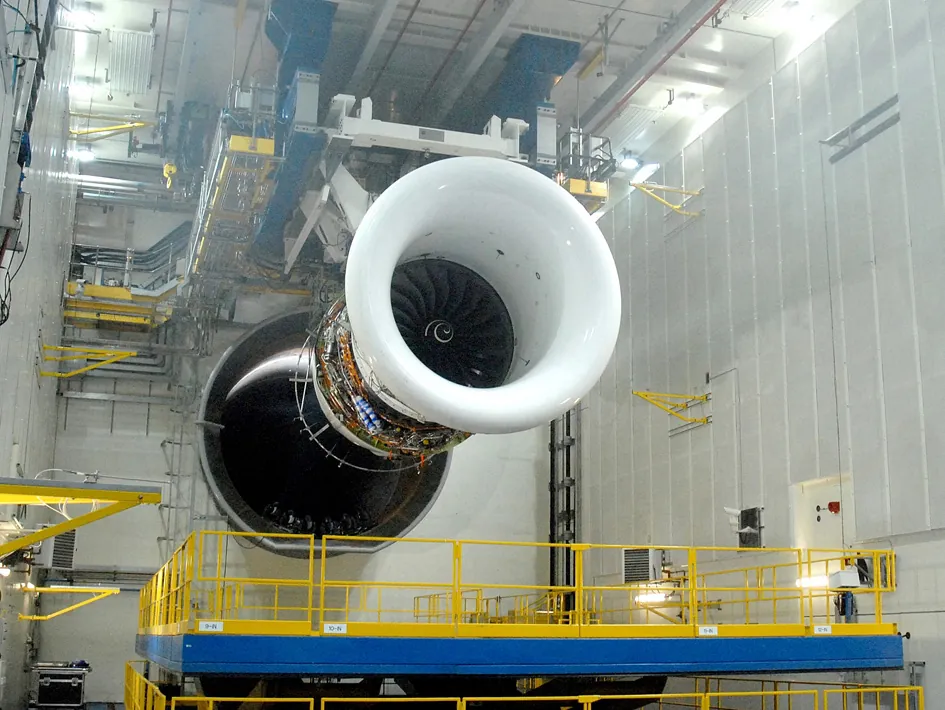
One real object: our desk arm’s shoulder joint, a jet engine, a temple chariot, a factory line.
The digital model
Software that represents it: geometry, joint limits, how fast the servo can move, what “normal” looks like.
The connection
Data flowing between them — sensor readings going up to the model, and (in a full twin) decisions or commands coming back. This link is sometimes called the digital thread.
Take away any one part and it is no longer a twin. A model with no live data is a simulation. A data feed with no model is just a dashboard. Researchers at the UK’s National Physical Laboratory make the same point: calling “plain” models twins — models that are not dynamically updated from measurements — turns “digital twin” into a buzzword.
2. Model vs shadow vs twin
| Digital copy | Data flow | What it can do | Weakness |
|---|---|---|---|
| Model (simulation) | None — only knows the commands | Rehearse, predict, test “what if” | Has no idea what the real arm is actually doing |
| Digital shadow | One way: real → digital | Show live readings, log history | Just copies; cannot predict, cannot judge if data is bad or late |
| Digital twin | Both ways: real ⇄ digital | Mirror + predict + detect problems + advise or block commands | Only as honest as its model and its data checks |
3. What makes a twin honest
A twin that looks perfect but is secretly out of date is worse than no twin — people trust it. So a good twin always knows three things about its own data:
| Check | Question it answers | Our numbers |
|---|---|---|
| Freshness (staleness) | How old is my latest reading? | 50 Hz stream = a reading every 20 ms; no data for 100–200 ms → STALE |
| Agreement (divergence) | Does the real arm move the way my model says it should? | Replay the last 0.2 s of commands; off by more than 8° for 3 samples → DIVERGED |
| Plausibility (glitches) | Could a real arm even do this? | A jump faster than 400°/s is a loose wire, not motion → ignore it and count it |
4. A twin is a story over time
Engineers sometimes split twins by stage of life: a prototype twin (designed before the real thing is built), an instance twin (one twin per real machine, e.g. “arm #3 on bench B”) and an aggregate twin (many instances together, e.g. “all 12 lab arms — which gearboxes wear out first?”). Our Python twin is an instance twin of one joint.
Visual
Visualise it: a model that listens to the real arm
Educational explorer: where simulations and real robots differ — exactly the gaps a digital twin’s live data is meant to catch. (A browser sim, not a production twin platform.)
Interactive · Robot simulation explorer · Educational


Practice motions, debug logic, and catch bad joint limits before you bend a real servo horn.
Educational value score
57
Toy metric — teaches tradeoffs, not a real KPI.
Browser educational sim — not Gazebo / not Isaac Sim / not MuJoCo / not a real-time physics engine.
Code lab
Code lab: model vs shadow vs twin
twin_mirror.py needs plain Python 3 only. A hidden “real” shoulder joint moves for 6 seconds at 50 Hz, with sensor noise. Three digital copies follow it. On purpose, three things go wrong: from 2.3 s to 3.5 s a hand blocks the joint, from 3.6 s to 4.0 s the cable is unplugged, and at 4.0 s someone asks for 150° — past the shelf at 140°. Run python3 twin_mirror.py.
"""twin_mirror.py - Stage 12 Lesson 2: model vs shadow vs digital twin.

One real shoulder joint (hidden 'truth') and three digital copies of it:
  MODEL  - a simulation that only knows the commands (no sensor data)
  SHADOW - copies the latest sensor reading (data flows one way, no model)
  TWIN   - model + live sensor data + health checks, and it may answer
           "what if?" questions before a command is sent back to the arm
Things go wrong on purpose: a hand blocks the joint, the USB cable drops out,
and someone asks for a move that would hit the shelf.
Only the standard library is needed:  python3 twin_mirror.py
"""
import random
from collections import deque

random.seed(7)
DT = 0.02                 # 50 Hz, like the Arduino stream
MAX_SPEED = 120.0         # deg/s, servo speed limit
TAU = 0.15                # s, how quickly the servo chases its target
SHELF = 140.0             # deg - the twin refuses moves past this
STALE_AFTER = 0.10        # s without data -> twin says STALE
WINDOW = 10               # samples (0.2 s): the twin replays its model over this window
DIVERGE_DEG = 8.0         # replayed model and measurement disagree by more than this ...
DIVERGE_SAMPLES = 3       # ... for this many samples in a row -> DIVERGED


def servo_step(angle, target):
    """Toy servo: chase the target, but never faster than MAX_SPEED."""
    speed = (target - angle) / TAU
    speed = max(-MAX_SPEED, min(MAX_SPEED, speed))
    return angle + speed * DT


# Timeline of commands from the planner (time s -> target deg)
REQUESTS = [(0.0, 90.0), (2.0, 30.0), (4.0, 150.0), (4.5, 120.0)]

truth = 0.0                   # the real joint (we can never see this directly)
model = 0.0                   # MODEL copy
shadow = 0.0                  # SHADOW copy
twin = 0.0                    # TWIN copy
twin_pred = 0.0               # twin's own model prediction
command = 0.0                 # what the real arm is told
last_data_t = 0.0
bad_count = 0
history = deque(maxlen=WINDOW)   # (twin state, command) for the last 0.2 s
errors = {"MODEL": [], "SHADOW": [], "TWIN": []}
events = []
rows = []
prev_status = "OK"

steps = int(6.0 / DT)
for i in range(steps + 1):
    t = round(i * DT, 2)

    # 1) planner requests -> the twin checks them BEFORE they reach the arm
    for rt, target in REQUESTS:
        if abs(t - rt) < DT / 2:
            # what-if: run the model forward from the twin's state
            sim = twin
            for _ in range(int(3.0 / DT)):
                sim = servo_step(sim, target)
            if target > SHELF or sim > SHELF:
                events.append(f"t={t:4.2f}s  request {target:.0f} deg REFUSED by twin what-if (shelf at {SHELF:.0f} deg) - real arm never moved")
            else:
                command = target
                events.append(f"t={t:4.2f}s  request {target:.0f} deg accepted, sent to arm")

    # 2) the real world (hidden): a hand blocks the joint from 2.3 s to 3.5 s
    blocked = 2.3 <= t < 3.5
    if not blocked:
        truth = servo_step(truth, command)

    # 3) the sensor stream: pot reading + noise, cable unplugged 3.6 s - 4.0 s
    link_ok = not (3.6 <= t < 4.0)
    reading = truth + random.gauss(0.0, 0.5) if link_ok else None

    # 4) the three digital copies
    model = servo_step(model, command)            # commands only
    if reading is not None:
        shadow = reading                          # copy, nothing else
    twin_pred = servo_step(twin, command)         # twin predicts ...
    if reading is not None:
        last_data_t = t
        gap = reading - twin_pred
        # health check: start from where the twin was 0.2 s ago, replay the
        # commands through the model, and compare with what the sensor says now
        if len(history) == WINDOW:
            replay = history[0][0]
            for _, cmd in history:
                replay = servo_step(replay, cmd)
            bad_count = bad_count + 1 if abs(reading - replay) > DIVERGE_DEG else 0
        twin = twin_pred + 0.5 * gap              # ... then corrects with data
    else:
        twin = twin_pred                          # no data: model only (dead reckoning)
    history.append((twin, command))
    stale = (t - last_data_t) > STALE_AFTER
    status = "STALE" if stale else ("DIVERGED" if bad_count >= DIVERGE_SAMPLES else "OK")

    for name, value in (("MODEL", model), ("SHADOW", shadow), ("TWIN", twin)):
        errors[name].append(abs(value - truth))
    if t in (0.5, 1.0, 2.0, 2.6, 3.2, 3.7, 3.9, 4.6, 6.0):
        rows.append((t, truth, model, shadow, twin, status))
    if status != prev_status:
        events.append(f"t={t:4.2f}s  twin status {prev_status} -> {status}")
        prev_status = status

print("time   truth   MODEL  SHADOW    TWIN  twin status")
for t, tr, mo, sh, tw, st in rows:
    print(f"{t:4.1f}s {tr:7.1f} {mo:7.1f} {sh:7.1f} {tw:7.1f}  {st}")
print()
print("events")
for e in events:
    print("  " + e)
print()
print("average error vs the real joint over 6 s (deg)")
for name in ("MODEL", "SHADOW", "TWIN"):
    vals = errors[name]
    print(f"  {name:6s} mean {sum(vals) / len(vals):5.2f}   worst {max(vals):6.2f}")
print()
print("lessons")
print("  MODEL never noticed the blocked joint - it is a simulation, not a twin.")
print("  SHADOW froze at the last reading when the cable dropped and could not say why.")
print("  TWIN followed the joint, flagged DIVERGED and STALE, and refused the shelf move.")
Output (run with python3 twin_mirror.py)
time   truth   MODEL  SHADOW    TWIN  twin status
 0.5s    62.4    62.4    62.6    62.5  OK
 1.0s    89.1    89.1    89.4    89.1  OK
 2.0s    87.6    87.6    87.8    87.7  OK
 2.6s    54.0    32.6    54.3    51.8  DIVERGED
 3.2s    54.0    30.0    54.5    51.6  DIVERGED
 3.7s    35.3    30.0    42.7    35.4  STALE
 3.9s    31.3    30.0    42.7    31.3  STALE
 4.6s    44.4    44.4    44.9    44.9  OK
 6.0s   120.0   120.0   119.4   119.6  OK

events
  t=0.00s  request 90 deg accepted, sent to arm
  t=2.00s  request 30 deg accepted, sent to arm
  t=2.40s  twin status OK -> DIVERGED
  t=3.58s  twin status DIVERGED -> OK
  t=3.68s  twin status OK -> STALE
  t=4.00s  request 150 deg REFUSED by twin what-if (shelf at 140 deg) - real arm never moved
  t=4.00s  twin status STALE -> OK
  t=4.50s  request 120 deg accepted, sent to arm

average error vs the real joint over 6 s (deg)
  MODEL  mean  4.79   worst  23.99
  SHADOW mean  0.97   worst  11.99
  TWIN   mean  0.64   worst   3.10

lessons
  MODEL never noticed the blocked joint - it is a simulation, not a twin.
  SHADOW froze at the last reading when the cable dropped and could not say why.
  TWIN followed the joint, flagged DIVERGED and STALE, and refused the shelf move.
Try it: use the explorer’s “Sim ≠ real” view and ask, for each gap you see, “would a twin with live data notice this?” (An educational browser sim, not a production twin platform.)
Interactive · Robot simulation explorer · Educational
Practice motions, debug logic, and catch bad joint limits before you bend a real servo horn.
Educational value score
57
Toy metric — teaches tradeoffs, not a real KPI.
Browser educational sim — not Gazebo / not Isaac Sim / not MuJoCo / not a real-time physics engine.
Bench build: stream a joint to its twin
Now a real data link. A potentiometer stands in for the joint angle sensor (you can later fix it to the arm’s shoulder axis). twin_stream.ino sends one line every 20 ms: a sequence number, the board’s time in ms, and the angle. The sequence number lets the laptop count lost lines; the time lets it compute speed. There is no motor in this circuit.
| Part | Connection | Note |
|---|---|---|
| 10 kΩ potentiometer, outer leg 1 | 5V | the pot is a sensor, it draws well under 1 mA — safe on the 5 V pin |
| Potentiometer, outer leg 2 | GND | swap the outer legs if the angle goes the wrong way |
| Potentiometer, middle leg (wiper) | A0 | analogRead gives 0–1023 |
| USB cable | Arduino ↔ laptop | this is the twin’s data link; unplug it to test STALE |
// twin_stream.ino - Stage 12 Lesson 2: stream one joint to its digital twin
// Board: Arduino Uno. A 10k potentiometer stands in for the joint angle sensor.
// Wiring: pot outer legs -> 5V and GND, middle leg (wiper) -> A0.
// No motor is connected in this sketch: we only send data UP to the twin.
// Output (115200 baud), one line every 20 ms (50 Hz):  seq,ms,deg

const uint8_t SENSOR_PIN = A0;
const unsigned long PERIOD_MS = 20;   // 50 Hz
unsigned long seq = 0;
unsigned long nextSend = 0;
float smoothDeg = 0.0;

void setup() {
  Serial.begin(115200);
  smoothDeg = analogRead(SENSOR_PIN) * (270.0 / 1023.0);
  Serial.println(F("# twin_stream ready: seq,ms,deg"));
}

void loop() {
  unsigned long now = millis();
  if ((long)(now - nextSend) < 0) return;   // not time yet
  nextSend = now + PERIOD_MS;

  // Typical single-turn pot: about 270 degrees of travel over 0..1023
  float deg = analogRead(SENSOR_PIN) * (270.0 / 1023.0);
  smoothDeg = 0.7 * smoothDeg + 0.3 * deg;   // light smoothing, keeps lag small

  Serial.print(seq++);
  Serial.print(',');
  Serial.print(now);
  Serial.print(',');
  Serial.println(smoothDeg, 1);
}
On the laptop, twin_listener.py is a small twin: it keeps the latest angle and speed, counts lost lines, ignores impossible jumps and says LIVE or STALE. Real mode needs pip install pyserial; --fake mode needs nothing and plays built-in test data with one lost line, one glitch and a pulled cable. The serial port is opened with a timeout so readline() can never hang forever.
"""twin_listener.py - Stage 12 Lesson 2: the laptop side of the twin.

Reads 'seq,ms,deg' lines from twin_stream.ino and keeps a tiny twin of
the joint: latest angle, speed, data age, and warnings.
  python3 twin_listener.py --port COM5          (Windows)
  python3 twin_listener.py --port /dev/ttyACM0  (Linux)
  python3 twin_listener.py --fake               (no board: built-in test data)
Real port mode needs:  pip install pyserial
"""
import argparse
import time

STALE_S = 0.20        # no fresh data for this long -> STALE
MAX_SPEED = 400.0     # deg/s - faster than this is a glitch, not a real arm


class Twin:
    def __init__(self):
        self.deg = None
        self.speed = 0.0
        self.last_seq = None
        self.last_ms = None
        self.last_rx = None
        self.lost = 0
        self.glitches = 0

    def update(self, line, rx_time):
        parts = line.strip().split(",")
        if len(parts) != 3 or line.startswith("#"):
            return "skip"
        try:
            seq, ms, deg = int(parts[0]), int(parts[1]), float(parts[2])
        except ValueError:
            return "skip"
        note = ""
        if self.last_seq is not None and seq != self.last_seq + 1:
            self.lost += max(0, seq - self.last_seq - 1)
            note = f" (lost {seq - self.last_seq - 1} packets)"
        if self.deg is not None and self.last_ms is not None and ms > self.last_ms:
            speed = (deg - self.deg) / ((ms - self.last_ms) / 1000.0)
            if abs(speed) > MAX_SPEED:
                self.glitches += 1
                self.last_seq, self.last_ms = seq, ms
                return f"GLITCH ignored: jump to {deg:.1f} deg{note}"
            self.speed = speed
        self.deg, self.last_seq, self.last_ms, self.last_rx = deg, seq, ms, rx_time
        return f"OK{note}"

    def status(self, now):
        if self.last_rx is None:
            return "WAITING"
        return "STALE" if now - self.last_rx > STALE_S else "LIVE"


def fake_stream():
    """Fake board: smooth sweep, one dropped packet, one glitch, then silence."""
    t0 = 0.0
    for seq in range(30):
        ms = seq * 20
        deg = 45.0 + 1.5 * seq
        if seq == 12:
            continue                    # packet lost on the wire
        if seq == 20:
            deg = 250.0                 # loose wire spike
        yield t0 + ms / 1000.0, f"{seq},{ms},{deg:.1f}"
    yield 0.58 + 0.30, None             # cable pulled: 300 ms of nothing


def main():
    ap = argparse.ArgumentParser()
    ap.add_argument("--port")
    ap.add_argument("--fake", action="store_true")
    args = ap.parse_args()
    twin = Twin()

    if args.fake:
        for rx, line in fake_stream():
            if line is None:
                print(f"t={rx:4.2f}s  no data ...       twin {twin.status(rx)}  last {twin.deg:.1f} deg")
                continue
            result = twin.update(line, rx)
            if result != "OK" or int(line.split(",")[0]) % 5 == 0:
                print(f"t={rx:4.2f}s  {line:16s} twin {twin.status(rx)}  {twin.deg:6.1f} deg "
                      f"{twin.speed:6.1f} deg/s  {result}")
        print(f"summary: lost packets {twin.lost}, glitches ignored {twin.glitches}")
        return

    if not args.port:
        ap.error("give --port or --fake")
    import serial  # pyserial
    with serial.Serial(args.port, 115200, timeout=0.05) as ser:
        last_print = 0.0
        while True:
            raw = ser.readline().decode("ascii", errors="ignore")
            now = time.monotonic()
            if raw:
                result = twin.update(raw, now)
                if result.startswith("GLITCH") or "lost" in result:
                    print(result)
            if now - last_print > 0.5:
                last_print = now
                if twin.deg is not None:
                    print(f"twin {twin.status(now):5s} {twin.deg:6.1f} deg {twin.speed:6.1f} deg/s "
                          f"lost {twin.lost} glitches {twin.glitches}")
                else:
                    print("waiting for data ...")


if __name__ == "__main__":
    main()
Output (python3 twin_listener.py --fake)
t=0.00s  0,0,45.0         twin LIVE    45.0 deg    0.0 deg/s  OK
t=0.10s  5,100,52.5       twin LIVE    52.5 deg   75.0 deg/s  OK
t=0.20s  10,200,60.0      twin LIVE    60.0 deg   75.0 deg/s  OK
t=0.26s  13,260,64.5      twin LIVE    64.5 deg   75.0 deg/s  OK (lost 1 packets)
t=0.30s  15,300,67.5      twin LIVE    67.5 deg   75.0 deg/s  OK
t=0.40s  20,400,250.0     twin LIVE    73.5 deg   75.0 deg/s  GLITCH ignored: jump to 250.0 deg
t=0.50s  25,500,82.5      twin LIVE    82.5 deg   75.0 deg/s  OK
t=0.88s  no data ...       twin STALE  last 88.5 deg
summary: lost packets 1, glitches ignored 1
Debugging
| Symptom | Likely cause | Fix |
|---|---|---|
| Listener prints only “waiting for data …” | wrong port, or Serial Monitor still open | List ports, close the IDE monitor, check 115200 baud |
| “could not open port” / access denied | another program owns the port, or (Linux) no permission | Close other programs; on Linux add your user to the dialout group and log in again |
| Angle jumps around by many degrees | loose wiper wire or breadboard contact | Press the wires in firmly; the GLITCH counter will tell you how often it happens |
| Angle goes the wrong way | pot outer legs swapped | Swap 5V and GND on the outer legs |
| Lots of “lost packets” | laptop too busy, or printing too much | Print less often; the 0.5 s summary is enough |
| Python twin never says DIVERGED | threshold too large for your change | Lower DIVERGE_DEG or shorten the blocked time to test the limits |
Real world
Digital twins in the real world
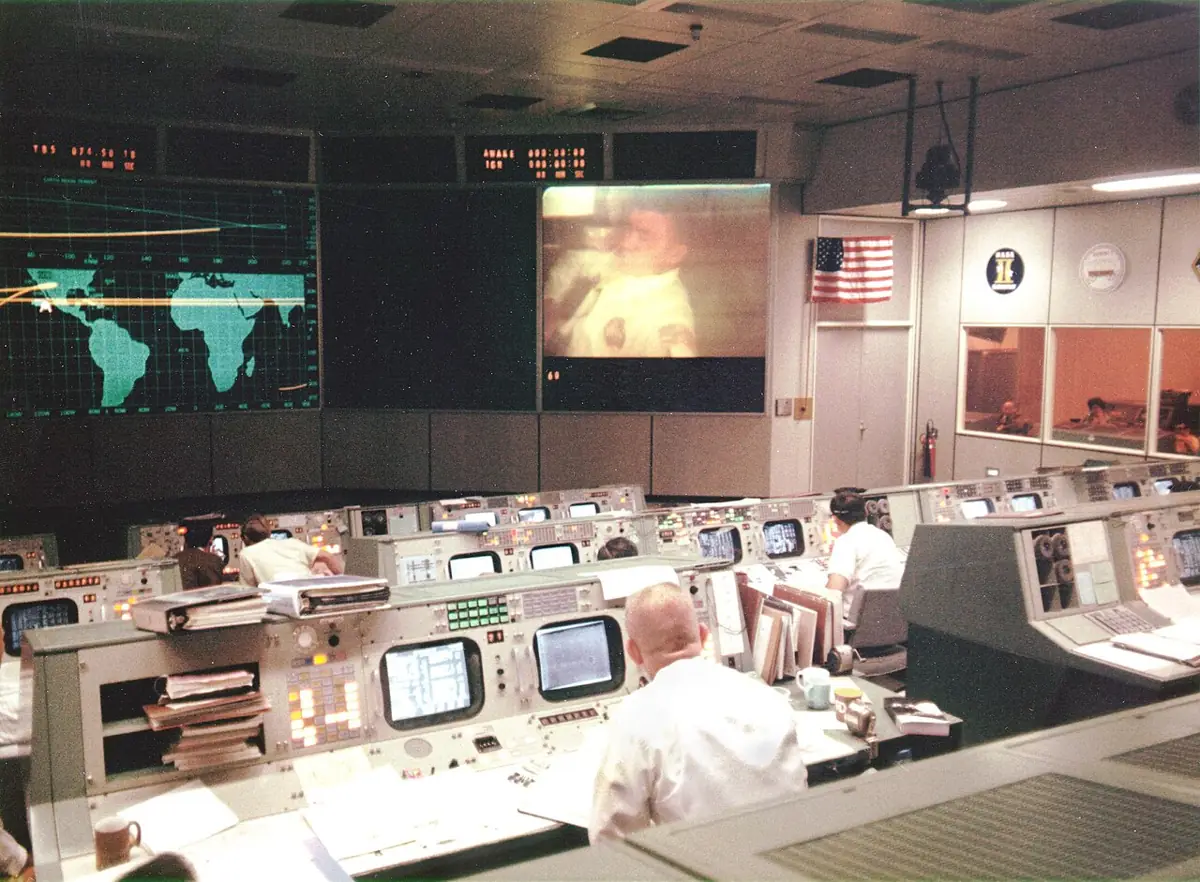
- Apollo 13 (1970): when an oxygen tank failed on the way to the Moon, NASA used its simulators on the ground to evaluate the failure. This is often told as an early ancestor of the digital twin idea; NASA later gave one of the first practical definitions of a digital twin (2010).
- Predictive maintenance: a twin of a machine compares live sensor data — for example gearbox vibration — with what its model expects, so a worn part can be replaced before it fails. Same idea as our DIVERGED alarm.
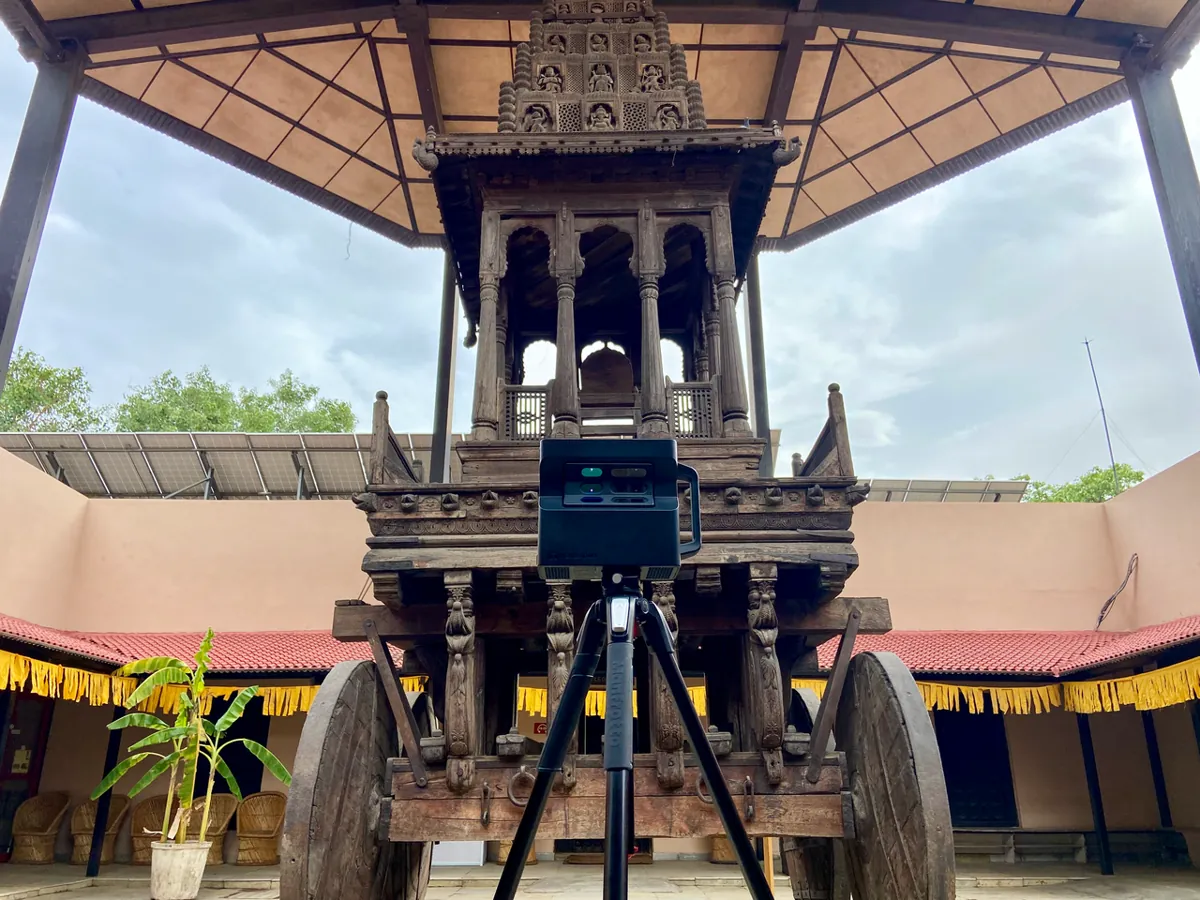
- Heritage in India: at the National Crafts Museum in New Delhi, a historic wooden temple chariot was 3D-scanned to make a high-detail digital copy for preservation, research and virtual visits.
- Factories and cities: twins of production lines, buildings and even whole cities are used to test changes on the model first and watch the real system for problems.
Think
Think about it
Think
The lab buys a beautiful 3D model of the desk arm, exact to 0.1 mm, but nothing connects it to the real arm. Your friend calls it “our digital twin”. Is it? What is the smallest change that would make it one?
Experiment
Try it in the lab
About 50 minutes. The Python parts need only Python 3 (pyserial for the real port). The bench part needs an Arduino UNO, a 10 kΩ potentiometer and three jumper wires — no motor.
Experiment
Break the link, block the joint, trust the twin
You will need
- `twin_mirror.py` and `twin_listener.py` (Python 3)
- Robot simulation explorer (in your browser)
- Arduino UNO, 10 kΩ potentiometer, jumper wires, USB cable
- Optional: `pip install pyserial` for the real port
Steps
- Run `twin_mirror.py`. Write down when the twin says DIVERGED and STALE, and the worst error of each copy.
- Change the block to start at 2.8 s instead of 2.3 s. How fast does the twin notice now?
- Set `DIVERGE_DEG = 3.0`. Does the twin start giving false alarms during normal moves? What is the trade-off?
- Change the 0.5 in `twin = twin_pred + 0.5 * gap` to 0.1 and then 0.9. Which twin trusts the sensor more? Which one handles noise better?
- Run `twin_listener.py --fake` and find the lost packet and the glitch in the output.
- Bench: upload `twin_stream.ino`, run `twin_listener.py --port <your port>`, turn the pot slowly, then quickly, then pull the USB cable for one second.
Interactive · Robot simulation explorer · Educational
Practice motions, debug logic, and catch bad joint limits before you bend a real servo horn.
Educational value score
57
Toy metric — teaches tradeoffs, not a real KPI.
Browser educational sim — not Gazebo / not Isaac Sim / not MuJoCo / not a real-time physics engine.
The plain model is confident and wrong when reality changes. The shadow is right only while data flows, and silently stale when it stops. The twin combines both and — most importantly — knows when not to be trusted: it says DIVERGED, STALE or GLITCH instead of drawing a pretty but wrong arm.
Knowledge check
Check your understanding
Knowledge check
1. What makes a digital twin different from an ordinary simulation?
2. A screen that copies sensor readings one way, with no model or feedback, is called a…
3. Which three parts does every digital twin have?
4. In `twin_mirror.py`, how did the twin notice the blocked joint at 2.40 s?
5. When the cable was unplugged, what did the shadow do?
6. Why does `twin_stream.ino` send a sequence number with every line?
7. The twin predicts that a requested move will hit the shelf. What should happen?
Mini assignment
Hands-on assignment
Mini assignment
Your first instance twin
Build and test a twin of one real joint, and prove — with output — that it notices when it should not be trusted.
Deliverables
- A one-paragraph explanation, in your own words, of model vs shadow vs twin, using the desk arm as the example.
- Output of `twin_mirror.py` with **your own** fault added (for example: a slower servo from 4.5 s, or noise that doubles), and a note on which copy noticed it.
- Bench: a screenshot of `twin_listener.py` showing LIVE, then STALE when you pull the cable, then LIVE again.
- A table of three “honesty checks” for your twin with the threshold you chose for each and why.
Do this, step by step
- Run
twin_mirror.pyand find the lines where the twin says DIVERGED and STALE. - Add your own fault (for example a slower
MAX_SPEED, or double the noise) and run again. - Note which copy noticed the fault first: the model, the shadow or the twin.
- Bench: run
twin_listener.py --port …withtwin_stream.ino, pull the USB cable, and plug it back in. - Fill in your three honesty checks with a threshold and a reason for each.
Stuck? Hints, one at a time
- No Arduino yet?
twin_listener.py --fakereplays a sample stream, so you can test the listener first. - STALE comes from time without data (
STALE_AFTER= 0.10 s), DIVERGED from model vs measurement (DIVERGE_DEGforDIVERGE_SAMPLESin a row). They are different checks. - If your fault is never caught, it may be smaller than
DIVERGE_DEG. Make it bigger or lower the threshold, and write down which you chose.
Challenges (pick by level)
- 🟢 Beginner: Add a fourth line to the summary that prints how many samples the twin spent in each status (OK, DIVERGED, STALE).
- 🟡 Intermediate: Make
twin_listener.pysave every accepted reading totwin_log.csv(time, angle, speed, status). Open it in a spreadsheet and plot the angle. - 🟠 Advanced: Add a second pot on A1 for the elbow and stream
seq,ms,shoulder,elbow. Extend the listener to keep a twin of both joints. - 🔴 Expert: In
twin_mirror.py, make the twin learn the servo speed: if the real joint is always slower thanMAX_SPEED, slowly lower the model’s speed limit. Show that the DIVERGED false alarms go away on a slow servo. - ⚫ Research: Read the “digital shadow” and “types of digital twin” parts of the Wikipedia article in the sources. Write half a page on whether a fitness-tracker app is a twin of its wearer.
Next step
A twin needs a model of the robot. In Lesson 3 — Robot Models and URDF Concepts you will learn how robots are described for simulators: links, joints, limits and frames written in URDF, the format ROS 2 and Gazebo use.
Look back: Lesson 1: Why Robots Need Simulation. Next: Lesson 3: Robot Models & URDF Concepts. Related: Stage 10 — ROS 2.
Sources
- Wikipedia — Digital twin — definition (a model continuously updated with real data), three parts (physical, digital, connection / digital thread), digital shadow vs twin, prototype / instance / aggregate types, NASA’s use of simulators to evaluate the Apollo 13 oxygen tank failure and NASA’s 2010 definition, predictive maintenance (gearbox vibration example), National Physical Laboratory objection to calling plain, non-updated models twins, and the 3D scan of a temple chariot at the National Crafts Museum, Delhi.
- pySerial — Short introduction — opening a port with a timeout,
readline()and why a timeout prevents blocking forever,python -m serial.tools.list_ports. - Photos: Wikimedia Commons (credits under each image). Descriptions of the chariot scan (Matterport Pro2 IR scanner), the Apollo 13 control room and the Trent engine test bench are from the Commons file pages.
Self-attested for now — keep artifacts in your lab notebook.
Complete
Today's goal
0 of 1 done today
Mark this lesson complete when you have worked the experiment, knowledge check, and assignment (even roughly).