
Robot Perception, Planning & Manipulation · Lesson 05
Planning a Robot Task
Est. 60–75 min
Why
Why this lesson matters
So far in this stage you built the robot’s picture of the world: what is there (L2), where it is (L3) and how much space it takes (L4). Now we answer what to do. A task planner turns a goal like “red block in the tray” into a short list of actions — pick, place, open, close — each with preconditions (what must be true before) and effects (what becomes true after). Only then do motion planners (L6–L10) work out *how* the arm moves for each action.
You will write a tiny STRIPS-style planner in plain Python, solve a stacked-block task and the famous Sussman anomaly, watch a robot re-plan when a grasp slips, and see how fast the search grows. On the bench, an Arduino runs a pick-and-place plan step by step, checks each step, retries and aborts safely.
Concept
Actions, preconditions, effects and plans
1. Task planning vs motion planning
| Task planning | Motion planning | |
|---|---|---|
| Question | Which actions, in which order? | How does the arm move for one action? |
| Works with | facts: on(R, table), clear(G), holding(R) | joint angles, poses, obstacles |
| Output | pick(G) → place(G, table) → pick(R) → place(R, tray) | a collision-free joint trajectory |
| Example tools | STRIPS, PDDL planners, behaviour trees, state machines | RRT, PRM, trajectory optimisers (L6–L10) |
2. STRIPS: states, actions, preconditions, effects
STRIPS was developed by Richard Fikes and Nils Nilsson at SRI International in 1971 — the same lab that built Shakey. A STRIPS problem has an initial state, a goal, and a set of actions. A state is a set of facts that are true. Each action has preconditions (facts that must be true to do it) and postconditions — facts it makes true (the add list) and facts it makes false (the delete list). A plan is a sequence of actions that can be executed from the initial state and ends in a state where the goal is true.
pick(x from s)
  pre:  handempty, clear(x), on(x, s), reachable(x)
  add:  holding(x), clear(s)        (if s is a block)
  del:  on(x, s), clear(x), handempty

place(x on s)
  pre:  holding(x), clear(s)        (if s is a block; table and tray always have room)
  add:  on(x, s), clear(x), handempty
  del:  holding(x), clear(s)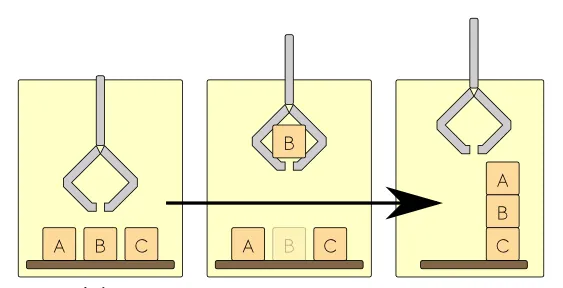
3. PDDL: a standard way to write planning problems
PDDL (Planning Domain Definition Language) was first developed by Drew McDermott and colleagues in 1998 for the International Planning Competition. It was inspired by STRIPS and ADL. A PDDL domain file describes the predicates and actions (with preconditions and effects); a problem file gives the objects, initial state and goal. A general-purpose planner reads both and outputs a plan. Our Python planner uses the same idea without the file format.
4. Why planning is not just “do the goals one by one”
The Sussman anomaly, first described by Gerald Sussman, shows the trap. Three blocks: C is on A, B is on the table. Goal: A on B and B on C. If you first achieve “A on B” (move C away, put A on B) you must then undo it to put B on C. If you first do “B on C”, you must undo that to move A. Planners that treat sub-goals separately (non-interleaved) get stuck; a planner that searches over the full state finds the 6-step plan.
5. Executing a plan: monitor, re-plan, abort
- Monitor effects: after every action, check with sensors that its effects really happened. After
pick(R), is the gripper really holding R (finger gap, force, or camera)? - Re-plan: if the observed state differs from the expected one, plan again from the observed state. Do not blindly continue the old plan.
- Retry limits: retry a failed step a few times, then abort to a safe state and ask a human.
- No plan is an answer: if the goal cannot be reached (object out of reach, tray full), the planner should say so — and the robot should not move.
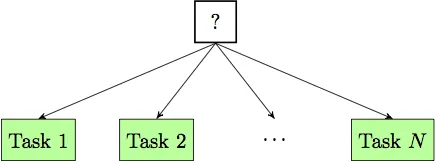
Many robots run plans as state machines (like the bench sketch) or behaviour trees. A behaviour tree is ticked from the root; each node returns running, success or failure. A sequence node runs its children in order until one fails; a fallback (selector) node tries children in order until one does not fail — a neat way to write “try to grasp; if that fails, re-detect and try again; if that fails, ask for help”.
Visual
Visualise it: from goal to action sequence
A goal becomes a sequence of actions. Each action can run only when its preconditions are true, and it changes the facts of the world. (Educational explorer, not an industrial task planner.)
Interactive · Task planning explorer · Educational

Not PDDL / not HTN / not industrial task planner.
Code lab
Code lab: a tiny STRIPS planner for the desk arm
task_planner_lab.py stores a state as a set of facts and searches breadth-first, so the plan it finds has the fewest actions. Six experiments: (1) red block to tray; (2) the same with the green block on top; (3) the Sussman anomaly, solved properly and then goal-by-goal; (4) execution with a grasp that slips once, detected and re-planned; (5) a block outside reach; (6) how many states the search visits as blocks are added. Run python3 task_planner_lab.py.
"""task_planner_lab.py — Stage 13 L05 (AIHUB STATION lab)

TASK planning for a desk arm: decide WHICH actions, in WHICH order, before any
motion is planned. A tiny STRIPS-style planner in plain Python.

State  = a set of true facts, e.g. ("on", "A", "table"), ("clear", "A"), ("handempty",)
Action = name + preconditions + add list + delete list
Planner = breadth-first search: finds the SHORTEST plan (fewest actions).
Run:  python3 task_planner_lab.py
"""
from collections import deque

def actions_for(state, blocks, places=("table", "tray")):
    """Yield every action whose preconditions are true in this state."""
    for x in blocks:
        if ("handempty",) in state and ("clear", x) in state and ("reachable", x) in state:
            for s in list(blocks) + list(places):
                if ("on", x, s) in state:
                    add = {("holding", x)} | ({("clear", s)} if s in blocks else set())
                    dele = {("on", x, s), ("clear", x), ("handempty",)}
                    yield (f"pick({x} from {s})", add, dele)
        if ("holding", x) in state:
            for s in list(blocks) + list(places):
                if s == x: continue
                if s in blocks and ("clear", s) not in state: continue
                add = {("on", x, s), ("clear", x), ("handempty",)}
                dele = {("holding", x)} | ({("clear", s)} if s in blocks else set())
                yield (f"place({x} on {s})", add, dele)

def plan(init, goal, blocks):
    start = frozenset(init); q = deque([(start, [])]); seen = {start}
    while q:
        s, p = q.popleft()
        if goal <= s: return p, len(seen)
        for name, add, dele in actions_for(s, blocks):
            n = frozenset((s - dele) | add)
            if n not in seen:
                seen.add(n); q.append((n, p + [name]))
    return None, len(seen)

def apply_plan(state, steps, blocks):
    s = set(state)
    for st in steps:
        for name, add, dele in actions_for(s, blocks):
            if name == st:
                s = (s - dele) | add; break
        else:
            return None
    return s

def world(on, blocks, unreachable=()):
    s = {("handempty",)}
    for x, y in on.items(): s.add(("on", x, y))
    for b in blocks:
        if b not in on.values(): s.add(("clear", b))
        if b not in unreachable: s.add(("reachable", b))
    return s

def show(title, p, n):
    print(title)
    if p is None: print(f"   NO PLAN exists (searched {n} states) -> report, do not move"); return
    for i, a in enumerate(p, 1): print(f"   {i}. {a}")
    print(f"   {len(p)} actions, {n} states searched")

# 1. simplest task
B = ("R", "G")
show("1. Put the red block R in the tray (R and G on the table)",
     *plan(world({"R": "table", "G": "table"}, B), {("on", "R", "tray")}, B))

# 2. the red block is under the green one
show("\n2. Same goal, but G is stacked on R",
     *plan(world({"R": "table", "G": "R"}, B), {("on", "R", "tray")}, B))

# 3. Sussman anomaly
B3 = ("A", "B", "C")
init3 = world({"A": "table", "B": "table", "C": "A"}, B3)
goal3 = {("on", "A", "B"), ("on", "B", "C")}
show("\n3. Sussman anomaly: C on A, B on table. Goal: A on B AND B on C", *plan(init3, goal3, B3))
print("   Goal-by-goal (no interleaving), first 'A on B', then 'B on C':")
p1, _ = plan(init3, {("on", "A", "B")}, B3)
s1 = apply_plan(init3, p1, B3)
p2, _ = plan(s1, {("on", "B", "C")}, B3)
s2 = apply_plan(s1, p2, B3)
print(f"     part 1: {p1}")
print(f"     part 2: {p2}")
print(f"     after both parts: A on B? {('on','A','B') in s2}   B on C? {('on','B','C') in s2}  -> goal 1 was undone")

# 4. execution monitoring and replanning
print("\n4. Execute with monitoring: the grasp of R slips once")
s = world({"R": "table", "G": "R"}, B)
goal = {("on", "R", "tray")}
p, _ = plan(s, goal, B)
step, slipped, log = 0, False, []
while not goal <= s:
    a = p[step]
    expected = apply_plan(s, [a], B)
    observed = expected
    if a.startswith("pick(R") and not slipped:
        observed = set(s); slipped = True          # gripper closed on nothing: state did not change
    if observed != expected:
        print(f"   {a:22s} -> expected 'holding R', sensors say NOT holding. Replanning...")
        p, _ = plan(observed, goal, B); step = 0; s = observed
        print(f"   new plan: {p}")
        continue
    print(f"   {a:22s} -> ok")
    s = observed; step += 1
print("   goal reached: R is in the tray")

# 5. impossible goal
show("\n5. R is outside the arm's reach (no 'reachable R' fact)",
     *plan(world({"R": "table", "G": "table"}, B, unreachable=("R",)), {("on", "R", "tray")}, B))

# 6. growth of the search
print("\n6. How fast the search grows (all blocks start on the table, goal: one tower)")
for n in (2, 3, 4, 5):
    bl = tuple("ABCDE"[:n])
    g = {("on", bl[i], bl[i+1]) for i in range(n-1)}
    p, nstates = plan(world({b: "table" for b in bl}, bl), g, bl)
    print(f"   {n} blocks: plan of {len(p)} actions, {nstates} states searched")
Output (run with python3 task_planner_lab.py)
1. Put the red block R in the tray (R and G on the table)
   1. pick(R from table)
   2. place(R on tray)
   2 actions, 7 states searched

2. Same goal, but G is stacked on R
   1. pick(G from R)
   2. place(G on table)
   3. pick(R from table)
   4. place(R on tray)
   4 actions, 10 states searched

3. Sussman anomaly: C on A, B on table. Goal: A on B AND B on C
   1. pick(C from A)
   2. place(C on table)
   3. pick(B from table)
   4. place(B on C)
   5. pick(A from table)
   6. place(A on B)
   6 actions, 64 states searched
   Goal-by-goal (no interleaving), first 'A on B', then 'B on C':
     part 1: ['pick(C from A)', 'place(C on table)', 'pick(A from table)', 'place(A on B)']
     part 2: ['pick(A from B)', 'place(A on table)', 'pick(B from table)', 'place(B on C)']
     after both parts: A on B? False   B on C? True  -> goal 1 was undone

4. Execute with monitoring: the grasp of R slips once
   pick(G from R)         -> ok
   place(G on table)      -> ok
   pick(R from table)     -> expected 'holding R', sensors say NOT holding. Replanning...
   new plan: ['pick(R from table)', 'place(R on tray)']
   pick(R from table)     -> ok
   place(R on tray)       -> ok
   goal reached: R is in the tray

5. R is outside the arm's reach (no 'reachable R' fact)
   NO PLAN exists (searched 4 states) -> report, do not move

6. How fast the search grows (all blocks start on the table, goal: one tower)
   2 blocks: plan of 2 actions, 7 states searched
   3 blocks: plan of 4 actions, 50 states searched
   4 blocks: plan of 6 actions, 391 states searched
5 blocks: plan of 8 actions, 3465 states searchedTry it: set up blocks, choose a goal, and step through the plan — see each action’s preconditions and effects. (Educational explorer, not an industrial task planner.)
Interactive · Task planning explorer · Educational
Not PDDL / not HTN / not industrial task planner.
Bench build: a monitored pick-and-place sequence on the UNO
task_sequencer.ino runs the plan GOTO_PICK → CLOSE → CHECK_HOLD → GOTO_TRAY → OPEN → GOTO_HOME as a state machine, with two servos: a swing arm (D9) and a gripper (D10). A push button on D2 stands for the “object in gripper” sensor. CHECK_HOLD monitors the effect of CLOSE: if the button is not pressed, the gripper opens and the plan goes back to GOTO_PICK — up to 2 retries — and then aborts to a safe home pose with the red LED on. Every step change is printed, so you can see the plan run.
| Part | Connection | Note |
|---|---|---|
| START button | D3 → button → GND | INPUT_PULLUP; pressed = LOW |
| “Holding” button | D2 → button → GND | press during CHECK_HOLD = object grasped |
| Arm servo (SG90-class) | signal → D9 | separate 5–6 V supply |
| Gripper servo (SG90-class) | signal → D10 | same separate supply |
| Servo supply | red → +5–6 V, brown → supply GND | supply GND joined to UNO GND |
| Green LED + 220 Ω / Red LED + 220 Ω | D5 / D6 → resistor → LED → GND | task done / task aborted |
// task_sequencer.ino — Stage 13 L05 (AIHUB STATION lab)
// Run a task plan step by step, check each step's EFFECT, and replan (retry)
// when a check fails. Two servos: a swing "arm" (D9) and a "gripper" (D10).
// A push button on D2 stands for the "object in gripper" sensor (pressed = holding).
// A button on D3 starts the task.
//
// Plan:  GOTO_PICK -> CLOSE -> CHECK_HOLD -> GOTO_TRAY -> OPEN -> GOTO_HOME
// If CHECK_HOLD fails: OPEN, back to GOTO_PICK (max 2 retries), else ABORT.
//
// Wiring (example): buttons D2 and D3 to GND (INPUT_PULLUP). Arm servo D9,
//   gripper servo D10 - BOTH powered from a SEPARATE 5-6 V supply (never GPIO
//   or the UNO 5V pin), grounds joined. Green LED D5, red LED D6, 220 ohm each.
#include <Servo.h>

const int HOLD_BTN = 2, START_BTN = 3, ARM_PIN = 9, GRIP_PIN = 10, GREEN = 5, RED = 6;
const int ARM_HOME = 90, ARM_PICK = 40, ARM_TRAY = 140, GRIP_OPEN = 30, GRIP_CLOSED = 100;
const int MAX_RETRIES = 2;

enum Step { IDLE, GOTO_PICK, CLOSE, CHECK_HOLD, GOTO_TRAY, OPEN, GOTO_HOME, DONE, ABORT };
const char* names[] = {"IDLE", "GOTO_PICK", "CLOSE", "CHECK_HOLD", "GOTO_TRAY", "OPEN", "GOTO_HOME", "DONE", "ABORT"};
Step step = IDLE;
int retries = 0;
bool carrying = false;
Servo arm, grip;

void moveSlow(Servo &s, int target) {          // gentle moves: 2 deg every 15 ms
  int a = s.read();
  while (a != target) { a += (target > a) ? min(2, target - a) : -min(2, a - target); s.write(a); delay(15); }
}

void go(Step next) {
  Serial.print(names[step]); Serial.print(F(" -> ")); Serial.println(names[next]);
  step = next;
}

void setup() {
  Serial.begin(115200);
  pinMode(HOLD_BTN, INPUT_PULLUP); pinMode(START_BTN, INPUT_PULLUP);
  pinMode(GREEN, OUTPUT); pinMode(RED, OUTPUT);
  arm.attach(ARM_PIN); grip.attach(GRIP_PIN);
  arm.write(ARM_HOME); grip.write(GRIP_OPEN);
  Serial.println(F("Press START (D3). Hold D2 during CHECK_HOLD to mean 'object grasped'."));
}

void loop() {
  switch (step) {
    case IDLE:
      if (digitalRead(START_BTN) == LOW) { retries = 0; digitalWrite(RED, LOW); digitalWrite(GREEN, LOW); go(GOTO_PICK); }
      break;
    case GOTO_PICK:                                  // precondition: gripper open, not carrying
      if (carrying) { go(ABORT); break; }
      moveSlow(grip, GRIP_OPEN); moveSlow(arm, ARM_PICK); go(CLOSE); break;
    case CLOSE:
      moveSlow(grip, GRIP_CLOSED); delay(300); go(CHECK_HOLD); break;
    case CHECK_HOLD:                                 // monitor the EFFECT of CLOSE
      if (digitalRead(HOLD_BTN) == LOW) { carrying = true; go(GOTO_TRAY); }
      else if (retries < MAX_RETRIES) {
        retries++; Serial.print(F("  grasp failed, retry ")); Serial.println(retries);
        moveSlow(grip, GRIP_OPEN); go(GOTO_PICK);
      } else { Serial.println(F("  grasp failed too often")); go(ABORT); }
      break;
    case GOTO_TRAY:
      moveSlow(arm, ARM_TRAY); go(OPEN); break;
    case OPEN:
      moveSlow(grip, GRIP_OPEN); carrying = false; go(GOTO_HOME); break;
    case GOTO_HOME:
      moveSlow(arm, ARM_HOME); go(DONE); break;
    case DONE:
      digitalWrite(GREEN, HIGH); Serial.println(F("TASK DONE")); go(IDLE); break;
    case ABORT:
      moveSlow(grip, GRIP_OPEN); moveSlow(arm, ARM_HOME);
      digitalWrite(RED, HIGH); Serial.println(F("TASK ABORTED - safe at home")); go(IDLE); break;
  }
  delay(20);
}Press START (D3). Hold D2 during CHECK_HOLD to mean 'object grasped'.
IDLE -> GOTO_PICK
GOTO_PICK -> CLOSE
CLOSE -> CHECK_HOLD
grasp failed, retry 1
CHECK_HOLD -> GOTO_PICK
GOTO_PICK -> CLOSE
CLOSE -> CHECK_HOLD
CHECK_HOLD -> GOTO_TRAY
GOTO_TRAY -> OPEN
OPEN -> GOTO_HOME
GOTO_HOME -> DONE
TASK DONE
DONE -> IDLEDebugging
| Symptom | Likely cause | Fix |
|---|---|---|
| Robot grasps the wrong object or a stack | missing precondition (clear(x)) | Add the precondition; make the world model provide the fact |
| Planner says NO PLAN for an easy task | a fact is missing from the initial state (e.g. reachable) | Print the initial state; check what the world model gives |
| Plan undoes its own work | goals solved one by one (Sussman) | Search over the full state with all goals together |
| Robot carries on after a failed grasp | effects not monitored | Check sensors after each action; re-plan from the observed state |
| Robot retries for ever | no retry limit | Limit retries; abort to a safe pose; ask a human |
| Planning is very slow with many objects | blind breadth-first search | Use a heuristic planner (A*, PDDL planners) or split the task |
| Bench: steps skip without waiting | button wiring or no pull-up | Use INPUT_PULLUP and wire buttons to GND |
Real world
Task planning in the real world
- Research history: STRIPS came from SRI in 1971, alongside Shakey; it still shapes planning languages today through PDDL.
- Planning competitions: PDDL was created so planners in the International Planning Competition could read the same problems.
- Games and robots: behaviour trees, used in big video games, are now also used for robot manipulation and multi-robot systems.
- Factories: fixed cells use hand-written sequences (state machines) with sensor checks after each step, retries, and safe stops.
- Your lab: write the actions of your desk arm with preconditions and effects before writing motion code. Most demo-day failures are missing preconditions.
Think
Think about it
Think
You add a “tray full” rule: the tray can hold at most 2 blocks. How would you write that as facts and preconditions, and what should the robot do if a third block must go to the tray?
Experiment
Try it in the lab
About 60 minutes. Python 3 for the script; Arduino UNO, two small servos with their own 5–6 V supply, two push buttons, two LEDs and two 220 Ω resistors for the bench.
Experiment
Plan, break and re-plan
You will need
- `task_planner_lab.py` (Python 3, no libraries)
- Task-planning explorer (in your browser)
- Arduino UNO, 2 × SG90-class servos + separate 5–6 V supply, 2 push buttons, green and red LEDs, two 220 Ω resistors, jumper wires
Steps
- Run `task_planner_lab.py`. Write the state (all facts) after each action of plan 2 by hand.
- Add a third block B on top of G in problem 2. How long is the plan now?
- In problem 3, try goal-by-goal in the other order (“B on C” first). What gets undone?
- In experiment 4, make the grasp slip twice. Does the re-planning still work? Add a retry limit of 2.
- Add a `tray` capacity of 2 blocks as described in “Think about it”.
- Bench: run the sequence and press D2 on the first try, then let one grasp fail, then let all fail.
- Bench: draw your state machine as boxes and arrows, including the retry and abort arrows.
Interactive · Task planning explorer · Educational
Not PDDL / not HTN / not industrial task planner.
A plan is only as good as its facts and preconditions. When execution and plan disagree, trust the sensors, re-plan from what is really true, and stop safely when there is no plan.
Knowledge check
Check your understanding
Knowledge check
1. Task planning decides…
2. In STRIPS, a precondition is…
3. Why did the arm in the story grasp the green block?
4. The Sussman anomaly shows that…
5. PDDL separates a planning problem into…
6. After pick(R), sensors say the gripper is empty. The robot should…
7. The planner finds no plan because the block is out of reach. The robot should…
8. In a behaviour tree, a fallback (selector) node…
Mini assignment
Hands-on assignment
Mini assignment
A task model for your desk arm
Write the actions, preconditions and effects for a real pick-and-place task on your desk arm, and test the plan.
Deliverables
- A list of all facts your task uses (on, clear, holding, reachable, in_tray …) and which sensor or world-model entry provides each one.
- Your actions in STRIPS style (pre / add / del), including at least one action besides pick and place (for example open_gripper or look).
- Plans from `task_planner_lab.py` (or your version) for three starting arrangements, one of which has no plan.
- A bench log from `task_sequencer.ino` showing a retry and an abort.
Do this, step by step
- Run
task_planner_lab.pyand read the plans it prints for each start arrangement. - List every fact your task uses (on, clear, holding, reachable, in_tray) and which sensor gives it.
- Write your actions in pre / add / del form, including one action besides pick and place.
- Try three start arrangements, including one where a block is unreachable so there is no plan.
- Bench: upload
task_sequencer.ino, press HOLD to fake a failed grip and log one retry and one abort.
Stuck? Hints, one at a time
- If the planner picks a block that has another block on it, the
clearprecondition is missing from pick. - “No plan” is a correct answer. Check the script prints the reason instead of moving.
MAX_RETRIESis 2. If your sequencer retries for ever, check the counter is reset only after success.
Challenges (pick by level)
- 🟢 Beginner: Solve the Sussman anomaly by hand with real blocks. Write the facts after each move.
- 🟡 Intermediate: Replace breadth-first search with A* using “number of goal facts not yet true” as the heuristic. Compare states searched in experiment 6.
- 🟠 Advanced: Write the desk-arm domain in PDDL and solve it with an open-source PDDL planner. Check you get the same plan.
- 🔴 Expert: Write the bench sequence as a behaviour tree (sequence + fallback nodes) in Python, and run it against a fake sensor that fails at random.
- ⚫ Research: Read about task and motion planning (TAMP): planners that choose actions and check that each one has a collision-free motion. Write one page on why a “valid” task plan can still be impossible to move.
Next step
Each action in your plan — “move to the red block”, “carry it to the tray” — needs a real motion. In Lesson 6 — Path Planning vs Motion Planning you will see the difference between finding a path for a point and finding a motion for a whole robot arm.
Look back: Lesson 4: Occupancy & Collision Representation. Next: Lesson 6: Path Planning vs Motion Planning. Related: Stage 10 — ROS 2.
Sources
- Wikipedia — Stanford Research Institute Problem Solver (STRIPS) — Fikes and Nilsson, SRI, 1971; initial state, goal, actions with preconditions and postconditions; plans.
- Wikipedia — Planning Domain Definition Language — McDermott et al., 1998, International Planning Competition; domain and problem files; inspired by STRIPS and ADL.
- Wikipedia — Sussman anomaly — non-interleaved planning undoes earlier sub-goals.
- Wikipedia — Behavior tree (AI, robotics and control)) — ticks; running/success/failure; sequence and fallback nodes; use in robotics.
- Arduino Servo library (GitHub) — controlling RC hobby servos.
- Photos: Wikimedia Commons (credits under each image).
Self-attested for now — keep artifacts in your lab notebook.
Complete
Today's goal
0 of 1 done today
Mark this lesson complete when you have worked the experiment, knowledge check, and assignment (even roughly).