
Computer Vision for Robotics (Vision Foundations) · Lesson 09
Bounding Boxes & Confidence
Est. 50–65 min
Why
Why this lesson matters
Lesson 8 gave you the words. This lesson makes you fluent with them: converting between the four common box formats without bugs, computing IoU by hand, using OpenCV’s built-in NMS correctly (per class!), making confidence steady over time, and turning a box centre into a millimetre target that a robot can use.
Concept
Boxes, overlap and trust
1. Four ways to write the same box
| Format | Numbers | Who uses it |
|---|---|---|
| xywh | top-left x, y, width, height (pixels) | OpenCV Rect, boundingRect, NMSBoxes |
| xyxy | x1, y1 (top-left), x2, y2 (bottom-right) | many detection libraries, drawing with cv.rectangle |
| cx, cy, w, h | centre, width, height | the robot (it wants the centre) |
| YOLO label | class cx cy w h, all divided by image width/height (0–1) | Ultralytics YOLO training labels, one .txt per image |
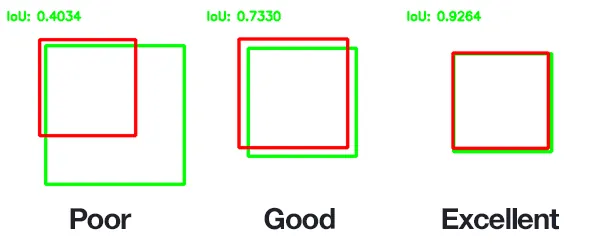
2. IoU — how much two boxes agree
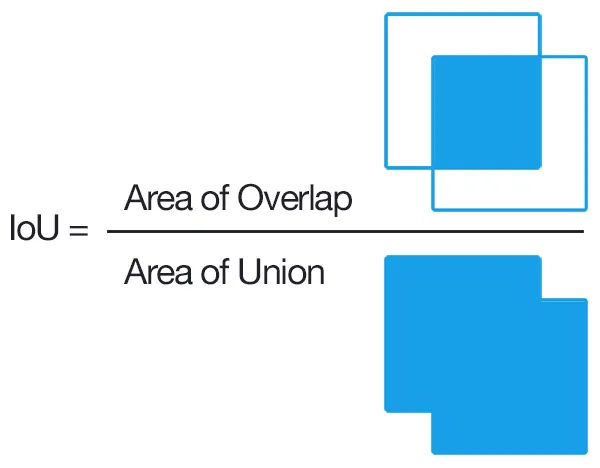
Small shifts hurt more than you expect: an 80 × 100 box moved 10 px sideways still has IoU 0.78, but moved 40 px it drops to 0.33 — below the usual 0.5 “correct” line. A tiny box fully inside a big one also scores low (0.25 in our test) even though it “touches” the object.
3. NMS done right
cv.dnn.NMSBoxes(boxes, scores, score_threshold, nms_threshold)— boxes in xywh; drops boxes belowscore_threshold, then removes boxes whose IoU with a stronger kept box is abovenms_threshold; returns indices to keep.- Lower `nms_threshold` = more aggressive (fewer boxes). Higher = duplicates survive.
- Class-blind NMS can delete a real neighbour of a different class.
cv.dnn.NMSBoxesBatched(boxes, scores, class_ids, …)runs NMS per class. cv.dnn.softNMSBoxeslowers neighbours’ scores instead of deleting them — useful when objects really overlap.
4. Confidence over time: smoothing + hysteresis
Smooth
Exponential moving average:
ema = 0.6·ema + 0.4·conf. Noise averages out; real changes still come through.Hysteresis
Turn ON when ema ≥ 0.6, turn OFF only when ema < 0.4. A score wobbling around 0.6 no longer flickers.
Pay the delay
Smoothing reacts a few frames late. Count it, and make sure the robot’s safety does not depend on it.
5. From box to robot target
With a camera looking straight down at a flat table, one simple number — millimetres per pixel — turns the box centre into a table offset. If 640 px covers 400 mm, then 1 px = 0.625 mm and a 3-pixel jitter is about 2 mm at the gripper. This shortcut ignores lens distortion and tilt; Lessons 12–13 replace it with proper calibration and projection.
Visual
Visualise it: boxes, scores and the threshold
Educational detection overlay with confidence labels, a threshold slider and noise. (Fake scores for teaching — not YOLO.)
Interactive · Object detection simulator · Educational (not YOLO)


- block conf=0.88 KEEP · box (40,70,50,45)
- cup conf=0.77 KEEP · box (130,85,42,55)
- bolt conf=0.67 KEEP · box (210,110,28,22)
Scores and boxes are scripted for teaching. This is not a real detector (not YOLO, not OpenCV DNN). Use it to practice threshold tradeoffs: high threshold → fewer false alarms, more misses.
Code lab
Code lab: formats, IoU, NMS and steady confidence
boxes_confidence.py runs six small experiments: box format conversions (including a YOLO label line and back), IoU on five cases, OpenCV NMS at four thresholds plus per-class NMS, a 40-frame confidence sequence with raw threshold vs smoothing + hysteresis, centre jitter, and box-to-millimetre conversion.
"""Stage 11 L09 - Bounding boxes and confidence, hands-on.

1) Box formats: xywh (OpenCV), xyxy, centre (cx,cy,w,h), YOLO normalised label line
2) IoU on simple cases
3) Non-maximum suppression with cv.dnn.NMSBoxes / NMSBoxesBatched
4) Confidence over time: raw threshold vs smoothing + hysteresis (flicker count)
5) Box jitter: smoothing the centre
6) Box centre -> table position in mm (simple top-down scale; Lessons 12-13 do it properly)
"""
import cv2 as cv
import numpy as np

IMG_W, IMG_H = 640, 480


def xywh_to_xyxy(b):
    x, y, w, h = b
    return (x, y, x + w, y + h)


def xyxy_to_xywh(b):
    x1, y1, x2, y2 = b
    return (x1, y1, x2 - x1, y2 - y1)


def xywh_to_cxcywh(b):
    x, y, w, h = b
    return (x + w / 2, y + h / 2, w, h)


def to_yolo_line(cls_id, b, iw, ih):
    cx, cy, w, h = xywh_to_cxcywh(b)
    return f'{cls_id} {cx / iw:.6f} {cy / ih:.6f} {w / iw:.6f} {h / ih:.6f}'


def from_yolo_line(line, iw, ih):
    c, cx, cy, w, h = line.split()
    cx, cy, w, h = float(cx) * iw, float(cy) * ih, float(w) * iw, float(h) * ih
    return int(c), (round(cx - w / 2), round(cy - h / 2), round(w), round(h))


def iou(a, b):
    ax1, ay1, ax2, ay2 = xywh_to_xyxy(a)
    bx1, by1, bx2, by2 = xywh_to_xyxy(b)
    inter = max(0, min(ax2, bx2) - max(ax1, bx1)) * max(0, min(ay2, by2) - max(ay1, by1))
    return inter / (a[2] * a[3] + b[2] * b[3] - inter)


cup = (200, 150, 80, 100)                                   # x, y, w, h in pixels
print('1) One cup, four ways to write the same box (image 640x480)')
print(f'   xywh  (OpenCV Rect)  : {cup}')
print(f'   xyxy  (corners)      : {xywh_to_xyxy(cup)}')
print(f'   cx,cy,w,h (centre)   : {xywh_to_cxcywh(cup)}')
line = to_yolo_line(41, cup, IMG_W, IMG_H)
print(f'   YOLO label line      : "{line}"   (class 41 = cup in COCO)')
print(f'   back from YOLO line  : {from_yolo_line(line, IMG_W, IMG_H)}')
print(f'   mix-up! xyxy read as xywh -> IoU with truth {iou(cup, xywh_to_xyxy(cup)):.2f}')

print('\n2) IoU = overlap / union')
for name, b in [('same box', cup), ('shifted 10 px right', (210, 150, 80, 100)),
                ('shifted 40 px right', (240, 150, 80, 100)), ('half size, inside', (220, 175, 40, 50)),
                ('next to it, no overlap', (290, 150, 80, 100))]:
    print(f'   {name:24s} IoU {iou(cup, b):.2f}')

print('\n3) Non-maximum suppression (cv.dnn.NMSBoxes)')
boxes = [(200, 150, 80, 100), (205, 155, 80, 100), (195, 148, 85, 104),   # three on the cup
         (330, 200, 60, 60), (334, 204, 58, 58),                          # two on the block
         (210, 160, 75, 95)]                                              # 'block' box over the cup
scores = [0.91, 0.86, 0.78, 0.84, 0.70, 0.66]
classes = [0, 0, 0, 1, 1, 1]                                              # 0 cup, 1 block
for nms_thr in (0.3, 0.5, 0.7, 0.9):
    keep = np.array(cv.dnn.NMSBoxes(boxes, scores, 0.5, nms_thr)).flatten().tolist()
    print(f'   class-blind, IoU limit {nms_thr}: keep {len(keep)} -> {keep}')
keep = np.array(cv.dnn.NMSBoxesBatched(boxes, scores, classes, 0.5, 0.5)).flatten().tolist()
print(f'   per-class (NMSBoxesBatched), IoU limit 0.5: keep {len(keep)} -> {keep}')
print('   (box 5 is a "block" box overlapping the cup: class-blind NMS hides it, per-class keeps it)')

print('\n4) Confidence over 40 frames: object present for frames 0-24, removed at frame 25')
rng = np.random.default_rng(3)
true_present = np.array([1] * 25 + [0] * 15)
conf = np.clip(np.where(true_present == 1, 0.72, 0.30) + rng.normal(0, 0.12, 40), 0, 1)
raw = conf >= 0.6
ema, state, smooth = conf[0], False, []
for c in conf:
    ema = 0.6 * ema + 0.4 * c                               # exponential moving average
    if not state and ema >= 0.6:                            # hysteresis: ON above 0.6 ...
        state = True
    elif state and ema < 0.4:                               # ... OFF only below 0.4
        state = False
    smooth.append(state)
smooth = np.array(smooth)
flips = lambda s: int(np.count_nonzero(s[1:] != s[:-1]))
print('   raw conf  : ' + ' '.join(f'{c:.2f}' for c in conf[:12]) + ' ...')
print(f'   raw >= 0.6      : on/off flips {flips(raw):2d}, wrong frames {int(np.count_nonzero(raw != true_present)):2d}/40')
print(f'   EMA + hysteresis: on/off flips {flips(smooth):2d}, wrong frames {int(np.count_nonzero(smooth != true_present)):2d}/40')
off_at = int(np.argmax((~smooth) & (np.arange(40) >= 25)))
print(f'   price of smoothing: object removed at frame 25, smoothed state turns off at frame {off_at}')

print('\n5) Box centre jitter over 25 frames (true centre x = 240 px)')
cx = 240 + rng.normal(0, 3.0, 25)
e, ex = cx[0], []
for v in cx:
    e = 0.7 * e + 0.3 * v
    ex.append(e)
print(f'   raw centre std {np.std(cx):.2f} px   smoothed std {np.std(ex[5:]):.2f} px')

print('\n6) Box centre -> table position (camera straight down, 640 px covers 400 mm)')
mm_per_px = 400 / IMG_W
cx_px, cy_px = xywh_to_cxcywh(cup)[:2]
print(f'   scale {mm_per_px:.3f} mm/px; cup centre ({cx_px:.0f}, {cy_px:.0f}) px')
print(f'   -> ({(cx_px - IMG_W / 2) * mm_per_px:+.1f}, {(cy_px - IMG_H / 2) * mm_per_px:+.1f}) mm from the image centre on the table')
print(f'   a 3 px jitter = {3 * mm_per_px:.1f} mm at the gripper')
Output (python3 boxes_confidence.py, tested with opencv-python 5.0)
1) One cup, four ways to write the same box (image 640x480)
   xywh  (OpenCV Rect)  : (200, 150, 80, 100)
   xyxy  (corners)      : (200, 150, 280, 250)
   cx,cy,w,h (centre)   : (240.0, 200.0, 80, 100)
   YOLO label line      : "41 0.375000 0.416667 0.125000 0.208333"   (class 41 = cup in COCO)
   back from YOLO line  : (41, (200, 150, 80, 100))
   mix-up! xyxy read as xywh -> IoU with truth 0.11

2) IoU = overlap / union
   same box                 IoU 1.00
   shifted 10 px right      IoU 0.78
   shifted 40 px right      IoU 0.33
   half size, inside        IoU 0.25
   next to it, no overlap   IoU 0.00

3) Non-maximum suppression (cv.dnn.NMSBoxes)
   class-blind, IoU limit 0.3: keep 2 -> [0, 3]
   class-blind, IoU limit 0.5: keep 2 -> [0, 3]
   class-blind, IoU limit 0.7: keep 2 -> [0, 3]
   class-blind, IoU limit 0.9: keep 5 -> [0, 1, 3, 4, 5]
   per-class (NMSBoxesBatched), IoU limit 0.5: keep 3 -> [0, 3, 5]
   (box 5 is a "block" box overlapping the cup: class-blind NMS hides it, per-class keeps it)

4) Confidence over 40 frames: object present for frames 0-24, removed at frame 25
   raw conf  : 0.96 0.41 0.77 0.65 0.67 0.69 0.48 0.69 0.62 1.00 0.75 0.68 ...
   raw >= 0.6      : on/off flips  7, wrong frames  3/40
   EMA + hysteresis: on/off flips  1, wrong frames  3/40
   price of smoothing: object removed at frame 25, smoothed state turns off at frame 28

5) Box centre jitter over 25 frames (true centre x = 240 px)
   raw centre std 2.87 px   smoothed std 1.17 px

6) Box centre -> table position (camera straight down, 640 px covers 400 mm)
   scale 0.625 mm/px; cup centre (240, 200) px
   -> (-50.0, -25.0) mm from the image centre on the table
   a 3 px jitter = 1.9 mm at the gripper
Try it: increase noise and watch the confidence numbers wobble. Find a threshold that keeps all three objects but never shows the glare box. (Educational sim — fake scores, not YOLO.)
Interactive · Object detection simulator · Educational (not YOLO)
- block conf=0.88 KEEP · box (40,70,50,45)
- cup conf=0.77 KEEP · box (130,85,42,55)
- bolt conf=0.67 KEEP · box (210,110,28,22)
Scores and boxes are scripted for teaching. This is not a real detector (not YOLO, not OpenCV DNN). Use it to practice threshold tradeoffs: high threshold → fewer false alarms, more misses.
box_tracker_live.py — a steady box from a real camera
This script finds the largest blob of one colour, draws its box, computes a simple confidence (how solidly the blob fills its box), and applies smoothing + hysteresis. Green box = tracking, orange = seen but not confirmed. With --mm-per-px it prints the table offset; with --port it drives the servo pointer below.
"""Stage 11 L09 - Track ONE coloured object's box with smoothed confidence.

Webcam:  python3 box_tracker_live.py --color red
Photo :  python3 box_tracker_live.py --image bench.png --color red --once
Arduino: --port /dev/ttyACM0 sends "X<0-1000>\\n" (box centre across the image) or "L\\n" (lost)
         to servo_pointer.ino.  (pip install pyserial)
--mm-per-px converts the centre to mm on the table for a camera looking straight down.
Confidence here = how solidly the blob fills its box (a simple stand-in for a detector score).
"""
import argparse

import cv2 as cv
import numpy as np

RANGES = {
    'red': [((0, 120, 70), (10, 255, 255)), ((170, 120, 70), (180, 255, 255))],
    'blue': [((100, 120, 70), (130, 255, 255))],
    'green': [((40, 80, 60), (85, 255, 255))],
    'yellow': [((20, 100, 100), (35, 255, 255))],
}


def detect(frame, color, min_area):
    hsv = cv.cvtColor(cv.GaussianBlur(frame, (5, 5), 0), cv.COLOR_BGR2HSV)
    mask = np.zeros(hsv.shape[:2], np.uint8)
    for lo, hi in RANGES[color]:
        mask |= cv.inRange(hsv, lo, hi)
    mask = cv.morphologyEx(mask, cv.MORPH_OPEN, np.ones((5, 5), np.uint8))
    cnts, _ = cv.findContours(mask, cv.RETR_EXTERNAL, cv.CHAIN_APPROX_SIMPLE)
    cnts = [c for c in cnts if cv.contourArea(c) >= min_area]
    if not cnts:
        return None, 0.0
    c = max(cnts, key=cv.contourArea)
    x, y, w, h = cv.boundingRect(c)
    fill = cv.contourArea(c) / float(w * h)
    return (x, y, w, h), min(1.0, fill)


def main() -> None:
    ap = argparse.ArgumentParser()
    ap.add_argument('--color', choices=sorted(RANGES), default='red')
    ap.add_argument('--image')
    ap.add_argument('--camera', type=int, default=0)
    ap.add_argument('--min-area', type=int, default=300)
    ap.add_argument('--on', type=float, default=0.6, help='turn ON when smoothed conf >= this')
    ap.add_argument('--off', type=float, default=0.4, help='turn OFF when smoothed conf < this')
    ap.add_argument('--mm-per-px', type=float, default=0.0)
    ap.add_argument('--once', action='store_true')
    ap.add_argument('--port')
    a = ap.parse_args()

    still = cv.imread(a.image) if a.image else None
    if a.image and still is None:
        raise SystemExit(f'could not read {a.image}')
    if a.once and still is None:
        raise SystemExit('--once needs --image')
    link = None
    if a.port:
        import serial
        link = serial.Serial(a.port, 115200, timeout=0.1)
    cap = None if still is not None else cv.VideoCapture(a.camera)
    if cap is not None and not cap.isOpened():
        raise SystemExit('camera not found - try --camera 1 or --image file.png')

    ema_conf, ema_c, on = 0.0, None, False
    while True:
        frame = still if still is not None else cap.read()[1]
        if frame is None:
            print('camera returned no frame')
            break
        ih, iw = frame.shape[:2]
        box, conf = detect(frame, a.color, a.min_area)
        ema_conf = 0.6 * ema_conf + 0.4 * conf if not a.once else conf
        on = ema_conf >= a.on if not on else ema_conf >= a.off       # hysteresis
        if box is not None:
            c = np.array([box[0] + box[2] / 2, box[1] + box[3] / 2])
            ema_c = c if ema_c is None or a.once else 0.7 * ema_c + 0.3 * c
        if link is not None:
            link.write((f'X{int(1000 * ema_c[0] / iw)}\n' if on and ema_c is not None else 'L\n').encode())
        if a.once:
            if box is None:
                print(f'no {a.color} object found')
            else:
                x, y, w, h = box
                print(f'xywh {box}  xyxy {(x, y, x + w, y + h)}  centre ({ema_c[0]:.1f}, {ema_c[1]:.1f})')
                print(f'YOLO-style line: 0 {ema_c[0] / iw:.4f} {ema_c[1] / ih:.4f} {w / iw:.4f} {h / ih:.4f}')
                print(f'confidence {conf:.2f} -> {"TRACKING" if on else "not confirmed"}')
                if a.mm_per_px:
                    print(f'table offset from image centre: ({(ema_c[0] - iw / 2) * a.mm_per_px:+.1f}, '
                          f'{(ema_c[1] - ih / 2) * a.mm_per_px:+.1f}) mm')
            break
        view = frame.copy()
        if box is not None:
            x, y, w, h = box
            cv.rectangle(view, (x, y), (x + w, y + h), (0, 255, 0) if on else (0, 200, 255), 2)
            cv.circle(view, (int(ema_c[0]), int(ema_c[1])), 4, (255, 255, 255), -1)
        cv.putText(view, f'{a.color} conf {conf:.2f} smooth {ema_conf:.2f} {"ON" if on else "off"}',
                   (8, 22), cv.FONT_HERSHEY_SIMPLEX, 0.6, (0, 255, 0), 2)
        cv.imshow('box tracker', view)
        if cv.waitKey(30) & 0xFF in (ord('q'), 27):
            break
    if cap is not None:
        cap.release()
    if link is not None:
        link.close()
    if not a.once:
        cv.destroyAllWindows()


if __name__ == '__main__':
main()python3 box_tracker_live.py --image bench.png --color blue --once --mm-per-px 0.625
# xywh (191, 121, 59, 59) xyxy (191, 121, 250, 180) centre (220.5, 150.5)
# YOLO-style line: 0 0.4594 0.4703 0.1229 0.1844
# confidence 0.79 -> TRACKING <- a round cup fills about 79% of its box (pi/4)
# table offset from image centre: (-12.2, -5.9) mm
# (bench.png is saved by Lesson 8's detection_concepts.py)
python3 box_tracker_live.py --color red # webcamBench build: a servo that points at the box
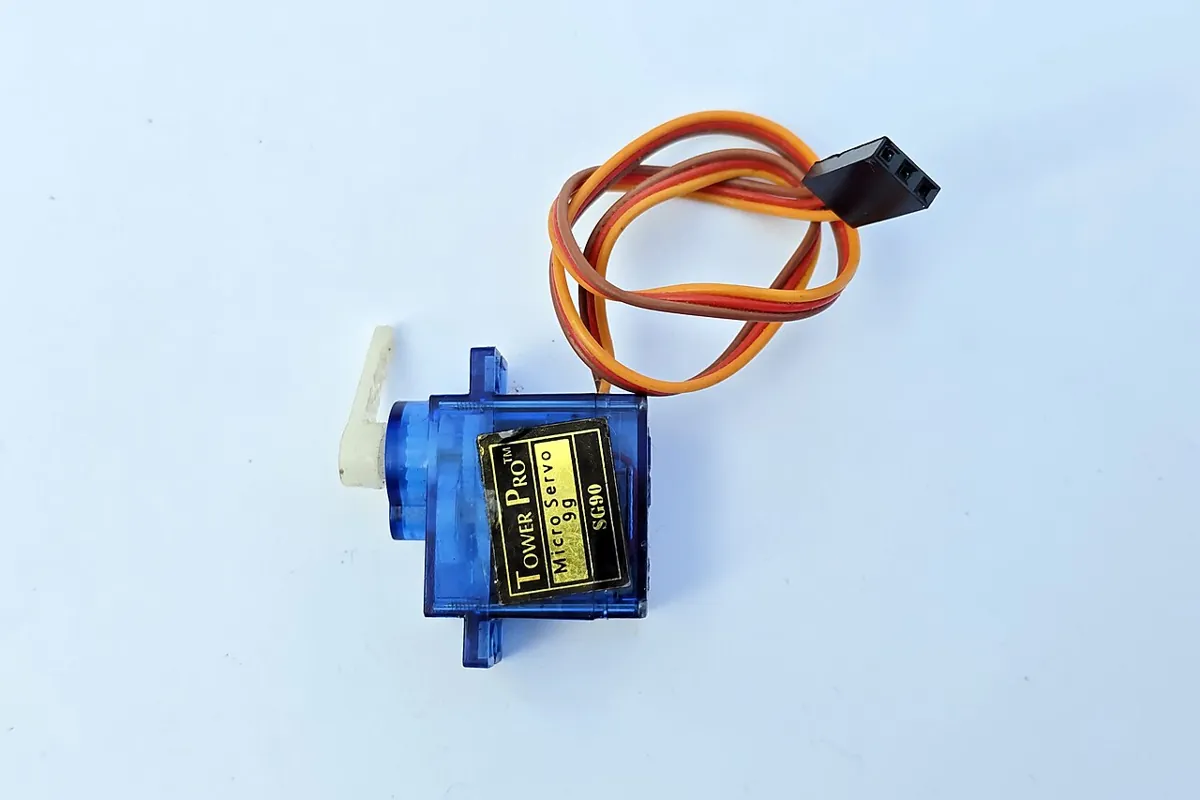
servo_pointer.ino maps the box centre (0–1000 across the image) to 30°–150° and moves at most 3° every 20 ms, so the pointer glides instead of jumping. When the object is lost it holds its position instead of chasing noise; the 1-second watchdog does the same if the camera stops.
| Part | Connection | Note |
|---|---|---|
| SG90 signal | D9 | signal only — tiny current |
| SG90 + (red) | separate 5 V supply (e.g. 5 V 2 A adapter) | never from a GPIO pin |
| SG90 − (brown) | supply GND and Arduino GND | common ground or the signal has no reference |
| Tracking LED | on-board D13 | on = tracking |
// Stage 11 L09 - Servo pointer: point at the detected object's box centre.
// box_tracker_live.py --port ... sends "X<0-1000>\n" (centre across the image width)
// or "L\n" when the object is lost / not confirmed.
//   X0 -> 30 deg (left edge) ... X1000 -> 150 deg (right edge)
//   The servo moves at most MAX_STEP deg per update (no sudden jumps).
//   Lost or no data for 1 s -> servo holds its position, LED D13 off.
//
// Wiring:
//   SG90 signal -> D9.  SG90 + (red) -> separate 5 V supply (e.g. 5 V 2 A adapter),
//   SG90 - (brown) -> supply GND AND Arduino GND (common ground).
//   Never power the servo from an Arduino GPIO pin. Stall current can be far
//   above what a pin (or the USB 5 V rail) should supply.
//   D13 has the on-board LED (tracking indicator).
#include <Servo.h>

Servo pointer;
const byte SERVO_PIN = 9, LED = 13;
const int MIN_DEG = 30, MAX_DEG = 150, MAX_STEP = 3;
int current = 90, target = 90;
bool tracking = false;
unsigned long lastMsg = 0, lastStep = 0;
char buf[10];
byte len = 0;

void handle(const char *s) {
  lastMsg = millis();
  if (s[0] == 'X') {
    long v = constrain(atol(s + 1), 0, 1000);
    target = MIN_DEG + (int)((MAX_DEG - MIN_DEG) * v / 1000);
    tracking = true;
  } else if (s[0] == 'L') {
    tracking = false;             // hold position, don't chase noise
  }
  digitalWrite(LED, tracking ? HIGH : LOW);
}

void setup() {
  pinMode(LED, OUTPUT);
  pointer.attach(SERVO_PIN);
  pointer.write(current);
  Serial.begin(115200);
  Serial.println(F("servo_pointer ready: X0..X1000 or L"));
}

void loop() {
  while (Serial.available()) {
    char c = Serial.read();
    if (c == '\n' || c == '\r') {
      buf[len] = 0;
      if (len) handle(buf);
      len = 0;
    } else if (len < sizeof(buf) - 1) {
      buf[len++] = c;
    }
  }
  if (lastMsg && millis() - lastMsg > 1000) {   // watchdog
    lastMsg = 0;
    tracking = false;
    digitalWrite(LED, LOW);
    Serial.println(F("no data for 1 s -> hold"));
  }
  if (tracking && millis() - lastStep >= 20) {   // 50 updates per second
    lastStep = millis();
    int d = constrain(target - current, -MAX_STEP, MAX_STEP);
    if (d != 0) {
      current += d;
      pointer.write(current);
    }
  }
}Debugging
| Symptom | Likely cause | Fix |
|---|---|---|
| Boxes drawn in the wrong place / wrong size | format mix-up | Print one box in all formats; convert once at the input |
| Boxes off after resizing the image | normalised vs pixel coordinates | Multiply YOLO values by the size of *this* image |
| Two classes overlap and one disappears | class-blind NMS | Use NMSBoxesBatched or run NMS per class |
| Detection flickers on/off | confidence near the threshold | EMA + hysteresis (on 0.6 / off 0.4) |
| Arm twitches while the object is still | centre jitter | Smooth the centre, add a dead-band, limit step size |
| Robot reacts late when the object moves | too much smoothing | Raise the EMA weight on the new value; measure the delay |
Real world
Boxes and confidence in real systems
- Dataset labelling: every training image for a YOLO-style detector comes with one text line per object in the normalised
class cx cy w hformat — the same conversion you wrote today. - Robot pick cells: a box centre becomes a pick target only after smoothing and a confidence check over several frames.
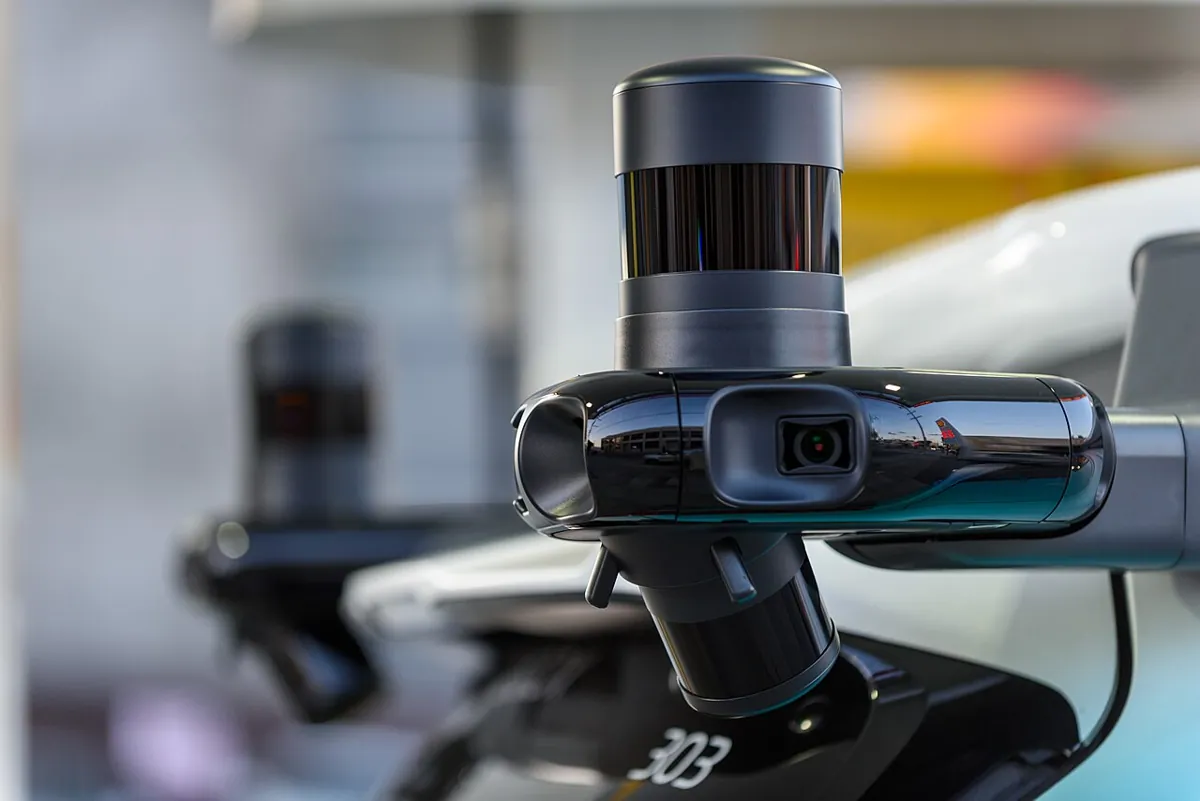
- Autonomous vehicles: test cars carry many cameras plus lidar; detections from all of them are combined, and overlapping boxes must be merged without deleting real neighbours.
- Pan-tilt cameras: a camera that follows a speaker or a ball is the servo pointer, scaled up.
Think
Think about it
Think
A cup and a spoon in the cup: the detector returns a cup box (0.90) and a spoon box (0.70) with IoU 0.55. With class-blind NMS at 0.5, what happens? What should you use instead?
Experiment
Try it in the lab
About 45 minutes. Python part needs NumPy and OpenCV; camera part needs a webcam and a coloured object; bench part needs an Arduino UNO, an SG90 servo and a separate 5 V supply.
Experiment
Make a box steady enough for a robot
You will need
- `boxes_confidence.py`, `box_tracker_live.py` (opencv-python, numpy; pyserial for `--port`)
- Webcam, a red or blue object on a plain table
- Object detection simulator (browser)
- Bench: Arduino UNO, SG90 servo, 5 V 2 A adapter, jumper wires
Steps
- Run `boxes_confidence.py`. Change the EMA weight from 0.4 to 0.1 and 0.8. How do flips and delay change?
- Change the hysteresis to on 0.6 / off 0.6 (no hysteresis). Count the flips.
- Draw two boxes on graph paper, compute IoU by hand, and check with the `iou` function.
- Webcam: run `box_tracker_live.py`, hold the object still, and watch the centre dot. Move it slowly, then quickly.
- Measure your mm-per-pixel: put a ruler in view and count pixels for 100 mm.
- Bench: run the servo pointer with `--port`. Move the object left and right.
Interactive · Object detection simulator · Educational (not YOLO)
- block conf=0.88 KEEP · box (40,70,50,45)
- cup conf=0.77 KEEP · box (130,85,42,55)
- bolt conf=0.67 KEEP · box (210,110,28,22)
Scores and boxes are scripted for teaching. This is not a real detector (not YOLO, not OpenCV DNN). Use it to practice threshold tradeoffs: high threshold → fewer false alarms, more misses.
A good box pipeline converts formats once, uses per-class NMS, smooths both confidence and position, and uses hysteresis — trading a few frames of delay for steady behaviour. The robot gets a calm, trustworthy target.
Knowledge check
Check your understanding
Knowledge check
1. Box xywh (100, 50, 40, 60). In xyxy it is…
2. Same box in a 400 × 200 image as a YOLO line (class 0)?
3. Two 10 × 10 boxes overlap in a 5 × 10 strip. IoU =
4. Lowering the NMS IoU threshold from 0.7 to 0.3 makes NMS…
5. Why use `NMSBoxesBatched`?
6. Hysteresis with ON 0.6 / OFF 0.4 mainly…
7. The cost of smoothing is…
8. Where must the SG90’s + wire go?
Mini assignment
Hands-on assignment
Mini assignment
Steady target for the arm
Make a camera pipeline that gives the arm a steady millimetre target for one coloured object, and prove it with numbers.
Deliverables
- Your mm-per-pixel measurement (photo of the ruler in the camera view).
- A 30-second log of raw vs smoothed centre (CSV) with the object still, and the standard deviation of each in mm.
- The number of on/off flips in 30 s with raw threshold vs smoothing + hysteresis.
- The delay (frames and ms) between removing the object and “lost”.
- Optional (bench): a video of the servo pointer following the object smoothly.
Do this, step by step
- Put a ruler in the camera view and count the pixels for 100 mm to get mm per pixel.
- Run
box_tracker_live.pywith the object still for 30 s and save raw and smoothed centres to CSV. - Compute the standard deviation of raw and smoothed centres in mm.
- Count on/off flips in 30 s with a single threshold, then with smoothing + hysteresis.
- Remove the object and measure the delay (frames and ms) until it says “lost”.
Stuck? Hints, one at a time
- mm per pixel = 100 / (pixels for 100 mm). It is only valid for a top-down camera and a flat table.
- A smaller EMA weight smooths more but reacts later; try 0.4 first.
- Hysteresis means two thresholds: turn ON above the high one, turn OFF only below the low one.
Challenges (pick by level)
- 🟢 Beginner: Write
xyxy_to_cxcywhand test it on 3 boxes. - 🟡 Intermediate: Write YOLO label files for 5 photos of your desk by hand and draw them back on the images to check.
- 🟠 Advanced: Add a dead-band to the servo pointer: ignore target changes smaller than 2°.
- 🔴 Expert: Track two objects of the same colour and keep their IDs stable from frame to frame by matching boxes with the highest IoU.
- ⚫ Research: Compare NMS, Soft-NMS (
cv.dnn.softNMSBoxes) and per-class NMS on a crowded scene. Report precision and recall withdetection_eval.pyfrom Lesson 8.
Next step
Your box pipeline is now ready for any detector. In Lesson 10 — Color-Based Object Detection you build the most practical detector for a robot lab: HSV colour ranges, masks and contours that sort coloured blocks reliably.
Sources
- OpenCV 4.x — Deep Neural Network module —
NMSBoxes(score and NMS thresholds, returned indices),NMSBoxesBatched(per-class),softNMSBoxes. - Ultralytics — Object Detection Datasets Overview — YOLO label format: one
.txtper image, one row per object asclass x_center y_center width height, normalised 0–1, zero-indexed classes; COCO class list (41 = cup). - Wikipedia — Object detection — IoU ≥ 0.5 rule for a true positive.
- Photos: Wikimedia Commons (credits under each image).
Look back: Lesson 8: Object Detection Concepts. Next: Lesson 10: Color-Based Object Detection. Related: Stage 11 — Computer Vision, Stage 13 — Perception, Planning & Manipulation.
Self-attested for now — keep artifacts in your lab notebook.
Complete
Today's goal
0 of 1 done today
Mark this lesson complete when you have worked the experiment, knowledge check, and assignment (even roughly).