
Computer Vision for Robotics (Vision Foundations) · Lesson 06
Feature Detection
Est. 60–75 min
Why
Why this lesson matters
Think about meeting a friend at a crowded Kota railway station. You do not check “is this person a human-shaped blob?” — you look for specific details: his spectacles, the red backpack, the way he walks. Even if he turns sideways or stands farther away, those details are still there. Feature detection gives a robot the same skill: find small, distinctive patches (keypoints), describe them with numbers (descriptors), and match them between a reference photo and the live camera.
In this lesson you will see why corners are better landmarks than flat areas or straight edges, detect them with Shi-Tomasi, use ORB (free and fast) to find and describe keypoints, match them with a brute-force Hamming matcher, throw away bad matches with the ratio test, and finally use a homography with RANSAC to draw the box outline in the scene — even when it is turned 25° and made smaller. On the bench, a match meter LED shows how sure the camera is.
Concept
Corners, keypoints, descriptors and matches
1. Why corners?
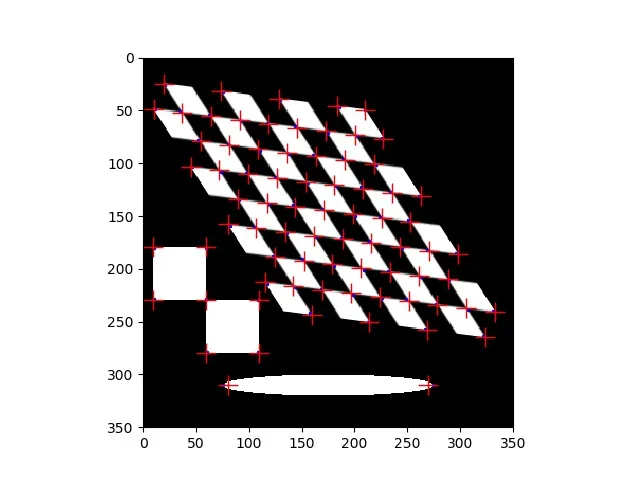
Imagine sliding a small window over the image. On a flat area, moving it in any direction changes nothing — you cannot tell where you are. On an edge, moving along the edge changes nothing — you know “somewhere on this line” only. At a corner, moving in *any* direction changes the window a lot — it is unique. That is why corners are good landmarks.
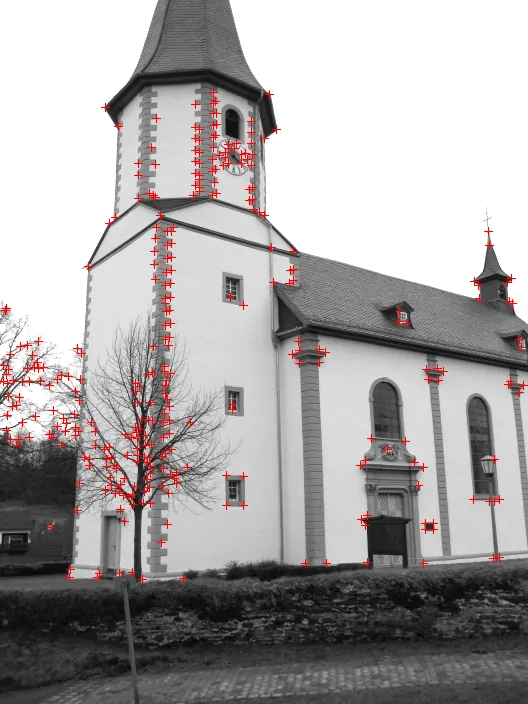
Harris measured this with a score R = λ₁λ₂ − k(λ₁ + λ₂)², where λ₁ and λ₂ describe how much the window changes in its two main directions. Shi and Tomasi (1994, “Good Features to Track”) simplified it to R = min(λ₁, λ₂): a corner only if *both* directions change enough. OpenCV gives it as cv.goodFeaturesToTrack(gray, maxCorners, qualityLevel, minDistance).
2. Keypoint + descriptor = a feature
- Keypoint — *where*: position (x, y), plus size and orientation so it can be recognised when the object is scaled or turned.
- Descriptor — *what it looks like*: a list of numbers summarising the patch around the keypoint. Two photos of the same spot give similar descriptors.
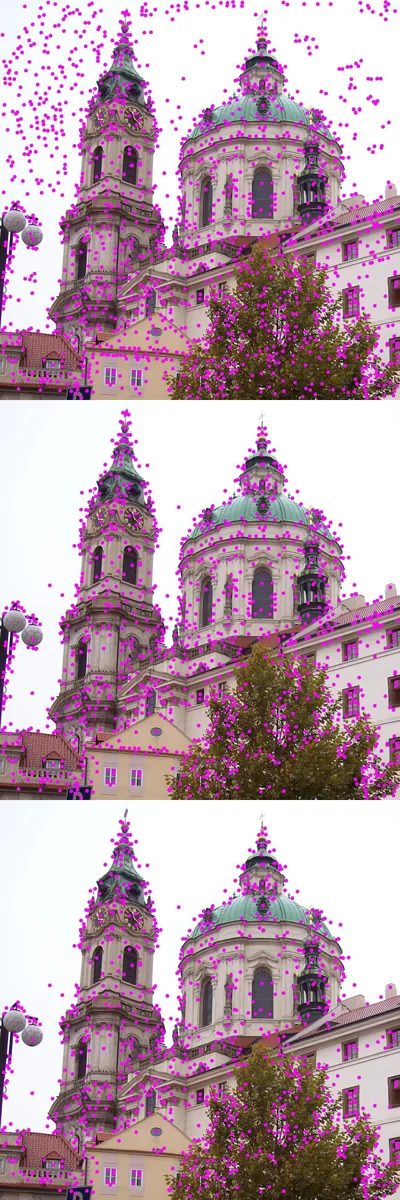
- SIFT (float descriptors, very robust) and ORB (binary descriptors, fast) are two famous choices. The OpenCV ORB tutorial describes ORB as a fast, free alternative to SIFT/SURF, a good choice on low-power devices.
3. How ORB works (short version)
FAST finds candidate corners
Very quick test of pixels on a small circle around each point.
Harris score keeps the best N
nfeatures(default 500) strongest points, found at several scales (an image pyramid) so size changes are handled.Orientation from the patch centroid
The direction from the corner to the intensity-weighted centre of its patch gives an angle, so rotation is handled.
Rotated BRIEF descriptor
Many tiny “is pixel A brighter than pixel B?” tests, steered by that angle. Result: 32 bytes = 256 bits per keypoint. Compare two descriptors by Hamming distance — how many bits differ.
4. Matching and filtering
| Method | OpenCV | Idea |
|---|---|---|
| Brute force | cv.BFMatcher(cv.NORM_HAMMING) | compare each query descriptor with every scene descriptor; take the closest. NORM_HAMMING for ORB; NORM_L2 for SIFT. |
| Cross-check | BFMatcher(..., crossCheck=True) | keep a pair only if each is the other’s best match |
| Ratio test (Lowe) | knnMatch(k=2), keep if best < 0.75 × second best | a good match is clearly better than the runner-up; repetitive patterns fail this test |
| Homography + RANSAC | cv.findHomography(src, dst, cv.RANSAC, 5.0) | fit one perspective transform (needs ≥ 4 points); matches that disagree are outliers |
Visual
Visualise it: corner responses
Educational feature lab: corner responses on a synthetic image, with a threshold slider. (Browser sim, simplified math — not OpenCV.)
Interactive · Feature detection lab · Educational


Green dots ≈ corner responses; template mode slides a patch and highlights a best-score location. Simplified browser math — not Harris/OpenCV/YOLO.
Code lab
Code lab: find the M3 box among others
features_lab.py draws a 240 × 180 printed label (“M3 NUTS”) and a 480 × 360 table scene where that label is turned 25°, scaled to 0.8× and moved, next to a different box (“SERVO”). Because we built the scene, we know exactly where every label point went — so we can count how many matches are really correct, and measure the homography error in pixels.
"""Stage 11 L06 - Feature detection: find the SAME box when it is moved, turned and resized.

No camera needed. We draw a 240x180 "label" of a parts box (texture + text), then a
480x360 table scene where that label is rotated 25 deg, scaled 0.8x and moved,
next to a different box. Steps:
  corners (Shi-Tomasi) -> ORB keypoints + descriptors -> match -> filter -> homography
and we check the found outline against the TRUE corners.
Run:  python3 features_lab.py      (saves features_matches.png)
"""
import cv2 as cv
import numpy as np

rng = np.random.default_rng(11)


def make_label(seed: int) -> np.ndarray:
    r = np.random.default_rng(seed)
    lab = np.full((180, 240), 200, np.uint8)
    for _ in range(45):                                   # printed blocks and circles
        x, y = int(r.integers(5, 215)), int(r.integers(5, 140))
        if r.random() < 0.5:
            cv.rectangle(lab, (x, y), (x + int(r.integers(6, 25)), y + int(r.integers(6, 25))),
                         int(r.integers(0, 120)), -1)
        else:
            cv.circle(lab, (x, y), int(r.integers(3, 12)), int(r.integers(0, 120)), -1)
    cv.putText(lab, 'M3 NUTS' if seed == 1 else 'SERVO', (12, 170), cv.FONT_HERSHEY_SIMPLEX, 1.0, 20, 2)
    cv.rectangle(lab, (0, 0), (239, 179), 30, 2)
    return lab


label = make_label(1)                     # the box we are looking for
other = make_label(2)                     # a different box (distractor)

# ---------- 1. Corners: a plain part vs a printed label -------------------------
plain = np.full((180, 240), 200, np.uint8)
cv.rectangle(plain, (40, 40), (199, 139), 60, -1)
for name, im in [('plain square ', plain), ('printed label', label)]:
    c = cv.goodFeaturesToTrack(im, 100, 0.01, 5)
    print(f'1) Shi-Tomasi corners (max 100) on {name}: {0 if c is None else len(c)}')
print('   a plain shape has only its 4 corners; texture gives many points to recognise')

# ---------- 2. Build the scene: label rotated 25 deg, scaled 0.8, moved ----------
scene = np.full((360, 480), 120, np.uint8)
scene = np.clip(scene + rng.normal(0, 6, scene.shape), 0, 255).astype(np.uint8)
A = cv.getRotationMatrix2D((120, 90), 25, 0.8)             # rotate+scale about label centre
A[:, 2] += (340 - 120, 240 - 90)                           # then move centre to (340, 240)
warped = cv.warpAffine(label, A, (480, 360), flags=cv.INTER_LINEAR, borderValue=0)
inside = cv.warpAffine(np.full_like(label, 255), A, (480, 360)) > 0
scene[inside] = warped[inside]
scene[10:130, 10:170] = cv.resize(other, (160, 120))       # distractor box top-left
scene = np.clip(scene + rng.normal(0, 4, scene.shape), 0, 255).astype(np.uint8)
corners_label = np.float32([[0, 0], [239, 0], [239, 179], [0, 179]]).reshape(-1, 1, 2)
truth = cv.transform(corners_label, A)

# ---------- 3. ORB keypoints and descriptors ------------------------------------
orb = cv.ORB_create(nfeatures=500)
kp1, des1 = orb.detectAndCompute(label, None)
kp2, des2 = orb.detectAndCompute(scene, None)
print(f'\n3) ORB keypoints: label={len(kp1)}  scene={len(kp2)}   descriptor = {des1.shape[1]} bytes = {des1.shape[1] * 8} bits')

# ---------- 4. Matching: raw, cross-check, ratio test ---------------------------
def on_target(m) -> bool:
    """Is this match CORRECT? We know A, so we know where each label point really went."""
    p = cv.transform(np.float32([[kp1[m.queryIdx].pt]]), A)[0, 0]
    return float(np.linalg.norm(p - np.float32(kp2[m.trainIdx].pt))) < 5.0


bf = cv.BFMatcher(cv.NORM_HAMMING)
raw = [p[0] for p in bf.knnMatch(des1, des2, k=1) if p]
cross = cv.BFMatcher(cv.NORM_HAMMING, crossCheck=True).match(des1, des2)
ratio = [m for m, n in bf.knnMatch(des1, des2, k=2) if m.distance < 0.75 * n.distance]
print('\n4) Matches            total  correct (within 5 px of the true spot)')
for name, ms in [('best match only ', raw), ('cross-check     ', cross), ('ratio test 0.75 ', ratio)]:
    good = sum(on_target(m) for m in ms)
    print(f'   {name}  {len(ms):5d}  {good:5d}  ({100 * good / max(len(ms), 1):3.0f}%)')

# ---------- 5. Homography with RANSAC: where is the box? -------------------------
src = np.float32([kp1[m.queryIdx].pt for m in ratio]).reshape(-1, 1, 2)
dst = np.float32([kp2[m.trainIdx].pt for m in ratio]).reshape(-1, 1, 2)
Hm, inl = cv.findHomography(src, dst, cv.RANSAC, 5.0)
found = cv.perspectiveTransform(corners_label, Hm)
err = np.linalg.norm(found - truth, axis=2).ravel()
print(f'\n5) findHomography (RANSAC, 5 px): inliers {int(inl.sum())} of {len(ratio)}')
for (fx, fy), (tx, ty), e in zip(found.reshape(-1, 2), truth.reshape(-1, 2), err):
    print(f'   corner found ({fx:6.1f},{fy:6.1f})  true ({tx:6.1f},{ty:6.1f})  error {e:4.1f} px')
centre = found.reshape(-1, 2).mean(axis=0)
angle = np.degrees(np.arctan2(found[1, 0, 1] - found[0, 0, 1], found[1, 0, 0] - found[0, 0, 0]))
scale = np.linalg.norm(found[1, 0] - found[0, 0]) / 239
print(f'   box centre ({centre[0]:.1f}, {centre[1]:.1f})  turned {-angle:.1f} deg  scale {scale:.2f}'
      '   (truth: (340, 240), 25 deg, 0.80)')

# ---------- 6. Not there? Then say so -------------------------------------------
empty = scene.copy()
empty[inside] = 120
kp3, des3 = orb.detectAndCompute(empty, None)
r3 = [m for m, n in bf.knnMatch(des1, des3, k=2) if m.distance < 0.75 * n.distance]
print(f'\n6) Same scene WITHOUT the box: {len(r3)} ratio-test matches -> '
      f'{"FOUND" if len(r3) >= 10 else "not found (need >= 10)"}')

vis = cv.drawMatches(label, kp1, scene, kp2, ratio, None, matchColor=(0, 255, 0),
                     flags=cv.DrawMatchesFlags_NOT_DRAW_SINGLE_POINTS)
cv.polylines(vis, [np.int32(found + (240, 0))], True, (0, 0, 255), 2)
cv.imwrite('features_matches.png', vis)
cv.imwrite('label.png', label)
cv.imwrite('scene.png', scene)
print('\nSaved features_matches.png, label.png and scene.png')
Output (python3 features_lab.py, tested with opencv-python 5.0)
1) Shi-Tomasi corners (max 100) on plain square : 4
1) Shi-Tomasi corners (max 100) on printed label: 100
   a plain shape has only its 4 corners; texture gives many points to recognise

3) ORB keypoints: label=361  scene=498   descriptor = 32 bytes = 256 bits

4) Matches            total  correct (within 5 px of the true spot)
   best match only     361     70  ( 19%)
   cross-check         101     48  ( 48%)
   ratio test 0.75      43     34  ( 79%)

5) findHomography (RANSAC, 5 px): inliers 34 of 43
   corner found ( 218.2, 215.3)  true ( 222.6, 215.3)  error  4.4 px
   corner found ( 397.6, 131.7)  true ( 395.9, 134.5)  error  3.3 px
   corner found ( 453.3, 263.4)  true ( 456.4, 264.3)  error  3.2 px
   corner found ( 285.4, 341.6)  true ( 283.1, 345.1)  error  4.2 px
   box centre (338.6, 238.0)  turned 25.0 deg  scale 0.83   (truth: (340, 240), 25 deg, 0.80)

6) Same scene WITHOUT the box: 7 ratio-test matches -> not found (need >= 10)

Saved features_matches.png, label.png and scene.png
Try it: in Corners mode, lower the threshold to see more (weaker) corner responses, then raise it until only the strongest remain. (Educational browser sim — simplified math, not OpenCV.)
Interactive · Feature detection lab · Educational
Green dots ≈ corner responses; template mode slides a patch and highlights a best-score location. Simplified browser math — not Harris/OpenCV/YOLO.
find_my_box.py — your own box on camera
Take a straight, well-lit photo of a printed box label (a biscuit packet, a component box, a book cover) and save it as query.png. find_my_box.py runs the same ORB → ratio test → homography steps on every webcam frame and draws the green outline when it finds the label, printing centre, turn angle and scale. It refuses a query photo with too little texture, and reports “not found” when matches are below --min.
"""Stage 11 L06 - Find a known box (by its printed label) with ORB + homography.

1. Take a straight photo of the box label:  query.png  (fill the frame, good light)
2. Webcam :  python3 find_my_box.py --query query.png
   Photo  :  python3 find_my_box.py --query label.png --scene scene.png --once
Arduino   :  add --port /dev/ttyACM0 to send "inliers\\n" to match_meter.ino (pip install pyserial)
It prints FOUND with centre, turn angle and scale, or 'not found' when matches < --min.
"""
import argparse

import cv2 as cv
import numpy as np


def locate(orb, bf, q, kq, dq, frame, min_good):
    gray = cv.cvtColor(frame, cv.COLOR_BGR2GRAY) if frame.ndim == 3 else frame
    ks, ds = orb.detectAndCompute(gray, None)
    if ds is None or len(ks) < 2:
        return None, 0
    good = [p[0] for p in bf.knnMatch(dq, ds, k=2) if len(p) == 2 and p[0].distance < 0.75 * p[1].distance]
    if len(good) < min_good:
        return None, len(good)
    src = np.float32([kq[m.queryIdx].pt for m in good]).reshape(-1, 1, 2)
    dst = np.float32([ks[m.trainIdx].pt for m in good]).reshape(-1, 1, 2)
    H, mask = cv.findHomography(src, dst, cv.RANSAC, 5.0)
    if H is None:
        return None, len(good)
    inliers = int(mask.sum())
    if inliers < min_good:
        return None, inliers
    h, w = q.shape
    box = cv.perspectiveTransform(np.float32([[0, 0], [w - 1, 0], [w - 1, h - 1], [0, h - 1]]).reshape(-1, 1, 2), H)
    return box, inliers


def main() -> None:
    ap = argparse.ArgumentParser()
    ap.add_argument('--query', required=True, help='straight photo of the label')
    ap.add_argument('--scene', help='photo instead of webcam')
    ap.add_argument('--camera', type=int, default=0)
    ap.add_argument('--min', type=int, default=10, help='minimum good matches / inliers')
    ap.add_argument('--once', action='store_true')
    ap.add_argument('--port')
    a = ap.parse_args()

    q = cv.imread(a.query, cv.IMREAD_GRAYSCALE)
    if q is None:
        raise SystemExit(f'could not read {a.query}')
    orb = cv.ORB_create(nfeatures=1000)
    bf = cv.BFMatcher(cv.NORM_HAMMING)
    kq, dq = orb.detectAndCompute(q, None)
    print(f'query: {len(kq)} keypoints')
    if dq is None or len(kq) < a.min:
        raise SystemExit('the query photo has too little texture - use a printed label, not a plain part')

    link = None
    if a.port:
        import serial
        link = serial.Serial(a.port, 115200, timeout=0.1)
    still = cv.imread(a.scene) if a.scene else None
    if a.scene and still is None:
        raise SystemExit(f'could not read {a.scene}')
    cap = None if still is not None else cv.VideoCapture(a.camera)
    if cap is not None and not cap.isOpened():
        raise SystemExit('camera not found - try --camera 1 or --scene file.png')

    while True:
        frame = still if still is not None else cap.read()[1]
        if frame is None:
            print('camera returned no frame')
            break
        box, n = locate(orb, bf, q, kq, dq, frame, a.min)
        if link is not None:
            link.write(f'{n if box is not None else 0}\n'.encode())
        if box is not None:
            c = box.reshape(-1, 2)
            cx, cy = c.mean(axis=0)
            ang = np.degrees(np.arctan2(c[1, 1] - c[0, 1], c[1, 0] - c[0, 0]))
            scale = np.linalg.norm(c[1] - c[0]) / (q.shape[1] - 1)
            msg = f'FOUND  inliers={n}  centre=({cx:.0f},{cy:.0f})  turned {-ang:.0f} deg  scale {scale:.2f}'
        else:
            msg = f'not found ({n} good matches, need {a.min})'
        if a.once:
            print(msg)
            break
        view = frame.copy() if frame.ndim == 3 else cv.cvtColor(frame, cv.COLOR_GRAY2BGR)
        if box is not None:
            cv.polylines(view, [np.int32(box)], True, (0, 255, 0), 3)
        cv.putText(view, msg[:40], (8, 22), cv.FONT_HERSHEY_SIMPLEX, 0.6, (0, 255, 255), 2)
        cv.imshow('find my box', view)
        if cv.waitKey(30) & 0xFF in (ord('q'), 27):
            break
    if cap is not None:
        cap.release()
    if link is not None:
        link.close()
    if not a.once:
        cv.destroyAllWindows()


if __name__ == '__main__':
main()python3 features_lab.py # saves label.png and scene.png
python3 find_my_box.py --query label.png --scene scene.png --once
# query: 422 keypoints
# FOUND inliers=53 centre=(339,239) turned 25 deg scale 0.81
python3 find_my_box.py --query query.png # webcam: turn and move your box
python3 find_my_box.py --query query.png --port /dev/ttyACM0 # + match meterBench build: a match meter
match_meter.ino receives the inlier count each frame. A blue LED on PWM pin 9 glows brighter as the count grows; the green LED on pin 13 lights only when the count stays above 15 for 3 frames in a row. A single lucky frame is not enough — that is how a robot should decide before moving a gripper. A 1-second watchdog switches both off if the camera script stops.
| Part | Connection | Note |
|---|---|---|
| Blue LED (meter) | D9 → 220 Ω → LED → GND | PWM brightness = confidence |
| Green LED (found) | D13 → 220 Ω → LED → GND | on-board LED on 13 also lights |
| Current | about 10–15 mA per LED | LEDs with resistors only |
| Later: gripper | servo on its own 5–6 V supply, grounds joined | never power a servo from a GPIO or the 5 V pin of a USB-powered board under load |
// Stage 11 L06 - Match meter: how sure is the camera that it sees YOUR box?
// find_my_box.py --port ... sends the number of RANSAC inliers each frame, e.g. "34\n"
// (0 = not found). The Arduino shows it two ways:
//   D9  (PWM) blue LED : brightness grows with the inlier count (0..60 -> 0..255)
//   D13 green LED      : ON when inliers >= FOUND_AT (a confident detection)
// The gripper should only move on a CONFIDENT, STEADY detection: here "found" needs
// 3 frames in a row above the limit, and any gap of 1 s switches everything off.
//
// Wiring: D9 -> 220R -> blue LED -> GND ;  D13 -> 220R -> green LED -> GND
//         (the UNO's on-board LED on D13 also lights). LEDs only, about 10-15 mA each;
//         never drive motors, servos or solenoids from these pins.

const byte METER = 9, FOUND_LED = 13;
const int FOUND_AT = 15;        // inliers needed
const byte STEADY = 3;          // frames in a row
byte streak = 0;
unsigned long lastMsg = 0;
char buf[8];
byte len = 0;

void apply(int n) {
  analogWrite(METER, constrain(map(n, 0, 60, 0, 255), 0, 255));
  streak = (n >= FOUND_AT) ? min(streak + 1, 255) : 0;
  digitalWrite(FOUND_LED, streak >= STEADY ? HIGH : LOW);
  Serial.print(F("inliers=")); Serial.print(n);
  Serial.println(streak >= STEADY ? F("  FOUND (steady)") : F(""));
}

void setup() {
  pinMode(METER, OUTPUT);
  pinMode(FOUND_LED, OUTPUT);
  Serial.begin(115200);
  apply(0);
}

void loop() {
  while (Serial.available()) {
    char c = Serial.read();
    if (c == '\n') {
      buf[len] = 0;
      if (len) { apply(atoi(buf)); lastMsg = millis(); }
      len = 0;
    } else if (c >= '0' && c <= '9' && len < sizeof(buf) - 1) {
      buf[len++] = c;
    }
  }
  if (lastMsg && millis() - lastMsg > 1000) {   // camera stopped -> safe state
    lastMsg = 0;
    apply(0);
  }
}
Debugging
| Symptom | Likely cause | Fix |
|---|---|---|
| “too little texture” | plain object or blurry query photo | Use a printed label; take a sharp, well-lit query photo |
| Found everywhere, outline jumps | no ratio test or min count | Keep ratio 0.75 and require ≥ 10 inliers, steady for a few frames |
error: ... npoints >= 4 in findHomography | fewer than 4 matches | Check the count before calling it |
knnMatch crash on unpack | some queries got only one neighbour | Check len(pair) == 2 (as in the script) |
| Works close, fails far away | label too small in pixels | Move closer, raise resolution, or increase nfeatures |
| Wrong norm error / poor matches | NORM_L2 used with ORB | ORB → NORM_HAMMING; SIFT → NORM_L2 |
| Glare on glossy box | reflections hide texture | Diffuse light, tilt the box slightly |
Real world
Features in real machines
- Panorama stitching: your phone matches features between neighbouring photos and warps them together with a homography — the ORB tutorial mentions panorama stitching on low-power devices.
- Robot navigation and tracking: “good features to track” are followed from frame to frame to estimate how the camera moved (the Shi-Tomasi tutorial notes the function is meant for tracking).
- Warehouse and store picking: identical boxes differ only by their printing; matching the label finds the right one and its rotation for the gripper.
- 3D from two photos: corners matched between a left and right image (like the church photos) are the starting point for depth — Lesson 14.
Think
Think about it
Think
You want to find a specific tile on a floor covered with identical tiles. ORB finds hundreds of keypoints, but the ratio test keeps almost none. Why?
Experiment
Try it in the lab
About 55 minutes. Python part needs NumPy and OpenCV; camera part needs a webcam and two printed boxes or packets; bench part needs an Arduino UNO, two LEDs and two 220 Ω resistors.
Experiment
Find your box, turned and moved
You will need
- `features_lab.py`, `find_my_box.py` (opencv-python, numpy; pyserial for `--port`)
- Webcam, two printed boxes / packets / book covers
- Feature detection lab (browser)
- Bench: Arduino UNO, blue + green LED, 2 × 220 Ω
Steps
- Run `features_lab.py`. Change the ratio from 0.75 to 0.6 and 0.9. How do “total” and “correct” change?
- Change the rotation from 25° to 90° and the scale from 0.8 to 0.5. When does detection fail?
- In the browser lab, compare corner responses at low and high threshold.
- Take your `query.png` and run `find_my_box.py`. Record inliers at 3 distances and 3 rotations.
- Show the wrong box. What is the highest inlier count you see? Set `--min` above it.
- Bench: connect `match_meter.ino` and watch the green LED only after 3 steady frames.
Interactive · Feature detection lab · Educational
Green dots ≈ corner responses; template mode slides a patch and highlights a best-score location. Simplified browser math — not Harris/OpenCV/YOLO.
Corners on textured objects make good features. Plain best-match is mostly wrong; the ratio test and RANSAC remove most mistakes. A minimum match count — held for several frames — is what separates “found” from “lucky noise”.
Knowledge check
Check your understanding
Knowledge check
1. Why is a corner a better landmark than a point on a straight edge?
2. Shi-Tomasi corner score is…
3. A keypoint tells you…, a descriptor tells you…
4. Which distance should you use to match ORB descriptors?
5. The ratio test keeps a match when…
6. findHomography needs at least…
7. What does RANSAC do here?
8. Which object is hardest for ORB?
Mini assignment
Hands-on assignment
Mini assignment
Find-the-box test report
Measure how reliably feature matching finds your own box, and where it breaks.
Deliverables
- Your query photo and three screenshots of the detected outline (straight, turned, far).
- A table: distance (cm), rotation (°), inliers, found yes/no — at least 12 rows.
- The highest inlier count seen for a *wrong* box, and the `--min` value you chose.
- Output of `features_lab.py` for ratio 0.6, 0.75 and 0.9 with a one-line conclusion.
- Optional (bench): video of the match meter as you move the box away.
Do this, step by step
- Take a straight, well-lit photo of a printed box label and save it as
query.png. - Run
find_my_box.py --query query.pngand record inliers at 3 distances and 3 rotations (at least 12 rows). - Show a wrong box and note the highest inlier count; set
--minabove it. - Run
features_lab.pywith ratio 0.6, 0.75 and 0.9 and write a one-line conclusion. - Save three screenshots of the detected outline: straight, turned and far.
Stuck? Hints, one at a time
- A plain, shiny or blurry label gives very few ORB keypoints — choose a box with lots of print.
- A lower ratio (0.6) keeps fewer but surer matches; a higher one (0.9) lets in more wrong ones.
findHomographyneeds at least 4 good matches, but trust it only from about 10 inliers upwards.
Challenges (pick by level)
- 🟢 Beginner: Draw the ORB keypoints on your query photo with
cv.drawKeypointsand count them. - 🟡 Intermediate: Add a third box to
features_lab.pyand print which box each scene match belongs to. - 🟠 Advanced: Replace ORB with SIFT (
cv.SIFT_create, NORM_L2) and compare correct-match % and time per frame. - 🔴 Expert: Recognise 3 different boxes in one frame: keep a query per box and report every box found with its centre and angle.
- ⚫ Research: Read the ORB paper (Rublee et al., ICCV 2011) and explain in your own words why steering BRIEF by orientation matters. Cite sources.
Next step
Features handle rotation and scale but need texture and some computing. For parts that always appear the same size and the same way up — a logo on a conveyor, a fixed marker — a simpler tool is often enough. Lesson 7 — Template Matching slides a small reference image over the scene and scores every position.
Sources
- OpenCV 4.x — Shi-Tomasi Corner Detector & Good Features to Track — Harris score vs R = min(λ₁, λ₂),
goodFeaturesToTrack(gray, N, quality, minDistance), meant for tracking. - OpenCV 4.x — ORB (Oriented FAST and Rotated BRIEF) — FAST + Harris ranking + pyramid, orientation by intensity centroid, steered BRIEF, nFeatures default 500, NORM_HAMMING, free alternative to SIFT/SURF.
- OpenCV 4.x — Feature Matching — BFMatcher, NORM_HAMMING for ORB, crossCheck, knnMatch and Lowe’s ratio test, FLANN.
- OpenCV 4.x — Feature Matching + Homography to find Objects — MIN_MATCH_COUNT 10,
findHomographywith RANSAC 5.0, at least four points,perspectiveTransformof the corners. - Photos: Wikimedia Commons (credits under each image).
Look back: Lesson 5: Edges, Features & Shapes. Next: Lesson 7: Template Matching. Related: Stage 11 — Computer Vision, Stage 13 — Perception, Planning & Manipulation.
Self-attested for now — keep artifacts in your lab notebook.
Complete
Today's goal
0 of 1 done today
Mark this lesson complete when you have worked the experiment, knowledge check, and assignment (even roughly).