
Computer Vision for Robotics (Vision Foundations) · Lesson 10
Color-Based Object Detection
Est. 55–70 min
Why
Why this lesson matters
Colour detection is the most useful “first detector” for a robot lab: no training, no GPU, runs at full frame rate on a laptop or even a Raspberry Pi. When you control the objects (coloured blocks, tape markers, painted parts), it is often *all you need*. In this chapter you will build a complete colour sorter: HSV ranges, the red wrap-around trick, mask clean-up, contour filters, and a pick list with centre and angle that the 6DOF arm can use.
Concept
HSV, masks and blobs
1. Why HSV beats RGB for colour
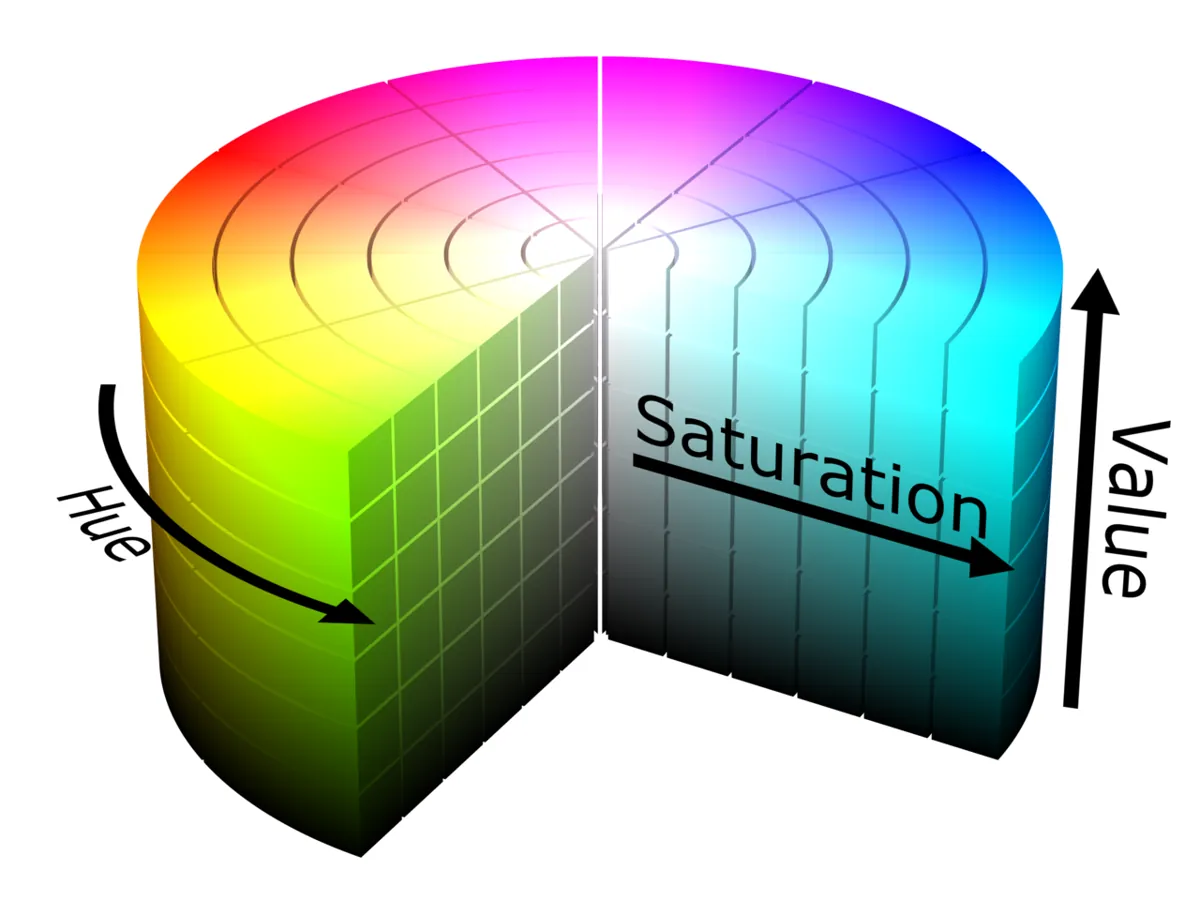
In RGB, the red, green and blue numbers of an object all go down together when light falls on it less. A shadow changes every number. In HSV, a shadow mainly changes V (value); H (hue) stays almost the same. So we gate on hue, demand a minimum saturation (to reject grey and white), and allow a wide range of V.
| Channel | OpenCV range | Meaning | Typical gate |
|---|---|---|---|
| H (hue) | 0–179 (degrees ÷ 2) | which colour | narrow: ±8–10 around the colour |
| S (saturation) | 0–255 | how “pure” — grey/white is low | minimum 100–120 |
| V (value) | 0–255 | how bright | wide: 50–255 |
| Colour | Starting HSV range (OpenCV) |
|---|---|
| Red | two ranges: (0,120,60)–(8,255,255) and (172,120,60)–(180,255,255) |
| Yellow | (22,120,60)–(35,255,255) |
| Green | (40,100,50)–(85,255,255) |
| Blue | (100,120,50)–(130,255,255) |
2. Red wraps around
Hue is a circle: 0° and 360° are both red. In OpenCV that means red pixels sit near 0 and near 179. One inRange call cannot cover both, so you make two masks and OR them. In our test, a red block had about 2,400 pixels in 0–8 and 2,900 in 172–180 — using only one range would lose half the block.
3. The pipeline
Blur
cv.GaussianBlur(frame, (5,5), 0)— removes sensor noise before thresholding.Convert
hsv = cv.cvtColor(blur, cv.COLOR_BGR2HSV)— remember OpenCV images are BGR.Gate
mask = cv.inRange(hsv, lower, upper)— white where the pixel is in range.Clean
Morphological open (removes specks) then close (fills small holes).
Find blobs
cv.findContours(mask, cv.RETR_EXTERNAL, …)— one outline per blob.Filter
Keep blobs with enough area, high solidity (area ÷ convex-hull area) and a sensible aspect ratio.
Measure
cv.minAreaRectgives centre, size and angle — what the gripper needs.
Visual
Visualise it: tune a colour gate
Hue min/max, minimum saturation and lighting sliders on a small desk scene. The gated pixels become a mask, then a box and centroid. (Educational canvas sim — not OpenCV.)
Interactive · Color object detector · Educational

Gate red-ish hues → mask → bounding box + centroid. Dim the lights and watch the gate fail — why industrial cells fix lighting. Pure canvas; not a webcam / not OpenCV.
Code lab
Code lab: sort blocks on a shaded bench
color_blocks_lab.py makes a test bench with two red, one green, one blue and two yellow blocks, an orange pen cap, 40 tiny coloured specks (wire bits, sticker pieces), and a shadow that darkens the right side down to 40% brightness. Then it compares RGB rules with HSV ranges, shows the red wrap-around, cleans the masks and prints a pick list.
"""Stage 11 L10 - Colour-based object detection: sort blocks on a shaded bench.

Scene: red, green, blue and yellow blocks + an orange pen cap, with a strong shadow
across the right half (like a window on one side of the Kota lab).
1) RGB thresholds vs HSV ranges in even light and in the shadow
2) Red wraps around hue 0/180 -> needs TWO ranges
3) Mask clean-up + contour filters (area, solidity, aspect) remove the noise
4) Final pick list with centre, angle and size - what the arm needs
"""
import cv2 as cv
import numpy as np

rng = np.random.default_rng(11)
H, W = 360, 560
img = np.full((H, W, 3), (170, 175, 180), np.uint8)
blocks = [  # (name, BGR, centre, size, angle)
    ('red', (35, 35, 200), (90, 100), (60, 40), 0), ('red', (40, 30, 190), (400, 260), (60, 40), 30),
    ('green', (60, 170, 50), (220, 110), (50, 50), 15), ('blue', (190, 90, 30), (360, 90), (70, 40), -20),
    ('yellow', (40, 210, 230), (120, 260), (50, 50), 45), ('yellow', (40, 205, 225), (480, 150), (50, 50), 0),
]
for name, bgr, c, s, a in blocks:
    pts = cv.boxPoints(((c[0], c[1]), s, a)).astype(np.int32)
    cv.fillPoly(img, [pts], bgr)
cv.circle(img, (260, 280), 12, (30, 120, 235), -1)                    # orange pen cap (distractor)
for _ in range(40):                                                   # tiny coloured specks: wire bits, stickers
    x, y = int(rng.integers(10, W - 10)), int(rng.integers(10, H - 10))
    cv.circle(img, (x, y), int(rng.integers(1, 4)), blocks[int(rng.integers(0, 6))][1], -1)
shade = np.ones((H, W), np.float32)
shade[:, 300:] = np.linspace(1.0, 0.4, W - 300)                      # shadow on the right
img = np.clip(img * shade[..., None] + rng.normal(0, 6, img.shape), 0, 255).astype(np.uint8)
cv.imwrite('blocks.png', img)
truth = {'red': 2, 'green': 1, 'blue': 1, 'yellow': 2}

RGB_RULES = {  # naive "the colour channel is big" rules on B,G,R
    'red': lambda b, g, r: (r > 150) & (g < 100) & (b < 100),
    'green': lambda b, g, r: (g > 140) & (r < 100) & (b < 100),
    'blue': lambda b, g, r: (b > 150) & (r < 100) & (g < 120),
    'yellow': lambda b, g, r: (r > 170) & (g > 170) & (b < 100),
}
HSV_RANGES = {
    'red': [((0, 120, 60), (8, 255, 255)), ((172, 120, 60), (180, 255, 255))],
    'green': [((40, 100, 50), (85, 255, 255))],
    'blue': [((100, 120, 50), (130, 255, 255))],
    'yellow': [((22, 120, 60), (35, 255, 255))],
}


def count_blobs(mask, min_area=600):
    n, _, stats, _ = cv.connectedComponentsWithStats(mask)
    return int(np.count_nonzero(stats[1:, cv.CC_STAT_AREA] >= min_area))


blur = cv.GaussianBlur(img, (5, 5), 0)
b, g, r = [blur[..., i].astype(int) for i in range(3)]
hsv = cv.cvtColor(blur, cv.COLOR_BGR2HSV)

print('1) Count blocks per colour (truth: ' + ', '.join(f'{k} {v}' for k, v in truth.items()) + ')')
print('   colour   RGB rule   HSV range')
masks = {}
for col in truth:
    m_rgb = RGB_RULES[col](b, g, r).astype(np.uint8) * 255
    m_hsv = np.zeros((H, W), np.uint8)
    for lo, hi in HSV_RANGES[col]:
        m_hsv |= cv.inRange(hsv, lo, hi)
    masks[col] = m_hsv
    print(f'   {col:7s}  {count_blobs(m_rgb):5d}      {count_blobs(m_hsv):5d}')
print('   -> the shadow makes R, G, B all smaller, so fixed RGB limits miss shaded blocks;')
print('      HSV keeps the hue the same and only V (brightness) drops.')

print('\n2) Red sits at BOTH ends of the hue circle')
px = hsv[100, 90]
print(f'   red block pixel HSV = {tuple(int(v) for v in px)}')
lo_only = cv.inRange(hsv, (0, 120, 60), (8, 255, 255))
hi_only = cv.inRange(hsv, (172, 120, 60), (180, 255, 255))
print(f'   red pixels with 0-8 only: {np.count_nonzero(lo_only)}, with 172-180 only: {np.count_nonzero(hi_only)}, '
      f'both ranges: {np.count_nonzero(lo_only | hi_only)}')

print('\n3) Clean the mask and filter the contours')
kernel = np.ones((5, 5), np.uint8)
picks = []
for col, m in masks.items():
    raw_cnts, _ = cv.findContours(m, cv.RETR_EXTERNAL, cv.CHAIN_APPROX_SIMPLE)
    clean = cv.morphologyEx(cv.morphologyEx(m, cv.MORPH_OPEN, kernel), cv.MORPH_CLOSE, kernel)
    cnts, _ = cv.findContours(clean, cv.RETR_EXTERNAL, cv.CHAIN_APPROX_SIMPLE)
    kept = []
    for c in cnts:
        area = cv.contourArea(c)
        if area < 600:                                    # too small: noise or pen cap
            continue
        solidity = area / cv.contourArea(cv.convexHull(c))
        (cx, cy), (w, h), ang = cv.minAreaRect(c)
        aspect = max(w, h) / max(1.0, min(w, h))
        if solidity < 0.85 or aspect > 3:                 # not block-shaped
            continue
        if aspect < 1.15:                                 # square: 0 and 90 deg look the same
            ang = (ang + 45) % 90 - 45
        else:                                             # rectangle: angle of the LONG side
            ang = (ang + 90 if w < h else ang)
            ang = (ang + 90) % 180 - 90
        kept.append(c)
        picks.append((col, cx, cy, area, ang, solidity))
    print(f'   {col:7s} raw contours {len(raw_cnts):3d} -> after clean-up + filters {len(kept)}')
print(f'   orange pen cap: hue {int(hsv[280, 260][0])} - between red (0-8) and yellow (22-35), area too small anyway')

print('\n4) Pick list for the arm (sorted left to right)')
for col, cx, cy, area, ang, sol in sorted(picks, key=lambda p: p[1]):
    print(f'   {col:7s} centre ({cx:5.1f}, {cy:5.1f}) px  area {area:6.0f}  angle {ang:+6.1f} deg  solidity {sol:.2f}')
found = {c: sum(1 for p in picks if p[0] == c) for c in truth}
print(f'   found {found}  ->  {"ALL CORRECT" if found == truth else "MISMATCH"}')
view = img.copy()
for col, cx, cy, *_ in picks:
    cv.circle(view, (int(cx), int(cy)), 5, (255, 255, 255), -1)
    cv.putText(view, col, (int(cx) - 20, int(cy) - 10), cv.FONT_HERSHEY_SIMPLEX, 0.45, (0, 0, 0), 1)
cv.imwrite('blocks_found.png', view)
print('saved blocks.png and blocks_found.png')
Output (python3 color_blocks_lab.py, tested with opencv-python 5.0)
1) Count blocks per colour (truth: red 2, green 1, blue 1, yellow 2)
   colour   RGB rule   HSV range
   red          2          2
   green        1          1
   blue         1          1
   yellow       1          2
   -> the shadow makes R, G, B all smaller, so fixed RGB limits miss shaded blocks;
      HSV keeps the hue the same and only V (brightness) drops.

2) Red sits at BOTH ends of the hue circle
   red block pixel HSV = (0, 212, 200)
   red pixels with 0-8 only: 2387, with 172-180 only: 2862, both ranges: 5249

3) Clean the mask and filter the contours
   red     raw contours  20 -> after clean-up + filters 2
   green   raw contours   4 -> after clean-up + filters 1
   blue    raw contours   5 -> after clean-up + filters 1
   yellow  raw contours  12 -> after clean-up + filters 2
   orange pen cap: hue 13 - between red (0-8) and yellow (22-35), area too small anyway

4) Pick list for the arm (sorted left to right)
   red     centre ( 90.0, 100.0) px  area   2398  angle   +0.0 deg  solidity 1.00
   yellow  centre (119.8, 259.8) px  area   2504  angle  -45.0 deg  solidity 0.99
   green   centre (219.5, 109.5) px  area   2438  angle  +15.0 deg  solidity 0.97
   blue    centre (359.5,  89.5) px  area   2732  angle  -20.0 deg  solidity 0.97
   red     centre (399.5, 259.5) px  area   2367  angle  +30.5 deg  solidity 0.97
   yellow  centre (480.0, 150.0) px  area   2498  angle   +0.0 deg  solidity 1.00
   found {'red': 2, 'green': 1, 'blue': 1, 'yellow': 2}  ->  ALL CORRECT
saved blocks.png and blocks_found.pngTry it: set the hue gate so only the red block is boxed. Then drag the lighting slider down until it fails, and fix it by lowering the saturation limit. Turn on the mask view to see which pixels survive. (Educational canvas sim — not OpenCV.)
Interactive · Color object detector · Educational
Gate red-ish hues → mask → bounding box + centroid. Dim the lights and watch the gate fail — why industrial cells fix lighting. Pure canvas; not a webcam / not OpenCV.
color_sorter_live.py — tune for your own light
The live script shows the camera with every block outlined and a mask window with six sliders (H/S/V low and high). Press 1–4 to choose the colour to tune, s to save the ranges to hsv_ranges.json, q to quit. With --port it sends the biggest block as a short line like R 160 277 (colour letter, x and y scaled to 0–1000) at most twice a second.
"""Stage 11 L10 - Live colour sorter: tune HSV ranges, find blocks, send a pick command.

  python color_sorter_live.py                 # webcam 0, press 1-4 to pick colour to tune, s to save
  python color_sorter_live.py --once img.png  # one image, print the pick list (no window)
  python color_sorter_live.py --port COM5     # also send 'R 512 300\\n' style lines to the Arduino

Ranges are saved to hsv_ranges.json so the next run starts tuned for YOUR light.
"""
import argparse
import json
import os
import time

import cv2 as cv
import numpy as np

DEFAULT = {
    'red': [[0, 120, 60, 8, 255, 255], [172, 120, 60, 180, 255, 255]],
    'green': [[40, 100, 50, 85, 255, 255]],
    'blue': [[100, 120, 50, 130, 255, 255]],
    'yellow': [[22, 120, 60, 35, 255, 255]],
}
LETTER = {'red': 'R', 'green': 'G', 'blue': 'B', 'yellow': 'Y'}
KERNEL = np.ones((5, 5), np.uint8)


def load_ranges(path):
    if os.path.exists(path):
        with open(path) as f:
            return json.load(f)
    return json.loads(json.dumps(DEFAULT))


def find_blocks(frame, ranges, min_area):
    hsv = cv.cvtColor(cv.GaussianBlur(frame, (5, 5), 0), cv.COLOR_BGR2HSV)
    picks = []
    for col, rs in ranges.items():
        m = np.zeros(frame.shape[:2], np.uint8)
        for r in rs:
            m |= cv.inRange(hsv, tuple(r[:3]), tuple(r[3:]))
        m = cv.morphologyEx(cv.morphologyEx(m, cv.MORPH_OPEN, KERNEL), cv.MORPH_CLOSE, KERNEL)
        cnts, _ = cv.findContours(m, cv.RETR_EXTERNAL, cv.CHAIN_APPROX_SIMPLE)
        for c in cnts:
            area = cv.contourArea(c)
            if area < min_area:
                continue
            solidity = area / max(1.0, cv.contourArea(cv.convexHull(c)))
            (cx, cy), (w, h), ang = cv.minAreaRect(c)
            if solidity < 0.85 or max(w, h) / max(1.0, min(w, h)) > 3:
                continue
            picks.append({'colour': col, 'cx': cx, 'cy': cy, 'area': area, 'angle': ang, 'contour': c})
    return sorted(picks, key=lambda p: -p['area'])


def to_command(p, shape):
    """Map the centre to 0-1000 on both axes so the Arduino does not care about resolution."""
    h, w = shape[:2]
    return f"{LETTER[p['colour']]} {int(1000 * p['cx'] / w)} {int(1000 * p['cy'] / h)}\n"


def main():
    ap = argparse.ArgumentParser()
    ap.add_argument('--cam', type=int, default=0)
    ap.add_argument('--once', help='process one image file and exit')
    ap.add_argument('--ranges', default='hsv_ranges.json')
    ap.add_argument('--min-area', type=float, default=600)
    ap.add_argument('--port', help='serial port of the Arduino, e.g. COM5 or /dev/ttyUSB0')
    a = ap.parse_args()
    ranges = load_ranges(a.ranges)

    if a.once:
        frame = cv.imread(a.once)
        if frame is None:
            raise SystemExit(f'could not read {a.once}')
        for p in find_blocks(frame, ranges, a.min_area):
            print(f"{p['colour']:7s} ({p['cx']:.0f}, {p['cy']:.0f}) area {p['area']:.0f} -> {to_command(p, frame.shape).strip()}")
        return

    ser = None
    if a.port:
        import serial  # pip install pyserial
        ser = serial.Serial(a.port, 115200, timeout=0.1)
        time.sleep(2)  # UNO resets when the port opens
    cap = cv.VideoCapture(a.cam)
    if not cap.isOpened():
        raise SystemExit('camera not found - try --cam 1')
    names = list(ranges)
    tune = names[0]
    cv.namedWindow('mask')
    for i, lab in enumerate(['H lo', 'S lo', 'V lo', 'H hi', 'S hi', 'V hi']):
        cv.createTrackbar(lab, 'mask', ranges[tune][0][i], 180 if 'H' in lab else 255, lambda v: None)
    last_sent = 0.0
    while True:
        ok, frame = cap.read()
        if not ok:
            break
        ranges[tune][0] = [cv.getTrackbarPos(l, 'mask') for l in ['H lo', 'S lo', 'V lo', 'H hi', 'S hi', 'V hi']]
        picks = find_blocks(frame, ranges, a.min_area)
        hsv = cv.cvtColor(frame, cv.COLOR_BGR2HSV)
        r = ranges[tune][0]
        cv.imshow('mask', cv.inRange(hsv, tuple(r[:3]), tuple(r[3:])))
        for p in picks:
            cv.drawContours(frame, [p['contour']], -1, (255, 255, 255), 2)
            cv.putText(frame, p['colour'], (int(p['cx']) - 20, int(p['cy']) - 10),
                       cv.FONT_HERSHEY_SIMPLEX, 0.6, (255, 255, 255), 2)
        cv.putText(frame, f'tuning: {tune} (1-4 to change, s save, q quit)', (10, 25),
                   cv.FONT_HERSHEY_SIMPLEX, 0.6, (0, 255, 255), 2)
        if ser and picks and time.time() - last_sent > 0.5:   # max 2 commands per second
            ser.write(to_command(picks[0], frame.shape).encode())
            last_sent = time.time()
        cv.imshow('colour sorter', frame)
        k = cv.waitKey(1) & 0xFF
        if k == ord('q'):
            break
        if k in (ord('1'), ord('2'), ord('3'), ord('4')):
            tune = names[k - ord('1')]
            for i, lab in enumerate(['H lo', 'S lo', 'V lo', 'H hi', 'S hi', 'V hi']):
                cv.setTrackbarPos(lab, 'mask', ranges[tune][0][i])
        if k == ord('s'):
            with open(a.ranges, 'w') as f:
                json.dump(ranges, f, indent=1)
            print('saved', a.ranges)
    cap.release()
    cv.destroyAllWindows()


if __name__ == '__main__':
main()python3 color_sorter_live.py --once blocks.png # blocks.png is saved by color_blocks_lab.py
# blue (359, 90) area 2732 -> B 641 248
# yellow (120, 260) area 2504 -> Y 213 721
# yellow (480, 150) area 2498 -> Y 857 416
# green (220, 109) area 2438 -> G 391 304
# red (90, 100) area 2398 -> R 160 277
# red (400, 260) area 2367 -> R 713 720
python3 color_sorter_live.py # webcam, tune with the sliders
python3 color_sorter_live.py --port COM5 # also talk to the Arduino (pip install pyserial)Bench build: a colour-bin indicator
Before the arm sorts blocks, a human helper can. color_bin_indicator.ino reads lines like R 160 277, checks them, lights the LED for that colour’s bin, and prints which side of the table the block is on. If no new command arrives for 1.5 s, all LEDs switch off — a stale command never stays “on”. Unknown letters light the D8 “unknown” LED.
| Part | Connection | Note |
|---|---|---|
| Red LED | D4 → 220 Ω → LED → GND | about 10–15 mA per LED with 220 Ω |
| Green LED | D5 → 220 Ω → LED → GND | |
| Blue LED | D6 → 220 Ω → LED → GND | |
| Yellow LED | D7 → 220 Ω → LED → GND | |
| “Unknown” LED or buzzer module | D8 (through 220 Ω for an LED) | use a buzzer *module*, not a bare high-current buzzer |
| USB | laptop | serial at 115200 baud |
// Stage 11 L10 - Colour bin indicator
// Laptop sends lines like "R 512 300" (colour letter, x 0-1000, y 0-1000).
// One LED per bin lights up so the helper (or later the arm) knows where the block goes.
// Wiring: D4 red LED, D5 green LED, D6 blue LED, D7 yellow LED, each through 220 ohm to GND
// (about 10-15 mA per LED). D8 buzzer module (or LED) = "unknown colour".
// Never drive motors/solenoids from these pins - use a driver and a separate supply.

const byte PIN_R = 4, PIN_G = 5, PIN_B = 6, PIN_Y = 7, PIN_UNKNOWN = 8;
const unsigned long HOLD_MS = 1500;  // LED stays on this long after a command
unsigned long lastCmd = 0;
char buf[24];
byte len = 0;

void allOff() {
  digitalWrite(PIN_R, LOW); digitalWrite(PIN_G, LOW);
  digitalWrite(PIN_B, LOW); digitalWrite(PIN_Y, LOW);
  digitalWrite(PIN_UNKNOWN, LOW);
}

void handle(char *line) {
  char colour;
  int x, y;
  if (sscanf(line, "%c %d %d", &colour, &x, &y) != 3 || x < 0 || x > 1000 || y < 0 || y > 1000) {
    Serial.println(F("ERR bad line"));
    return;
  }
  allOff();
  byte pin = PIN_UNKNOWN;
  if (colour == 'R') pin = PIN_R;
  else if (colour == 'G') pin = PIN_G;
  else if (colour == 'B') pin = PIN_B;
  else if (colour == 'Y') pin = PIN_Y;
  digitalWrite(pin, HIGH);
  lastCmd = millis();
  Serial.print(F("OK ")); Serial.print(colour);
  Serial.print(F(" side=")); Serial.println(x < 500 ? F("left") : F("right"));
}

void setup() {
  Serial.begin(115200);
  pinMode(PIN_R, OUTPUT); pinMode(PIN_G, OUTPUT); pinMode(PIN_B, OUTPUT);
  pinMode(PIN_Y, OUTPUT); pinMode(PIN_UNKNOWN, OUTPUT);
  allOff();
  Serial.println(F("colour bin indicator ready"));
}

void loop() {
  while (Serial.available()) {
    char c = Serial.read();
    if (c == '\n' || c == '\r') {
      if (len) { buf[len] = 0; handle(buf); len = 0; }
    } else if (len < sizeof(buf) - 1) {
      buf[len++] = c;
    } else {
      len = 0;  // line too long: drop it
    }
  }
  if (lastCmd && millis() - lastCmd > HOLD_MS) { allOff(); lastCmd = 0; }  // timeout: all off
}Debugging
| Symptom | Likely cause | Fix |
|---|---|---|
| Works in the morning, fails in the evening | lighting changed; V or S out of range | Widen V; add steady LED lighting over the table; re-tune and save |
| Red block found only partly | only one hue range used | OR two masks: 0–8 and 172–180 |
| Hundreds of tiny blobs | noise, specks, JPEG artefacts | Blur first; morphological open; minimum area |
| Block split into two blobs | glare stripe in the middle (low S) | Morphological close; diffuse light; matte blocks |
| White table detected as yellow | saturation limit too low | Raise S minimum to 100+ |
| Colours wrong on a new webcam | auto white balance | Lock white balance/exposure if the camera allows; re-tune |
| Skin or wooden table detected as red/orange | skin and wood hues are near red/orange | Use strong, saturated block colours; add an area/shape filter |
Real world
Colour detection in real systems
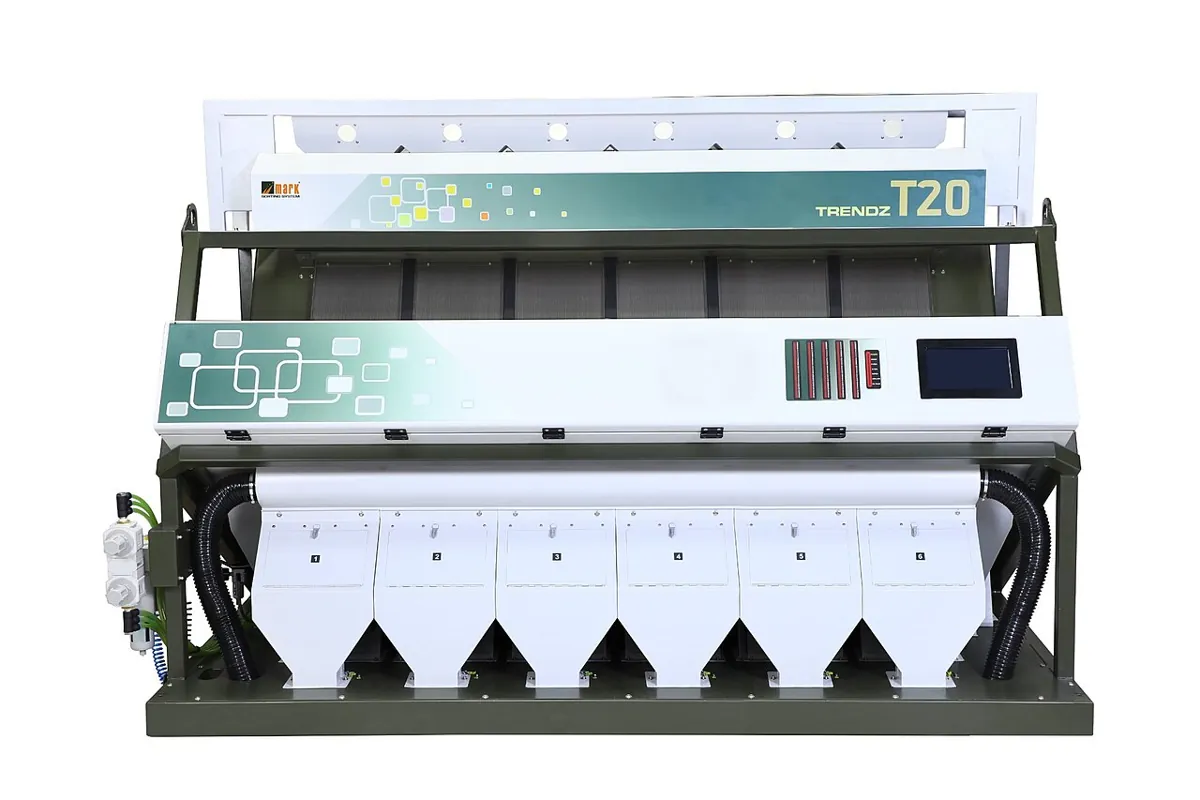
Food and grain sorting: optical colour sorters drop rice, pulses, seeds and nuts past cameras, and short air jets blow out any grain whose colour is wrong — discoloured, black or a stone. The idea is exactly today’s lesson: a colour gate, very fast.
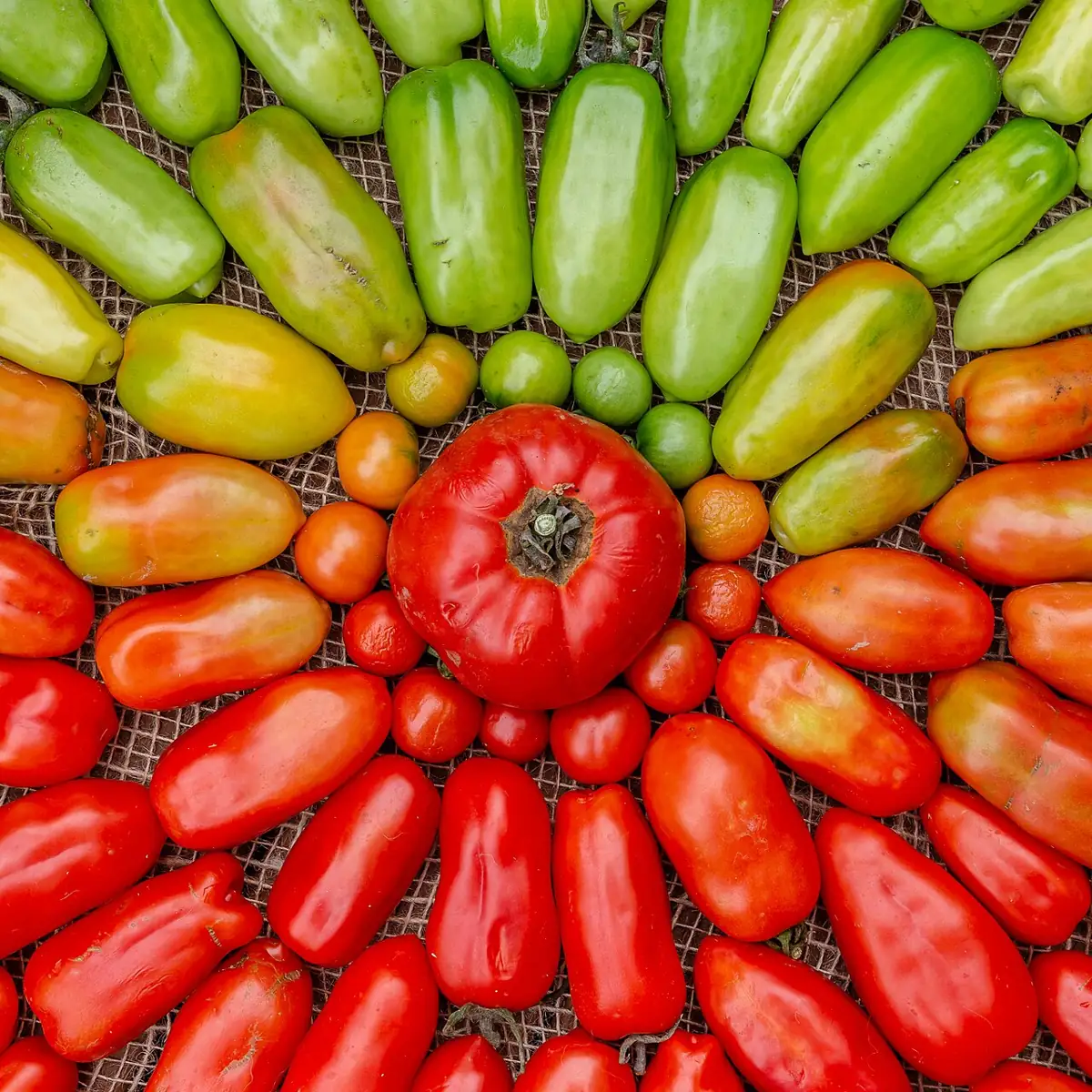
- Agriculture: ripeness grading of tomatoes, mangoes and other fruit uses hue — green to orange to red.
- Robot labs and competitions: coloured balls, cubes and tape lines are found with HSV gates because they are fast and predictable.
- Factories: simple colour checks — is the right coloured wire, cap or label in place? — are a classic machine-vision job.
- Limits: colour alone cannot tell a red cup from a red book. When objects are not colour-coded, you need shape features or a learned detector (Lesson 11).
Think
Think about it
Think
Your sorter must separate orange blocks from red and yellow ones. Orange has hue around 10–20 in OpenCV. What problems do you expect, and what would you change in the setup (not just the code)?
Experiment
Try it in the lab
About 50 minutes. Python part needs NumPy and OpenCV; camera part needs a webcam and 4–6 coloured blocks (LEGO, painted wood, or coloured paper squares); bench part needs an Arduino UNO, 5 LEDs and 5 × 220 Ω resistors.
Experiment
Build and stress-test a colour sorter
You will need
- `color_blocks_lab.py`, `color_sorter_live.py` (opencv-python, numpy; pyserial for `--port`)
- Webcam on a stand looking down at a plain table
- Coloured blocks, one desk lamp
- Colour object detector (browser)
- Bench: Arduino UNO, 5 LEDs, 5 × 220 Ω, breadboard, jumpers
Steps
- Run `color_blocks_lab.py`. Change the shadow from 0.4 to 0.25. Which colours fail first in RGB? In HSV?
- Delete the second red range and run again. How many red blocks are found now?
- Remove the morphological open. How many raw contours survive the filters?
- Webcam: run `color_sorter_live.py`, tune each colour, and save `hsv_ranges.json`.
- Move the desk lamp to three positions (front, side, off). Count correct detections each time.
- Bench: wire the five LEDs, upload the sketch, and run with `--port`. Move blocks around and watch the LEDs.
Interactive · Color object detector · Educational
Gate red-ish hues → mask → bounding box + centroid. Dim the lights and watch the gate fail — why industrial cells fix lighting. Pure canvas; not a webcam / not OpenCV.
HSV separates colour from brightness, so a good gate survives shadows that break RGB rules. Most real failures come from the setup — lighting, glare, auto white balance — so fixing the light usually beats endless re-tuning.
Knowledge check
Check your understanding
Knowledge check
1. Why is HSV better than RGB for detecting a coloured block in a shadow?
2. In OpenCV, the hue range is…
3. Why does red need two `inRange` calls?
4. A white table keeps showing up in your yellow mask. Raise…
5. Morphological “open” on a mask…
6. Solidity is…
7. Pure green BGR (0,255,0) in OpenCV HSV has hue…
8. The colour-bin LEDs switch off 1.5 s after the last command because…
Mini assignment
Hands-on assignment
Mini assignment
Four-colour sorter with a lighting report
Build a camera sorter for four block colours and prove how well it works under different lighting.
Deliverables
- Your saved `hsv_ranges.json` and a screenshot of each colour’s mask.
- A table: 3 lighting setups × 4 colours, with correct / missed / wrong counts for 10 placements each.
- One photo of a failure and your explanation (which of H, S or V went out of range?).
- The change you made to the *setup* (not the code) that helped most.
- Optional (bench): a short video of the LEDs following blocks you move.
Do this, step by step
- Run
color_sorter_live.py, tune each of the four colours and savehsv_ranges.json. - Take a mask screenshot for each colour.
- Do 10 placements per colour under 3 lighting setups (front lamp, side lamp, lamp off) and count correct / missed / wrong.
- Photograph one failure and write which of H, S or V went out of range.
- Change the setup (not the code) — e.g. a diffuser or a matte mat — and repeat the worst lighting.
Stuck? Hints, one at a time
- Red needs two hue ranges, one near 0 and one near 179.
- If shadows break a colour, lower its V limit first; H should not change much with light.
- Tiny specks are removed by the morphological open and the minimum-area filter — do not just widen the ranges.
Challenges (pick by level)
- 🟢 Beginner: Print the HSV value of the pixel under the mouse when you click (
cv.setMouseCallback). - 🟡 Intermediate: Add orange as a fifth colour and decide by the median hue of each blob.
- 🟠 Advanced: Convert each block centre to millimetres with your mm-per-pixel from Lesson 9 and print a pick list sorted by distance from the arm base.
- 🔴 Expert: Auto-tune: put one block of each colour in marked squares, sample their HSV values, and compute the ranges automatically (median ± 3 × spread).
- ⚫ Research: Compare HSV gating with the Lab colour space (
cv.COLOR_BGR2Lab) under three lights. Which keeps colours more stable? Show numbers.
Next step
Colour works when *you* choose the objects. In Lesson 11 — Classical vs AI Vision you compare these hand-made rules with learned detectors: when each one wins, what each costs, and how real robot cells combine both.
Sources
- OpenCV 4.x — Changing Colorspaces —
cv.cvtColorwithCOLOR_BGR2HSV,cv.inRange, OpenCV HSV ranges (H 0–179, S and V 0–255), finding a starting hue and the [H−10, 100, 100]–[H+10, 255, 255] rule. - OpenCV 4.x — Contour Properties — aspect ratio, extent, solidity (contour area ÷ convex-hull area).
- Wikipedia — HSL and HSV — hue as an angle starting at red 0° and wrapping at 360°; HSV value; use in robot-vision object detection; limitations.
- Photos: Wikimedia Commons (credits under each image).
Look back: Lesson 9: Bounding Boxes & Confidence. Next: Lesson 11: Classical vs AI Vision. Related: Stage 11 — Computer Vision, Stage 13 — Perception, Planning & Manipulation.
Self-attested for now — keep artifacts in your lab notebook.
Complete
Today's goal
0 of 1 done today
Mark this lesson complete when you have worked the experiment, knowledge check, and assignment (even roughly).