
Computer Vision for Robotics (Vision Foundations) · Lesson 08
Object Detection Concepts
Est. 50–65 min
Why
Why this lesson matters
Lessons 5–7 found objects with hand-made rules: colour, contours, features, templates. This lesson steps back and gives you the common language of every detector, from a colour rule to a YOLO network: a list of {class, confidence, box}, the threshold that decides which ones you trust, the cleaning step (non-maximum suppression), and how you measure a detector with IoU, precision and recall. After this, Lessons 9–11 go deeper into boxes and confidence, colour-based detection, and classical vs AI vision.
Concept
What, where, and how sure
1. Classification vs detection vs segmentation
| Task | Question it answers | Output |
|---|---|---|
| Classification | What is this picture? | one label (+ score) for the whole image |
| Object detection | What objects, where, how many? | a list of {class, confidence, box} |
| Semantic segmentation | Which class does each pixel belong to? | a label for every pixel |
| Instance segmentation | Which object does each pixel belong to? | a mask per object |
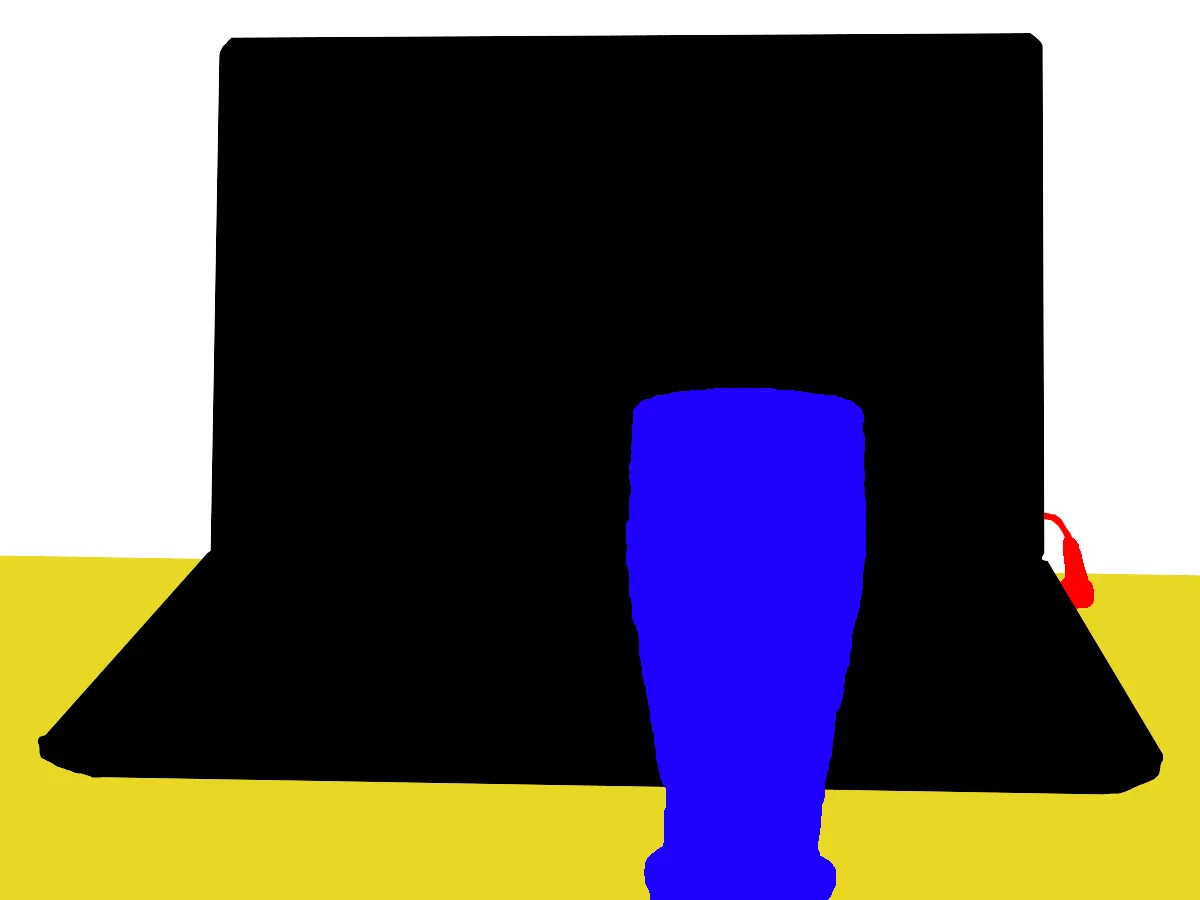
2. The output every detector gives
Whatever is inside, a detector returns something like [{"class": "cup", "confidence": 0.83, "box": [192, 124, 56, 56]}, ...] — box as x, y, width, height in pixels. The robot uses the class to decide *what to do*, the box centre to decide *where to look*, and the confidence to decide *whether to trust it*. A 2-D box is not yet a 3-D grasp; Lessons 12–15 add calibration, depth and pose.
3. How a classical detector works
Classifier for one window
Some rule or model answers “how much does this patch look like a cup?” — colour fraction, HOG features + SVM, etc.
Slide windows at many sizes
Objects can be anywhere and any size, so the window moves across the image at several sizes and shapes. That is a LOT of windows.
Threshold
Keep windows above a confidence limit.
Non-maximum suppression (NMS)
Neighbouring windows on the same object all score high. Keep the strongest, drop overlapping ones.
OpenCV’s classic people detector (HOGDescriptor) is exactly this idea: it describes a 64 × 128 window with histograms of gradient directions and a linear SVM decides “person or not”, at many scales. Modern neural detectors (R-CNN family, YOLO, SSD, DETR) learn their features from data and predict boxes for the whole image in one pass — but they still output class + confidence + box, still need a threshold, and many still use NMS.
4. How you measure a detector
- IoU (intersection over union): overlap area ÷ combined area of the predicted box and the human-drawn “ground truth” box. 1 = perfect, 0 = no overlap.
- True positive (TP): correct class and IoU ≥ 0.5 (a common rule). Each ground-truth object can be matched only once.
- False positive (FP): a box with no matching object — wrong place, wrong class, or a duplicate.
- False negative (FN): a real object with no box.
- Precision = TP / (TP + FP): of the boxes I drew, how many were right? Recall = TP / (TP + FN): of the real objects, how many did I find?
- mAP: the area under the precision–recall curve per class, averaged over classes — the number papers report.
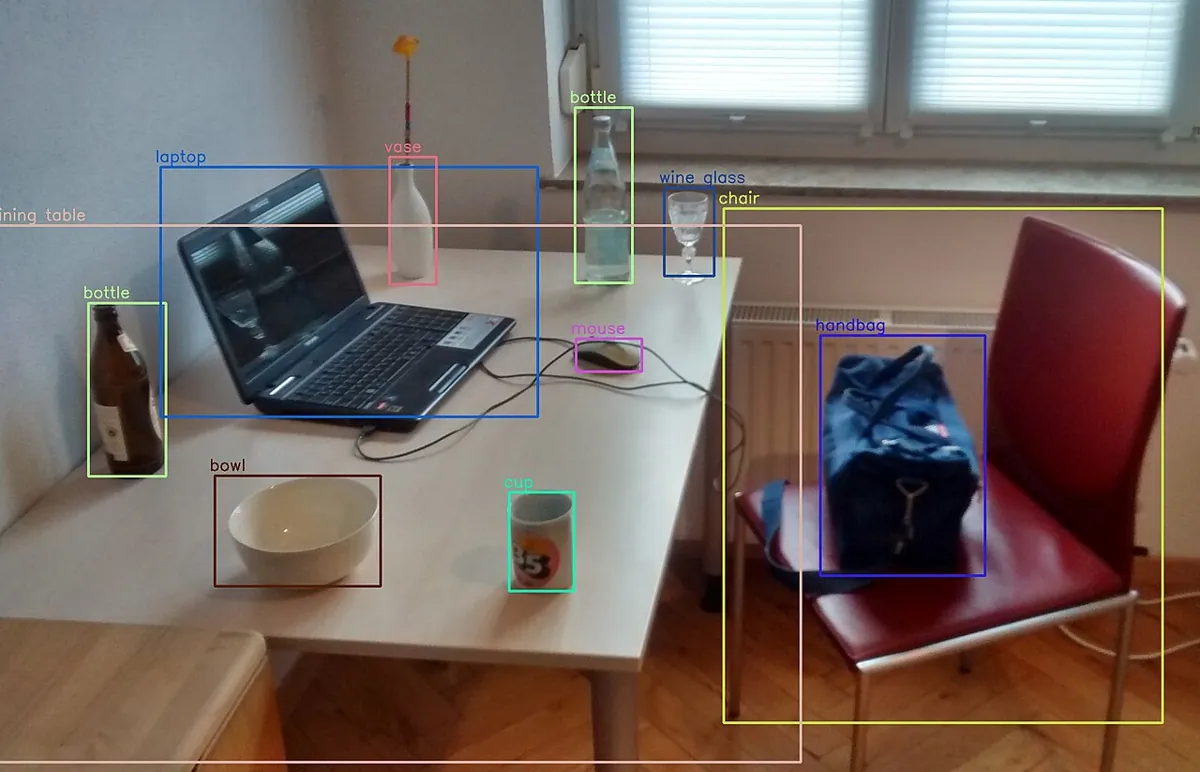
Visual
Visualise it: threshold, noise and false positives
Educational detection overlay: class + confidence boxes, a threshold slider and noise that creates a “glare” false positive. (Fake scores for teaching — not YOLO.)
Interactive · Object detection simulator · Educational (not YOLO)


- block conf=0.88 KEEP · box (40,70,50,45)
- cup conf=0.77 KEEP · box (130,85,42,55)
- bolt conf=0.67 KEEP · box (210,110,28,22)
Scores and boxes are scripted for teaching. This is not a real detector (not YOLO, not OpenCV DNN). Use it to practice threshold tradeoffs: high threshold → fewer false alarms, more misses.
Code lab
Code lab: build and judge a tiny detector
detection_concepts.py makes a noisy 480 × 320 bench with two red blocks (different sizes), a blue cup seen from above, a dark bolt — and a small red sticker that is *not* a block. It runs a whole-image classifier, then a sliding-window detector (colour fraction score, 45 window sizes, integral image for speed), applies NMS, and scores the result against ground truth at four confidence thresholds.
"""Stage 11 L08 - Object detection concepts on a synthetic Kota-lab bench.

Classification  -> ONE label for the whole picture.
Detection       -> a LIST of {class, confidence, box}.
We build a tiny classical detector (colour 'classifier' + sliding windows at many
sizes), clean it with non-maximum suppression, and score it against hand-drawn
ground truth with IoU >= 0.5 -> TP / FP / FN, precision and recall.
Not a neural network: the same ideas (windows, scores, threshold, NMS, IoU)
are what YOLO-style detectors output and are judged by.
"""
import json

import cv2 as cv
import numpy as np

rng = np.random.default_rng(7)
H, W = 320, 480
img = np.full((H, W, 3), (150, 150, 150), np.uint8)              # grey bench (BGR)
cv.rectangle(img, (60, 180), (119, 229), (40, 40, 200), -1)       # red block
cv.rectangle(img, (300, 60), (339, 93), (40, 40, 200), -1)        # small red block
cv.circle(img, (220, 150), 30, (200, 90, 30), -1)                  # blue cup (top view)
cv.rectangle(img, (360, 220), (399, 235), (90, 90, 90), -1)        # dark bolt
cv.rectangle(img, (420, 40), (437, 57), (50, 50, 190), -1)         # red sticker (NOT a block)
img = np.clip(img.astype(int) + rng.normal(0, 12, img.shape), 0, 255).astype(np.uint8)
cv.imwrite('bench.png', img)

truth = [  # (class, x, y, w, h) drawn by a human = ground truth
    ('block', 60, 180, 60, 50), ('block', 300, 60, 40, 34),
    ('cup', 190, 120, 61, 61), ('bolt', 360, 220, 40, 16),
]

hsv = cv.cvtColor(cv.GaussianBlur(img, (5, 5), 0), cv.COLOR_BGR2HSV)
masks = {
    'block': cv.inRange(hsv, (0, 120, 70), (10, 255, 255)) | cv.inRange(hsv, (170, 120, 70), (180, 255, 255)),
    'cup': cv.inRange(hsv, (100, 120, 70), (130, 255, 255)),
    'bolt': cv.inRange(hsv, (0, 0, 0), (180, 60, 110)),
}

print('1) CLASSIFICATION answers only "what is in the picture?"')
counts = {k: int(np.count_nonzero(m)) for k, m in masks.items()}
print(f'   pixels per class: {counts}')
print(f'   classifier says: "{max(counts, key=counts.get)}"  (no position, no count)')

print('\n2) DETECTION: slide windows of many sizes, score each one')
sizes = [(w, h) for w in range(16, 72, 8) for h in range(16, 72, 8) if max(w, h) <= 3 * min(w, h)]
stride = 4
cands = []
evaluated = 0
for cls, m in masks.items():
    ii = cv.integral((m > 0).astype(np.uint8))                     # sum of any box in O(1)
    box_sum = lambda x, y, w, h: int(ii[y + h, x + w] - ii[y, x + w] - ii[y + h, x] + ii[y, x])
    for w, h in sizes:
        for y in range(0, H - h, stride):
            for x in range(0, W - w, stride):
                evaluated += 1
                inside = box_sum(x, y, w, h)
                if inside < 0.3 * w * h:
                    continue
                x0, y0 = max(0, x - w // 2), max(0, y - h // 2)
                x1, y1 = min(W, x + w + w // 2), min(H, y + h + h // 2)
                around = box_sum(x0, y0, x1 - x0, y1 - y0) - inside      # object pixels left OUTSIDE
                conf = inside / (w * h + around)                            # tight box -> close to 1
                cands.append((cls, conf, (x, y, w, h)))
print(f'   windows scored: {evaluated:,}   ({len(sizes)} sizes x 3 classes, stride {stride})')
print(f'   windows with confidence >= 0.3: {len(cands):,}  <- many boxes per object')


def nms(cands, score_thr, iou_thr=0.4, inside_thr=0.8):
    """Greedy NMS per class: keep the best box, drop boxes that overlap it
    (IoU > iou_thr) or sit mostly inside it (a fragment of the same object)."""
    out = []
    for cls in masks:
        rest = sorted((d for d in cands if d[0] == cls and d[1] >= score_thr), key=lambda d: -d[1])
        while rest:
            best = rest.pop(0)
            out.append(best)
            rest = [d for d in rest if iou(d[2], best[2]) <= iou_thr and inside(d[2], best[2]) <= inside_thr]
    return sorted(out, key=lambda d: -d[1])


def inside(a, b):
    """fraction of the smaller box covered by the other box"""
    ix = max(0, min(a[0] + a[2], b[0] + b[2]) - max(a[0], b[0]))
    iy = max(0, min(a[1] + a[3], b[1] + b[3]) - max(a[1], b[1]))
    return ix * iy / min(a[2] * a[3], b[2] * b[3])


def iou(a, b):
    ax, ay, aw, ah = a
    bx, by, bw, bh = b
    ix = max(0, min(ax + aw, bx + bw) - max(ax, bx))
    iy = max(0, min(ay + ah, by + bh) - max(ay, by))
    inter = ix * iy
    return inter / (aw * ah + bw * bh - inter)


def evaluate(dets):
    used, tp = set(), 0
    for cls, conf, box in dets:                     # highest confidence first
        best, bi = 0.0, None
        for i, (tc, *tb) in enumerate(truth):
            if tc == cls and i not in used and iou(box, tb) > best:
                best, bi = iou(box, tb), i
        if bi is not None and best >= 0.5:
            used.add(bi)
            tp += 1
    fp, fn = len(dets) - tp, len(truth) - tp
    return tp, fp, fn


print('\n3) After non-maximum suppression, confidence threshold 0.3:')
dets = nms(cands, 0.3)
print(f'   {len(cands):,} windows -> {len(dets)} detections. Top 8:')
for cls, conf, (x, y, w, h) in dets[:8]:
    gt = max((iou((x, y, w, h), tb) for tc, *tb in truth if tc == cls), default=0)
    print(f'   {cls:5s} conf {conf:.2f}  box x={x:3d} y={y:3d} w={w:2d} h={h:2d}   IoU with truth {gt:.2f}')

print('\n4) Same detector, different confidence thresholds (match = same class + IoU >= 0.5)')
print('   thr  dets  TP  FP  FN  precision  recall')
for thr in (0.3, 0.5, 0.7, 0.9):
    d = [x for x in dets if x[1] >= thr]
    tp, fp, fn = evaluate(d)
    p = tp / (tp + fp) if tp + fp else 1.0
    r = tp / (tp + fn)
    print(f'   {thr:.1f}  {len(d):4d}  {tp:2d}  {fp:2d}  {fn:2d}   {p:7.2f}  {r:6.2f}')

print('\n5) What the robot receives (threshold 0.7) - targets, not pixels:')
for c, sc, b in dets:
    if sc >= 0.7:
        print('  ', json.dumps({'class': c, 'confidence': round(sc, 2), 'box': [int(v) for v in b],
                               'centre_px': [int(b[0] + b[2] / 2), int(b[1] + b[3] / 2)]}))
view = img.copy()
for c, s, (x, y, w, h) in dets:
    cv.rectangle(view, (x, y), (x + w, y + h), (0, 255, 0) if s >= 0.7 else (0, 255, 255), 2)
    cv.putText(view, f'{c} {s:.2f}', (x, y - 4), cv.FONT_HERSHEY_SIMPLEX, 0.4, (255, 255, 255), 1)
cv.imwrite('detections.png', view)
print('saved bench.png and detections.png')
Output (python3 detection_concepts.py, tested with opencv-python 5.0)
1) CLASSIFICATION answers only "what is in the picture?"
   pixels per class: {'block': 4674, 'cup': 2821, 'bolt': 581}
   classifier says: "block"  (no position, no count)

2) DETECTION: slide windows of many sizes, score each one
   windows scored: 1,038,780   (45 sizes x 3 classes, stride 4)
   windows with confidence >= 0.3: 28,406  <- many boxes per object

3) After non-maximum suppression, confidence threshold 0.3:
   28,406 windows -> 90 detections. Top 8:
   block conf 0.94  box x=300 y= 60 w=40 h=32   IoU with truth 0.94
   bolt  conf 0.91  box x=360 y=220 w=40 h=16   IoU with truth 1.00
   block conf 0.90  box x= 56 y=180 w=64 h=48   IoU with truth 0.90
   cup   conf 0.83  box x=192 y=124 w=56 h=56   IoU with truth 0.84
   block conf 0.79  box x=420 y= 40 w=16 h=16   IoU with truth 0.00
   block conf 0.59  box x=300 y= 56 w=16 h=40   IoU with truth 0.37
   block conf 0.59  box x=324 y= 56 w=16 h=40   IoU with truth 0.37
   block conf 0.58  box x= 60 y=208 w=64 h=24   IoU with truth 0.41

4) Same detector, different confidence thresholds (match = same class + IoU >= 0.5)
   thr  dets  TP  FP  FN  precision  recall
   0.3    90   4  86   0      0.04    1.00
   0.5    13   4   9   0      0.31    1.00
   0.7     5   4   1   0      0.80    1.00
   0.9     3   3   0   1      1.00    0.75

5) What the robot receives (threshold 0.7) - targets, not pixels:
   {"class": "block", "confidence": 0.94, "box": [300, 60, 40, 32], "centre_px": [320, 76]}
   {"class": "bolt", "confidence": 0.91, "box": [360, 220, 40, 16], "centre_px": [380, 228]}
   {"class": "block", "confidence": 0.9, "box": [56, 180, 64, 48], "centre_px": [88, 204]}
   {"class": "cup", "confidence": 0.83, "box": [192, 124, 56, 56], "centre_px": [220, 152]}
   {"class": "block", "confidence": 0.79, "box": [420, 40, 16, 16], "centre_px": [428, 48]}
saved bench.png and detections.pngTry it: raise the confidence threshold until the dashed “glare” box disappears. Which real object is lost first? Switch between classical-style and AI-style scores. (Educational sim — fake scores, not YOLO.)
Interactive · Object detection simulator · Educational (not YOLO)
- block conf=0.88 KEEP · box (40,70,50,45)
- cup conf=0.77 KEEP · box (130,85,42,55)
- bolt conf=0.67 KEEP · box (210,110,28,22)
Scores and boxes are scripted for teaching. This is not a real detector (not YOLO, not OpenCV DNN). Use it to practice threshold tradeoffs: high threshold → fewer false alarms, more misses.
detection_eval.py — judge any detector
Label a few of your own photos by hand (truth.json), save your detector’s output (preds.json), and this script prints TP/FP/FN, precision and recall per class at several thresholds. It works the same for a colour rule, a template, or a YOLO model.
"""Stage 11 L08 - Score ANY detector against your own hand-labelled ground truth.

truth.json: {"img1.png": [["block", x, y, w, h], ...], ...}
preds.json: {"img1.png": [["block", conf, x, y, w, h], ...], ...}
python3 detection_eval.py truth.json preds.json [--iou 0.5]
python3 detection_eval.py --demo        # runs on a small built-in example
Prints TP/FP/FN, precision and recall for several confidence thresholds, per class.
"""
import argparse
import json
from collections import defaultdict


def iou(a, b):
    ix = max(0, min(a[0] + a[2], b[0] + b[2]) - max(a[0], b[0]))
    iy = max(0, min(a[1] + a[3], b[1] + b[3]) - max(a[1], b[1]))
    inter = ix * iy
    union = a[2] * a[3] + b[2] * b[3] - inter
    return inter / union if union else 0.0


def score(truth, preds, thr, iou_thr):
    stats = defaultdict(lambda: [0, 0, 0])                # class -> [TP, FP, FN]
    for img, gts in truth.items():
        used = set()
        ps = sorted((p for p in preds.get(img, []) if p[1] >= thr), key=lambda p: -p[1])
        for cls, conf, *box in ps:
            best, bi = 0.0, None
            for i, (gc, *gb) in enumerate(gts):
                if gc == cls and i not in used and iou(box, gb) > best:
                    best, bi = iou(box, gb), i
            if bi is not None and best >= iou_thr:
                used.add(bi)
                stats[cls][0] += 1
            else:
                stats[cls][1] += 1
        for i, (gc, *_) in enumerate(gts):
            if i not in used:
                stats[gc][2] += 1
    return stats


DEMO_TRUTH = {'a.png': [['cup', 10, 10, 50, 60], ['block', 100, 40, 40, 40]],
              'b.png': [['cup', 30, 20, 50, 60]]}
DEMO_PREDS = {'a.png': [['cup', 0.92, 12, 12, 48, 58], ['block', 0.55, 104, 44, 40, 40], ['cup', 0.40, 150, 150, 30, 30]],
              'b.png': [['cup', 0.81, 60, 50, 50, 60], ['block', 0.65, 200, 10, 20, 20]]}


def main() -> None:
    ap = argparse.ArgumentParser()
    ap.add_argument('truth', nargs='?')
    ap.add_argument('preds', nargs='?')
    ap.add_argument('--iou', type=float, default=0.5)
    ap.add_argument('--demo', action='store_true')
    a = ap.parse_args()
    if a.demo:
        truth, preds = DEMO_TRUTH, DEMO_PREDS
    elif a.truth and a.preds:
        truth, preds = json.load(open(a.truth)), json.load(open(a.preds))
    else:
        raise SystemExit('give truth.json preds.json, or --demo')
    print(f'match rule: same class AND IoU >= {a.iou}')
    print('thr   class  TP  FP  FN  precision  recall')
    for thr in (0.3, 0.5, 0.7, 0.9):
        for cls, (tp, fp, fn) in sorted(score(truth, preds, thr, a.iou).items()):
            p = tp / (tp + fp) if tp + fp else 1.0
            r = tp / (tp + fn) if tp + fn else 1.0
            print(f'{thr:.1f}  {cls:6s} {tp:3d} {fp:3d} {fn:3d}   {p:7.2f}  {r:6.2f}')


if __name__ == '__main__':
main()python3 detection_eval.py --demo
# match rule: same class AND IoU >= 0.5
# thr class TP FP FN precision recall
# 0.5 cup 1 1 1 0.50 0.50 <- one cup box in the wrong place = 1 FP + 1 FN
# 0.7 block 0 0 1 1.00 0.00 <- the real block scored only 0.55
python3 detection_eval.py truth.json preds.json --iou 0.5Bench build: a detection gate
detection_gate.ino reads one line per frame — D cup 83 or N — and lights yellow for “something seen” and green only when the target class is above 70% for 3 frames in a row. One lucky (or unlucky) frame must never move a robot. No data for 1 second → both off.
| Part | Connection | Note |
|---|---|---|
| Green LED | D5 → 220 Ω → LED → GND | target confirmed |
| Yellow LED | D6 → 220 Ω → LED → GND | seen, not confirmed |
| Current | about 10–15 mA per LED | LEDs with resistors only |
| Later: gripper servo / conveyor | own 5–6 V supply + driver, common GND | never from a GPIO pin |
// Stage 11 L08 - Detection gate: act only on CONFIRMED detections.
// The PC sends one line per frame:  "D <class> <confidence 0-100>"   e.g. "D cup 83"
// or "N" when nothing was detected in that frame.
//   yellow LED (D6): something seen, but not yet confirmed
//   green  LED (D5): the TARGET class seen with confidence >= MIN_CONF
//                    in CONFIRM_FRAMES frames in a row -> "safe to plan a pick"
// One good frame is not enough: a single false positive must not move a robot.
// 1 s watchdog: no data -> both LEDs off (not confirmed).
//
// Wiring: D5 -> 220R -> green LED -> GND ; D6 -> 220R -> yellow LED -> GND
// About 10-15 mA per LED. Real actuators (gripper servo, conveyor) need their
// own supply and driver - never power them from a GPIO pin.

const byte GREEN = 5, YELLOW = 6;
const char TARGET[] = "cup";
const int MIN_CONF = 70;          // percent
const byte CONFIRM_FRAMES = 3;

byte streak = 0;
unsigned long lastMsg = 0;
char line[24];
byte len = 0;

void handle(char *s) {
  lastMsg = millis();
  if (s[0] == 'N') {
    streak = 0;
    digitalWrite(YELLOW, LOW);
  } else if (s[0] == 'D') {
    char cls[12];
    int conf = 0;
    if (sscanf(s + 1, "%11s %d", cls, &conf) != 2) return;
    bool good = strcmp(cls, TARGET) == 0 && conf >= MIN_CONF;
    streak = good ? min(streak + 1, 250) : 0;
    digitalWrite(YELLOW, HIGH);
    Serial.print(cls); Serial.print(' '); Serial.print(conf);
    Serial.print(F("%  streak=")); Serial.println(streak);
  }
  digitalWrite(GREEN, streak >= CONFIRM_FRAMES ? HIGH : LOW);
}

void setup() {
  pinMode(GREEN, OUTPUT);
  pinMode(YELLOW, OUTPUT);
  Serial.begin(115200);
  Serial.println(F("detection_gate ready (target: cup, >=70%, 3 frames)"));
}

void loop() {
  while (Serial.available()) {
    char c = Serial.read();
    if (c == '\n' || c == '\r') {
      line[len] = 0;
      if (len) handle(line);
      len = 0;
    } else if (len < sizeof(line) - 1) {
      line[len++] = c;
    }
  }
  if (lastMsg && millis() - lastMsg > 1000) {
    lastMsg = 0;
    streak = 0;
    digitalWrite(GREEN, LOW);
    digitalWrite(YELLOW, LOW);
    Serial.println(F("no data for 1 s -> not confirmed"));
  }
}Debugging
| Symptom | Likely cause | Fix |
|---|---|---|
| Many boxes on one object | no / weak NMS | Apply NMS per class; also drop boxes mostly inside a stronger box |
| Confident box on a non-object | similar colour/shape, glare | Raise threshold, require N frames, add a second check (size, shape) |
| Real object missed | threshold too high, object too small or new | Lower threshold, add window sizes, more training examples |
| Precision looks perfect, recall terrible | threshold so high almost nothing passes | Report both numbers; pick the threshold from the trade-off |
| IoU always 0 | box format mix-up (x,y,w,h vs x1,y1,x2,y2) | Convert all boxes to one format first |
| Very slow | too many windows | Bigger stride, fewer sizes, region of interest, or a one-pass neural detector |
Real world
Object detection in the real world
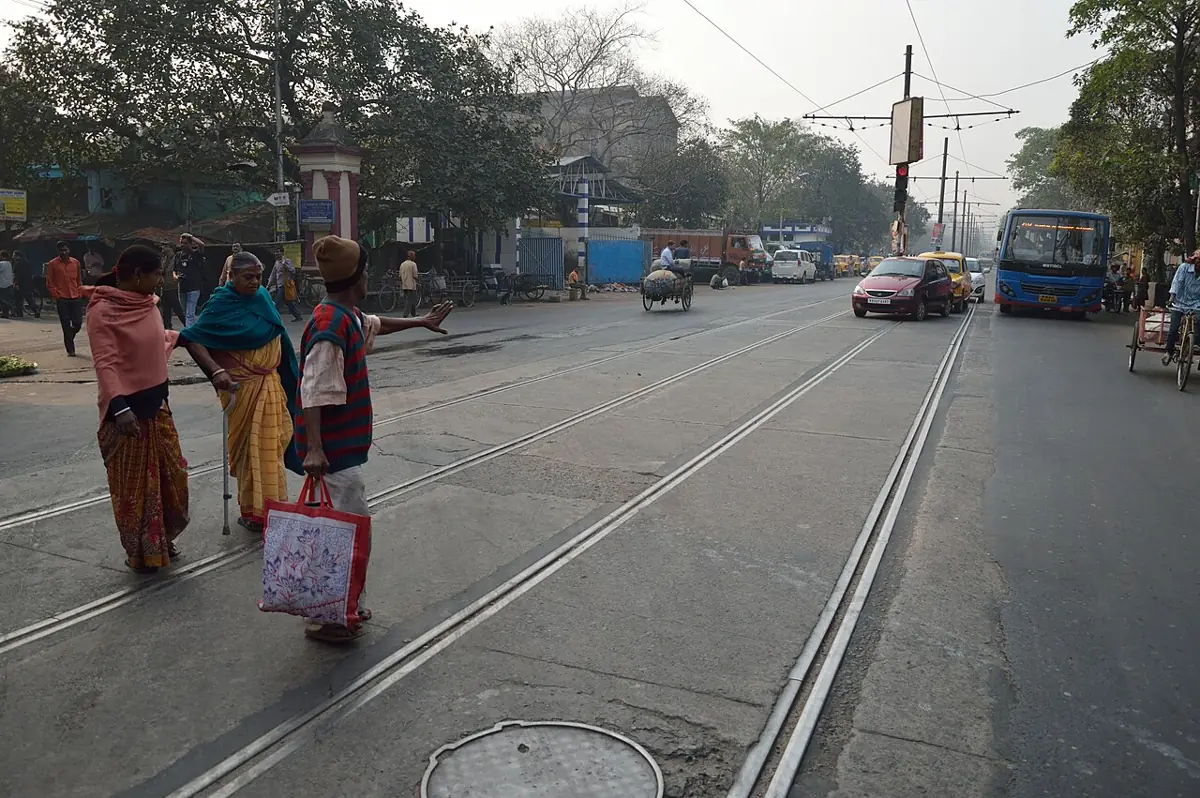
- Pedestrian detection: one of the most studied detection problems — cars and mobile robots must find people before planning a stop.
- Vehicle counting and traffic: cameras detect and count vehicles at junctions.
- Warehouses and pick cells: detect boxes, totes or parts, then hand the box centre to the arm planner.
- Sports: tracking a ball during a football match or a cricket bat’s movement starts with detection in every frame.
- Face detection: finding faces in a photo before any recognition step.
Think
Think about it
Think
For a robot that picks a cup from a table, would you rather have high precision or high recall? Now answer again for a mobile robot that must stop for people.
Experiment
Try it in the lab
About 45 minutes. Python part needs NumPy and OpenCV; the bench part needs an Arduino UNO, two LEDs and two 220 Ω resistors.
Experiment
Precision vs recall on your bench
You will need
- `detection_concepts.py`, `detection_eval.py` (opencv-python, numpy)
- Object detection simulator (browser)
- 5–10 phone photos of your desk with 2–5 objects
- Bench: Arduino UNO, green + yellow LED, 2 × 220 Ω
Steps
- Run `detection_concepts.py`. Open `detections.png` and find the sticker false positive.
- Make the sticker bigger (e.g. 30 × 30). What happens to precision at 0.7?
- Change `stride = 4` to `stride = 8`. How many windows now? Do the top boxes still fit?
- In the simulator, find the threshold where the glare box goes but all real objects stay.
- Label your own photos (truth.json) and write a few predictions by hand or from any detector (preds.json). Run `detection_eval.py`.
- Bench: upload `detection_gate.ino`, type `D cup 83` three times in the Serial Monitor, then `D cup 40`. Watch the LEDs.
Interactive · Object detection simulator · Educational (not YOLO)
- block conf=0.88 KEEP · box (40,70,50,45)
- cup conf=0.77 KEEP · box (130,85,42,55)
- bolt conf=0.67 KEEP · box (210,110,28,22)
Scores and boxes are scripted for teaching. This is not a real detector (not YOLO, not OpenCV DNN). Use it to practice threshold tradeoffs: high threshold → fewer false alarms, more misses.
Every detector — rule or neural net — gives class + confidence + box. One threshold sets the balance between finding everything (recall) and being right (precision); NMS turns many boxes into one per object; IoU decides whether a box counts as correct.
Knowledge check
Check your understanding
Knowledge check
1. Two cups and a block on the table. A classifier outputs…
2. A detector output item contains…
3. Predicted box and truth box overlap 40 px²; their union is 100 px². IoU =
4. 8 correct boxes, 2 wrong boxes, 4 objects missed. Precision and recall?
5. Raising the confidence threshold usually…
6. Why is NMS needed?
7. OpenCV’s HOG people detector uses a window of…
8. Why does the detection gate need 3 frames in a row?
Mini assignment
Hands-on assignment
Mini assignment
Measure a detector honestly
Take 10 photos of your desk, label the ground truth, run any detector (this lesson’s colour detector, a template from Lesson 7, or a pretrained model), and report its precision and recall.
Deliverables
- 10 photos with truth.json (at least 2 classes, 25+ objects total).
- preds.json from your detector, and the command you used.
- The detection_eval.py table and a precision–recall plot for thresholds 0.1–0.9.
- Two example images: your worst false positive and your worst false negative, with a reason for each.
- Your chosen threshold for a pick-and-place robot, and why.
Do this, step by step
- Take 10 photos of your desk with 2–5 objects each (at least 2 classes, 25+ objects in total).
- Write
truth.jsonwith a class and box for every object. - Run any detector (colour rule, Lesson 7 template or a pretrained model) and save
preds.jsonwith confidences. - Run
detection_eval.pyand plot precision and recall for thresholds 0.1 to 0.9. - Pick your worst false positive and worst false negative, and choose a threshold for a pick-and-place robot.
Stuck? Hints, one at a time
- A prediction counts as correct only if the class is right and IoU with a truth box is at least 0.5.
- Precision = TP / (TP + FP); recall = TP / (TP + FN). Missed objects only lower recall.
- For a robot that moves, a wrong pick costs more than a missed one — lean towards higher precision.
Challenges (pick by level)
- 🟢 Beginner: Compute IoU by hand for 3 pairs of boxes on graph paper, then check with the
ioufunction. - 🟡 Intermediate: Print how many windows the detector evaluates for strides 2, 4, 8 and the time taken.
- 🟠 Advanced: Add a “sticker” rejector: drop block detections smaller than a minimum area. Show precision before and after.
- 🔴 Expert: Compute average precision (area under the precision–recall curve) per class in
detection_eval.py. - ⚫ Research: Read about the R-CNN, YOLO and DETR families and compare, in your own words, how each avoids scoring a million windows. Cite the papers.
Next step
You now know the words: box, confidence, threshold, NMS, IoU. Lesson 9 — Bounding Boxes & Confidence works hands-on with them: box formats, converting box pixels to robot targets, smoothing confidence over time, and tuning NMS.
Sources
- Wikipedia — Object detection — definition, uses (face/pedestrian detection, vehicle counting, ball tracking), IoU ≥ 0.5 true-positive rule, false positives/negatives, mAP, non-neural (Viola–Jones, SIFT, HOG) vs neural (R-CNN, YOLO, SSD, DETR) methods, YOLOv3/COCO 80-class figure.
- OpenCV 4.x — cv::HOGDescriptor — HOG + linear SVM detector, default 64 × 128 people-detector window, detectMultiScale, grouping overlapping rectangles.
- OpenCV 4.x — Template Matching — the sliding-and-scoring idea from Lesson 7.
- Photos: Wikimedia Commons (credits under each image).
Look back: Lesson 7: Template Matching. Next: Lesson 9: Bounding Boxes & Confidence. Related: Stage 11 — Computer Vision, Stage 13 — Perception, Planning & Manipulation.
Self-attested for now — keep artifacts in your lab notebook.
Complete
Today's goal
0 of 1 done today
Mark this lesson complete when you have worked the experiment, knowledge check, and assignment (even roughly).