
Computer Vision for Robotics (Vision Foundations) · Lesson 07
Template Matching
Est. 50–65 min
Why
Why this lesson matters
Think of a teacher checking OMR answer sheets with a punched transparent sheet: she lays the template over each answer sheet and the marks either line up or they don’t. Template matching does exactly this, at every position of the image, and gives a score for how well each position lines up.
In this lesson you will learn how cv.matchTemplate slides a template and builds a score map, why the result is smaller than the image, which of the six comparison methods to trust (and which one fails), how to find all copies with a threshold plus non-maximum suppression, and the method’s big weaknesses: rotation and scale. Then you will count real parts with your webcam and drive a kit-checker light on the Arduino.
Concept
Slide, score, pick the best
1. Slide and compare
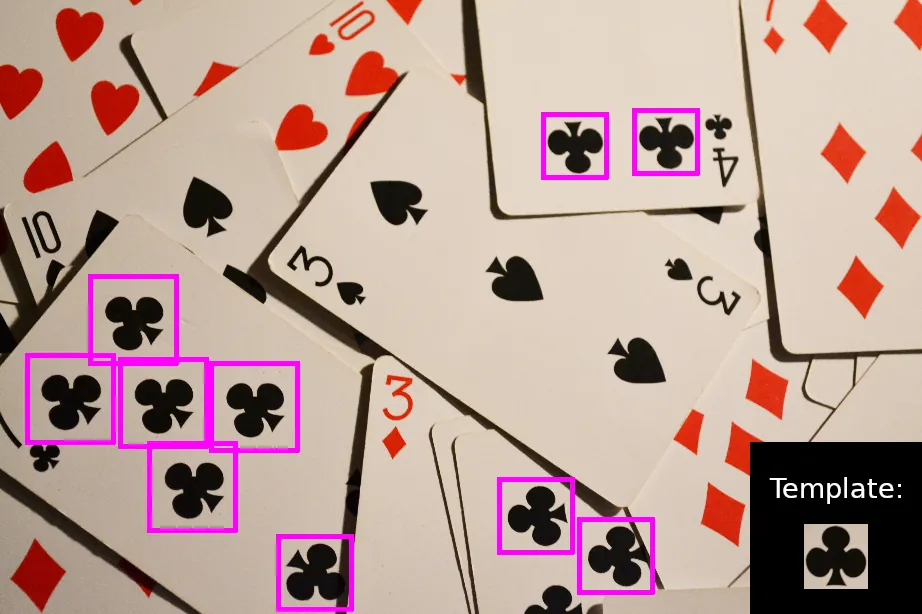
cv.matchTemplate(image, template, method) places the template at the top-left of the image, compares it with the patch under it, writes a score, moves one pixel, and repeats — like a 2-D convolution. For an image W × H and a template w × h, the result is (W − w + 1) × (H − h + 1): the template must fit completely inside. Each result pixel is the score for a template whose top-left corner is there. cv.minMaxLoc(result) gives the best one.
2. The six methods
| Method | Best match is | Notes |
|---|---|---|
TM_SQDIFF | minimum | sum of squared differences; needs the same brightness |
TM_SQDIFF_NORMED | minimum (0 = perfect) | normalised, still sensitive to lighting change |
TM_CCORR | maximum | plain correlation; bright areas score high — the OpenCV tutorial notes its result is not good |
TM_CCORR_NORMED | maximum (1 = perfect) | better, but not mean-corrected |
TM_CCOEFF | maximum | subtracts the mean first |
TM_CCOEFF_NORMED | maximum (1 = perfect, −1 = opposite) | safe default: works when the whole scene gets brighter or darker |
3. Finding every copy
Threshold the score map
np.where(res >= 0.8)gives every position above the limit (the tutorial finds Mario coins this way).Expect clusters
Positions one or two pixels away from a real match also score high. With a lower threshold you get many boxes for one object.
Non-maximum suppression
Sort hits by score, keep the strongest, drop any other hit closer than half a template, repeat. Now one box = one object.
4. Where template matching breaks
- Rotation: the template is a fixed picture. Turn the part and the score falls quickly.
- Scale: move the camera closer and the part looks bigger — the template no longer fits. Fix: try several template sizes (multi-scale search) or keep the camera height fixed.
- Perspective and deformation: tilted or bent parts change shape — use features (Lesson 6) instead.
- Speed: every position × every template size × every angle. Keep templates small and search only a region of interest.
Visual
Visualise it: slide a template and watch the score
Educational template lab: slide a patch across a synthetic image and see the best-score location. (Browser sim, simplified math — not OpenCV.)
Interactive · Feature detection lab · Educational


Green dots ≈ corner responses; template mode slides a patch and highlights a best-score location. Simplified browser math — not Harris/OpenCV/YOLO.
Code lab
Code lab: count the screws in the kit tray
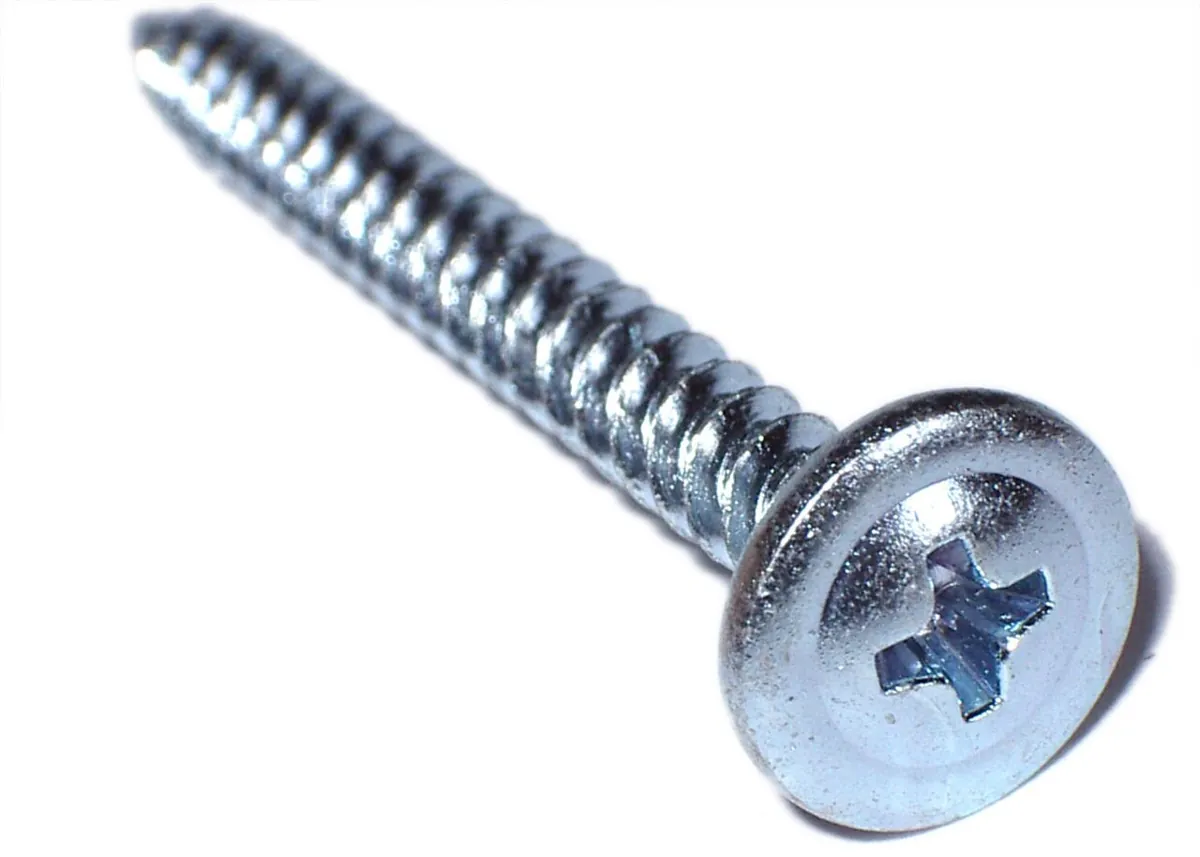
template_lab.py draws a 30 × 30 screw-head template (round head with a cross slot) and a 400 × 260 tray with three screws, a washer and a hex nut. It checks the result size, compares all six methods under normal and dim light, finds all screws with threshold + non-maximum suppression, and measures how the score falls when the slot is rotated or the screw is scaled.
"""Stage 11 L07 - Template matching: slide a small picture over the scene and score it.

No camera needed. We draw a 30x30 "screw head" template (circle with a cross slot)
and a 400x260 tray with THREE screws, one washer and one hex nut. Then:
  result size -> 6 methods -> find all screws -> light change -> rotation & scale.
Run:  python3 template_lab.py      (saves template_result.png and tray.png)
"""
import cv2 as cv
import numpy as np

rng = np.random.default_rng(5)


def screw(size=30, angle=0.0):
    t = np.full((size, size), 90, np.uint8)
    c = size // 2
    cv.circle(t, (c, c), int(size * 0.42), 210, -1)                 # shiny head
    slot = np.zeros_like(t)
    cv.line(slot, (c - int(size * 0.3), c), (c + int(size * 0.3), c), 255, max(2, size // 10))
    cv.line(slot, (c, c - int(size * 0.3)), (c, c + int(size * 0.3)), 255, max(2, size // 10))
    if angle:
        slot = cv.warpAffine(slot, cv.getRotationMatrix2D((c, c), angle, 1.0), (size, size))
    t[slot > 127] = 40                                                # dark cross slot
    return t


template = screw()
h, w = template.shape
tray = np.full((260, 400), 90, np.uint8)
truth = [(40, 50), (200, 120), (320, 40)]                             # top-left of each screw
for x, y in truth:
    tray[y:y + h, x:x + w] = template
cv.circle(tray, (95, 190), 14, 210, -1)                               # washer: round, no slot
cv.circle(tray, (95, 190), 5, 90, -1)
hexagon = np.array([[290 + 15 * np.cos(a), 200 + 15 * np.sin(a)] for a in np.radians(range(0, 360, 60))], np.int32)
cv.fillPoly(tray, [hexagon], 200)                                     # hex nut
tray = np.clip(tray + rng.normal(0, 5, tray.shape), 0, 255).astype(np.uint8)

# ---------- 1. Size of the result map --------------------------------------------
res = cv.matchTemplate(tray, template, cv.TM_CCOEFF_NORMED)
print(f'1) scene {tray.shape[1]}x{tray.shape[0]}, template {w}x{h} -> result {res.shape[1]}x{res.shape[0]}'
      f'  (W-w+1, H-h+1) = ({tray.shape[1] - w + 1}, {tray.shape[0] - h + 1})')


def best(img, tpl, method):
    r = cv.matchTemplate(img, tpl, method)
    mn, mx, mnl, mxl = cv.minMaxLoc(r)
    return (mnl, mn) if method in (cv.TM_SQDIFF, cv.TM_SQDIFF_NORMED) else (mxl, mx)


def is_screw(loc, tol=3):
    return any(abs(loc[0] - x) <= tol and abs(loc[1] - y) <= tol for x, y in truth)


# ---------- 2. The six methods, normal light and dim light ------------------------
dim = (tray * 0.55).astype(np.uint8)                       # lights at 55%
print('\n2) Best match of each method      normal light          dim light (55%)')
for name in ['TM_CCOEFF', 'TM_CCOEFF_NORMED', 'TM_CCORR', 'TM_CCORR_NORMED', 'TM_SQDIFF', 'TM_SQDIFF_NORMED']:
    m = getattr(cv, name)
    (l1, s1), (l2, s2) = best(tray, template, m), best(dim, template, m)
    print(f'   {name:17s} {str(l1):11s} {"screw" if is_screw(l1) else "WRONG":5s}   '
          f'{str(l2):11s} {"screw" if is_screw(l2) else "WRONG":5s} score {s2:10.3g}')
print('   CCORR (not normalised) just loves bright areas. In dim light SQDIFF_NORMED slipped too;')
print('   CCOEFF_NORMED subtracts the mean brightness first, so it is the safe default.')

# ---------- 3. All the screws: threshold + non-maximum suppression -----------------
print('\n3) Find ALL screws with TM_CCOEFF_NORMED')
for t in (0.8, 0.5):
    print(f'   positions scoring >= {t}: {int(np.count_nonzero(res >= t))}')
print('   at 0.5 the pixels NEXT TO each screw also pass -> many boxes for one screw')
ys, xs = np.where(res >= 0.5)
hits = []
for s, x, y in sorted(zip(res[ys, xs], xs, ys), reverse=True):        # strongest first
    if all(abs(x - hx) > w // 2 or abs(y - hy) > h // 2 for _, hx, hy in hits):
        hits.append((s, int(x), int(y)))
for s, x, y in hits:
    print(f'   screw at ({x:3d},{y:3d})  score {s:.3f}  {"OK" if is_screw((x, y)) else "FALSE"}')
print(f'   after non-maximum suppression: {len(hits)} screws (truth: {len(truth)})')
print(f'   best score on the washer: {res[176:190, 80:96].max():.2f}   on the hex nut: {res[186:200, 276:290].max():.2f}')

# ---------- 4. Rotation and scale: the weak spot ----------------------------------
print('\n4) Same scene, screw slot ROTATED or screw SCALED (score at the true place)')
for ang in (0, 10, 20, 45):
    t2 = tray.copy()
    t2[120:150, 200:230] = screw(30, ang)
    print(f'   slot turned {ang:2d} deg -> score {cv.matchTemplate(t2[120:150, 200:230], template, cv.TM_CCOEFF_NORMED)[0, 0]:.2f}')
for s in (1.0, 1.2, 1.5):
    n = int(round(30 * s))
    big = cv.resize(template, (n, n))
    pad = np.full((n + 20, n + 20), 90, np.uint8)
    pad[10:10 + n, 10:10 + n] = big
    one = cv.matchTemplate(pad, template, cv.TM_CCOEFF_NORMED).max()
    multi = max((cv.matchTemplate(pad, cv.resize(template, (int(30 * k), int(30 * k))), cv.TM_CCOEFF_NORMED).max(), k)
                for k in np.arange(0.8, 1.61, 0.1))
    print(f'   screw {s:.1f}x bigger -> one template {one:.2f} | multi-scale best {multi[0]:.2f} at {multi[1]:.1f}x')

out = cv.cvtColor(tray, cv.COLOR_GRAY2BGR)
for s, x, y in hits:
    cv.rectangle(out, (x, y), (x + w, y + h), (0, 0, 255), 2)
heat = cv.applyColorMap(cv.normalize(res, None, 0, 255, cv.NORM_MINMAX).astype(np.uint8), cv.COLORMAP_JET)
heat = cv.copyMakeBorder(heat, 0, h - 1, 0, w - 1, cv.BORDER_CONSTANT)
cv.imwrite('template_result.png', np.hstack([out, heat]))
cv.imwrite('tray.png', tray)
cv.imwrite('screw_template.png', template)
print('\nSaved template_result.png (hits | score map), tray.png and screw_template.png')
Output (python3 template_lab.py, tested with opencv-python 5.0)
1) scene 400x260, template 30x30 -> result 371x231  (W-w+1, H-h+1) = (371, 231)

2) Best match of each method      normal light          dim light (55%)
   TM_CCOEFF         (40, 50)    screw   (40, 50)    screw score   2.01e+06
   TM_CCOEFF_NORMED  (40, 50)    screw   (40, 50)    screw score      0.997
   TM_CCORR          (80, 176)   WRONG   (80, 176)   WRONG score   9.78e+06
   TM_CCORR_NORMED   (40, 50)    screw   (40, 50)    screw score      0.999
   TM_SQDIFF         (40, 50)    screw   (40, 50)    screw score    3.2e+06
   TM_SQDIFF_NORMED  (40, 50)    screw   (80, 174)   WRONG score      0.342
   CCORR (not normalised) just loves bright areas. In dim light SQDIFF_NORMED slipped too;
   CCOEFF_NORMED subtracts the mean brightness first, so it is the safe default.

3) Find ALL screws with TM_CCOEFF_NORMED
   positions scoring >= 0.8: 3
   positions scoring >= 0.5: 27
   at 0.5 the pixels NEXT TO each screw also pass -> many boxes for one screw
   screw at ( 40, 50)  score 0.997  OK
   screw at (320, 40)  score 0.997  OK
   screw at (200,120)  score 0.997  OK
   after non-maximum suppression: 3 screws (truth: 3)
   best score on the washer: 0.40   on the hex nut: 0.26

4) Same scene, screw slot ROTATED or screw SCALED (score at the true place)
   slot turned  0 deg -> score 1.00
   slot turned 10 deg -> score 0.70
   slot turned 20 deg -> score 0.46
   slot turned 45 deg -> score 0.08
   screw 1.0x bigger -> one template 1.00 | multi-scale best 1.00 at 1.0x
   screw 1.2x bigger -> one template 0.57 | multi-scale best 1.00 at 1.2x
   screw 1.5x bigger -> one template 0.24 | multi-scale best 1.00 at 1.5x

Saved template_result.png (hits | score map), tray.png and screw_template.png
Try it: switch to “Template match” and move the search window slider — watch where the best score is highlighted. (Educational browser sim — simplified math, not OpenCV.)
Interactive · Feature detection lab · Educational
Green dots ≈ corner responses; template mode slides a patch and highlights a best-score location. Simplified browser math — not Harris/OpenCV/YOLO.
template_finder.py — count real parts
Point the webcam straight down at a tray from a fixed height. Press t, drag a box around one part and the template is saved as my_template.png. From then on every copy above the threshold is boxed and counted. --multiscale also tries 0.8×–1.3× sizes. With --port it sends the count to the kit checker below.
"""Stage 11 L07 - Count every copy of a template in the camera view (or a photo).

Template: --template file.png, or press 't' in the live window and drag a box.
Webcam :  python3 template_finder.py --template screw_template.png
Photo  :  python3 template_finder.py --image tray.png --template screw_template.png --once
Arduino:  --port /dev/ttyACM0 sends "C<count>\\n" to kit_checker.ino (pip install pyserial)
Uses TM_CCOEFF_NORMED + threshold + non-maximum suppression, optional multi-scale.
"""
import argparse

import cv2 as cv
import numpy as np


def find_all(gray, tpl, thresh, scales):
    hits = []
    for k in scales:
        t = cv.resize(tpl, None, fx=k, fy=k) if k != 1.0 else tpl
        th, tw = t.shape
        if th > gray.shape[0] or tw > gray.shape[1]:
            continue
        r = cv.matchTemplate(gray, t, cv.TM_CCOEFF_NORMED)
        ys, xs = np.where(r >= thresh)
        hits += [(float(r[y, x]), int(x), int(y), tw, th) for y, x in zip(ys, xs)]
    keep = []
    for s, x, y, tw, th in sorted(hits, reverse=True):          # strongest first
        if all(abs(x - kx) > min(tw, kw) // 2 or abs(y - ky) > min(th, kh) // 2 for _, kx, ky, kw, kh in keep):
            keep.append((s, x, y, tw, th))
    return keep


def main() -> None:
    ap = argparse.ArgumentParser()
    ap.add_argument('--template')
    ap.add_argument('--image')
    ap.add_argument('--camera', type=int, default=0)
    ap.add_argument('--thresh', type=float, default=0.8)
    ap.add_argument('--multiscale', action='store_true', help='also try 0.8x..1.3x')
    ap.add_argument('--once', action='store_true')
    ap.add_argument('--port')
    a = ap.parse_args()
    scales = list(np.round(np.arange(0.8, 1.31, 0.1), 2)) if a.multiscale else [1.0]

    tpl = cv.imread(a.template, cv.IMREAD_GRAYSCALE) if a.template else None
    if a.template and tpl is None:
        raise SystemExit(f'could not read {a.template}')
    still = cv.imread(a.image) if a.image else None
    if a.image and still is None:
        raise SystemExit(f'could not read {a.image}')
    if a.once and (still is None or tpl is None):
        raise SystemExit('--once needs --image and --template')
    link = None
    if a.port:
        import serial
        link = serial.Serial(a.port, 115200, timeout=0.1)
    cap = None if still is not None else cv.VideoCapture(a.camera)
    if cap is not None and not cap.isOpened():
        raise SystemExit('camera not found - try --camera 1 or --image file.png')

    while True:
        frame = still if still is not None else cap.read()[1]
        if frame is None:
            print('camera returned no frame')
            break
        gray = cv.cvtColor(frame, cv.COLOR_BGR2GRAY)
        hits = find_all(gray, tpl, a.thresh, scales) if tpl is not None else []
        if link is not None and tpl is not None:
            link.write(f'C{len(hits)}\n'.encode())
        if a.once:
            for s, x, y, tw, th in hits:
                print(f'match at ({x},{y}) size {tw}x{th} score {s:.3f}')
            print(f'{len(hits)} match(es) at threshold {a.thresh}')
            break
        view = frame.copy()
        for s, x, y, tw, th in hits:
            cv.rectangle(view, (x, y), (x + tw, y + th), (0, 0, 255), 2)
            cv.putText(view, f'{s:.2f}', (x, y - 4), cv.FONT_HERSHEY_SIMPLEX, 0.45, (0, 255, 255), 1)
        msg = f'count={len(hits)}' if tpl is not None else "press 't' and drag a box around ONE part"
        cv.putText(view, msg, (8, 22), cv.FONT_HERSHEY_SIMPLEX, 0.6, (0, 255, 0), 2)
        cv.imshow('template finder', view)
        key = cv.waitKey(30) & 0xFF
        if key == ord('t'):
            x, y, w, h = cv.selectROI('template finder', frame, False)
            if w > 5 and h > 5:
                tpl = gray[y:y + h, x:x + w].copy()
                cv.imwrite('my_template.png', tpl)
                print(f'template saved: my_template.png ({w}x{h})')
        if key in (ord('q'), 27):
            break
    if cap is not None:
        cap.release()
    if link is not None:
        link.close()
    if not a.once:
        cv.destroyAllWindows()


if __name__ == '__main__':
main()python3 template_lab.py # saves tray.png and screw_template.png
python3 template_finder.py --image tray.png --template screw_template.png --once
# match at (40,50) size 30x30 score 0.997
# match at (320,40) size 30x30 score 0.997
# match at (200,120) size 30x30 score 0.997
# 3 match(es) at threshold 0.8
# Same tray photographed 1.2x bigger: 0 matches, but 3 with --multiscale
python3 template_finder.py # webcam: press t, drag around one partBench build: a kit-checker light
kit_checker.ino compares the camera count with the expected number of parts (set with E3 in the Serial Monitor; it is saved in EEPROM). Green = complete for 5 frames in a row, red = part missing, both = extra part or a false match. The 1-second watchdog switches both off if the camera stops — a dark light means “not checked”, never “OK”.
| Part | Connection | Note |
|---|---|---|
| Green LED | D5 → 220 Ω → LED → GND | kit OK (steady) |
| Red LED | D6 → 220 Ω → LED → GND | missing part |
| Current | about 10–15 mA per LED | LEDs with resistors only |
| Later: reject pusher / conveyor | own supply + motor driver or MOSFET | never from a GPIO pin |
// Stage 11 L07 - Kit checker: is the tray complete?
// template_finder.py --port ... sends "C<count>\n" every frame (count of matches).
// Set how many parts the kit needs with "E<number>" in the Serial Monitor (default 3).
//   green LED (D5): count == expected for 5 frames in a row  -> kit OK
//   red   LED (D6): count <  expected                         -> part missing
//   both  ON      : count >  expected                         -> extra part / false match
// Expected count is saved in EEPROM so it survives a reset.
//
// Wiring: D5 -> 220R -> green LED -> GND ; D6 -> 220R -> red LED -> GND
// LEDs with resistors only (about 10-15 mA each). A conveyor motor or reject
// pusher would need its own supply and a driver - never a GPIO pin.
#include <EEPROM.h>

const byte GREEN = 5, RED = 6;
byte expected = 3;
byte okFrames = 0;
unsigned long lastMsg = 0;
char buf[8];
byte len = 0;

void showCount(int n) {
  okFrames = (n == expected) ? min(okFrames + 1, 255) : 0;
  digitalWrite(GREEN, (okFrames >= 5 || n > expected) ? HIGH : LOW);
  digitalWrite(RED, (n < expected || n > expected) ? HIGH : LOW);
  Serial.print(F("count=")); Serial.print(n);
  Serial.print(F(" expected=")); Serial.print(expected);
  if (n < expected) Serial.println(F("  MISSING"));
  else if (n > expected) Serial.println(F("  EXTRA?"));
  else Serial.println(okFrames >= 5 ? F("  KIT OK") : F("  checking..."));
}

void handle(const char *line) {
  if (line[0] == 'C') { showCount(atoi(line + 1)); lastMsg = millis(); }
  if (line[0] == 'E') {
    int e = atoi(line + 1);
    if (e > 0 && e < 100) { expected = e; EEPROM.update(0, expected); okFrames = 0; }
    Serial.print(F("expected set to ")); Serial.println(expected);
  }
}

void setup() {
  pinMode(GREEN, OUTPUT);
  pinMode(RED, OUTPUT);
  Serial.begin(115200);
  byte e = EEPROM.read(0);
  if (e > 0 && e < 100) expected = e;
  Serial.print(F("kit_checker ready, expected=")); Serial.println(expected);
}

void loop() {
  while (Serial.available()) {
    char c = Serial.read();
    if (c == '\n' || c == '\r') {
      buf[len] = 0;
      if (len) handle(buf);
      len = 0;
    } else if (len < sizeof(buf) - 1) {
      buf[len++] = c;
    }
  }
  if (lastMsg && millis() - lastMsg > 1000) {        // camera stopped
    lastMsg = 0;
    okFrames = 0;
    digitalWrite(GREEN, LOW);
    digitalWrite(RED, LOW);
    Serial.println(F("no data for 1 s -> LEDs off"));
  }
}
Debugging
| Symptom | Likely cause | Fix |
|---|---|---|
| Box is in the wrong place by a constant offset | treating the result as the centre | Result pixel = template top-left; add w/2, h/2 for the centre |
| Best match on a bright area | TM_CCORR or wrong min/max | Use TM_CCOEFF_NORMED and max_loc; SQDIFF uses min_loc |
| Many boxes on one part | no non-maximum suppression | Keep strongest, drop neighbours within half a template |
| Count drops when parts turn | rotation | Place parts in a jig, or search rotated templates, or use features |
| Nothing found after moving the camera | scale changed | Fix the camera height, or use --multiscale |
error: (-215) ... _img.size().height <= _templ... | template bigger than the image | Use a smaller template or a larger image |
| Slow on a Raspberry Pi | large image × many scales | Resize down, crop to the tray, fewer scales |
Real world
Template matching in real machines
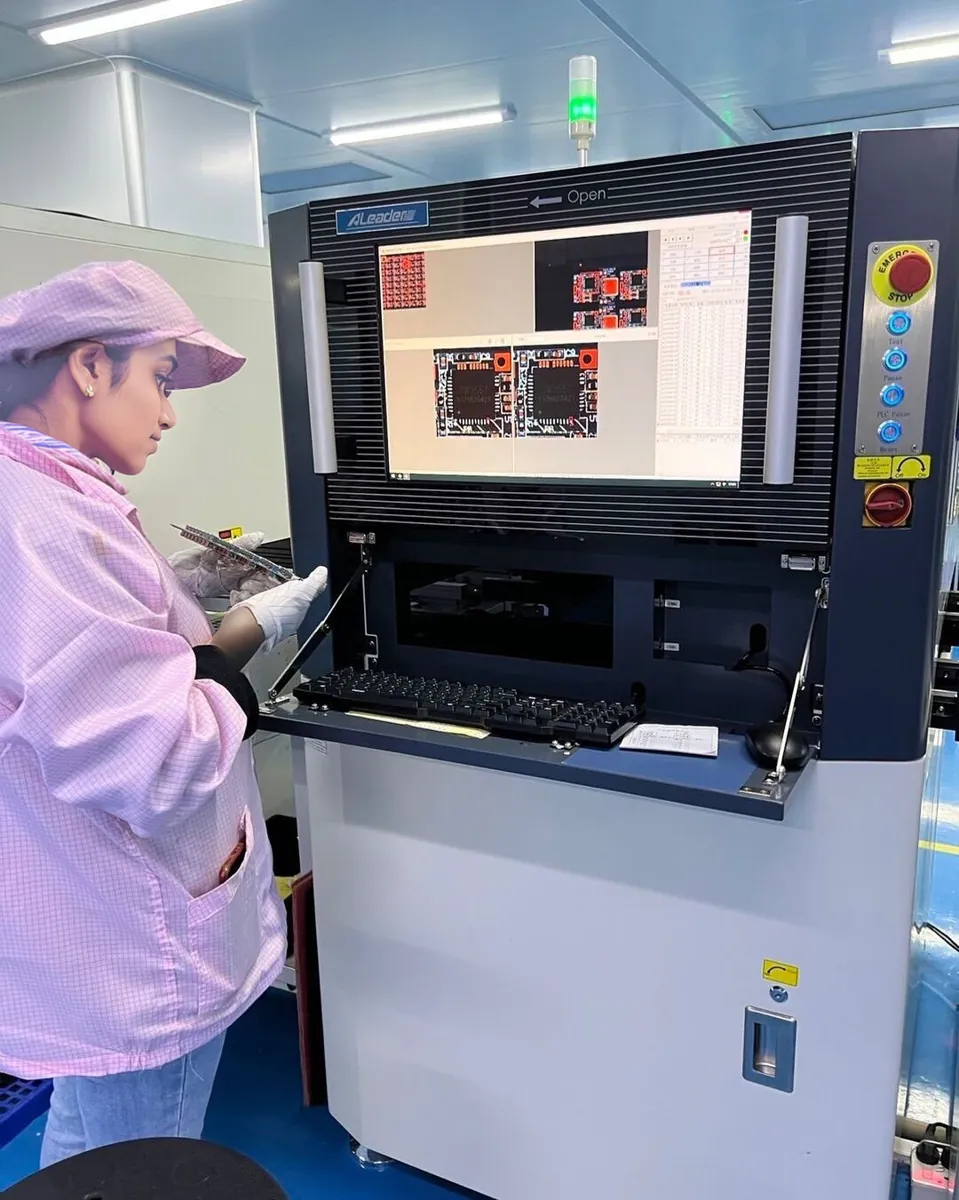
- Electronics assembly: boards are checked by machines for missing or shifted components, then by people. Fixed camera, fixed board position — the conditions where comparing with a known-good picture works well.
- Kit and packaging checks: a fixed camera above a tray counts parts and stops incomplete kits — today’s bench build.
- Reading fixed screens and gauges: a robot can find a known icon or digit on a display with a template.
- Game bots and UI testing: finding a button or a coin on a screen is a classic use (the OpenCV tutorial’s Mario coin example).
Think
Think about it
Think
Your screw template works perfectly at 9 am. At 4 pm, sunlight from the window falls on half the tray and the count drops from 3 to 2. The camera has not moved. What happened and how would you fix it?
Experiment
Try it in the lab
About 45 minutes. Python part needs NumPy and OpenCV; camera part needs a webcam fixed above a tray and a few identical small parts; bench part needs an Arduino UNO, two LEDs and two 220 Ω resistors.
Experiment
Count the kit
You will need
- `template_lab.py`, `template_finder.py` (opencv-python, numpy; pyserial for `--port`)
- Webcam on a stand looking straight down, a plain tray, 3–5 identical parts
- Feature detection lab in “Template match” mode (browser)
- Bench: Arduino UNO, green + red LED, 2 × 220 Ω
Steps
- Run `template_lab.py`. Change the dim factor from 0.55 to 0.3. Which methods still find a screw?
- Lower the threshold in Part 3 to 0.35. Does the washer become a false “screw”?
- In the browser lab, use Template match and find the best-score position.
- Webcam: press `t`, select one part, and check the count with 1, 2, 3 parts on the tray.
- Rotate one part by 15°, 30°, 45°. At what angle is it lost?
- Raise the camera 5 cm. Is the count still right? Try `--multiscale`.
- Bench: run `kit_checker.ino` with `E3`, then connect the Python script with `--port`.
Interactive · Feature detection lab · Educational
Green dots ≈ corner responses; template mode slides a patch and highlights a best-score location. Simplified browser math — not Harris/OpenCV/YOLO.
Template matching is excellent when size, angle and lighting are fixed. TM_CCOEFF_NORMED survives a uniform brightness change. A threshold plus non-maximum suppression turns clusters into one box per part. Rotation and scale are its weak spots — control them with the setup or search over them.
Knowledge check
Check your understanding
Knowledge check
1. Image 640 × 480, template 40 × 30. Result size?
2. For `TM_SQDIFF`, the best match is at…
3. Which method is the safest default when lighting may change uniformly?
4. A result pixel at (x, y) means the template’s … is at (x, y).
5. Why do you need non-maximum suppression when finding many objects?
6. The part turns 45°. What usually happens to the score?
7. The camera moves closer. Best fix?
8. On the kit checker, why are both LEDs off when no data arrives?
Mini assignment
Hands-on assignment
Mini assignment
Kit-tray counter
Build a camera station that counts one part type in a tray and reports missing parts reliably.
Deliverables
- Photo of your camera stand and tray, with camera height in cm.
- Your template image and chosen threshold, with the reason.
- A table of 15 trials (0–5 parts, random positions): true count, detected count, correct yes/no.
- The rotation angle at which a part is lost, and how you handled it (jig, rotated templates, or lower threshold).
- Optional (bench): a short video of the kit checker going red → green as you add the last part.
Do this, step by step
- Fix the webcam on a stand looking straight down and write the camera height in cm.
- Run
template_finder.py, presstand select one part to make your template. - Do 15 trials with 0–5 parts in random positions and fill: true count, detected count, correct yes/no.
- Rotate one part by 15°, 30° and 45° and note when it is lost.
- Choose a fix (a jig, rotated templates or a lower threshold) and test it again.
Stuck? Hints, one at a time
- With
TM_CCOEFF_NORMEDthe best match is the highest score; withTM_SQDIFFit is the lowest. - If one part gives many boxes, non-maximum suppression is missing or its overlap limit is too loose.
- If the count fails after moving the camera, the parts changed size — keep the height fixed or try
--multiscale.
Challenges (pick by level)
- 🟢 Beginner: Print the score map’s min and max values for each of the six methods.
- 🟡 Intermediate: Add the centre of each match (x + w/2, y + h/2) to the output and draw a dot there.
- 🟠 Advanced: Add rotation search: rotate the template in 15° steps and keep the best angle per part.
- 🔴 Expert: Count two part types (screws and nuts) in one tray with two templates, without double-counting the same spot.
- ⚫ Research: Compare template matching on Canny edges vs on grey images under uneven light. Which is more robust? Show numbers and cite sources.
Next step
So far each method finds one kind of thing in a fixed way. Real robots must find *any* object of a class — any bottle, any person, any tool — and say how sure they are. Lesson 8 — Object Detection Concepts introduces the language of detectors: classes, boxes, confidence, and how detection differs from classification.
Sources
- OpenCV 4.x — Template Matching —
matchTemplateslides like 2D convolution, result size (W−w+1, H−h+1),minMaxLoc, SQDIFF uses the minimum, the six methods (TM_CCORR result “not good”), multiple objects withnp.where(res >= 0.8). - OpenCV 4.x — Getting Started with Videos —
VideoCaptureloop used by the finder. - OpenCV 4.x — Feature Matching + Homography — the alternative when parts rotate or tilt (Lesson 6).
- Photos: Wikimedia Commons (credits under each image).
Look back: Lesson 6: Feature Detection. Next: Lesson 8: Object Detection Concepts. Related: Stage 11 — Computer Vision, Stage 13 — Perception, Planning & Manipulation.
Self-attested for now — keep artifacts in your lab notebook.
Complete
Today's goal
0 of 1 done today
Mark this lesson complete when you have worked the experiment, knowledge check, and assignment (even roughly).