
Math for Robotics · Lesson 05
3D Vectors
Est. 35–45 min
Why
Why height forces you into 3D
Concept
The big idea: (x, y, z), unit vectors, and the cross product
- A 3D vector is (x, y, z). Magnitude |v| = √(x²+y²+z²).
- Unit vector: v / |v| — same direction, length 1.
- Dot product still measures alignment: a·b = |a||b| cos φ.
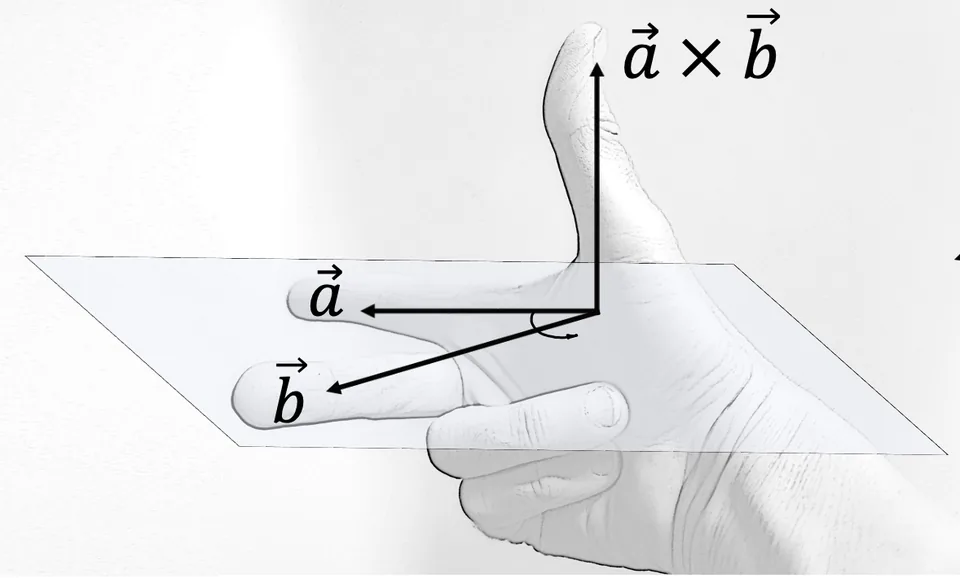
- Cross product a×b is a vector perpendicular to both (right-hand rule). |a×b| = |a||b| sin φ.
- Use cross products for surface normals and torque direction τ = r × F.
How it works
How it actually works, step by step
Write three components
Agree on +z (often up). Write (x,y,z) in metres.
Normalise when you need direction only
Divide by magnitude to get a unit direction for “look-at” or approach axes.
Dot for alignment
Same as 2D — now with a z term.
Cross for a perpendicular
Point fingers along a, curl toward b; thumb shows a×b. Check a·(a×b)=0.
a × b = (aᵧb_z − a_z bᵧ, a_z bₓ − aₓ b_z, aₓ bᵧ − aᵧ bₓ)
Visual
Visualise it: 3D magnitude, dot, and cross
Slide a and b components. Read |a|, a·b, angle, and a×b. Dashed arrow is the cross product.
Interactive · 3D vector lab (magnitude, dot, cross)
|a|
3.000
a · b
0.000
∠(a,b)
90.0°
|a × b|
6.708
a × b = (-2.00, 5.00, -4.00)
Dashed arrow is a × b (right-hand rule). Cross product is perpendicular to both a and b — useful for surface normals and torque direction.
Worked example
Worked example: a=(1,2,2), b=(2,0,−1)
Code lab
Code lab: magnitude, unit, cross
"""Stage 1 L05 — 3D magnitude, unit vector, and cross product."""
import math

a = (1.0, 2.0, 2.0)
b = (2.0, 0.0, -1.0)

def mag(u):
    return math.sqrt(u[0]**2 + u[1]**2 + u[2]**2)

def unit(u):
    m = mag(u)
    return (u[0]/m, u[1]/m, u[2]/m)

def cross(u, v):
    return (
        u[1]*v[2] - u[2]*v[1],
        u[2]*v[0] - u[0]*v[2],
        u[0]*v[1] - u[1]*v[0],
    )

def dot(u, v):
    return u[0]*v[0] + u[1]*v[1] + u[2]*v[2]

c = cross(a, b)
print(f"a = {a}, |a| = {mag(a):.3f}")
print(f"unit(a) = ({unit(a)[0]:.3f}, {unit(a)[1]:.3f}, {unit(a)[2]:.3f})")
print(f"a × b = {c}")
print(f"check a·(a×b) = {dot(a, c):.1f} (should be 0)")
print(f"check b·(a×b) = {dot(b, c):.1f} (should be 0)")
print(f"|a×b| = {mag(c):.3f}")
Expected output
a = (1.0, 2.0, 2.0), |a| = 3.000
unit(a) = (0.333, 0.667, 0.667)
a × b = (-2.0, 5.0, -4.0)
check a·(a×b) = 0.0 (should be 0)
check b·(a×b) = 0.0 (should be 0)
|a×b| = 6.708
Real world
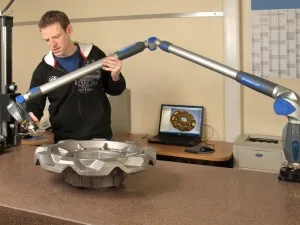
Normals, torque, and measuring arms
Mistakes
Common mistakes and confusions
Hardware & safety
Hardware lab and safety notes
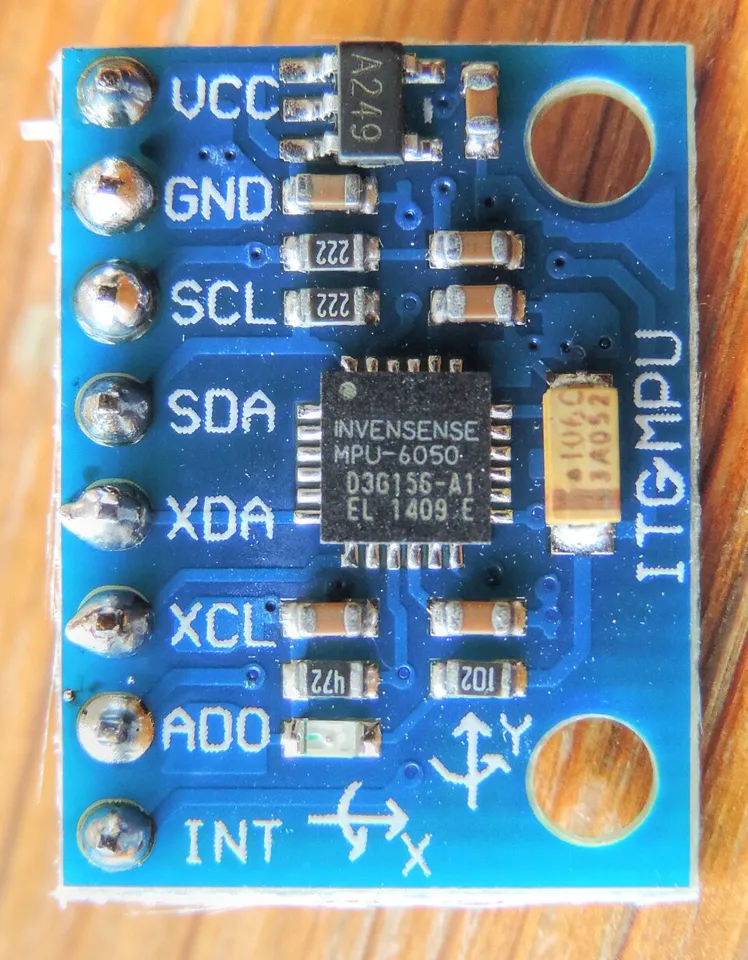
Every phone and many robot boards have an accelerometer (part of an IMU). Held still, it measures a 3D vector of about 9.8 m/s² pointing up (it feels the table pushing against gravity).
- Install any free sensor app (look for raw “accelerometer” x, y, z). Lay the phone flat: you should see roughly (0, 0, 9.8).
- Tilt it 90° onto its side: the 9.8 moves to x or y. The magnitude stays ≈ 9.8 — only direction changed.
- Later, an MPU-6050 on I²C gives the same kind of vector to an Arduino (3.3 V/5 V module, 4 wires, no high current).
Debugging
Debugging: when it doesn’t work
| Symptom | Likely cause | Fix |
|---|---|---|
| Cross product points the wrong way | Order swapped (b × a = −a × b) | Keep the order a × b; use the right-hand rule |
| Unit vector has length ≠ 1 | Divided by the wrong magnitude | Divide each component by |a| of the same vector |
| Normal of the desk is not ±z | Points not measured in one frame | Measure all three points from one corner |
| Phone shows −9.8 on z | Phone is upside down (screen facing table) | That is correct — the sign tells you which way is up |
Think
Think about it
Think
Why is a×a always the zero vector?
Experiment
Try it in the lab: desk axes
Experiment
Desk axes
You will need
- Your right hand
- vector-3d interactive
- Notebook
Steps
- Point index finger +x along the desk, middle finger +y, thumb +z (right-hand triad).
- In the interactive, set a and b nearly parallel — confirm |a×b| shrinks.
- Set them nearly perpendicular — |a×b| grows toward |a||b|.
Interactive · 3D vector lab (magnitude, dot, cross)
|a|
3.000
a · b
0.000
∠(a,b)
90.0°
|a × b|
6.708
a × b = (-2.00, 5.00, -4.00)
Dashed arrow is a × b (right-hand rule). Cross product is perpendicular to both a and b — useful for surface normals and torque direction.
|a×b| should approach 0 when the angle readout approaches 0° or 180°.
Knowledge check
Check your understanding
Knowledge check
1. |(1,2,2)| equals…
2. a × b is perpendicular to…
3. Right-hand rule thumb shows…
4. Unit vector has length…
Practice quiz
Mini assignment
Hands-on assignment
Mini assignment
3D point log
Measure or invent three points on your desk as (x,y,z) cm in a right-handed frame. Compute two edge vectors and their cross product (a normal to the desk plane — should be mostly ±z).
Deliverables
- Frame sketch
- Three points
- Cross-product normal
Do this, step by step
- Measure three corners of a book on your desk in cm (one frame, z = 0 for all).
- Make two edge vectors from the first corner and compute their cross product by hand.
- Run
vectors_3d.pywith your numbers and compare. - Normalise the result and check its length is 1.000.
Stuck? Hints, one at a time
- Hint 1: Example corners: P0 = (0,0,0), P1 = (20,0,0), P2 = (0,15,0) → edges (20,0,0) and (0,15,0).
- Hint 2: (20,0,0) × (0,15,0) = (0, 0, 300) — straight up, as expected for a flat book.
- Hint 3: Unit normal = (0, 0, 300)/300 = (0, 0, 1).
Challenges (pick by level)
- 🟢 Easy: Compute |(2, 3, 6)|. (Answer: 7.)
- 🟡 Medium: Show that a × b is perpendicular to both a and b using two dot products.
- 🟠 Hard: Log your phone's (x, y, z) at 5 tilts and compute the magnitude each time. How close to 9.8 m/s² is it?
Next step
Next, Lesson 6: Matrices — a neat way to transform many vectors at once. Related: IMUs and sensor fusion in Stage 5 — Robotics Fundamentals.
Sources
- Wikipedia — Cross product
- Wikipedia — Unit vector
- Wikipedia — Accelerometer
- Wikipedia — Inertial measurement unit
- Photos: Wikimedia Commons (credits under each image).
Self-attested for now — keep artifacts in your lab notebook.
Complete
Today's goal
0 of 1 done today
Mark this lesson complete when you have worked the experiment, knowledge check, and assignment (even roughly).