
Math for Robotics · Lesson 08
Frames & Reference Frames
Est. 35–45 min
Why
Why robots keep a family tree of frames
Concept
The big idea: parent / child frames and composition
- Each frame has a parent (except the root).
- An edge stores the transform from parent to child (or child to parent — pick a convention and stick to it).
- Composition: T_world_tool = T_world_base · T_base_link · T_link_tool
- In ROS this tree is often called TF. Same idea everywhere.
How it works
How it actually works, step by step
Draw the tree
Boxes for frames, arrows for parent→child.
Label each edge
Write θ and (tx,ty) or a small matrix for that relative pose.
Multiply along the path
From root to the frame you care about, multiply transforms in order.
Apply to a point
Once you have T_world_tool, the tool origin in world is T applied to (0,0).
Visual
Visualise it: robot pose as chained frames
Adjust the robot pose controls and watch how child frames ride along with their parents.
Interactive · Robot pose / transformation demo
Tip (x, y)
(152.1, 75.4)
Tip yaw
-5.0°
Simplification: planar 2R arm. Each joint adds a rotation; tip pose is the product of link transforms — the same idea as homogeneous chains on a 6DOF arm.
Worked example
Worked example: base → link → tool
Code lab
Code lab: compose three transforms
"""Stage 1 L08 — chain three planar transforms: world ← base ← link1 ← tool."""
import math

def T(theta_deg, tx, ty):
    th = math.radians(theta_deg)
    c, s = math.cos(th), math.sin(th)
    return ((c, -s, tx), (s, c, ty), (0, 0, 1))

def mul(A, B):
    C = [[0]*3 for _ in range(3)]
    for i in range(3):
        for j in range(3):
            C[i][j] = A[i][0]*B[0][j] + A[i][1]*B[1][j] + A[i][2]*B[2][j]
    return C

def apply(M, x, y):
    return (M[0][0]*x + M[0][1]*y + M[0][2], M[1][0]*x + M[1][1]*y + M[1][2])

T_WB = T(0, 0.0, 0.0)       # base at world origin for this demo
T_BL = T(45, 0.12, 0.0)     # link1 frame: origin 12 cm along base x, then turned 45°
T_LT = T(0, 0.10, 0.0)      # tool: 10 cm along the (turned) link x

T_WT = mul(mul(T_WB, T_BL), T_LT)
tip = apply(T_WT, 0, 0)
print("T_world_tool tip at origin of tool frame:")
print(f"  ({tip[0]*100:.2f} cm, {tip[1]*100:.2f} cm)")
print("Chain rule: T_WT = T_WB · T_BL · T_LT")
Expected output
T_world_tool tip at origin of tool frame:
  (19.07 cm, 7.07 cm)
Chain rule: T_WT = T_WB · T_BL · T_LT
Real world
TF trees and measuring arms
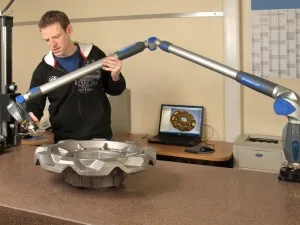
- ROS tf2 / TF tree: map → odom → base_link → … → tool0
- CAD assemblies: part frames nested under a root
Mistakes
Common mistakes and confusions
Hardware & safety
Hardware lab and safety notes
Your desk lamp (or the paper arm) is a perfect frame tree: {desk} → {base} → {arm1} → {arm2} → {bulb}. Each joint is one edge in the tree.
- Stick small paper labels on each part of the lamp with the frame name.
- Measure one edge: e.g. arm1 is 30 cm long and makes 60° with the base.
- Robots in ROS 2 keep exactly this kind of tree in tf2, updated many times per second.
Debugging
Debugging: when it doesn’t work
| Symptom | Likely cause | Fix |
|---|---|---|
| Tip lands in a strange place | Multiplied in the wrong order | Follow the path: T_WT = T_WB · T_BL · T_LT |
| A frame is “not found” | Orphan frame with no parent | Every frame except the root needs exactly one parent |
| Two parents for one frame | Loop in the tree | Pick one parent; trees have no loops |
| Tip off by the link length | Translation added in the wrong frame | Each translation is in its parent's frame |
Think
Think about it
Think
If you only know T_base_tool and T_world_base, how do you get T_world_tool?
Experiment
Try it in the lab: tree on paper
Experiment
Tree on paper
You will need
- Paper
- robot-pose interactive
Steps
- Sketch world → base → link1 → tool.
- Invent simple numbers for each edge.
- Compose on paper, then compare to the code lab pattern.
Interactive · Robot pose / transformation demo
Tip (x, y)
(152.1, 75.4)
Tip yaw
-5.0°
Simplification: planar 2R arm. Each joint adds a rotation; tip pose is the product of link transforms — the same idea as homogeneous chains on a 6DOF arm.
The tip only depends on the product along the path — intermediate names are bookkeeping.
Knowledge check
Check your understanding
Knowledge check
1. A frame tree edge stores…
2. T_world_tool is usually…
3. ROS often calls this tree…
4. Wrong multiply order typically…
Practice quiz
Mini assignment
Hands-on assignment
Mini assignment
Your TF sketch
Draw a TF-style tree for a desk lamp or a desk arm toy: name each frame and one relative transform on each edge.
Deliverables
- Tree sketch
- One numeric edge
Do this, step by step
- Draw the frame tree for your lamp or paper arm (boxes and arrows).
- Write one transform on each edge: angle and translation.
- Put your numbers into
frame_tree.py(T_BL, T_LT) and run it. - Measure the real tip with a ruler and compare.
Stuck? Hints, one at a time
- Hint 1: Start at the root ({desk} or {world}) and go one step at a time to the tip.
- Hint 2: Each
T(angle, tx, ty): translation in the parent frame, then turn the child by angle. - Hint 3: With base at origin, link frame 12 cm along x turned 45°, tool 10 cm further: tip = (12 + 10·cos45°, 10·sin45°) ≈ (19.07, 7.07) cm.
Challenges (pick by level)
- 🟢 Easy: Add a {camera} frame on the base to your tree.
- 🟡 Medium: Change T_BL to 90° and predict the tip before running.
- 🟠 Hard: Add a fourth transform (a gripper 5 cm long, turned −30°) and print every frame's origin.
Next step
Next, Lesson 9: Rotation looks closely at the R part of each edge. Related: real TF trees in Stage 10 — ROS 2.
Sources
- ROS 2 docs — Introducing tf2
- ROS REP 105 — Coordinate frames for mobile platforms
- Wikipedia — Frame of reference
- Photos: Wikimedia Commons (credits under each image).
Self-attested for now — keep artifacts in your lab notebook.
Complete
Today's goal
0 of 1 done today
Mark this lesson complete when you have worked the experiment, knowledge check, and assignment (even roughly).