
Math for Robotics · Lesson 02
Trigonometry for Robots
Est. 35–45 min
Why
Why robots live on triangles
This lesson connects the unit circle to a two-link arm tip position, and shows why atan2 (two-argument arctangent) beats plain atan when you recover an angle from a vector.
Concept
The big idea: sin and cos place a link in the plane
- Right triangle: opposite = hyp · sin θ, adjacent = hyp · cos θ.
- On the unit circle: point at angle θ is (cos θ, sin θ).
- One link of length L at angle q: tip offset ≈ (L cos q, L sin q).
- Two-link planar arm: x = L1 cos q1 + L2 cos(q1+q2), y = L1 sin q1 + L2 sin(q1+q2).
- atan2(y, x) recovers a signed angle in the correct quadrant.
x = L₁ cos q₁ + L₂ cos(q₁+q₂) y = L₁ sin q₁ + L₂ sin(q₁+q₂)
How it works
How it actually works, step by step
Draw link 1
From the base, go distance L1 at absolute angle q1. Landing point: (L1 cos q1, L1 sin q1).
Draw link 2
From that elbow, go distance L2 at absolute angle q1+q2 (each joint adds to the previous absolute heading).
Add the vectors
Tip = vector1 + vector2. That is the FK formula above.
Recover an angle
Given a vector (x,y), use atan2(y,x). Plain atan(y/x) loses the left half-plane.
Visual
Visualise it: unit circle as a unit-length link
cos θ and sin θ are adjacent/opposite when hypotenuse = 1 — and the x/y of a unit-length link.
Interactive · Unit circle / angle explorer
Radians
0.785
Turns
0.125
cos θ (x)
0.707
sin θ (y)
0.707
Lab convention: +θ is CCW from +x. Full turn = 6.2832 rad. Robot firmware often stores radians; UI knobs often show degrees — convert carefully.
Worked example
Worked example: L1=10 cm, L2=8 cm
Code lab
Code lab: two-link forward kinematics
"""Stage 1 L02 — planar two-link forward kinematics."""
import math

L1, L2 = 0.10, 0.08  # metres
q1_deg, q2_deg = 40.0, -30.0
q1 = math.radians(q1_deg)
q2 = math.radians(q2_deg)

x = L1 * math.cos(q1) + L2 * math.cos(q1 + q2)
y = L1 * math.sin(q1) + L2 * math.sin(q1 + q2)
reach = math.hypot(x, y)
tip_angle = math.atan2(y, x)

print(f"L1={L1*100:.0f} cm, L2={L2*100:.0f} cm")
print(f"q1={q1_deg}°, q2={q2_deg}°")
print(f"tip (x, y) = ({x*100:.2f} cm, {y*100:.2f} cm)")
print(f"|tip| from base = {reach*100:.2f} cm")
print(f"atan2(y, x) = {math.degrees(tip_angle):.1f}°")
Expected output
L1=10 cm, L2=8 cm
q1=40.0°, q2=-30.0°
tip (x, y) = (15.54 cm, 7.82 cm)
|tip| from base = 17.39 cm
atan2(y, x) = 26.7°
Real world
Where trig shows up on a real arm
- Hobby “geometric IK” for planar arms is triangle chasing with the law of cosines.
- Even 6DOF closed-form tricks repeatedly use sin/cos of joint angles.
- Camera rays and lidar bearings are trig in polar form.
Mistakes
Common mistakes and confusions
Hardware & safety
Hardware lab and safety notes
A potentiometer is the cheapest “joint encoder” you can buy. Turn the knob, read an angle, and let the Arduino compute where a 10 cm link tip would be.
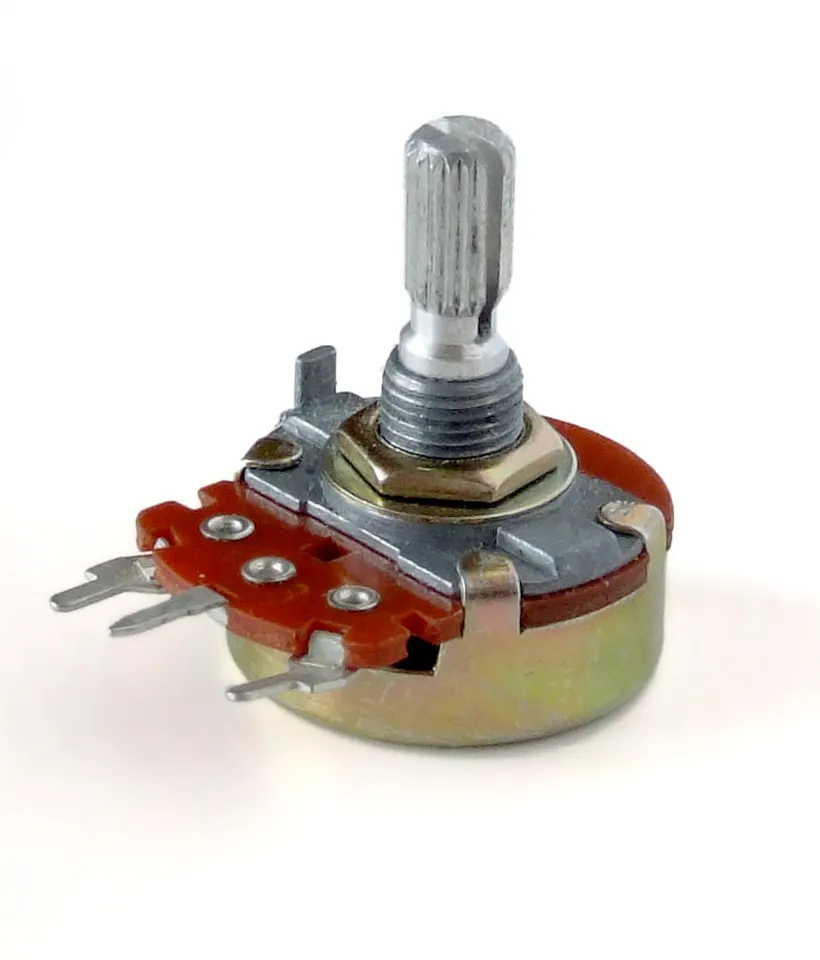
- Pot outer legs → 5 V and GND, middle leg (wiper) → A0. No motor, so this is safe on USB power.
analogReadgives 0–1023; a typical pot turns about 270°, so angle ≈ raw × 270/1023 (check your pot's datasheet).- Convert to radians before
sin()/cos()— Arduino trig also uses radians.
// pot_angle.ino — read a potentiometer as a "joint angle" and print sin/cos/tip position.
// Wiring: pot outer legs -> 5 V and GND, middle leg (wiper) -> A0. No motor needed.
const float L1 = 10.0;  // link length in cm (pretend)

void setup() {
  Serial.begin(9600);
}

void loop() {
  int raw = analogRead(A0);                    // 0..1023
  float deg = raw * (270.0 / 1023.0);          // typical pot sweep is about 270 degrees
  float rad = deg * PI / 180.0;                // convert before sin/cos
  float x = L1 * cos(rad);
  float y = L1 * sin(rad);
  Serial.print("deg=");
  Serial.print(deg, 1);
  Serial.print("  x=");
  Serial.print(x, 2);
  Serial.print(" cm  y=");
  Serial.print(y, 2);
  Serial.println(" cm");
  delay(300);
}
Example Serial Monitor output (your numbers depend on the knob)
deg=0.0  x=10.00 cm  y=0.00 cm
deg=90.0  x=-0.00 cm  y=10.00 cm
deg=135.1  x=-7.09 cm  y=7.05 cm
Debugging
Debugging: when it doesn’t work
| Symptom | Likely cause | Fix |
|---|---|---|
| Tip is in the wrong quadrant | Used atan(y/x) — loses the sign of x | Use atan2(y, x) |
| x and y look random | Degrees passed to sin/cos | Convert with radians() / * PI/180 |
| Second link points the wrong way | Used q2 instead of q1+q2 for link 2 | Link 2 absolute angle = q1 + q2 |
| Pot reading jumps around | Loose wiper wire or floating A0 | Press wires in firmly; wiper must go to A0 |
Think
Think about it
Think
If a link of length L points at angle q, what is its tip offset from the joint? Why does wrong quadrant atan break a gripper approach?
Experiment
Try it in the lab: paper two-link FK
Experiment
Paper two-link FK
You will need
- Calculator or Python
- Notebook
- Optional: two paper strips as links
Steps
- Pick L1=10 cm, L2=8 cm, q1=40°, q2=−30°.
- Compute tip (x,y) in degrees mode, then again after converting to radians in code.
- Compare which mode you prefer for hand calc vs code.
Both methods should agree within rounding — if not, you mixed units.
Knowledge check
Check your understanding
Knowledge check
1. On the unit circle, the y-coordinate at angle θ is…
2. Why prefer atan2(y, x)?
3. Planar two-link tip x typically sums…
4. Absolute world angle of link 2 is…
Practice quiz
Mini assignment
Hands-on assignment
Mini assignment
Trig cheat strip
Make a one-page cheat strip: sin/cos of 0,30,45,60,90; atan2 reminder; two-link FK formulas.
Deliverables
- Cheat strip photo or text
Do this, step by step
- Run
two_link_fk.pyand confirm the tip ≈ (15.54, 7.82) cm. - On graph paper, draw the same arm (1 square = 1 cm) with a protractor and measure the tip. Within 3 mm?
- Change q2 to +30° and predict whether the tip moves up or down before you run the code.
- Make the cheat strip: sin/cos for 0°, 30°, 45°, 60°, 90°, the atan2 rule and the two FK formulas.
Stuck? Hints, one at a time
- Hint 1: Link 2's absolute angle is q1 + q2 = 40° + 30° = 70° now.
- Hint 2: sin 70° is bigger than sin 10°, so y goes up: about 10·sin40° + 8·sin70° ≈ 13.9 cm.
- Hint 3: For the cheat strip, remember the pattern sin 0°, 30°, 45°, 60°, 90° = √0/2, √1/2, √2/2, √3/2, √4/2.
Challenges (pick by level)
- 🟢 Easy: Compute the tip for q1 = 90°, q2 = 0° by hand. (Answer: (0, 18) cm.)
- 🟡 Medium: Use
math.atan2to recover q1 from the tip of a one-link arm at (−5, 5). - 🟠 Hard: Build
pot_angle.ino, add a second pot for q2 and print the two-link tip.
Next step
Next, Lesson 3: Coordinate Systems — every (x, y) you just computed needs a named frame. Related: full FK and IK in Stage 8 — Kinematics & IK.
Sources
- Wikipedia — Trigonometric functions
- Wikipedia — atan2
- Wikipedia — Forward kinematics
- Wikipedia — Potentiometer
- Arduino docs — analogRead()
- Photos: Wikimedia Commons (credits under each image).
Self-attested for now — keep artifacts in your lab notebook.
Complete
Today's goal
0 of 1 done today
Mark this lesson complete when you have worked the experiment, knowledge check, and assignment (even roughly).