
Programming & Python · Lesson 04
Conditions & Decision Making
Est. 35–45 min
Try it · Python in your browser
Run this lesson's example (threshold_policy.py), change a number, run it again.
Why
Why robots need clear if/elif/else policies
By the end you will write ordered threshold policies, put battery abort first, and test edge cases on paper.
Concept
The big idea: branch on sensor truth
if condition:runs a block when condition is true.elifchains more tests; first match wins.elsecatches the remaining cases.- Order matters: check ABORT / STOP before CRUISE.
- Prefer named constants:
STOP_CM = 15.
How it works
How it actually works, step by step
List outcomes
ABORT, STOP, SLOW, CRUISE — name them.
Order hazards first
Battery fail and collision stop before “go fast”.
Write comparisons
distance_cm < 15, battery_ok is False, etc.
Table-test
Pick 4 input rows; predict outputs; run the script.
Visual
Visualise it: code-flow decisions
Step through if / if-else / while style flow. Change the condition and watch the path highlight.
Interactive · Code flow visualizer
distance = sensor.read()
if distance < 20:
    stop()
    turn_left()
else:
drive_forward()- 01 · read sensor
- 02 · else → drive_forward()
- 03 · done
Worked example
Worked example: four cases
| distance_cm | battery_ok | command |
|---|---|---|
| 10 | True | STOP |
| 25 | True | SLOW |
| 55 | True | CRUISE |
| 25 | False | ABORT |
Code lab
Code lab: threshold policy
#!/usr/bin/env python3
"""Water-tank / parking-sensor style threshold policy."""

def policy(distance_cm: float, battery_ok: bool) -> str:
    if not battery_ok:
        return "ABORT"
    if distance_cm < 15:
        return "STOP"
    elif distance_cm < 40:
        return "SLOW"
    else:
        return "CRUISE"

cases = [
    (10.0, True),
    (25.0, True),
    (55.0, True),
    (25.0, False),
]
for d, bat in cases:
    print(f"distance_cm={d:4.1f} battery_ok={bat!s:5} → {policy(d, bat)}")
Expected output
distance_cm=10.0 battery_ok=True  → STOP
distance_cm=25.0 battery_ok=True  → SLOW
distance_cm=55.0 battery_ok=True  → CRUISE
distance_cm=25.0 battery_ok=False → ABORT
Real world
Where thresholds live in the lab
- E-stop software latch: if estop → disable PWM.
- Workspace limits: if joint out of range → hold.
- Mode switches: teach vs run vs fault.
Mistakes
Common mistakes and confusions
Hardware & safety
Hardware lab and safety notes
Test your policy by hand before any robot moves: hold a book in front of an HC-SR04 (or type numbers) and say aloud what the robot should do at 10, 15, 25 and 40 cm.
- Put a ruler on the desk; mark 15 cm and 40 cm with tape.
- Edge cases matter: at exactly 15 cm the code says SLOW (because
< 15is False). - Battery check goes first — a dead battery beats every other rule.
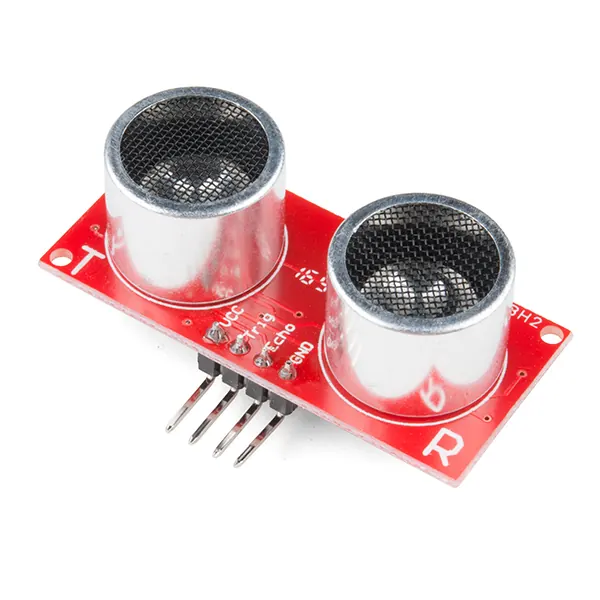
policy() to test your bands.Photo: SparkFun Electronics · CC BY 2.0 · Source: Wikimedia Commons · resized, converted to WebPDebugging
Debugging: when it doesn’t work
| Symptom | Likely cause | Fix |
|---|---|---|
SyntaxError on if d = 10: | = instead of == | Use == (or <) for comparison |
| Robot never stops | CRUISE checked before STOP | Order checks: hazards first |
| At 15 cm the result is SLOW, not STOP | < excludes the boundary | Use <= if 15 cm should stop |
battery_ok is the string "False" and still passes | Non-empty strings are truthy | Convert to a real bool |
Think
Think about it
Think
Why put battery_ok check before distance checks?
Experiment
Try it in the lab: threshold policy
Experiment
Threshold policy
- Write STOP_CM and SLOW_CM constants.
- Fill a 4-row table of inputs → expected commands.
- Run threshold_policy.py and compare.
- Use the code-flow interactive to trace one if-else path.
Interactive · Code flow visualizer
distance = sensor.read()
if distance < 20:
    stop()
    turn_left()
else:
drive_forward()- 01 · read sensor
- 02 · else → drive_forward()
- 03 · done
Knowledge check
Check your understanding
Knowledge check
1. First matching elif/if branch…
2. In our demo, distance 25 and battery False →
3. Comparison operator for equality is…
4. Named STOP_CM helps because…
5. else runs when…
Practice quiz
Coding practice
Mini assignment
Hands-on assignment
Mini assignment
Policy card
Design an if/elif/else policy for a desk sensor with at least one abort condition and two speed bands.
Deliverables
- Policy card (constants + branches)
- 4-row test table
Do this, step by step
- Run
threshold_policy.pyand check the four outputs. - Add cases (15.0, True) and (40.0, True). Predict, then run.
- Move the battery check to the bottom and see which case breaks.
- Make your policy card: constants, branches, and a 4-row test table.
Stuck? Hints, one at a time
- Hint 1: 10 → STOP, 25 → SLOW, 55 → CRUISE, battery False → ABORT.
- Hint 2: 15.0 → SLOW and 40.0 → CRUISE, because both comparisons are strict
<. - Hint 3: With battery last, (25.0, False) returns SLOW — dangerous. Hazards first.
Challenges (pick by level)
- 🟢 Easy: Add a constant
STOP_CM = 15and use it instead of the number. - 🟡 Medium: Add a
REVERSEband below 5 cm. - 🟠 Hard: Write a loop that tests all distances 0–60 cm in steps of 5 and prints the table.
Next step
Next, Lesson 5: Loops. Related: feedback thinking in Stage 7 — Control Systems & PID.
Sources
- Python docs — if statements
- Python docs — Truth value testing
- Python docs — Comparisons
- Photos: Wikimedia Commons (credits under each image).
Self-attested for now — keep artifacts in your lab notebook.
Complete
Today's goal
0 of 1 done today
Mark this lesson complete when you have worked the experiment, knowledge check, and assignment (even roughly).