
Programming & Python · Lesson 02
Python Fundamentals
Est. 30–40 min
Try it · Python in your browser
Run this lesson's example (hello_lab.py), change a number, run it again.
Why
Why the grammar of Python matters before joint commands
By the end you will run a small script, explain why indentation is syntax (not fashion), use comments, and fix a broken indent by eye.
Concept
The big idea: statements, indentation, comments, scripts
A script is a .py file the interpreter runs from top to bottom.
- Statement: one instruction (
print("hi"),x = 3). - Comment:
# ...— for humans; Python skips it. - Indentation: spaces at the start of a line define blocks (
if,for,def). Prefer 4 spaces. - Run:
python3 hello_lab.pyfrom a terminal in that folder.
Why robots care
A missing indent can skip a safety if and send a motion you never meant. Treat indentation like wiring: wrong connection, wrong behavior.
How it works
How it actually works, step by step
Create a file
Save code as
hello_lab.pyin a folder you can find.Write statements
Assignments and prints. One sensible idea per line.
Open a block
Lines ending with
:start a block. Next lines indent.Run it
python3 hello_lab.py— read stdout; fix errors from the top message down.
Visual
Visualise it: command console
Issue simple textual commands. Notice order matters — same as script order.
Interactive · Robot command console
Commands (Python-like):
  drive_forward(cm=20)
  turn_left(deg=90)
  turn_right(deg=90)
  stop()
  status()
- # robot console ready — type a command
Worked example
Worked example: ready vs not-ready
Battery flag True → print ready. False → print charge first. The if block must be indented; the final “Script finished.” stays at the left margin so it always runs.
Code lab
Code lab: hello lab script
Copy and run. Match the output exactly.
#!/usr/bin/env python3
"""First lab script — statements, comments, indentation."""

# Comments start with # — the robot ignores them
lab_name = "AIHUB Robotics Lab"
print("Hello,", lab_name)

# Indentation matters: this block belongs to if
battery_ok = True
if battery_ok:
    print("Status: ready for mission")
else:
    print("Status: charge battery first")

print("Script finished.")
Expected output
Hello, AIHUB Robotics Lab
Status: ready for mission
Script finished.
Real world
Where fundamentals show up in the lab
- Bring-up scripts: print “driver up” before motion.
- CI tests: tiny scripts that must exit 0.
- Notebooks vs scripts: notebooks are great for explore; ship behavior as
.pyfiles.
Mistakes
Common mistakes and confusions
Hardware & safety
Hardware lab and safety notes
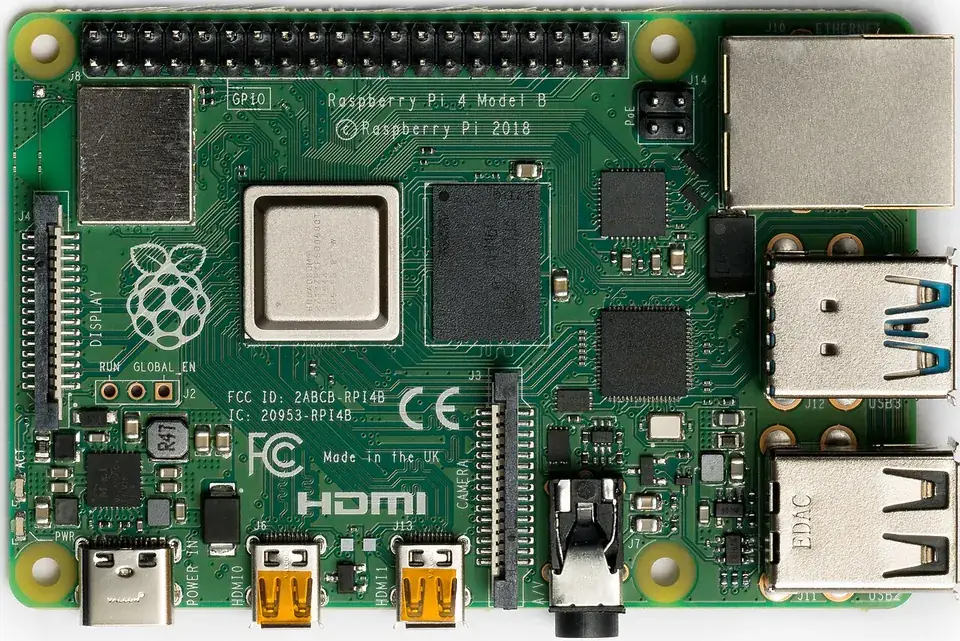
Set up a tidy desk “lab bench” for coding: laptop or Raspberry Pi, a terminal, a text editor, and one project folder. Good habits now save hours later.
- Make a folder
~/aihub-lab/stage-02/and save every script there. - Check your version with
python3 --version(you want 3.10 or newer). - On a Raspberry Pi, Python 3 is already installed with Raspberry Pi OS.
Debugging
Debugging: when it doesn’t work
| Symptom | Likely cause | Fix |
|---|---|---|
SyntaxError: invalid syntax at print "hi" | Python 2 style print | Use print("hi") and run with python3 |
IndentationError: expected an indented block | Nothing indented after : | Indent the block 4 spaces |
No such file or directory | Terminal is in a different folder | cd into the folder, or use ls to check |
| Script runs but prints nothing | File not saved | Save (Ctrl+S) before running |
Think
Think about it
Think
Why is IndentationError a feature for robots, not a nuisance?
Experiment
Try it in the lab: indent audit
Break and fix indentation on purpose.
Experiment
Indent audit
You will need
- Terminal
- hello_lab.py
Steps
- Run the script; confirm output matches the lesson.
- Remove indent from the print under if; run; read the error.
- Fix indent; run again.
- Add a second comment line describing your robot goal in one sentence.
Interactive · Robot command console
Commands (Python-like):
  drive_forward(cm=20)
  turn_left(deg=90)
  turn_right(deg=90)
  stop()
  status()
- # robot console ready — type a command
You should see IndentationError when broken and clean output when fixed.
Knowledge check
Check your understanding
Knowledge check
1. In Python, indentation…
2. Best command to run a script on most lab laptops?
3. Comments starting with # are…
4. A line ending with : usually means…
5. Mixing tabs and spaces often causes…
Practice quiz
Coding practice
Mini assignment
Hands-on assignment
Mini assignment
Hello lab script
Write a 15–25 line script that prints your name, a robot goal, and a ready/not-ready branch.
Deliverables
- hello_lab_custom.py
- Screenshot or paste of terminal output
Do this, step by step
- Create
hello_lab.py, copy the lab code and runpython3 hello_lab.py. - Change
battery_oktoFalseand run again. Which line changed? - Remove the indent before one
printinside theifand read the error message from the top. - Write
hello_lab_custom.py(15–25 lines) with your name, a robot goal and a ready/not-ready branch.
Stuck? Hints, one at a time
- Hint 1: With
battery_ok = Falsethe output says “charge battery first”. - Hint 2: Python reports
IndentationErrorand gives the line number — read that number first. - Hint 3: Use the rubric: runs with python3, uses if/else, has at least two comments.
Challenges (pick by level)
- 🟢 Easy: Print the robot goal in capital letters with
.upper(). - 🟡 Medium: Add a
battery_pctnumber and print ready only if it is 20 or more. - 🟠 Hard: Ask for the battery value with
input()and convert it withint().
Next step
Next, Lesson 3: Variables, Types & Operators. Related: using the terminal well in Stage 3 — Linux & Dev Environment.
Sources
- Python docs — The Python Tutorial
- Python docs — Using Python on Unix platforms
- Wikipedia — Raspberry Pi
- Photos: Wikimedia Commons (credits under each image).
Self-attested for now — keep artifacts in your lab notebook.
Complete
Today's goal
0 of 1 done today
Mark this lesson complete when you have worked the experiment, knowledge check, and assignment (even roughly).