
Programming & Python · Lesson 08
Objects & Classes
Est. 35–45 min
Try it · Python in your browser
Run this lesson's example (sensor_class.py), change a number, run it again.
Why
Why objects bundle state and behavior
By the end you will write a tiny class with __init__, methods, and instance attributes — enough for a sensor stub.
Concept
The big idea: class = blueprint, object = instance
class Name:defines a blueprint.__init__sets initial state (self.name = ...).- Methods take
selfas first parameter. - Instance:
front = DistanceSensor("front").
How it works
How it actually works, step by step
Name the thing
Sensor, driver, buffer — noun first.
List state
What must be remembered between calls?
List actions
read, reset, is_close…
Code __init__ + methods
Keep methods short; return values with units in names.
Visual
Visualise it: command console as object calls
Imagine each command as a method on a driver object.
Interactive · Robot command console
Commands (Python-like):
  drive_forward(cm=20)
  turn_left(deg=90)
  turn_right(deg=90)
  stop()
  status()
- # robot console ready — type a command
Code lab
Code lab: DistanceSensor
#!/usr/bin/env python3
"""Tiny sensor class — state + methods."""

class DistanceSensor:
    def __init__(self, name: str, offset_cm: float = 0.0):
        self.name = name
        self.offset_cm = offset_cm
        self.last_cm = None

    def read(self, raw_cm: float) -> float:
        self.last_cm = raw_cm + self.offset_cm
        return self.last_cm

    def is_close(self, threshold_cm: float = 20.0) -> bool:
        if self.last_cm is None:
            return False
        return self.last_cm < threshold_cm

front = DistanceSensor("front", offset_cm=0.5)
print(f"{front.name} reading = {front.read(17.0)} cm")
print(f"close? {front.is_close(20)}")
print(f"close@15? {front.is_close(15)}")
Expected output
front reading = 17.5 cm
close? True
close@15? False
Real world
Where classes help in the lab
- Hardware drivers wrap serial protocols.
- Filters keep EMA state.
- Controllers hold last command + limits.
Mistakes
Common mistakes and confusions
Hardware & safety
Hardware lab and safety notes
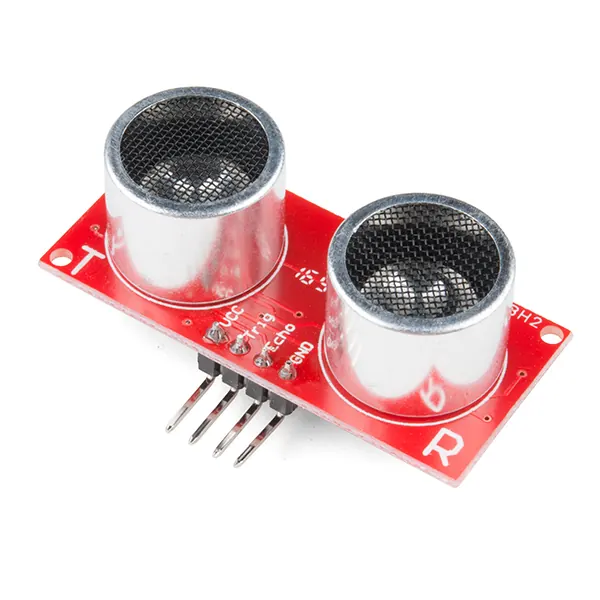
One class per real part. Give each HC-SR04 on your robot its own DistanceSensor object — front and back — each with its own offset (the sensor face is rarely at the robot's edge).
- Measure the offset: tape distance from the sensor face to the robot's front edge.
- Two objects, one class:
front = DistanceSensor("front", 0.5),back = DistanceSensor("back", -1.0). - Each object keeps its own
last_cm.
Debugging
Debugging: when it doesn’t work
| Symptom | Likely cause | Fix |
|---|---|---|
TypeError: read() takes 1 positional argument but 2 were given | Missing self in the method | First parameter must be self |
NameError: name 'last_cm' is not defined | Used last_cm instead of self.last_cm | Use self. for state |
is_close() is False before any read | last_cm is None at start | That is safe by design — call read() first |
| Both sensors show the same value | Shared class attribute | Set state in __init__ with self. |
Think
Think about it
Think
Why store last_cm on the object instead of a global?
Experiment
Try it in the lab: class sketch
Experiment
Class sketch
- Run sensor_class.py; confirm reading 17.5 with offset 0.5.
- Add a second sensor "left" with different offset.
- Sketch on paper: attributes vs methods for a BatteryMonitor.
Interactive · Robot command console
Commands (Python-like):
  drive_forward(cm=20)
  turn_left(deg=90)
  turn_right(deg=90)
  stop()
  status()
- # robot console ready — type a command
Knowledge check
Check your understanding
Knowledge check
1. An object is…
2. __init__ is for…
3. In the lab, front.read(17.0) returned…
4. self refers to…
5. is_close before any read should…
Practice quiz
Coding practice
Mini assignment
Hands-on assignment
Mini assignment
Mini class map
Implement DistanceSensor (or BatteryMonitor) with __init__, one update method, one query method.
Deliverables
- sensor_custom.py
- 2 instance demo printout
Do this, step by step
- Run
sensor_class.py: 17.0 + 0.5 = 17.5 cm, close at 20 is True, at 15 is False. - Create a second sensor
backwith offset −1.0 and read 30.0. - Add a method
reset()that setslast_cmback to None. - Write
sensor_custom.py(DistanceSensor or BatteryMonitor) with a 2-instance demo.
Stuck? Hints, one at a time
- Hint 1:
back.read(30.0)returns 29.0. - Hint 2:
def reset(self): self.last_cm = None. - Hint 3: BatteryMonitor idea: state
last_v, methodupdate(v), queryis_low(threshold_v=10.5).
Challenges (pick by level)
- 🟢 Easy: Add a
__repr__that prints the name and last reading. - 🟡 Medium: Keep a list of the last 5 readings inside the object.
- 🟠 Hard: Write a
Robotclass that owns two sensors and hasnearest_cm().
Next step
Next, Lesson 9: Modules, Packages & Environments. Related: ROS 2 nodes are classes too, in Stage 10 — ROS 2.
Sources
- Python docs — Classes
- Python docs — Class and instance variables
- Python docs — object.__repr__
- Photos: Wikimedia Commons (credits under each image).
Self-attested for now — keep artifacts in your lab notebook.
Complete
Today's goal
0 of 1 done today
Mark this lesson complete when you have worked the experiment, knowledge check, and assignment (even roughly).