
Programming & Python · Lesson 15
Capstone — Build a Robot Controller
Est. 45–60 min
Try it · Python in your browser
Run this lesson's example (capstone_ctrl.py), change a number, run it again.
Why
Why stitch the whole Stage 2 toolkit
By the end you will run and explain a vertical slice that uses validation, policy, and slew together.
Concept
The big idea: validate → decide → slew → act
- Pipeline: raw → validate → decide(target) → slew(actual) → log/act.
- Keep functions small and testable.
- Show a table of dist / tgt / speed / note.
- Name failure modes: reject streaks → STOP.
How it works
How it actually works, step by step
Feed a scripted stream
Stand-in for sensor ticks.
Validate each sample
Skip impossibles.
Map distance → target speed
STOP / SLOW / GO bands.
Slew toward target
Respect max_delta.
Print the portfolio table
Proof for your notebook.
Visual
Visualise it: controller challenge
Play the challenge: your mental model should now match sense → decide → (slew) → act.
Interactive · Robot controller challenge
Wire a sense → decide → act loop. Tune the stop threshold, then step the controller.
distance = sensor.read()  # 55
if distance < 20:
    stop(); turn_left()
elif distance < 35:
    drive_forward(slow=True)
else:
    drive_forward()
# last action: idleDecision now: drive_forward · turns=0 · t=0
Code lab
Code lab: capstone controller
#!/usr/bin/env python3
"""Capstone: tiny sensor → decision → slewed actuator controller."""

def validate(cm: float):
    return cm if 2.0 <= cm <= 400.0 else None

def slew(cur: float, tgt: float, max_d: float) -> float:
    d = max(-max_d, min(max_d, tgt - cur))
    return cur + d

def decide(distance_cm: float) -> float:
    """Return target speed 0..1 from distance."""
    if distance_cm < 15:
        return 0.0
    if distance_cm < 40:
        return 0.3
    return 0.8

readings = [55.0, 42.0, 30.0, 18.0, 10.0, 12.0]
speed = 0.0
print(f"{'dist':>6}  {'tgt':>5}  {'speed':>6}  note")
for raw in readings:
    v = validate(raw)
    if v is None:
        print(f"{raw:6.1f}  skip invalid")
        continue
    tgt = decide(v)
    speed = slew(speed, tgt, 0.2)
    note = "STOP" if speed == 0 else ("SLOW" if speed < 0.5 else "GO")
    print(f"{v:6.1f}  {tgt:5.1f}  {speed:6.2f}  {note}")
Expected output
  dist    tgt   speed  note
  55.0    0.8    0.20  SLOW
  42.0    0.8    0.40  SLOW
  30.0    0.3    0.30  SLOW
  18.0    0.3    0.30  SLOW
  10.0    0.0    0.10  SLOW
  12.0    0.0    0.00  STOP
Real world
What “done” looks like for this stage
- Desk demos with ultrasonic + differential drive stubs.
- Host watchdogs that rate-limit jog commands.
- Portfolio piece before Linux / electronics stages.
Mistakes
Common mistakes and confusions
Hardware & safety
Hardware lab and safety notes
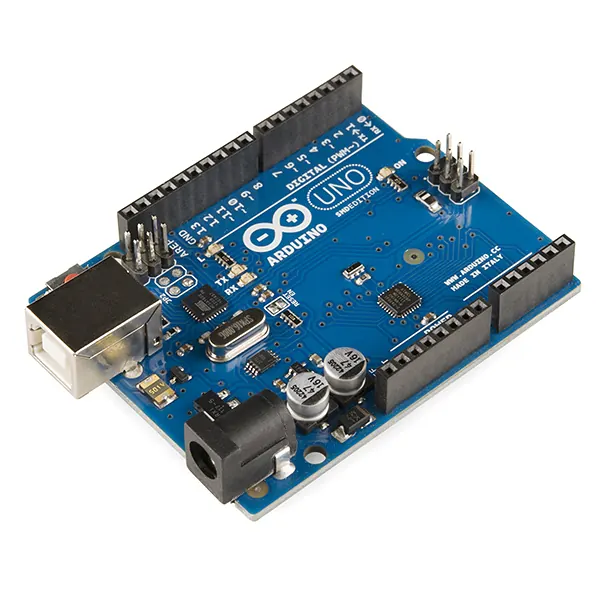
Run the capstone on real parts if you have them: HC-SR04 for distance, an Uno streaming readings over serial, and the target speed printed (or sent to a motor driver with the wheels lifted).
- Desk-safe first: scripted readings, then live sensor readings with the motors disconnected, then motors with wheels off the ground.
- Motor driver (e.g. L298N or TB6612FNG) gets its own battery; join its GND to the Uno GND.
- Keep a physical off switch on the motor supply.
Debugging
Debugging: when it doesn’t work
| Symptom | Likely cause | Fix |
|---|---|---|
| Speed jumps straight to 0.8 | Slew not applied | Pass every target through slew() |
| Controller crashes on a spike | No validate step | Call validate() before decide() |
| Never shows STOP | Speed only ramps down 0.2 per tick | Expected — slew limits braking too; tune if unsafe |
| Log file is unreadable | Printed text, not JSON | Use json.dumps(row) per line |
Think
Think about it
Think
In the sample table, why is speed 0.10 when target already went to 0.0 at dist 10?
Experiment
Try it in the lab: portfolio run
Experiment
Portfolio run
- Run capstone_ctrl.py; match the printed table.
- Change max slew to 0.05; observe longer STOP approach.
- Add one invalid reading to the list; ensure it is skipped.
- Use the controller challenge interactive to explain your policy aloud.
Interactive · Robot controller challenge
Wire a sense → decide → act loop. Tune the stop threshold, then step the controller.
distance = sensor.read()  # 55
if distance < 20:
    stop(); turn_left()
elif distance < 35:
    drive_forward(slow=True)
else:
    drive_forward()
# last action: idleDecision now: drive_forward · turns=0 · t=0
Knowledge check
Check your understanding
Knowledge check
1. Capstone pipeline order is…
2. At dist 10 with slew 0.2 from 0.30, first new speed…
3. A good Stage 2 portfolio includes…
4. Invalid readings should…
5. Next stages after Python typically harden…
Practice quiz
Coding practice
Mini assignment
Hands-on assignment
Mini assignment
Controller portfolio
Ship a personalised capstone: validate + decide + slew + JSONL log + short README of thresholds.
Deliverables
- capstone_custom.py
- sample_run.jsonl
- README thresholds & failure modes (≤1 page)
Do this, step by step
- Run
capstone_ctrl.pyand copy the table into your notebook. - Add a spike 999.0 to
readingsand confirm it prints “skip invalid”. - Add JSONL logging of every row (Lesson 10).
- Write your README: thresholds, max_delta, and 2 failure modes with safe defaults.
Stuck? Hints, one at a time
- Hint 1: With max_delta 0.2 the speed rises 0.20, 0.40, then falls toward the targets.
- Hint 2: Put validate → decide → slew in a function
tick(raw, speed)that returns the new speed. - Hint 3: Good failure modes: “no reading for 0.5 s → STOP” and “battery below 10.5 V → STOP”.
Challenges (pick by level)
- 🟢 Easy: Change the STOP band to 20 cm and re-run.
- 🟡 Medium: Allow faster braking than speeding up (two max_delta values).
- 🟠 Hard: Feed real HC-SR04 readings over pyserial and log a 30-second run.
Next step
You have finished Stage 2! Look back at Lesson 14: Python + Robot Control if slew still feels new. Next stage: Stage 3 — Linux & Dev Environment. Related: Stage 7 — Control Systems & PID.
Sources
- Python docs — json
- pySerial documentation
- Arduino docs — Serial
- Photos: Wikimedia Commons (credits under each image).
Self-attested for now — keep artifacts in your lab notebook.
Complete
Today's goal
0 of 1 done today
Mark this lesson complete when you have worked the experiment, knowledge check, and assignment (even roughly).