
Programming & Python · Lesson 09
Modules, Packages & Environments
Est. 30–40 min
Try it · Python in your browser
Run this lesson's example (imports_demo.py), change a number, run it again.
Why
Why projects need walls between dependencies
By the end you will import stdlib modules, explain why venv exists, and sketch a simple project layout.
Concept
The big idea: import, packages, venv
import math/from math import radians.- A module is usually a
.pyfile; a package is a folder with modules. python3 -m venv .venvthen activate — Stage 3 deepens this.- Keep robot apps as small modules:
sensors.py,control.py,main.py.
How it works
How it actually works, step by step
Import what you need
stdlib first (math, json, pathlib).
Split files by role
sensors / decide / act / main.
Create a venv for the project
Avoid system-wide pip spaghetti.
Pin a short requirements list later
When you add third-party libs.
Visual
Visualise it: structured data / layout thinking
Think in compartments — modules hold related functions the way structures hold related fields.
Interactive · Data structure explorer
Ultrasonic ring buffer as a Python list
readings = [12.4,11.9,18.2,9.5,22]
latest = readings[-1]      # 22.0
mid    = readings[2]     # 18.2
min    = 9.5
max    = 22.0
avg    = 14.80
# robotics: rolling window for filters
Code lab
Code lab: imports demo
#!/usr/bin/env python3
"""Show stdlib import + a tiny local helper pattern."""
import math
import json

def package_hint():
    return {
        "python": "3.x",
        "tip": "use venv so desk-arm libs do not fight camera-ML libs",
        "pi": round(math.pi, 5),
    }

info = package_hint()
print(json.dumps(info, indent=2))
print("math.radians(90) =", round(math.radians(90), 4))
Expected output
{
  "python": "3.x",
  "tip": "use venv so desk-arm libs do not fight camera-ML libs",
  "pi": 3.14159
}
math.radians(90) = 1.5708Real world
Where environments save lab days
- One venv per robot project on a shared lab laptop.
- ROS workspaces also isolate — mental model transfers.
- CI installs from requirements into a clean env.
Mistakes
Common mistakes and confusions
Hardware & safety
Hardware lab and safety notes
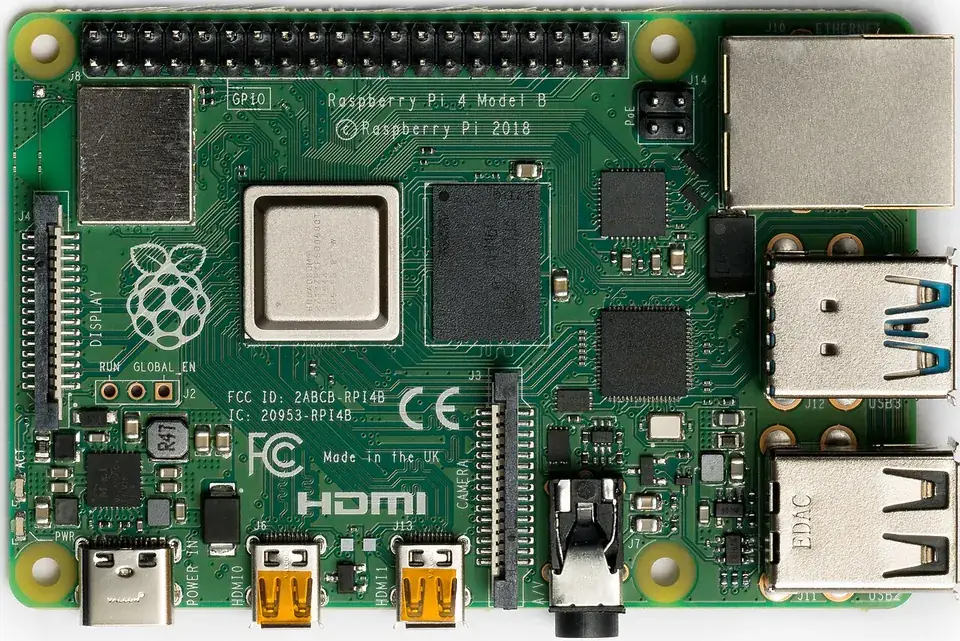
On a Raspberry Pi robot, a virtual environment keeps your robot libraries separate from the system. Newer Raspberry Pi OS (Bookworm) even blocks system-wide pip install by default — so venv is the normal way.
- Create:
python3 -m venv .venv; activate:source .venv/bin/activate(Windows:.venv\Scripts\activate). - Install inside it:
pip install numpy pyserial; save withpip freeze > requirements.txt. - Folder layout:
sensors.py,decide.py,act.py,main.py.
Debugging
Debugging: when it doesn’t work
| Symptom | Likely cause | Fix |
|---|---|---|
error: externally-managed-environment | pip into system Python (PEP 668) | Create and activate a venv first |
ModuleNotFoundError: No module named 'numpy' | Installed in a different environment | Activate the venv, then pip install |
ImportError (circular import) | A imports B, B imports A | Move shared code to a third module |
Your file json.py breaks import json | Name shadows the stdlib module | Rename your file |
Think
Think about it
Think
Why not install every pip package globally “for convenience”?
Experiment
Try it in the lab: layout sketch
Experiment
Layout sketch
- Run imports_demo.py; confirm math.radians(90) ≈ 1.5708.
- On paper, draw main.py importing sensors.py and control.py.
- Write the three venv commands in your notebook (do not need network here).
Interactive · Data structure explorer
Ultrasonic ring buffer as a Python list
readings = [12.4,11.9,18.2,9.5,22]
latest = readings[-1]      # 22.0
mid    = readings[2]     # 18.2
min    = 9.5
max    = 22.0
avg    = 14.80
# robotics: rolling window for filters
Knowledge check
Check your understanding
Knowledge check
1. import math gives you…
2. venv is for…
3. math.radians(90) ≈
4. A good tiny layout includes…
5. Circular imports are…
Practice quiz
Coding practice
Mini assignment
Hands-on assignment
Mini assignment
Env checklist
Write a checklist: venv create/activate, folder layout for a mini robot app, and which stdlib modules you expect to import.
Deliverables
- checklist.md
- imports_custom.py using math+json
Do this, step by step
- Run
imports_demo.pyand checkmath.radians(90) = 1.5708. - Create a venv in your Stage 2 folder and activate it; run
which python(orwhere python). - Split
sense_act_story.pyintosensors.pyandmain.pywith an import. - Write
checklist.mdandimports_custom.pythat usesmathandjson.
Stuck? Hints, one at a time
- Hint 1: After activating,
which pythonpoints inside.venv/bin/. - Hint 2: In
main.py:from sensors import read_distance_cm. - Hint 3: Add
if __name__ == "__main__":so importing a file does not run its demo.
Challenges (pick by level)
- 🟢 Easy: Print
sys.versionandsys.prefixinside and outside the venv. - 🟡 Medium: Make a
requirements.txtand recreate the venv from it. - 🟠 Hard: Turn your folder into a package with
__init__.pyand run it withpython -m.
Next step
Next, Lesson 10: Files, Data & JSON. Related: shell and packages in Stage 3 — Linux & Dev Environment.
Sources
- Python docs — Modules
- Python docs — venv
- PEP 668 — Externally managed environments
- Photos: Wikimedia Commons (credits under each image).
Self-attested for now — keep artifacts in your lab notebook.
Complete
Today's goal
0 of 1 done today
Mark this lesson complete when you have worked the experiment, knowledge check, and assignment (even roughly).