
Programming & Python · Lesson 01
Why Programming Matters in Robotics
Est. 30–40 min
Try it · Python in your browser
Run this lesson's example (sense_act_story.py), change a number, run it again.
Why
Why hardware alone is not a robot
By the end you will explain sense → decide → act in plain words, say why Python is a friendly host language for lab robots, and sketch one behavior brief (what to sense, what to decide, what to command).
Concept
The big idea: software turns sensors and motors into behavior
Behavior is what the robot does over time: stop, turn, grasp, log, recover. Hardware supplies capability; software supplies policy.
- Sense: read sensors or messages (distance, joint angle, battery).
- Decide: apply rules or controllers (if too close → stop).
- Act: send commands (speed, joint setpoints) with timeouts and limits.
- Log: write what happened so you can debug tomorrow morning.
Why Python in this lab?
Python reads almost like English, has a huge library ecosystem, and runs well on a laptop that talks to an Arduino / Raspberry Pi / ROS machine. Firm real-time loops may live in C++ on a microcontroller — Python still shines for host logic, tests, and data.
How it works
How it actually works, step by step
Pick a behavior
Example: “If something is closer than 20 cm in front, stop; else creep forward.”
Name the inputs
distance_cm from an ultrasonic (or a stub that returns a number).
Write the policy
if / elif / else — or a tiny function decide(distance_cm).
Send one command
Print or publish STOP / SLOW / GO. On real hardware you would talk to a driver; here we keep it honest and simulated.
Repeat on a clock
Robots loop. Sense again. Decide again. Act again.
Visual
Visualise it: sense → decide → act playground
Try a tiny policy in the playground. Notice how changing the rule changes motion — that is programming.
Interactive · Robot controller challenge
Wire a sense → decide → act loop. Tune the stop threshold, then step the controller.
distance = sensor.read()  # 55
if distance < 20:
    stop(); turn_left()
elif distance < 35:
    drive_forward(slow=True)
else:
    drive_forward()
# last action: idleDecision now: drive_forward · turns=0 · t=0
Worked example
Worked example: parking-sensor style stop
You stand behind a car with a parking beeper. Distance falls. Beep rate rises. Below a threshold the car must not roll further. That is sense → decide → act without jargon.
Code lab
Code lab: sense → decide → act stub
Copy into sense_act_story.py and run python3 sense_act_story.py. Your terminal should match the output below.
#!/usr/bin/env python3
"""Mini sense → decide → act story (no hardware)."""

def read_distance_cm():
    # Pretend ultrasonic reading (lab stub)
    return 22.0

def decide(distance_cm: float) -> str:
    if distance_cm < 15:
        return "STOP"
    if distance_cm < 40:
        return "SLOW"
    return "GO"

def act(command: str) -> None:
    print(f"actuator ← {command}")

distance = read_distance_cm()
cmd = decide(distance)
print(f"sensor distance_cm = {distance}")
print(f"decision = {cmd}")
act(cmd)
Expected output
sensor distance_cm = 22.0
decision = SLOW
actuator ← SLOW
Real world
Where programming shows up in the lab
- Factory arms: weld / pick programs are software policies over joint paths.
- Vacuum robots: map + decide + drive in a loop.
- Your desk arm: even a “wave hello” demo is a scripted sequence of joint commands.
Mistakes
Common mistakes and confusions
Hardware & safety
Hardware lab and safety notes
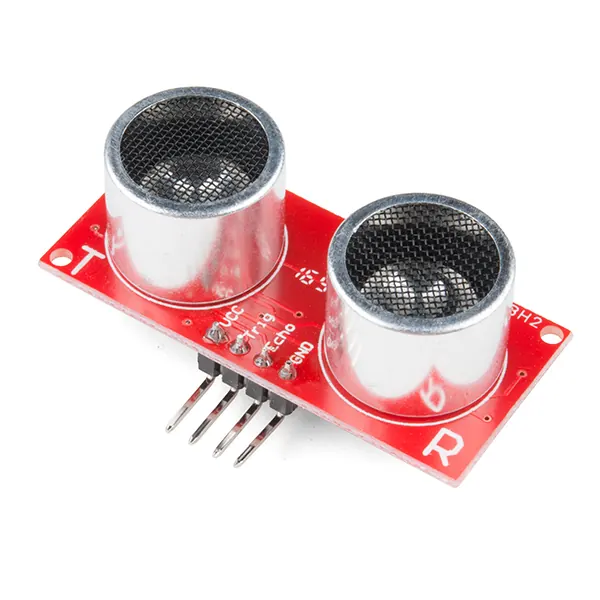
You do not need hardware yet. If you have a kit, wire an HC-SR04 ultrasonic sensor to an Arduino Uno and let it print distance_cm on the Serial Monitor — that number is the *sense* part of sense_act_story.py.
- HC-SR04: VCC → Uno 5 V, GND → GND, Trig → pin 9, Echo → pin 10. The sensor draws only ~15 mA, so the Uno can power it.
- For now, *act* is a
print(). Only drive a real motor later, through a motor driver with its own supply. - No kit? Keep
read_distance_cm()as a stub that returns a number — the logic is the same.
Debugging
Debugging: when it doesn’t work
| Symptom | Likely cause | Fix |
|---|---|---|
python3: command not found | Python not installed or not on PATH | Install Python 3 or try python / py -3 on Windows |
| Decision is always GO | Stub always returns a big number | Change read_distance_cm() to 10.0 and re-run |
IndentationError | Mixed spaces and tabs after copy-paste | Re-indent with 4 spaces |
| Serial Monitor shows garbage | Baud rate mismatch | Match Serial.begin(9600) and the monitor setting |
Think
Think about it
Think
A robot has perfect motors but no program. What can it do on its own?
Experiment
Try it in the lab: name the loop
Write the three boxes of behavior for one robot task you care about.
Experiment
Name the loop
You will need
- Lab notebook
- This lesson’s interactive
Steps
- Pick a task (e.g. “creep forward until 20 cm, then stop”).
- Write Sense: which reading(s)?
- Write Decide: thresholds and outcomes.
- Write Act: what command leaves the laptop?
- Run the playground once with a “too close” case and once with a “clear” case.
Interactive · Robot controller challenge
Wire a sense → decide → act loop. Tune the stop threshold, then step the controller.
distance = sensor.read()  # 55
if distance < 20:
    stop(); turn_left()
elif distance < 35:
    drive_forward(slow=True)
else:
    drive_forward()
# last action: idleDecision now: drive_forward · turns=0 · t=0
You should be able to point at each box and say what changed when distance changed.
Knowledge check
Check your understanding
Knowledge check
1. Sense → decide → act means…
2. Hardware without software is closest to…
3. Why is Python popular on the host PC in labs?
4. A good first behavior brief includes…
5. In the stub, distance_cm = 22 led to…
Practice quiz
Coding practice
Mini assignment
Hands-on assignment
Mini assignment
Behavior brief
Write a one-page behavior brief for a desk-arm or mobile demo: sense, decide, act, and one failure mode (e.g. sensor timeout).
Deliverables
- Behavior brief (≤1 page)
- One failure mode + safe default command
Do this, step by step
- Run
sense_act_story.pyand copy its three output lines. - Change the stub to return 10.0, then 50.0. Write down the decision each time.
- Draw the sense → decide → act loop for your own demo (desk arm or small rover) on paper.
- Write the behaviour brief: one sense, one rule, one action, and one failure mode with a safe default.
Stuck? Hints, one at a time
- Hint 1: 22.0 cm gives SLOW, 10.0 gives STOP, 50.0 gives GO — the thresholds are 15 and 40 cm.
- Hint 2: A good failure mode: “sensor gives no reading for 0.5 s”. Safe default: STOP.
- Hint 3: Keep the brief to plain sentences first; the code comes in Lessons 4 and 11.
Challenges (pick by level)
- 🟢 Easy: Add a fourth band: below 5 cm print
BACK UP. - 🟡 Medium: Make
read_distance_cm()return a value from a list so each run tests a different number. - 🟠 Hard: If you have an HC-SR04, copy one Serial Monitor reading into the stub and check the decision matches what you see.
Next step
Next, Lesson 2: Python Fundamentals — your first real script. Related: sensors in Stage 0 — Orientation and the terminal in Stage 3 — Linux & Dev Environment.
Sources
- Python docs — The Python Tutorial
- Arduino docs — Serial.begin()
- Wikipedia — Ultrasonic transducer
- Photos: Wikimedia Commons (credits under each image).
Self-attested for now — keep artifacts in your lab notebook.
Complete
Today's goal
0 of 1 done today
Mark this lesson complete when you have worked the experiment, knowledge check, and assignment (even roughly).