
Programming & Python · Lesson 14
Python + Robot Control
Est. 35–45 min
Try it · Python in your browser
Run this lesson's example (slew_cmd.py), change a number, run it again.
Why
Why commands need rate limits
By the end you will implement slew(), watch a ramp to 0.8, and tune max_delta.
Concept
The big idea: slew / saturate motion requests
- target may jump; actual moves by at most max_delta per tick.
- Also clamp absolute limits (min/max speed).
- Combine with sensor policy: decide → target → slew → act.
- Log both target and actual for debugging.
How it works
How it actually works, step by step
Read target from decide()
0..1 speed or joint setpoint.
Compute delta
target − current.
Clamp delta
±max_delta.
Apply
current += clamped_delta; send actual.
actual ← actual + clip(target − actual, −Δmax, +Δmax)
Visual
Visualise it: command slew lab
Set target and max_delta, press Run ramp. Watch actual climb in steps — cause and effect.
Interactive · Command slew / rate limit
Like easing an auto-rickshaw accelerator — the target can jump, but actual speed only moves by max_delta each tick.
Code lab
Code lab: slew ramp
#!/usr/bin/env python3
"""Rate-limit (slew) a speed command so the arm does not jerk."""

def slew(current: float, target: float, max_delta: float) -> float:
    delta = target - current
    if delta > max_delta:
        delta = max_delta
    elif delta < -max_delta:
        delta = -max_delta
    return current + delta

speed = 0.0
target = 0.8
max_step = 0.15
print(f"{'tick':>4}  {'speed':>6}  → target {target}")
for t in range(1, 9):
    speed = slew(speed, target, max_step)
    print(f"{t:4d}  {speed:6.2f}")
print("done — notice the ramp, not a jump")
Expected output
tick   speed  → target 0.8
   1    0.15
   2    0.30
   3    0.45
   4    0.60
   5    0.75
   6    0.80
   7    0.80
   8    0.80
done — notice the ramp, not a jump
Real world
Where slew limits protect hardware
- Joint jog UIs.
- Mobile base speed commands.
- Gripper close speed ramps.
Mistakes
Common mistakes and confusions
Hardware & safety
Hardware lab and safety notes
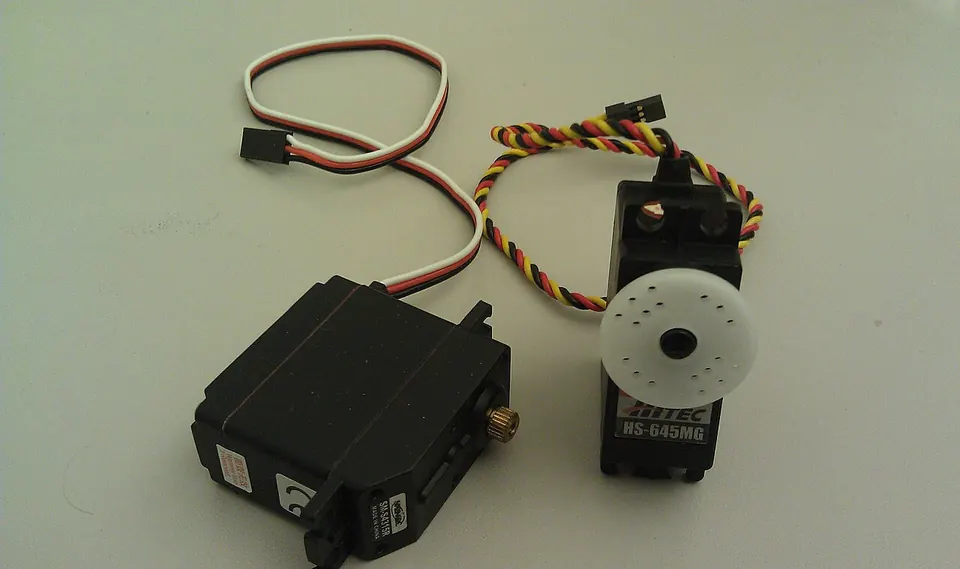
Slew limiting protects gears and stops wheelies. Try it on a real servo: send the ramped angles from Python (or an Arduino loop) and watch the smooth move, then send one big jump and compare.
- Servo signal → Uno pin 9; servo power from a separate 5–6 V supply (4×AA or a 5 V 2 A adapter); join GND with the Uno.
- Start with small
max_deltaand raise it slowly. - Keep fingers out of the arm's reach while testing.
Debugging
Debugging: when it doesn’t work
| Symptom | Likely cause | Fix |
|---|---|---|
| Speed overshoots the target | Clamp applied after adding | Clamp the delta, then add |
| Robot brakes hard | Slew only on the way up | Limit both positive and negative delta |
| Ramp never reaches the target | Not enough ticks | Run until speed == target |
| Servo jitters at the end | Noisy target from sensor | Smooth the target (Lesson 13) |
Think
Think about it
Think
If max_delta is 0.15 and target jumps 0→0.8, how many ticks until arrival (ideal)?
Experiment
Try it in the lab: slew on paper
Experiment
Slew on paper
- Run slew_cmd.py; confirm tick 6 reaches 0.80.
- In the interactive, set max_delta=0.05 and run — count ticks.
- Set target to 0 while mid-ramp; confirm it slews down too.
Interactive · Command slew / rate limit
Like easing an auto-rickshaw accelerator — the target can jump, but actual speed only moves by max_delta each tick.
Knowledge check
Check your understanding
Knowledge check
1. Slew limiting means…
2. In the lab with Δ=0.15 to target 0.8, tick 1 speed is…
3. clip(delta, −Δ, +Δ) handles…
4. Logging target and actual helps…
5. Decide should output…
Practice quiz
Coding practice
Mini assignment
Hands-on assignment
Mini assignment
Control notes
Implement slew for speed in 0..1 with configurable max_delta; plot or print a ramp table.
Deliverables
- slew_custom.py
- Ramp table for target 0.9 with two different Δ values
Do this, step by step
- Run
slew_cmd.py: 0.15, 0.30, 0.45, 0.60, 0.75, 0.80, 0.80, 0.80. - Set target to 0.9 and max_step to 0.1. How many ticks to reach it?
- Now max_step = 0.3. Compare.
- Write
slew_custom.pyand print both ramp tables (target 0.9, two Δ values).
Stuck? Hints, one at a time
- Hint 1: With Δ = 0.1 it takes 9 ticks (0.1, 0.2 … 0.9).
- Hint 2: With Δ = 0.3 it takes 3 ticks (0.3, 0.6, 0.9).
- Hint 3:
min(max_d, max(-max_d, target - current))clamps the delta in one line.
Challenges (pick by level)
- 🟢 Easy: Ramp down from 0.8 to 0 with the same function.
- 🟡 Medium: Use different limits for speeding up and slowing down.
- 🟠 Hard: Ramp a servo angle on hardware and log every command to JSONL.
Next step
Next, Lesson 15: Capstone — Build a Robot Controller. Related: PID and rate limits in Stage 7 — Control Systems & PID and smooth paths in Stage 9 — Trajectory Planning.
Sources
- Wikipedia — Slew rate
- Arduino docs — Servo library
- Python docs — min() and max()
- Photos: Wikimedia Commons (credits under each image).
Self-attested for now — keep artifacts in your lab notebook.
Complete
Today's goal
0 of 1 done today
Mark this lesson complete when you have worked the experiment, knowledge check, and assignment (even roughly).