
Programming & Python · Lesson 05
Loops
Est. 35–45 min
Try it · Python in your browser
Run this lesson's example (mission_loop.py), change a number, run it again.
Why
Why robots live in loops
By the end you will write for/while loops, use break, understand for-else, and set a max_steps budget.
Concept
The big idea: while / for with a budget and exits
for item in sequence:walks a list / range.while condition:repeats until false — guard against forever.breakexits early;continueskips to next iteration.- for-else: else runs if the loop did not break.
- Always budget: max_steps, timeouts, watchdog thoughts.
How it works
How it actually works, step by step
List work items
Waypoints, joint samples, sensor ticks.
Choose for vs while
Known sequence → for. Unknown duration with condition → while.
Add an escape
break on obstacle; max_steps on budget.
Log progress
Print step counts so hangs are visible.
Visual
Visualise it: loop simulator
Set N and run. Watch the robot repeat a command pattern — loops made visible.
Interactive · Loop simulator
for i in range(N): run a fixed command list — watch the robot repeat the pattern.
cmds = ["forward","forward","left","forward","right","forward"]
for i in range(3):
    for c in cmds:
getattr(robot, c)()Code lab
Code lab: mission loop
#!/usr/bin/env python3
"""Mission loop with budget and early exit."""

waypoints = ["A", "B", "C", "D"]
max_steps = 10
steps = 0
obstacle = False  # flip to True to see early stop

print("mission start")
for wp in waypoints:
    steps += 1
    if steps > max_steps:
        print("budget exceeded → stop")
        break
    if obstacle and wp == "C":
        print(f"obstacle near {wp} → abort loop")
        break
    print(f"visit {wp} (step {steps})")
else:
    # runs only if loop did NOT break
    print("all waypoints done")
print(f"total steps used: {steps}")
Expected output
mission start
visit A (step 1)
visit B (step 2)
visit C (step 3)
visit D (step 4)
all waypoints done
total steps used: 4
Real world
Where loops show up in the lab
- Control loops at fixed rate (even if timing is Stage 7).
- Data collection for N samples.
- Retry loops with attempt limits.
Mistakes
Common mistakes and confusions
Hardware & safety
Hardware lab and safety notes
Every robot runs a loop. Try a safe one on your desk: a “waypoint” walk with paper cards A–D, or an Arduino blinking its built-in LED in a counted loop.
- Paper version: put cards A, B, C, D on the floor; walk them in order, one step per loop.
- Arduino version: blink the on-board LED (pin 13) 5 times with a
forloop — the LED is built in, so no wiring. - Always know how to stop: Ctrl+C in the terminal, the reset button on the Uno.
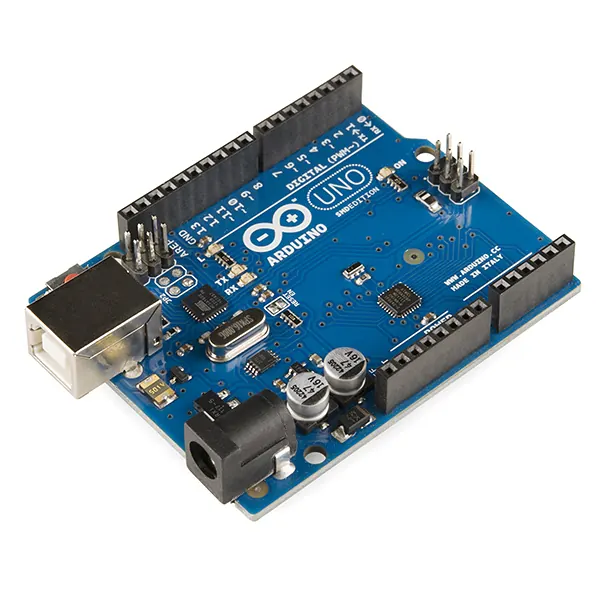
loop() runs forever, so your Python loops need their own budget.Photo: SparkFun Electronics · CC BY 2.0 · Source: Wikimedia Commons · resized, converted to WebPDebugging
Debugging: when it doesn’t work
| Symptom | Likely cause | Fix |
|---|---|---|
| Script never ends | while condition never becomes False | Add a max_steps budget and a break |
| “all waypoints done” printed after an abort | else attached to the if, not the for | Indent else: level with for |
| Loop runs one time too few | range(1, 5) stops at 4 | Stop value is excluded |
| Steps used = 3 with max_steps = 2 | The step is counted before the budget check | That is by design — the 3rd step is refused |
Think
Think about it
Think
When does the else clause on a for-loop run?
Experiment
Try it in the lab: repeat a pattern
Experiment
Repeat a pattern
- Run the loop simulator with N=3 and N=5.
- Run mission_loop.py; note the for-else message.
- Flip obstacle to True; confirm else does not run.
- Write your own for i in range(5) that prints tick i.
Interactive · Loop simulator
for i in range(N): run a fixed command list — watch the robot repeat the pattern.
cmds = ["forward","forward","left","forward","right","forward"]
for i in range(3):
    for c in cmds:
getattr(robot, c)()Knowledge check
Check your understanding
Knowledge check
1. break does what?
2. for-else else runs when…
3. A mission max_steps budget prevents…
4. range(3) yields…
5. while needs…
Practice quiz
Coding practice
Mini assignment
Hands-on assignment
Mini assignment
Loop budget
Write a waypoint visitor with max_steps and an obstacle break. Include for-else completion print.
Deliverables
- mission_loop_custom.py
- Note of steps used for a 4-waypoint clear run
Do this, step by step
- Run
mission_loop.py— expect visit A–D, then “all waypoints done”, total steps 4. - Set
obstacle = True. Which waypoints are visited now? - Set
max_steps = 2(obstacle False) and predict the output. - Write
mission_loop_custom.pywith your own waypoints, budget and obstacle break.
Stuck? Hints, one at a time
- Hint 1: With the obstacle, A and B are visited, then “obstacle near C → abort loop”; the
elsedoes not run. - Hint 2: With max_steps = 2: visit A, visit B, “budget exceeded → stop”, total steps used: 3.
- Hint 3: for-else: the
elseblock runs only when the loop finishes withoutbreak.
Challenges (pick by level)
- 🟢 Easy: Print the step number with each waypoint using
enumerate(). - 🟡 Medium: Rewrite the mission as a
whileloop with the same budget. - 🟠 Hard: Add a retry: if a waypoint fails, try once more before aborting.
Next step
Next, Lesson 6: Functions. Related: fixed-rate control loops in Stage 7 — Control Systems & PID.
Sources
- Python docs — for statements
- Python docs — break and continue, else on loops
- Arduino docs — for loop
- Photos: Wikimedia Commons (credits under each image).
Self-attested for now — keep artifacts in your lab notebook.
Complete
Today's goal
0 of 1 done today
Mark this lesson complete when you have worked the experiment, knowledge check, and assignment (even roughly).