
Linux & Dev Environment · Lesson 07
Environment Variables
Est. 35–45 min
Why
Why the same code behaves differently on two machines
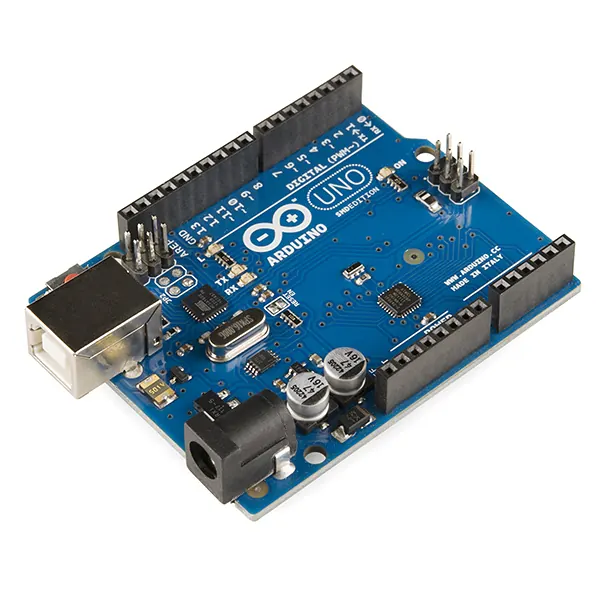
Your laptop sees the Arduino on /dev/ttyACM0, the lab PC sees it on /dev/ttyUSB0. Hard-coding the port means editing code every time. Reading it from the environment means the same code runs everywhere.
Concept
The big idea: key=value settings that children inherit
- An environment variable is a NAME=value pair. By convention names are UPPER_CASE.
echo $HOMEreads one.envorprintenvlists all of them.export NAME=valuesets it and passes it to programs you start from this shell (children).NAME=valuewithout export stays private to the current shell.NAME=value python3 app.pysets it for just that one command.- Values are always strings.
BAUD=115200arrives in Python as"115200"— convert withint().
| Variable | Example | Who uses it |
|---|---|---|
HOME | /home/ashish | Everything — ~ expands to this |
USER | ashish | Scripts, prompts |
PATH | /home/ashish/.local/bin:/usr/bin:/bin | The shell, to find commands |
PYTHONPATH | /home/ashish/robot_ws/src | Python, extra import folders |
VIRTUAL_ENV | /home/ashish/robot_ws/.venv | Set by venv activate (Lesson 11) |
ROS_DOMAIN_ID | 7 | ROS 2 — robots with different IDs ignore each other (Stage 10) |
Your own: SERIAL_PORT, ROBOT_NAME | /dev/ttyUSB0, desk-arm | Your robot code |
How it works
How it actually works: PATH and inheritance
PATH is a list of folders separated by :. When you type robotctl, the shell checks each folder from left to right and runs the first robotctl it finds. Like a dabbawala who stops at the first pickup point that has your tiffin.
You type a name
python3(no slash, so it is not a path).Split PATH
/home/ashish/robot_ws/.venv/bin : /usr/local/bin : /usr/bin : /bin.Check each folder
Does
/home/ashish/robot_ws/.venv/bin/python3exist and have the x bit? Yes → run it. Stop searching.Nothing found
python3: command not found. Either it is not installed, or its folder is not on PATH.
Inheritance: each process gets a copy of its parent’s exported variables. A child can change its copy, but that never flows back to the parent. That is why running export X=1 inside a script does not change your terminal — unless you source the script.
Visual
Visualise it: PATH lookup lab
Pick a command, reorder PATH with the arrows, and toggle venv activation or ROS setup. The first folder that has the command wins — watch the search stop there.
Interactive · PATH lookup lab (which program really runs?)
When you type a command, the shell walks the folders in $PATH from left to right and runs the first match — like a dabbawala stopping at the first pickup point that has your tiffin.
- 1. /home/ashish/.local/bin
your personal tools
✗ no python3 here — keep walking
- 2. /usr/local/bin
tools you installed by hand
✗ no python3 here — keep walking
- 3. /usr/bin
apt packages live here
✔ FOUND → runs this one
- 4. /bin
on Ubuntu this is a link to /usr/bin
not checked (search already stopped)
$ echo $PATH
/home/ashish/.local/bin:/usr/local/bin:/usr/bin:/bin
$ command -v python3
/usr/bin/python3

# runs: Python 3.12 (system — do not pip install here)
Try: pick robotctl and move /usr/bin above ~/.local/bin. Then pick python3 and toggle the venv.
Worked example
Worked example: one script, two machines
read_env.py reads the port, name and baud rate from the environment, with safe defaults.
# read_env.py — let the environment configure the robot, with safe defaults (Lesson 7)
import os

port = os.environ.get("SERIAL_PORT", "/dev/ttyUSB0")
name = os.environ.get("ROBOT_NAME", "unnamed-robot")
baud = int(os.environ.get("BAUD", "115200"))   # env values are always strings

print(f"robot={name} port={port} baud={baud}")
Run as: python3 read_env.py (nothing set → defaults)
robot=unnamed-robot port=/dev/ttyUSB0 baud=115200
SERIAL_PORT=/dev/ttyACM0 ROBOT_NAME=lab-arm BAUD=57600 python3 read_env.pyExpected output
robot=lab-arm port=/dev/ttyACM0 baud=57600
Same file, zero edits, different behaviour. This is how real robot software is configured.
Code lab
Code lab: exported vs private, defaults and PATH order
#!/usr/bin/env bash
# env_path_demo.sh — exported vs not exported, defaults, and PATH order (Lesson 7)
export ROBOT_NAME=desk-arm          # exported: child processes can see it
LOCAL_NOTE="only this shell"        # not exported: children cannot see it
bash -c 'echo "child sees ROBOT_NAME=[$ROBOT_NAME]"'
bash -c 'echo "child sees LOCAL_NOTE=[$LOCAL_NOTE]"'
echo "serial port: ${SERIAL_PORT:-/dev/ttyUSB0}  (default used because SERIAL_PORT is empty)"

# Two folders, each with a different "robotctl" — PATH order decides which runs
mkdir -p /tmp/aihub-lab/env-demo/old /tmp/aihub-lab/env-demo/new
printf '#!/bin/sh\necho "robotctl v1.0 (old)"\n' > /tmp/aihub-lab/env-demo/old/robotctl
printf '#!/bin/sh\necho "robotctl v2.0 (new)"\n' > /tmp/aihub-lab/env-demo/new/robotctl
chmod +x /tmp/aihub-lab/env-demo/old/robotctl /tmp/aihub-lab/env-demo/new/robotctl
PATH="/tmp/aihub-lab/env-demo/old:/tmp/aihub-lab/env-demo/new:$PATH"
robotctl
PATH="/tmp/aihub-lab/env-demo/new:$PATH"   # put "new" in front
robotctl
Expected output
child sees ROBOT_NAME=[desk-arm]
child sees LOCAL_NOTE=[]
serial port: /dev/ttyUSB0  (default used because SERIAL_PORT is empty)
robotctl v1.0 (old)
robotctl v2.0 (new)
echo 'export ROBOT_NAME=desk-arm' >> ~/.bashrc
echo 'export PATH="$HOME/.local/bin:$PATH"' >> ~/.bashrc
source ~/.bashrc        # reload in this terminal
echo $ROBOT_NAME
Expected output
desk-arm
Real world
Where environment variables run a robot
source /opt/ros/jazzy/setup.bashadds ROS 2 folders to PATH and sets several ROS variables (Stage 10).ROS_DOMAIN_IDkeeps two teams’ robots on the same Wi-Fi from hearing each other.- Launch scripts export
SERIAL_PORT,CAMERA_INDEX,LOG_DIRso every process agrees. - CI servers and Docker containers configure the same code entirely through environment variables.
Mistakes
Common mistakes and debugging
Hardware & safety
Hardware lab and safety notes
Environment variables let one script run on the laptop (simulation) and on the robot (real serial port) without editing code.
- Put the serial port in a variable, e.g.
ROBOT_PORT=/dev/ttyACM0, and read it withos.environ.getand a safe default. - Make the default simulation, so a missing variable never moves a real motor.
- Keep secrets (Wi-Fi passwords, API keys) in a
.envfile that is in.gitignore.
Debugging
Debugging: when it doesn’t work
| Symptom | Likely cause | Fix |
|---|---|---|
| Variable is empty in Python | Set without export, so child programs cannot see it | export ROBOT_PORT=/dev/ttyACM0 |
| Works in one terminal, not another | Variables live only in that shell | Put them in set_env.sh and source it |
Old robotctl version runs | An earlier folder in PATH wins | which -a robotctl shows the order |
PATH is broken, nothing works | PATH= overwritten instead of extended | Use export PATH="$HOME/bin:$PATH"; open a new terminal |
Think
Think about it
Think
Why pass `SERIAL_PORT` through the environment instead of hard-coding `/dev/ttyUSB0`?
Experiment
Try it in the lab: which program really runs?
Use the PATH lookup lab. Predict the winner before every change.
Experiment
Which program really runs?
You will need
- PATH lookup lab
- Optional: Ubuntu terminal
Steps
- Pick `robotctl`. Which version runs? Move `/usr/bin` above `~/.local/bin` with the ↑ arrow. Which runs now?
- Pick `python3`. Toggle the venv on and off. Read the PATH string each time — where was `.venv/bin` added?
- Pick `ros2` with ROS setup OFF. Read the error. Turn it ON.
- Pick `python` (without the 3) with the venv OFF. Why is it “not found” on Ubuntu?
- On a real machine, run `env_path_demo.sh` and `read_env.py` with and without variables set.
Interactive · PATH lookup lab (which program really runs?)
When you type a command, the shell walks the folders in $PATH from left to right and runs the first match — like a dabbawala stopping at the first pickup point that has your tiffin.
- 1. /home/ashish/.local/bin
your personal tools
✗ no python3 here — keep walking
- 2. /usr/local/bin
tools you installed by hand
✗ no python3 here — keep walking
- 3. /usr/bin
apt packages live here
✔ FOUND → runs this one
- 4. /bin
on Ubuntu this is a link to /usr/bin
not checked (search already stopped)
$ echo $PATH
/home/ashish/.local/bin:/usr/local/bin:/usr/bin:/bin
$ command -v python3
/usr/bin/python3

# runs: Python 3.12 (system — do not pip install here)
Try: pick robotctl and move /usr/bin above ~/.local/bin. Then pick python3 and toggle the venv.
Changing PATH never changes the programs themselves — only which one the shell finds first.
Knowledge check
Check your understanding
Knowledge check
1. Environment variables are…
2. Hard-coding `/dev/ttyUSB0` in source is risky because…
3. Secrets in environment variables should…
4. Two folders on PATH both contain `robotctl`. Which runs?
5. In Python, `os.environ.get("BAUD")` returns…
Mini assignment
Hands-on assignment
Mini assignment
Environment registry
Document every environment variable your robot will use.
Deliverables
- Table: name, example value, default, who reads it, secret? (yes/no)
- A `set_env.sh` you `source` before running the robot
- Your version of read_env.py using at least three of the variables
Do this, step by step
- In the PATH lab, move folders up and down and predict which
robotctlruns. - Run
read_env.pywith nothing set, then withROBOT_MODE=real ROBOT_PORT=/dev/ttyACM0 python3 read_env.py. - Write
set_env.shwith at least three variables andsourceit. - Fill in the environment registry table.
Stuck? Hints, one at a time
- Hint 1:
env | grep ROBOTshows what is set right now. - Hint 2:
source set_env.shchanges this shell;bash set_env.shchanges a child shell that exits immediately. - Hint 3: Mark a variable “secret” if it would be a problem on GitHub.
Challenges (pick by level)
- 🟢 Easy: Print
$HOME,$USERand$PATHand explain each. - 🟡 Medium: Make
read_env.pyrefuse to start ifROBOT_MODE=realbut no port is set. - 🟠 Hard: Set
ROS_DOMAIN_IDand explain why two teams in one lab need different values.
Next step
Look back: Lesson 6: Package Management. Next: Lesson 8: Bash & Shell Scripting. Related: Stage 10 — ROS 2 (ROS 2 uses ROS_DOMAIN_ID and source all the time).
Sources
- environ(7) manual page
- Python docs — os.environ
- bash(1) manual page — ENVIRONMENT
- ROS 2 Jazzy — The ROS_DOMAIN_ID
- Photos: Wikimedia Commons (credits under each image).
Self-attested for now — keep artifacts in your lab notebook.
Complete
Today's goal
0 of 1 done today
Mark this lesson complete when you have worked the experiment, knowledge check, and assignment (even roughly).