
Linux & Dev Environment · Lesson 04
Linux Permissions & Users
Est. 40–50 min
Why
Why “Permission denied” is the first wall every robot builder hits
You will meet this on day one: you plug in the arm’s USB cable, run your Python script and get PermissionError: [Errno 13] Permission denied: '/dev/ttyUSB0'. The fix is not sudo — it is understanding who owns the port and which group you need to join.
Concept
The big idea: owner, group, others × read, write, execute
Every file and device has an owner (a user), a group, and nine permission bits: read / write / execute for each of user, group and others.
-rwxr-x---  1  ashish  robotics  64  Oct 13 10:15  bringup.sh
│└┬┘└┬┘└┬┘     └─┬──┘  └──┬───┘
│ │  │  │        owner    group
│ │  │  └ others: ---  (nothing)
│ │  └ group:  r-x  (read + run)
│ └ user:   rwx  (read + write + run)
└ type: - file d directory c character device (serial, camera)| Bit | Value | On a file | On a folder |
|---|---|---|---|
| r | 4 | Read the contents (cat) | List names inside (ls) |
| w | 2 | Change the contents | Create / delete files inside |
| x | 1 | Run it as a program (./bringup.sh) | Enter it (cd) |
digit = r(4) + w(2) + x(1) e.g. rwx = 7, r-x = 5, rw- = 6, r-- = 4
- Three digits = user, group, others
chmod 750 bringup.sh→ rwx r-x ---
chmod u+x file— symbolic way: give the user execute.g-wremoves group write,o=clears others.chown ashish:robotics file— change owner and group (needssudo).groups— which groups you belong to.id— the same with numbers.sudo command— run one command as root. Powerful, logged, and easy to misuse.
How it works
How it actually works: how Linux decides “allowed” or “denied”
Who are you?
Your process carries your user id and your list of groups (
idshows them).Are you the owner?
If yes, Linux uses only the user bits — and stops there.
Else: are you in the file’s group?
If yes, it uses only the group bits.
Else: you are “others”
It uses the others bits.
Check the action
Reading needs r, writing needs w, running needs x. Missing bit →
Permission denied.
Visual
Visualise it: file permission lab (rwx · octal · chmod)
Drag the user / group / other sliders (0–7) or tap r, w, x. The octal number, ls -l string and chmod command update together. Then pick who is knocking and see which row Linux uses.
Interactive · File permission lab (rwx · octal · chmod)
File: bringup.sh · owner ashish · group robotics. Drag a slider or tap the r/w/x keys, then choose who is trying to use the file.
octal
644
ls -l shows
-rw-r--r--
$ chmod 644 bringup.sh
$ ls -l bringup.sh
-rw-r--r-- 1 ashish robotics 64 Oct 13 10:15 bringup.sh
Who is knocking?
Linux checks: owner? → group member? → everyone else. For priya it uses the group bits: r--
- read (cat / open)✔ ALLOWED
- write (edit / send bytes)✗ Permission denied
- execute (./run it)✗ Permission denied
Worked example
Worked example: the serial port that said no
Neha plugs in a CH340 USB-serial Arduino clone. Here is her debugging session on Ubuntu:
ls -l /dev/ttyUSB0
# crw-rw---- 1 root dialout 188, 0 Oct 13 10:15 /dev/ttyUSB0
#  owner root: rw   group dialout: rw   others: ---

groups
# neha adm cdrom sudo plugdev        <- no 'dialout', so Neha is "others"

sudo usermod -aG dialout $USER       # -a = append, -G = to this group
# now LOG OUT and log back in (or reboot) so the new group applies

groups
# neha adm cdrom sudo dialout plugdev <- fixed, no sudo needed for Pythondialout; on Arch-based distros it is often uucp. The serial_ports.py script below reads the real group from the device itself.Code lab
Code lab: read, change and test permissions
Run bash perms_demo.sh. It creates two files in /tmp/aihub-lab/perms-demo, shows their modes with stat, fails to run the script, fixes it with chmod u+x, and locks the calibration file with 600.
#!/usr/bin/env bash
# perms_demo.sh — read, change and test permissions (Lesson 4)
# Safe: works only inside /tmp/aihub-lab/perms-demo
mkdir -p /tmp/aihub-lab/perms-demo && cd /tmp/aihub-lab/perms-demo
printf '#!/usr/bin/env bash\necho "bring-up script running"\n' > bringup.sh
echo "joint1_offset_deg: 2.5" > calib.yaml
chmod 644 bringup.sh calib.yaml
stat -c '%A  %a  %n' bringup.sh calib.yaml
./bringup.sh 2>/dev/null || echo "./bringup.sh -> Permission denied (no x bit yet)"
chmod u+x bringup.sh          # give the owner the execute key
chmod 600 calib.yaml          # only the owner may read/write calibration
stat -c '%A  %a  %n' bringup.sh calib.yaml
./bringup.sh
Expected output
-rw-r--r--  644  bringup.sh
-rw-r--r--  644  calib.yaml
./bringup.sh -> Permission denied (no x bit yet)
-rwxr--r--  744  bringup.sh
-rw-------  600  calib.yaml
bring-up script running
Now a Python helper you will reuse with every Arduino. It finds USB serial ports and tells you whether you can open them — and the exact fix if not.
# serial_ports.py — find USB serial devices and check if YOU may open them (Lesson 4)
import glob
import grp
import os

ports = sorted(glob.glob("/dev/ttyUSB*") + glob.glob("/dev/ttyACM*"))
if not ports:
    print("No USB serial ports found. Plug in the Arduino/ESP32 and run again.")

for port in ports:
    group = grp.getgrgid(os.stat(port).st_gid).gr_name
    can_rw = os.access(port, os.R_OK | os.W_OK)
    print(f"{port}: group={group}, you can read+write: {can_rw}")
    if not can_rw:
        print(f"  fix: sudo usermod -aG {group} $USER   (then log out and log in)")
Output with no board plugged in (with a board you will see one line per port)
No USB serial ports found. Plug in the Arduino/ESP32 and run again.
Arduino link
Try it with hardware: Arduino → Linux serial
If you have an Arduino Uno / Nano, upload this sketch from the Arduino IDE, then plug it into your Ubuntu laptop.
// hello_serial.ino — tiny Arduino sketch to test the Linux serial link (Lesson 4)
void setup() {
  Serial.begin(115200);          // must match the baud rate on the Linux side
}

void loop() {
  Serial.println("AIHUB arm ready");
  delay(1000);                   // one line every second
}ls /dev/ttyUSB* /dev/ttyACM* # genuine Uno → ttyACM0, CH340 clones → ttyUSB0
sudo dmesg | tail -n 5 # kernel message names the new port
python3 serial_ports.py # can you read+write it?
pip install pyserial # inside your venv (Lesson 11)
python3 -m serial.tools.miniterm /dev/ttyACM0 115200 # Ctrl+] to quitWhat you should see in miniterm (one line per second)
AIHUB arm ready
AIHUB arm ready
AIHUB arm ready
Real world
Where permissions bite in the robot lab
- Serial ports (
/dev/ttyUSB0,/dev/ttyACM0) — usually groupdialout. - Cameras (
/dev/video0) — usually groupvideo. - Scripts in
scripts/needxto run as./bringup.sh. - SSH private keys must be
600— the SSH client refuses keys that others can read (Lesson 13). - udev rules in
/etc/udev/rules.d/can give a device a fixed name and group — a later, more advanced fix.
Mistakes
Common mistakes and debugging
Hardware & safety
Hardware lab and safety notes
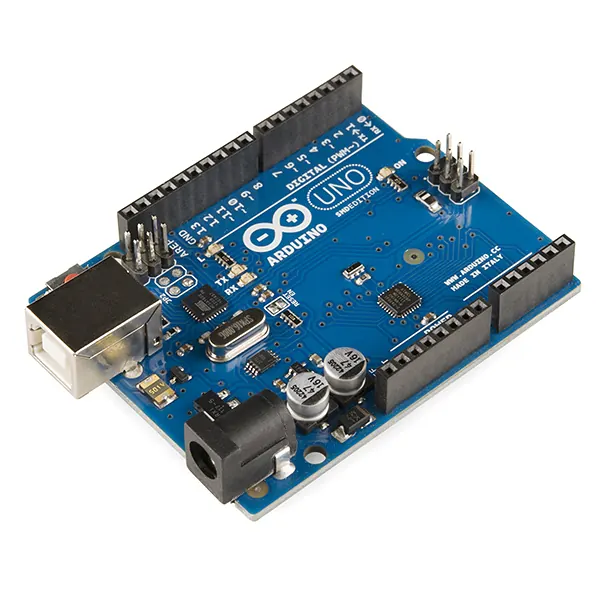
The most common Linux problem in a robot lab is “Permission denied” on the Arduino port. This is where you fix it properly.
- Use the
hello_serial.inosketch above (it compiles for Arduino Uno: 1,638 bytes). - Fix access with
sudo usermod -aG dialout $USER, then log out and back in — not withsudo python3orchmod 777. - Only one program can hold a serial port at a time: close the Arduino IDE Serial Monitor before running Python.
Debugging
Debugging: when it doesn’t work
| Symptom | Likely cause | Fix |
|---|---|---|
Permission denied: '/dev/ttyACM0' | You are not in the dialout group | sudo usermod -aG dialout $USER, then log out and in |
Still denied after usermod | Group change not applied yet | Log out fully (or reboot); check with groups |
./bringup.sh: Permission denied | Script has no execute bit | chmod u+x bringup.sh |
Device or resource busy | Serial Monitor or another script holds the port | Close the other program; fuser /dev/ttyACM0 shows who |
Think
Think about it
Think
Why is `sudo python3 robot.py` a bad habit even if it “works”?
Experiment
Try it in the lab: be the watchman
Use the permission lab. For each step, predict ALLOWED / denied before you click.
Experiment
Be the watchman
You will need
- Permission lab
- Notebook
Steps
- Click the 644 preset. As `guest`, can you run the script? Can you read it?
- Click 755. Now can `guest` run it? Write the ls -l string you see.
- Click 660 (serial-port style). Select `priya`, then untick “priya is in the group”. What changes, and why?
- Set user = 0, group = 4, others = 4 (mode 044). Select the owner `ashish`. Can he read his own file?
- Click 777 and read the warning. Write one sentence on why 750 is better for a bring-up script.
- On a real Ubuntu machine, run `perms_demo.sh` and `serial_ports.py`.
Interactive · File permission lab (rwx · octal · chmod)
File: bringup.sh · owner ashish · group robotics. Drag a slider or tap the r/w/x keys, then choose who is trying to use the file.
octal
644
ls -l shows
-rw-r--r--
$ chmod 644 bringup.sh
$ ls -l bringup.sh
-rw-r--r-- 1 ashish robotics 64 Oct 13 10:15 bringup.sh
Who is knocking?
Linux checks: owner? → group member? → everyone else. For priya it uses the group bits: r--
- read (cat / open)✔ ALLOWED
- write (edit / send bytes)✗ Permission denied
- execute (./run it)✗ Permission denied
The highlighted row is the only one that counts. Being the owner with no owner bits means denied, even if others are allowed.
Knowledge check
Check your understanding
Knowledge check
1. Permission denied on a serial device usually means…
2. The best long-term fix is…
3. `ls -l` helps you see…
4. `chmod 750 bringup.sh` gives…
5. Why must you use `usermod -aG` and not `usermod -G`?
Mini assignment
Hands-on assignment
Mini assignment
Permissions memo
Write a half-page memo for your lab team: how to fix serial and camera access the right way.
Deliverables
- Explain user / group / others with the watchman analogy
- A table of 5 robot files with the mode you would give each (octal + rwx) and why
- The exact commands to diagnose and fix `/dev/ttyUSB0` access
Do this, step by step
- In the permission lab, set
bringup.shto750and read the rwx string aloud. - Run
perms_demo.shand match eachls -lline with its octal number. - If you have an Arduino: upload
hello_serial.ino, runls -l /dev/ttyACM0andgroups, and fix access the right way. - Write your memo with a 5-file table (octal + rwx + reason).
Stuck? Hints, one at a time
- Hint 1: r = 4, w = 2, x = 1. Add them per group: rwx = 7, r-x = 5, --- = 0.
- Hint 2: The serial port line looks like
crw-rw---- root dialout— so group members can read and write. - Hint 3:
-ainusermod -aGmeans append; without it you lose your other groups.
Challenges (pick by level)
- 🟢 Easy: Make a
secrets.envreadable only by you (600). - 🟡 Medium: Read
hello_serialoutput withpython3 -m serial.tools.minitermat 115200 baud. - 🟠 Hard: Find your camera’s group with
ls -l /dev/video0and explain how to give a user access.
Next step
Look back: Lesson 3: Files & Directories. Next: Lesson 5: Processes & System Monitoring. Related: Stage 0 — Power & Communication and Stage 4 — Electronics.
Sources
- chmod(1) manual page
- usermod(8) manual page
- pySerial — tools (list_ports, miniterm)
- Arduino docs — Serial
- Photos: Wikimedia Commons (credits under each image).
Self-attested for now — keep artifacts in your lab notebook.
Complete
Today's goal
0 of 1 done today
Mark this lesson complete when you have worked the experiment, knowledge check, and assignment (even roughly).