
Linux & Dev Environment · Lesson 06
Package Management
Est. 35–45 min
Why
Why you never hunt for .exe files on Linux
A robotics laptop needs compilers, Git, Python tools, camera utilities and later ROS 2. Installing them from trusted repositories (instead of downloading random files) keeps the machine secure, consistent and easy to rebuild.
Concept
The big idea: repositories, packages and dependencies
- Package: a bundle of program + files + metadata (version, what it depends on). On Ubuntu they are
.debfiles. - Repository: a signed online store of packages. Your list of repositories lives under
/etc/apt/. - apt: the friendly front-end. dpkg: the lower-level tool that actually unpacks
.debfiles. - Dependencies: packages a package needs. apt works them out and installs them too.
- Two worlds: apt for system tools (git, compilers,
python3-venv), pip inside a venv for your project’s Python libraries (Lesson 11).
| Command | Meaning | Needs sudo? |
|---|---|---|
sudo apt update | Download the latest package lists (rate list) | Yes |
sudo apt upgrade | Upgrade installed packages | Yes |
sudo apt install git | Install a package + dependencies | Yes |
sudo apt remove pkg / purge | Remove (purge also removes its config) | Yes |
sudo apt autoremove | Remove dependencies nobody needs any more | Yes |
apt search serial | Search names and descriptions | No |
apt show python3-venv | Read the package label | No |
dpkg -L git | Which files did this package install? | No |
dpkg -S /usr/bin/git | Which package owns this file? | No |
How it works
How it actually works: what `apt install` does
Read the local list
apt checks the package lists downloaded by your last
apt update. Old list → it may not find new packages (“Unable to locate package”).Solve dependencies
It works out every extra package needed and shows you the plan: “The following NEW packages will be installed…”.
Download and verify
Packages are downloaded and their signatures are checked against the repository keys — this is why repositories are “trusted”.
Unpack and configure
dpkg places files: programs into
/usr/bin, libraries into/usr/lib, settings into/etc.Ready to use
The new command is now found through
$PATH(Lesson 7). Check withcommand -v git.
Visual
Visualise it: where installed programs land
apt places programs like git and python3 in /usr/bin. Pick a command and see which folder on PATH provides it — then toggle the venv to see why project Python should not come from apt.
Interactive · PATH lookup lab (which program really runs?)
When you type a command, the shell walks the folders in $PATH from left to right and runs the first match — like a dabbawala stopping at the first pickup point that has your tiffin.
- 1. /home/ashish/.local/bin
your personal tools
✗ no python3 here — keep walking
- 2. /usr/local/bin
tools you installed by hand
✗ no python3 here — keep walking
- 3. /usr/bin
apt packages live here
✔ FOUND → runs this one
- 4. /bin
on Ubuntu this is a link to /usr/bin
not checked (search already stopped)
$ echo $PATH
/home/ashish/.local/bin:/usr/local/bin:/usr/bin:/bin
$ command -v python3
/usr/bin/python3

# runs: Python 3.12 (system — do not pip install here)
Try: pick robotctl and move /usr/bin above ~/.local/bin. Then pick python3 and toggle the venv.
Worked example
Worked example: apt or pip?
| You need… | Use | Why |
|---|---|---|
| git, build-essential, curl | apt | System tools shared by every project |
python3-venv | apt | Needed to create virtual environments on Ubuntu |
| numpy, pyserial, opencv-python for one project | pip inside a venv | Each project can pin its own versions |
| ROS 2 Jazzy | apt (after adding the official ROS 2 repository) | Follow the official install guide for your Ubuntu version |
| A Python command-line tool for yourself | pipx | Isolated, but available everywhere |
Code lab
Code lab: check, then install
First, a script that only checks which tools exist. Safe to run anywhere.
#!/usr/bin/env bash
# check_tools.sh — which robotics tools are already installed? (Lesson 6)
# Only checks; installs nothing.
for tool in git python3 gcc make curl ros2; do
  if command -v "$tool" >/dev/null 2>&1; then
    echo "OK       $tool  ->  $(command -v "$tool")"
  else
    echo "MISSING  $tool"
  fi
done
Output on our test machine (yours will differ — that is the point)
OK       git  ->  /usr/bin/git
OK       python3  ->  /usr/bin/python3
OK       gcc  ->  /usr/bin/gcc
MISSING  make
OK       curl  ->  /usr/bin/curl
MISSING  ros2
Then, on a real Ubuntu laptop, install the missing basics. Read each line before you press Enter; apt will show a plan and ask Y/n.
# apt_setup.sh — fresh Ubuntu robotics laptop (run on a REAL Ubuntu machine)
sudo apt update                      # 1. download the latest package list
sudo apt upgrade -y                  # 2. update what is already installed
sudo apt install -y git build-essential python3-pip python3-venv curl
apt show python3-venv | head -n 3    # 3. read the "label" of a package
apt list --installed | grep python3-venv
Run check_tools.sh again — make and gcc (from build-essential) should now say OK. ros2 stays MISSING until Stage 10.
Real world
Where package skills show up in robotics
- Jetson / Pi bring-up usually starts with
sudo apt update && sudo apt install git python3-venv. - ROS 2 is installed with apt from the official ROS 2 repository.
v4l-utilsgivesv4l2-ctl --list-devicesfor checking USB cameras.- Keeping an
apt_setup.shin your repo lets a teammate rebuild your laptop setup in minutes.
Mistakes
Common mistakes and debugging
Hardware & safety
Hardware lab and safety notes
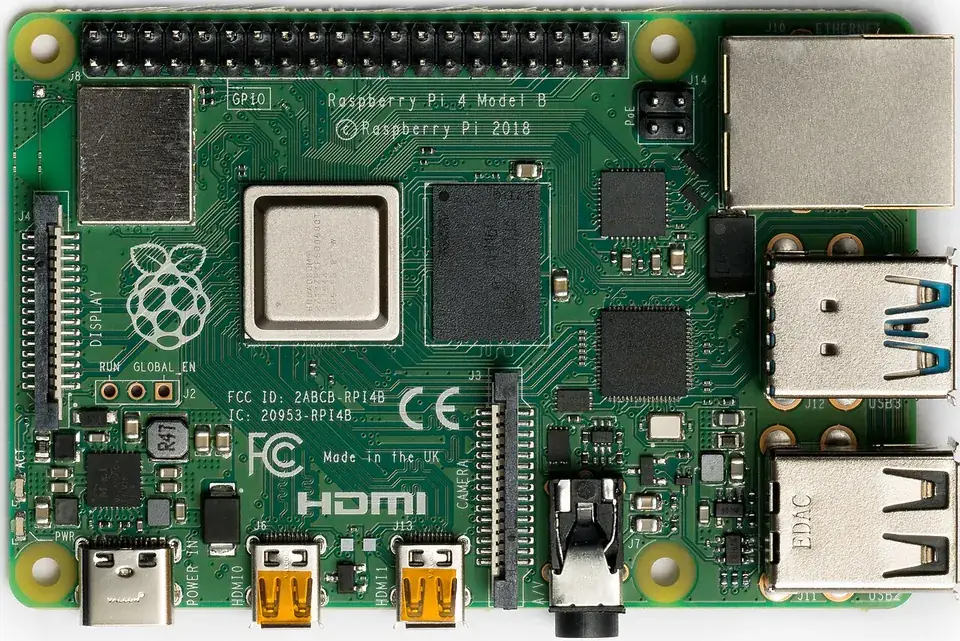
Packages are how a Raspberry Pi or Jetson gets its robot tools. Install carefully — a robot that half-updated is a robot that does not boot.
- On a Pi, run
sudo apt updateand thenapt list --upgradablebefore upgrading anything. - Keep the Pi on its proper power supply during upgrades; power loss mid-upgrade can corrupt the SD card.
- Python libraries such as pyserial go in a venv (Lesson 11), not system-wide with
sudo pip.
Debugging
Debugging: when it doesn’t work
| Symptom | Likely cause | Fix |
|---|---|---|
Unable to locate package | Package list out of date or wrong name | sudo apt update, then apt search name |
error: externally-managed-environment | pip outside a venv on Ubuntu 23.04+ / Debian 12+ (PEP 668) | Create a venv (Lesson 11) or use the python3-... apt package |
Could not get lock /var/lib/dpkg/lock | Another apt (or auto-update) is running | Wait a few minutes; do not delete the lock file |
command not found right after install | Tool installed under a different name | dpkg -L package | grep bin lists its programs |
Think
Think about it
Think
Why not `pip install` every library globally as root?
Experiment
Try it in the lab: plan a fresh robotics laptop
Pretend a new Ubuntu laptop has just arrived in the lab.
Experiment
Plan a fresh robotics laptop
You will need
- PATH lookup lab
- Notebook
- Optional: Ubuntu machine
Steps
- Write 8 tools you would want on day one (git, python3-venv, curl, htop, …).
- Mark each one: apt, pip-in-venv, or later (ROS 2).
- In the PATH lookup lab, pick `git` — which folder provides it? That is where apt installed it.
- Pick `pip` with the venv OFF, then ON. Explain the difference in one line.
- On Ubuntu, run `check_tools.sh`, install the missing ones, and run it again.
Interactive · PATH lookup lab (which program really runs?)
When you type a command, the shell walks the folders in $PATH from left to right and runs the first match — like a dabbawala stopping at the first pickup point that has your tiffin.
- 1. /home/ashish/.local/bin
your personal tools
✗ no python3 here — keep walking
- 2. /usr/local/bin
tools you installed by hand
✗ no python3 here — keep walking
- 3. /usr/bin
apt packages live here
✔ FOUND → runs this one
- 4. /bin
on Ubuntu this is a link to /usr/bin
not checked (search already stopped)
$ echo $PATH
/home/ashish/.local/bin:/usr/local/bin:/usr/bin:/bin
$ command -v python3
/usr/bin/python3

# runs: Python 3.12 (system — do not pip install here)
Try: pick robotctl and move /usr/bin above ~/.local/bin. Then pick python3 and toggle the venv.
apt-installed tools live in /usr/bin. Your project’s pip and python should come from .venv/bin once activated.
Knowledge check
Check your understanding
Knowledge check
1. On Ubuntu, `apt` is mainly for…
2. Python project dependencies are usually better in…
3. This browser course…
4. `sudo apt update` …
5. You see “externally-managed-environment” from pip. Best fix?
Mini assignment
Hands-on assignment
Mini assignment
apt shortlist
Create `apt_setup.sh` for your own robotics laptop.
Deliverables
- At least 6 apt packages, each with a one-line reason
- A separate list of Python libraries that will go into the venv instead
- Before/after output of `check_tools.sh`
Do this, step by step
- Run
check_tools.shand save the output as “before”. - Write your
apt_setup.shwith at least 6 packages and a reason for each. - Run it on an Ubuntu machine (or explain each line if you cannot).
- Run
check_tools.shagain and save “after”.
Stuck? Hints, one at a time
- Hint 1: Good starting packages: git, build-essential, python3-venv, python3-pip, curl, tmux.
- Hint 2:
-yonly answers “yes”; it does not make an install safer. - Hint 3: pyserial, numpy and opencv-python belong in the venv list, not in apt.
Challenges (pick by level)
- 🟢 Easy: Use
apt show tmuxto read a package’s description and size. - 🟡 Medium: Find which package owns
/usr/bin/gitwithdpkg -S /usr/bin/git. - 🟠 Hard: Make
apt_setup.shskip packages already installed and print a summary.
Next step
Look back: Lesson 5: Processes & System Monitoring. Next: Lesson 7: Environment Variables. Related: Stage 2 — Modules, Packages & Environments.
Sources
- Ubuntu Server docs — Package management
- Debian Wiki — Apt
- PEP 668 — externally managed environments
- Photos: Wikimedia Commons (credits under each image).
Self-attested for now — keep artifacts in your lab notebook.
Complete
Today's goal
0 of 1 done today
Mark this lesson complete when you have worked the experiment, knowledge check, and assignment (even roughly).