
Linux & Dev Environment · Lesson 09
Git & GitHub for Robotics
Est. 45–55 min
Why
Why every working demo deserves a saved snapshot
Robot code changes all the time: a stop distance here, a PID gain there, a new camera driver. Without Git, one bad edit the night before a demo and you cannot remember what worked. With Git, git log and git diff tell you exactly what changed — and you can go back.
Concept
The big idea: working folder → staging → commit → remote
| Place | Courier analogy | Command to move forward |
|---|---|---|
| Working folder | Things lying on the kitchen table | edit files |
| Staging area | Carton you are packing | git add file |
| Repository (local history) | Sealed parcels with receipts | git commit -m "message" |
| Remote (GitHub) | Courier office | git push |
| Command | Meaning |
|---|---|
git init / git clone URL | Start a repo here / copy an existing one |
git status | What changed? What is staged? (run it often) |
git add file / git add -p | Stage a file / stage piece by piece |
git commit -m "feat: …" | Save a snapshot with a message |
git log --oneline | Short history, newest first |
git diff / git diff --staged | Unstaged / staged changes line by line |
git restore file | Throw away unsaved edits in a file (careful) |
git switch -c tune-pid | Create and move to a new branch |
git pull / git push | Get / send commits from / to the remote |
git tag demo-v1 | Name a known-good commit |
- Commit messages describe intent:
fix: clamp serial timeout to 2 s, notupdateorasdf. - `.gitignore` lists what must never be committed:
.venv/,logs/,__pycache__/, big recordings, secrets. - GitHub is one popular remote host; GitLab and others work the same way with Git.
How it works
How it actually works: what a commit really is
Snapshot, not diff
A commit records the full state of every tracked file (Git stores unchanged files cleverly, so it stays small).
ID
Each commit gets a hash like
a1b2c3d…computed from its contents, author, time and parent. Change anything and the ID changes.Parent link
Every commit points to the one before it, forming a chain — your project’s history.
Branch = a name tag
mainis just a label pointing at the latest commit of that line of work. A new branch is a new label.Push
git pushsends commits the remote does not have yet. Nothing is uploaded until you push.
Visual
Visualise it: Git workflow simulator
Move files from working (modified / untracked) to staged with git add, then seal them with a commit message. Watch each file’s status badge change.
Interactive · Git workflow simulator
Working tree
- M robot_controller.py
- ?? camera_driver.py
- M README.md
- ?? config/robot.yaml
Staging area
- (empty)
Recent commits
- (none yet)
# git workflow simulator — working → add → commit
# no remote / network / credentials
Code lab
Code lab: your first robot repository
Run bash git_first_commit.sh. It makes a throw-away repo in /tmp/aihub-lab/git-demo, commits twice and proves that .gitignore works.
#!/usr/bin/env bash
# git_first_commit.sh — your first robot repo, step by step (Lesson 9)
# Safe: uses a throw-away folder inside /tmp/aihub-lab
rm -rf /tmp/aihub-lab/git-demo && mkdir -p /tmp/aihub-lab/git-demo && cd /tmp/aihub-lab/git-demo
git init -q -b main
git config user.name "Ashish Vijay"            # this repo only
git config user.email "ashish@example.com"
echo 'STOP_CM = 20' > robot_controller.py
printf '.venv/\nlogs/\n*.log\n' > .gitignore
mkdir -p logs && echo "noise" > logs/run.log
git status --short
git add robot_controller.py .gitignore
git commit -q -m "feat: add stop threshold for desk arm"
echo 'STOP_CM = 25' > robot_controller.py
git status --short
git diff --stat
git commit -q -am "tune: stop at 25 cm after bench test"
git log --format='%s'
git check-ignore -v logs/run.log
Expected output
?? .gitignore
?? robot_controller.py
 M robot_controller.py
 robot_controller.py | 2 +-
 1 file changed, 1 insertion(+), 1 deletion(-)
tune: stop at 25 cm after bench test
feat: add stop threshold for desk arm
.gitignore:2:logs/	logs/run.log
git remote add origin git@github.com:<your-user>/robot_ws.git
git push -u origin main
# later: edit → git add → git commit → git push
Real world
Where Git saves robot teams
- Before a competition,
git tag competition-dayon the known-good commit. If a late fix breaks things,git switch --detach competition-daygets it back. git diffonconfig/robot.yamlshows exactly which limit someone changed.git bisectcan find which commit introduced a bug by testing old versions.- Laptop and Jetson both
git pullfrom the same remote — no more “which copy is latest?”.
Mistakes
Common mistakes and debugging
Hardware & safety
Hardware lab and safety notes
Git is for code and config — not for the robot’s hardware secrets or giant log files.
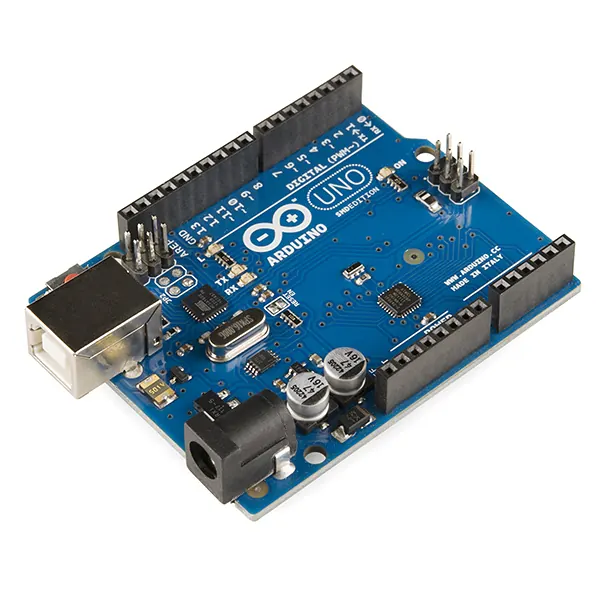
- Commit the Arduino sketch (
.ino) and your wiring notes next to the Python code, so code and hardware stay in step. - Tag the commit that worked on the real robot (
git tag demo-ok) before changing anything. - Keep logs, recordings,
.venv/and.envout with.gitignore.
Debugging
Debugging: when it doesn’t work
| Symptom | Likely cause | Fix |
|---|---|---|
Please tell me who you are | Name/email not set | git config --global user.name "…" and user.email |
fatal: not a git repository | Wrong folder | cd ~/robot_ws or run git init |
| Huge repo, slow push | Logs/videos committed | Add them to .gitignore, git rm --cached the files |
rejected — fetch first | Remote has commits you do not | git pull --rebase, then push |
Think
Think about it
Think
Should calibrated joint offsets for your specific arm be committed?
Experiment
Try it in the lab: the Git loop
Use the simulator first, then repeat on a real machine with the script.
Experiment
The Git loop
You will need
- Git workflow simulator
- Optional: Ubuntu terminal with git
Steps
- In the simulator, `git add` only `robot_controller.py` and commit with a clear message.
- Add the untracked `camera_driver.py` and commit again with a different message.
- Try to commit with nothing staged and read the message.
- Write three `.gitignore` entries for a robotics repo and explain each.
- On a real machine, run `git_first_commit.sh`, then `cd /tmp/aihub-lab/git-demo && git log --oneline` to see the hashes.
Interactive · Git workflow simulator
Working tree
- M robot_controller.py
- ?? camera_driver.py
- M README.md
- ?? config/robot.yaml
Staging area
- (empty)
Recent commits
- (none yet)
# git workflow simulator — working → add → commit
# no remote / network / credentials
Only staged files go into a commit. Untracked files stay out until you add them.
Knowledge check
Check your understanding
Knowledge check
1. `git add` moves changes into the…
2. A good commit message is…
3. Which should usually be in .gitignore?
4. `git status` shows `?? camera_driver.py`. This means…
5. You pushed a password to GitHub. What must you do?
Mini assignment
Hands-on assignment
Mini assignment
Repo hygiene card
Turn your robot workspace into a clean Git repository.
Deliverables
- `git init` your `robot_ws` with a sensible `.gitignore`
- At least 3 commits with good messages (paste `git log --oneline`)
- A one-page card: the four places, 8 daily commands, and 3 things you will never commit
Do this, step by step
- Click through the Git simulator: edit → add → commit → push.
- Run
git_first_commit.shand compare with the expected log. git inityour ownrobot_ws, add a.gitignore, and make 3 commits with clear messages.- Paste
git log --onelineinto your repo card.
Stuck? Hints, one at a time
- Hint 1: The four places: working folder → staging area → local repo → remote (GitHub).
- Hint 2: Good message: “Add serial port check to bringup” — a verb and what changed.
- Hint 3: Start
.gitignorewith.venv/,logs/,__pycache__/,.env.
Challenges (pick by level)
- 🟢 Easy: Use
git diffbefore committing and read what changed. - 🟡 Medium: Create a branch
try-new-gains, commit, then switch back tomain. - 🟠 Hard: Use
git bisecton a small repo to find a commit that broke a test.
Next step
Look back: Lesson 8: Bash & Shell Scripting. Next: Lesson 10: VS Code for Robotics. Related: Stage 10 — ROS 2 (ROS 2 packages are shared as Git repositories).
Sources
- Pro Git book
- Git docs — gitignore
- GitHub Docs — Ignoring files
- github/gitignore templates
- Photos: Wikimedia Commons (credits under each image).
Self-attested for now — keep artifacts in your lab notebook.
Complete
Today's goal
0 of 1 done today
Mark this lesson complete when you have worked the experiment, knowledge check, and assignment (even roughly).